

As an Amazon Associate we earn from qualifying purchases.
- Best overall: Dell Alienware AW2725DF 27-inch QHD QD-OLED Gaming Monitor
- Best budget: AOC Q27G3XMN 27-inch QHD Mini LED Gaming Monitor
- Best premium: ASUS ROG Swift OLED PG27AQDP 27-inch QHD Gaming Monitor
- Best for USB-C connectivity: MSI MPG 271QRX QD-OLED 27-inch QHD Gaming Monitor
- A 1440p resolution and a 360Hz refresh rate are not competing categories: several picks combine both.
- Choose a 360Hz OLED for exceptional motion clarity and contrast in competitive games.
- A 180Hz or 240Hz 1440p monitor is a strong value choice for mixed gaming and everyday use.
- Compare panel type, connectivity, refresh rate and graphics-card capability before choosing.
The choice between a 1440p monitor and a 360Hz monitor is not a straight either-or decision: a monitor can offer 1440p resolution and a 360Hz refresh rate together. The real question is whether high-resolution detail, ultra-smooth motion, contrast, or value matters most for your setup. For Black Friday 2026, I researched and compared specs, reviews and owner feedback across seven 1440p gaming monitors, including fast OLED screens and more affordable IPS and Mini LED options.
My pick for most people is a 240Hz 1440p monitor: the refresh rate feels smooth in competitive games without making the display a specialist purchase. Players focused on esports should look at the 360Hz and 480Hz OLED choices, while shoppers who want strong HDR for less should compare the AOC Mini LED. Use the picks below to match display performance to your games, PC and budget—not just the biggest refresh-rate number.
How We Picked
- Compared resolution, refresh rate, response-time specifications and panel type across every monitor.
- Prioritized widely recognized models with clear specifications and useful owner-feedback history.
- Considered whether each monitor fits a distinct use, including esports, mixed gaming, HDR and value.
- Checked connectivity features such as HDMI 2.1, USB-C power delivery, KVM and variable refresh-rate support.
- Balanced headline performance against practical trade-offs such as OLED care, screen finish and panel technology.
Comparison Table
| Product | Best for | Resolution | Refresh rate | Panel |
|---|---|---|---|---|
| Dell Alienware AW2725DF 27-inch QHD QD-OLED Gaming Monitor | Fast gaming with rich OLED color | 2560 × 1440 | 360Hz | QD-OLED |
| Samsung Odyssey OLED G6 G60SD 27-inch QHD Gaming Monitor | Bright rooms and competitive gaming | 2560 × 1440 | 360Hz | QD-OLED |
| MSI MPG 271QRX QD-OLED 27-inch QHD Gaming Monitor | A high-speed gaming desk with USB-C | 2560 × 1440 | 360Hz | QD-OLED |
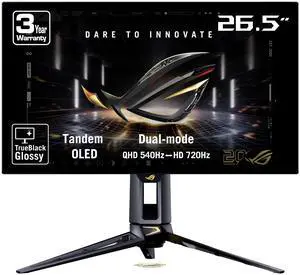
| ASUS ROG Swift OLED PG27AQDP 27-inch QHD Gaming Monitor | Esports players seeking maximum refresh rate | 2560 × 1440 | 480Hz | WOLED |
| AOC Q27G3XMN 27-inch QHD Mini LED Gaming Monitor | Value-focused HDR gaming | 2560 × 1440 | 180Hz | VA with Mini LED |
| Gigabyte M27Q X 27-inch QHD Gaming Monitor | Mixed gaming, work and multitasking | 2560 × 1440 | 240Hz | IPS |
| LG UltraGear 27GR83Q-B 27-inch QHD Gaming Monitor | A simple high-refresh-rate gaming setup | 2560 × 1440 | 240Hz | IPS |
Best Picks Reviewed
#1 · Top pick
Dell Alienware AW2725DF 27-inch QHD QD-OLED Gaming Monitor
The Dell Alienware AW2725DF 27-inch QHD QD-OLED Gaming Monitor is the best overall for competitive and story-driven gaming, with a 360Hz refresh rate and deep OLED contrast.

Best for: Fast gaming with rich OLED color
- Resolution
- 2560 × 1440
- Refresh rate
- 360Hz
- Panel
- QD-OLED
- Response time
- 0.03ms
- Combines 1440p detail with a very high refresh rate.
- OLED contrast makes dark scenes stand out.
- Fast response-time specification suits competitive play.
- OLED care considerations matter for static desktop use.
- A high-end graphics card helps take advantage of 360Hz.
Is the Dell Alienware AW2725DF 27-inch QHD QD-OLED Gaming Monitor worth buying on Black Friday 2026?
The Dell Alienware AW2725DF 27-inch QHD QD-OLED Gaming Monitor is worth considering for players who want both 1440p detail and 360Hz motion. The Dell Alienware AW2725DF 27-inch QHD QD-OLED Gaming Monitor's QD-OLED panel adds strong contrast, while its high refresh rate suits fast competitive games.
See today’s Black Friday price on Amazon
#2
Samsung Odyssey OLED G6 G60SD 27-inch QHD Gaming Monitor
The Samsung Odyssey OLED G6 G60SD 27-inch QHD Gaming Monitor is the best 360Hz pick for players who prefer a matte OLED screen, with a 360Hz refresh rate.
Best for: Bright rooms and competitive gaming
- Resolution
- 2560 × 1440
- Refresh rate
- 360Hz
- Panel
- QD-OLED
- Response time
- 0.03ms
- Pairs a 360Hz refresh rate with QHD resolution.
- Matte screen treatment reduces distracting reflections.
- OLED technology delivers deep blacks.
- OLED remains a more specialized choice for static work.
- The highest refresh rate benefits games that run at very high frame rates.
Is the Samsung Odyssey OLED G6 G60SD 27-inch QHD Gaming Monitor worth buying on Black Friday 2026?
The Samsung Odyssey OLED G6 G60SD 27-inch QHD Gaming Monitor is a strong choice for competitive players who want 360Hz motion with OLED contrast. The Samsung Odyssey OLED G6 G60SD 27-inch QHD Gaming Monitor's matte screen treatment also suits rooms where reflections distract from gameplay.
See today’s Black Friday price on Amazon
#3
MSI MPG 271QRX QD-OLED 27-inch QHD Gaming Monitor
The MSI MPG 271QRX QD-OLED 27-inch QHD Gaming Monitor is the best connectivity-focused 360Hz pick for PC and console players, with HDMI 2.1 and 90W USB-C power delivery.
Best for: A high-speed gaming desk with USB-C
- Resolution
- 2560 × 1440
- Refresh rate
- 360Hz
- Panel
- QD-OLED
- USB-C power
- Up to 90W
- Provides 360Hz gaming and QHD resolution.
- USB-C power delivery can simplify a laptop setup.
- HDMI 2.1 supports modern gaming connections.
- A laptop needs compatible USB-C power input to use charging.
- OLED care is part of ownership.
Is the MSI MPG 271QRX QD-OLED 27-inch QHD Gaming Monitor worth buying on Black Friday 2026?
The MSI MPG 271QRX QD-OLED 27-inch QHD Gaming Monitor is worth a close look for a fast gaming setup that also connects to a laptop. The MSI MPG 271QRX QD-OLED 27-inch QHD Gaming Monitor's 360Hz panel, HDMI 2.1 and up to 90W USB-C power delivery cover different desk needs.
See today’s Black Friday price on Amazon
#4
ASUS ROG Swift OLED PG27AQDP 27-inch QHD Gaming Monitor
The ASUS ROG Swift OLED PG27AQDP 27-inch QHD Gaming Monitor is the best premium pick for elite esports performance, with a 480Hz refresh rate at 1440p.

Best for: Esports players seeking maximum refresh rate
- Resolution
- 2560 × 1440
- Refresh rate
- 480Hz
- Panel
- WOLED
- Response time
- 0.03ms
- A 480Hz refresh rate tops this guide.
- 1440p resolution keeps image detail sharp.
- OLED contrast supports immersive single-player games.
- A powerful PC is needed to drive very high frame rates.
- The premium performance focus is excessive for casual play.
Is the ASUS ROG Swift OLED PG27AQDP 27-inch QHD Gaming Monitor worth buying on Black Friday 2026?
The ASUS ROG Swift OLED PG27AQDP 27-inch QHD Gaming Monitor is worth considering for serious esports players who prioritize motion smoothness. The ASUS ROG Swift OLED PG27AQDP 27-inch QHD Gaming Monitor's 480Hz refresh rate is the standout feature, while 1440p resolution and OLED contrast keep it useful beyond competitive matches.
See today’s Black Friday price on Amazon
#5
AOC Q27G3XMN 27-inch QHD Mini LED Gaming Monitor
The AOC Q27G3XMN 27-inch QHD Mini LED Gaming Monitor is the best budget-oriented HDR pick for value-focused players, with a 180Hz refresh rate and Mini LED backlight.

Best for: Value-focused HDR gaming
- Resolution
- 2560 × 1440
- Refresh rate
- 180Hz
- Panel
- VA with Mini LED
- Local dimming zones
- 336
- Mini LED local dimming brings stronger HDR potential.
- 180Hz is smooth for a broad range of games.
- QHD resolution suits a 27-inch screen.
- VA viewing angles differ from IPS and OLED.
- Local dimming can create visible halos around bright objects.
Is the AOC Q27G3XMN 27-inch QHD Mini LED Gaming Monitor worth buying on Black Friday 2026?
The AOC Q27G3XMN 27-inch QHD Mini LED Gaming Monitor is a good fit for shoppers who want QHD gaming and HDR features without prioritizing 360Hz. The AOC Q27G3XMN 27-inch QHD Mini LED Gaming Monitor's 180Hz refresh rate and 336-zone Mini LED backlight make it a balanced value-focused option.
See today’s Black Friday price on Amazon
#6
Gigabyte M27Q X 27-inch QHD Gaming Monitor
The Gigabyte M27Q X 27-inch QHD Gaming Monitor is the best all-round IPS pick for players who want speed without OLED, with a 240Hz refresh rate.
Best for: Mixed gaming, work and multitasking
- Resolution
- 2560 × 1440
- Refresh rate
- 240Hz
- Panel
- IPS
- Response time
- 1ms MPRT
- 240Hz supports fast gaming without jumping to 360Hz.
- IPS viewing angles work well for shared screens.
- Built-in KVM helps manage multiple devices.
- IPS contrast is less dramatic than OLED.
- HDR impact is more limited than Mini LED options.
Is the Gigabyte M27Q X 27-inch QHD Gaming Monitor worth buying on Black Friday 2026?
The Gigabyte M27Q X 27-inch QHD Gaming Monitor is worth considering for a mixed-use setup with gaming and everyday computing. The Gigabyte M27Q X 27-inch QHD Gaming Monitor's 240Hz refresh rate delivers smooth motion, while the IPS panel and KVM feature suit a flexible desk.
See today’s Black Friday price on Amazon
#7
LG UltraGear 27GR83Q-B 27-inch QHD Gaming Monitor
The LG UltraGear 27GR83Q-B 27-inch QHD Gaming Monitor is the best straightforward 240Hz IPS pick for PC and console gaming, with HDMI 2.1 connectivity.

Best for: A simple high-refresh-rate gaming setup
- Resolution
- 2560 × 1440
- Refresh rate
- 240Hz
- Panel
- IPS
- Response time
- 1ms
- 240Hz refresh rate suits competitive and action games.
- HDMI 2.1 supports modern consoles.
- IPS panel offers broad viewing angles.
- IPS black levels are less deep than OLED.
- Does not reach the refresh rate of 360Hz models.
Is the LG UltraGear 27GR83Q-B 27-inch QHD Gaming Monitor worth buying on Black Friday 2026?
The LG UltraGear 27GR83Q-B 27-inch QHD Gaming Monitor is a sensible pick for gamers who want 1440p, 240Hz and familiar IPS performance. HDMI 2.1 adds flexibility for console connections, while the refresh rate suits fast PC games.
See today’s Black Friday price on Amazon
Is a 1440p monitor or a 360Hz monitor better for gaming?
A 1440p monitor prioritizes image resolution, while a 360Hz monitor prioritizes motion smoothness; the Dell Alienware AW2725DF 27-inch QHD QD-OLED Gaming Monitor delivers both at once. The resolution describes how many pixels form the image, and the refresh rate describes how many times per second the display updates.
For many PC gamers, 1440p at 240Hz is a practical balance. The Gigabyte M27Q X 27-inch QHD Gaming Monitor and LG UltraGear 27GR83Q-B 27-inch QHD Gaming Monitor serve that middle ground. Choose 360Hz or 480Hz when competitive play is central and your PC can produce enough frames. A refresh-rate advantage does not replace a capable graphics card.
Is 360Hz worth it for a 1440p gaming monitor?
A 360Hz 1440p monitor makes the most sense for players of fast competitive games who can sustain high frame rates. The Samsung Odyssey OLED G6 G60SD 27-inch QHD Gaming Monitor pairs 1440p with 360Hz, while the ASUS ROG Swift OLED PG27AQDP 27-inch QHD Gaming Monitor goes further with 480Hz.
The practical gain depends on the games you play and your PC hardware. Higher refresh rates can make motion look smoother and reduce the time between screen updates, but the effect matters less for slower games and everyday browsing. A 240Hz model is already responsive for many players. Skip it if your games rarely run at high frame rates or you prefer visual effects over competitive speed.
Which panel type is best for a 1440p gaming monitor?
OLED suits players who value deep blacks and fast pixel response, IPS suits versatile gaming and work, and Mini LED suits shoppers seeking stronger HDR. The MSI MPG 271QRX QD-OLED 27-inch QHD Gaming Monitor and Dell Alienware AW2725DF 27-inch QHD QD-OLED Gaming Monitor represent the OLED route.
The Gigabyte M27Q X 27-inch QHD Gaming Monitor uses IPS for broad viewing angles and flexible daily use. The AOC Q27G3XMN 27-inch QHD Mini LED Gaming Monitor uses a VA panel with local dimming zones to boost HDR contrast. Panel choice brings trade-offs: OLED ownership calls for sensible screen-care habits, while IPS and VA panels do not deliver the same pixel-level contrast.
What should you check before buying a Black Friday 2026 monitor?
Check resolution, refresh rate, ports, stand adjustment and graphics-card capability before choosing a Black Friday 2026 gaming monitor. The LG UltraGear 27GR83Q-B 27-inch QHD Gaming Monitor offers HDMI 2.1 for modern console connections, while the MSI MPG 271QRX QD-OLED 27-inch QHD Gaming Monitor adds USB-C power delivery.
Confirm the exact model and screen size, then check that the monitor supports the connections your PC or console needs. Compare refresh rate alongside response-time specifications rather than treating either number as a complete measure of motion quality. A comfortable height-adjustable stand and a suitable desk footprint matter during long sessions. Look for a warranty that clearly covers the monitor’s display technology.
Which 1440p monitor is the best value for different gamers?
The AOC Q27G3XMN 27-inch QHD Mini LED Gaming Monitor is the value-oriented choice for HDR, while the Gigabyte M27Q X 27-inch QHD Gaming Monitor is a stronger all-round IPS option. Both offer 1440p resolution without requiring a 360Hz OLED panel.
Choose the AOC Q27G3XMN 27-inch QHD Mini LED Gaming Monitor when local dimming and HDR are priorities. Pick the Gigabyte M27Q X 27-inch QHD Gaming Monitor for a 240Hz IPS screen and built-in KVM. The Dell Alienware AW2725DF 27-inch QHD QD-OLED Gaming Monitor suits players who want high refresh and OLED contrast in one display. Match the monitor to real gaming habits rather than buying performance your system cannot use.
Buying Guide
Match refresh rate to your PC
A 240Hz or 360Hz monitor is most useful when a PC can deliver high frame rates in the games you play. Check game settings and graphics-card capability before choosing the Samsung Odyssey OLED G6 G60SD 27-inch QHD Gaming Monitor or another high-refresh model.
Choose resolution for screen detail
A 2560 × 1440 display provides more detail than 1080p at the same screen size. All seven recommendations pair QHD resolution with refresh rates from 180Hz to 480Hz.
Pick a panel for your priorities
Choose OLED for deep contrast, IPS for broad everyday versatility, or Mini LED for local-dimming HDR. The right panel depends on your games, room lighting and screen-care preferences.
Check ports and device compatibility
Confirm the monitor has the right ports for your PC, console and laptop. HDMI 2.1 supports modern console setups, while the MSI MPG 271QRX QD-OLED 27-inch QHD Gaming Monitor adds USB-C power delivery.
Compare the whole setup, not one number
Stand adjustment, desk space, warranty terms and graphics-card output matter alongside refresh rate. A well-matched 240Hz monitor often serves more players than a 480Hz screen that their system cannot fully use.
FAQ
Is a 1440p monitor better than a 360Hz monitor?
Neither category is automatically better because 1440p describes resolution and 360Hz describes refresh rate. The Dell Alienware AW2725DF 27-inch QHD QD-OLED Gaming Monitor combines both, while shoppers can also choose 1440p monitors with 180Hz or 240Hz refresh rates.
Are there 1440p monitors with a 360Hz refresh rate?
Yes. The Dell Alienware AW2725DF 27-inch QHD QD-OLED Gaming Monitor, Samsung Odyssey OLED G6 G60SD 27-inch QHD Gaming Monitor and MSI MPG 271QRX QD-OLED 27-inch QHD Gaming Monitor all pair 1440p resolution with a 360Hz refresh rate.
Is 360Hz better than 240Hz for gaming?
A 360Hz monitor updates more often than a 240Hz monitor and best suits competitive players whose PCs deliver very high frame rates. The Gigabyte M27Q X 27-inch QHD Gaming Monitor offers 240Hz, a strong match for many fast games and mixed-use setups.
Is OLED or Mini LED better for a 1440p gaming monitor?
OLED offers deep contrast and fast pixel response, while Mini LED uses local dimming for stronger HDR brightness and contrast. The Dell Alienware AW2725DF 27-inch QHD QD-OLED Gaming Monitor is an OLED pick; the AOC Q27G3XMN 27-inch QHD Mini LED Gaming Monitor is the Mini LED choice.
What is the best budget-oriented 1440p gaming monitor in this guide?
The AOC Q27G3XMN 27-inch QHD Mini LED Gaming Monitor is the value-oriented pick for shoppers seeking HDR features and 180Hz gaming. The model combines QHD resolution with a 336-zone Mini LED backlight, making it distinct from the faster OLED recommendations.
Which 1440p monitor has the highest refresh rate?
The ASUS ROG Swift OLED PG27AQDP 27-inch QHD Gaming Monitor has the highest refresh rate in this guide at 480Hz. The 1440p OLED display is aimed at competitive players with a PC capable of producing very high frame rates.