

As an Amazon Associate we earn from qualifying purchases.
- Best overall: Keychron K2 HE Special Edition Wireless Magnetic Switch Keyboard
- Best budget: Keychron K2 Pro QMK/VIA Wireless Mechanical Keyboard
- Best premium: Keychron Q1 Pro QMK/VIA Wireless Custom Mechanical Keyboard (Knob Version)
- Best for multi-device wireless: Keychron Q1 Max QMK/VIA Wireless Custom Mechanical Keyboard
- Keychron Q1 Pro suits buyers who want a premium, customizable 75-percent mechanical keyboard.
- Keychron K2 HE stands out for magnetic switches, adjustable actuation and 2.4 GHz wireless.
- Keychron K2 Pro is a more compact, lower-cost-style alternative with a 75-percent layout and mechanical switches.
- Keychron Q1 Max and Keychron Q1 HE add wireless flexibility or Hall effect control to the Q1 format.
- Choose a keyboard by switch feel, connection needs, layout and compatibility before comparing Black Friday 2026 offers.
Keychron Q1 Pro and Keychron K2 HE serve different keyboard needs: Keychron Q1 Pro is a customizable 75-percent mechanical board, while Keychron K2 HE adds magnetic switches and adjustable actuation. I researched and compared specs, reviews and owner feedback across seven Keychron models to help you choose a Black Friday 2026 keyboard for gaming, work or both.
Here's the bottom line: pick Keychron K2 HE if Hall effect controls and low-latency 2.4 GHz wireless top your list. Choose Keychron Q1 Pro for a sturdy aluminum build, QMK/VIA customization and a familiar mechanical typing experience. The other five picks cover compact layouts, premium wireless connections and alternate ways to tune your setup.
How We Picked
- Compared layouts and key counts to show how each board fits a desk and gaming setup.
- Reviewed connection options, including Bluetooth, 2.4 GHz wireless and wired USB-C.
- Considered switch type, customization tools and features such as adjustable actuation.
- Used published specifications, owner feedback and review coverage rather than detailed claims.
- Selected boards with clear differences so shoppers can match a model to a specific use.
Comparison Table
| Product | Best for | Layout | Wireless options | Battery capacity |
|---|---|---|---|---|
| Keychron Q1 Pro QMK/VIA Wireless Custom Mechanical Keyboard (Knob Version) | Premium mechanical typing | 75-percent | Bluetooth 5.1 | 4000 mAh |
| Keychron K2 HE Special Edition Wireless Magnetic Switch Keyboard | Gaming with Hall effect switches | 75-percent | 2.4 GHz and Bluetooth | 4000 mAh |
| Keychron Q1 HE QMK Wireless Custom Keyboard | Premium Hall effect customization | 75-percent | 2.4 GHz and Bluetooth | 4000 mAh |
| Keychron Q1 Max QMK/VIA Wireless Custom Mechanical Keyboard | Three-mode wireless flexibility | 75-percent | 2.4 GHz and Bluetooth | 4000 mAh |
| Keychron Q2 Pro QMK/VIA Wireless Custom Mechanical Keyboard | Compact premium typing | 65-percent | Bluetooth 5.1 | 4000 mAh |
| Keychron K2 Pro QMK/VIA Wireless Mechanical Keyboard | Value-minded compact mechanical setup | 75-percent | Bluetooth 5.1 | 4000 mAh |
| Keychron K8 Pro QMK/VIA Wireless Mechanical Keyboard | Tenkeyless productivity | Tenkeyless, 87 keys | Bluetooth 5.1 | 4000 mAh |
Best Picks Reviewed
#1
Keychron Q1 Pro QMK/VIA Wireless Custom Mechanical Keyboard (Knob Version)
The Keychron Q1 Pro QMK/VIA Wireless Custom Mechanical Keyboard (Knob Version) is the best premium mechanical pick for custom-keyboard fans; its 75-percent layout delivers function-row access without a full-size footprint.

Best for: Custom mechanical typing and desktop setups
- Layout
- 75-percent, 82 keys
- Battery
- 4000 mAh
- Wireless
- Bluetooth 5.1
- Customization
- QMK and VIA
- Aluminum body gives the board a substantial, premium feel.
- QMK and VIA support deep key remapping.
- Knob adds quick control for volume or assigned functions.
- Bluetooth is the wireless option; there is no 2.4 GHz receiver.
Is the Keychron Q1 Pro QMK/VIA Wireless Custom Mechanical Keyboard (Knob Version) worth buying on Black Friday 2026?
Yes. The Keychron Q1 Pro QMK/VIA Wireless Custom Mechanical Keyboard (Knob Version) is a strong Black Friday 2026 choice for buyers who want an aluminum 75-percent board, QMK/VIA remapping and a programmable knob. Choose another model if 2.4 GHz wireless is essential.
See today’s Black Friday price on Amazon
#2 · Top pick
Keychron K2 HE Special Edition Wireless Magnetic Switch Keyboard
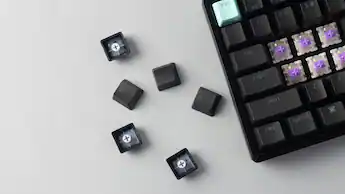
The Keychron K2 HE Special Edition Wireless Magnetic Switch Keyboard is the best gaming pick for players who want tunable Hall effect controls; its 75-percent layout balances compact size with a function row.
Best for: Gaming with adjustable magnetic switches
- Layout
- 75-percent
- Battery
- 4000 mAh
- Wireless
- 2.4 GHz and Bluetooth
- Switch type
- Magnetic Hall effect
- Adjustable actuation supports personalized key response.
- 2.4 GHz wireless, Bluetooth and wired modes offer flexible connections.
- Compact layout keeps dedicated function keys.
- Magnetic switches feel and behave differently from conventional mechanical switches.
Is the Keychron K2 HE Special Edition Wireless Magnetic Switch Keyboard worth buying on Black Friday 2026?
Yes. The Keychron K2 HE Special Edition Wireless Magnetic Switch Keyboard is worth considering for players who want magnetic switches, adjustable actuation and 2.4 GHz wireless in a 75-percent layout. Pick a conventional mechanical board if standard switch feel matters more than Hall effect features.
See today’s Black Friday price on Amazon
#3
Keychron Q1 HE QMK Wireless Custom Keyboard
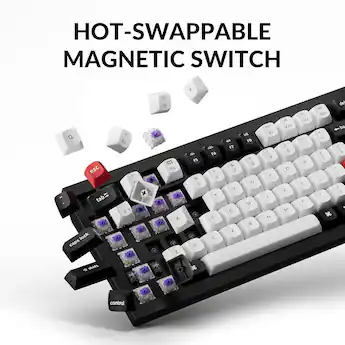
The Keychron Q1 HE QMK Wireless Custom Keyboard is the best premium Hall effect alternative for players who want a customizable Q1-format board; its 75-percent layout keeps navigation and function keys close.
Best for: Hall effect customization in a premium case
- Layout
- 75-percent
- Battery
- 4000 mAh
- Wireless
- 2.4 GHz and Bluetooth
- Switch type
- Magnetic Hall effect
- Magnetic switches offer adjustable actuation.
- Wireless and wired modes cover desktop and multi-device use.
- QMK support enables extensive key customization.
- A premium feature set is more than casual typists need.
Is the Keychron Q1 HE QMK Wireless Custom Keyboard worth buying on Black Friday 2026?
Yes. The Keychron Q1 HE QMK Wireless Custom Keyboard is a compelling fit for buyers who want a premium 75-percent board with Hall effect switches, wireless options and key remapping. The Keychron Q1 HE QMK Wireless Custom Keyboard's specialized magnetic controls make it a better match for feature-focused gamers than basic typing setups.
See today’s Black Friday price on Amazon
#4
Keychron Q1 Max QMK/VIA Wireless Custom Mechanical Keyboard
The Keychron Q1 Max QMK/VIA Wireless Custom Mechanical Keyboard is the best versatile mechanical pick for users who want three connection modes; its 75-percent layout saves desk space while retaining key navigation.
Best for: Multi-device mechanical keyboard setups
- Layout
- 75-percent
- Battery
- 4000 mAh
- Wireless
- 2.4 GHz and Bluetooth
- Customization
- QMK and VIA
- 2.4 GHz, Bluetooth and wired connections add flexibility.
- QMK and VIA support extensive remapping.
- Compact layout retains a function row and arrow keys.
- Mechanical switches do not offer Hall effect actuation.
Is the Keychron Q1 Max QMK/VIA Wireless Custom Mechanical Keyboard worth buying on Black Friday 2026?
Yes. The Keychron Q1 Max QMK/VIA Wireless Custom Mechanical Keyboard is a smart choice for buyers who want a customizable 75-percent mechanical board with 2.4 GHz, Bluetooth and wired connections. Choose the Keychron Q1 HE or Keychron K2 HE for magnetic-switch features.
See today’s Black Friday price on Amazon
#5
Keychron Q2 Pro QMK/VIA Wireless Custom Mechanical Keyboard
The Keychron Q2 Pro QMK/VIA Wireless Custom Mechanical Keyboard is the best compact premium pick for users who prefer a 65-percent layout; its 4000 mAh battery supports cordless desktop use.

Best for: Compact premium typing and gaming
- Layout
- 65-percent
- Battery
- 4000 mAh
- Wireless
- Bluetooth 5.1
- Customization
- QMK and VIA
- Small footprint leaves extra room for mouse movement.
- QMK and VIA support extensive key remapping.
- Premium construction suits a long-term desktop setup.
- Bluetooth is the wireless connection; no 2.4 GHz receiver is included.
Is the Keychron Q2 Pro QMK/VIA Wireless Custom Mechanical Keyboard worth buying on Black Friday 2026?
Yes. The Keychron Q2 Pro QMK/VIA Wireless Custom Mechanical Keyboard is worth a look if a 65-percent layout, wireless mechanical typing and QMK/VIA customization fit your routine. Buyers who rely on a function row or 2.4 GHz wireless should compare the larger Q1 models.
See today’s Black Friday price on Amazon
#6
Keychron K2 Pro QMK/VIA Wireless Mechanical Keyboard
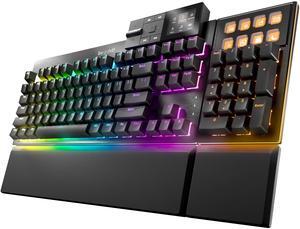
The Keychron K2 Pro QMK/VIA Wireless Mechanical Keyboard is the best value-minded pick for users who want a compact wireless mechanical board; its 75-percent layout keeps a function row in reach.
Best for: Compact mechanical typing on a tighter budget
- Layout
- 75-percent
- Battery
- 4000 mAh
- Wireless
- Bluetooth 5.1
- Customization
- QMK and VIA
- Compact layout retains function keys and arrow keys.
- QMK and VIA provide useful remapping options.
- Wireless and USB-C wired modes suit varied desk use.
- No 2.4 GHz wireless connection.
Is the Keychron K2 Pro QMK/VIA Wireless Mechanical Keyboard worth buying on Black Friday 2026?
Yes. The Keychron K2 Pro QMK/VIA Wireless Mechanical Keyboard is a practical Black Friday 2026 pick for shoppers who want a customizable 75-percent board without the premium aluminum Q-series focus. The Keychron K2 Pro QMK/VIA Wireless Mechanical Keyboard's Bluetooth connection suits desk use, while the Q1 Max offers 2.4 GHz.
See today’s Black Friday price on Amazon
#7
Keychron K8 Pro QMK/VIA Wireless Mechanical Keyboard
The Keychron K8 Pro QMK/VIA Wireless Mechanical Keyboard is the best tenkeyless pick for users who want dedicated navigation keys; its 87-key layout leaves the number pad off the desk.

Best for: Tenkeyless layouts and everyday productivity
- Layout
- Tenkeyless, 87 keys
- Battery
- 4000 mAh
- Wireless
- Bluetooth 5.1
- Customization
- QMK and VIA
- Dedicated navigation keys suit work and gaming.
- QMK and VIA support custom layouts.
- Bluetooth and wired modes support multiple setups.
- The larger tenkeyless footprint is less compact than 65-percent boards.
Is the Keychron K8 Pro QMK/VIA Wireless Mechanical Keyboard worth buying on Black Friday 2026?
Yes. The Keychron K8 Pro QMK/VIA Wireless Mechanical Keyboard is a good fit for buyers who want an 87-key tenkeyless layout, wireless connectivity and custom remapping. Choose a 65-percent or 75-percent option if reducing desk footprint is more important than dedicated navigation keys.
See today’s Black Friday price on Amazon
Which is better, Keychron Q1 Pro or Keychron K2 HE?
Keychron Q1 Pro and Keychron K2 HE are both 75-percent keyboards, but Keychron K2 HE is the stronger gaming choice for Hall effect controls. Magnetic switches allow adjustable actuation, and its 2.4 GHz connection gives wireless-focused players an option beyond Bluetooth.
Keychron Q1 Pro is the better match for a traditional mechanical feel and deeper customization through QMK and VIA. The aluminum case, programmable knob and Bluetooth support make it a polished desktop board. Pick by switch technology first: magnetic controls distinguish Keychron K2 HE, while Keychron Q1 Pro focuses on a customizable mechanical experience. Worth it for most players. Keychron K2 HE earns that recommendation when gaming features matter most; the Q1 Pro remains a strong everyday alternative.
What makes Keychron K2 HE different from a regular mechanical keyboard?
Keychron K2 HE uses magnetic Hall effect switches in a 75-percent layout, giving players adjustable actuation instead of relying only on a fixed mechanical switch response. The feature set targets gaming input control, and 2.4 GHz wireless, Bluetooth and wired modes support different setups.
Conventional mechanical models such as Keychron K2 Pro use familiar mechanical switches and provide QMK/VIA customization, but they do not share the K2 HE's magnetic actuation approach. Consider how the keyboard will feel during everyday typing as well as play. Keychron K2 HE is the distinctive pick for players who want adjustable response; Keychron Q1 Pro or Keychron K2 Pro suits shoppers who favor conventional mechanical switches.
Is Keychron Q1 Pro a good keyboard for gaming and work?
Keychron Q1 Pro is a capable gaming-and-work keyboard with an 82-key, 75-percent layout, Bluetooth 5.1 and QMK/VIA support. The function row and arrow keys retain familiar controls, while the compact footprint leaves room for a mouse and other desk gear.
The mechanical switch design is a sensible fit for users who want one board for documents, chat and games. The programmable knob adds a convenient control, and the aluminum body gives the keyboard a premium desktop feel. Keychron Q1 Pro does not offer 2.4 GHz wireless, so wireless gaming prioritizing a receiver connection points toward Keychron K2 HE or Keychron Q1 Max. Wired USB-C remains an option for a direct connection.
Which Keychron layout should I choose for gaming?
Keychron Q1 Pro and Keychron K2 HE use 75-percent layouts, Keychron Q2 Pro uses a 65-percent layout, and Keychron K8 Pro uses a tenkeyless layout with 87 keys. The right choice depends on how often you use function keys, navigation controls and a number pad.
A 75-percent keyboard is a strong middle ground for gamers who want a function row without a full-size board. A 65-percent model gives mouse space priority, while a tenkeyless board preserves dedicated navigation keys. Keychron K8 Pro suits work-heavy setups; Keychron Q2 Pro suits compact desks. Compare the physical layout before choosing based on switches or wireless features, since layout changes daily muscle memory.
Which Keychron keyboard connection is best for a gaming setup?
Keychron K2 HE and Keychron Q1 Max support 2.4 GHz wireless, Bluetooth and wired use, while Keychron Q1 Pro, Keychron Q2 Pro, Keychron K2 Pro and Keychron K8 Pro offer Bluetooth and wired connections. Connection flexibility is a key distinction in this seven-keyboard comparison.
A 2.4 GHz receiver provides a dedicated wireless link for compatible gaming setups, while Bluetooth is convenient for pairing with computers and other devices. Wired USB-C provides a direct connection and avoids managing a wireless link. Check the connection your gaming device supports before buying. Keychron Q1 Max is the versatile mechanical option; Keychron K2 HE adds Hall effect switches to its multi-mode setup.
Buying Guide
Choose the switch type first
Keychron K2 HE and Keychron Q1 HE use magnetic Hall effect switches for adjustable actuation. Keychron Q1 Pro, Keychron Q1 Max, Keychron Q2 Pro, Keychron K2 Pro and Keychron K8 Pro use mechanical switch designs. Pick the typing feel and gaming controls you want before comparing other features.
Match the layout to your desk
Keychron Q1 Pro and Keychron K2 HE are 75-percent boards with a function row. Keychron Q2 Pro trims down to 65 percent, while Keychron K8 Pro keeps a tenkeyless 87-key layout. Measure your available space and consider which keys you use each day.
Check wireless needs
Keychron K2 HE, Keychron Q1 HE and Keychron Q1 Max include 2.4 GHz wireless alongside Bluetooth and wired modes. Keychron Q1 Pro, Keychron Q2 Pro, Keychron K2 Pro and Keychron K8 Pro focus on Bluetooth and wired connections. Match the keyboard to your device and preferred connection.
Compare customization and construction
Keychron Q1 Pro, Keychron Q1 Max, Keychron Q2 Pro, Keychron K2 Pro and Keychron K8 Pro support QMK and VIA customization. The Q-series options emphasize premium construction, while K-series boards provide alternatives with different layouts and features. Review the exact variant before choosing.
Shop by total fit, not a headline
Keychron Q1 Pro and Keychron K2 HE address different priorities, so compare switch type, connection, layout and build before choosing a Black Friday 2026 offer. Confirm the exact model, keyboard layout and switch configuration on the listing. A strong fit for your setup matters more than a flashy promotion.
FAQ
Keychron Q1 Pro vs Keychron K2 HE: which is better for gaming?
Keychron K2 HE is the better fit for gaming-focused buyers who want magnetic Hall effect switches, adjustable actuation and 2.4 GHz wireless. Keychron Q1 Pro is a strong alternative for traditional mechanical typing, QMK/VIA customization and a premium aluminum case. Both use 75-percent layouts.
Does Keychron K2 HE have wireless connectivity?
Yes. Keychron K2 HE supports 2.4 GHz wireless, Bluetooth and wired connections. The three modes give players options for different devices and desk setups. Check your target device's connection support and the exact keyboard listing before ordering.
Does Keychron Q1 Pro support QMK and VIA?
Yes. Keychron Q1 Pro supports QMK and VIA, allowing users to remap keys and customize keyboard behavior. The Q1 Pro also includes a programmable knob and Bluetooth 5.1 wireless. Choose it for mechanical customization rather than Hall effect switch controls.
Which Keychron keyboard is best for a small desk?
Keychron Q2 Pro is the most compact option in this group, using a 65-percent layout. Keychron Q1 Pro and Keychron K2 HE retain a function row in a 75-percent format, while Keychron K8 Pro offers 87 keys in a tenkeyless layout.
What should I look for in a Keychron Black Friday 2026 keyboard offer?
Compare the exact model, switch type, layout, connection modes and included accessories before choosing a Keychron keyboard for Black Friday 2026. Keychron Q1 Pro favors customizable mechanical typing, while Keychron K2 HE adds magnetic switches and 2.4 GHz wireless for gaming-focused setups.