

As an Amazon Associate we earn from qualifying purchases.
- Best overall: Dell Alienware AW3423DWF 34-inch QD-OLED Gaming Monitor
- Best budget: Dell S3422DWG 34-inch Curved Gaming Monitor
- Best premium: Samsung Odyssey OLED G8 G80SD 32-inch Gaming Monitor
- Best for productivity: LG 28MQ780-B DualUp Monitor
- The LG DualUp 28MQ780-B prioritizes a tall, productivity-focused 16:18 screen; the Dell Alienware AW3423DW prioritizes immersive ultrawide gaming.
- The Dell Alienware AW3423DW pairs a 34-inch QD-OLED panel with a 175Hz refresh rate.
- The LG DualUp 28MQ780-B offers a 28-inch 2560 × 2880 display and a 16:18 aspect ratio.
- Compare panel type, refresh rate, screen shape and connectivity before choosing a monitor for Black Friday 2026.
The LG DualUp 28MQ780-B and Dell Alienware AW3423DW solve very different monitor problems. The LG is a tall 16:18 workspace display for stacked windows, documents and creative work. The Dell is a curved 21:9 QD-OLED gaming monitor built for wide, high-refresh play. Your choice comes down to whether you want more vertical workspace or a more immersive gaming view.
I researched and compared specs, reviews and owner feedback to build this Black Friday 2026 guide. Alongside the two headline models, you’ll find five alternatives for different budgets, desk setups and gaming styles. Here's the bottom line: prioritize the LG for multitasking and the Dell for cinematic PC gaming.
How We Picked
- Compared resolution, aspect ratio, panel technology and refresh rate to identify each monitor’s strengths.
- Reviewed manufacturer specifications, professional reviews and owner feedback for practical setup considerations.
- Included alternatives for competitive gaming, ultrawide play, 4K gaming and work-focused multitasking.
- Considered console and PC compatibility, including HDMI and DisplayPort connections where relevant.
- Selected distinct models so the guide covers different use cases rather than repeating nearly identical options.
Comparison Table
| Product | Best for | Resolution | Refresh rate | Panel |
|---|---|---|---|---|
| LG 28MQ780-B DualUp Monitor | Vertical productivity | 2560 × 2880 | 60Hz | Nano IPS |
| Dell Alienware AW3423DW 34-inch QD-OLED Gaming Monitor | Premium ultrawide gaming | 3440 × 1440 | 175Hz | QD-OLED |
| Dell Alienware AW3423DWF 34-inch QD-OLED Gaming Monitor | Overall ultrawide gaming | 3440 × 1440 | 165Hz | QD-OLED |
| LG 34GS95QE-B UltraGear OLED Gaming Monitor | Fast curved OLED gaming | 3440 × 1440 | 240Hz | OLED |
| Samsung Odyssey OLED G8 G80SD 32-inch Gaming Monitor | 4K OLED gaming | 3840 × 2160 | 240Hz | QD-OLED |
| Dell Alienware AW2725DF 27-inch QD-OLED Gaming Monitor | Competitive esports | 2560 × 1440 | 360Hz | QD-OLED |
| Dell S3422DWG 34-inch Curved Gaming Monitor | Value ultrawide gaming | 3440 × 1440 | 144Hz | VA |
Best Picks Reviewed
#1
LG 28MQ780-B DualUp Monitor
The LG 28MQ780-B DualUp Monitor is the best productivity pick for multitaskers who want a 28-inch, 16:18 display with 2560 × 2880 resolution.

Best for: Stacked windows, writing and creative work
- Screen size
- 28 inches
- Resolution
- 2560 × 2880
- Aspect ratio
- 16:18
- Refresh rate
- 60Hz
- Unusual vertical workspace fits more content on screen.
- Nano IPS panel supports wide viewing angles.
- Ergonomic stand supports flexible positioning.
- 60Hz refresh rate is not designed for high-refresh gaming.
Is the LG 28MQ780-B DualUp Monitor worth buying on Black Friday 2026?
The LG 28MQ780-B DualUp Monitor is worth considering for productivity-focused buyers who value vertical workspace over gaming speed. The LG 28MQ780-B DualUp Monitor's 28-inch 2560 × 2880 screen suits documents, coding and stacked applications, while the 60Hz refresh rate makes it a less suitable choice for competitive gaming.
See today’s Black Friday price on Amazon
#2
Dell Alienware AW3423DW 34-inch QD-OLED Gaming Monitor
The Dell Alienware AW3423DW 34-inch QD-OLED Gaming Monitor is the best premium ultrawide for immersive PC players who want a 175Hz refresh rate.
Best for: Immersive PC gaming and vivid contrast
- Screen size
- 34.18 inches
- Resolution
- 3440 × 1440
- Refresh rate
- 175Hz
- Panel
- QD-OLED
- QD-OLED delivers deep blacks and rich color.
- 21:9 screen widens compatible games.
- 175Hz refresh rate supports smooth PC play.
- Ultrawide format and OLED care requirements do not suit every setup.
Is the Dell Alienware AW3423DW 34-inch QD-OLED Gaming Monitor worth buying on Black Friday 2026?
The Dell Alienware AW3423DW 34-inch QD-OLED Gaming Monitor is a strong pick for PC players seeking ultrawide immersion, vivid contrast and a 175Hz refresh rate. Check your graphics card, desk space and game compatibility first, since 21:9 play and OLED ownership suit specific setups.
See today’s Black Friday price on Amazon
#3 · Top pick
Dell Alienware AW3423DWF 34-inch QD-OLED Gaming Monitor
The Dell Alienware AW3423DWF 34-inch QD-OLED Gaming Monitor is the best overall gaming pick for PC players who want a 165Hz ultrawide OLED display.
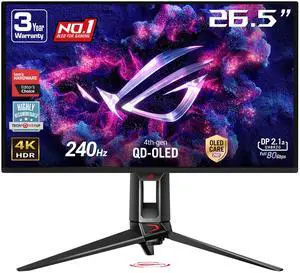
Best for: Ultrawide gaming with broad GPU support
- Screen size
- 34 inches
- Resolution
- 3440 × 1440
- Refresh rate
- 165Hz
- Panel
- QD-OLED
- Wide QD-OLED picture brings strong contrast.
- 165Hz refresh rate suits fast PC games.
- Adaptive-Sync support suits compatible graphics cards.
- OLED care and ultrawide game support require consideration.
Is the Dell Alienware AW3423DWF 34-inch QD-OLED Gaming Monitor a good Black Friday 2026 gaming pick?
The Dell Alienware AW3423DWF 34-inch QD-OLED Gaming Monitor is a good Black Friday 2026 pick for PC gamers seeking a curved ultrawide OLED experience. The Dell Alienware AW3423DWF 34-inch QD-OLED Gaming Monitor's 3440 × 1440 resolution and 165Hz refresh rate balance immersive visuals with responsive play.
See today’s Black Friday price on Amazon
#4
LG 34GS95QE-B UltraGear OLED Gaming Monitor
The LG 34GS95QE-B UltraGear OLED Gaming Monitor is the best high-refresh curved OLED pick for PC gamers who want a 240Hz screen.
Best for: Fast ultrawide gaming
- Screen size
- 34 inches
- Resolution
- 3440 × 1440
- Refresh rate
- 240Hz
- Panel
- OLED
- 240Hz refresh rate favors fast gameplay.
- OLED panel provides high contrast.
- Curved 21:9 screen adds peripheral game space.
- A powerful gaming PC is needed to make full use of 240Hz.
Is the LG 34GS95QE-B UltraGear OLED Gaming Monitor worth buying for Black Friday 2026?
The LG 34GS95QE-B UltraGear OLED Gaming Monitor is a strong fit for PC gamers who want a fast 34-inch ultrawide OLED. The LG 34GS95QE-B UltraGear OLED Gaming Monitor's 240Hz refresh rate targets responsive play, while 3440 × 1440 resolution and the curved format suit immersive desktop gaming.
See today’s Black Friday price on Amazon
#5
Samsung Odyssey OLED G8 G80SD 32-inch Gaming Monitor
The Samsung Odyssey OLED G8 G80SD 32-inch Gaming Monitor is the best 4K OLED pick for PC players who want a 240Hz refresh rate.
Best for: 4K gaming and sharp desktop detail
- Screen size
- 32 inches
- Resolution
- 3840 × 2160
- Refresh rate
- 240Hz
- Panel
- QD-OLED
- 4K resolution delivers detailed images.
- 240Hz refresh rate supports high-frame-rate play.
- QD-OLED combines deep blacks with vivid color.
- Driving 4K games at high frame rates calls for powerful PC hardware.
Is the Samsung Odyssey OLED G8 G80SD 32-inch Gaming Monitor worth buying on Black Friday 2026?
The Samsung Odyssey OLED G8 G80SD 32-inch Gaming Monitor is worth considering for players who want 4K detail and a 240Hz QD-OLED panel. Pair the monitor with a capable gaming PC to benefit from its resolution and high refresh rate.
See today’s Black Friday price on Amazon
#6
Dell Alienware AW2725DF 27-inch QD-OLED Gaming Monitor
The Dell Alienware AW2725DF 27-inch QD-OLED Gaming Monitor is the best esports pick for competitive PC players who want a 360Hz refresh rate.
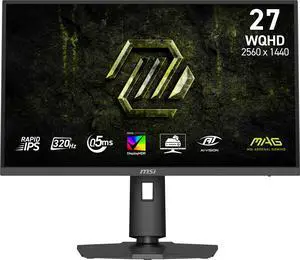
Best for: Competitive shooters and esports
- Screen size
- 27 inches
- Resolution
- 2560 × 1440
- Refresh rate
- 360Hz
- Panel
- QD-OLED
- 360Hz refresh rate targets competitive play.
- 27-inch size suits focused desktop setups.
- QD-OLED offers rich contrast.
- A top-tier PC is required to approach 360 frames per second.
Is the Dell Alienware AW2725DF 27-inch QD-OLED Gaming Monitor a good esports monitor?
The Dell Alienware AW2725DF 27-inch QD-OLED Gaming Monitor is a good esports choice for PC players who prioritize refresh rate and a compact screen. The Dell Alienware AW2725DF 27-inch QD-OLED Gaming Monitor's 360Hz panel pairs 2560 × 1440 resolution with QD-OLED contrast, but a fast PC is essential to benefit from its speed.
See today’s Black Friday price on Amazon
#7
Dell S3422DWG 34-inch Curved Gaming Monitor
The Dell S3422DWG 34-inch Curved Gaming Monitor is the best budget-oriented ultrawide pick for players who want a 144Hz refresh rate.
Best for: Ultrawide gaming on a sensible setup
- Screen size
- 34 inches
- Resolution
- 3440 × 1440
- Refresh rate
- 144Hz
- Panel
- VA
- 144Hz refresh rate supports smooth play.
- Ultrawide resolution gives games extra horizontal space.
- VA panel offers strong contrast.
- VA motion performance and color do not match the OLED alternatives.
Is the Dell S3422DWG 34-inch Curved Gaming Monitor a good Black Friday 2026 value?
The Dell S3422DWG 34-inch Curved Gaming Monitor is a sensible value-focused choice for players who want 21:9 gaming and a 144Hz refresh rate. The Dell S3422DWG 34-inch Curved Gaming Monitor's VA panel and 3440 × 1440 resolution suit immersive play, though shoppers seeking OLED contrast should compare the premium alternatives.
See today’s Black Friday price on Amazon
Which is better, the LG DualUp 28MQ780-B or the Dell Alienware AW3423DW?
The LG 28MQ780-B DualUp Monitor is better for vertical multitasking, while the Dell Alienware AW3423DW 34-inch QD-OLED Gaming Monitor is better for immersive gaming. The LG’s 16:18 screen and 2560 × 2880 resolution offer a tall workspace for documents, code and stacked windows. The Dell’s 21:9 screen, 3440 × 1440 resolution and 175Hz refresh rate target wide PC gaming.
Panel technology separates the two as well. The LG uses Nano IPS and a 60Hz refresh rate, which suits general work and creative tasks. The Dell uses QD-OLED for deep blacks and vivid contrast, with a high refresh rate for fast games. Choose by your main activity: productivity-first users should look at the LG, while PC gamers should start with the Dell.
Is the Dell Alienware AW3423DW worth buying for Black Friday 2026?
The Dell Alienware AW3423DW 34-inch QD-OLED Gaming Monitor is worth buying for PC players who want a 34-inch ultrawide OLED and a 175Hz refresh rate. Its 3440 × 1440 resolution offers more horizontal space than a standard widescreen display, and QD-OLED gives compatible games dramatic contrast.
Check that your desk can accommodate a curved 34-inch monitor and that your PC supports the games and frame rates you want. Console players should review their console’s resolution and refresh-rate support before choosing an ultrawide. For a tall work display, the LG 28MQ780-B DualUp Monitor is the better match.
Which monitor is best for gaming, work and esports?
The Dell Alienware AW3423DWF 34-inch QD-OLED Gaming Monitor is the best all-around pick here for immersive PC gaming, while the LG 28MQ780-B DualUp Monitor is the work-focused choice. The AW3423DWF combines a 165Hz refresh rate with a 3440 × 1440 QD-OLED panel, and the LG’s unusual 16:18 layout keeps more vertical content in view.
Competitive players who prioritize speed should compare the Dell Alienware AW2725DF 27-inch QD-OLED Gaming Monitor and its 360Hz refresh rate. For 4K detail, the Samsung Odyssey OLED G8 G80SD 32-inch Gaming Monitor offers 3840 × 2160 resolution at 240Hz. Match the screen to your game genres and PC performance.
What should you compare before choosing an OLED or IPS monitor?
The LG 28MQ780-B DualUp Monitor and Dell Alienware AW3423DW 34-inch QD-OLED Gaming Monitor differ in panel, shape, refresh rate and purpose. IPS panels suit broad productivity use, while OLED and QD-OLED models emphasize contrast and gaming visuals. Screen resolution alone does not tell you how a monitor fits a desk or a game.
Check available ports, stand adjustment, screen curvature and device compatibility before buying. OLED shoppers should also read the manufacturer’s care guidance and consider how often their screen displays static elements. A 240Hz or 360Hz panel makes the most sense when a gaming PC can deliver high frame rates.
Which monitor should you choose for Black Friday 2026?
The Dell Alienware AW3423DWF 34-inch QD-OLED Gaming Monitor is the best starting point for a PC gamer who wants an ultrawide OLED, while the Dell S3422DWG 34-inch Curved Gaming Monitor is the value-oriented alternative. The LG DualUp stands apart as a work-first display rather than a direct gaming rival.
Set your priorities before comparing listings: screen size, aspect ratio, panel type, refresh rate and connection needs. The LG 28MQ780-B DualUp Monitor is the clear fit for vertical workspace; the Dell Alienware AW3423DW is the immersive QD-OLED choice. Worth it for most players. Pick the display that fits your actual setup, not just the biggest spec.
Buying Guide
Choose the right screen shape
The LG 28MQ780-B DualUp Monitor uses a tall 16:18 layout for documents and stacked windows. The Dell Alienware AW3423DW offers a 21:9 ultrawide view for compatible games and side-by-side apps. Check your desk width and the software you use most.
Match refresh rate to your games
The Dell Alienware AW2725DF reaches 360Hz for competitive PC gaming, while the Dell S3422DWG offers 144Hz for ultrawide play. Higher refresh rates work best when the PC and game deliver matching frame rates.
Compare resolution and PC performance
The Samsung Odyssey OLED G8 G80SD delivers 3840 × 2160 resolution at 240Hz, a demanding combination for a gaming PC. The 3440 × 1440 ultrawide models use a different shape and pixel load. Check GPU capability before choosing.
Understand the panel trade-offs
Nano IPS supports the LG DualUp’s work-focused design, while OLED and QD-OLED models emphasize contrast and rich color. VA options such as the Dell S3422DWG provide a different balance. Review care guidance for OLED screens before purchase.
Verify connections and setup needs
Check that the monitor has the ports needed for your PC or console, and confirm support for your preferred resolution and refresh rate. Measure desk space, review stand adjustment and consider whether an ultrawide curve suits your seating position.
FAQ
LG DualUp 28MQ780 vs Dell Alienware AW3423DW: which is better for gaming?
The Dell Alienware AW3423DW 34-inch QD-OLED Gaming Monitor is better for immersive PC gaming, with a 34.18-inch ultrawide display and 175Hz refresh rate. The LG 28MQ780-B DualUp Monitor is better for productivity, with a tall 16:18 screen and 60Hz refresh rate.
Is the LG 28MQ780-B DualUp Monitor good for gaming?
The LG 28MQ780-B DualUp Monitor handles casual gaming, but its 60Hz refresh rate and 16:18 shape focus on productivity rather than gaming. Players seeking high-refresh gaming should compare the Dell Alienware AW3423DW or a faster 240Hz model from this guide.
Is the Dell Alienware AW3423DW 34-inch QD-OLED Gaming Monitor good for console gaming?
The Dell Alienware AW3423DW 34-inch QD-OLED Gaming Monitor offers vivid QD-OLED visuals, but its 21:9 aspect ratio is primarily suited to PC ultrawide gaming. Check your console’s supported resolutions and refresh rates, plus how it handles ultrawide output, before choosing it.
What is the best ultrawide gaming monitor in this Black Friday 2026 guide?
The Dell Alienware AW3423DWF 34-inch QD-OLED Gaming Monitor is the guide’s best overall ultrawide pick. Its 3440 × 1440 resolution, QD-OLED panel and 165Hz refresh rate suit immersive PC play. The Dell S3422DWG is a VA alternative with a 144Hz refresh rate.
Is a 360Hz monitor worth it for gaming?
The Dell Alienware AW2725DF 27-inch QD-OLED Gaming Monitor’s 360Hz refresh rate suits competitive players with a PC capable of delivering very high frame rates. Casual players and slower-paced game fans often get more practical value from prioritizing resolution, screen size or panel quality.
Is an OLED monitor a good choice for work?
The Samsung Odyssey OLED G8 G80SD 32-inch Gaming Monitor can handle work and gaming, but OLED ownership calls for attention to manufacturer care guidance, especially with static screen content. The LG 28MQ780-B DualUp Monitor is a more purpose-built choice for tall productivity layouts.