

As an Amazon Associate we earn from qualifying purchases.
- Best overall: Samsung 990 EVO Plus 2TB
- Best budget: Samsung 990 EVO 2TB
- Best premium: Samsung 9100 PRO 2TB
- Best for PCIe 4.0 gaming: WD_BLACK SN850X 2TB
- Samsung 990 EVO Plus 2TB offers a strong balance of speed, capacity, and broad compatibility for everyday PC upgrades.
- Samsung 9100 PRO 2TB is the premium choice, with PCIe 5.0 speeds up to 14,700 MB/s read.
- PCIe 4.0 drives deliver ample performance for most gaming and general-use systems at lower power and cooling demands.
- Check your device’s M.2 size, PCIe generation, and heatsink clearance before choosing an SSD.
- Black Friday 2026 is a good time to compare capacity and features across these SSDs, not just advertised speed.
Samsung 990 EVO Plus 2TB and Samsung 9100 PRO 2TB are the two key choices in this Black Friday 2026 SSD comparison: one prioritizes value and compatibility, while the other targets premium PCIe 5.0 performance. I researched and compared specs, reviews and owner feedback to identify which drive suits different PCs, gaming builds, and upgrade plans.
The short version: choose Samsung 990 EVO Plus 2TB for a balanced everyday upgrade, and choose Samsung 9100 PRO 2TB when your system supports PCIe 5.0 and your workload benefits from very high transfer speeds. The guide also compares six alternatives, explains what to check before buying, and names a fit for each common use.
How We Picked
- Compared published sequential read and write specifications, while treating headline speeds as manufacturer maximums rather than guaranteed everyday results.
- Considered PCIe generation, M.2 2280 form factor, storage capacity, and compatibility with desktop PCs, laptops, and supported consoles.
- Reviewed product features, owner feedback, warranty information, and the practical value of each drive’s performance tier.
- Included both PCIe 4.0 and PCIe 5.0 models so shoppers can match performance to system capability and cooling.
- Prioritized drives with clear use cases, established specifications, and capacities suited to common operating-system and game libraries.
Comparison Table
| Product | Best for | Capacity | Sequential read | Sequential write |
|---|---|---|---|---|
| Samsung 990 EVO Plus 2TB | Balanced PC upgrade | 2TB | Up to 7,250 MB/s | Up to 6,300 MB/s |
| Samsung 9100 PRO 2TB | PCIe 5.0 performance | 2TB | Up to 14,700 MB/s | Up to 13,400 MB/s |
| Samsung 990 PRO 2TB | Premium PCIe 4.0 gaming | 2TB | Up to 7,450 MB/s | Up to 6,900 MB/s |
| Samsung 990 EVO 2TB | Everyday storage | 2TB | Up to 5,000 MB/s | Up to 4,200 MB/s |
| Crucial T705 2TB | PCIe 5.0 workstation | 2TB | Up to 14,500 MB/s | Up to 12,700 MB/s |
| WD_BLACK SN850X 2TB | PC gaming libraries | 2TB | Up to 7,300 MB/s | Up to 6,600 MB/s |
| Crucial T500 2TB | Fast PCIe 4.0 systems | 2TB | Up to 7,400 MB/s | Up to 7,000 MB/s |
Best Picks Reviewed
#1 · Top pick
Samsung 990 EVO Plus 2TB
The Samsung 990 EVO Plus 2TB is the best balanced SSD for mainstream PC owners, with sequential reads up to 7,250 MB/s. The drive pairs PCIe 4.0 x4 or PCIe 5.0 x2 compatibility with generous capacity for games and everyday files.

Best for: Mainstream PC upgrades and large game libraries
- Capacity
- 2TB
- Interface
- PCIe 4.0 x4 / PCIe 5.0 x2
- Sequential read
- Up to 7,250 MB/s
- Sequential write
- Up to 6,300 MB/s
- Fast PCIe 4.0 performance for everyday computing
- 2TB capacity suits large libraries
- Supports more than one PCIe lane configuration
- Does not reach PCIe 5.0 flagship speeds
Is the Samsung 990 EVO Plus 2TB worth buying on Black Friday 2026?
The Samsung 990 EVO Plus 2TB is worth considering for a balanced PC upgrade with 2TB of space and read speeds up to 7,250 MB/s. The Samsung 990 EVO Plus 2TB's PCIe 4.0 performance is a sensible fit for gaming and general use without requiring a PCIe 5.0 system.
See today’s Black Friday price on Amazon
#2
Samsung 9100 PRO 2TB
The Samsung 9100 PRO 2TB is the best premium SSD for PCIe 5.0 desktop builds, with sequential reads up to 14,700 MB/s. The drive is designed for demanding transfers and workloads, provided the motherboard and cooling setup support its performance class.
Best for: PCIe 5.0 power users and high-speed transfers
- Capacity
- 2TB
- Interface
- PCIe 5.0 x4
- Sequential read
- Up to 14,700 MB/s
- Sequential write
- Up to 13,400 MB/s
- Flagship PCIe 5.0 transfer speeds
- 2TB capacity for demanding projects
- Strong fit for compatible high-end systems
- Needs a PCIe 5.0 host to reach its top speeds
- High-speed workloads call for careful thermal planning
Is the Samsung 9100 PRO 2TB worth buying on Black Friday 2026?
The Samsung 9100 PRO 2TB is worth buying for a compatible PCIe 5.0 system that benefits from very fast storage. The Samsung 9100 PRO 2TB's sequential read rating reaches 14,700 MB/s, while a PCIe 4.0 computer limits the drive’s interface advantage.
See today’s Black Friday price on Amazon
#3
Samsung 990 PRO 2TB
The Samsung 990 PRO 2TB is the best high-performance PCIe 4.0 SSD for demanding gaming PCs, with sequential reads up to 7,450 MB/s. The drive offers a premium alternative when a PCIe 5.0 platform is not part of the upgrade.
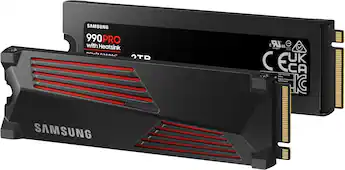
Best for: High-end PCIe 4.0 gaming PCs
- Capacity
- 2TB
- Interface
- PCIe 4.0 x4
- Sequential read
- Up to 7,450 MB/s
- Sequential write
- Up to 6,900 MB/s
- High-end PCIe 4.0 speed
- Large 2TB model suits gaming libraries
- Established flagship product line
- Sequential speeds are below PCIe 5.0 drives
Is the Samsung 990 PRO 2TB a good gaming SSD for Black Friday 2026?
The Samsung 990 PRO 2TB is a good gaming SSD for a PCIe 4.0 PC, with read speeds up to 7,450 MB/s and 2TB of storage. The drive is a strong fit when high performance matters but a PCIe 5.0 upgrade is unnecessary.
See today’s Black Friday price on Amazon
#4
Samsung 990 EVO 2TB
The Samsung 990 EVO 2TB is the best straightforward Samsung upgrade for everyday users, with sequential reads up to 5,000 MB/s. The drive keeps a familiar M.2 2280 format and offers practical capacity for work, apps, and games.
Best for: Everyday storage upgrades
- Capacity
- 2TB
- Interface
- PCIe 4.0 x4 / PCIe 5.0 x2
- Sequential read
- Up to 5,000 MB/s
- Sequential write
- Up to 4,200 MB/s
- 2TB capacity for varied everyday use
- Dual interface support
- Good performance for common PC tasks
- Slower than the EVO Plus and PRO alternatives
Is the Samsung 990 EVO 2TB a good SSD for everyday use?
The Samsung 990 EVO 2TB is a good everyday SSD for users who want 2TB of storage and read speeds up to 5,000 MB/s. The drive suits general computing and gaming, while speed-focused creators should compare faster models.
See today’s Black Friday price on Amazon
#5
Crucial T705 2TB
The Crucial T705 2TB is the best premium alternative for PCIe 5.0 builds, with sequential reads up to 14,500 MB/s. The drive targets demanding data transfers and benefits from a compatible motherboard and suitable thermal management.
Best for: PCIe 5.0 creators and workstation users
- Capacity
- 2TB
- Interface
- PCIe 5.0 x4
- Sequential read
- Up to 14,500 MB/s
- Sequential write
- Up to 12,700 MB/s
- Very high PCIe 5.0 sequential speeds
- 2TB capacity for large work files
- Alternative to Samsung’s flagship drive
- Requires a PCIe 5.0-compatible system for maximum speed
- High-performance operation needs cooling consideration
Is the Crucial T705 2TB worth buying on Black Friday 2026?
The Crucial T705 2TB is worth considering for a PCIe 5.0 workstation or desktop that handles large transfers. The Crucial T705 2TB's rated sequential read speed reaches 14,500 MB/s, and its 2TB capacity provides room for active projects and applications.
See today’s Black Friday price on Amazon
#6
WD_BLACK SN850X 2TB
The WD_BLACK SN850X 2TB is the best gaming-focused PCIe 4.0 alternative, with sequential reads up to 7,300 MB/s. The drive balances strong game-loading performance with a 2TB capacity for players building a large PC library.
Best for: PC gaming libraries
- Capacity
- 2TB
- Interface
- PCIe 4.0 x4
- Sequential read
- Up to 7,300 MB/s
- Sequential write
- Up to 6,600 MB/s
- Strong PCIe 4.0 gaming performance
- 2TB capacity is useful for installed games
- Heatsink and non-heatsink versions are available
- Check the exact version for heatsink clearance
Is the WD_BLACK SN850X 2TB a good gaming SSD?
The WD_BLACK SN850X 2TB is a good gaming SSD for a PCIe 4.0 desktop, with sequential reads up to 7,300 MB/s. Choose the heatsink or non-heatsink version based on your motherboard, case clearance, and cooling arrangement.
See today’s Black Friday price on Amazon
#7
Crucial T500 2TB
The Crucial T500 2TB is the best balanced alternative for a fast PCIe 4.0 PC, with sequential reads up to 7,400 MB/s. The drive brings near-top-tier interface performance to users who do not need a PCIe 5.0 model.
Best for: Fast PCIe 4.0 general-purpose systems
- Capacity
- 2TB
- Interface
- PCIe 4.0 x4
- Sequential read
- Up to 7,400 MB/s
- Sequential write
- Up to 7,000 MB/s
- High sequential speeds for PCIe 4.0
- 2TB option supports sizable game and work libraries
- Good match for both productivity and gaming
- Does not use PCIe 5.0 bandwidth
Is the Crucial T500 2TB a good alternative to Samsung SSDs?
The Crucial T500 2TB is a good Samsung alternative for a PCIe 4.0 system, with sequential reads up to 7,400 MB/s and writes up to 7,000 MB/s. The 2TB model suits mixed gaming, productivity, and everyday storage needs.
See today’s Black Friday price on Amazon
Which is better, Samsung 990 EVO Plus or Samsung 9100 PRO?
Samsung 990 EVO Plus 2TB is the better value-oriented pick for most mainstream systems, while Samsung 9100 PRO 2TB is the speed leader for PCIe 5.0 builds. Samsung 990 EVO Plus 2TB reaches reads up to 7,250 MB/s; Samsung 9100 PRO 2TB reaches up to 14,700 MB/s.
The faster rating does not make Samsung 9100 PRO 2TB the right fit for every buyer. A PCIe 4.0 system cannot deliver the drive’s top interface speeds, and many everyday tasks do not need flagship transfer rates. My pick for most people is Samsung 990 EVO Plus 2TB because it balances capacity, speed, and platform flexibility.
Is Samsung 9100 PRO worth choosing over a PCIe 4.0 SSD?
Samsung 9100 PRO 2TB is worth choosing over a PCIe 4.0 SSD when the computer supports PCIe 5.0 and the workload uses high sustained storage bandwidth. The drive’s published read speed reaches 14,700 MB/s, making it a premium option for large transfers and demanding creative work.
Samsung 990 PRO 2TB and Crucial T500 2TB are better-matched options for PCIe 4.0 builds, with read speeds above 7,000 MB/s. Buyers should check motherboard support, M.2 slot generation, and cooling before paying for a PCIe 5.0 drive. Everyday browsing, office work, and many games do not require the top sequential rating.
Which SSD is best for a gaming PC or PS5?
WD_BLACK SN850X 2TB and Samsung 990 PRO 2TB are strong PCIe 4.0 gaming choices, with rated reads of 7,300 MB/s and 7,450 MB/s respectively. Samsung 990 EVO Plus 2TB also suits a gaming PC, offering up to 7,250 MB/s reads and 2TB of space.
For a PS5 upgrade, confirm the console’s M.2 requirements and install a compatible heatsink; a drive’s speed rating alone does not guarantee fit. Samsung 9100 PRO 2TB is designed for PCIe 5.0 hosts, while a PS5 expansion slot uses PCIe 4.0. Skip it if the intended system cannot use its interface advantage.
Do PCIe 5.0 SSDs need a heatsink?
Samsung 9100 PRO 2TB and Crucial T705 2TB benefit from a cooling plan in PCIe 5.0 systems because sustained high-speed activity produces heat. Confirm whether the motherboard includes an M.2 heatsink and whether the selected SSD version has one attached.
Samsung 990 EVO Plus 2TB and other PCIe 4.0 drives also need adequate airflow, although typical everyday workloads place different demands on cooling. Laptop buyers should verify the laptop’s M.2 size, single- or double-sided clearance, and thermal design before ordering. A heatsink that fits a desktop motherboard often does not fit inside a laptop.
What should I compare before buying an SSD on Black Friday 2026?
Samsung 990 EVO Plus 2TB is a useful starting point for comparing capacity, interface, and speed, while Samsung 9100 PRO 2TB represents the premium PCIe 5.0 tier. Compare the exact capacity and heatsink version, not only a product family name or maximum speed.
Check device compatibility first, then consider how much space the operating system, applications, and game or work library need. Read and write ratings describe sequential transfers, not every real-world task. Compare warranty terms, seller identity, return conditions, and included software before completing a Black Friday 2026 purchase.
Buying Guide
Match the SSD to your PCIe generation
Confirm the motherboard or laptop’s M.2 slot generation before selecting a drive. Samsung 9100 PRO 2TB and Crucial T705 2TB target PCIe 5.0 systems, while Samsung 990 PRO 2TB and WD_BLACK SN850X 2TB are PCIe 4.0 options. A newer drive works at the host’s supported interface limit.
Choose capacity for your actual library
A 2TB SSD gives many PC owners room for the operating system, applications, and a broad game library. Check the drive’s formatted capacity and your current storage use. Buyers with large video projects or extensive game collections should compare available capacities before deciding.
Treat headline speed as a ceiling
Manufacturer sequential read and write figures are maximum ratings under specified conditions. Everyday startup, game loading, and small-file tasks do not scale directly with sequential transfer speed. For mixed daily use, prioritize capacity, compatibility, and a sensible performance tier.
Check heat and physical clearance
Verify M.2 2280 support, heatsink height, and airflow for a desktop; check thickness and thermal pad requirements for a laptop. PS5 owners should confirm console fit and use a compatible heatsink. A drive that fits the slot but blocks another component is not a good match.
Compare the complete Black Friday offer
Review the exact model, capacity, heatsink configuration, seller, warranty, and return policy. Compare the final listing details rather than relying on a headline speed or product-family name. Confirm that the listing is for the desired 2TB variant before checkout.
FAQ
What is the main difference between Samsung 990 EVO Plus and Samsung 9100 PRO?
Samsung 990 EVO Plus 2TB is a flexible PCIe 4.0-class choice with reads up to 7,250 MB/s. Samsung 9100 PRO 2TB is a PCIe 5.0 flagship rated for reads up to 14,700 MB/s, so it suits compatible high-performance systems.
Is Samsung 990 EVO Plus faster than Samsung 990 EVO?
Samsung 990 EVO Plus 2TB is faster on published sequential ratings, reaching reads up to 7,250 MB/s and writes up to 6,300 MB/s. Samsung 990 EVO 2TB is rated for reads up to 5,000 MB/s and writes up to 4,200 MB/s.
Does Samsung 9100 PRO work in a PCIe 4.0 computer?
Samsung 9100 PRO 2TB is a PCIe 5.0 x4 SSD and operates according to the compatible system’s supported interface. A PCIe 4.0 host does not provide PCIe 5.0 top speeds, so compare a PCIe 4.0 drive for a better-matched upgrade.
Which 2TB SSD is best for PS5?
WD_BLACK SN850X 2TB and Samsung 990 PRO 2TB are PCIe 4.0 options suitable for consideration in a PS5 expansion. Check Sony’s M.2 requirements, the exact drive dimensions, and heatsink fit before purchase; console compatibility depends on meeting those requirements.
Should I buy a PCIe 5.0 SSD for gaming?
Samsung 9100 PRO 2TB makes sense for gaming when the PC supports PCIe 5.0 and the buyer also values fast large-file transfers. Samsung 990 EVO Plus 2TB, Samsung 990 PRO 2TB, and WD_BLACK SN850X 2TB are strong PCIe 4.0 choices for gaming systems.
Does Samsung 990 EVO Plus 2TB need a heatsink?
Samsung 990 EVO Plus 2TB needs adequate thermal support and physical compatibility with its host. A desktop motherboard’s M.2 heatsink often provides suitable coverage; laptop and console buyers should follow the device maker’s clearance and heatsink requirements.