

As an Amazon Associate we earn from qualifying purchases.
- Best overall: ULTRALOQ U-Bolt Pro WiFi Smart Lock
- Best budget: eufy Security Smart Lock C30
- Best premium: eufy Security Smart Lock S330
- Best for Matter homes: eufy Security Smart Lock E30
- ULTRALOQ U-Bolt Pro WiFi Smart Lock is the strongest all-around pick for fingerprint access and built-in Wi-Fi.
- eufy Security Smart Lock C220 pairs fingerprint entry with app control and a simple retrofit-style deadbolt design.
- eufy Security Smart Lock C30 is the best fit for shoppers who want keypad access without fingerprint hardware.
- Choose a lock by door compatibility and smart-home ecosystem first, then compare access methods and battery needs.
Ultraloq and eufy both offer smart locks for keyless entry, but their product ranges suit different homes and priorities. ULTRALOQ U-Bolt Pro WiFi Smart Lock stands out for a wide choice of entry methods, while eufy Security Smart Lock C220 offers an approachable fingerprint-and-keypad setup. For Black Friday 2026, the right pick depends on whether you value access flexibility, connected-home compatibility, or a straightforward keypad deadbolt.
I researched and compared specs, reviews and owner feedback to build this shopper-first guide. The picks cover fingerprint models, keypad-only options, Z-Wave and Matter connections, and a premium model with a built-in camera. Check your door measurements and smart-home hub requirements before buying; those details matter as much as the feature list.
How We Picked
- Compared entry options, including fingerprint readers, keypads, physical keys and app control.
- Reviewed Wi-Fi, Z-Wave and Matter compatibility, with attention to whether a hub is needed.
- Considered installation style and the importance of checking door thickness, backset and existing hardware.
- Used published specifications, customer reviews and owner feedback to assess everyday convenience.
- Selected models across different budgets and use cases rather than treating one brand as right for every home.
Comparison Table
| Product | Best for | Access options | Wireless or smart-home connection | Fingerprint entry |
|---|---|---|---|---|
| ULTRALOQ U-Bolt Pro WiFi Smart Lock | Flexible entry methods | 8-in-1 | Built-in Wi-Fi | Yes |
| ULTRALOQ U-Bolt Pro Z-Wave Smart Lock | Z-Wave homes | 6-in-1 | Z-Wave | Yes |
| ULTRALOQ U-Bolt WiFi Smart Lock | Keypad-first access | 4-in-1 | Built-in Wi-Fi | No |
| eufy Security Smart Lock C220 | Fingerprint-and-keypad entry | 4-in-1 | Built-in Wi-Fi | Yes |
| eufy Security Smart Lock C30 | Keypad and app control | 3-in-1 | Built-in Wi-Fi | No |
| eufy Security Smart Lock E30 | Matter households | 4-in-1 | Matter | Yes |
| eufy Security Smart Lock S330 | Video monitoring | Fingerprint, keypad, app and key | Video smart lock | Yes |
Best Picks Reviewed
#1 · Top pick
ULTRALOQ U-Bolt Pro WiFi Smart Lock
The ULTRALOQ U-Bolt Pro WiFi Smart Lock is the best overall choice for households wanting flexible keyless entry, with 8-in-1 access options and built-in Wi-Fi.

Best for: Fingerprint access and flexible entry methods
- Access options
- 8-in-1
- Wireless connection
- Built-in Wi-Fi
- Power
- 8 AA batteries
- Offers fingerprint, keypad, app and physical-key entry.
- Built-in Wi-Fi supports remote app access without a separate bridge.
- Auto-unlock adds convenience for arriving home.
- Feature-rich setup takes more configuration than a basic keypad lock.
Is the ULTRALOQ U-Bolt Pro WiFi Smart Lock worth buying on Black Friday 2026?
Yes. The ULTRALOQ U-Bolt Pro WiFi Smart Lock is a strong Black Friday 2026 pick for homes that want fingerprint entry, remote app control and a physical-key backup in one deadbolt. Confirm door fit and Wi-Fi coverage before purchase.
See today’s Black Friday price on Amazon
#2
ULTRALOQ U-Bolt Pro Z-Wave Smart Lock
The ULTRALOQ U-Bolt Pro Z-Wave Smart Lock is the best choice for Z-Wave households wanting fingerprint entry, with 6-in-1 access and smart-home hub support.
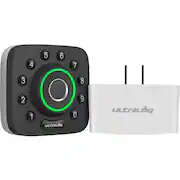
Best for: Homes already using a Z-Wave hub
- Access options
- 6-in-1
- Wireless connection
- Z-Wave
- Power
- 8 AA batteries
- Combines a fingerprint reader with keypad and key access.
- Fits into compatible Z-Wave smart-home setups.
- Keeps a physical key option for backup entry.
- Requires a compatible Z-Wave hub for connected features.
Is the ULTRALOQ U-Bolt Pro Z-Wave Smart Lock worth buying on Black Friday 2026?
Yes. The ULTRALOQ U-Bolt Pro Z-Wave Smart Lock suits shoppers who already own a compatible Z-Wave hub and want fingerprint entry at the front door. Check hub compatibility and confirm the lock matches your deadbolt before choosing it.
See today’s Black Friday price on Amazon
#3
ULTRALOQ U-Bolt WiFi Smart Lock
The ULTRALOQ U-Bolt WiFi Smart Lock is the best pick for keypad-first households wanting remote access, with 4-in-1 entry and built-in Wi-Fi.

Best for: Keypad entry with remote app access
- Access options
- 4-in-1
- Wireless connection
- Built-in Wi-Fi
- Power
- 4 AA batteries
- Offers keypad and app control alongside a physical key.
- Built-in Wi-Fi avoids a separate connection bridge.
- A simpler feature set than fingerprint-equipped models.
- Lacks the fingerprint reader found on the U-Bolt Pro models.
Is the ULTRALOQ U-Bolt WiFi Smart Lock worth buying on Black Friday 2026?
Yes. The ULTRALOQ U-Bolt WiFi Smart Lock is a sensible choice for shoppers who prefer keypad codes and remote app control over fingerprint entry. The ULTRALOQ U-Bolt WiFi Smart Lock's built-in Wi-Fi keeps setup straightforward, while the physical key provides a backup.
See today’s Black Friday price on Amazon
#4
eufy Security Smart Lock C220
The eufy Security Smart Lock C220 is the best eufy pick for fingerprint-and-keypad convenience, with 4-in-1 access and built-in Wi-Fi.

Best for: Fingerprint entry in a straightforward deadbolt
- Access options
- 4-in-1
- Wireless connection
- Built-in Wi-Fi
- Power
- 8 AA batteries
- Includes fingerprint, keypad, app and physical-key entry.
- Built-in Wi-Fi supports remote access through the app.
- A practical match for households that want more than code entry.
- Requires regular battery monitoring for dependable operation.
Is the eufy Security Smart Lock C220 worth buying on Black Friday 2026?
Yes. The eufy Security Smart Lock C220 is a worthwhile choice for households that want fingerprint unlocking, keypad codes and app access in one deadbolt. The physical key adds backup entry, and built-in Wi-Fi supports remote app use.
See today’s Black Friday price on Amazon
#5
eufy Security Smart Lock C30
The eufy Security Smart Lock C30 is the best budget-style pick for keypad-focused homes, with 3-in-1 access and built-in Wi-Fi.
Best for: Keypad codes and app control
- Access options
- 3-in-1
- Wireless connection
- Built-in Wi-Fi
- Power
- 4 AA batteries
- Combines keypad access, app control and a physical key.
- Built-in Wi-Fi supports connected features without an extra bridge.
- Avoids the added hardware of a fingerprint reader.
- Does not offer fingerprint unlocking.
Is the eufy Security Smart Lock C30 worth buying on Black Friday 2026?
Yes. The eufy Security Smart Lock C30 is a good fit for shoppers who want code-based entry and app control without paying for fingerprint features they do not need. The physical key is useful as a backup access method.
See today’s Black Friday price on Amazon
#6
eufy Security Smart Lock E30
The eufy Security Smart Lock E30 is the best eufy choice for Matter-connected homes, with 4-in-1 access and Matter smart-home support.
Best for: Matter compatibility and fingerprint entry
- Access options
- 4-in-1
- Smart-home standard
- Matter
- Power
- 8 AA batteries
- Offers fingerprint, keypad, app and physical-key access.
- Matter support helps connect the lock to compatible smart-home platforms.
- A versatile option for homes planning a connected-device setup.
- Matter features depend on compatible home equipment and setup.
Is the eufy Security Smart Lock E30 worth buying on Black Friday 2026?
Yes. The eufy Security Smart Lock E30 suits shoppers who want fingerprint entry and Matter compatibility in one lock. Check that your smart-home platform and hub support the Matter setup you plan to use before placing the lock on your door.
See today’s Black Friday price on Amazon
#7
eufy Security Smart Lock S330
The eufy Security Smart Lock S330 is the best premium pick for shoppers wanting camera-based door awareness, with 2K video and integrated smart-lock access.
Best for: Video door monitoring and smart entry
- Video resolution
- 2K
- Access options
- Fingerprint, keypad, app and key
- Product type
- Video smart lock
- Adds a built-in camera to smart-lock functionality.
- Combines video monitoring with multiple entry options.
- A useful all-in-one choice for a front-door upgrade.
- The camera-equipped design is bulkier than a basic deadbolt.
Is the eufy Security Smart Lock S330 worth buying on Black Friday 2026?
Yes. The eufy Security Smart Lock S330 is worth considering if you want a smart lock with a built-in 2K camera and several entry options. Compare its larger video-lock design with your door layout and monitoring needs.
See today’s Black Friday price on Amazon
Which is better, Ultraloq or eufy smart locks?
ULTRALOQ U-Bolt Pro WiFi Smart Lock is the best all-around choice for entry flexibility, while eufy Security Smart Lock C220 is a strong direct rival for fingerprint access and app control. The better brand depends on your door, preferred entry method and connected-home setup.
ULTRALOQ U-Bolt Pro WiFi Smart Lock offers 8-in-1 access and built-in Wi-Fi, making it especially appealing when different household members want different ways to unlock the door. eufy Security Smart Lock C220 keeps the core features shopper-friendly with fingerprint, keypad, app and key entry. Both brands offer simpler keypad models too.
For smart-home integration, compare the exact model rather than assuming every lock supports the same platform. ULTRALOQ U-Bolt Pro Z-Wave Smart Lock is aimed at Z-Wave setups, while eufy Security Smart Lock E30 brings Matter support. Best bet: match the lock to your existing equipment before comparing extras.
Which smart lock is best for fingerprint entry?
ULTRALOQ U-Bolt Pro WiFi Smart Lock and eufy Security Smart Lock C220 both suit homes that want fingerprint entry alongside a keypad and physical key. Each offers a familiar deadbolt format and connected app features, so your choice comes down to preferred brand, smart-home requirements and installation fit.
ULTRALOQ U-Bolt Pro Z-Wave Smart Lock is another fingerprint option, with a clear advantage for households already using a compatible Z-Wave hub. eufy Security Smart Lock E30 is a better match for shoppers who want fingerprint access and Matter support. Neither smart-home standard is a substitute for checking compatibility with your own hub and platform.
Fingerprint readers reduce the need to remember a code for everyday entry, while backup options remain important for guests and unexpected battery issues. Easy recommendation: choose a fingerprint model only if the feature will be used regularly; keypad models cover the essentials at a simpler level.
Which model is best for a smart-home setup?
eufy Security Smart Lock E30 is the clearest choice for shoppers seeking Matter support, while ULTRALOQ U-Bolt Pro Z-Wave Smart Lock fits homes with an existing Z-Wave hub. Smart-home compatibility is model-specific, so confirm the exact lock works with your controller before buying.
ULTRALOQ U-Bolt Pro WiFi Smart Lock and eufy Security Smart Lock C220 use built-in Wi-Fi for connected app features. That makes them good candidates for shoppers who want remote access without adding a separate lock bridge. Wi-Fi coverage at the door still matters, and app functions depend on account and network setup.
A connected lock should also work well as a standalone door lock. Keep physical-key access or another backup plan, and decide who needs user codes or app permissions. For a household with a smart-home hub, favor protocol compatibility; for a simpler setup, built-in Wi-Fi keeps the equipment list shorter.
What should you check before buying a smart lock?
Every shopper should check door thickness, backset, deadbolt type and clearance before buying any smart lock. A feature-rich lock is not a good deal if its hardware does not fit the door or leaves too little room for a handle, trim or storm door.
ULTRALOQ U-Bolt Pro WiFi Smart Lock and eufy Security Smart Lock C220 are deadbolt-style choices, while eufy Security Smart Lock S330 adds a camera to the door hardware. Camera-equipped products need extra attention to placement and viewing angle. Review the manufacturer’s fit guide and installation requirements for the exact model.
Think through battery access, backup entry and who will manage codes. Households with frequent guests often benefit from app-based sharing or keypad codes, while a single resident can prefer fingerprint entry. Check Wi-Fi strength or hub compatibility before starting installation so connected features work as intended.
Are smart locks worth buying on Black Friday 2026?
Smart locks are worth considering on Black Friday 2026 when keyless entry, remote access or door monitoring solves a real need at home. ULTRALOQ U-Bolt Pro WiFi Smart Lock is a versatile upgrade, and eufy Security Smart Lock C30 offers a simpler route to keypad and app control.
A deal guide should help narrow the field by features, not just brand names. Buyers who want biometric entry can compare ULTRALOQ U-Bolt Pro WiFi Smart Lock with eufy Security Smart Lock C220. Shoppers with a Matter setup can look at eufy Security Smart Lock E30, while households already using Z-Wave have a dedicated option in ULTRALOQ U-Bolt Pro Z-Wave Smart Lock.
Before checkout, verify door fit, platform support, included accessories and return terms. Prioritize a reliable backup entry method and a model that suits the people who use the door every day. A familiar, useful feature set beats paying attention to extras that will sit unused.
Buying Guide
Start with door compatibility
Measure the deadbolt area and check the manufacturer’s fit chart for door thickness, backset and clearance. Confirm whether the model replaces a deadbolt or adds camera hardware. A compatible fit is essential for reliable locking and an uncomplicated installation.
Choose your everyday entry method
Fingerprint access is convenient for regular users, while keypad codes work well for guests and families. App control supports remote management, and a physical key is a useful backup. Choose the combination that matches how people actually enter your home.
Match the connection to your home
Built-in Wi-Fi can simplify remote access, while Matter and Z-Wave suit homes built around compatible smart-home equipment. Check hub requirements and platform support for the exact model. Confirm that the signal reaches the front door.
Consider batteries and backup access
Check the specified battery type and quantity, then plan to monitor battery alerts. Keep a physical key or another manufacturer-supported backup method available. Battery details differ between models, so rely on the listing and manual for your chosen lock.
Compare useful features, not just extras
Decide whether remote app access, guest codes, fingerprint recognition or camera monitoring matters most. Camera-equipped models add door awareness but require careful placement. Compare the features you will use against setup needs before picking a Black Friday 2026 option.
FAQ
What is the main difference between Ultraloq and eufy smart locks?
ULTRALOQ offers models such as the U-Bolt Pro WiFi Smart Lock with multiple entry methods and Z-Wave alternatives. eufy’s range includes keypad, fingerprint, Matter and camera-equipped choices. Compare the individual model’s connection type and access features rather than choosing by brand alone.
Does eufy Security Smart Lock C220 have a fingerprint reader?
Yes. eufy Security Smart Lock C220 includes fingerprint entry along with keypad, app and physical-key access. Built-in Wi-Fi supports connected features. Check the product’s fit requirements and setup instructions to confirm compatibility with your deadbolt and home network.
Does ULTRALOQ U-Bolt Pro WiFi Smart Lock need a hub?
ULTRALOQ U-Bolt Pro WiFi Smart Lock has built-in Wi-Fi for connected app features, so a separate Wi-Fi bridge is not required for that connection. A compatible network and sufficient signal near the door are still important for reliable remote access.
Is eufy Security Smart Lock E30 compatible with Matter?
Yes. eufy Security Smart Lock E30 supports Matter, making it a fit for shoppers building a compatible smart-home setup. Confirm your platform, controller and any hub requirements before purchase, since Matter features depend on the equipment and configuration in your home.
Which smart lock is best for keypad-only entry?
eufy Security Smart Lock C30 is a good keypad-focused choice, with app control and a physical key alongside keypad access. ULTRALOQ U-Bolt WiFi Smart Lock is another option for shoppers seeking keypad entry with built-in Wi-Fi. Compare door fit and app needs.
Is eufy Security Smart Lock S330 a video doorbell or a smart lock?
eufy Security Smart Lock S330 combines smart-lock access with a built-in 2K camera, bringing video monitoring and entry features into one product. Its integrated design differs from a standard deadbolt, so check placement, door clearance and the manufacturer’s installation guidance.