

As an Amazon Associate we earn from qualifying purchases.
- Best overall: TP-Link Archer AX72 AX5400 Wi-Fi 6 Router
- Best budget: TP-Link Archer AX10 AX1500 Wi-Fi 6 Router
- Best premium: TP-Link Archer BE550 BE9300 Tri-Band Wi-Fi 7 Router
- Best for Wi-Fi 6E devices: TP-Link Archer AXE75 AXE5400 Tri-Band Wi-Fi 6E Router
- TP-Link Archer AX72 offers AX5400 Wi-Fi 6 speeds and is the stronger fit for busy homes with several connected devices.
- TP-Link Archer AX3000 provides AX3000 Wi-Fi 6 speeds for everyday streaming, browsing, and smaller households.
- TP-Link Archer AX55 is another AX3000 option with HomeShield security features and a USB 3.0 port.
- TP-Link Archer AXE75 adds a 6 GHz band, while TP-Link Archer BE550 brings Wi-Fi 7 and five 2.5 Gbps ports.
- Choose by home size, device load, wired-port needs, and whether your devices support newer Wi-Fi bands.
TP-Link Archer AX72 is the stronger Black Friday 2026 pick for households that need extra wireless capacity, while TP-Link Archer AX3000 is a sensible fit for everyday use and smaller homes. The headline difference is speed class: TP-Link Archer AX72 is an AX5400 router, and TP-Link Archer AX3000 is an AX3000 router. Both use Wi-Fi 6 and offer gigabit wired connections.
I researched and compared specs, reviews and owner feedback to make the choices easier to shop. The guide also compares seven TP-Link routers, from an entry-level Wi-Fi 6 model to Wi-Fi 7 and Wi-Fi 6E options. Best bet: match the router to your internet plan, home layout, and device mix rather than choosing by the biggest speed number alone.
How We Picked
- Compared advertised Wi-Fi class and band speeds to distinguish everyday routers from higher-capacity options.
- Reviewed port counts, Ethernet speeds, USB ports, and processor details for useful wired and shared-device features.
- Considered the needs of different homes, including smaller spaces, busy households, gamers, and people planning a future upgrade.
- Used manufacturer specifications alongside reviews and owner feedback to frame practical strengths and trade-offs.
- Selected TP-Link models spanning Wi-Fi 6, Wi-Fi 6E, and Wi-Fi 7 so shoppers can compare different upgrade levels.
Comparison Table
| Product | Best for | Wi-Fi class | 5 GHz speed | Ethernet ports |
|---|---|---|---|---|
| TP-Link Archer AX72 AX5400 Wi-Fi 6 Router | Busy households with several active devices | AX5400 | Up to 4,804 Mbps | 5 gigabit ports |
| TP-Link Archer AX3000 Wi-Fi 6 Router (Archer AX50) | Everyday Wi-Fi 6 use in a smaller household | AX3000 | Up to 2,402 Mbps | 5 gigabit ports |
| TP-Link Archer AX55 AX3000 Dual-Band Wi-Fi 6 Router | Households seeking AX3000 Wi-Fi 6 and HomeShield | AX3000 | Up to 2,402 Mbps | 5 gigabit ports |
| TP-Link Archer AXE75 AXE5400 Tri-Band Wi-Fi 6E Router | Homes with Wi-Fi 6E devices | AXE5400 | Up to 2,402 Mbps | 5 gigabit ports |
| TP-Link Archer AX6000 AX6000 Wi-Fi 6 Router | Homes with several wired devices | AX6000 | Up to 4,804 Mbps | 8 gigabit LAN ports; 1 at 2.5 Gbps WAN |
| TP-Link Archer BE550 BE9300 Tri-Band Wi-Fi 7 Router | Wi-Fi 7 homes needing multi-gig ports | BE9300 | Up to 5,764 Mbps | 5 at 2.5 Gbps |
| TP-Link Archer AX10 AX1500 Wi-Fi 6 Router | Basic Wi-Fi 6 use and smaller homes | AX1500 | Up to 1,201 Mbps | 5 gigabit ports |
Best Picks Reviewed
#1 · Top pick
TP-Link Archer AX72 AX5400 Wi-Fi 6 Router
The TP-Link Archer AX72 AX5400 Wi-Fi 6 Router is the best overall router for busy homes, with AX5400 dual-band Wi-Fi and a 1.5 GHz triple-core processor. The higher speed class gives it more wireless capacity than AX3000 alternatives.

Best for: Busy households with several active devices
- Wi-Fi class
- AX5400
- 5 GHz speed
- Up to 4,804 Mbps
- 2.4 GHz speed
- Up to 574 Mbps
- Antennas
- 6
- Higher advertised wireless capacity than AX3000 models
- Includes a USB 3.0 port
- Six external antennas
- Gigabit Ethernet ports do not offer multi-gig wired speeds
Is the TP-Link Archer AX72 AX5400 Wi-Fi 6 Router worth buying on Black Friday 2026?
Yes. The TP-Link Archer AX72 AX5400 Wi-Fi 6 Router is a strong Black Friday 2026 choice for homes with numerous connected devices, 4,804 Mbps advertised 5 GHz speed, six antennas, and a USB 3.0 port.
See today’s Black Friday price on Amazon
#2
TP-Link Archer AX3000 Wi-Fi 6 Router (Archer AX50)
The TP-Link Archer AX3000 Wi-Fi 6 Router (Archer AX50) is the best AX3000-class choice for everyday households, with up to 2,402 Mbps on 5 GHz. The dual-band Wi-Fi 6 design suits streaming, browsing, and routine connected-home use.
Best for: Everyday Wi-Fi 6 use in a smaller household
- Wi-Fi class
- AX3000
- 5 GHz speed
- Up to 2,402 Mbps
- 2.4 GHz speed
- Up to 574 Mbps
- Ethernet ports
- 5 gigabit ports
- Wi-Fi 6 at the AX3000 speed class
- Gigabit Ethernet connections for wired devices
- USB 3.0 port for network storage
- Less advertised Wi-Fi capacity than the AX5400 class
Is the TP-Link Archer AX3000 Wi-Fi 6 Router (Archer AX50) worth buying on Black Friday 2026?
Yes. The TP-Link Archer AX3000 Wi-Fi 6 Router (Archer AX50) is a practical pick for ordinary household internet use, with up to 2,402 Mbps on 5 GHz, gigabit Ethernet ports, and dual-band Wi-Fi 6.
See today’s Black Friday price on Amazon
#3
TP-Link Archer AX55 AX3000 Dual-Band Wi-Fi 6 Router
The TP-Link Archer AX55 AX3000 Dual-Band Wi-Fi 6 Router is the best alternative for shoppers who want AX3000 performance with HomeShield features. The TP-Link Archer AX55 AX3000 Dual-Band Wi-Fi 6 Router's 2,402 Mbps 5 GHz speed class supports routine streaming and connected devices.
Best for: Households seeking AX3000 Wi-Fi 6 and HomeShield
- Wi-Fi class
- AX3000
- 5 GHz speed
- Up to 2,402 Mbps
- 2.4 GHz speed
- Up to 574 Mbps
- USB port
- 1 USB 3.0
- HomeShield network security features
- USB 3.0 port
- Four gigabit LAN ports
- AX3000 capacity is below the AX72's AX5400 rating
Is the TP-Link Archer AX55 AX3000 Dual-Band Wi-Fi 6 Router worth buying on Black Friday 2026?
Yes. The TP-Link Archer AX55 AX3000 Dual-Band Wi-Fi 6 Router offers a useful balance for everyday homes, combining up to 2,402 Mbps on 5 GHz, HomeShield features, four gigabit LAN ports, and a USB 3.0 connection.
See today’s Black Friday price on Amazon
#4
TP-Link Archer AXE75 AXE5400 Tri-Band Wi-Fi 6E Router
The TP-Link Archer AXE75 AXE5400 Tri-Band Wi-Fi 6E Router is the best choice for compatible devices that need a 6 GHz band, with three bands and AXE5400-class advertised speed. The TP-Link Archer AXE75 AXE5400 Tri-Band Wi-Fi 6E Router's 1.7 GHz quad-core processor supports the router's tri-band design.
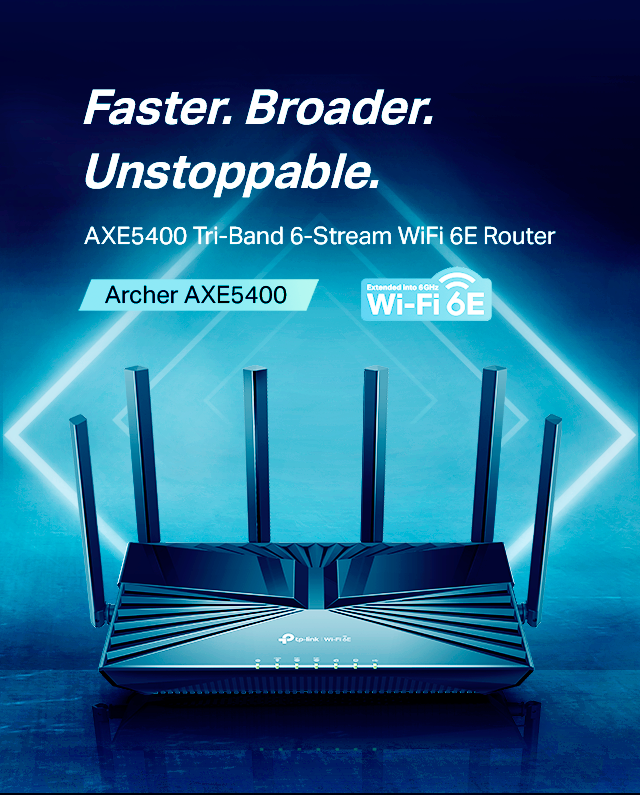
Best for: Homes with Wi-Fi 6E devices
- Wi-Fi class
- AXE5400
- Bands
- 3
- 6 GHz speed
- Up to 2,402 Mbps
- Processor
- 1.7 GHz quad-core
- Adds a 6 GHz band for compatible devices
- Tri-band connection
- USB 3.0 port
- 6 GHz benefits require compatible devices and suitable placement
Is the TP-Link Archer AXE75 AXE5400 Tri-Band Wi-Fi 6E Router worth buying on Black Friday 2026?
Yes. The TP-Link Archer AXE75 AXE5400 Tri-Band Wi-Fi 6E Router is worth considering when your devices support Wi-Fi 6E, because it adds a 2,402 Mbps 6 GHz band alongside its 5 GHz and 2.4 GHz bands.
See today’s Black Friday price on Amazon
#5
TP-Link Archer AX6000 AX6000 Wi-Fi 6 Router
The TP-Link Archer AX6000 AX6000 Wi-Fi 6 Router is the best fit for users prioritizing wired connections, with eight gigabit LAN ports and a 2.5 Gbps WAN port. Dual-band AX6000 Wi-Fi also serves busy homes with compatible devices.
Best for: Homes with several wired devices
- Wi-Fi class
- AX6000
- 5 GHz speed
- Up to 4,804 Mbps
- 2.4 GHz speed
- Up to 1,148 Mbps
- LAN ports
- 8 gigabit ports
- WAN port
- 1 at 2.5 Gbps
- Eight gigabit LAN ports
- 2.5 Gbps WAN port
- USB 3.0 and USB 2.0 ports
- Large port selection is unnecessary for homes with few wired devices
Is the TP-Link Archer AX6000 AX6000 Wi-Fi 6 Router worth buying on Black Friday 2026?
Yes. The TP-Link Archer AX6000 AX6000 Wi-Fi 6 Router is a worthwhile option for wired-device-heavy homes, with eight gigabit LAN ports, a 2.5 Gbps WAN port, and AX6000 dual-band Wi-Fi.
See today’s Black Friday price on Amazon
#6
TP-Link Archer BE550 BE9300 Tri-Band Wi-Fi 7 Router
The TP-Link Archer BE550 BE9300 Tri-Band Wi-Fi 7 Router is the best premium upgrade for Wi-Fi 7 households, with five 2.5 Gbps Ethernet ports. The TP-Link Archer BE550 BE9300 Tri-Band Wi-Fi 7 Router's three bands and newer wireless standard suit compatible devices and faster wired plans.
Best for: Wi-Fi 7 homes needing multi-gig ports
- Wi-Fi class
- BE9300
- Bands
- 3
- Ethernet ports
- 5 at 2.5 Gbps
- USB port
- 1 USB 3.0
- Wi-Fi 7 support
- Five 2.5 Gbps Ethernet ports
- Tri-band wireless design
- Older Wi-Fi devices do not use its full Wi-Fi 7 feature set
Is the TP-Link Archer BE550 BE9300 Tri-Band Wi-Fi 7 Router worth buying on Black Friday 2026?
Yes. The TP-Link Archer BE550 BE9300 Tri-Band Wi-Fi 7 Router is a strong premium choice for compatible devices and multi-gig setups, with three wireless bands and five 2.5 Gbps Ethernet ports.
See today’s Black Friday price on Amazon
#7
TP-Link Archer AX10 AX1500 Wi-Fi 6 Router
The TP-Link Archer AX10 AX1500 Wi-Fi 6 Router is the best entry-level pick for basic Wi-Fi 6 needs, with up to 1,201 Mbps on 5 GHz. The TP-Link Archer AX10 AX1500 Wi-Fi 6 Router's dual-band setup covers everyday browsing and streaming in modest device loads.
Best for: Basic Wi-Fi 6 use and smaller homes
- Wi-Fi class
- AX1500
- 5 GHz speed
- Up to 1,201 Mbps
- 2.4 GHz speed
- Up to 300 Mbps
- Ethernet ports
- 5 gigabit ports
- Wi-Fi 6 support
- Gigabit Ethernet ports
- Straightforward option for basic home networks
- Lower advertised wireless capacity than AX3000 and AX5400 routers
Is the TP-Link Archer AX10 AX1500 Wi-Fi 6 Router worth buying on Black Friday 2026?
Yes. The TP-Link Archer AX10 AX1500 Wi-Fi 6 Router is a suitable choice for smaller homes with basic networking demands, offering up to 1,201 Mbps on 5 GHz and gigabit Ethernet ports for wired connections.
See today’s Black Friday price on Amazon
Which is better, TP-Link Archer AX72 or TP-Link Archer AX3000?
TP-Link Archer AX72 AX5400 Wi-Fi 6 Router is the stronger choice for high device loads, while TP-Link Archer AX3000 Wi-Fi 6 Router (Archer AX50) is a practical everyday option. The AX72 has an AX5400 rating and up to 4,804 Mbps on 5 GHz; the AX3000 model has an AX3000 rating and up to 2,402 Mbps on 5 GHz.
The speed ratings describe theoretical wireless link rates, not guaranteed internet speeds in every room. Your internet plan, router placement, building materials, and connected devices all affect the experience. Choose TP-Link Archer AX72 when wireless capacity is the priority. Choose TP-Link Archer AX3000 when your household has moderate needs and the AX3000 feature set is enough. Easy recommendation: decide based on device load and plan speed, then compare ports and security features.
What is the main difference between AX5400 and AX3000 routers?
AX5400 and AX3000 identify different combined theoretical Wi-Fi speed classes, with AX5400 offering a higher advertised total. TP-Link Archer AX72 AX5400 Wi-Fi 6 Router reaches up to 4,804 Mbps on 5 GHz and 574 Mbps on 2.4 GHz; TP-Link Archer AX3000 Wi-Fi 6 Router (Archer AX50) reaches up to 2,402 Mbps and 574 Mbps on those bands.
A higher class is useful when a home has several active devices or regularly moves large amounts of data across Wi-Fi. The number does not mean one device receives that full speed, and actual performance varies with client capability and conditions. Both routers use Wi-Fi 6 and include gigabit wired connections, so the best match depends on network demand rather than the label alone.
Which TP-Link router is best for a large or busy home?
TP-Link Archer AX72 AX5400 Wi-Fi 6 Router is the strongest pick in this guide for a busy home, with six antennas and an AX5400 wireless rating. TP-Link Archer AX6000 AX6000 Wi-Fi 6 Router is a better match for homes that also need eight gigabit LAN ports and a 2.5 Gbps WAN port.
Router placement matters as much as the model: a central, open location supports better coverage than a cabinet or corner. Large layouts with distant rooms or multiple floors benefit from a mesh system, since a single router has limits. For a household with many active clients, compare router capacity, wired-device needs, and the layout before choosing a model based only on its speed class.
Should you choose Wi-Fi 6, Wi-Fi 6E, or Wi-Fi 7?
TP-Link Archer AX72 AX5400 Wi-Fi 6 Router suits shoppers who want a capable Wi-Fi 6 router, TP-Link Archer AXE75 AXE5400 Tri-Band Wi-Fi 6E Router adds a 6 GHz band, and TP-Link Archer BE550 BE9300 Tri-Band Wi-Fi 7 Router offers the newest standard in this selection.
Wi-Fi 6E and Wi-Fi 7 are most relevant when your devices support those standards and your home benefits from extra band capacity or multi-gig wired connections. Older devices still connect, but they do not gain features they do not support. Check the wireless standards of phones, computers, consoles, and smart-home gear before spending extra on a higher-generation router.
What should you compare before buying a TP-Link router on Black Friday 2026?
Compare the TP-Link router's wireless class, Ethernet ports, supported standards, and fit for your home's layout before choosing a Black Friday 2026 model. TP-Link Archer AX72 AX5400 Wi-Fi 6 Router emphasizes wireless capacity, while TP-Link Archer AX6000 AX6000 Wi-Fi 6 Router emphasizes a large selection of wired ports.
Confirm that the router's WAN connection suits your internet service and that the number of LAN ports covers devices such as consoles, desktop computers, and TVs. Check for a USB port if you plan to connect storage. Also review the product's security features and device compatibility. A well-matched router is a better buy than a model whose headline specifications exceed your household's actual needs.
Buying Guide
Match the speed class to your household
AX1500 and AX3000 routers suit basic to everyday use, while AX5400 and AX6000 models offer higher advertised wireless capacity. TP-Link Archer AX72 is the step-up choice over TP-Link Archer AX3000 for busy device loads.
Check your internet plan and wired connections
A router cannot make an internet plan faster than its service allows. Check WAN speed and LAN-port count, especially for desktop computers, consoles, and streaming devices that benefit from Ethernet.
Choose a band your devices support
Wi-Fi 6 is a broadly useful option; Wi-Fi 6E adds 6 GHz, and Wi-Fi 7 brings a newer wireless generation. Confirm device compatibility before prioritizing those upgrades.
Consider the shape of your home
Walls, floors, router placement, and distance affect coverage. Set a router in an open, central spot, and consider a mesh setup for large or multi-floor layouts.
Review useful extras
Compare USB ports, security features, and multi-gig Ethernet where relevant. TP-Link Archer AX55 includes HomeShield features, while TP-Link Archer BE550 offers five 2.5 Gbps Ethernet ports.
FAQ
TP-Link Archer AX72 vs TP-Link Archer AX3000: which is better?
TP-Link Archer AX72 is better for households that want more advertised wireless capacity, with AX5400-class Wi-Fi and up to 4,804 Mbps on 5 GHz. TP-Link Archer AX3000 is a good everyday alternative for moderate device loads, with up to 2,402 Mbps on 5 GHz.
Is TP-Link Archer AX72 worth buying on Black Friday 2026?
Yes. TP-Link Archer AX72 AX5400 Wi-Fi 6 Router is worth considering for busy homes that need more wireless capacity than an AX3000 model provides. Its six antennas, USB 3.0 port, and up to 4,804 Mbps 5 GHz link rate are key features.
Is TP-Link Archer AX3000 good for gaming?
TP-Link Archer AX3000 Wi-Fi 6 Router (Archer AX50) is suitable for gaming when its Wi-Fi 6 support and gigabit Ethernet match your devices and internet service. A wired Ethernet connection helps provide a consistent link. Game performance also depends on service quality, distance, and network congestion.
What is the difference between TP-Link Archer AX50 and AX55?
TP-Link Archer AX50 and TP-Link Archer AX55 are AX3000 dual-band Wi-Fi 6 routers with advertised speeds up to 2,402 Mbps on 5 GHz and 574 Mbps on 2.4 GHz. TP-Link Archer AX55 is distinguished by HomeShield features; compare each listing's included features and hardware before choosing.
Is TP-Link Archer AXE75 better than TP-Link Archer AX72?
TP-Link Archer AXE75 is the better fit for Wi-Fi 6E devices that can use its 6 GHz band. TP-Link Archer AX72 is a strong Wi-Fi 6 choice for homes that do not need 6 GHz. Both have an AX5400-class advertised rating, but their bands differ.
Is TP-Link Archer BE550 a good Wi-Fi 7 router?
Yes. TP-Link Archer BE550 BE9300 Tri-Band Wi-Fi 7 Router is a capable Wi-Fi 7 option with three bands and five 2.5 Gbps Ethernet ports. The upgrade is most useful when household devices support Wi-Fi 7 or the network benefits from multi-gig wired connections.