

As an Amazon Associate we earn from qualifying purchases.
- Best overall: TP-Link Archer GE800 BE19000 Tri-Band Wi-Fi 7 Gaming Router
- Best budget: TP-Link Archer BE550 BE9300 Tri-Band Wi-Fi 7 Router
- Best premium: ASUS RT-BE96U BE19000 Tri-Band WiFi 7 Router
- Best for cable modem replacement: Motorola MB8611 DOCSIS 3.1 Cable Modem
- A gaming router manages Wi-Fi and home-network traffic; a cable modem connects a coax line to your internet service.
- A modem does not replace a router, and a router does not replace a modem on a cable internet plan.
- TP-Link Archer GE800 BE19000 Tri-Band Wi-Fi 7 Gaming Router is the gaming-focused router pick.
- Motorola MB8611 DOCSIS 3.1 Cable Modem is a straightforward modem choice with a 2.5GbE port.
- Check your internet provider’s compatibility list and service plan before choosing a modem.
A gaming router and a cable modem do different jobs: a router shares your internet connection across devices, while a modem connects your home to your cable provider. You need both functions for a typical cable internet setup, whether they come from separate devices or a combined gateway. I’m Jake Morrison, and for this Black Friday 2026 guide, we researched and compared specs, reviews and owner feedback to separate the gear that improves your local network from the gear that brings internet in.
The key move is matching the purchase to the problem. Lag between a console and router points toward network placement, wiring or router features; an outdated modem or provider compatibility issue points toward the modem. Here's the bottom line: a faster router does not raise the speed tier from your ISP, and a new modem does not deliver better Wi-Fi on its own. Worth it for most players: buy only the part your setup needs, then check compatibility before checkout.
How We Picked
- We compared Wi-Fi generations, advertised wireless classes, bands and gaming-focused features for router picks.
- We checked DOCSIS versions and Ethernet port speeds for cable modem picks.
- We prioritized products with clear specifications and broad relevance to console, PC and VR setups.
- We considered owner feedback and setup practicality without treating advertised maximum speeds as real-world guarantees.
- We included both separate-device options and choices for different network needs; ISP compatibility remains essential for every modem.
Comparison Table
| Product | Best for | Wireless standard | Wireless class or DOCSIS version | Fastest Ethernet port |
|---|---|---|---|---|
| TP-Link Archer GE800 BE19000 Tri-Band Wi-Fi 7 Gaming Router | Gaming-first network | Wi-Fi 7 | BE19000 | 10GbE |
| ASUS RT-BE96U BE19000 Tri-Band WiFi 7 Router | Premium multi-device home | Wi-Fi 7 | BE19000 | 10GbE |
| TP-Link Archer BE800 BE19000 Tri-Band Wi-Fi 7 Router | High-speed general networking | Wi-Fi 7 | BE19000 | 10GbE |
| NETGEAR Nighthawk RS700S BE19000 WiFi 7 Router | Streamlined Wi-Fi 7 upgrade | Wi-Fi 7 | BE19000 | 10GbE |
| TP-Link Archer BE550 BE9300 Tri-Band Wi-Fi 7 Router | Accessible Wi-Fi 7 upgrade | Wi-Fi 7 | BE9300 | 2.5GbE |
| ASUS RT-AX86U Pro AX5700 Dual Band WiFi 6 Gaming Router | Wi-Fi 6 console gaming | Wi-Fi 6 | AX5700 | 2.5GbE |
| Motorola MB8611 DOCSIS 3.1 Cable Modem | Cable modem replacement | Cable modem | DOCSIS 3.1 | 2.5GbE |
| ARRIS SURFboard S33 DOCSIS 3.1 Multi-Gig Cable Modem | Multi-gig cable service | Cable modem | DOCSIS 3.1 | 2.5GbE |
Best Picks Reviewed
#1 · Top pick
TP-Link Archer GE800 BE19000 Tri-Band Wi-Fi 7 Gaming Router
The TP-Link Archer GE800 BE19000 Tri-Band Wi-Fi 7 Gaming Router is the best gaming-first pick for serious players, with a BE19000 wireless class and dedicated gaming features.

Best for: High-end gaming setups and multi-device homes
- Wi-Fi generation
- Wi-Fi 7
- Wireless class
- BE19000
- Bands
- 3
- 10GbE ports
- 2
- Gaming-focused network tools
- Tri-band Wi-Fi 7
- Two 10GbE ports
- Premium feature set exceeds basic gaming needs
Is the TP-Link Archer GE800 BE19000 Tri-Band Wi-Fi 7 Gaming Router worth buying on Black Friday 2026?
Yes. The TP-Link Archer GE800 BE19000 Tri-Band Wi-Fi 7 Gaming Router suits players building a premium, multi-device network, with three Wi-Fi bands, gaming-focused controls and two 10GbE ports for fast wired connections.
See today’s Black Friday price on Amazon
#2
ASUS RT-BE96U BE19000 Tri-Band WiFi 7 Router
The ASUS RT-BE96U BE19000 Tri-Band WiFi 7 Router is the best premium all-around router for large, busy networks, with a BE19000 wireless class and Wi-Fi 7.

Best for: Power users with many connected devices
- Wi-Fi generation
- Wi-Fi 7
- Wireless class
- BE19000
- Bands
- 3
- 10GbE ports
- 2
- Wi-Fi 7 across three bands
- Two 10GbE ports
- Broad networking feature set
- Requires compatible devices to benefit fully from Wi-Fi 7
Is the ASUS RT-BE96U BE19000 Tri-Band WiFi 7 Router worth buying on Black Friday 2026?
Yes. The ASUS RT-BE96U BE19000 Tri-Band WiFi 7 Router is a strong premium choice for homes with demanding network needs, offering three Wi-Fi 7 bands and two 10GbE ports for fast wired equipment.
See today’s Black Friday price on Amazon
#3
TP-Link Archer BE800 BE19000 Tri-Band Wi-Fi 7 Router
The TP-Link Archer BE800 BE19000 Tri-Band Wi-Fi 7 Router is the best high-speed general-purpose pick for busy households, with a BE19000 wireless class and two 10GbE ports.

Best for: Fast home networks without gaming-specific styling
- Wi-Fi generation
- Wi-Fi 7
- Wireless class
- BE19000
- Bands
- 3
- 10GbE ports
- 2
- High-end tri-band Wi-Fi 7
- Two 10GbE ports
- Works for gaming and general networking
- Advanced speeds need compatible devices and service
Is the TP-Link Archer BE800 BE19000 Tri-Band Wi-Fi 7 Router worth buying on Black Friday 2026?
Yes. The TP-Link Archer BE800 BE19000 Tri-Band Wi-Fi 7 Router is worth considering for households that want high-end wireless capacity and fast wired networking, with three bands and two 10GbE ports.
See today’s Black Friday price on Amazon
#4
NETGEAR Nighthawk RS700S BE19000 WiFi 7 Router
The NETGEAR Nighthawk RS700S BE19000 WiFi 7 Router is the best streamlined Wi-Fi 7 upgrade for demanding homes, with a BE19000 wireless class and a 10GbE port.
Best for: Wi-Fi 7 upgrades with multi-gig wired needs
- Wi-Fi generation
- Wi-Fi 7
- Wireless class
- BE19000
- Bands
- 3
- 10GbE ports
- 1
- Tri-band Wi-Fi 7
- 10GbE connectivity
- Designed for high-capacity home networks
- Check the port mix against your wired-device needs
Is the NETGEAR Nighthawk RS700S BE19000 WiFi 7 Router worth buying on Black Friday 2026?
Yes. The NETGEAR Nighthawk RS700S BE19000 WiFi 7 Router is a capable upgrade for homes adding Wi-Fi 7 devices, with tri-band networking and a 10GbE port for a compatible wired connection.
See today’s Black Friday price on Amazon
#5
TP-Link Archer BE550 BE9300 Tri-Band Wi-Fi 7 Router
The TP-Link Archer BE550 BE9300 Tri-Band Wi-Fi 7 Router is the best value-oriented Wi-Fi 7 router for players upgrading from older Wi-Fi, with a BE9300 class and 3 bands.
Best for: A more accessible Wi-Fi 7 upgrade
- Wi-Fi generation
- Wi-Fi 7
- Wireless class
- BE9300
- Bands
- 3
- 2.5GbE ports
- 1
- Tri-band Wi-Fi 7
- Simpler fit for everyday gaming
- 2.5GbE wired connection
- Lower advertised wireless class than flagship Wi-Fi 7 picks
Is the TP-Link Archer BE550 BE9300 Tri-Band Wi-Fi 7 Router worth buying on Black Friday 2026?
Yes. The TP-Link Archer BE550 BE9300 Tri-Band Wi-Fi 7 Router fits players who want a newer wireless standard without flagship-tier networking, offering three bands and a 2.5GbE port for compatible equipment.
See today’s Black Friday price on Amazon
#6
ASUS RT-AX86U Pro AX5700 Dual Band WiFi 6 Gaming Router
The ASUS RT-AX86U Pro AX5700 Dual Band WiFi 6 Gaming Router is the best established Wi-Fi 6 gaming pick for console players, with an AX5700 class and a 2.5GbE port.
Best for: Console gaming and wired multi-gig connections
- Wi-Fi generation
- Wi-Fi 6
- Wireless class
- AX5700
- Bands
- 2
- 2.5GbE port
- 1
- Gaming-focused router controls
- 2.5GbE connectivity
- Wi-Fi 6 suits many current devices
- Dual-band Wi-Fi 6 rather than tri-band Wi-Fi 7
Is the ASUS RT-AX86U Pro AX5700 Dual Band WiFi 6 Gaming Router worth buying on Black Friday 2026?
Yes. The ASUS RT-AX86U Pro AX5700 Dual Band WiFi 6 Gaming Router remains a sensible choice for a console-focused setup, with gaming controls, dual-band Wi-Fi 6 and one 2.5GbE port.
See today’s Black Friday price on Amazon
#7
Motorola MB8611 DOCSIS 3.1 Cable Modem
The Motorola MB8611 DOCSIS 3.1 Cable Modem is the best straightforward modem pick for cable subscribers, with DOCSIS 3.1 and a 2.5GbE Ethernet port.
Best for: Replacing a compatible cable modem
- DOCSIS standard
- 3.1
- Ethernet ports
- 1
- Fastest Ethernet port
- 2.5GbE
- DOCSIS 3.1 support
- 2.5GbE connection
- Pairs with a separate router
- Does not include Wi-Fi
Is the Motorola MB8611 DOCSIS 3.1 Cable Modem worth buying on Black Friday 2026?
Yes. The Motorola MB8611 DOCSIS 3.1 Cable Modem is a practical replacement for cable customers whose provider approves the model, with DOCSIS 3.1 support and a 2.5GbE Ethernet port. Pair it with a separate router for Wi-Fi.
See today’s Black Friday price on Amazon
#8
ARRIS SURFboard S33 DOCSIS 3.1 Multi-Gig Cable Modem
The ARRIS SURFboard S33 DOCSIS 3.1 Multi-Gig Cable Modem is the best flexible modem for a multi-gig cable setup, with DOCSIS 3.1 and a 2.5GbE port.
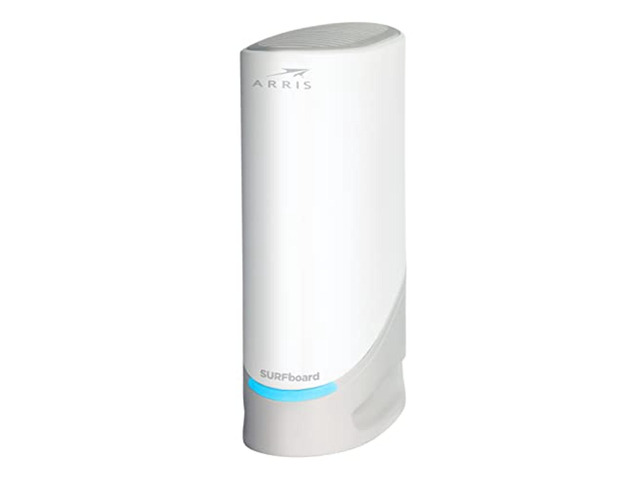
Best for: Cable subscribers wanting multi-gig Ethernet
- DOCSIS standard
- 3.1
- Ethernet ports
- 2
- Fastest Ethernet port
- 2.5GbE
- DOCSIS 3.1 technology
- 2.5GbE and 1GbE port options
- Compact standalone modem design
- No built-in wireless router
Is the ARRIS SURFboard S33 DOCSIS 3.1 Multi-Gig Cable Modem worth buying on Black Friday 2026?
Yes. The ARRIS SURFboard S33 DOCSIS 3.1 Multi-Gig Cable Modem is a solid standalone modem for a compatible cable plan, with a 2.5GbE port and an additional 1GbE port. Use a separate router for Wi-Fi.
See today’s Black Friday price on Amazon
What is the difference between a gaming router and a cable modem?
A gaming router manages your home network, while a cable modem connects that network to an ISP through a coax line. A standard cable setup needs both jobs covered, either by two separate devices or by one combined gateway. The router handles Wi-Fi, wired connections and traffic between devices; the modem handles the provider connection.
For a gamer, the router is the part that affects local wireless coverage, network prioritization and wired device connections. The modem matters when an old unit limits the service connection or when your ISP requires a compatible model. Buying a gaming router alone does not replace a modem, and a modem alone does not create Wi-Fi. Identify which box you already own before choosing your Black Friday 2026 upgrade.
Should gamers upgrade the router or the cable modem first?
Gamers should upgrade the router for weak Wi-Fi or crowded home networks, and the cable modem for a provider compatibility or modem-capacity problem. Start by separating local network symptoms from service-line issues. A console that performs better over Ethernet points toward a Wi-Fi or placement concern, while provider notices about an unsupported modem point toward a modem replacement.
A speed test by itself does not identify the cause of lag. Congestion, signal interference, router placement, game servers and the ISP connection all affect play. Check your current equipment, run a wired connection where practical, and review your ISP plan and approved modem list. For a console near the router, Ethernet often makes a more useful first change than buying a flagship wireless router.
Does a gaming router improve ping and online gaming?
A gaming router can improve local network management, but no router guarantees lower ping to a remote game server. Features such as traffic prioritization help organize activity inside your home network, especially when downloads, streaming and gameplay share the same connection. A wired Ethernet link also avoids Wi-Fi interference between a nearby console and router.
Distance to the game server, ISP routing and household congestion remain important. Prioritization does not change the game server or increase the speed tier on your internet plan. For the clearest upgrade, connect a stationary console or gaming PC by Ethernet, place the router in an open central spot, and reserve gaming features for devices that need them. A new modem is the better purchase only when the existing modem is the constraint.
Do cable modems have Wi-Fi or gaming features?
The Motorola MB8611 DOCSIS 3.1 Cable Modem and ARRIS SURFboard S33 DOCSIS 3.1 Multi-Gig Cable Modem do not provide Wi-Fi, so each needs a separate router for wireless access. A cable modem’s job is to connect a coax service line to Ethernet equipment. A modem with a multi-gig port still does not function as a gaming router.
A gateway combines modem and router functions, but the products in this guide are separate devices. Separate equipment lets you upgrade the router without replacing a compatible modem, or replace the modem while keeping your preferred Wi-Fi setup. Confirm whether your current ISP-supplied box is a modem, a router or a gateway before adding another device. Avoid a duplicate purchase by checking the model label and your provider account.
What should you check before buying a cable modem?
Cable modem shoppers should verify provider approval, DOCSIS compatibility and the Ethernet port speed before buying. Internet providers maintain equipment compatibility lists, and approval varies by provider and service plan. A DOCSIS 3.1 label is a useful starting point, not a guarantee that every plan or provider supports a particular model.
Match the modem’s Ethernet port to the router’s WAN port and the service tier you pay for. The Motorola MB8611 DOCSIS 3.1 Cable Modem and ARRIS SURFboard S33 DOCSIS 3.1 Multi-Gig Cable Modem each offer a 2.5GbE connection, but usable service speed depends on ISP provisioning and compatible equipment throughout the setup. Check activation instructions, return terms and the provider’s current list before purchase.
Buying Guide
Choose between a router and a modem
A router upgrade targets Wi-Fi and home-network features; a modem upgrade targets the cable-provider connection. Check the device labels on your existing setup first. A gateway combines both functions, while the products in this guide are separate devices.
Match Wi-Fi to your devices
Wi-Fi 7 routers such as the TP-Link Archer GE800 BE19000 Tri-Band Wi-Fi 7 Gaming Router suit homes adding compatible newer devices. Wi-Fi 6 remains a practical fit for many consoles and phones. Wireless class numbers describe theoretical combined capacity, not a guaranteed gaming speed.
Check wired ports and placement
A 2.5GbE or 10GbE port serves compatible multi-gig equipment, but your console, router and internet plan all shape the connection. For a nearby console, use Ethernet where possible. Place the router in an open area rather than behind a TV or inside a cabinet.
Verify the modem with your ISP
Confirm the exact modem model appears on your provider’s approved list and matches your service plan. DOCSIS 3.1 support and a fast Ethernet port do not guarantee provider approval. Keep your current router only if it works with the replacement modem and service.
Set a sensible upgrade priority
Replace the device connected to the problem rather than buying both by default. Prioritize wired gameplay and router placement for local connection issues. Replace a modem when the provider flags compatibility or the device no longer suits the subscribed service.
FAQ
Do I need a gaming router and a cable modem?
A cable internet setup needs a modem function and a router function. Separate products such as the Motorola MB8611 DOCSIS 3.1 Cable Modem and ASUS RT-AX86U Pro AX5700 Dual Band WiFi 6 Gaming Router provide both jobs together; a gateway combines them in one device.
Can I use a gaming router without a cable modem?
A gaming router needs an internet source, such as a modem, fiber ONT or another supported network connection. The TP-Link Archer GE800 BE19000 Tri-Band Wi-Fi 7 Gaming Router provides Wi-Fi and routing, but it does not connect directly to a coax cable line.
Will a new cable modem make my Wi-Fi faster?
A modem does not broadcast Wi-Fi. The ARRIS SURFboard S33 DOCSIS 3.1 Multi-Gig Cable Modem provides a wired internet connection, and a separate router creates Wi-Fi. Wireless performance depends on the router, device compatibility, placement and local conditions.
Is Wi-Fi 7 worth it for console gaming?
Wi-Fi 7 suits homes with compatible devices and a broader need for newer wireless networking. The TP-Link Archer BE550 BE9300 Tri-Band Wi-Fi 7 Router offers that standard, but a wired Ethernet connection remains a strong choice for a stationary console.
How do I know if a cable modem works with my provider?
Check the provider’s current approved modem list using the exact model name and hardware version. The Motorola MB8611 DOCSIS 3.1 Cable Modem supports DOCSIS 3.1, but service eligibility still depends on provider approval, plan support and activation.
Should I replace a modem rented from my internet provider?
Compare the provider’s equipment terms, compatibility list and support process before replacing a rental. The Motorola MB8611 DOCSIS 3.1 Cable Modem is a separate modem option, but your ISP must approve and activate it for your account.