

As an Amazon Associate we earn from qualifying purchases.
- Best overall: MSI Cyborg 15 (Core i7-13620H, RTX 4060 configuration)
- Best budget: MSI Cyborg 15 (Core i7-13620H, RTX 4050 configuration)
- Best premium: MSI Titan 18 HX AI A2XW (Core Ultra 9 285HX, RTX 5090 configuration)
- Best for a performance-focused 16-inch setup: MSI Vector 16 HX AI (Core Ultra 9 275HX, RTX 5070 Ti configuration)
- MSI Cyborg 15 configurations prioritize a portable design and accessible gaming performance, while MSI Titan 18 HX AI configurations target maximum performance and a large display.
- Choose an MSI Cyborg 15 with RTX 4050 for entry-level gaming or an RTX 4060 configuration for stronger graphics performance.
- Choose MSI Titan 18 HX AI A2XW for a flagship setup with an 18-inch 4K Mini LED display and RTX 5090 graphics.
- Compare the exact processor, graphics chip, memory, storage, screen, and warranty for each configuration before choosing a Black Friday 2026 laptop.
The MSI Cyborg 15 suits gamers who value a more portable laptop, while the MSI Titan 18 HX AI is built for people seeking top-tier performance and a large premium screen. For this Black Friday 2026 guide, I researched and compared specs, reviews and owner feedback across MSI’s gaming range. The key difference is straightforward: Cyborg models aim for a practical balance, and Titan models put power and premium features first.
My pick for most people is an MSI Cyborg 15 with RTX 4060 graphics: it offers a stronger gaming foundation than the entry RTX 4050 configuration without the bulk and complexity of a flagship Titan. Buyers with demanding games, creative workloads, or a preference for an expansive screen should consider the Titan 18 HX AI. Check the exact configuration before buying because memory, storage, display, and graphics options vary by listing.
How We Picked
- Compared processor and graphics configurations to distinguish everyday gaming laptops from high-performance flagship systems.
- Reviewed screen size, resolution, refresh rate, and panel technology for gaming, streaming, and creative work.
- Considered portability, expected desk footprint, and whether a laptop is practical as a daily carry.
- Compared memory and storage configurations, prioritizing models with clearly stated specs that suit modern games.
- Used published specifications, reviews, and owner feedback rather than research; individual listings can differ by region and configuration.
Comparison Table
| Product | Best for | Graphics | Display | Memory and storage |
|---|---|---|---|---|
| MSI Cyborg 15 (Core i7-13620H, RTX 4050 configuration) | Entry-level gaming | RTX 4050, 6GB | 15.6-inch Full HD, 144Hz | 16GB RAM, 512GB SSD |
| MSI Cyborg 15 (Core i7-13620H, RTX 4060 configuration) | Mainstream gaming | RTX 4060, 8GB | 15.6-inch Full HD, 144Hz | 16GB RAM, 512GB SSD |
| MSI Cyborg 15 AI A1V (Core Ultra 7 155H, RTX 4060 configuration) | Newer processor in a midrange laptop | RTX 4060, 8GB | 15.6-inch Full HD, 144Hz | 16GB RAM, 1TB SSD |
| MSI Katana 15 HX (Core i7-14650HX, RTX 5070 configuration) | Higher graphics performance in a 15-inch laptop | RTX 5070, 8GB | 15.6-inch, up to 165Hz | 16GB RAM, 1TB SSD |
| MSI Vector 16 HX AI (Core Ultra 9 275HX, RTX 5070 Ti configuration) | Gaming and creative work | RTX 5070 Ti, 12GB | 16-inch, up to 240Hz | 32GB RAM, 1TB SSD |
| MSI Raider 18 HX AI (Core Ultra 9 285HX, RTX 5090 configuration) | Large-screen performance | RTX 5090, 24GB | 18-inch, up to 240Hz | 32GB RAM, 2TB SSD |
| MSI Titan 18 HX AI A2XW (Core Ultra 9 285HX, RTX 5090 configuration) | Flagship gaming and premium display quality | RTX 5090, 24GB | 18-inch UHD+, 120Hz Mini LED | 64GB RAM, 2TB SSD |
Best Picks Reviewed
#1
MSI Cyborg 15 (Core i7-13620H, RTX 4050 configuration)
The MSI Cyborg 15 (Core i7-13620H, RTX 4050 configuration) is the best entry-level gaming pick for students and casual players who want a 15.6-inch laptop with an RTX 4050 GPU.

Best for: Entry-level gaming and everyday laptop use
- Processor
- Intel Core i7-13620H, 10 cores
- Graphics
- NVIDIA GeForce RTX 4050, 6GB
- Display
- 15.6-inch Full HD, 144Hz
- Memory and storage
- 16GB RAM, 512GB SSD configuration
- RTX 4050 graphics support modern PC gaming features.
- 15.6-inch screen balances workspace and portability.
- High-refresh display suits fast-paced games.
- 6GB graphics memory and entry-level GPU performance are less suited to demanding settings.
Is the MSI Cyborg 15 (Core i7-13620H, RTX 4050 configuration) worth buying on Black Friday 2026?
The MSI Cyborg 15 (Core i7-13620H, RTX 4050 configuration) is worth considering for casual gaming, school, and general use. The MSI Cyborg 15 (Core i7-13620H, RTX 4050 configuration)'s RTX 4050 GPU and 144Hz Full HD screen make a practical entry point, though demanding games benefit from a stronger graphics configuration.
See today’s Black Friday price on Amazon
#2 · Top pick
MSI Cyborg 15 (Core i7-13620H, RTX 4060 configuration)
The MSI Cyborg 15 (Core i7-13620H, RTX 4060 configuration) is the best balanced Cyborg pick for mainstream gamers who want an RTX 4060 GPU and a 15.6-inch screen.

Best for: Mainstream gaming in a portable 15-inch laptop
- Processor
- Intel Core i7-13620H, 10 cores
- Graphics
- NVIDIA GeForce RTX 4060, 8GB
- Display
- 15.6-inch Full HD, 144Hz
- Memory and storage
- 16GB RAM, 512GB SSD configuration
- RTX 4060 provides more graphics headroom than RTX 4050.
- 8GB graphics memory suits a wider range of games.
- 144Hz screen keeps motion smooth in supported games.
- The chassis and display features remain more basic than premium MSI models.
Is the MSI Cyborg 15 (Core i7-13620H, RTX 4060 configuration) a good Black Friday 2026 laptop?
The MSI Cyborg 15 (Core i7-13620H, RTX 4060 configuration) is a good Black Friday 2026 choice for mainstream gaming and everyday computing. The RTX 4060’s 8GB graphics memory offers useful headroom, while the 144Hz Full HD display keeps the package focused and straightforward.
See today’s Black Friday price on Amazon
#3
MSI Cyborg 15 AI A1V (Core Ultra 7 155H, RTX 4060 configuration)
The MSI Cyborg 15 AI A1V (Core Ultra 7 155H, RTX 4060 configuration) is the best efficient Cyborg option for buyers who want a newer processor paired with an RTX 4060 GPU.

Best for: A newer processor in a midrange gaming laptop
- Processor
- Intel Core Ultra 7 155H, 16 cores
- Graphics
- NVIDIA GeForce RTX 4060, 8GB
- Display
- 15.6-inch Full HD, 144Hz
- Memory and storage
- 16GB RAM, 1TB SSD configuration
- Core Ultra 7 processor offers a newer platform.
- RTX 4060 graphics pair well with the high-refresh screen.
- A 1TB SSD configuration provides room for more games.
- A larger SSD and updated processor do not turn the Cyborg into a premium-screen laptop.
Is the MSI Cyborg 15 AI A1V (Core Ultra 7 155H, RTX 4060 configuration) worth buying?
The MSI Cyborg 15 AI A1V (Core Ultra 7 155H, RTX 4060 configuration) is worth considering for gamers who want a newer processor and an RTX 4060 in a 15.6-inch chassis. Confirm the seller’s memory and SSD configuration because listings can differ.
See today’s Black Friday price on Amazon
#4
MSI Katana 15 HX (Core i7-14650HX, RTX 5070 configuration)
The MSI Katana 15 HX (Core i7-14650HX, RTX 5070 configuration) is the best step-up gaming pick for players who want an RTX 5070 GPU in a 15.6-inch format.
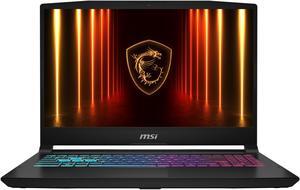
Best for: Higher graphics performance without an 18-inch laptop
- Processor
- Intel Core i7-14650HX, 16 cores
- Graphics
- NVIDIA GeForce RTX 5070, 8GB
- Display
- 15.6-inch, up to 165Hz
- Memory and storage
- 16GB RAM, 1TB SSD configuration
- RTX 5070 graphics target a higher performance tier.
- A 15.6-inch design takes less desk space than 18-inch models.
- The HX processor is suited to demanding games and multitasking.
- The gaming-focused design is less compact than thin-and-light laptops.
Is the MSI Katana 15 HX (Core i7-14650HX, RTX 5070 configuration) a good Black Friday 2026 gaming laptop?
The MSI Katana 15 HX (Core i7-14650HX, RTX 5070 configuration) is a strong option for buyers seeking a graphics step up from the Cyborg line without choosing an 18-inch flagship. Check the exact screen refresh rate and memory listed for the configuration.
See today’s Black Friday price on Amazon
#5
MSI Vector 16 HX AI (Core Ultra 9 275HX, RTX 5070 Ti configuration)
The MSI Vector 16 HX AI (Core Ultra 9 275HX, RTX 5070 Ti configuration) is the best performance-focused middle ground for gamers and creators who want RTX 5070 Ti graphics.
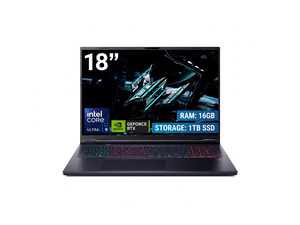
Best for: Gaming and creative work in a 16-inch system
- Processor
- Intel Core Ultra 9 275HX, 24 cores
- Graphics
- NVIDIA GeForce RTX 5070 Ti, 12GB
- Display
- 16-inch, up to 240Hz
- Memory and storage
- 32GB RAM, 1TB SSD configuration
- RTX 5070 Ti graphics offer more capability than midrange options.
- A 16-inch screen adds working room without an 18-inch footprint.
- 32GB memory supports demanding multitasking.
- The powerful components call for a larger, heavier laptop design.
Is the MSI Vector 16 HX AI (Core Ultra 9 275HX, RTX 5070 Ti configuration) worth buying?
The MSI Vector 16 HX AI (Core Ultra 9 275HX, RTX 5070 Ti configuration) is worth considering for demanding gaming, editing, and multitasking. The MSI Vector 16 HX AI (Core Ultra 9 275HX, RTX 5070 Ti configuration)'s 12GB RTX 5070 Ti and 32GB memory configuration offers a balanced alternative to the larger Titan family.
See today’s Black Friday price on Amazon
#6
MSI Raider 18 HX AI (Core Ultra 9 285HX, RTX 5090 configuration)
The MSI Raider 18 HX AI (Core Ultra 9 285HX, RTX 5090 configuration) is the best large-screen performance pick for gamers who want RTX 5090 graphics and an 18-inch display.

Best for: High-performance gaming on a large screen
- Processor
- Intel Core Ultra 9 285HX, 24 cores
- Graphics
- NVIDIA GeForce RTX 5090, 24GB
- Display
- 18-inch, up to 240Hz
- Memory and storage
- 32GB RAM, 2TB SSD configuration
- RTX 5090 graphics target demanding games and creative workloads.
- An 18-inch screen gives games and projects a spacious view.
- Large storage configuration suits a broad game library.
- The large chassis favors a desk over frequent commuting.
Is the MSI Raider 18 HX AI (Core Ultra 9 285HX, RTX 5090 configuration) worth buying on Black Friday 2026?
The MSI Raider 18 HX AI (Core Ultra 9 285HX, RTX 5090 configuration) is worth considering for buyers seeking flagship graphics and a large gaming display. The MSI Raider 18 HX AI (Core Ultra 9 285HX, RTX 5090 configuration)'s RTX 5090 and 18-inch screen suit a desk-centered setup better than daily travel.
See today’s Black Friday price on Amazon
#7
MSI Titan 18 HX AI A2XW (Core Ultra 9 285HX, RTX 5090 configuration)
The MSI Titan 18 HX AI A2XW (Core Ultra 9 285HX, RTX 5090 configuration) is the best premium pick for enthusiasts who want RTX 5090 graphics and an 18-inch 4K Mini LED display.
Best for: Flagship gaming and premium large-screen use
- Processor
- Intel Core Ultra 9 285HX, 24 cores
- Graphics
- NVIDIA GeForce RTX 5090, 24GB
- Display
- 18-inch UHD+, 120Hz Mini LED
- Memory and storage
- 64GB RAM, 2TB SSD configuration
- UHD+ Mini LED display delivers a premium large-screen experience.
- RTX 5090 and 64GB memory suit demanding workloads.
- A 2TB SSD provides substantial built-in storage.
- The large, powerful design is less suited to portable everyday use.
Is the MSI Titan 18 HX AI A2XW (Core Ultra 9 285HX, RTX 5090 configuration) worth buying?
The MSI Titan 18 HX AI A2XW (Core Ultra 9 285HX, RTX 5090 configuration) is worth considering for buyers who prioritize premium display quality and flagship performance. The 18-inch UHD+ Mini LED screen, RTX 5090, and 64GB memory make it a powerful desk-focused choice.
See today’s Black Friday price on Amazon
Which is better, MSI Cyborg 15 or MSI Titan for Black Friday 2026?
The MSI Cyborg 15 suits mainstream gaming and portability, with RTX 4050 or RTX 4060 graphics and a 15.6-inch screen. The MSI Titan 18 HX AI A2XW pairs RTX 5090 graphics with an 18-inch UHD+ Mini LED display.
Choose the MSI Titan 18 HX AI A2XW for demanding games and creative work. Choose the MSI Cyborg 15 for a more portable daily laptop.
Is the MSI Cyborg 15 good for gaming?
The MSI Cyborg 15 handles mainstream gaming well. RTX 4050 configurations suit casual play; RTX 4060 models add graphics capability and 8GB of graphics memory. Listed models feature a 15.6-inch Full HD screen with a 144Hz refresh rate.
For demanding games or high-resolution creative work, compare MSI Vector, MSI Raider, and MSI Titan models.
What makes the MSI Titan 18 HX AI different from the Cyborg 15?
The MSI Titan 18 HX AI A2XW features an 18-inch UHD+ Mini LED screen, 120Hz refresh rate, RTX 5090 graphics, and 64GB of memory. MSI Cyborg 15 models use a 15.6-inch Full HD screen with RTX 4050 or RTX 4060 graphics.
The Titan suits demanding games and creative projects. Its large chassis is less convenient to carry, and its components exceed basic browsing or schoolwork needs.
Which MSI gaming laptop is the best value for Black Friday 2026?
The MSI Cyborg 15 with RTX 4060 graphics is a strong mainstream option, with a 15.6-inch screen, 144Hz refresh rate, and 8GB of graphics memory. Choose the RTX 4050 model for casual gaming. The MSI Cyborg 15 AI A1V offers a Core Ultra 7 processor and 1TB SSD configuration.
Compare the processor, graphics, memory, storage, display, warranty, and return terms in each listing. Match specifications to your games and workload.
Should you buy an MSI Cyborg, Vector, Raider, or Titan?
The MSI Cyborg 15 is a practical gaming laptop. The MSI Vector 16 HX AI offers a performance-focused middle ground with RTX 5070 Ti graphics and 32GB of memory. The MSI Raider 18 HX AI and MSI Titan 18 HX AI target large-screen gaming.
The MSI Raider 18 HX AI has RTX 5090 graphics and an 18-inch screen. The MSI Titan 18 HX AI A2XW adds a UHD+ Mini LED display and 64GB of memory. Choose based on performance needs, screen preference, and portability.
Buying Guide
Choose graphics for your games
The MSI Cyborg 15 with RTX 4050 suits casual gaming; the RTX 4060 version adds headroom. Consider RTX 5070 or RTX 5070 Ti for more demanding games, and RTX 5090 for flagship performance.
Compare screen size and panel
A 15.6-inch Full HD screen favors portability; 16-inch and 18-inch models offer more viewing space. The MSI Titan 18 HX AI A2XW features a UHD+ Mini LED panel. Confirm resolution and refresh rate in the listing.
Check memory and storage
At least 16GB of memory suits gaming and multitasking; 32GB or more supports heavier workloads. A 1TB or 2TB SSD accommodates larger game libraries. Confirm the configuration and upgrade options.
Balance performance with portability
The MSI Cyborg 15 suits regular travel. The MSI Vector 16 HX AI provides a larger middle ground, while the MSI Raider 18 HX AI and MSI Titan 18 HX AI suit desk-centered use. Check weight, charger size, and ports.
Verify the exact listing
MSI model families include varied configurations. Confirm the full product name, processor, graphics, memory, storage, display, warranty, and return policy before buying.
FAQ
MSI Cyborg 15 vs MSI Titan: which is better for gaming?
The MSI Titan 18 HX AI is better for flagship gaming, with the featured configuration pairing RTX 5090 graphics and an 18-inch UHD+ Mini LED display. The MSI Cyborg 15 is better for everyday gaming and portability, especially in an RTX 4060 configuration.
Is the MSI Cyborg 15 RTX 4060 good for gaming?
The MSI Cyborg 15 with RTX 4060 graphics is a good fit for mainstream gaming, with an 8GB GPU and a 15.6-inch Full HD 144Hz screen in the listed configuration. Check the individual game’s recommended specs and the exact laptop configuration before buying.
Is the MSI Titan 18 HX AI worth buying on Black Friday 2026?
The MSI Titan 18 HX AI A2XW is worth considering for enthusiasts who want flagship graphics, substantial memory, and a premium large screen. Its RTX 5090, 64GB RAM, and 18-inch UHD+ Mini LED display make it better suited to demanding gaming and creative work than basic tasks.
What is the difference between MSI Cyborg 15 RTX 4050 and RTX 4060?
The MSI Cyborg 15 RTX 4050 configuration has 6GB graphics memory, while the RTX 4060 configuration has 8GB. The RTX 4060 model provides more graphics headroom for games, but buyers should compare the exact screen, processor, memory, and storage listed for each laptop.
Is the MSI Vector 16 HX AI a better choice than the Cyborg 15?
The MSI Vector 16 HX AI is a better fit for demanding gaming and creative workloads, with the featured configuration offering RTX 5070 Ti graphics and 32GB RAM. The MSI Cyborg 15 is a more practical choice for mainstream gaming, a smaller screen, and everyday portability.
Should I choose MSI Raider 18 HX AI or MSI Titan 18 HX AI?
The MSI Titan 18 HX AI A2XW is the better choice for a premium UHD+ Mini LED screen and a 64GB memory configuration. The MSI Raider 18 HX AI also offers RTX 5090 graphics and an 18-inch screen, making it a strong option for large-screen performance.