

As an Amazon Associate we earn from qualifying purchases.
- Best overall: Anker 555 USB-C Hub (8-in-1)
- Best budget: Apple 35W Dual USB-C Port Compact Power Adapter
- Best premium: Anker 737 Charger (GaNPrime 120W)
- Best for travel: Anker 735 Charger (GaNPrime 65W)
- A 70W USB-C charger supplies power; a USB-C hub expands connectivity, so the products solve different problems.
- The Apple 70W USB-C Power Adapter is a straightforward single-port choice for compatible MacBook models.
- The Anker 735 Charger (GaNPrime 65W) adds compact, multi-device charging with three ports.
- USB-C hubs such as the Anker 555 USB-C Hub (8-in-1) provide connections for displays and accessories, with power pass-through.
- Check wattage, port types and display support against your MacBook and accessories before choosing.
MacBook charger 70W vs MacBook USB-C hub Black Friday 2026 is a choice between two different tools, not two versions of the same product. A 70W charger provides power through USB-C. A USB-C hub adds connections such as HDMI, USB-A and memory-card readers; some hubs also accept power pass-through from a separate charger.
I researched and compared specs, reviews and owner feedback across seven useful options, from Apple’s 70W adapter to multiport hubs. The right pick depends on whether your MacBook needs faster charging, more desk connections, or both. My pick for most people who need extra connectivity is the Anker 555 USB-C Hub (8-in-1); MacBook owners short on charging power should start with a dedicated adapter instead.
How We Picked
- Compared maximum charging output with the power needs of compatible MacBook models.
- Checked port counts and connection types, including USB-C, USB-A, HDMI and card readers.
- Reviewed manufacturer specifications for display resolution, charging pass-through and device compatibility.
- Considered portability, multi-device charging and practical fit for travel or a fixed desk.
- Researched and compared specs, reviews and owner feedback without treating a hub and charger as interchangeable.
Comparison Table
| Product | Best for | Maximum output | USB-C ports | Video output (max) |
|---|---|---|---|---|
| Apple 70W USB-C Power Adapter | Single-port MacBook charging | 70W | 1 | 0 |
| Apple 35W Dual USB-C Port Compact Power Adapter | Two smaller devices | 35W total | 2 | 0 |
| Anker 735 Charger (GaNPrime 65W) | Compact multi-device charging | 65W | 2 | 0 |
| Anker 737 Charger (GaNPrime 120W) | Higher-output multi-device charging | 120W | 2 | 0 |
| UGREEN Nexode 100W USB C Charger (4-Port) | Charging several USB devices | 100W | 3 | 0 |
| Anker 555 USB-C Hub (8-in-1) | Everyday desk connections | 100W pass-through | 2 | 4K |
| Anker 565 USB-C Hub (11-in-1) | A desk with many peripherals | 100W pass-through | 2 | 4K |
Best Picks Reviewed
#1
Apple 70W USB-C Power Adapter
The Apple 70W USB-C Power Adapter is the best simple charger for MacBook owners who want one reliable USB-C power source, with a maximum output of 70W. The Apple 70W USB-C Power Adapter's single port keeps setup easy, but it does not add connections.

Best for: One-cable charging for a compatible MacBook
- Maximum output
- 70W
- USB-C ports
- 1
- Video output (max)
- 0
- Apple-branded adapter with 70W output
- Simple USB-C charging setup
- Works with compatible USB-C devices
- One port only
- No hub or display connections
Is the Apple 70W USB-C Power Adapter worth buying on Black Friday 2026?
The Apple 70W USB-C Power Adapter is a sensible choice for MacBook owners who want a direct, single-port charger. The Apple 70W USB-C Power Adapter's 70W output suits compatible MacBook models, while a separate hub is needed for HDMI, USB-A and card-reader connections.
See today’s Black Friday price on Amazon
#2
Apple 35W Dual USB-C Port Compact Power Adapter
The Apple 35W Dual USB-C Port Compact Power Adapter is the best Apple-branded option for charging two small devices from one adapter, with 2 USB-C ports and 35W total output. MacBook users needing more charging headroom should choose a higher-wattage model.
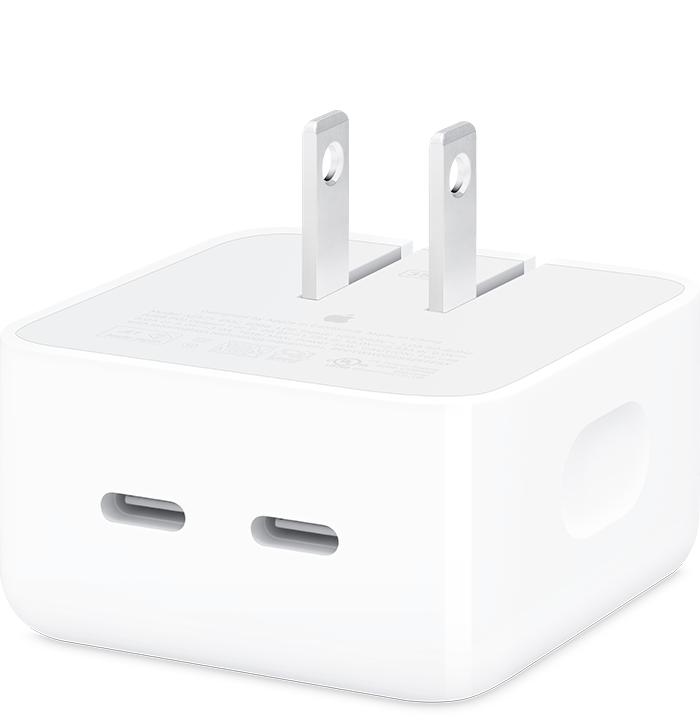
Best for: Apple users charging a MacBook and a smaller device
- Maximum output
- 35W total
- USB-C ports
- 2
- Video output (max)
- 0
- Two USB-C charging ports
- Compact design
- Useful for phones and smaller devices
- 35W total output is below 70W
- Does not add data or display ports
Is the Apple 35W Dual USB-C Port Compact Power Adapter worth buying on Black Friday 2026?
The Apple 35W Dual USB-C Port Compact Power Adapter is worth considering for travel and lower-power devices. The Apple 35W Dual USB-C Port Compact Power Adapter's two USB-C ports charge two devices, but the shared 35W output is not a 70W replacement for MacBook owners seeking higher charging power.
See today’s Black Friday price on Amazon
#3
Anker 735 Charger (GaNPrime 65W)
The Anker 735 Charger (GaNPrime 65W) is the best compact multi-device charger for MacBook owners who also charge a phone or tablet, with 65W maximum output and 3 ports. The Anker 735 Charger (GaNPrime 65W)'s total output is below a 70W adapter.

Best for: Travel charging for a laptop and personal devices
- Maximum output
- 65W
- USB-C ports
- 2
- Video output (max)
- 0
- Three ports in one charger
- 65W maximum output
- Can charge multiple device types
- Power is shared when charging multiple devices
- No HDMI or USB-A data hub
Is the Anker 735 Charger (GaNPrime 65W) worth buying on Black Friday 2026?
The Anker 735 Charger (GaNPrime 65W) is a useful travel charger for a MacBook and smaller devices. The Anker 735 Charger (GaNPrime 65W) has three ports and up to 65W output, but it is a charger rather than a hub and does not provide HDMI or data connections.
See today’s Black Friday price on Amazon
#4
Anker 737 Charger (GaNPrime 120W)
The Anker 737 Charger (GaNPrime 120W) is the best high-output pick for charging several devices, with 120W maximum output across 3 ports. The Anker 737 Charger (GaNPrime 120W)'s added headroom suits demanding multi-device setups better than a basic single-port adapter.
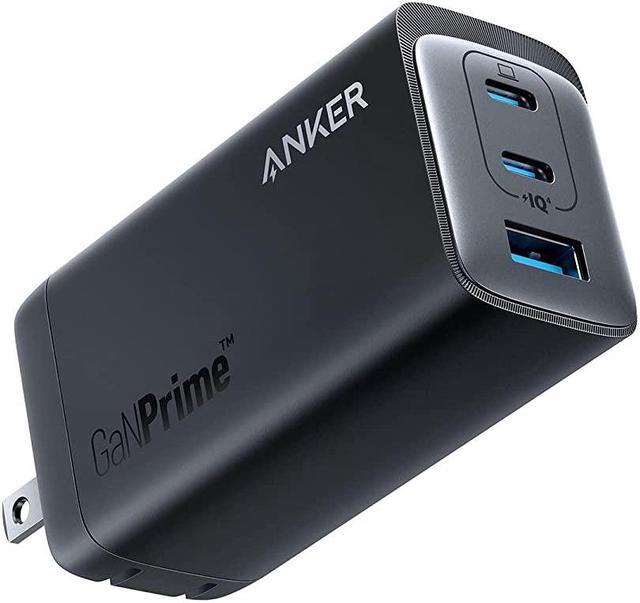
Best for: Higher-output charging for a laptop and other devices
- Maximum output
- 120W
- USB-C ports
- 2
- Video output (max)
- 0
- High 120W total output
- Three charging ports
- Useful for multiple USB-C devices
- Does not provide data or display ports
- Larger than a basic single-port adapter
Is the Anker 737 Charger (GaNPrime 120W) worth buying on Black Friday 2026?
The Anker 737 Charger (GaNPrime 120W) is a strong fit for users who charge a MacBook alongside other devices. The Anker 737 Charger (GaNPrime 120W)'s 120W total output and three ports offer more charging capacity, but a separate hub is still needed for peripherals and external displays.
See today’s Black Friday price on Amazon
#5
UGREEN Nexode 100W USB C Charger (4-Port)
The UGREEN Nexode 100W USB C Charger (4-Port) is the best multi-device charging option for a shared travel bag, with 100W maximum output and 4 ports. The UGREEN Nexode 100W USB C Charger (4-Port) consolidates charging adapters without replacing a USB-C hub.

Best for: Charging several USB devices from one adapter
- Maximum output
- 100W
- USB-C ports
- 3
- Video output (max)
- 0
- Four total charging ports
- Up to 100W output
- Suitable for a range of USB devices
- Output is shared across connected devices
- No HDMI, card reader or USB-A data hub
Is the UGREEN Nexode 100W USB C Charger (4-Port) worth buying on Black Friday 2026?
The UGREEN Nexode 100W USB C Charger (4-Port) is worth a look for people who charge a laptop, phone and other devices together. The UGREEN Nexode 100W USB C Charger (4-Port)'s 100W maximum and four ports serve charging needs, while a separate hub handles monitor and accessory connections.
See today’s Black Friday price on Amazon
#6 · Top pick
Anker 555 USB-C Hub (8-in-1)
The Anker 555 USB-C Hub (8-in-1) is the best everyday connectivity upgrade for MacBook owners who need a display and common accessories, with 8 functions and up to 100W power pass-through. A separate charger supplies power.
Best for: Desk and home-office connectivity
- Maximum output
- 100W pass-through
- USB-C ports
- 2
- Video output (max)
- 4K
- Eight-in-one connection set
- HDMI display connection up to 4K
- Power pass-through support
- Pass-through requires a separate charger
- Actual charging depends on the connected power adapter
Is the Anker 555 USB-C Hub (8-in-1) worth buying on Black Friday 2026?
The Anker 555 USB-C Hub (8-in-1) is a practical choice for adding display and accessory connections to a MacBook. The Anker 555 USB-C Hub (8-in-1) supports up to 100W power pass-through, but it does not generate power; connect a compatible charger to power the laptop through the hub.
See today’s Black Friday price on Amazon
#7
Anker 565 USB-C Hub (11-in-1)
The Anker 565 USB-C Hub (11-in-1) is the best connection-rich desk hub for MacBook owners with varied peripherals, offering 11 functions and up to 100W power pass-through. The Anker 565 USB-C Hub (11-in-1)'s broad connection set suits a more elaborate workstation.
Best for: A fixed desk with multiple peripherals
- USB-C ports
- 2
- Video output (max)
- 4K
- Eleven-in-one connection set
- HDMI display connection up to 4K
- Power pass-through support
- Requires a separate charger for power pass-through
- More connections than a minimal setup needs
Is the Anker 565 USB-C Hub (11-in-1) worth buying on Black Friday 2026?
The Anker 565 USB-C Hub (11-in-1) is a good fit for a MacBook desk with several accessories and an external display. The Anker 565 USB-C Hub (11-in-1)'s 11-in-1 design and 100W power pass-through add flexibility, but a compatible charger remains necessary for laptop power.
See today’s Black Friday price on Amazon
Is a 70W MacBook charger better than a USB-C hub?
A 70W charger supplies up to 70 watts of power, while a USB-C hub adds connections such as HDMI and USB-A. The Apple 70W USB-C Power Adapter charges a compatible MacBook through one USB-C connection; the Anker 555 USB-C Hub (8-in-1) connects accessories and supports power pass-through from a separate adapter.
Choose a charger when your main issue is power: a missing adapter, a low-wattage supply or the need to charge multiple devices. Choose a hub when your MacBook lacks ports for a monitor, storage device or memory card. For both needs, pair a suitable charger with a hub that supports power pass-through. Confirm the hub’s video and charging requirements before connecting a display.
Does a 70W charger work with every MacBook?
The Apple 70W USB-C Power Adapter supplies up to 70W, but MacBook charging speed depends on the exact model and its supported power input. Check the MacBook’s technical specifications and the adapter requirements before choosing a charger.
A higher-output charger does not force a MacBook to draw more power than it supports, while a lower-output adapter can charge more slowly under heavy use. Multiport chargers also divide available output among connected devices. The Anker 735 Charger (GaNPrime 65W), for example, lists a 65W maximum, and its available power depends on how its ports are used. Match the output to the laptop, then account for phones or tablets sharing the adapter.
Can a USB-C hub charge a MacBook?
The Anker 555 USB-C Hub (8-in-1) supports up to 100W power pass-through, so a separate compatible charger can power a connected MacBook through the hub. The hub itself is not a wall charger.
Check the hub’s pass-through specification and use a power adapter and cable suited to the laptop. A hub’s listed pass-through maximum describes the supported input path, not a guarantee that the MacBook receives that full amount. Connected accessories and hub design affect the power available to the computer. For a simple charging setup, connect a charger directly; for charging plus extra ports, a pass-through hub reduces cable swaps at the desk.
Which USB-C hub features matter for a MacBook desk?
The Anker 565 USB-C Hub (11-in-1) provides 11 functions, while the Anker 555 USB-C Hub (8-in-1) offers a more compact set of everyday connections. The right fit depends on the actual devices on the desk.
Start with the display: check the hub’s HDMI resolution support and your MacBook’s external-display limits. Next, count USB-A and USB-C ports for a mouse, keyboard, storage and other accessories. Add an SD or microSD reader only if you use memory cards. Power pass-through is useful when the laptop should charge through the hub, but requires a separate adapter. More ports do not automatically mean faster data transfer or support for multiple external displays, so verify each feature against the manufacturer specifications.
What should shoppers compare for Black Friday 2026?
The Apple 70W USB-C Power Adapter, Anker 555 USB-C Hub (8-in-1) and Anker 737 Charger (GaNPrime 120W) serve three distinct jobs: direct charging, expanded connectivity and higher-output multi-device charging. Compare like with like before deciding.
For adapters, check maximum wattage, port count and how output is shared. For hubs, compare connection types, video support and power pass-through. Also confirm that the product works with the specific MacBook and accessories in use. Skip it if a hub’s extra ports have no role in your setup; choose a dedicated charger instead. Black Friday shopping is a good time to prioritize the missing feature rather than buying the largest specification sheet.
Buying Guide
Match the charger wattage to your MacBook
Check the laptop’s model specifications and required charging input. A 70W adapter suits compatible models; a higher-output option offers more capacity for multi-device charging. Compare the adapter’s total output, not only its port count.
Decide whether you need power or ports
Choose an adapter to charge devices. Choose a hub to connect displays, storage and other accessories. A hub with power pass-through still needs a separate wall charger, so include that adapter in the setup.
Count the connections you actually use
List the monitor, USB accessories and card formats required at your desk. Check the number and type of ports on the hub, then verify display resolution and data support rather than relying on the total port count.
Understand shared charging output
Multiport adapters divide available power among connected devices. Review the manufacturer’s output details for one-device and multi-device use, especially when charging a laptop, phone and tablet together.
Check compatibility before checkout
Confirm MacBook model support, USB-C power requirements, display limits and cable capability. For hubs, verify that the computer supports the display connection you plan to use. For chargers, confirm adequate wattage.
FAQ
Is a 70W charger enough for a MacBook?
The Apple 70W USB-C Power Adapter is enough for MacBook models that support charging at that level. Check the exact laptop specifications before buying, since charging speed and recommended adapter output vary by model and workload.
Can I use a USB-C hub instead of a MacBook charger?
The Anker 555 USB-C Hub (8-in-1) does not replace a wall charger; its 100W power pass-through accepts power from a separate compatible adapter. Use the hub for connections and an adapter for charging.
Which is better for travel: a charger or a USB-C hub?
The Anker 735 Charger (GaNPrime 65W) is better for consolidating charging, with three ports and 65W maximum output. A USB-C hub is the travel choice when HDMI, USB-A or card-reader access matters more.
Does the Anker 555 USB-C Hub (8-in-1) support 4K?
The Anker 555 USB-C Hub (8-in-1) lists HDMI video output up to 4K. Confirm the MacBook’s display capabilities, monitor requirements and supported refresh rate before purchase, since the full setup depends on each connected device.
Should I buy a 100W charger or a 100W USB-C hub?
The UGREEN Nexode 100W USB C Charger (4-Port) provides charging output, while the Anker 555 USB-C Hub (8-in-1) offers connections and 100W power pass-through. Pick the charger for power or the hub for connectivity; both needs call for both products.
Can a multiport charger deliver full power to a MacBook?
The Anker 737 Charger (GaNPrime 120W) lists 120W maximum output across three ports, but available output changes when multiple devices are connected. Check the manufacturer’s port-sharing details and match the available laptop output to the MacBook.