

As an Amazon Associate we earn from qualifying purchases.
- Best overall: Logitech Combo Touch Keyboard Case with Trackpad for iPad (10th generation)
- Best budget: Logitech Crayon (USB-C)
- Best premium: Apple Magic Keyboard Folio for iPad (10th generation)
- Best for drawing: Apple Pencil (1st generation)
- Logitech Combo Touch adds a detachable keyboard, trackpad and protective case to compatible iPads.
- Apple Pencil (1st generation) is for drawing and handwriting, not typing or trackpad control.
- Check the exact iPad model before buying: accessory compatibility differs across generations and screen sizes.
- Apple Pencil (USB-C) and Logitech Crayon (USB-C) offer simpler charging than Apple Pencil (1st generation).
- Black Friday 2026 shoppers should compare compatibility, included features and return policies before choosing.
Logitech Combo Touch and Apple Pencil (1st generation) solve different iPad problems: Combo Touch adds a keyboard and trackpad, while Apple Pencil adds precise pen input. For Black Friday 2026, the better buy depends on whether an iPad is mainly a typing device, a drawing surface or both.
I researched and compared specs, reviews and owner feedback across seven iPad accessories to make this guide useful for common shopping questions. Check your iPad’s exact generation and screen size before choosing; similar-looking models do not guarantee accessory compatibility. My pick for most people who write often is a compatible Logitech Combo Touch, while Apple Pencil (1st generation) suits note-taking and drawing.
How We Picked
- Compared each accessory’s stated iPad model and screen-size compatibility.
- Prioritized useful differences, including keyboard, trackpad, pen input and charging method.
- Reviewed product specifications, owner feedback and recurring setup or portability considerations.
- Included alternatives for different budgets, workflows and iPad generations without assuming one accessory fits every user.
- Favored products with a clear use case and enough published information to verify their core features.
Comparison Table
| Product | Best for | iPad fit | Keyboard or stylus input | Charging or connection |
|---|---|---|---|---|
| Logitech Combo Touch Keyboard Case with Trackpad for iPad (10th generation) | Typing and tablet flexibility | iPad (10th generation), 10.9-inch | Detachable keyboard and trackpad | Smart Connector |
| Logitech Combo Touch for iPad Air 11-inch (M2) | Typing on iPad Air | iPad Air 11-inch (M2) | Detachable keyboard and trackpad | Smart Connector |
| Logitech Combo Touch for iPad Pro 11-inch (M4) | Typing on iPad Pro | iPad Pro 11-inch (M4) | Detachable keyboard and trackpad | Smart Connector |
| Apple Pencil (1st generation) | Pressure-sensitive drawing | Compatible iPad models | Pressure and tilt input | Lightning |
| Apple Pencil (USB-C) | Notes and markup | Compatible USB-C iPad models | Tilt input, no pressure sensitivity | USB-C |
| Logitech Crayon (USB-C) | School notes and casual drawing | Compatible iPad models | Tilt input and palm rejection | USB-C |
| Apple Magic Keyboard Folio for iPad (10th generation) | Apple keyboard layout and trackpad | iPad (10th generation), 10.9-inch | Detachable keyboard and trackpad | Smart Connector |
Best Picks Reviewed
#1 · Top pick
Logitech Combo Touch Keyboard Case with Trackpad for iPad (10th generation)
The Logitech Combo Touch Keyboard Case with Trackpad for iPad (10th generation) is the best keyboard case for iPad 10th-generation owners who type regularly. The detachable keyboard, trackpad and adjustable kickstand turn the tablet into a more laptop-like setup.

Best for: Typing, schoolwork and browsing on iPad (10th generation)
- iPad fit
- iPad (10th generation), 10.9-inch
- Keyboard
- Detachable, backlit
- Control
- Integrated trackpad
- Connection
- Smart Connector
- Keyboard, trackpad and case in one accessory
- Detachable keyboard supports tablet-first use
- Kickstand adjusts the viewing angle
- Adds bulk compared with a slim folio
- Fits only the specified iPad generation
Is the Logitech Combo Touch Keyboard Case with Trackpad for iPad (10th generation) worth buying on Black Friday 2026?
The Logitech Combo Touch Keyboard Case with Trackpad for iPad (10th generation) is worth considering when typing and trackpad navigation matter more than keeping the iPad as light as possible. Confirm the tablet is the 10th-generation model before ordering.
See today’s Black Friday price on Amazon
#2
Logitech Combo Touch for iPad Air 11-inch (M2)
The Logitech Combo Touch for iPad Air 11-inch (M2) is the best keyboard case for iPad Air owners who need frequent typing and tablet flexibility. The case combines a detachable keyboard, trackpad and kickstand for a 11-inch iPad Air setup.
Best for: iPad Air 11-inch (M2) owners who switch between typing and touch
- iPad fit
- iPad Air 11-inch (M2)
- Keyboard
- Detachable, backlit
- Control
- Integrated trackpad
- Connection
- Smart Connector
- Keyboard detaches for tablet use
- Trackpad supports cursor-based navigation
- Case and stand stay with the iPad
- Not interchangeable with every iPad Air
- Bulkier than a basic protective cover
Is the Logitech Combo Touch for iPad Air 11-inch (M2) worth buying on Black Friday 2026?
The Logitech Combo Touch for iPad Air 11-inch (M2) is a good fit for owners who use their tablet for documents, email and browsing. Check the model designation on the iPad and the accessory listing, since iPad Air cases are not universal.
See today’s Black Friday price on Amazon
#3
Logitech Combo Touch for iPad Pro 11-inch (M4)
The Logitech Combo Touch for iPad Pro 11-inch (M4) is the best detachable keyboard case for iPad Pro owners who want typing and tablet modes. The Logitech Combo Touch for iPad Pro 11-inch (M4)'s 11-inch fit, trackpad and adjustable kickstand support work on a desk or casual viewing.
Best for: iPad Pro 11-inch (M4) owners who want a detachable keyboard
- iPad fit
- iPad Pro 11-inch (M4)
- Keyboard
- Detachable, backlit
- Control
- Integrated trackpad
- Connection
- Smart Connector
- Keyboard separates from the protective case
- Trackpad adds pointer control
- Kickstand supports hands-free viewing
- The fit is specific to the listed iPad Pro
- Less compact than a standalone keyboard
Is the Logitech Combo Touch for iPad Pro 11-inch (M4) worth buying on Black Friday 2026?
The Logitech Combo Touch for iPad Pro 11-inch (M4) is worth considering for owners who want laptop-style input without a permanently attached keyboard. Verify the exact Pro generation and 11-inch size before buying; a similar screen size alone does not confirm fit.
See today’s Black Friday price on Amazon
#4
Apple Pencil (1st generation)
The Apple Pencil (1st generation) is the best Apple stylus for compatible iPads that require first-generation Pencil support. The Apple Pencil (1st generation) offers pressure sensitivity and tilt detection for handwriting, sketching and detailed drawing, but it does not add a keyboard or trackpad.
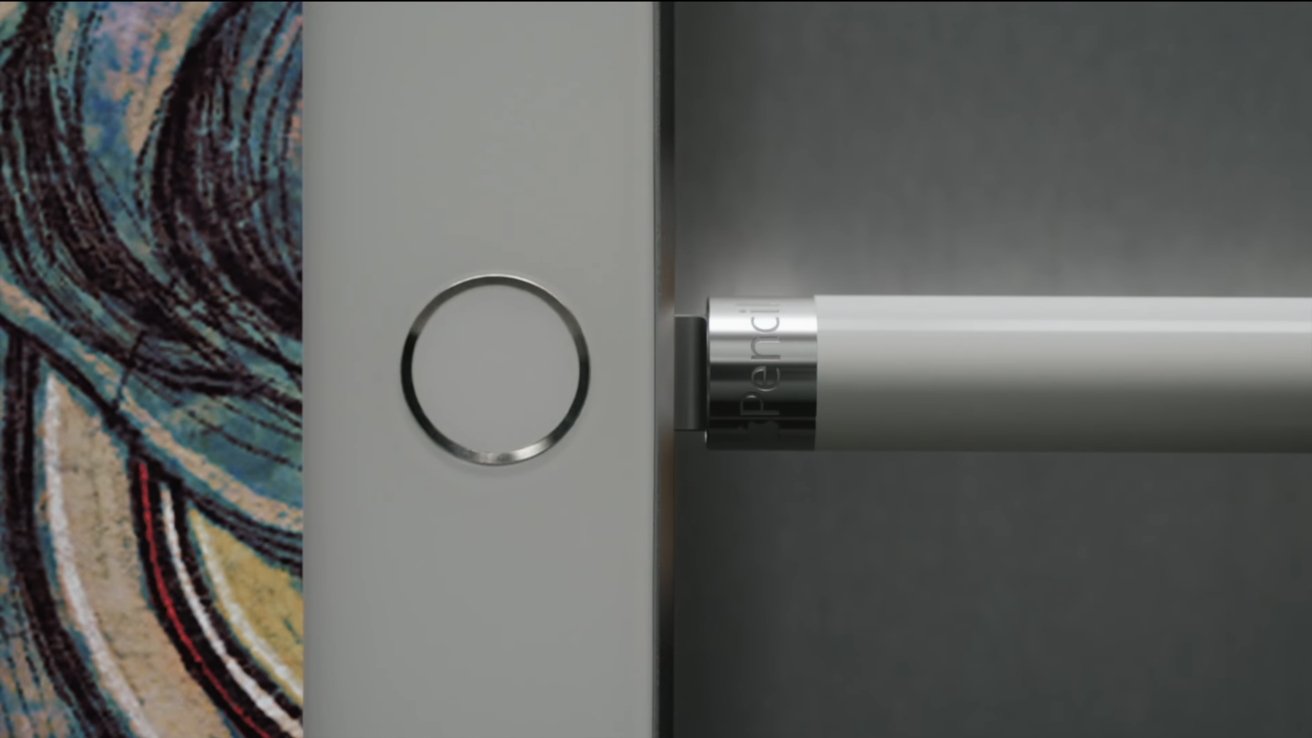
Best for: Handwriting, sketching and drawing on compatible iPads
- Input
- Pressure and tilt sensitivity
- Pairing
- Lightning
- Charging
- Lightning connector
- Compatibility note
- iPad (10th generation) requires an adapter
- Pressure sensitivity for varied drawing strokes
- Tilt detection supports shading
- Useful for handwriting and markup
- Lightning charging is less convenient on USB-C iPads
- Not every iPad supports this generation
Is the Apple Pencil (1st generation) worth buying on Black Friday 2026?
The Apple Pencil (1st generation) is worth considering when a compatible iPad and pressure-sensitive drawing are priorities. Confirm the iPad model first; iPad (10th generation) owners also need the compatible USB-C to Apple Pencil Adapter for pairing and charging.
See today’s Black Friday price on Amazon
#5
Apple Pencil (USB-C)
The Apple Pencil (USB-C) is the best straightforward Apple stylus for compatible USB-C iPads used for notes, markup and sketching. USB-C charging simplifies cable access, while tilt sensitivity supports drawing; the model does not provide pressure sensitivity.

Best for: Notes and markup on compatible USB-C iPads
- Input
- Tilt sensitivity; no pressure sensitivity
- Charging
- USB-C
- Attachment
- Magnetic attachment
- Compatibility
- Compatible USB-C iPad models
- USB-C charging
- Magnetic attachment for storage
- Good for notes, markup and basic drawing
- Lacks pressure sensitivity
- Compatibility varies by iPad model
Is the Apple Pencil (USB-C) worth buying on Black Friday 2026?
The Apple Pencil (USB-C) is worth considering for compatible iPad owners who want a simple stylus for notes and markup. Choose another Pencil model if pressure-sensitive brush control is essential, and check Apple’s compatibility list for the exact iPad.
See today’s Black Friday price on Amazon
#6
Logitech Crayon (USB-C)
The Logitech Crayon (USB-C) is the best alternative stylus for compatible iPads when dependable writing and drawing matter more than pressure-sensitive strokes. The Logitech Crayon (USB-C) supports tilt input and palm rejection, and charges through USB-C.
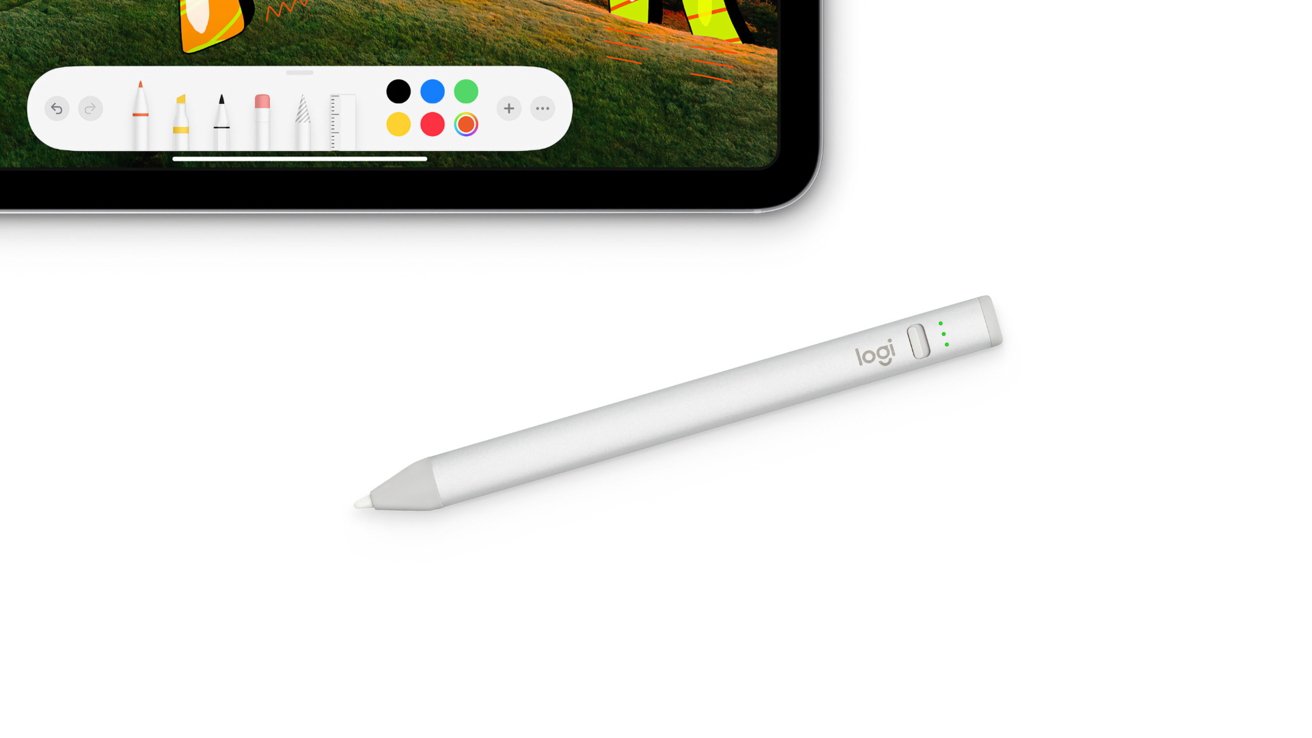
Best for: Students and casual artists using compatible iPads
- Input
- Tilt sensitivity
- Charging
- USB-C
- Palm rejection
- Supported on compatible iPads
- Pressure sensitivity
- Not supported
- USB-C charging
- Palm rejection supports comfortable writing
- Tilt input adds shading control
- No pressure-sensitive line weight
- Check compatibility before purchase
Is the Logitech Crayon (USB-C) worth buying on Black Friday 2026?
The Logitech Crayon (USB-C) is worth considering for school notes, annotation and casual drawing on a compatible iPad. USB-C charging is convenient, but the stylus lacks pressure sensitivity, so artists who need expressive brush strokes should compare other options.
See today’s Black Friday price on Amazon
#7
Apple Magic Keyboard Folio for iPad (10th generation)
The Apple Magic Keyboard Folio for iPad (10th generation) is the best Apple keyboard folio for owners who want a detachable keyboard and trackpad. The Apple Magic Keyboard Folio for iPad (10th generation)'s two-piece design pairs a keyboard with a back panel and adjustable stand for the 10.9-inch iPad.
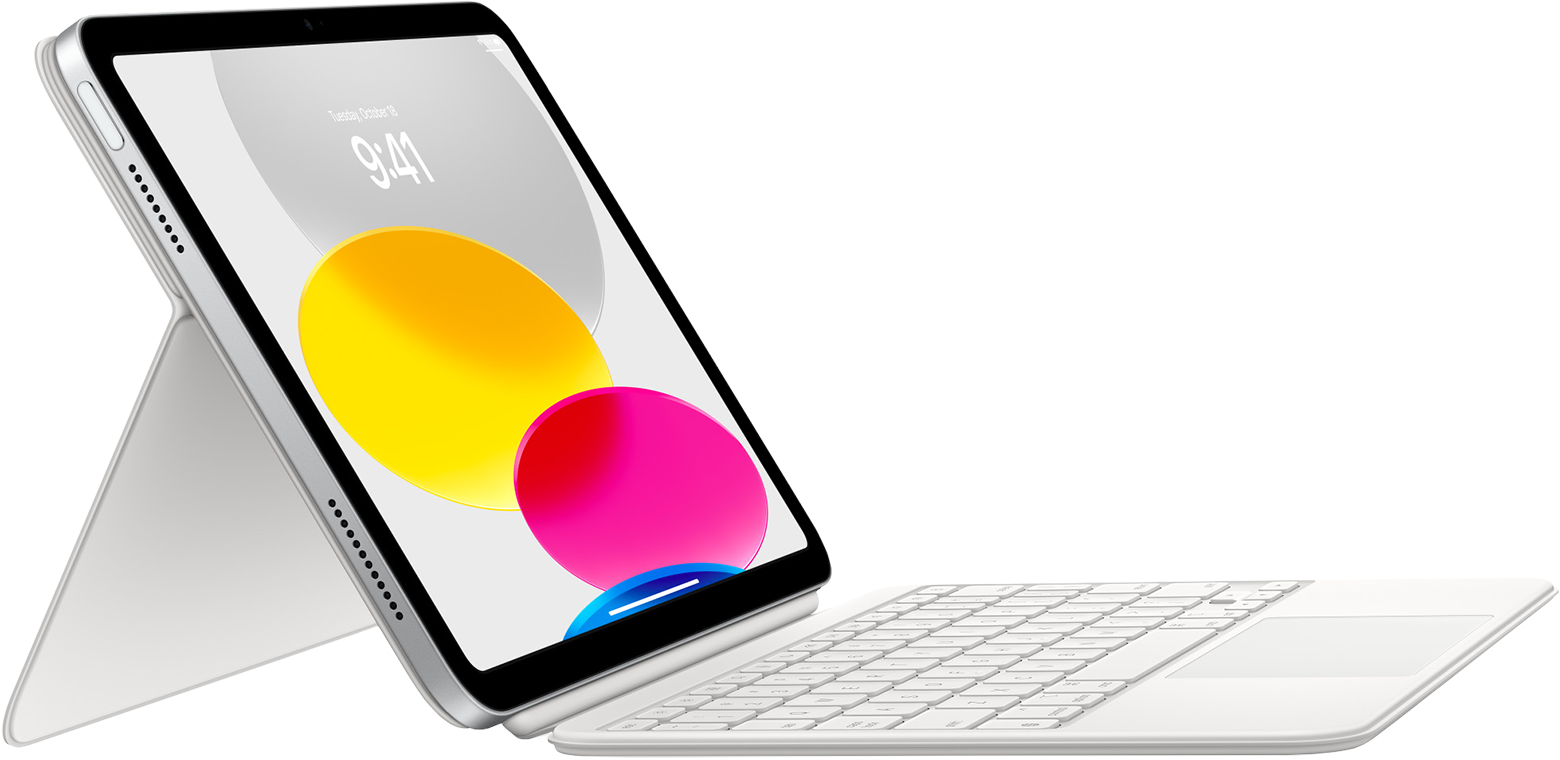
Best for: iPad (10th generation) owners who prefer Apple’s keyboard layout
- iPad fit
- iPad (10th generation), 10.9-inch
- Keyboard
- Detachable, 14-key function row
- Control
- Integrated trackpad
- Design
- Two-piece folio
- Detachable keyboard and adjustable back stand
- Integrated trackpad
- 14-key function row
- Fits only iPad (10th generation)
- Keyboard and stand create a multi-piece setup
Is the Apple Magic Keyboard Folio for iPad (10th generation) worth buying on Black Friday 2026?
The Apple Magic Keyboard Folio for iPad (10th generation) is worth considering when an Apple keyboard layout and integrated trackpad are priorities. The Apple Magic Keyboard Folio for iPad (10th generation)'s two-piece design is flexible, but shoppers should verify the iPad generation because this folio is not a universal iPad case.
See today’s Black Friday price on Amazon
Is Logitech Combo Touch or Apple Pencil (1st generation) better for an iPad?
Logitech Combo Touch is better for typing, while Apple Pencil (1st generation) is better for handwriting and drawing; the two accessories serve separate jobs. A keyboard case adds keys, a trackpad and protection, whereas a stylus adds direct pen input.
Choose Logitech Combo Touch if documents, email, classroom work or spreadsheet navigation take up much of the day. Its detachable keyboard leaves the iPad ready for touch use, and the trackpad makes pointer tasks more familiar.
Choose Apple Pencil (1st generation) for sketching, marking up PDFs or handwritten notes on a compatible iPad. Buyers who want both workflows can use a keyboard case and a stylus together, but should check that each accessory supports the same iPad model.
Which iPad models work with these accessories?
Logitech Combo Touch Keyboard Case with Trackpad for iPad (10th generation) and Apple Magic Keyboard Folio for iPad (10th generation) fit the 10th-generation iPad, while the other Combo Touch cases listed here are model-specific.
Do not rely on screen size alone when choosing a case. iPad generations with similar dimensions can differ in camera placement, connector position or body shape, so check the complete model name in both the iPad settings and the product listing.
Apple Pencil (1st generation), Apple Pencil (USB-C) and Logitech Crayon (USB-C) also have distinct compatibility lists. The 10th-generation iPad requires an adapter for Apple Pencil (1st generation); confirm current compatibility details before checkout.
Can Logitech Combo Touch replace an Apple Pencil?
Logitech Combo Touch cannot replace Apple Pencil (1st generation) because Combo Touch provides keyboard and trackpad input, not stylus input. The accessories are alternatives only when a shopper needs one specific kind of control.
A keyboard case is the useful choice for long typing sessions, cursor work and tablet protection. Apple Pencil (1st generation) is the useful choice for handwriting, sketching and fine edits directly on screen.
For a mixed workflow, pairing a compatible keyboard case with a compatible Pencil covers typing and drawing. Compare total carry weight, charging needs and iPad compatibility instead of assuming one accessory does everything.
What is the difference between Apple Pencil (1st generation) and Apple Pencil (USB-C)?
Apple Pencil (1st generation) supports pressure and tilt input, while Apple Pencil (USB-C) supports tilt input but not pressure sensitivity. That distinction matters most for artists who vary line weight with pressure.
Apple Pencil (USB-C) charges through USB-C and attaches magnetically for storage on compatible iPads. Apple Pencil (1st generation) uses a Lightning connector, and the 10th-generation iPad needs an adapter for pairing and charging.
For general notes and markup, either stylus fits the right compatible iPad. For pressure-sensitive drawing, check the feature set and iPad support before choosing the older Pencil generation.
What should shoppers compare for Black Friday 2026?
Black Friday 2026 shoppers should compare exact iPad fit, included features and return terms before choosing an accessory. A good-looking promotion is not useful if the case does not fit the tablet or the stylus does not pair with it.
For Logitech Combo Touch, compare the precise iPad model, detachable keyboard design, trackpad and Smart Connector connection. For Apple Pencil (1st generation), compare compatibility, pressure sensitivity and the Lightning-based charging setup.
Check whether a listing includes the accessory version and layout you want, then review the seller’s return policy. Saving the iPad’s model name before browsing reduces mix-ups across similar generations and screen sizes.
Buying Guide
Start with your iPad model
Find the iPad’s full model name and generation in Settings, then match it to the accessory listing. Screen size alone is not enough: cases are often built for a specific body, camera position and connector layout.
Choose input for your daily work
Pick Logitech Combo Touch or Apple Magic Keyboard Folio for frequent typing and trackpad use. Pick Apple Pencil or Logitech Crayon for handwriting, markup and drawing. A stylus does not replace a keyboard, and a keyboard case does not provide pen input.
Compare stylus features
Pressure sensitivity is a key distinction for drawing. Apple Pencil (1st generation) supports pressure and tilt, while Apple Pencil (USB-C) and Logitech Crayon (USB-C) support tilt without pressure sensitivity. Check compatibility before comparing features.
Think about charging and carrying
USB-C charging suits shoppers who want to use a current USB-C cable for a stylus. Apple Pencil (1st generation) uses Lightning, with an adapter required for iPad (10th generation). Keyboard cases add useful controls but make an iPad setup bulkier.
Check Black Friday 2026 listing details
Compare the exact variant, seller, included accessories and return policy across listings. Confirm keyboard layout and iPad fit, and verify whether required adapters are included. Product names that differ by one generation or screen size can describe incompatible accessories.
FAQ
Logitech Combo Touch iPad vs Apple Pencil 1st generation: which is better for students?
Logitech Combo Touch is better for students who type essays, use a trackpad and want a case. Apple Pencil (1st generation) is better for handwritten notes and drawing on a compatible iPad. Students who need both tasks should verify compatibility and consider carrying both accessories.
Does Apple Pencil (1st generation) work with iPad (10th generation)?
Apple Pencil (1st generation) works with iPad (10th generation) when paired and charged using the compatible USB-C to Apple Pencil Adapter. Check whether the adapter is included with the Pencil listing, and confirm the iPad model before ordering.
Does Logitech Combo Touch have a trackpad?
Logitech Combo Touch Keyboard Case models listed in this guide include an integrated trackpad alongside a detachable keyboard. The case also provides a kickstand, while Smart Connector is used for connection on the listed iPad versions. Confirm the exact model fit before purchase.
Is Apple Pencil (USB-C) pressure sensitive?
Apple Pencil (USB-C) does not support pressure sensitivity, though it supports tilt input for compatible iPad drawing apps. The Apple Pencil (1st generation) supports both pressure and tilt. Choose based on the features required and verify that the stylus supports the iPad.
Can Apple Pencil (1st generation) and Logitech Combo Touch be used together?
Apple Pencil (1st generation) and Logitech Combo Touch can serve different roles on a compatible iPad: the Pencil handles writing and drawing, while Combo Touch provides a keyboard and trackpad. Check that both accessories support the exact same iPad generation and size.