

As an Amazon Associate we earn from qualifying purchases.
- Best overall: ASUS ROG Azoth 75% Wireless Custom Gaming Keyboard (ROG NX Red Switches)
- Best budget: HyperX Alloy Origins 60 Mechanical Gaming Keyboard (HyperX Red Switches)
- Best premium: SteelSeries Apex Pro TKL Gen 3 Gaming Keyboard
- Best for compact TKL gaming: HyperX Alloy Origins Core RGB Mechanical Gaming Keyboard (Aqua Switches)
- HyperX Alloy Origins keyboards suit gamers who want a sturdy wired board with a straightforward layout.
- ASUS ROG Azoth adds a 75% layout, wireless connections, hot-swappable switches and a 2-inch OLED screen.
- The ASUS ROG Azoth is the strongest all-around choice for custom features and wireless flexibility.
- The HyperX Alloy Origins Core is the practical pick for players who prefer a compact TKL keyboard.
- Compare layout, connection type and switch feel before choosing a Black Friday 2026 keyboard.
The ASUS ROG Azoth is the more feature-packed keyboard, while the HyperX Alloy Origins line is the simpler wired choice for gamers who want a solid, dependable board. We researched and compared specs, reviews and owner feedback to help you decide which one fits your desk, play style and Black Friday 2026 plans.
Here's the bottom line: choose the Azoth for wireless play, hot-swappable switches and a compact 75% layout. Choose an Alloy Origins model for a familiar wired setup and a range of sizes, from full-size to 60%. We also included strong alternatives for players who want magnetic switches, a low-profile design or more keys in a compact footprint.
How We Picked
- Compared keyboard layouts, including full-size, 96%, TKL, 75% and 60% designs.
- Checked connection options, with special attention to wired, Bluetooth and 2.4GHz wireless modes.
- Reviewed switch types and customization features, including hot-swap and adjustable-actuation designs.
- Considered gamer-focused details such as RGB lighting, keycap materials, onboard controls and construction.
- Prioritized models with clear strengths for distinct budgets, desk setups and gaming preferences.
Comparison Table
Best Picks Reviewed
#1 · Top pick
ASUS ROG Azoth 75% Wireless Custom Gaming Keyboard (ROG NX Red Switches)
The ASUS ROG Azoth 75% Wireless Custom Gaming Keyboard (ROG NX Red Switches) is the best overall keyboard for gamers who want wireless flexibility and customization, with a 2-inch OLED screen and hot-swappable switches.

Best for: Wireless gaming and customization
- Layout
- 75%
- Display
- 2-inch OLED
- Connections
- 3 modes
- Switch type
- ROG NX Red linear
- Tri-mode connection supports wired USB, Bluetooth and 2.4GHz wireless.
- Hot-swappable switches give keyboard fans room to customize.
- OLED screen provides at-a-glance system and keyboard information.
- The feature-rich design takes more setup and desk space than a 60% board.
Is the ASUS ROG Azoth 75% Wireless Custom Gaming Keyboard worth buying on Black Friday 2026?
Yes. The ASUS ROG Azoth 75% Wireless Custom Gaming Keyboard stands out for its 2-inch OLED, tri-mode connection and hot-swappable switches. Choose it when wireless flexibility and customization matter more than getting the simplest wired keyboard.
See today’s Black Friday price on Amazon
#2
HyperX Alloy Origins Core RGB Mechanical Gaming Keyboard (Aqua Switches)
The HyperX Alloy Origins Core RGB Mechanical Gaming Keyboard (Aqua Switches) is the best TKL pick for players who want a compact wired board with tactile feedback, backed by its 87-key layout.
Best for: Tactile TKL gaming
- Layout
- 87 keys, TKL
- Switch type
- Aqua tactile
- Connection
- USB-C wired
- Lighting
- Per-key RGB
- Compact layout leaves more room for mouse movement.
- Aqua switches give a tactile bump without a clicky switch sound.
- Aluminum body is built for a stable gaming setup.
- Wired-only connectivity offers less setup flexibility than the Azoth.
Is the HyperX Alloy Origins Core RGB Mechanical Gaming Keyboard worth buying on Black Friday 2026?
Yes. The HyperX Alloy Origins Core RGB Mechanical Gaming Keyboard is a strong match for players who want an 87-key TKL layout, tactile switches and RGB lighting. Pick the Core when a compact wired setup suits your desk better than wireless features.
See today’s Black Friday price on Amazon
#3
HyperX Alloy Origins RGB Mechanical Gaming Keyboard (HyperX Red Switches)
The HyperX Alloy Origins RGB Mechanical Gaming Keyboard (HyperX Red Switches) is the best full-size pick for players who want a complete wired layout, with 104 keys for gaming and everyday tasks.
Best for: Full-size wired gaming
- Layout
- 104 keys
- Switch type
- HyperX Red linear
- Connection
- USB-C wired
- Lighting
- Per-key RGB
- Full-size layout includes a number pad.
- Linear switches suit fast, smooth key presses.
- Aluminum construction gives the board a solid feel.
- The larger footprint leaves less room for wide mouse movements.
Is the HyperX Alloy Origins RGB Mechanical Gaming Keyboard worth buying on Black Friday 2026?
Yes. The HyperX Alloy Origins RGB Mechanical Gaming Keyboard offers a 104-key layout, linear switches and per-key RGB. The HyperX Alloy Origins RGB Mechanical Gaming Keyboard (HyperX Red Switches) fits players who need a number pad and prefer a wired board over the smaller layouts and wireless options in this guide.
See today’s Black Friday price on Amazon
#4
HyperX Alloy Origins 60 Mechanical Gaming Keyboard (HyperX Red Switches)
The HyperX Alloy Origins 60 Mechanical Gaming Keyboard (HyperX Red Switches) is the best compact wired pick for players who want a minimal desk footprint, with a 60% layout and 61 keys.
Best for: Small desks and travel
- Layout
- 61 keys, 60%
- Switch type
- HyperX Red linear
- Connection
- USB-C wired
- Lighting
- Per-key RGB
- Small footprint gives a mouse more room on tight desks.
- Linear switches deliver a smooth keypress feel.
- Detachable USB-C cable makes packing and storage simpler.
- The compact layout omits dedicated function and arrow-key rows.
Is the HyperX Alloy Origins 60 Mechanical Gaming Keyboard worth buying on Black Friday 2026?
Yes. The HyperX Alloy Origins 60 Mechanical Gaming Keyboard is a good fit for players who value a compact 61-key layout, wired simplicity and linear switches. Check that the condensed key arrangement works for your everyday typing before choosing it.
See today’s Black Friday price on Amazon
#5
ASUS ROG Strix Scope II 96 Wireless Gaming Keyboard (ROG NX Snow Switches)
The ASUS ROG Strix Scope II 96 Wireless Gaming Keyboard (ROG NX Snow Switches) is the best pick for players who want a number pad in less space, with a 96% layout and three connection modes.
Best for: Compact number-pad gaming
- Layout
- 96%
- Connections
- 3 modes
- Switch type
- ROG NX Snow linear
- Lighting
- Per-key RGB
- Keeps a number pad while using a more compact layout than full-size boards.
- Supports 2.4GHz wireless, Bluetooth and wired USB.
- Hot-swappable switches support further customization.
- The condensed layout takes adjustment for players used to full-size spacing.
Is the ASUS ROG Strix Scope II 96 Wireless Gaming Keyboard worth buying on Black Friday 2026?
Yes. The ASUS ROG Strix Scope II 96 Wireless Gaming Keyboard combines a number pad with a compact 96% layout and tri-mode connectivity. Choose it if you want a smaller desk footprint without giving up the dedicated number keys.
See today’s Black Friday price on Amazon
#6
Keychron Q1 HE Wireless Magnetic Switch Custom Mechanical Keyboard (Shell White)
The Keychron Q1 HE Wireless Magnetic Switch Custom Mechanical Keyboard (Shell White) is the best magnetic-switch pick for competitive players who want adjustable actuation, with a 75% layout and 2.4GHz wireless.
Best for: Adjustable magnetic switches
- Layout
- 75%
- Actuation range
- 0.1–3.35mm
- Polling rate
- Up to 1000Hz
- Connections
- 3 modes
- Adjustable actuation lets players tailor key response.
- Magnetic switches support advanced gaming functions.
- Tri-mode connections add flexibility for different devices.
- Magnetic-switch features suit players who want to customize settings, not plug-and-play simplicity.
Is the Keychron Q1 HE Wireless Magnetic Switch Custom Mechanical Keyboard worth buying on Black Friday 2026?
Yes. The Keychron Q1 HE Wireless Magnetic Switch Custom Mechanical Keyboard is worth a look for players who want adjustable actuation and magnetic-switch features. The Keychron Q1 HE Wireless Magnetic Switch Custom Mechanical Keyboard (Shell White)'s 75% layout and tri-mode connections also suit a flexible gaming and work setup.
See today’s Black Friday price on Amazon
#7
SteelSeries Apex Pro TKL Gen 3 Gaming Keyboard
The SteelSeries Apex Pro TKL Gen 3 Gaming Keyboard is the best premium pick for players who want adjustable key response and a compact layout, with OmniPoint 3.0 switches and a 0.1–4.0mm actuation range.
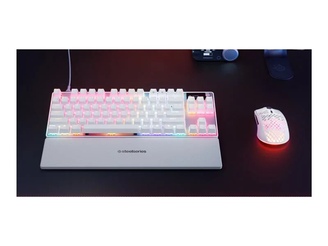
Best for: Competitive actuation tuning
- Layout
- TKL
- Switches
- OmniPoint 3.0
- Actuation range
- 0.1–4.0mm
- Display
- OLED screen
- Adjustable actuation supports personalized key response.
- TKL layout keeps the number pad off the desk.
- OLED screen adds onboard information and controls.
- The SteelSeries Apex Pro TKL Gen 3 Gaming Keyboard's advanced settings are unnecessary for players who want a basic keyboard.
Is the SteelSeries Apex Pro TKL Gen 3 Gaming Keyboard worth buying on Black Friday 2026?
Yes. The SteelSeries Apex Pro TKL Gen 3 Gaming Keyboard suits competitive players who want adjustable actuation and onboard controls. The SteelSeries Apex Pro TKL Gen 3 Gaming Keyboard's TKL footprint is a good fit for a dedicated gaming desk, especially when tuning key response is a priority.
See today’s Black Friday price on Amazon
#8
Logitech G915 X LIGHTSPEED Wireless Gaming Keyboard (Tactile, Full Size)
The Logitech G915 X LIGHTSPEED Wireless Gaming Keyboard (Tactile, Full Size) is the best low-profile wireless pick for players who want a full-size board, with 3 connection options and tactile switches.
Best for: Low-profile wireless gaming
- Layout
- Full size
- Connections
- 3 modes
- Switch type
- Low-profile tactile
- Lighting
- LIGHTSYNC RGB
- Low-profile design suits players who prefer a shorter key travel feel.
- Wireless and wired options support varied setups.
- Full-size layout includes dedicated number keys.
- Tactile low-profile switches feel different from standard-height mechanical switches.
Is the Logitech G915 X LIGHTSPEED Wireless Gaming Keyboard worth buying on Black Friday 2026?
Yes. The Logitech G915 X LIGHTSPEED Wireless Gaming Keyboard is a strong option for gamers who want a full-size layout, low-profile tactile switches and flexible connections. Choose it when a wireless board with a slimmer profile fits your desk and typing preferences.
See today’s Black Friday price on Amazon
Which keyboard is better: HyperX Alloy Origins or ASUS ROG Azoth?
The ASUS ROG Azoth is the feature-rich choice, with a 75-percent layout, three connection modes, hot-swappable switches and an OLED display. HyperX Alloy Origins models offer straightforward wired gaming in 60-percent, TKL and full-size layouts.
Choose the Azoth for wireless flexibility and customization. Choose the HyperX Alloy Origins Core or HyperX Alloy Origins 60 for a familiar wired setup in a smaller footprint.
What is the difference between the ASUS ROG Azoth and HyperX Alloy Origins?
The ASUS ROG Azoth combines a compact layout, wireless connections and an onboard OLED screen. HyperX Alloy Origins keyboards focus on wired play, per-key RGB lighting and aluminum construction, with multiple layout options.
For a wireless, custom-style board, choose the Azoth. For a simple wired keyboard, select the HyperX Alloy Origins layout and switch variant that suit your desk and typing habits.
Which keyboard layout should you choose for gaming?
The ASUS ROG Azoth’s 75-percent layout retains arrow keys and core controls. The HyperX Alloy Origins Core’s TKL layout keeps the function row and arrows but removes the number pad. The HyperX Alloy Origins 60 saves more desk space, with fewer dedicated keys and more function layers.
The ASUS ROG Strix Scope II 96 Wireless keeps a number pad in a compact footprint. Full-size layouts suit number-heavy work. Choose the smallest layout that keeps the keys you use regularly.
Do wireless gaming keyboards work well for PC gaming?
The ASUS ROG Azoth, ASUS ROG Strix Scope II 96 Wireless and Logitech G915 X LIGHTSPEED offer multiple connections, including 2.4GHz wireless. Bluetooth supports device switching; 2.4GHz is the gaming-focused wireless option on compatible models.
Wired HyperX Alloy Origins keyboards avoid battery charging. Choose wired for a fixed setup or a tri-mode model for cable-free play and device switching.
Are hot-swappable or adjustable switches worth choosing?
The ASUS ROG Azoth supports hot-swappable switches. The Keychron Q1 HE and SteelSeries Apex Pro TKL Gen 3 offer magnetic switches with adjustable actuation. Hot-swap support simplifies compatible switch changes; adjustable actuation controls how far a key travels before registering.
Choose these features if you plan to tune your keyboard. Otherwise, prioritize a switch feel you enjoy.
Buying Guide
Choose your layout first
Full-size keeps the number pad; TKL retains arrows and the function row; 75-percent and 60-percent layouts save more desk space.
Pick a switch feel
Linear switches press smoothly, tactile switches add a bump, and clicky switches make an audible sound. Check the exact switch variant.
Decide between wired and wireless
Wired connections keep setup simple. Tri-mode models add Bluetooth and 2.4GHz options; confirm compatibility with your devices.
Check customization features
Hot-swappable switches simplify replacements. Magnetic switches with adjustable actuation provide more control. Choose features you plan to use.
Compare the exact model variant
Confirm the full product name, layout, switch type and connections before buying on Black Friday 2026.
FAQ
Which is better for gaming, HyperX Alloy Origins or ASUS ROG Azoth?
The ASUS ROG Azoth is better for players who want wireless connections, a 75% layout and switch customization. The HyperX Alloy Origins is better for players who want a straightforward wired keyboard, with 60%, TKL and full-size options across the lineup.
Is the ASUS ROG Azoth worth buying on Black Friday 2026?
Yes. The ASUS ROG Azoth combines a 2-inch OLED screen, hot-swappable switches and three connection modes in a 75% layout. It is a strong Black Friday 2026 pick for players who value wireless flexibility and enthusiast features.
Is the HyperX Alloy Origins Core good for gaming?
Yes. The HyperX Alloy Origins Core has an 87-key TKL layout, RGB lighting and a wired USB-C connection. The Aqua switch version offers tactile feedback, while the compact design leaves more desk space for mouse movement.
What is the difference between TKL and 75% keyboards?
TKL keyboards keep the function row and arrow keys but remove the number pad. A 75% design also keeps core controls and arrows in a more condensed arrangement. Exact key placement varies by model, so check the layout image before you buy.
Which keyboard is best for a small gaming desk?
The HyperX Alloy Origins 60 is the smallest option in this guide, with a 61-key layout. The HyperX Alloy Origins Core keeps dedicated arrow keys in a TKL footprint, making it a practical alternative for players who want a compact board without going fully minimal.
Are wireless keyboards good for competitive gaming?
Yes. Models such as the ASUS ROG Azoth offer a 2.4GHz wireless connection alongside other modes. Players who prefer a cable-free desk can use that connection for gaming, while wired keyboards remain a simple choice for a permanent setup.