

As an Amazon Associate we earn from qualifying purchases.
- Best overall: SteelSeries Apex Pro TKL Gen 3 Gaming Keyboard
- Best budget: Corsair K70 RGB PRO Mechanical Gaming Keyboard with Cherry MX Speed Switches
- Best premium: Corsair K100 RGB Optical-Mechanical Gaming Keyboard with OPX Switches
- Best for wireless gaming: Logitech G915 X LIGHTSPEED TKL Wireless Gaming Keyboard
- Corsair K100 RGB is a full-size gaming keyboard with six macro keys and 4,000 Hz polling.
- SteelSeries Apex Pro TKL Gen 3 offers adjustable actuation from 0.1 to 4.0 mm and an 8,000 Hz polling rate.
- SteelSeries Apex Pro is the stronger fit for adjustable switches; Corsair K100 RGB suits players who want a numpad and dedicated macros.
- Logitech G915 X LIGHTSPEED TKL is a wireless, low-profile alternative, while ASUS ROG Azoth offers a compact 75% layout.
- Black Friday 2026 shoppers should match keyboard layout, switch feel, and connection type to their setup before choosing.
Corsair K100 RGB and SteelSeries Apex Pro keyboards serve different gaming needs: Corsair K100 RGB brings a full-size layout, six macro keys, and 4,000 Hz polling, while SteelSeries Apex Pro TKL Gen 3 adds adjustable actuation and 8,000 Hz polling. I researched and compared specs, reviews, and owner feedback to build this Black Friday 2026 guide around the features that shape everyday play.
Here's the bottom line: choose Corsair K100 RGB for dedicated controls and a numpad, or choose SteelSeries Apex Pro for switch customization and fast input adjustment. The guide also covers five alternatives, from compact wireless keyboards to analog optical models. Compare the layout, connection, and switch features first; those choices matter more than extra lighting effects for most setups.
How We Picked
- Compared layout and desk footprint, including full-size, tenkeyless, and 75% keyboards.
- Reviewed switch type, actuation range, and whether each model offers analog or adjustable input.
- Checked stated polling rates and connection options, including wired, Bluetooth, and 2.4 GHz wireless.
- Considered useful gaming and daily-use features such as macro keys, media controls, OLED displays, and hot-swappable switches.
- Used manufacturer specifications alongside reviews and owner feedback; no product is presented as personally compared.
Comparison Table
| Product | Best for | Layout | Polling rate | Actuation range |
|---|---|---|---|---|
| Corsair K100 RGB Optical-Mechanical Gaming Keyboard with OPX Switches | Macros and full-size controls | Full-size | 4,000 Hz | 1.0 mm |
| SteelSeries Apex Pro TKL Gen 3 Gaming Keyboard | Adjustable actuation in TKL | TKL | 8,000 Hz | 0.1–4.0 mm |
| SteelSeries Apex Pro Gen 3 Full-Size Gaming Keyboard | Adjustable actuation with numpad | Full-size | 8,000 Hz | 0.1–4.0 mm |
| Corsair K70 RGB PRO Mechanical Gaming Keyboard with Cherry MX Speed Switches | Conventional mechanical switches | Full-size | Up to 8,000 Hz | 1.2 mm |
| Logitech G915 X LIGHTSPEED TKL Wireless Gaming Keyboard | Low-profile wireless play | TKL | Not specified | 1.3 mm actuation |
| Razer Huntsman V3 Pro TKL Analog Optical Gaming Keyboard | Analog optical input | TKL | Not specified | 0.1–4.0 mm |
| ASUS ROG Azoth 75% Wireless DIY Custom Gaming Keyboard | Compact wireless customization | 75% | Up to 1,000 Hz | Not specified |
Best Picks Reviewed
#1
Corsair K100 RGB Optical-Mechanical Gaming Keyboard with OPX Switches
The Corsair K100 RGB Optical-Mechanical Gaming Keyboard with OPX Switches is the best full-size pick for players who want dedicated macros, with six macro keys and 4,000 Hz polling.

Best for: Full-size control, macro keys, and fast optical input
- Layout
- Full-size, 100%
- Polling rate
- 4,000 Hz
- OPX actuation
- 1.0 mm
- Macro keys
- 6
- Six dedicated macro keys support custom actions.
- OPX optical switches have a short 1.0 mm actuation point.
- Includes a numpad, media controls, and a detachable wrist rest.
- The full-size body takes up more desk space than TKL options.
- Wired-only connection limits flexible placement.
Is the Corsair K100 RGB Optical-Mechanical Gaming Keyboard with OPX Switches worth buying on Black Friday 2026?
The Corsair K100 RGB Optical-Mechanical Gaming Keyboard with OPX Switches is worth considering for players who want a wired full-size board, six macro keys, and 4,000 Hz polling. The numpad and dedicated controls suit gaming and productivity setups.
See today’s Black Friday price on Amazon
#2 · Top pick
SteelSeries Apex Pro TKL Gen 3 Gaming Keyboard
The SteelSeries Apex Pro TKL Gen 3 Gaming Keyboard is the best adjustable-switch pick for competitive players, with 0.1–4.0 mm actuation and 8,000 Hz polling.
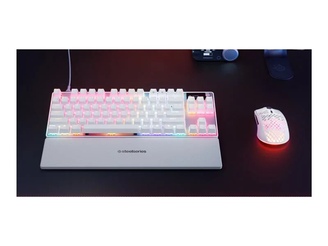
Best for: Adjustable actuation in a compact wired layout
- Layout
- TKL, 80%
- Polling rate
- 8,000 Hz
- Actuation range
- 0.1–4.0 mm
- Switch system
- OmniPoint 3.0
- Adjustable actuation lets players tune key response.
- TKL layout leaves more room for mouse movement.
- OLED smart display provides quick access to information and settings.
- No dedicated numpad.
- Advanced switch settings take time to configure.
Is the SteelSeries Apex Pro TKL Gen 3 Gaming Keyboard worth buying on Black Friday 2026?
The SteelSeries Apex Pro TKL Gen 3 Gaming Keyboard is worth buying for players who want fine control over actuation and an 8,000 Hz polling rate. The SteelSeries Apex Pro TKL Gen 3 Gaming Keyboard's TKL footprint frees desk space, while OmniPoint 3.0 switches support adjustable response.
See today’s Black Friday price on Amazon
#3
SteelSeries Apex Pro Gen 3 Full-Size Gaming Keyboard
The SteelSeries Apex Pro Gen 3 Full-Size Gaming Keyboard is the best full-size choice for players who want adjustable switches and a numpad, with an 8,000 Hz polling rate.
Best for: Adjustable switches with full-size controls
- Layout
- Full-size, 100%
- Polling rate
- 8,000 Hz
- Actuation range
- 0.1–4.0 mm
- Switch system
- OmniPoint 3.0
- Offers adjustable actuation across the main gaming keys.
- Full-size layout retains a numpad for work and shortcuts.
- OLED display provides onboard status and customization.
- Full-size footprint needs more desk space.
- Wired connection is less flexible than wireless alternatives.
Is the SteelSeries Apex Pro Gen 3 Full-Size Gaming Keyboard worth buying on Black Friday 2026?
The SteelSeries Apex Pro Gen 3 Full-Size Gaming Keyboard is a strong fit for players who want a numpad without giving up adjustable actuation. OmniPoint 3.0 switches offer a 0.1–4.0 mm range, and the board supports 8,000 Hz polling.
See today’s Black Friday price on Amazon
#4
Corsair K70 RGB PRO Mechanical Gaming Keyboard with Cherry MX Speed Switches
The Corsair K70 RGB PRO Mechanical Gaming Keyboard with Cherry MX Speed Switches is the best straightforward wired alternative for players who want a full-size board, with 8,000 Hz hyper-polling.

Best for: Fast conventional mechanical typing and gaming
- Layout
- Full-size, 100%
- Polling rate
- Up to 8,000 Hz
- Switch actuation
- 1.2 mm
- Onboard profiles
- Up to 50
- Cherry MX Speed switches offer a familiar mechanical feel.
- Full-size layout includes a numpad and dedicated media controls.
- Onboard profile storage supports saved configurations.
- Does not offer adjustable actuation.
- Wired full-size design is less compact than TKL models.
Is the Corsair K70 RGB PRO Mechanical Gaming Keyboard with Cherry MX Speed Switches worth buying on Black Friday 2026?
The Corsair K70 RGB PRO Mechanical Gaming Keyboard with Cherry MX Speed Switches is worth considering for players who prefer conventional mechanical switches and a full-size layout. The 1.2 mm actuation point and up-to-8,000 Hz hyper-polling suit fast-paced gaming.
See today’s Black Friday price on Amazon
#5
Logitech G915 X LIGHTSPEED TKL Wireless Gaming Keyboard
The Logitech G915 X LIGHTSPEED TKL Wireless Gaming Keyboard is the best low-profile wireless pick for players who want a tidy desk, with three connection modes.
Best for: Wireless gaming and low-profile keys
- Layout
- TKL, 80%
- Connection modes
- 3
- Switch travel
- 1.9 mm
- Battery life
- Up to 100 hours, lighting off
- LIGHTSPEED wireless, Bluetooth, and wired USB-C provide flexible connections.
- Low-profile mechanical keys support a slim typing position.
- TKL layout frees space for mouse movement.
- No numpad in the TKL layout.
- Low-profile key feel differs from standard-height mechanical boards.
Is the Logitech G915 X LIGHTSPEED TKL Wireless Gaming Keyboard worth buying on Black Friday 2026?
The Logitech G915 X LIGHTSPEED TKL Wireless Gaming Keyboard is worth buying for players who want wireless convenience, three connection modes, and low-profile mechanical keys. The Logitech G915 X LIGHTSPEED TKL Wireless Gaming Keyboard's TKL layout cuts desk clutter, and battery life reaches up to 100 hours with lighting off.
See today’s Black Friday price on Amazon
#6
Razer Huntsman V3 Pro TKL Analog Optical Gaming Keyboard
The Razer Huntsman V3 Pro TKL Analog Optical Gaming Keyboard is the best compact analog-switch pick for players who want adjustable input, with a 0.1–4.0 mm actuation range.
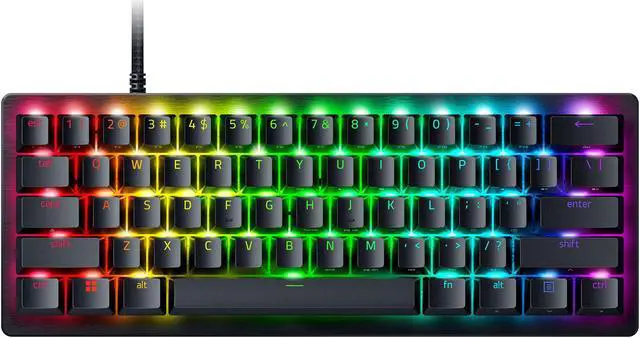
Best for: Analog input and adjustable key response
- Layout
- TKL, 80%
- Actuation range
- 0.1–4.0 mm
- Switch type
- Analog optical
- Connection
- Wired USB-A
- Adjustable actuation supports different play styles.
- Rapid Trigger feature is designed for quick repeated inputs.
- Compact TKL layout creates extra mouse space.
- No numpad or wireless connection.
- Analog features require setup to match personal preferences.
Is the Razer Huntsman V3 Pro TKL Analog Optical Gaming Keyboard worth buying on Black Friday 2026?
The Razer Huntsman V3 Pro TKL Analog Optical Gaming Keyboard is worth considering for players who want analog optical switches and adjustable actuation. The Razer Huntsman V3 Pro TKL Analog Optical Gaming Keyboard's 0.1–4.0 mm range, Rapid Trigger feature, and compact TKL layout target responsive competitive play.
See today’s Black Friday price on Amazon
#7
ASUS ROG Azoth 75% Wireless DIY Custom Gaming Keyboard
The ASUS ROG Azoth 75% Wireless DIY Custom Gaming Keyboard is the best compact customization pick for players who want wireless flexibility, with three connection modes.
Best for: Compact wireless setups and keyboard customization
- Layout
- 75%
- Connection modes
- 3
- Display
- 2-inch OLED
- Battery capacity
- 2,000 mAh
- 2.4 GHz, Bluetooth, and wired USB connections offer versatile setup options.
- Compact 75% layout keeps arrow keys and useful navigation controls.
- Gasket mount and hot-swappable switches appeal to customization fans.
- Compact layout omits the numpad.
- Customization features add complexity for players seeking a simple plug-in board.
Is the ASUS ROG Azoth 75% Wireless DIY Custom Gaming Keyboard worth buying on Black Friday 2026?
The ASUS ROG Azoth 75% Wireless DIY Custom Gaming Keyboard is worth buying for players who want a compact board with three connection modes and hot-swappable switches. The ASUS ROG Azoth 75% Wireless DIY Custom Gaming Keyboard's 2-inch OLED and gasket-mounted design add useful customization options.
See today’s Black Friday price on Amazon
Which is better, Corsair K100 RGB or SteelSeries Apex Pro?
Corsair K100 RGB is better for macro-heavy full-size setups, while SteelSeries Apex Pro TKL Gen 3 is better for adjustable switches and compact competitive play. Corsair K100 RGB provides six dedicated macro keys, OPX optical switches, and 4,000 Hz polling. SteelSeries Apex Pro TKL Gen 3 provides OmniPoint 3.0 switches with a 0.1–4.0 mm actuation range and 8,000 Hz polling.
The decision comes down to layout and input preferences. Pick Corsair K100 RGB if a numpad, dedicated macros, and a wrist rest belong in the setup. Pick SteelSeries Apex Pro TKL Gen 3 if adjustable actuation and extra mouse room matter more. Players who want both a numpad and adjustable switches can consider SteelSeries Apex Pro Gen 3 Full-Size Gaming Keyboard. Worth it for most players depends on which feature will get regular use, not which board has the longer feature list.
What is the difference between adjustable and optical switches?
SteelSeries Apex Pro TKL Gen 3 and Razer Huntsman V3 Pro TKL offer 0.1–4.0 mm adjustable actuation, while Corsair K100 RGB OPX switches use a fixed 1.0 mm actuation point. Adjustable actuation lets players choose how far a key travels before registering an input. That creates room to set a light response for movement or a deeper response to reduce accidental presses.
Optical switches register input through light-based sensing rather than a traditional metal contact. Corsair OPX is an optical-mechanical switch with a fixed actuation point, while SteelSeries OmniPoint 3.0 and Razer analog optical systems add actuation adjustment. Players who want simple, fast input get a clear option in Corsair K100 RGB. Players who want to tune response for different games have more flexibility with Apex Pro or Huntsman V3 Pro.
Should I choose a full-size, TKL, or 75% gaming keyboard?
Corsair K100 RGB offers full-size controls, SteelSeries Apex Pro TKL Gen 3 removes the numpad, and ASUS ROG Azoth uses a 75% layout. A full-size keyboard suits players who use number entry, macro keys, and extra controls. The trade-off is desk space: a wider board leaves less room for low-sensitivity mouse movement.
TKL keyboards keep the main typing area and arrow keys while removing the numpad, making them a practical fit for many gaming desks. A 75% board, such as ASUS ROG Azoth, trims more width but keeps arrow and navigation keys. Check the layout image and key arrangement before buying. Anyone who regularly uses number entry should favor full-size; anyone prioritizing mouse room should start with TKL or 75%.
Which keyboard is best for wireless gaming?
Logitech G915 X LIGHTSPEED TKL and ASUS ROG Azoth are the wireless picks in this guide, and both offer three connection modes. Logitech G915 X LIGHTSPEED TKL supports LIGHTSPEED wireless, Bluetooth, and wired USB-C. The low-profile TKL design works well for players seeking a slim board and an open mouse area.
ASUS ROG Azoth combines 2.4 GHz wireless, Bluetooth, and wired USB with a compact 75% layout, hot-swappable switches, and a 2-inch OLED. Choose Logitech for a low-profile wireless gaming experience; choose ASUS for a customization-focused compact board. Wired picks such as Corsair K100 RGB and SteelSeries Apex Pro TKL Gen 3 suit setups where a cable and stable desk placement are acceptable.
What should I compare for Black Friday 2026?
Black Friday 2026 keyboard shoppers should compare layout, switch type, connection, and included controls before selecting a model. Corsair K100 RGB is the match for six macro keys and a numpad. SteelSeries Apex Pro TKL Gen 3 is the match for adjustable actuation in a compact wired board. Logitech G915 X LIGHTSPEED TKL is the wireless low-profile option.
Check the exact product variant before checkout, since switch versions and layouts differ within keyboard families. Confirm that the listed model includes the switch type and regional layout you want, then compare warranty and return terms. RGB lighting is a bonus; typing feel, desk space, and connection are daily-use choices. A short checklist helps narrow the field: full-size or compact, wired or wireless, fixed or adjustable switches, and dedicated macros or a cleaner layout.
Buying Guide
Choose the layout before the switch
Corsair K100 RGB and SteelSeries Apex Pro Gen 3 Full-Size are full-size boards with numpads, while SteelSeries Apex Pro TKL Gen 3 uses a TKL layout. Pick full-size for number entry and more dedicated controls; pick TKL or 75% to save desk space.
Match actuation to your play style
SteelSeries Apex Pro TKL Gen 3 offers 0.1–4.0 mm adjustable actuation, while Corsair K100 RGB OPX switches use a fixed 1.0 mm point. Adjustable input gives more tuning options; fixed actuation keeps setup simple.
Decide whether wireless matters
Logitech G915 X LIGHTSPEED TKL and ASUS ROG Azoth provide three connection modes. Choose a wireless model for flexible placement or a wired keyboard such as Corsair K100 RGB when a cable fits the desk setup.
Check the exact variant and features
Corsair K100 RGB comes in switch variants, so confirm the listed OPX or Cherry MX version. Verify keyboard layout, switch type, and included accessories before ordering. Compare owner feedback and return terms alongside the specification sheet.
FAQ
Is Corsair K100 RGB better than SteelSeries Apex Pro for gaming?
Corsair K100 RGB is better for players who want six macro keys, a numpad, and OPX optical switches. SteelSeries Apex Pro TKL Gen 3 is better for adjustable actuation from 0.1 to 4.0 mm and 8,000 Hz polling. Choose based on layout and switch control.
What is the polling rate of Corsair K100 RGB?
Corsair K100 RGB Optical-Mechanical Gaming Keyboard with OPX Switches supports 4,000 Hz polling through Corsair AXON technology. The full-size wired layout also includes six macro keys, dedicated media controls, and a 1.0 mm OPX switch actuation point.
Does SteelSeries Apex Pro TKL Gen 3 have adjustable actuation?
SteelSeries Apex Pro TKL Gen 3 Gaming Keyboard has OmniPoint 3.0 adjustable switches with a 0.1–4.0 mm actuation range. The board also supports 8,000 Hz polling and uses a TKL layout that removes the numpad for a smaller desk footprint.
Is a TKL keyboard good for competitive gaming?
SteelSeries Apex Pro TKL Gen 3 and Razer Huntsman V3 Pro TKL both use an 80% TKL layout. Removing the numpad creates additional mouse room while keeping the main typing keys and arrow keys. TKL suits players who do not need frequent number-pad input.
Which gaming keyboard in this guide is wireless?
Logitech G915 X LIGHTSPEED TKL and ASUS ROG Azoth are wireless options with three connection modes each. Logitech pairs low-profile keys with LIGHTSPEED wireless, Bluetooth, and USB-C; ASUS pairs a 75% layout with 2.4 GHz, Bluetooth, and wired USB.