

As an Amazon Associate we earn from qualifying purchases.
- Best overall: Samsung 32-Inch Smart Monitor M7 M70D 4K UHD
- Best budget: Samsung 27-Inch ViewFinity S8 S80D 4K UHD Monitor
- Best premium: Samsung 27-Inch ViewFinity S9 S90PC 5K Monitor
- Best for video calls: Samsung 32-Inch Smart Monitor M8 M80D 4K UHD
- Samsung Smart Monitor M7 M70D combines a 32-inch 4K screen with built-in streaming apps and USB-C charging.
- Samsung ViewFinity S8 S80D suits focused desk work with an IPS panel, 4K resolution and up to 90W USB-C power.
- Samsung Smart Monitor M7 prioritizes smart TV features; Samsung ViewFinity S8 prioritizes a productivity-focused monitor setup.
- Samsung ViewFinity S9 adds a 5K screen, while Samsung ViewFinity S6 offers a 34-inch ultrawide format.
- Choose screen size, USB-C charging and built-in apps before deciding which Black Friday 2026 monitor fits your setup.
Samsung Smart Monitor M7 vs Samsung ViewFinity S8 Black Friday 2026 comes down to entertainment features versus a work-first desktop setup. We researched and compared specs, reviews and owner feedback across Samsung’s smart monitors and ViewFinity lineup to help narrow the choice. The M7 brings Tizen streaming apps, speakers and a 4K screen, while the S8 focuses on clear workspace viewing, ergonomic adjustment and higher-power USB-C charging.
My pick for most people is the Samsung Smart Monitor M7 M70D 32-inch model when a monitor also needs to handle streaming without a separate TV device. The Samsung ViewFinity S8 S80D 32-inch model is the stronger fit for laptop-first work and a more adjustable desk setup. The other picks cover larger screens, a 5K premium option and an ultrawide format. Compare the features you will use daily, then check each model’s listing for the right screen size and connection configuration.
How We Picked
- Compared screen resolution, panel type, refresh rate and available screen sizes across the Samsung Smart Monitor and ViewFinity ranges.
- Prioritized useful differences for everyday buyers: built-in streaming, USB-C charging, ergonomic stands, speakers and webcam availability.
- Reviewed product specifications alongside customer reviews and owner feedback to identify recurring strengths and trade-offs.
- Selected models for distinct needs rather than treating every monitor as a substitute for the M7 or S8.
- Focused on Black Friday 2026 shopping decisions without relying on price predictions or temporary listing claims.
Comparison Table
| Product | Best for | Resolution | Refresh rate | USB-C charging |
|---|---|---|---|---|
| Samsung 32-Inch Smart Monitor M7 M70D 4K UHD | Streaming and everyday desk work | 3840 x 2160 | 60Hz | Up to 65W |
| Samsung 43-Inch Smart Monitor M7 M70D 4K UHD | Large-screen streaming and shared viewing | 3840 x 2160 | 60Hz | Up to 65W |
| Samsung 32-Inch Smart Monitor M8 M80D 4K UHD | Video calls and smart entertainment | 3840 x 2160 | 60Hz | Up to 65W |
| Samsung 32-Inch ViewFinity S8 S80D 4K UHD Monitor | Laptop-based productivity | 3840 x 2160 | 60Hz | Up to 90W |
| Samsung 27-Inch ViewFinity S8 S80D 4K UHD Monitor | Compact 4K desk setups | 3840 x 2160 | 60Hz | Up to 90W |
| Samsung 27-Inch ViewFinity S9 S90PC 5K Monitor | High-resolution creative work | 5120 x 2880 | 60Hz | Up to 90W |
| Samsung 34-Inch ViewFinity S6 S65UC Ultra-WQHD Monitor | Ultrawide multitasking | 3440 x 1440 | 100Hz | Up to 90W |
Best Picks Reviewed
#1 · Top pick
Samsung 32-Inch Smart Monitor M7 M70D 4K UHD
The Samsung 32-Inch Smart Monitor M7 M70D 4K UHD is the best all-around smart monitor for home offices that also stream shows, with a 32-inch 4K panel and USB-C charging up to 65W.

Best for: Streaming and everyday desk work
- Screen size
- 32 inches
- Resolution
- 3840 x 2160
- Refresh rate
- 60Hz
- USB-C charging
- Up to 65W
- Built-in smart TV apps reduce the need for a separate streaming device.
- 4K resolution gives documents and video a detailed appearance.
- USB-C supports video, data and laptop charging through one connection.
- The 60Hz refresh rate is not aimed at high-refresh gaming.
Is the Samsung 32-Inch Smart Monitor M7 M70D 4K UHD worth buying on Black Friday 2026?
The Samsung 32-Inch Smart Monitor M7 M70D 4K UHD is worth considering for a mixed-use desk, thanks to its 32-inch 4K screen, built-in streaming and 65W USB-C charging. Pick a ViewFinity S8 for a more work-focused setup.
See today’s Black Friday price on Amazon
#2
Samsung 43-Inch Smart Monitor M7 M70D 4K UHD
The Samsung 43-Inch Smart Monitor M7 M70D 4K UHD is the best large-screen smart monitor for viewers who want a TV-like desk display, with a 43-inch 4K panel and 60Hz refresh rate.

Best for: Large-screen streaming and shared viewing
- Screen size
- 43 inches
- Resolution
- 3840 x 2160
- Refresh rate
- 60Hz
- USB-C charging
- Up to 65W
- Large 4K image works well for streaming and split-screen tasks.
- Tizen smart features put entertainment apps on the monitor.
- USB-C offers a convenient laptop connection.
- The wide footprint needs a deep desk or a suitable mounting setup.
Is the Samsung 43-Inch Smart Monitor M7 M70D 4K UHD worth buying on Black Friday 2026?
The Samsung 43-Inch Smart Monitor M7 M70D 4K UHD is a strong fit for shoppers who want one large display for streaming and computer use. The Samsung 43-Inch Smart Monitor M7 M70D 4K UHD's 43-inch 4K screen is roomier than a typical desk monitor, but needs more space.
See today’s Black Friday price on Amazon
#3
Samsung 32-Inch Smart Monitor M8 M80D 4K UHD
The Samsung 32-Inch Smart Monitor M8 M80D 4K UHD is the best smart monitor for video calls and streaming, with a 32-inch 4K screen and detachable SlimFit camera.

Best for: Video calls and smart entertainment
- Screen size
- 32 inches
- Resolution
- 3840 x 2160
- Refresh rate
- 60Hz
- USB-C charging
- Up to 65W
- SlimFit camera supports video calls without a separate webcam.
- Smart TV apps make the screen useful when a computer is disconnected.
- USB-C provides a single-cable connection for compatible laptops.
- A productivity-first buyer gets more value from the S8’s work-focused design.
Is the Samsung 32-Inch Smart Monitor M8 M80D 4K UHD worth buying on Black Friday 2026?
The Samsung 32-Inch Smart Monitor M8 M80D 4K UHD is worth a look for a desk that doubles as a video-call and streaming station. The included detachable camera distinguishes it from the M7, while the 32-inch 4K panel keeps work spacious.
See today’s Black Friday price on Amazon
#4
Samsung 32-Inch ViewFinity S8 S80D 4K UHD Monitor
The Samsung 32-Inch ViewFinity S8 S80D 4K UHD Monitor is the best productivity monitor for laptop users who want a flexible desk setup, with a 32-inch 4K IPS panel and up to 90W USB-C charging.

Best for: Laptop-based productivity
- Screen size
- 32 inches
- Resolution
- 3840 x 2160
- Refresh rate
- 60Hz
- USB-C charging
- Up to 90W
- USB-C charging supports compatible laptops at up to 90W.
- IPS viewing angles suit desk work and shared viewing.
- An adjustable stand supports a more ergonomic screen position.
- The monitor does not offer the M7’s built-in smart TV experience.
Is the Samsung 32-Inch ViewFinity S8 S80D 4K UHD Monitor worth buying on Black Friday 2026?
The Samsung 32-Inch ViewFinity S8 S80D 4K UHD Monitor is a good Black Friday 2026 pick for laptop-first work, with a 32-inch 4K IPS panel and 90W USB-C charging. Choose the M7 instead when built-in streaming apps matter more.
See today’s Black Friday price on Amazon
#5
Samsung 27-Inch ViewFinity S8 S80D 4K UHD Monitor
The Samsung 27-Inch ViewFinity S8 S80D 4K UHD Monitor is the best compact 4K productivity monitor for smaller desks, with a 27-inch 3840 x 2160 panel and USB-C charging up to 90W.
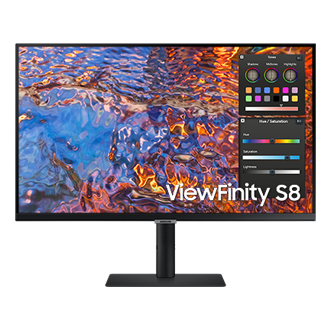
Best for: Compact 4K desk setups
- Screen size
- 27 inches
- Resolution
- 3840 x 2160
- Refresh rate
- 60Hz
- USB-C charging
- Up to 90W
- The 27-inch size fits more desks than a 32-inch screen.
- 4K resolution delivers detailed text and image content.
- USB-C charging helps simplify a compatible laptop workspace.
- Small text can require display scaling for comfortable reading.
Is the Samsung 27-Inch ViewFinity S8 S80D 4K UHD Monitor worth buying on Black Friday 2026?
The Samsung 27-Inch ViewFinity S8 S80D 4K UHD Monitor suits a compact desk that still needs a detailed 4K image. The Samsung 27-Inch ViewFinity S8 S80D 4K UHD Monitor's 90W USB-C charging helps with laptop setups, while its 27-inch screen takes less room than the 32-inch option.
See today’s Black Friday price on Amazon
#6
Samsung 27-Inch ViewFinity S9 S90PC 5K Monitor
The Samsung 27-Inch ViewFinity S9 S90PC 5K Monitor is the best premium display for high-detail creative work, with a 27-inch 5120 x 2880 screen and Thunderbolt 4 connectivity.
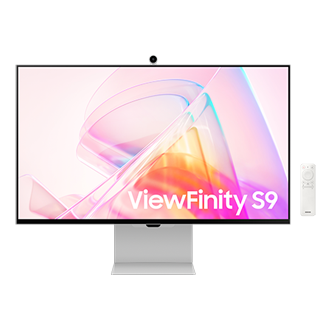
Best for: High-resolution creative work
- Screen size
- 27 inches
- Resolution
- 5120 x 2880
- Refresh rate
- 60Hz
- Thunderbolt charging
- Up to 90W
- 5K resolution provides more pixel detail than a standard 4K display.
- Thunderbolt 4 supports a streamlined compatible workstation.
- The package includes a webcam for video meetings.
- The premium feature set exceeds the needs of basic office tasks.
Is the Samsung 27-Inch ViewFinity S9 S90PC 5K Monitor worth buying on Black Friday 2026?
The Samsung 27-Inch ViewFinity S9 S90PC 5K Monitor is worth considering for detailed creative work and compatible Thunderbolt setups. The Samsung 27-Inch ViewFinity S9 S90PC 5K Monitor's 5120 x 2880 resolution exceeds 4K, but everyday office buyers get a better feature match from the ViewFinity S8.
See today’s Black Friday price on Amazon
#7
Samsung 34-Inch ViewFinity S6 S65UC Ultra-WQHD Monitor
The Samsung 34-Inch ViewFinity S6 S65UC Ultra-WQHD Monitor is the best ultrawide productivity pick for multitaskers, with a 34-inch 3440 x 1440 screen and 100Hz refresh rate.
Best for: Ultrawide multitasking
- Screen size
- 34 inches
- Resolution
- 3440 x 1440
- Refresh rate
- 100Hz
- USB-C charging
- Up to 90W
- Ultrawide format puts multiple windows side by side.
- 100Hz refresh rate offers smoother motion than a 60Hz monitor.
- USB-C charging and built-in KVM features support desk productivity.
- The 3440 x 1440 resolution is not 4K.
Is the Samsung 34-Inch ViewFinity S6 S65UC Ultra-WQHD Monitor worth buying on Black Friday 2026?
The Samsung 34-Inch ViewFinity S6 S65UC Ultra-WQHD Monitor is a good fit for spreadsheet work and side-by-side windows. The Samsung 34-Inch ViewFinity S6 S65UC Ultra-WQHD Monitor's 34-inch ultrawide screen and 100Hz refresh rate offer a different experience from the 4K M7 and S8 models.
See today’s Black Friday price on Amazon
Which is better, Samsung Smart Monitor M7 or Samsung ViewFinity S8?
Samsung Smart Monitor M7 is better for streaming and all-in-one convenience, while Samsung ViewFinity S8 is better for laptop-centered productivity and desk adjustment. Both lines include 4K, 60Hz models, so the main difference is how each monitor fits into a workspace.
The M7 includes smart TV apps and speakers, making it a straightforward choice for a desk used for both work and entertainment. The S8 puts more emphasis on a productivity monitor setup, including an adjustable stand and USB-C charging up to 90W on the selected models. That higher power delivery suits compatible laptops that need more charging capacity. Choose M7 for a screen that can entertain without a computer; choose S8 for a monitor that anchors a work desk.
Is the Samsung Smart Monitor M7 good for Black Friday 2026?
Samsung Smart Monitor M7 is a strong Black Friday 2026 choice for shoppers who want a 4K monitor with built-in streaming and a 60Hz refresh rate. The M7’s smart functions make it more versatile than a standard computer monitor for mixed-use rooms.
The 32-inch M70D is the balanced pick for desk work, video and streaming, while the 43-inch version suits larger rooms and shared viewing. USB-C supports a tidy connection to compatible laptops, and built-in apps keep entertainment available when the computer is off. Skip it if a highly adjustable, work-first monitor is the priority or if high refresh gaming is the main use.
What does Samsung ViewFinity S8 offer over the M7?
Samsung ViewFinity S8 offers a more productivity-focused setup than Samsung Smart Monitor M7, with an IPS panel and USB-C charging up to 90W on the featured S80D models. Both ranges offer 4K resolution and a 60Hz refresh rate in these configurations.
The S8’s adjustable stand supports a comfortable desk position, and USB-C power delivery can reduce cable clutter for compatible laptops. The M7 counters with integrated streaming features and smart TV apps, so the difference is not a simple performance upgrade. Pick S8 for work, laptop docking and monitor ergonomics. Pick M7 when standalone streaming is a daily requirement or when a single screen serves multiple roles.
Which screen size should you choose?
A 27-inch 4K monitor fits compact desks, a 32-inch 4K screen balances workspace and detail, and a 43-inch M7 suits TV-like viewing. The best size depends on desk depth, viewing distance and whether the display serves one person or a room.
The 27-inch ViewFinity S8 gives a compact workspace a sharp image, while the 32-inch M7 and S8 leave more room for multiple windows. The 43-inch M7 is the roomiest smart monitor in this lineup and is better suited to a larger surface. The 34-inch ViewFinity S6 trades the common 16:9 shape for an ultrawide layout, making it useful for side-by-side tasks. Measure the desk and check stand depth before choosing.
Which Samsung monitor is best for gaming?
Samsung 34-Inch ViewFinity S6 S65UC is the strongest gaming-oriented choice here, with a 100Hz refresh rate, while the featured M7 and S8 models run at 60Hz. The S6 still prioritizes productivity over dedicated gaming features.
The 100Hz refresh rate makes motion smoother than on the 60Hz models, and its 3440 x 1440 ultrawide resolution gives compatible games a wider field of view. The M7 remains suitable for casual play and console use, but its smart apps and large-screen convenience are its core appeal. Shoppers focused on competitive gaming should compare response time, variable refresh support and console compatibility against a gaming-specific monitor before buying.
Buying Guide
Choose smart features or a work-first monitor
Samsung Smart Monitor M7 is the better match when built-in streaming apps and speakers matter. Samsung ViewFinity S8 is the work-first choice for adjustable positioning and USB-C laptop charging.
Match USB-C power to your laptop
Check your laptop’s charging requirement before choosing. The featured M7 models provide up to 65W USB-C charging, while the S8 models provide up to 90W.
Pick a screen size that fits the desk
A 27-inch screen suits compact desks, 32 inches works as a flexible everyday size, and 43 inches needs more room. Measure desk depth and the monitor stand before ordering.
Check the refresh rate and resolution
The M7 and S8 picks offer 4K at 60Hz. Choose the ViewFinity S6 for 100Hz and an ultrawide layout, or the ViewFinity S9 for 5K detail.
Confirm connections and included accessories
Compare HDMI, USB-C, USB-A and webcam needs against the exact product listing. Model configurations can differ by size, so verify the complete model name before checkout.
FAQ
Samsung Smart Monitor M7 vs Samsung ViewFinity S8: which is better for work?
Samsung ViewFinity S8 is better for a laptop-centered work setup, with an adjustable stand and up to 90W USB-C charging on the featured S80D models. Samsung Smart Monitor M7 is the better all-purpose option when streaming apps and speakers are important.
Does the Samsung Smart Monitor M7 have built-in apps?
Samsung Smart Monitor M7 includes a smart TV platform with streaming apps, so compatible services run on the monitor without a connected computer. The feature gives the M7 an entertainment advantage over the work-focused Samsung ViewFinity S8.
Does the Samsung ViewFinity S8 charge a laptop over USB-C?
Samsung ViewFinity S8 S80D models in this guide support USB-C laptop charging up to 90W. Check the exact screen-size model and its listing to confirm the connection and power specifications before buying.
Is a 32-inch 4K Samsung monitor better than a 27-inch model?
A 32-inch 4K Samsung monitor gives more physical screen area for documents and side-by-side windows, while a 27-inch model takes less desk space. Both offer 3840 x 2160 resolution, so choose based on desk size and viewing distance.
Which Samsung monitor is best for streaming without a TV?
Samsung Smart Monitor M7 is the best fit for streaming without a separate TV, because its smart apps and speakers support entertainment directly from the monitor. Choose a 32-inch model for a desk or the 43-inch model for a larger viewing area.
Is the Samsung ViewFinity S6 a 4K monitor?
Samsung ViewFinity S6 S65UC is an ultrawide 3440 x 1440 monitor, not a 4K model. Its 34-inch screen and 100Hz refresh rate favor multitasking and smoother motion over the 4K resolution found on the M7 and S8.