

As an Amazon Associate we earn from qualifying purchases.
- Best overall: Acer Nitro XV272U Vbmiiprzx 27-inch WQHD Gaming Monitor
- Best budget: Dell G2724D 27-inch QHD Gaming Monitor
- Best premium: LG UltraGear 27GP850-B 27-inch QHD Nano IPS Gaming Monitor
- Best for switching computers: Gigabyte M27Q 27-inch QHD KVM Gaming Monitor
- Acer Nitro XV272U Vbmiiprzx is the better fit for high-refresh-rate gaming, with a 170Hz refresh rate and 1440p resolution.
- BenQ MOBIUZ EX2780Q stands out for built-in 2.1-channel audio, HDRi picture modes and a 144Hz refresh rate.
- Both featured monitors use 27-inch QHD displays, but their audio, refresh rates and gaming extras suit different buyers.
- Compare the Acer and BenQ models with five alternatives from Gigabyte, LG, Dell, MSI and ASUS before choosing a Black Friday 2026 monitor.
Acer Nitro XV272U Vbmiiprzx and BenQ MOBIUZ EX2780Q are 27-inch QHD gaming monitors with distinct strengths: Acer offers a higher 170Hz refresh rate, while BenQ pairs 144Hz gaming with built-in 2.1-channel sound. For Black Friday 2026, the right choice depends on whether speed, integrated audio or a feature-rich alternative matters most.
I researched and compared specs, reviews and owner feedback to build this guide around real differences rather than labels alone. My pick for most people is the Acer Nitro XV272U Vbmiiprzx for its faster refresh rate, while the BenQ MOBIUZ EX2780Q makes more sense for a desk setup where built-in speakers and HDRi modes are useful.
How We Picked
- Compared core display specifications, including screen size, QHD resolution, panel type and refresh rate.
- Reviewed gaming features such as adaptive sync, response-time claims, variable refresh support and KVM functionality.
- Considered everyday usability, including built-in speakers, stand adjustments, connectivity and picture modes.
- Researched and compared specs, reviews and owner feedback, prioritizing clearly documented model-specific features.
- Selected alternatives that offer distinct strengths instead of treating every 27-inch QHD gaming monitor as interchangeable.
Comparison Table
| Product | Best for | Resolution | Refresh rate | Standout feature |
|---|---|---|---|---|
| Acer Nitro XV272U Vbmiiprzx 27-inch WQHD Gaming Monitor | Fast-paced PC gaming | 2560 × 1440 | Up to 170Hz | IPS panel |
| BenQ MOBIUZ EX2780Q 27-inch QHD Gaming Monitor | Gaming with built-in speakers | 2560 × 1440 | 144Hz | 2.1-channel speakers |
| Gigabyte M27Q 27-inch QHD KVM Gaming Monitor | Switching between two computers | 2560 × 1440 | Up to 170Hz | Built-in KVM |
| LG UltraGear 27GP850-B 27-inch QHD Nano IPS Gaming Monitor | Color-focused gaming | 2560 × 1440 | 165Hz native, up to 180Hz overclocked | Nano IPS |
| Dell G2724D 27-inch QHD Gaming Monitor | Simple QHD gaming setups | 2560 × 1440 | 165Hz | IPS panel |
| MSI G274QPF-QD 27-inch QHD Quantum Dot Gaming Monitor | Vivid color and fast gameplay | 2560 × 1440 | 170Hz | Quantum-dot Rapid IPS |
| ASUS TUF Gaming VG27AQ1A 27-inch QHD Gaming Monitor | Mixed console and PC gaming | 2560 × 1440 | Up to 170Hz | IPS panel |
Best Picks Reviewed
#1 · Top pick
Acer Nitro XV272U Vbmiiprzx 27-inch WQHD Gaming Monitor
The Acer Nitro XV272U Vbmiiprzx 27-inch WQHD Gaming Monitor is the best high-refresh-rate pick for PC gamers who want sharp 1440p play. The Acer Nitro XV272U Vbmiiprzx 27-inch WQHD Gaming Monitor's 170Hz refresh rate gives it a speed advantage over the BenQ MOBIUZ EX2780Q.

Best for: Fast-paced PC gaming
- Screen size
- 27 inches
- Resolution
- 2560 × 1440
- Refresh rate
- Up to 170Hz
- Panel
- IPS
- High 170Hz refresh rate
- QHD resolution suits a 27-inch screen
- IPS panel supports broad viewing angles
- Built-in audio is less of a draw than the BenQ’s 2.1-channel system
Is the Acer Nitro XV272U Vbmiiprzx worth buying on Black Friday 2026?
The Acer Nitro XV272U Vbmiiprzx is worth considering for 1440p gaming, especially when a 170Hz refresh rate is a priority. The Acer Nitro XV272U Vbmiiprzx 27-inch WQHD Gaming Monitor's IPS panel and QHD resolution balance smooth motion with detailed desktop and game images.
See today’s Black Friday price on Amazon
#2
BenQ MOBIUZ EX2780Q 27-inch QHD Gaming Monitor
The BenQ MOBIUZ EX2780Q 27-inch QHD Gaming Monitor is the best built-in-audio pick for players who want fewer desk accessories. The BenQ MOBIUZ EX2780Q 27-inch QHD Gaming Monitor's 144Hz refresh rate and 2.1-channel speaker system combine gaming performance with integrated sound.
Best for: Gaming with built-in speakers
- Screen size
- 27 inches
- Resolution
- 2560 × 1440
- Refresh rate
- 144Hz
- Audio
- 2.1-channel speakers
- Built-in speakers include a subwoofer
- HDRi modes offer picture presets
- QHD resolution with a 144Hz refresh rate
- Refresh rate is lower than the Acer’s 170Hz
Is the BenQ MOBIUZ EX2780Q worth buying on Black Friday 2026?
The BenQ MOBIUZ EX2780Q is a good Black Friday 2026 choice for buyers who value integrated sound and a QHD gaming display. The BenQ MOBIUZ EX2780Q 27-inch QHD Gaming Monitor's 144Hz panel, HDRi modes and 2.1-channel audio make it a versatile desk monitor.
See today’s Black Friday price on Amazon
#3
Gigabyte M27Q 27-inch QHD KVM Gaming Monitor
The Gigabyte M27Q 27-inch QHD KVM Gaming Monitor is the best multitasking pick for users who switch between computers. The Gigabyte M27Q 27-inch QHD KVM Gaming Monitor's 170Hz refresh rate and built-in KVM functionality combine responsive gaming with a useful desk-control feature.
Best for: Switching between two computers
- Screen size
- 27 inches
- Resolution
- 2560 × 1440
- Refresh rate
- Up to 170Hz
- Feature
- Built-in KVM
- KVM feature supports a multi-computer setup
- 170Hz refresh rate
- QHD IPS display
- The KVM feature is unnecessary for a single-computer setup
Is the Gigabyte M27Q worth buying on Black Friday 2026?
The Gigabyte M27Q is worth considering when one monitor needs to serve both a gaming PC and another computer. The Gigabyte M27Q 27-inch QHD KVM Gaming Monitor's 170Hz QHD IPS display handles gaming, while the integrated KVM feature helps simplify switching between connected systems.
See today’s Black Friday price on Amazon
#4
LG UltraGear 27GP850-B 27-inch QHD Nano IPS Gaming Monitor
The LG UltraGear 27GP850-B 27-inch QHD Nano IPS Gaming Monitor is the best color-focused pick for gamers who want a fast display with a Nano IPS panel. The LG UltraGear 27GP850-B 27-inch QHD Nano IPS Gaming Monitor's refresh rate reaches 180Hz with overclocking.
Best for: Color-focused gaming
- Screen size
- 27 inches
- Resolution
- 2560 × 1440
- Refresh rate
- 165Hz native, up to 180Hz overclocked
- Panel
- Nano IPS
- Nano IPS panel
- Overclocked refresh rate reaches 180Hz
- QHD resolution
- Overclocking is required to reach the maximum refresh rate
Is the LG UltraGear 27GP850-B worth buying on Black Friday 2026?
The LG UltraGear 27GP850-B is a strong choice for buyers who want a QHD Nano IPS gaming monitor. The LG UltraGear 27GP850-B 27-inch QHD Nano IPS Gaming Monitor's 165Hz native refresh rate and 180Hz overclocked option offer a high-refresh alternative to both the Acer and BenQ models.
See today’s Black Friday price on Amazon
#5
Dell G2724D 27-inch QHD Gaming Monitor
The Dell G2724D 27-inch QHD Gaming Monitor is the best straightforward gaming pick for buyers who want a fast 1440p display without extra desk features. The Dell G2724D 27-inch QHD Gaming Monitor's 165Hz refresh rate delivers a solid balance of clarity and motion.
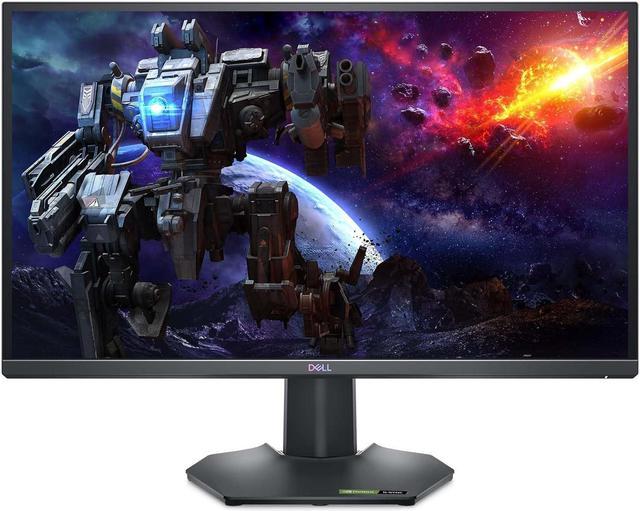
Best for: Simple QHD gaming setups
- Screen size
- 27 inches
- Resolution
- 2560 × 1440
- Refresh rate
- 165Hz
- Panel
- IPS
- 165Hz refresh rate
- QHD IPS display
- A focused feature set for gaming
- Does not include the BenQ’s 2.1-channel audio system
Is the Dell G2724D worth buying on Black Friday 2026?
The Dell G2724D is worth considering for a clean, uncomplicated QHD gaming setup. The Dell G2724D 27-inch QHD Gaming Monitor's 165Hz IPS panel offers a high-refresh experience, while its straightforward feature set suits buyers who do not need built-in KVM or enhanced speakers.
See today’s Black Friday price on Amazon
#6
MSI G274QPF-QD 27-inch QHD Quantum Dot Gaming Monitor
The MSI G274QPF-QD 27-inch QHD Quantum Dot Gaming Monitor is the best quantum-dot option for gamers who prioritize vivid color and a high refresh rate. The MSI G274QPF-QD 27-inch QHD Quantum Dot Gaming Monitor's 170Hz panel pairs QHD detail with fast on-screen motion.
Best for: Vivid color and fast gameplay
- Screen size
- 27 inches
- Resolution
- 2560 × 1440
- Refresh rate
- 170Hz
- Panel
- Rapid IPS with quantum dot
- Quantum-dot display technology
- 170Hz refresh rate
- QHD resolution
- Extra color technology is less important to buyers focused only on speed
Is the MSI G274QPF-QD worth buying on Black Friday 2026?
The MSI G274QPF-QD is a good fit for gamers who want QHD resolution, a 170Hz refresh rate and quantum-dot color technology. The MSI G274QPF-QD 27-inch QHD Quantum Dot Gaming Monitor's specifications make it a direct alternative to the Acer Nitro XV272U for fast PC gaming.
See today’s Black Friday price on Amazon
#7
ASUS TUF Gaming VG27AQ1A 27-inch QHD Gaming Monitor
The ASUS TUF Gaming VG27AQ1A 27-inch QHD Gaming Monitor is the best console-and-PC flexibility pick for buyers who want a high-refresh 1440p screen. The ASUS TUF Gaming VG27AQ1A 27-inch QHD Gaming Monitor's refresh rate reaches 170Hz, supporting fast gameplay across compatible setups.
Best for: Mixed console and PC gaming
- Screen size
- 27 inches
- Resolution
- 2560 × 1440
- Refresh rate
- Up to 170Hz
- Panel
- IPS
- Up to 170Hz refresh rate
- QHD IPS panel
- Gaming-focused feature set
- Does not match BenQ’s integrated 2.1-channel sound
Is the ASUS TUF Gaming VG27AQ1A worth buying on Black Friday 2026?
The ASUS TUF Gaming VG27AQ1A is worth considering for a mixed gaming setup that includes PC and console play. The ASUS TUF Gaming VG27AQ1A 27-inch QHD Gaming Monitor's QHD IPS panel and refresh rate of up to 170Hz offer a fast display, subject to supported input and settings.
See today’s Black Friday price on Amazon
Which is better, Acer Nitro XV272U or BenQ EX2780Q?
The Acer Nitro XV272U Vbmiiprzx is the better fit for maximum refresh rate, with 170Hz compared with 144Hz on the BenQ MOBIUZ EX2780Q. Both monitors have 27-inch QHD displays, so the key decision is speed versus built-in sound.
Choose the Acer Nitro XV272U Vbmiiprzx for competitive PC games where a higher refresh rate is a priority. Choose the BenQ MOBIUZ EX2780Q for a more self-contained setup: its 2.1-channel audio system includes a subwoofer, and its HDRi modes offer convenient picture options.
Both models make sense as gaming monitors, but neither wins every category. Check the exact model listing and supported connection options against your computer or console before buying.
Is 1440p resolution good on a 27-inch gaming monitor?
A 27-inch QHD monitor such as the Acer Nitro XV272U Vbmiiprzx provides 2560 × 1440 resolution, a useful match for gaming and desktop work. The resolution offers more detail than Full HD while avoiding the greater graphics demand of 4K.
The BenQ MOBIUZ EX2780Q uses the same 2560 × 1440 resolution, as do all five alternatives in this guide. A monitor’s refresh rate and your computer’s graphics performance also affect the experience, especially in fast games.
For buyers comparing QHD monitors, look at text clarity, panel type, refresh rate and connection needs together. Resolution alone does not determine whether a display suits a particular desk or gaming system.
What refresh rate should a gaming monitor have?
A 144Hz refresh rate is a useful baseline for smooth PC gaming, while the Acer Nitro XV272U Vbmiiprzx and Gigabyte M27Q reach 170Hz. Higher refresh rates show more frames per second when the computer and game produce enough frames.
The BenQ MOBIUZ EX2780Q reaches 144Hz and suits many gaming setups, especially when integrated speakers are valuable. The LG UltraGear 27GP850-B offers a 165Hz native rate and up to 180Hz with overclocking, while the Dell G2724D reaches 165Hz.
Match the screen’s refresh rate to your graphics hardware and game preferences. Competitive players often place more weight on refresh rate, while casual players can value speakers, color features and convenience just as highly.
Which monitor is best for built-in audio?
The BenQ MOBIUZ EX2780Q is the clearest choice for built-in audio because it has a 2.1-channel speaker system with a subwoofer. The feature reduces the need for separate desktop speakers for everyday viewing and casual gaming.
The Acer Nitro XV272U Vbmiiprzx places more emphasis on a 170Hz gaming display than on an enhanced integrated sound setup. Buyers who already use a headset, soundbar or speakers have less reason to favor the BenQ for audio.
Consider where the monitor will sit and how sound will be used. Built-in audio can simplify a compact desk, but dedicated headphones or speakers remain a better fit for buyers who want a separate sound system.
Which 27-inch QHD gaming monitor is best for productivity too?
The Gigabyte M27Q is the best productivity-focused alternative for people who use two computers, thanks to its built-in KVM feature and 170Hz QHD display. KVM functionality helps control more than one connected system with a shared keyboard and mouse.
For a single-computer desk, the Acer Nitro XV272U Vbmiiprzx and Dell G2724D provide QHD resolution and high refresh rates without making KVM a deciding factor. The BenQ MOBIUZ EX2780Q is useful when integrated sound also serves video calls and media.
Monitor ergonomics and available ports matter alongside resolution. Confirm the specific model’s connection and stand details against your desk, laptop and peripherals before making the final choice.
Buying Guide
Choose the right refresh rate
Compare refresh rates against your computer’s graphics performance. The Acer Nitro XV272U Vbmiiprzx reaches 170Hz, while the BenQ MOBIUZ EX2780Q reaches 144Hz. A higher maximum rate is most useful when your games and system can supply enough frames.
Check resolution and screen size
All seven picks use 27-inch QHD displays at 2560 × 1440. That shared resolution makes refresh rate, panel technology and extra features more useful comparison points than screen size alone.
Decide whether built-in sound matters
The BenQ MOBIUZ EX2780Q has a 2.1-channel speaker system with a subwoofer. Choose it for a simpler audio setup; prioritize a faster panel when a headset or external speakers already handle sound.
Match features to your desk
The Gigabyte M27Q adds KVM functionality for multi-computer desks, while the BenQ includes built-in speakers. Skip it if a monitor’s special feature does not match your setup; prioritize the display qualities you use every day.
Verify compatibility before checkout
Confirm that your computer or console supports the resolution and refresh rate you want, and check the exact model’s ports and included accessories. Compare Black Friday 2026 listings by full model name to avoid confusing similar monitor variants.
FAQ
Acer Nitro XV272U vs BenQ EX2780Q: which is better for gaming?
The Acer Nitro XV272U Vbmiiprzx is better for buyers prioritizing a higher refresh rate, with up to 170Hz. The BenQ MOBIUZ EX2780Q reaches 144Hz and adds 2.1-channel audio, making it a better fit when integrated speakers matter.
Is the BenQ MOBIUZ EX2780Q a 144Hz monitor?
Yes. The BenQ MOBIUZ EX2780Q has a 144Hz refresh rate and 2560 × 1440 resolution. Its 27-inch QHD panel is paired with HDRi picture modes and 2.1-channel audio, including a subwoofer.
Does the Acer Nitro XV272U have a 170Hz refresh rate?
The Acer Nitro XV272U Vbmiiprzx supports a refresh rate of up to 170Hz. Its 27-inch IPS display has 2560 × 1440 resolution, making it a high-refresh QHD option for compatible gaming systems.
Which monitor has better speakers, Acer Nitro XV272U or BenQ EX2780Q?
The BenQ MOBIUZ EX2780Q has the stronger built-in audio feature set, with 2.1-channel speakers and a subwoofer. The Acer Nitro XV272U Vbmiiprzx is the higher-refresh choice, but integrated sound is not its main selling point.
Are QHD gaming monitors good for Black Friday 2026?
QHD gaming monitors are strong Black Friday 2026 options for shoppers who want 2560 × 1440 resolution and high refresh rates in a 27-inch display. Compare full model names, refresh rates, audio and compatibility rather than choosing on resolution alone.
Is the Gigabyte M27Q good for a work and gaming setup?
The Gigabyte M27Q suits a work-and-gaming desk that connects more than one computer. Its built-in KVM supports switching between systems, while its 27-inch QHD IPS display and 170Hz refresh rate support gaming and everyday desktop use.