

As an Amazon Associate we earn from qualifying purchases.
- The Dell UltraSharp U4025QW suits professionals who want a spacious curved screen for productivity, creative work and multitasking.
- Key specs include a 40-inch 5120 x 2160 display, 120Hz refresh rate, 2500R curve and Thunderbolt 4 connectivity.
- For Black Friday 2026, compare retailer bundles, included cables, seller details, delivery terms and stock on the exact Dell UltraSharp U4025QW model.
- The Dell UltraSharp U4025QW is a capable premium work monitor for buyers who value screen space and docking features over a compact setup.
- The Dell UltraSharp U4025QW combines a 40-inch curved screen with 5K2K resolution and a 120Hz refresh rate.
- Thunderbolt 4 connectivity, a built-in hub and Ethernet help reduce desktop cable clutter.
- The 2500R curve and wide 21:9 display suit side-by-side windows, timelines and detailed documents.
- A large desk and a compatible computer help buyers get the most from the Dell UltraSharp U4025QW.
- Black Friday shoppers should verify the exact model, retailer bundle and return terms before checkout.
The Dell UltraSharp U4025QW is a 40-inch 5K2K curved monitor with a 120Hz refresh rate and Thunderbolt 4 docking, built for people who want one expansive workspace. For Black Friday 2026, I’m focusing on the details that affect real value: the exact model, included accessories, seller support and whether the screen fits your desk and computer.
I’m Marcus Reed, and we researched and compared specs, reviews and owner feedback to assess where the Dell UltraSharp U4025QW makes sense. My pick for most people who need one monitor for demanding office work is this display, provided they have room for its wide panel and value its hub features. The sections below explain what to check before buying.
How We Picked
- Compared the Dell UltraSharp U4025QW’s resolution, panel size, curve and refresh rate against common productivity needs.
- Reviewed its Thunderbolt 4, USB hub, network and display connections for laptop-docking practicality.
- Considered owner feedback about desk space, setup, text clarity and everyday use.
- Prioritized Black Friday deal checks that affect purchase value, including seller identity, included accessories, returns and stock.
Dell UltraSharp U4025QW Black Friday Deals 2026
#1 · Top pick
Dell UltraSharp U4025QW
The Dell UltraSharp U4025QW is a feature-rich 40-inch work monitor for buyers who want a wide, high-resolution desktop and integrated docking. The Dell UltraSharp U4025QW's size, cost tier and demanding resolution make it a focused choice rather than a simple upgrade for every desk.
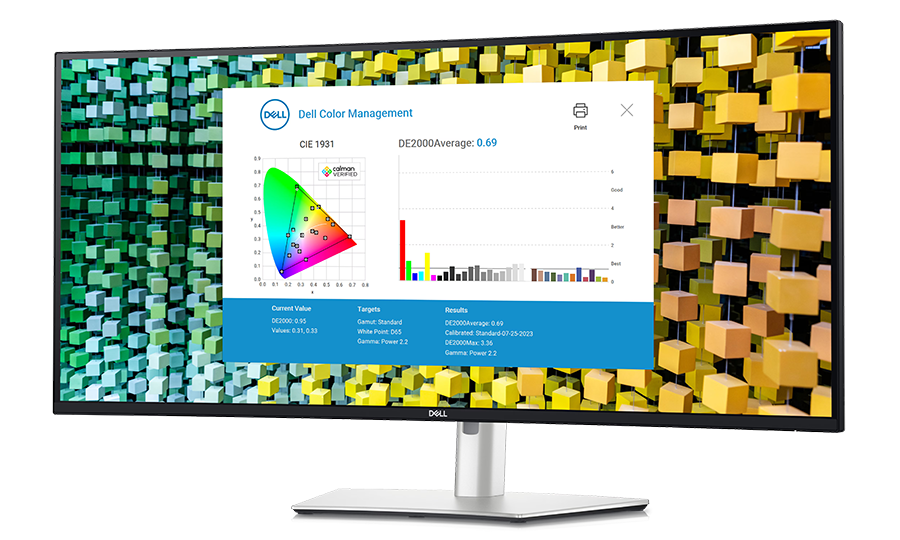
Best for: Professionals who need expansive workspace and laptop docking in one monitor.
- Screen size
- 40 inches
- Resolution
- 5120 x 2160 pixels, 5K2K
- Refresh rate
- 120Hz
- Curvature
- 2500R
- Panel type
- IPS Black
- Upstream connection
- Thunderbolt 4, up to 140W power delivery
- Broad 5K2K workspace supports multiple open windows.
- 120Hz refresh rate makes scrolling and motion feel smoother.
- Thunderbolt 4 and integrated hub simplify laptop connections.
- 2500R curve helps keep the wide screen within a natural viewing arc.
- The 40-inch panel needs a deep, wide desk and careful placement.
- Driving the full resolution at high refresh rates calls for a capable computer.
Is the Dell UltraSharp U4025QW worth buying on Black Friday 2026?
The Dell UltraSharp U4025QW is worth considering on Black Friday 2026 if a 40-inch 5K2K workspace, 120Hz refresh rate and Thunderbolt 4 hub match your setup. Check the exact model, seller, included accessories and return policy, and confirm your computer supports the display.
See today’s Black Friday price on Amazon
What makes the Dell UltraSharp U4025QW stand out?
The Dell UltraSharp U4025QW pairs a 40-inch 5120 x 2160 display with a 120Hz refresh rate for a high-detail, extra-wide work area. The 21:9 format gives spreadsheets, editing timelines and browser windows room to sit side by side, reducing the need to switch between full-screen apps.
IPS Black technology and the 2500R curve add to the monitor’s productivity focus. The curve follows the breadth of the panel, while the high pixel count helps keep text and fine interface details crisp at a normal working distance. Dell lists wide color coverage, including 99 percent DCI-P3, for creative tasks where color range matters.
The strongest case for the Dell UltraSharp U4025QW is not just its screen. Thunderbolt 4, USB ports and Ethernet make the display a desktop hub for a connected laptop. Buyers should still confirm that their computer can drive the resolution and refresh rate they want.
Is the Dell UltraSharp U4025QW good for work and multitasking?
The Dell UltraSharp U4025QW is well suited to multitasking because its 40-inch 5K2K panel can show several work windows without stacking them as tightly as a standard widescreen display. Office users can keep documents, messages and reference material visible together, while developers and editors gain room for long timelines and tool panels.
The 120Hz refresh rate supports smoother scrolling and cursor movement than a conventional 60Hz screen. That feature improves day-to-day responsiveness, though it does not replace the high refresh rates sought by competitive gaming specialists. The wide format also supports a more continuous workspace than a pair of separate monitors, without a bezel dividing the center.
Desk layout matters. The Dell UltraSharp U4025QW is physically large, so measure the desk width and viewing distance, then check that stands, speakers and laptop docks still fit. Skip it if you need a small display, have limited desk depth or rarely keep multiple windows open.
What ports and docking features does the Dell UltraSharp U4025QW have?
The Dell UltraSharp U4025QW has Thunderbolt 4 connectivity with power delivery up to 140W, making one-cable laptop docking a central part of its appeal. A compatible computer can use the cable for display output, data and charging, while the monitor’s integrated ports help connect desk accessories.
The monitor also includes a built-in USB hub and Ethernet connectivity, useful for a keyboard, mouse, storage device or wired network connection. Dell’s hub design aims to keep frequently used accessories attached to the display rather than directly to a laptop. That can make a shared desk easier to connect and disconnect.
Check your laptop’s port capabilities before relying on a single cable. Thunderbolt 4 support, charging needs, display output and operating-system compatibility all matter. Review the Dell UltraSharp U4025QW’s current connection diagram and the computer maker’s specifications, then identify any adapters or cables your workspace still needs.
What should you know about image quality on the Dell UltraSharp U4025QW?
The Dell UltraSharp U4025QW provides 5120 x 2160 resolution across a 40-inch IPS Black panel, giving text and interface elements plenty of detail for productivity. The 21:9 aspect ratio creates horizontal room for wide documents, video timelines and multiple apps, while the 2500R curve helps make the panel easier to view across its width.
Dell specifies 99 percent DCI-P3 color coverage, a useful reference for design and media work that benefits from a broad color gamut. Color coverage alone does not guarantee that every display is perfectly suited to a particular production workflow. Buyers with strict color requirements should check calibration needs and professional review measurements before purchase.
The 120Hz refresh rate is another practical image-quality feature: scrolling and supported motion appear smoother than on a 60Hz display. The Dell UltraSharp U4025QW is aimed at mixed work and productivity, not at replacing a dedicated high-refresh gaming monitor. Confirm that the computer and cable support the resolution and refresh rate together.
Will the Dell UltraSharp U4025QW work with your computer?
The Dell UltraSharp U4025QW works best with a computer that supports 5120 x 2160 output and the monitor’s preferred refresh rate over a compatible connection. Thunderbolt 4 laptops are a natural match for its one-cable docking approach, but the exact experience depends on the computer’s graphics hardware, ports and operating system.
A computer with USB-C does not automatically support every Thunderbolt feature or the same charging level. Check the manufacturer’s specifications for display output, USB-C power delivery and supported resolution. Desktop users should also confirm that their graphics card has an appropriate video output and can drive the wide 5K2K panel at the target refresh rate.
Before ordering, list the devices that need to connect: laptop, desktop, webcam, storage, network and peripherals. Compare that list with the Dell UltraSharp U4025QW port layout and verify which cables are included. A little compatibility checking prevents a premium monitor from becoming a setup that needs extra adapters.
What should you check before buying the Dell UltraSharp U4025QW on Black Friday?
For Black Friday 2026, verify that the listing names the Dell UltraSharp U4025QW and that the seller, fulfillment details and warranty terms are clear. Similar monitor names and configuration descriptions can create confusion, so match the model number rather than relying on a short headline or product photo.
Compare what each retailer includes in the box, including the power cable, Thunderbolt cable and any other listed accessories. Review delivery timing, return conditions and the process for handling a damaged screen. A bundle has value only when its extras match your setup and the seller’s terms work for you.
Large-screen stock and delivery arrangements deserve attention, especially if you need a particular arrival date. Check the retailer’s latest product page and cart details before checkout, and save the order confirmation. My advice is to settle your desk measurements and computer compatibility before sale events start, so a quick listing change does not rush the decision.
Buying Guide
Measure your desk and viewing distance
The Dell UltraSharp U4025QW has a 40-inch curved panel, so measure available width and depth before ordering. Leave room for the stand, keyboard and speakers, and check that your normal sitting position suits a wide display.
Confirm laptop and desktop compatibility
The Dell UltraSharp U4025QW’s 5120 x 2160 resolution and 120Hz refresh rate require compatible graphics output. Check your computer’s ports, supported display modes and USB-C or Thunderbolt charging capability before relying on one-cable docking.
Compare the exact Black Friday listing
Match the Dell UltraSharp U4025QW model number across the product page, cart and order confirmation. Review the retailer, included cables, delivery terms, warranty and return policy; verify any bundle contents before treating them as useful value.
Plan the connection layout
List the peripherals and network connections that will use the Dell UltraSharp U4025QW hub. Check its port arrangement against your keyboard, mouse, storage and laptop needs, then account for any adapters or cables not included.
Alternatives to Consider
- LG 40WP95C-W: Choose the LG 40WP95C-W if you want a 40-inch 5K2K curved monitor with Thunderbolt connectivity and its feature set better matches your laptop and desk. Compare port requirements and warranty support before choosing it over the Dell UltraSharp U4025QW.
- Lenovo ThinkVision P40w-20: Choose the Lenovo ThinkVision P40w-20 if its connectivity, management tools or workplace support better fit your organization. Check the precise port and display requirements, since your preferred docking setup should guide the decision against the Dell UltraSharp U4025QW.
- Samsung ViewFinity S9 S49C950: Choose the Samsung ViewFinity S9 S49C950 if you prefer a wider 49-inch super-ultrawide layout for broad timelines and side-by-side applications. Pick the Dell UltraSharp U4025QW instead when its 5K2K resolution and Thunderbolt hub better suit your work.
FAQ
What is the resolution of the Dell UltraSharp U4025QW?
The Dell UltraSharp U4025QW has a 5120 x 2160 resolution, often described as 5K2K, on a 40-inch curved display. The wide 21:9 format provides room for multiple applications, long editing timelines and large spreadsheets. Check your computer’s graphics output to confirm support for the resolution.
Does the Dell UltraSharp U4025QW support 120Hz?
Yes, the Dell UltraSharp U4025QW supports a refresh rate of up to 120Hz. The higher refresh rate makes compatible desktop motion and scrolling appear smoother than on a 60Hz monitor. Your computer, graphics connection and selected display settings must support the resolution and refresh rate together.
Does the Dell UltraSharp U4025QW have Thunderbolt 4?
Yes, the Dell UltraSharp U4025QW includes Thunderbolt 4 connectivity and supports power delivery up to 140W. A compatible laptop can connect for display, data and charging through one cable. Confirm your laptop’s Thunderbolt and charging specifications, since USB-C ports do not all support identical features.
Is the Dell UltraSharp U4025QW a good monitor for MacBook?
The Dell UltraSharp U4025QW can suit a MacBook with compatible Thunderbolt or USB-C display output, particularly when you want a large 5K2K workspace and monitor-based docking. Confirm the specific MacBook model’s supported external display resolution, refresh rate and charging requirements before buying.
Is the Dell UltraSharp U4025QW good for gaming?
The Dell UltraSharp U4025QW’s 120Hz refresh rate supports smoother motion than a 60Hz display, and its 5K2K resolution creates a detailed, wide image. The monitor is primarily oriented toward productivity and docking. Check your graphics hardware and game requirements before expecting demanding titles to run at full resolution.
What should I check in a Dell UltraSharp U4025QW Black Friday deal?
For a Dell UltraSharp U4025QW Black Friday 2026 offer, verify the exact model number, seller, warranty, delivery terms and return policy. Compare the included cables and bundle contents with your setup, and confirm the display is in stock through the retailer’s current listing before completing an order.