

As an Amazon Associate we earn from qualifying purchases.
- Best overall: Microsoft 365 Family Subscription
- Best budget: Microsoft 365 Basic Subscription
- Best premium: Microsoft 365 Family Subscription
- Best for one person: Microsoft 365 Personal Subscription
- Microsoft 365 Personal serves 1 person with 1 TB of cloud storage and Office apps.
- Microsoft 365 Family shares benefits with up to 6 people, with 1 TB of storage per person.
- Microsoft 365 Basic is a lower-cost fit for 1 person who needs 100 GB of storage but not desktop Office apps.
- Office Home 2024 is a one-time purchase for 1 PC or Mac, rather than a continuing Microsoft 365 subscription.
- Choose a plan based on the number of people, need for desktop apps, and cloud storage—not the Black Friday label alone.
Microsoft 365 Personal is the better Black Friday 2026 choice for 1 person, while Microsoft 365 Family is the stronger value for households with 2 to 6 people. Both include desktop Office apps and 1 TB of OneDrive storage per licensed person, so the key difference is how many people can use the subscription.
I’m Marcus Reed, and we researched and compared specs, reviews and owner feedback to make this guide practical for shoppers weighing subscriptions against one-time Office purchases. My pick for most households is Microsoft 365 Family; solo users should start with Microsoft 365 Personal, and shoppers who only need web apps should consider Microsoft 365 Basic.
How We Picked
- Compared the number of people each plan supports, including whether a subscription owner can share benefits with other household members.
- Checked cloud storage allotments, desktop app access, and the difference between web-only and installable Office apps.
- Included both Microsoft 365 subscriptions and Office one-time purchases to cover shoppers who prefer recurring access or a fixed license.
- Reviewed business plans as alternatives for small organizations that need user management, business email, or work-focused services.
- Prioritized clear use cases, practical limitations, and plan details that help shoppers compare options during Black Friday 2026.
Comparison Table
| Product | Best for | People | OneDrive storage | Desktop Office apps |
|---|---|---|---|---|
| Microsoft 365 Personal Subscription | One Office user | 1 | 1 TB | Included |
| Microsoft 365 Family Subscription | Households | Up to 6 | 1 TB per person | Included |
| Microsoft 365 Basic Subscription | One storage-focused user | 1 | 100 GB | Not included |
| Microsoft Office Home 2024 One-Time Purchase | One computer, no subscription | 1 | None | Included |
| Microsoft Office Home & Business 2024 One-Time Purchase | One computer with Outlook | 1 | None | Included |
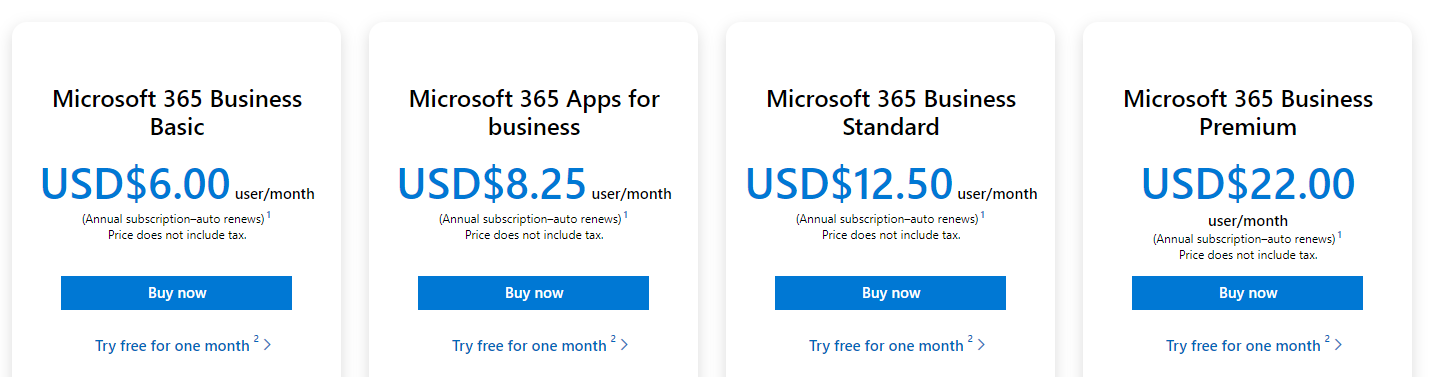
| Microsoft 365 Business Basic Subscription | Small teams using web apps | Up to 300 | 1 TB per user | Not included |
| Microsoft 365 Business Standard Subscription | Small teams needing desktop apps | Up to 300 | 1 TB per user | Included |
Best Picks Reviewed
#1
Microsoft 365 Personal Subscription
The Microsoft 365 Personal Subscription is the best Office plan for 1 person who wants desktop apps and 1 TB of cloud storage. The subscription supports use across multiple devices, with up to 5 devices signed in at once.

Best for: One person who uses Office across devices
- People
- 1
- OneDrive storage
- 1 TB
- Devices signed in at once
- Up to 5
- Subscription term
- 1 year or monthly
- Includes desktop Word, Excel, PowerPoint, and Outlook
- Provides 1 TB of OneDrive storage
- Works across multiple device types
- Does not share its full benefits with additional people
Is the Microsoft 365 Personal Subscription worth buying on Black Friday 2026?
The Microsoft 365 Personal Subscription is worth considering for 1 person who regularly uses desktop Office and needs 1 TB of cloud storage. Compare its subscription renewal terms with a one-time Office license before choosing.
See today’s Black Friday price on Amazon
#2 · Top pick
Microsoft 365 Family Subscription
The Microsoft 365 Family Subscription is the best shared Office plan for households with up to 6 people. Each person receives 1 TB of OneDrive storage, and each can use the apps on up to 5 devices at once.
Best for: Households sharing Office and cloud storage
- People
- 1 to 6
- OneDrive storage
- 1 TB per person, up to 6 TB
- Devices signed in at once
- Up to 5 per person
- Subscription term
- 1 year or monthly
- One subscription can cover up to 6 people
- Gives each person a separate 1 TB storage allowance
- Includes desktop Office apps
- Sharing benefits requires inviting each person to the subscription
Is the Microsoft 365 Family Subscription worth buying on Black Friday 2026?
The Microsoft 365 Family Subscription is a strong option for households with 2 to 6 Office users. Separate accounts and 1 TB of OneDrive storage per person make it easier to share the plan without combining everyone’s files.
See today’s Black Friday price on Amazon
#3
Microsoft 365 Basic Subscription
The Microsoft 365 Basic Subscription is the best storage-focused option for 1 person who does not need desktop Office apps. The plan includes 100 GB of OneDrive storage and web and mobile access to core Office services.
Best for: One person who mainly needs cloud storage
- People
- 1
- OneDrive storage
- 100 GB
- Desktop Office apps
- Not included
- Subscription term
- 1 year or monthly
- Offers more cloud storage than a free account
- Works with web and mobile Office services
- Keeps the plan simple for one user
- Does not include the full desktop Office apps
Is the Microsoft 365 Basic Subscription worth buying on Black Friday 2026?
The Microsoft 365 Basic Subscription is worth considering for 1 person who wants 100 GB of OneDrive storage and uses Office in a browser or on a phone. Choose Personal instead when desktop apps or 1 TB of storage matter.
See today’s Black Friday price on Amazon
#4
Microsoft Office Home 2024 One-Time Purchase
The Microsoft Office Home 2024 One-Time Purchase is the best fit for 1 household user who wants core Office apps without a recurring subscription. The license covers 1 PC or Mac and includes Word, Excel, PowerPoint, and OneNote.

Best for: One user who prefers a one-time license
- Licensed computers
- 1 PC or Mac
- Included apps
- 4
- License type
- One-time purchase
- Cloud storage included
- None
- Does not require a recurring subscription
- Includes 4 familiar Office apps
- Suitable for a single primary computer
- Does not include OneDrive storage or Outlook
Is the Microsoft Office Home 2024 One-Time Purchase worth buying on Black Friday 2026?
The Microsoft Office Home 2024 One-Time Purchase suits 1 person who needs Word, Excel, PowerPoint, and OneNote on a single PC or Mac. Microsoft 365 is a better match for multi-device use, cloud storage, and ongoing app access.
See today’s Black Friday price on Amazon
#5
Microsoft Office Home & Business 2024 One-Time Purchase
The Microsoft Office Home & Business 2024 One-Time Purchase is the best one-computer option for a home or small-business user who needs Outlook. The license covers 1 PC or Mac and adds Outlook to the core Office apps.

Best for: One computer user who needs Outlook
- Licensed computers
- 1 PC or Mac
- Included apps
- 5
- License type
- One-time purchase
- Cloud storage included
- None
- Includes Outlook for email and calendars
- Provides a one-time license for 1 computer
- Includes Word, Excel, PowerPoint, and OneNote
- Does not include OneDrive cloud storage
Is the Microsoft Office Home & Business 2024 One-Time Purchase worth buying on Black Friday 2026?
The Microsoft Office Home & Business 2024 One-Time Purchase is a practical choice for 1 PC or Mac user who needs Outlook and core Office apps. Choose Microsoft 365 instead if your work requires cloud storage or multiple devices.
See today’s Black Friday price on Amazon
#6
Microsoft 365 Business Basic Subscription
The Microsoft 365 Business Basic Subscription is the best web-first option for small organizations that need business services without desktop Office apps. The plan supports up to 300 users and provides 1 TB of OneDrive storage per user.
Best for: Small teams using web and mobile apps
- Users
- Up to 300
- OneDrive storage
- 1 TB per user
- Desktop Office apps
- Not included
- Plan type
- Business subscription
- Provides business-oriented account administration
- Includes 1 TB of storage per user
- Supports web and mobile Office apps
- Does not include desktop Office apps
Is the Microsoft 365 Business Basic Subscription worth buying on Black Friday 2026?
The Microsoft 365 Business Basic Subscription is a useful fit for small teams that need web and mobile Office apps, business services, and 1 TB of storage per user. Select Business Standard when staff need installable desktop apps.
See today’s Black Friday price on Amazon
#7
Microsoft 365 Business Standard Subscription
The Microsoft 365 Business Standard Subscription is the best full-app option for organizations with up to 300 users. Each user gets 1 TB of OneDrive storage and desktop Office apps, making the plan a fit for teams that work across devices.
Best for: Small organizations needing desktop Office apps
- Users
- Up to 300
- OneDrive storage
- 1 TB per user
- Desktop Office apps
- Included
- Plan type
- Business subscription
- Includes installable Office apps
- Supports business account management
- Provides 1 TB of storage per user
- Business administration features exceed most household needs
Is the Microsoft 365 Business Standard Subscription worth buying on Black Friday 2026?
The Microsoft 365 Business Standard Subscription is a strong choice for organizations that need desktop Office apps, business services, and storage for up to 300 users. Households should compare Microsoft 365 Family instead of paying for business administration tools.
See today’s Black Friday price on Amazon
Which is better, Microsoft 365 Personal or Microsoft 365 Family?
Microsoft 365 Personal serves one person; Microsoft 365 Family supports up to six, with 1 TB of OneDrive storage per person. Both include desktop Office apps, so choose based on how many people need them.
Family members use separate Microsoft accounts and keep their files private. Choose Personal for solo use; choose Family when several people need Office and storage.
How does Microsoft 365 Family sharing work?
The subscription owner invites up to five other people to Microsoft 365 Family. Each member uses a separate Microsoft account, gets 1 TB of OneDrive storage, and can use Office on up to five devices at once.
Members manage their own files and settings; sharing the plan does not give the owner access to their OneDrive files. Family is for household use, not centralized business administration.
What do Microsoft 365 Personal and Family include?
Microsoft 365 Personal includes Office apps and 1 TB of OneDrive storage for one person. Microsoft 365 Family provides the same benefits for up to six people. Features can vary by device and account, so check plan details before buying.
Microsoft 365 Basic offers 100 GB of storage for one user, without the full desktop Office suite. A one-time Office license provides desktop apps without subscription storage. Choose based on your app and storage needs.
Should you buy Microsoft 365 or a one-time Office license?
Microsoft 365 Personal and Family combine Office apps with OneDrive storage and access across devices. Family also supports household sharing. A one-time Office license covers one computer and does not include OneDrive storage.
Compare the apps, devices, and storage you need. Check that the license supports your computer and includes the tools you use, such as Outlook.
Which Microsoft 365 plan should a small business choose?
Microsoft 365 Business Basic provides web and mobile Office apps, while Microsoft 365 Business Standard adds desktop apps. Both include 1 TB of OneDrive storage per user and business account management.
Choose Business Basic for browser-based work and organization-managed accounts. Choose Business Standard when staff need installable Word, Excel, PowerPoint, and Outlook. Personal and Family plans are simpler for household use.
Buying Guide
Count the people who need Office
Microsoft 365 Personal covers one person; Microsoft 365 Family covers up to six. Count users, not devices, since each person can install apps on several devices.
Choose the storage amount
Personal includes 1 TB of OneDrive storage for one user; Family provides 1 TB per person for up to six. Microsoft 365 Basic includes 100 GB for one user.
Decide whether desktop apps matter
Microsoft 365 Personal and Family include desktop apps. Microsoft 365 Basic focuses on web and mobile services. Check device compatibility before buying.
Compare subscription and one-time licenses
Microsoft 365 combines apps with cloud storage during the subscription term. A one-time Office license covers one computer. Review renewal settings and license limits.
Check the Black Friday offer details
Read the listing for the exact plan, user limit, subscription term, renewal settings, and account requirements. Compare included features, not just the offer headline.
FAQ
Is Microsoft 365 Personal or Family better for Black Friday 2026?
Microsoft 365 Family is better for 2 to 6 people who need Office apps and separate OneDrive storage, while Microsoft 365 Personal is better for 1 user. Compare the plan’s user limit and storage allowance with your household’s actual needs.
How many people can use Microsoft 365 Family?
Microsoft 365 Family supports up to 6 people, including the subscription owner. Each person gets an individual account and 1 TB of OneDrive storage. The owner shares the subscription by inviting household members, rather than combining all users under one account.
Does Microsoft 365 Personal include 1 TB of storage?
Yes. Microsoft 365 Personal includes 1 TB of OneDrive storage for 1 person, along with desktop Office apps. The plan supports access across devices, with up to 5 devices signed in at once. Check current plan details for app and platform compatibility.
Can I use Microsoft 365 Family on multiple devices?
Yes. Each Microsoft 365 Family member can install the included apps across their devices and use them on up to 5 devices at once. The plan supports up to 6 people, and each member has a separate account and 1 TB of OneDrive storage.
Is Microsoft 365 Basic enough for Office?
Microsoft 365 Basic is enough for users who need 100 GB of OneDrive storage and use Office services on the web or mobile devices. The plan does not include the full desktop Office apps, so choose Microsoft 365 Personal for installable apps and 1 TB of storage.
What is the difference between Microsoft 365 and Office Home 2024?
Microsoft 365 Personal and Family are subscriptions that include Office apps and OneDrive storage. Microsoft Office Home 2024 is a one-time purchase for 1 PC or Mac, with core Office apps but no OneDrive storage. Office Home & Business 2024 adds Outlook.
Can Microsoft 365 Family be used for a business?
Microsoft 365 Family is designed for household sharing, not business account administration. Small organizations should compare Microsoft 365 Business Basic and Microsoft 365 Business Standard, which support up to 300 users and include business-oriented account management.