

As an Amazon Associate we earn from qualifying purchases.
- Best overall: Kingston FURY Beast 32GB (2 x 16GB) DDR4-3200 CL16 Desktop Memory Kit
- Best budget: Kingston FURY Beast 16GB (2 x 8GB) DDR4-3200 CL16 Desktop Memory Kit
- Best premium: G.Skill Ripjaws V Series 64GB (2 x 32GB) DDR4-3200 CL16 Desktop Memory Kit
- Kingston FURY Beast 32GB (2 x 16GB) DDR4-3600 CL18 Desktop Memory Kit: G.Skill Ripjaws V Series 64GB (2 x 32GB) DDR4-3200 CL16 Desktop Memory Kit
- Both G.Skill Ripjaws V and Kingston FURY Beast offer DDR4 desktop kits in 16GB, 32GB and 64GB capacities.
- A 32GB kit with a 3200 MT/s rating is a practical fit for most DDR4 gaming and everyday desktop builds.
- Kingston FURY Beast modules have a lower profile than G.Skill Ripjaws V modules, a useful detail for tight cooler clearance.
- Check motherboard support and enable the memory profile in BIOS to run a kit at its rated speed.
G.Skill Ripjaws V and Kingston FURY Beast DDR4 memory kits both serve desktop builders looking for dependable dual-channel RAM, but the right choice depends on capacity, speed, clearance and platform support. For Black Friday 2026, a 32GB kit rated at 3200 MT/s stands out as a balanced starting point for gaming and general use.
I researched and compared specs, reviews and owner feedback to sort the main capacities and speed tiers into clear buying choices. G.Skill Ripjaws V offers a broad range of familiar kit configurations, while Kingston FURY Beast pairs common DDR4 speeds with a lower-profile heat spreader. Confirm your motherboard’s memory support and available DIMM slots before choosing.
How We Picked
- Compared capacity and kit layout, prioritizing matched two-module kits for dual-channel desktops.
- Reviewed rated data rates and CAS latency to distinguish everyday value configurations from faster options.
- Considered module height and form factor for compatibility with CPU coolers and compact desktop builds.
- Checked stated compatibility features, including Intel XMP support, while advising buyers to verify motherboard support.
- Used product specifications, reviews and owner feedback to assess practical value without relying on promotional pricing.
Comparison Table
| Product | Best for | Capacity | Rated data rate | CAS latency |
|---|---|---|---|---|
| G.Skill Ripjaws V Series 16GB (2 x 8GB) DDR4-3200 CL16 Desktop Memory Kit | Budget builds | 16GB | 3200 MT/s | CL16 |
| G.Skill Ripjaws V Series 32GB (2 x 16GB) DDR4-3200 CL16 Desktop Memory Kit | Everyday desktop use | 32GB | 3200 MT/s | CL16 |
| G.Skill Ripjaws V Series 32GB (2 x 16GB) DDR4-3600 CL16 Desktop Memory Kit | Higher-speed compatible builds | 32GB | 3600 MT/s | CL16 |
| G.Skill Ripjaws V Series 64GB (2 x 32GB) DDR4-3200 CL16 Desktop Memory Kit | Capacity-heavy workloads | 64GB | 3200 MT/s | CL16 |
| Kingston FURY Beast 16GB (2 x 8GB) DDR4-3200 CL16 Desktop Memory Kit | Compact budget upgrades | 16GB | 3200 MT/s | CL16 |
| Kingston FURY Beast 32GB (2 x 16GB) DDR4-3200 CL16 Desktop Memory Kit | Balanced gaming and general use | 32GB | 3200 MT/s | CL16 |
| Kingston FURY Beast 32GB (2 x 16GB) DDR4-3600 CL18 Desktop Memory Kit | Supported 3600 MT/s systems | 32GB | 3600 MT/s | CL18 |
| Kingston FURY Beast 64GB (2 x 32GB) DDR4-3200 CL16 Desktop Memory Kit | High-capacity desktops | 64GB | 3200 MT/s | CL16 |
Best Picks Reviewed
#1
G.Skill Ripjaws V Series 16GB (2 x 8GB) DDR4-3200 CL16 Desktop Memory Kit
The G.Skill Ripjaws V Series 16GB (2 x 8GB) DDR4-3200 CL16 Desktop Memory Kit is the best entry-level pick for older or budget gaming desktops, with a 3200 MT/s rating.

Best for: Budget builds and modest multitasking
- Capacity
- 16GB (2 x 8GB)
- Rated data rate
- 3200 MT/s
- CAS latency
- CL16
- Dual-channel 2-module kit
- Common 3200 MT/s speed tier
- Straightforward desktop upgrade
- 16GB leaves less headroom for demanding workloads
- Check Ripjaws V clearance against large CPU coolers
Is the G.Skill Ripjaws V Series 16GB (2 x 8GB) DDR4-3200 CL16 Desktop Memory Kit worth buying on Black Friday 2026?
Yes. The G.Skill Ripjaws V Series 16GB (2 x 8GB) DDR4-3200 CL16 Desktop Memory Kit is a sensible low-capacity upgrade for compatible DDR4 desktops, with two matched modules and a 3200 MT/s rating. Choose 32GB for heavier multitasking.
See today’s Black Friday price on Amazon
#2
G.Skill Ripjaws V Series 32GB (2 x 16GB) DDR4-3200 CL16 Desktop Memory Kit
The G.Skill Ripjaws V Series 32GB (2 x 16GB) DDR4-3200 CL16 Desktop Memory Kit is the best all-around G.Skill choice for mainstream desktops, with 32GB at 3200 MT/s.
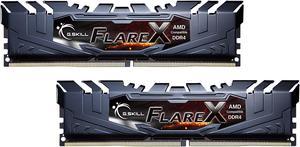
Best for: Everyday gaming and general desktop use
- Capacity
- 32GB (2 x 16GB)
- Rated data rate
- 3200 MT/s
- CAS latency
- CL16
- Useful 32GB capacity
- Matched dual-channel modules
- CL16 rating
- Module height needs clearance checking
- Rated speed requires platform support
Is the G.Skill Ripjaws V Series 32GB (2 x 16GB) DDR4-3200 CL16 Desktop Memory Kit worth buying on Black Friday 2026?
Yes. The G.Skill Ripjaws V Series 32GB (2 x 16GB) DDR4-3200 CL16 Desktop Memory Kit balances capacity, speed and latency for many DDR4 desktops. Confirm motherboard support, then enable the supported memory profile to use the rated 3200 MT/s speed.
See today’s Black Friday price on Amazon
#3
G.Skill Ripjaws V Series 32GB (2 x 16GB) DDR4-3600 CL16 Desktop Memory Kit
The G.Skill Ripjaws V Series 32GB (2 x 16GB) DDR4-3600 CL16 Desktop Memory Kit is the best higher-speed G.Skill pick for compatible systems, with a 3600 MT/s rating.

Best for: Supported builds seeking faster rated memory
- Capacity
- 32GB (2 x 16GB)
- Rated data rate
- 3600 MT/s
- CAS latency
- CL16
- 3600 MT/s rated speed
- 32GB dual-channel capacity
- CL16 latency rating
- Motherboard and processor support matter
- Requires profile configuration for rated speed
Is the G.Skill Ripjaws V Series 32GB (2 x 16GB) DDR4-3600 CL16 Desktop Memory Kit worth buying on Black Friday 2026?
Yes, for a desktop that supports the 3600 MT/s profile. The G.Skill Ripjaws V Series 32GB (2 x 16GB) DDR4-3600 CL16 Desktop Memory Kit pairs 32GB capacity with a CL16 rating; verify platform compatibility before choosing it over a 3200 MT/s kit.
See today’s Black Friday price on Amazon
#4
G.Skill Ripjaws V Series 64GB (2 x 32GB) DDR4-3200 CL16 Desktop Memory Kit
The G.Skill Ripjaws V Series 64GB (2 x 32GB) DDR4-3200 CL16 Desktop Memory Kit is the best capacity-focused G.Skill option for heavier desktop workloads, with 64GB across 2 modules.
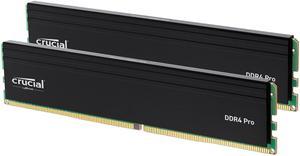
Best for: Large projects and demanding multitasking
- Capacity
- 64GB (2 x 32GB)
- Rated data rate
- 3200 MT/s
- CAS latency
- CL16
- 64GB total capacity
- Two-module configuration
- 3200 MT/s rated speed
- Excess capacity for basic desktop use
- Verify support for 32GB DIMMs
Is the G.Skill Ripjaws V Series 64GB (2 x 32GB) DDR4-3200 CL16 Desktop Memory Kit worth buying on Black Friday 2026?
Yes, when the desktop workload benefits from 64GB. The G.Skill Ripjaws V Series 64GB (2 x 32GB) DDR4-3200 CL16 Desktop Memory Kit provides two modules and a 3200 MT/s rating. Check motherboard capacity limits and memory support before purchase.
See today’s Black Friday price on Amazon
#5
Kingston FURY Beast 16GB (2 x 8GB) DDR4-3200 CL16 Desktop Memory Kit
The Kingston FURY Beast 16GB (2 x 8GB) DDR4-3200 CL16 Desktop Memory Kit is the best compact budget pick for a compatible desktop, with a 3200 MT/s rating and 16GB total capacity.

Best for: Entry-level upgrades with limited cooler clearance
- Capacity
- 16GB (2 x 8GB)
- Rated data rate
- 3200 MT/s
- CAS latency
- CL16
- Two-module kit
- Low-profile heat spreader
- Common 3200 MT/s tier
- 16GB is a limited capacity for demanding workloads
- Confirm motherboard compatibility
Is the Kingston FURY Beast 16GB (2 x 8GB) DDR4-3200 CL16 Desktop Memory Kit worth buying on Black Friday 2026?
Yes. The Kingston FURY Beast 16GB (2 x 8GB) DDR4-3200 CL16 Desktop Memory Kit suits a basic DDR4 desktop upgrade, and its low-profile heat spreader helps with cooler clearance. Choose a 32GB kit for broader multitasking headroom.
See today’s Black Friday price on Amazon
#6 · Top pick
Kingston FURY Beast 32GB (2 x 16GB) DDR4-3200 CL16 Desktop Memory Kit
The Kingston FURY Beast 32GB (2 x 16GB) DDR4-3200 CL16 Desktop Memory Kit is the best overall Kingston pick for most desktop users, with 32GB at 3200 MT/s.
Best for: Balanced gaming and daily computing
- Capacity
- 32GB (2 x 16GB)
- Rated data rate
- 3200 MT/s
- CAS latency
- CL16
- Practical 32GB capacity
- Low-profile module design
- CL16 rating
- Rated speed depends on platform support
- Not the high-capacity choice for intensive projects
Is the Kingston FURY Beast 32GB (2 x 16GB) DDR4-3200 CL16 Desktop Memory Kit worth buying on Black Friday 2026?
Yes. The Kingston FURY Beast 32GB (2 x 16GB) DDR4-3200 CL16 Desktop Memory Kit offers a balanced 32GB capacity, CL16 rating and 3200 MT/s speed. The lower-profile modules suit builds where large CPU coolers restrict memory clearance.
See today’s Black Friday price on Amazon
#7
Kingston FURY Beast 32GB (2 x 16GB) DDR4-3600 CL18 Desktop Memory Kit
The Kingston FURY Beast 32GB (2 x 16GB) DDR4-3600 CL18 Desktop Memory Kit is the best Kingston speed-step option for supported desktops, with a rated data rate of 3600 MT/s.
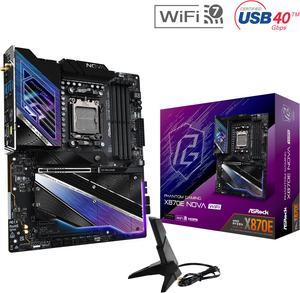
Best for: Compatible systems targeting 3600 MT/s
- Capacity
- 32GB (2 x 16GB)
- Rated data rate
- 3600 MT/s
- CAS latency
- CL18
- 3600 MT/s rated speed
- 32GB across two modules
- Low-profile heat spreader
- CL18 latency rating
- Check CPU and motherboard memory support
Is the Kingston FURY Beast 32GB (2 x 16GB) DDR4-3600 CL18 Desktop Memory Kit worth buying on Black Friday 2026?
Yes, for a compatible desktop configured for 3600 MT/s memory. The Kingston FURY Beast 32GB (2 x 16GB) DDR4-3600 CL18 Desktop Memory Kit combines two modules with 32GB capacity. Confirm the supported memory profile before selecting it.
See today’s Black Friday price on Amazon
#8
Kingston FURY Beast 64GB (2 x 32GB) DDR4-3200 CL16 Desktop Memory Kit
The Kingston FURY Beast 64GB (2 x 32GB) DDR4-3200 CL16 Desktop Memory Kit is the best Kingston choice for capacity-heavy desktop work, with 64GB in a 2-module kit.

Best for: High-capacity desktop workloads
- Capacity
- 64GB (2 x 32GB)
- Rated data rate
- 3200 MT/s
- CAS latency
- CL16
- 64GB total capacity
- Two-module arrangement
- Low-profile heat spreader
- More capacity than basic users need
- Verify motherboard support for 32GB modules
Is the Kingston FURY Beast 64GB (2 x 32GB) DDR4-3200 CL16 Desktop Memory Kit worth buying on Black Friday 2026?
Yes, when demanding desktop work calls for 64GB of RAM. The Kingston FURY Beast 64GB (2 x 32GB) DDR4-3200 CL16 Desktop Memory Kit provides two matched modules and a 3200 MT/s rating. Confirm the motherboard supports this capacity.
See today’s Black Friday price on Amazon
Which is better, G.Skill Ripjaws V or Kingston FURY Beast DDR4?
G.Skill Ripjaws V and Kingston FURY Beast are both strong DDR4 choices, and a matched 32GB kit rated at 3200 MT/s is the safest starting point for a broad range of desktop users. Both lines include two-module options across everyday and higher-capacity configurations.
Kingston FURY Beast stands out for its lower-profile heat spreader, while G.Skill Ripjaws V offers familiar capacity and speed combinations, including 3600 MT/s choices. For most people, the best value comes from matching capacity and rated speed to the computer rather than choosing by brand alone. Compare exact kit specifications, since latency and module layout vary by model.
Is 16GB or 32GB better for a DDR4 desktop?
A 32GB kit is the more flexible choice for a modern desktop, while 16GB suits basic use and upgrades where budget or motherboard slots are limited. Both G.Skill Ripjaws V and Kingston FURY Beast offer 16GB and 32GB dual-module kits.
A 16GB kit with two 8GB modules supports dual-channel operation on a compatible board, but background apps and demanding games leave less spare capacity. A 32GB kit with two 16GB modules gives more room for multitasking and keeps two DIMM slots free on a four-slot motherboard. Check the system’s existing RAM before combining kits; matching kits are the simpler route.
Does DDR4-3600 outperform DDR4-3200?
DDR4-3600 has a higher rated data rate than DDR4-3200, but the real-world difference depends on the processor, motherboard and workload. G.Skill Ripjaws V offers a 32GB DDR4-3600 CL16 option, and Kingston FURY Beast has a 32GB DDR4-3600 CL18 kit.
The higher speed is most relevant when the platform supports the memory profile and the workload benefits from memory bandwidth. A 3200 MT/s CL16 kit remains a balanced choice for many systems and often offers simpler compatibility. Check the motherboard’s memory support list and CPU specifications, then enable the correct XMP profile in BIOS to reach the kit’s rated speed.
Which RAM kit is better for a large CPU cooler?
Kingston FURY Beast is the better starting point for tight CPU-cooler clearance because its modules have a lower-profile heat spreader than G.Skill Ripjaws V. Check the exact kit and cooler dimensions before purchasing, since component layouts vary.
G.Skill Ripjaws V is a capable option when the case and cooler leave adequate room around the DIMM slots. Large air coolers can overhang memory slots, and front-fan adjustments do not suit every build. Review the cooler manufacturer’s clearance information and motherboard layout. A low-profile module reduces fit concerns, but it does not replace measuring the specific components.
What should buyers check before choosing DDR4 RAM?
Buyers should confirm DDR4 support, module capacity, DIMM count and rated speed before choosing either G.Skill Ripjaws V or Kingston FURY Beast. A kit must match the motherboard and processor, not just the case or brand preference.
Check whether the board supports the selected capacity per slot and whether the kit’s XMP profile is supported. Confirm available slots and avoid mixing memory with different speeds or timings when possible. Black Friday 2026 is a useful time to compare exact model specifications, but a compatible kit is a better choice than a faster kit your system cannot run at its rated settings.
Buying Guide
Choose capacity first
Pick 16GB for basic desktop use and 32GB for broader multitasking or gaming. Select 64GB when the workload needs it, and confirm motherboard support for 32GB modules.
Match rated speed to your platform
Compare DDR4-3200 and DDR4-3600 against the processor and motherboard specifications. Enable the supported XMP profile in BIOS to run compatible memory at its rated data rate.
Check latency and kit layout
Compare CAS latency alongside data rate, and favor matched two-module kits for dual-channel desktops. A 2 x 16GB kit gives 32GB while keeping two slots open on a four-slot board.
Measure cooler clearance
Kingston FURY Beast has a lower-profile heat spreader than G.Skill Ripjaws V. Check the exact RAM and cooler dimensions, plus the motherboard’s DIMM layout, before ordering.
FAQ
G.Skill Ripjaws V DDR4 vs Kingston FURY Beast DDR4 Black Friday 2026: which should I buy?
Choose G.Skill Ripjaws V or Kingston FURY Beast by matching capacity, speed and physical clearance to your desktop. A 32GB DDR4-3200 CL16 kit is a balanced choice for many users. Kingston FURY Beast is the better starting point when cooler clearance is tight.
Is Kingston FURY Beast DDR4 compatible with G.Skill Ripjaws V?
Both product lines use desktop DDR4 DIMMs, but compatibility depends on the motherboard and processor. Mixing G.Skill Ripjaws V with Kingston FURY Beast is less predictable than using one matched kit. Check board support, capacity limits and memory settings before combining modules.
Is 3200 MT/s enough for DDR4 gaming?
DDR4-3200 is a solid speed tier for many gaming desktops, especially in a matched dual-channel kit with 32GB capacity. Results depend on the processor, motherboard and game. Confirm platform support and enable the memory profile to run compatible RAM at its rated speed.
Should I buy a 16GB or 32GB DDR4 kit on Black Friday 2026?
Choose 16GB for basic computing or a focused budget upgrade, and choose 32GB for more multitasking headroom. G.Skill Ripjaws V and Kingston FURY Beast both offer these capacities in two-module kits. Check your current memory and available motherboard slots first.
Does Kingston FURY Beast have better cooler clearance than G.Skill Ripjaws V?
Kingston FURY Beast has a lower-profile heat spreader than G.Skill Ripjaws V, which helps in builds with limited space around the DIMM slots. Exact component dimensions still matter. Compare the RAM height with the CPU cooler and motherboard layout before choosing.