

As an Amazon Associate we earn from qualifying purchases.
- Best overall: Samsung 980 1TB
- Best budget: Samsung 970 EVO Plus 1TB
- Best premium: Samsung 990 PRO 1TB
- Best for larger libraries: Samsung 970 EVO Plus 2TB
- Samsung 970 EVO Plus and Samsung 980 both use PCIe 3.0 x4 and reach up to 3,500 MB/s sequential read speed.
- Samsung 970 EVO Plus reaches up to 3,300 MB/s sequential write speed; Samsung 980 reaches up to 3,000 MB/s.
- Samsung 980 uses Host Memory Buffer technology instead of onboard DRAM, while Samsung 970 EVO Plus includes DRAM.
- Samsung 980 PRO and Samsung 990 PRO are PCIe 4.0 alternatives for compatible computers that need faster transfers.
- Check your computer’s M.2 size, NVMe support and PCIe generation before choosing an SSD.
Samsung 970 EVO Plus and Samsung 980 are PCIe 3.0 x4 NVMe SSDs with up to 3,500 MB/s sequential read speed, making either a practical upgrade for many PCs. The Samsung 970 EVO Plus has a higher maximum sequential write speed of 3,300 MB/s, compared with 3,000 MB/s for Samsung 980.
For this Black Friday 2026 buying guide, I researched and compared specs, reviews and owner feedback across Samsung’s popular M.2 SSD lineup. My pick for most people is the Samsung 980 1TB for everyday computing; Samsung 970 EVO Plus 1TB is a strong alternative for buyers who value onboard DRAM. The right choice still depends on capacity, workload and device compatibility.
How We Picked
- Compared manufacturer-listed sequential read and write speeds, interface generation and endurance ratings.
- Considered everyday uses such as boot drives, gaming libraries, large file transfers and laptop upgrades.
- Reviewed product specifications, customer reviews and owner feedback for practical trade-offs.
- Included PCIe 4.0 alternatives for buyers with compatible systems who need higher peak speeds.
- Prioritized clear capacity and compatibility guidance over headline performance alone.
Comparison Table
| Product | Best for | Max sequential read | Max sequential write | Warranty |
|---|---|---|---|---|
| Samsung 970 EVO Plus 1TB | DRAM-backed everyday performance | 3,500 MB/s | 3,300 MB/s | 5 years |
| Samsung 970 EVO Plus 2TB | Large PCIe 3.0 libraries | 3,500 MB/s | 3,300 MB/s | 5 years |
| Samsung 980 1TB | General PC upgrades | 3,500 MB/s | 3,000 MB/s | 5 years |
| Samsung 980 2TB | High-capacity everyday storage | 3,500 MB/s | 3,000 MB/s | 5 years |
| Samsung 980 PRO 1TB | PCIe 4.0 systems | 7,000 MB/s | 5,000 MB/s | 5 years |
| Samsung 990 EVO 1TB | Efficiency-focused newer PCs | 5,000 MB/s | 4,200 MB/s | 5 years |
| Samsung 990 PRO 1TB | Premium PCIe 4.0 performance | 7,450 MB/s | 6,900 MB/s | 5 years |
Best Picks Reviewed
#1
Samsung 970 EVO Plus 1TB
The Samsung 970 EVO Plus 1TB is the best balanced PCIe 3.0 SSD for users who want onboard DRAM, with up to 3,500 MB/s read and 3,300 MB/s write speeds.

Best for: Everyday PC upgrades and DRAM-backed performance
- Capacity
- 1TB
- Max sequential read
- 3,500 MB/s
- Max sequential write
- 3,300 MB/s
- Interface
- PCIe 3.0 x4, NVMe
- Onboard DRAM cache
- Strong sequential write speed for PCIe 3.0
- Five-year limited warranty
- Cannot reach PCIe 4.0 SSD speeds
Is the Samsung 970 EVO Plus 1TB worth buying on Black Friday 2026?
Yes. The Samsung 970 EVO Plus 1TB is a capable PCIe 3.0 NVMe drive with onboard DRAM and sequential speeds up to 3,500 MB/s read and 3,300 MB/s write. Choose it for a compatible PC that benefits from a reliable everyday SSD.
See today’s Black Friday price on Amazon
#2
Samsung 970 EVO Plus 2TB
The Samsung 970 EVO Plus 2TB is the best high-capacity PCIe 3.0 option for users who want onboard DRAM and room for large applications, with 2TB of storage.

Best for: Large PC game and project libraries
- Capacity
- 2TB
- Max sequential read
- 3,500 MB/s
- Max sequential write
- 3,300 MB/s
- Interface
- PCIe 3.0 x4, NVMe
- 2TB capacity suits large libraries
- Onboard DRAM cache
- Five-year limited warranty
- PCIe 3.0 limits peak transfer speeds
Is the Samsung 970 EVO Plus 2TB worth buying on Black Friday 2026?
Yes. The Samsung 970 EVO Plus 2TB combines 2TB of space with PCIe 3.0 x4 performance, reaching up to 3,500 MB/s read and 3,300 MB/s write. The capacity suits users who want fewer drives for games, media and work files.
See today’s Black Friday price on Amazon
#3 · Top pick
Samsung 980 1TB
The Samsung 980 1TB is the best straightforward PCIe 3.0 SSD for everyday PC use, with a maximum sequential read speed of 3,500 MB/s.

Best for: General PC and laptop upgrades
- Capacity
- 1TB
- Max sequential read
- 3,500 MB/s
- Max sequential write
- 3,000 MB/s
- Interface
- PCIe 3.0 x4, NVMe
- Fast sequential read performance
- NVMe M.2 form factor
- Five-year limited warranty
- Uses Host Memory Buffer rather than onboard DRAM
Is the Samsung 980 1TB worth buying on Black Friday 2026?
Yes. The Samsung 980 1TB is a sensible everyday NVMe upgrade, with up to 3,500 MB/s read and 3,000 MB/s write speeds. The Samsung 980 1TB's DRAM-less design uses Host Memory Buffer technology, so it suits general PC use better than demanding sustained workloads.
See today’s Black Friday price on Amazon
#4
Samsung 980 2TB
The Samsung 980 2TB is the best spacious DRAM-less choice for general computing, with 2TB capacity and sequential reads up to 3,500 MB/s.
Best for: High-capacity everyday storage
- Capacity
- 2TB
- Max sequential read
- 3,500 MB/s
- Max sequential write
- 3,000 MB/s
- Interface
- PCIe 3.0 x4, NVMe
- 2TB capacity for apps and media
- Up to 3,500 MB/s sequential reads
- Five-year limited warranty
- No onboard DRAM cache
Is the Samsung 980 2TB worth buying on Black Friday 2026?
Yes. The Samsung 980 2TB delivers substantial storage for a compatible PC, with sequential speeds up to 3,500 MB/s read and 3,000 MB/s write. The Samsung 980 2TB's Host Memory Buffer design works well for everyday storage and normal desktop or laptop workloads.
See today’s Black Friday price on Amazon
#5
Samsung 980 PRO 1TB
The Samsung 980 PRO 1TB is the best step-up SSD for PCIe 4.0 systems, with sequential reads up to 7,000 MB/s.
Best for: Compatible PCIe 4.0 PCs and demanding transfers
- Capacity
- 1TB
- Max sequential read
- 7,000 MB/s
- Max sequential write
- 5,000 MB/s
- Interface
- PCIe 4.0 x4, NVMe
- Higher peak speeds than PCIe 3.0 models
- Onboard DRAM cache
- Five-year limited warranty
- Requires PCIe 4.0 support for top speeds
Is the Samsung 980 PRO 1TB worth buying on Black Friday 2026?
Yes, for a compatible PCIe 4.0 computer. The Samsung 980 PRO 1TB reaches up to 7,000 MB/s read and 5,000 MB/s write, making it a stronger fit for large transfers and demanding workloads than the Samsung 970 EVO Plus or Samsung 980.
See today’s Black Friday price on Amazon
#6
Samsung 990 EVO 1TB
The Samsung 990 EVO 1TB is the best newer-generation efficiency-focused upgrade for compatible systems, with sequential reads up to 5,000 MB/s.

Best for: Efficient newer PC upgrades
- Capacity
- 1TB
- Max sequential read
- 5,000 MB/s
- Max sequential write
- 4,200 MB/s
- Interface
- PCIe 4.0 x4 or PCIe 5.0 x2
- Newer interface flexibility
- Higher peak read speed than PCIe 3.0 drives
- Five-year limited warranty
- Host device determines the available interface speed
Is the Samsung 990 EVO 1TB worth buying on Black Friday 2026?
Yes. The Samsung 990 EVO 1TB offers up to 5,000 MB/s read and 4,200 MB/s write speeds, along with support for PCIe 4.0 x4 or PCIe 5.0 x2. Check the computer’s M.2 specifications to confirm compatibility and expected performance.
See today’s Black Friday price on Amazon
#7
Samsung 990 PRO 1TB
The Samsung 990 PRO 1TB is the best premium option for high-speed PCIe 4.0 storage, with sequential reads up to 7,450 MB/s.
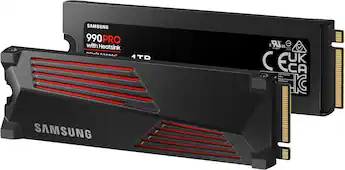
Best for: Premium gaming and demanding PC workloads
- Capacity
- 1TB
- Max sequential read
- 7,450 MB/s
- Max sequential write
- 6,900 MB/s
- Interface
- PCIe 4.0 x4, NVMe
- High sequential read and write speeds
- Onboard DRAM cache
- Five-year limited warranty
- Needs PCIe 4.0 support to reach its rated speeds
Is the Samsung 990 PRO 1TB worth buying on Black Friday 2026?
Yes. The Samsung 990 PRO 1TB is a premium PCIe 4.0 NVMe SSD with sequential speeds up to 7,450 MB/s read and 6,900 MB/s write. Choose it for a compatible PC where fast file handling and demanding storage performance matter.
See today’s Black Friday price on Amazon
Samsung 970 EVO Plus vs Samsung 980: which is better?
Samsung 970 EVO Plus and Samsung 980 share PCIe 3.0 x4 and a maximum sequential read speed of 3,500 MB/s, but their write speeds and cache designs differ. Samsung 970 EVO Plus reaches up to 3,300 MB/s write and includes onboard DRAM. Samsung 980 reaches up to 3,000 MB/s write and uses Host Memory Buffer technology.
For everyday startup, browsing and application use, the two drives are close on paper. Samsung 970 EVO Plus has the clearer advantage for users who value onboard DRAM or frequently move large files. Samsung 980 is still a capable general-use choice. Skip it if the system needs PCIe 4.0 speeds; consider Samsung 980 PRO or Samsung 990 PRO instead.
Is Samsung 970 EVO Plus or Samsung 980 better for gaming?
Samsung 970 EVO Plus 1TB and Samsung 980 1TB both deliver up to 3,500 MB/s sequential reads, making either a solid NVMe gaming drive for compatible PCs. Game loading also depends on the computer, game files and workload, so the difference between these two PCIe 3.0 models is not defined by peak read speed alone.
Choose a 2TB model when a large game library matters more than a small speed distinction. Samsung 970 EVO Plus 2TB adds onboard DRAM, while Samsung 980 2TB offers a DRAM-less design with Host Memory Buffer. For a system with PCIe 4.0 support, Samsung 980 PRO and Samsung 990 PRO have higher maximum sequential speeds.
Which Samsung SSD capacity should you buy?
Samsung 970 EVO Plus and Samsung 980 are available in 1TB and 2TB versions in this guide, giving PC buyers two practical capacity choices. A 1TB drive suits a system drive with everyday applications and a moderate selection of games, while 2TB provides more room for larger libraries, media and project files.
Check how much storage your existing files occupy before choosing. Remember to leave free space for operating system updates, applications and new downloads. For a laptop with only one M.2 slot, a larger capacity can reduce the need to replace the drive later. Confirm the exact model and capacity shown on the product listing before ordering.
Will Samsung 970 EVO Plus and Samsung 980 fit your laptop or PC?
Samsung 970 EVO Plus and Samsung 980 are M.2 2280 NVMe SSDs that use PCIe 3.0 x4, so the device must support that form factor and NVMe storage. A physically similar M.2 slot does not guarantee compatibility: some slots support SATA drives only, and some systems have restrictions on drive thickness or capacity.
Check the device manual or manufacturer support page for M.2 2280 NVMe compatibility before buying. A PCIe 4.0 slot generally supports PCIe 3.0 drives, but the drive operates within its own PCIe 3.0 speed range. For a laptop upgrade, confirm that the existing drive is replaceable and that the computer supports the chosen capacity.
Are PCIe 4.0 Samsung SSDs worth considering?
Samsung 980 PRO 1TB and Samsung 990 PRO 1TB reach up to 7,000 MB/s and 7,450 MB/s sequential read speeds, respectively, compared with up to 3,500 MB/s for Samsung 970 EVO Plus and Samsung 980. The higher figures are relevant to compatible PCIe 4.0 systems and workloads involving large transfers.
Everyday browsing and typical app launches do not always benefit from the highest advertised sequential speed. Choose Samsung 980 PRO or Samsung 990 PRO when the computer supports PCIe 4.0 and the workload justifies the upgrade. For a PCIe 3.0 computer, Samsung 970 EVO Plus or Samsung 980 remains a more directly matched option.
Buying Guide
Check the M.2 slot and PCIe generation
Samsung 970 EVO Plus and Samsung 980 need an M.2 2280 NVMe slot with PCIe support. Confirm the device specifications first; Samsung 980 PRO and Samsung 990 PRO need PCIe 4.0 support to reach their top speeds.
Choose capacity around your library
Samsung 970 EVO Plus 1TB and Samsung 980 1TB suit a typical system drive, while their 2TB versions give more space for games, media and work files. Check current storage use before deciding.
Match the drive to your workload
Samsung 970 EVO Plus includes onboard DRAM and reaches up to 3,300 MB/s write. Samsung 980 uses Host Memory Buffer and reaches up to 3,000 MB/s write, making it a straightforward general-use alternative.
Read the full model name carefully
Samsung 980 and Samsung 980 PRO are different performance tiers: Samsung 980 is PCIe 3.0, while Samsung 980 PRO is PCIe 4.0. Verify the capacity and model suffix on the listing before purchasing.
Review warranty and endurance details
The Samsung SSD models in this guide list a five-year limited warranty. Check the official warranty terms and the capacity-specific endurance rating for the exact drive, especially for frequent large writes.
FAQ
Samsung 970 EVO Plus vs Samsung 980: which should I buy?
Samsung 970 EVO Plus is the better fit for buyers who want onboard DRAM and up to 3,300 MB/s sequential write speed. Samsung 980 reaches up to 3,000 MB/s write and suits general use. Both offer up to 3,500 MB/s sequential read over PCIe 3.0 x4.
Is Samsung 970 EVO Plus faster than Samsung 980?
Samsung 970 EVO Plus has a higher maximum sequential write speed of 3,300 MB/s, compared with 3,000 MB/s for Samsung 980. Both drives list sequential read speeds up to 3,500 MB/s. Real performance depends on the computer and the type of workload.
Does Samsung 980 have DRAM?
Samsung 980 does not include onboard DRAM; the drive uses Host Memory Buffer technology. Samsung 970 EVO Plus includes onboard DRAM. Both are PCIe 3.0 x4 NVMe SSDs, with maximum sequential read speeds of 3,500 MB/s.
Can Samsung 970 EVO Plus work in a PCIe 4.0 slot?
Samsung 970 EVO Plus is a PCIe 3.0 x4 NVMe SSD and fits a compatible PCIe 4.0 M.2 slot, operating at its PCIe 3.0 limits. Check that the computer supports M.2 2280 NVMe drives; a similar-looking SATA-only slot is not enough.
Is Samsung 980 good for a laptop upgrade?
Samsung 980 is a suitable laptop upgrade when the laptop supports M.2 2280 NVMe storage. The 1TB model reaches up to 3,500 MB/s read and 3,000 MB/s write. Verify the laptop’s drive type, slot size and capacity support before ordering.
Should I choose Samsung 980 PRO over Samsung 980?
Choose Samsung 980 PRO when the PC supports PCIe 4.0 and higher transfer speeds matter: the 1TB model reaches up to 7,000 MB/s read. Samsung 980 is PCIe 3.0 and reaches up to 3,500 MB/s read, fitting older or everyday-use systems.