

As an Amazon Associate we earn from qualifying purchases.
- Best overall: eufy Security Smart Lock C220
- Best budget: eufy Security Smart Lock C210
- Best premium: eufy Security Video Smart Lock S330
- Best for flexible unlocking: ULTRALOQ U-Bolt Pro WiFi Smart Lock
- eufy Security Smart Lock C220 is the straightforward pick for a fingerprint keypad lock with built-in Wi-Fi.
- ULTRALOQ U-Bolt Pro WiFi Smart Lock stands out for its 8-in-1 unlocking options and built-in Wi-Fi.
- ULTRALOQ U-Bolt Pro Z-Wave Smart Lock suits homes already using a compatible Z-Wave hub.
- Schlage Encode Smart WiFi Deadbolt offers keypad entry and support for up to 100 access codes.
- Check door fit, smart-home compatibility and power requirements before choosing a Black Friday 2026 smart lock.
Black Friday 2026 smart-lock shoppers comparing the ULTRALOQ U-Bolt and eufy Security Smart Lock C220 are weighing two practical priorities: unlocking flexibility and everyday simplicity. I researched and compared specs, reviews and owner feedback to explain how the fingerprint, keypad, app and connectivity features differ, and to identify alternatives for homes with different smart-home setups.
The eufy Security Smart Lock C220 is an easy recommendation for shoppers who want fingerprint access and built-in Wi-Fi in one lock. The ULTRALOQ U-Bolt Pro WiFi Smart Lock is the best bet for buyers who value a wider range of entry methods. Below, seven picks, clear comparison details and fit-checking advice help narrow the choice.
How We Picked
- Compared entry options, including fingerprint readers, keypads, physical keys and phone apps.
- Reviewed stated connectivity, including built-in Wi-Fi, Bluetooth and Z-Wave requirements.
- Considered power setup and published battery details where the manufacturer provides a clear specification.
- Prioritized products with useful access management, such as guest codes, remote control or smart-home integration.
- Included alternatives for different budgets, hub setups and preferences, while advising shoppers to verify door and deadbolt compatibility.
Comparison Table
| Product | Best for | Fingerprint access | Wi-Fi | Keypad access |
|---|---|---|---|---|
| ULTRALOQ U-Bolt Pro WiFi Smart Lock | Flexible unlocking | Yes | Built in | Yes |
| eufy Security Smart Lock C220 | Fingerprint and app access | Yes | Built in | Yes |
| ULTRALOQ U-Bolt Pro Z-Wave Smart Lock | Compatible Z-Wave homes | Yes | Hub required | Yes |
| eufy Security Smart Lock C210 | Keypad-first access | No | Built in | Yes |
| eufy Security Video Smart Lock S330 | Lock and camera features | Yes | Built in | Yes |
| Aqara Smart Lock U100 | Apple Home Key users | Yes | Hub-dependent features | Yes |
| Schlage Encode Smart WiFi Deadbolt | Many individual access codes | No | Built in | Yes |
Best Picks Reviewed
#1
ULTRALOQ U-Bolt Pro WiFi Smart Lock
The ULTRALOQ U-Bolt Pro WiFi Smart Lock is the best flexible-entry pick for households that want several ways to unlock, with 8-in-1 access methods. Built-in Wi-Fi supports remote management without a separate Wi-Fi bridge.

Best for: Households wanting fingerprint, keypad, app and key access.
- Unlock options
- 8-in-1
- Wi-Fi
- Built in
- Power
- 4 AA batteries
- Fingerprint access
- Yes
- Combines fingerprint, keypad, app and physical-key entry.
- Built-in Wi-Fi enables remote access management.
- Auto-lock and guest access options support daily household use.
- Feature-rich setup requires time to configure.
- Buyers should confirm the door dimensions before ordering.
Is the ULTRALOQ U-Bolt Pro WiFi Smart Lock worth buying on Black Friday 2026?
The ULTRALOQ U-Bolt Pro WiFi Smart Lock is worth considering for a home that benefits from fingerprint entry, remote management and an emergency key. The ULTRALOQ U-Bolt Pro WiFi Smart Lock's 8-in-1 access design offers more entry flexibility than a basic keypad deadbolt.
See today’s Black Friday price on Amazon
#2 · Top pick
eufy Security Smart Lock C220
The eufy Security Smart Lock C220 is the best simple fingerprint-and-Wi-Fi pick for households seeking keyless access with fewer setup pieces. The model supports 6 unlocking methods and connects through built-in Wi-Fi.

Best for: Shoppers who want a fingerprint reader with app control.
- Unlock methods
- 6
- Wi-Fi
- Built in
- Fingerprint access
- Yes
- Ingress rating
- IP53
- Fingerprint access reduces reliance on memorized codes.
- Built-in Wi-Fi supports remote lock management.
- Keypad, app and key entry give households useful alternatives.
- Check battery access and replacement needs during installation planning.
- Smart-home compatibility depends on the household’s existing devices.
Is the eufy Security Smart Lock C220 worth buying on Black Friday 2026?
The eufy Security Smart Lock C220 is worth considering for shoppers who want fingerprint entry, a keypad and built-in Wi-Fi in one deadbolt. Six unlocking methods give family members and guests multiple ways to enter.
See today’s Black Friday price on Amazon
#3
ULTRALOQ U-Bolt Pro Z-Wave Smart Lock
The ULTRALOQ U-Bolt Pro Z-Wave Smart Lock is the best hub-based pick for households already using compatible Z-Wave equipment. The ULTRALOQ U-Bolt Pro Z-Wave Smart Lock's 6-in-1 access setup combines several entry options, while remote control depends on the connected hub.
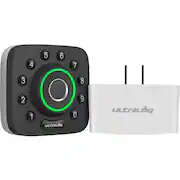
Best for: Homes with a compatible Z-Wave hub already installed.
- Unlock options
- 6-in-1
- Wireless protocol
- Z-Wave
- Fingerprint access
- Yes
- Wi-Fi
- Requires a compatible hub for remote access
- Fingerprint and keypad entry support keyless routines.
- Z-Wave integration suits an established smart-home hub.
- Physical-key entry provides a backup option.
- A compatible hub is needed for connected remote features.
- Not the right fit for shoppers seeking standalone built-in Wi-Fi.
Is the ULTRALOQ U-Bolt Pro Z-Wave Smart Lock worth buying on Black Friday 2026?
The ULTRALOQ U-Bolt Pro Z-Wave Smart Lock is worth considering when a compatible Z-Wave hub is already part of the home. Six access methods add daily flexibility, but remote features rely on the hub rather than built-in Wi-Fi.
See today’s Black Friday price on Amazon
#4
eufy Security Smart Lock C210
The eufy Security Smart Lock C210 is the best keypad-focused pick for shoppers who want app-connected entry without prioritizing a fingerprint reader. Five unlocking methods provide useful flexibility for household members and visitors.

Best for: Keypad-first shoppers seeking connected access.
- Unlock methods
- 5
- Wi-Fi
- Built in
- Fingerprint access
- No
- Power
- 4 AA batteries
- Keypad entry avoids requiring a fingerprint reader.
- Built-in Wi-Fi supports app-based access management.
- A physical key offers a backup entry method.
- Does not include fingerprint unlocking.
- Shoppers should check smart-home support for their specific setup.
Is the eufy Security Smart Lock C210 worth buying on Black Friday 2026?
The eufy Security Smart Lock C210 is worth considering for shoppers who prefer keypad and app access over fingerprint entry. Five unlocking methods cover everyday needs, while built-in Wi-Fi supports remote management through the connected app.
See today’s Black Friday price on Amazon
#5
eufy Security Video Smart Lock S330
The eufy Security Video Smart Lock S330 is the best premium pick for households that want a video doorbell camera and smart lock features in one product. The eufy Security Video Smart Lock S330's 2K camera adds a visual view of the entry area.
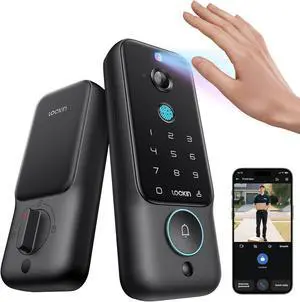
Best for: Shoppers combining entry security and a door camera.
- Camera resolution
- 2K
- Fingerprint access
- Yes
- Wi-Fi
- Built in
- Battery capacity
- 10,000 mAh
- Combines a smart lock and a 2K camera.
- Fingerprint access and keypad entry support keyless use.
- App connectivity brings lock and video features together.
- The camera-focused design is more than a basic deadbolt replacement.
- Check door layout and installation needs before purchase.
Is the eufy Security Video Smart Lock S330 worth buying on Black Friday 2026?
The eufy Security Video Smart Lock S330 is worth considering when a household wants a camera and connected lock in one device. The eufy Security Video Smart Lock S330's 2K camera and fingerprint entry distinguish it from simpler keypad-only deadbolts.
See today’s Black Friday price on Amazon
#6
Aqara Smart Lock U100
The Aqara Smart Lock U100 is the best Apple Home Key pick for shoppers who want fingerprint access and Apple-focused smart-home integration. Support for up to 50 fingerprints suits households managing access for multiple people.
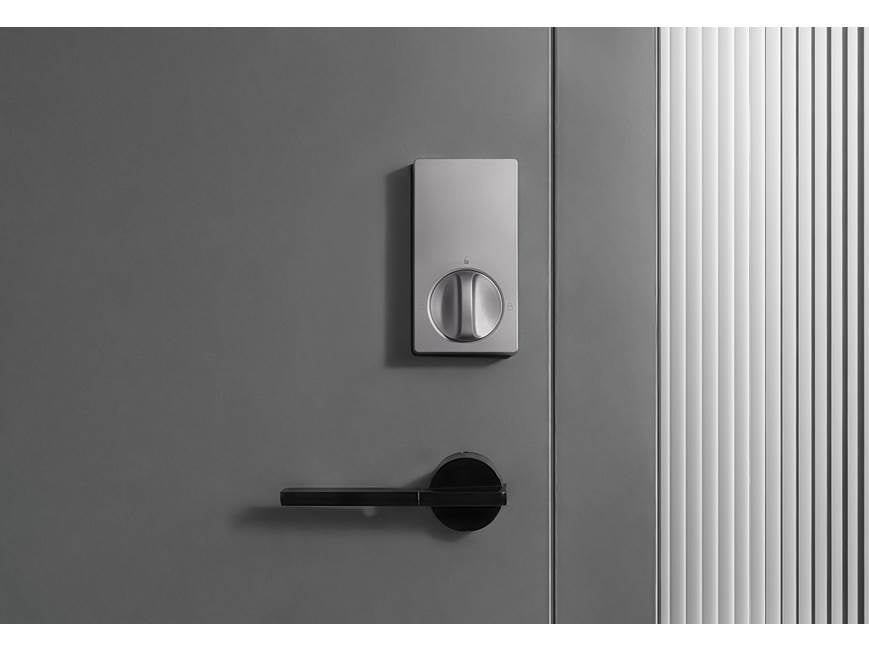
Best for: Apple Home users seeking fingerprint and Home Key access.
- Fingerprint capacity
- Up to 50
- Apple Home Key
- Supported
- Power
- 8 AA batteries
- Weather resistance
- IP65
- Apple Home Key adds a convenient compatible-device option.
- Fingerprint capacity supports up to 50 stored users.
- Keypad and physical-key access provide alternatives.
- Some smart-home functions depend on compatible Aqara equipment.
- Buyers should confirm ecosystem compatibility before choosing.
Is the Aqara Smart Lock U100 worth buying on Black Friday 2026?
The Aqara Smart Lock U100 is worth considering for Apple Home users who want Home Key support alongside fingerprint and keypad entry. The Aqara Smart Lock U100's capacity for up to 50 fingerprints is useful for households with several regular users.
See today’s Black Friday price on Amazon
#7
Schlage Encode Smart WiFi Deadbolt
The Schlage Encode Smart WiFi Deadbolt is the best high-capacity code pick for households that manage many guests or service providers. The keypad stores up to 100 access codes, and built-in Wi-Fi supports remote control.
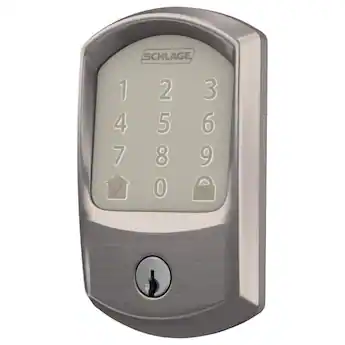
Best for: Homes that need many individual keypad access codes.
- Access-code capacity
- Up to 100 codes
- Wi-Fi
- Built in
- Power
- 4 AA batteries
- Fingerprint access
- No
- Large code capacity suits frequent guest access.
- Built-in Wi-Fi supports app-based remote management.
- Keypad and physical key provide two entry options.
- Does not have a fingerprint reader.
- Confirm the door and deadbolt requirements before installation.
Is the Schlage Encode Smart WiFi Deadbolt worth buying on Black Friday 2026?
The Schlage Encode Smart WiFi Deadbolt is worth considering for households that assign separate codes to guests, cleaners or family members. Capacity for up to 100 access codes and built-in Wi-Fi make it a strong connected keypad option.
See today’s Black Friday price on Amazon
Which is better, the ULTRALOQ U-Bolt Pro WiFi Smart Lock or eufy Security Smart Lock C220?
The ULTRALOQ U-Bolt Pro WiFi Smart Lock offers eight entry methods; the eufy Security Smart Lock C220 offers six. Both include fingerprint access, keypad entry and built-in Wi-Fi.
Choose the ULTRALOQ U-Bolt Pro WiFi Smart Lock for more entry options, including a physical key. Choose the eufy Security Smart Lock C220 for a simpler fingerprint-and-keypad setup. Check door fit, app preferences and smart-home compatibility before deciding.
What should shoppers look for in smart-lock Black Friday 2026 deals?
Compare door fit, access methods, connectivity and smart-home compatibility before choosing a lock. Start with the entry options your household uses, such as fingerprint, keypad, phone or physical key.
Built-in Wi-Fi supports remote features without a separate bridge on compatible models. Z-Wave locks require a compatible hub. Check the maker’s app and platform requirements rather than assuming compatibility.
Confirm battery type, backup entry and installation requirements. Check the exact model and included accessories on the retailer listing. Camera locks also need a suitable door layout.
How do smart locks handle guest codes and family access?
The Schlage Encode Smart WiFi Deadbolt supports up to 100 access codes. The eufy Security Smart Lock C220 and ULTRALOQ U-Bolt Pro WiFi Smart Lock provide app-connected access management; features vary by model.
Separate codes help manage access for family, visitors and service providers without sharing one permanent number. App controls can let owners update or remove access. Fingerprint entry gives regular users another option.
Consider how household members will enter if a phone or network is unavailable. A physical key offers backup on many models, while some connected features require a hub or network.
Will these smart locks fit every front door?
No. Compare door thickness, backset, bore hole and deadbolt measurements with the manufacturer’s installation guide. Existing hardware and unusual door layouts can affect compatibility.
Check the deadbolt style, door-edge measurements and interior clearance before ordering. The eufy Security Video Smart Lock S330 also needs suitable camera placement and a clear view of the entry. Confirm there is room for the keypad and interior assembly.
Review the exact model’s included parts and installation requirements. Renters should get permission before replacing hardware. Ask the manufacturer or a qualified installer about unclear measurements or door construction.
Which smart lock is best for Apple Home, Z-Wave or a camera setup?
The Aqara Smart Lock U100 supports Apple Home Key, the ULTRALOQ U-Bolt Pro Z-Wave Smart Lock works with compatible Z-Wave hubs, and the eufy Security Video Smart Lock S330 combines a deadbolt with a 2K camera.
Choose the Aqara Smart Lock U100 for compatible Apple devices, the ULTRALOQ U-Bolt Pro Z-Wave Smart Lock for a home with a suitable hub, or the eufy Security Video Smart Lock S330 to view the entry area. Check each maker’s compatibility list for your devices and desired features. For built-in Wi-Fi without a camera, consider the eufy Security Smart Lock C220.
Buying Guide
Choose the unlocking method first
Prioritize fingerprint, keypad, app or physical-key entry. The ULTRALOQ U-Bolt Pro WiFi Smart Lock and eufy Security Smart Lock C220 include fingerprint access; eufy Security Smart Lock C210 offers keypad and connected entry.
Confirm Wi-Fi and hub needs
Built-in Wi-Fi supports remote features without a separate bridge on compatible models. The ULTRALOQ U-Bolt Pro Z-Wave Smart Lock requires a compatible hub for connected control.
Check door fit and installation
Measure door thickness, backset and deadbolt opening, then compare them with the maker’s requirements. Camera models need suitable placement and a clear view.
Compare code and user management
Consider the number of users and how often access codes change. The Schlage Encode Smart WiFi Deadbolt supports up to 100 codes; other models’ fingerprint capacity and app controls vary.
Review power and backup entry
Check battery type, replacement steps and low-battery guidance. A physical key or other supported backup helps when batteries run down or connected features are unavailable.
FAQ
Is the eufy Security Smart Lock C220 better than the ULTRALOQ U-Bolt Pro WiFi Smart Lock?
The eufy Security Smart Lock C220 is a strong choice for simple fingerprint, keypad and built-in Wi-Fi access. The ULTRALOQ U-Bolt Pro WiFi Smart Lock suits shoppers who want 8-in-1 entry flexibility. The better fit depends on which access methods and app features matter most.
Does the eufy Security Smart Lock C220 have built-in Wi-Fi?
Yes, the eufy Security Smart Lock C220 has built-in Wi-Fi for connected app features. Shoppers should check the current product details for network requirements and confirm that their home Wi-Fi reaches the door reliably before installation.
Does the ULTRALOQ U-Bolt Pro WiFi Smart Lock require a hub?
The ULTRALOQ U-Bolt Pro WiFi Smart Lock has built-in Wi-Fi, so it does not require a separate Wi-Fi bridge for its basic remote connection. Smart-home features and voice-assistant support still depend on the compatible services and devices listed by ULTRALOQ.
Which smart lock in this guide has a camera?
The eufy Security Video Smart Lock S330 combines a smart lock with a 2K camera. The Aqara Smart Lock U100, eufy Security Smart Lock C220 and ULTRALOQ U-Bolt models focus on lock access rather than an integrated entry camera.
What should I check before buying a smart lock on Black Friday 2026?
Confirm door measurements, deadbolt style, installation clearance, battery requirements and smart-home compatibility before choosing a Black Friday 2026 smart lock. Compare the exact model and included accessories, then make sure its entry methods suit everyone who needs regular access.
Which smart lock is best for a home with many guests?
The Schlage Encode Smart WiFi Deadbolt is a useful pick for frequent guest access because it supports up to 100 access codes. Separate codes can help households manage visitors and service providers; check the app controls and code-management details for the exact model.