

As an Amazon Associate we earn from qualifying purchases.
- Best overall: ASUS ZenWiFi BD4 (3-Pack)
- Best budget: ASUS ZenWiFi BD4 (3-Pack)
- Best premium: ASUS ROG Rapture GT-BE98 Pro
- Best for gaming: ASUS ROG Rapture GT-AXE16000
- ASUS ROG Rapture GT-AXE16000 is the feature-packed pick for gaming setups that need quad-band Wi-Fi 6E and 10GbE.
- ASUS ZenWiFi BD4 (3-Pack) is the practical whole-home mesh pick, with Wi-Fi 7 and three nodes for broader coverage.
- ASUS RT-BE58U suits buyers who want a simpler Wi-Fi 7 router with a 2.5GbE port.
- ASUS ROG Rapture GT-BE98 Pro and ASUS ZenWiFi BQ16 Pro are premium choices for faster multi-device networks.
- Choose a single router for a focused gaming space or a mesh system to extend coverage across multiple rooms.
ASUS ROG Rapture GT-AXE16000 is the better fit for a demanding gaming station, while ASUS ZenWiFi BD4 (3-Pack) is the stronger choice for whole-home mesh coverage. Both serve different needs: the ROG model prioritizes high-end wired and wireless connectivity, and the ZenWiFi system spreads Wi-Fi 7 across three nodes.
For this Black Friday 2026 guide, we researched and compared specs, reviews and owner feedback across seven ASUS routers and mesh systems. I focused on the details that change everyday use: Wi-Fi generation, bands, Ethernet ports, and whether each product suits one room or a whole home. Here's the bottom line: choose the network shape first, then match the router to your gaming, streaming, and device demands.
How We Picked
- Compared Wi-Fi standards, band counts, and advertised wireless class to distinguish entry-level, mesh, and premium routers.
- Reviewed Ethernet connectivity, with special attention to multi-gig ports for gaming PCs, consoles, NAS devices, and fast internet plans.
- Considered each product's intended setup, from single-room gaming to multi-node whole-home coverage.
- Researched specs, reviews and owner feedback to identify practical strengths and common setup or placement considerations.
- Selected products across different budgets and home-networking needs, rather than treating one premium router as the answer for everyone.
Comparison Table
| Product | Best for | Wi-Fi generation | Wireless class | Bands |
|---|---|---|---|---|
| ASUS ROG Rapture GT-AXE16000 | High-end gaming and wired setups | Wi-Fi 6E | AXE16000 | 4 |
| ASUS ZenWiFi BD4 (3-Pack) | Whole-home Wi-Fi 7 mesh | Wi-Fi 7 | BE3600 | 2 |
| ASUS ROG Rapture GT-BE98 Pro | Wi-Fi 7 gaming enthusiasts | Wi-Fi 7 | BE30000 | 4 |
| ASUS RT-BE96U | Premium standalone Wi-Fi 7 | Wi-Fi 7 | BE19000 | 3 |
| ASUS ZenWiFi BQ16 Pro (2-Pack) | Premium whole-home mesh | Wi-Fi 7 | BE30000 | 4 |
| ASUS ZenWiFi BT8 (2-Pack) | Midrange Wi-Fi 7 mesh | Wi-Fi 7 | BE14000 | 3 |
| ASUS RT-AXE7800 | Standalone Wi-Fi 6E | Wi-Fi 6E | AXE7800 | 3 |
Best Picks Reviewed
#1
ASUS ROG Rapture GT-AXE16000
The ASUS ROG Rapture GT-AXE16000 is the best premium gaming router for players who want quad-band Wi-Fi 6E and a full wired setup. The ASUS ROG Rapture GT-AXE16000's 16-stream wireless design makes it a high-capacity centerpiece for a demanding network.

Best for: High-end gaming and wired setups
- Wi-Fi generation
- Wi-Fi 6E
- Wireless class
- AXE16000
- Bands
- 4
- 10GbE ports
- 2
- Quad-band design includes the 6GHz band.
- Two 10GbE ports support high-speed wired devices.
- Gaming-focused controls and features.
- Premium feature set is excessive for basic browsing and small homes.
Is the ASUS ROG Rapture GT-AXE16000 worth buying on Black Friday 2026?
The ASUS ROG Rapture GT-AXE16000 is worth considering for gamers with many connected devices, a fast internet plan, and wired gear to connect. The ASUS ROG Rapture GT-AXE16000's four bands and two 10GbE ports offer headroom for demanding setups.
See today’s Black Friday price on Amazon
#2 · Top pick
ASUS ZenWiFi BD4 (3-Pack)
The ASUS ZenWiFi BD4 (3-Pack) is the best mesh system for households that want Wi-Fi 7 coverage from three nodes. The ASUS ZenWiFi BD4 (3-Pack)'s BE3600 dual-band design favors straightforward whole-home networking over a large collection of premium gaming ports.
Best for: Whole-home Wi-Fi 7 mesh
- Wi-Fi generation
- Wi-Fi 7
- Wireless class
- BE3600
- Nodes
- 3
- Ethernet port speed
- 2.5GbE
- Three nodes help distribute coverage across multiple rooms.
- Wi-Fi 7 offers a modern wireless standard.
- 2.5GbE connectivity supports faster wired links.
- Dual-band design lacks a dedicated wireless backhaul band.
Is the ASUS ZenWiFi BD4 (3-Pack) worth buying on Black Friday 2026?
The ASUS ZenWiFi BD4 (3-Pack) is worth considering for homes where a single router leaves weak spots. Three Wi-Fi 7 nodes provide a mesh approach, and the 2.5GbE port gives compatible wired devices a faster connection.
See today’s Black Friday price on Amazon
#3
ASUS ROG Rapture GT-BE98 Pro
The ASUS ROG Rapture GT-BE98 Pro is the best Wi-Fi 7 gaming router for enthusiasts who want a quad-band network and multi-gig wired options. The ASUS ROG Rapture GT-BE98 Pro's BE30000 class targets a busy home with demanding devices.
Best for: Wi-Fi 7 gaming enthusiasts
- Wi-Fi generation
- Wi-Fi 7
- Wireless class
- BE30000
- Bands
- 4
- 10GbE ports
- 2
- Quad-band design supports a high-capacity network.
- Two 10GbE ports suit fast wired connections.
- Gaming-oriented controls and traffic prioritization.
- The ASUS ROG Rapture GT-BE98 Pro's premium capabilities are a poor match for modest internet plans.
Is the ASUS ROG Rapture GT-BE98 Pro worth buying on Black Friday 2026?
The ASUS ROG Rapture GT-BE98 Pro is worth considering for a gaming household building around Wi-Fi 7 and multi-gig Ethernet. Four bands and two 10GbE ports provide useful flexibility for demanding wireless and wired devices.
See today’s Black Friday price on Amazon
#4
ASUS RT-BE96U
The ASUS RT-BE96U is the best premium standalone Wi-Fi 7 router for buyers who want tri-band capacity without a mesh bundle. The ASUS RT-BE96U's BE19000 class and two 10GbE ports suit a fast, wired home network.
Best for: Premium standalone Wi-Fi 7
- Wi-Fi generation
- Wi-Fi 7
- Wireless class
- BE19000
- Bands
- 3
- 10GbE ports
- 2
- Tri-band Wi-Fi 7 supports a wide mix of connected devices.
- Two 10GbE ports offer strong wired flexibility.
- Standalone format avoids adding mesh nodes without need.
- A single router is not the best fix for every distant dead zone.
Is the ASUS RT-BE96U worth buying on Black Friday 2026?
The ASUS RT-BE96U is worth considering for buyers who want a high-end Wi-Fi 7 router without a multi-node system. The ASUS RT-BE96U's tri-band design and two 10GbE ports make it a strong match for fast internet and wired equipment.
See today’s Black Friday price on Amazon
#5
ASUS ZenWiFi BQ16 Pro (2-Pack)
The ASUS ZenWiFi BQ16 Pro (2-Pack) is the best premium mesh system for large homes with many high-demand devices. The ASUS ZenWiFi BQ16 Pro (2-Pack)'s quad-band BE30000 Wi-Fi 7 design aims to deliver broad coverage with substantial network capacity.
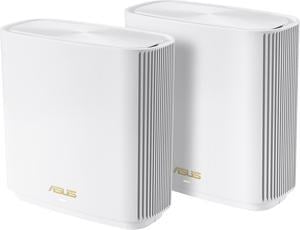
Best for: Premium whole-home mesh
- Wi-Fi generation
- Wi-Fi 7
- Wireless class
- BE30000
- Bands
- 4
- Nodes
- 2
- Two-node system supports a mesh layout.
- Quad-band Wi-Fi 7 targets demanding device loads.
- Premium design suits fast, modern home networks.
- A premium mesh system is unnecessary for smaller, simple layouts.
Is the ASUS ZenWiFi BQ16 Pro (2-Pack) worth buying on Black Friday 2026?
The ASUS ZenWiFi BQ16 Pro (2-Pack) is worth considering for a large home with multiple demanding users. The ASUS ZenWiFi BQ16 Pro (2-Pack)'s two-node, quad-band Wi-Fi 7 design combines mesh coverage with a high wireless class for capable devices.
See today’s Black Friday price on Amazon
#6
ASUS ZenWiFi BT8 (2-Pack)
The ASUS ZenWiFi BT8 (2-Pack) is the best mesh option for households seeking Wi-Fi 7 without moving to a top-tier quad-band system. The ASUS ZenWiFi BT8 (2-Pack)'s tri-band BE14000 design balances multi-node coverage and strong wireless capacity.
Best for: Midrange Wi-Fi 7 mesh
- Wi-Fi generation
- Wi-Fi 7
- Wireless class
- BE14000
- Nodes
- 2
- Two nodes create a flexible mesh setup.
- Tri-band Wi-Fi 7 gives more capacity than entry-level dual-band models.
- A sensible step down from the highest-end mesh options.
- Two nodes require smart placement for the best coverage.
Is the ASUS ZenWiFi BT8 (2-Pack) worth buying on Black Friday 2026?
The ASUS ZenWiFi BT8 (2-Pack) is worth considering for households that need mesh coverage and want Wi-Fi 7. The ASUS ZenWiFi BT8 (2-Pack)'s two nodes and three bands offer a useful middle ground between basic mesh kits and premium quad-band systems.
See today’s Black Friday price on Amazon
#7
ASUS RT-AXE7800
The ASUS RT-AXE7800 is the best Wi-Fi 6E router for buyers who want access to the 6GHz band in a standalone model. The ASUS RT-AXE7800's AXE7800 tri-band design adds a modern wireless option without requiring a Wi-Fi 7 upgrade.
Best for: Standalone Wi-Fi 6E
- Wi-Fi generation
- Wi-Fi 6E
- Wireless class
- AXE7800
- Bands
- 3
- Multi-gig port
- 1 x 2.5GbE
- 6GHz band supports compatible devices.
- Tri-band design separates wireless traffic across bands.
- 2.5GbE port supports a faster wired connection.
- Not the right pick for shoppers who specifically want Wi-Fi 7.
Is the ASUS RT-AXE7800 worth buying on Black Friday 2026?
The ASUS RT-AXE7800 is worth considering if you want a standalone Wi-Fi 6E router with a 6GHz band and a 2.5GbE port. Choose a Wi-Fi 7 model instead if newer wireless features are your priority.
See today’s Black Friday price on Amazon
Which is better, ASUS ROG Rapture GT-AXE16000 or ASUS ZenWiFi BD4?
ASUS ROG Rapture GT-AXE16000 is better for a high-end gaming hub, while ASUS ZenWiFi BD4 (3-Pack) is better for mesh coverage across multiple rooms. The ROG router has four bands, including 6GHz, and two 10GbE ports. The BD4 kit has three Wi-Fi 7 nodes and a 2.5GbE port on each unit.
The key difference is the job each product is built to do. ASUS ROG Rapture GT-AXE16000 puts a large set of wireless and wired features in one router. ASUS ZenWiFi BD4 (3-Pack) distributes the network through three coordinated access points. Pick the ROG model if your console, gaming PC, or network storage sits near the router and you value wired connections. Pick BD4 if rooms at the edge of the home need more consistent Wi-Fi.
For many homes, mesh placement matters more than chasing the biggest wireless class. A multi-gig gaming setup benefits from the ROG model's ports, while a multi-floor layout benefits from the BD4 nodes.
Is Wi-Fi 7 better than Wi-Fi 6E for gaming?
Wi-Fi 7 is the newer standard, while Wi-Fi 6E adds a 6GHz band; ASUS ROG Rapture GT-BE98 Pro and ASUS RT-BE96U are Wi-Fi 7 options, and ASUS ROG Rapture GT-AXE16000 is Wi-Fi 6E. The right fit depends on your devices, internet connection, and router placement.
A Wi-Fi 7 router makes sense when the household has compatible devices and you want a newer network foundation. Wi-Fi 6E remains a capable choice for devices that support 6GHz, especially where that band helps separate traffic. The router standard alone does not guarantee a better match for every game or home. A stable wired Ethernet connection remains the straightforward choice for a stationary console or PC.
Check the wireless standards supported by your phone, laptop, and gaming gear before paying for a feature set your devices cannot use. For gaming, also compare Ethernet ports, placement options, and whether mesh coverage solves an actual weak-signal area.
Should I choose a gaming router or a mesh system?
ASUS ROG Rapture GT-AXE16000 suits a focused gaming setup, while ASUS ZenWiFi BD4 (3-Pack) suits homes that need coverage from three mesh nodes. The single-router and mesh formats solve different network problems, so the floor plan should guide the decision.
A gaming router is a strong pick when the main goal is connecting a console, PC, and wired accessories in one room. ASUS ROG Rapture GT-AXE16000 adds quad-band Wi-Fi 6E and two 10GbE ports for a feature-rich central hub. A mesh system is more useful when walls, distance, or multiple floors create weak spots that one router cannot address effectively.
Before buying mesh, identify where the primary router and satellite nodes can sit. Nodes need a useful connection to one another, not just a place in the room with the weakest signal. ASUS ZenWiFi BD4 (3-Pack) gives buyers three units to plan that layout.
Which ASUS router is best for a Wi-Fi 7 upgrade?
ASUS ROG Rapture GT-BE98 Pro is the Wi-Fi 7 pick for premium gaming, while ASUS ZenWiFi BD4 (3-Pack) is the Wi-Fi 7 pick for three-node mesh coverage. Their four-band and two-band designs reflect different priorities, even though both use Wi-Fi 7.
Choose ASUS ROG Rapture GT-BE98 Pro for its quad-band BE30000 class and two 10GbE ports. The router is aimed at an enthusiast setup with high network demands and wired equipment. Choose ASUS ZenWiFi BD4 (3-Pack) for a simpler distributed network that reaches more areas through three nodes. The BE3600 class is less focused on maximum headline capacity and more focused on accessible mesh coverage.
Compatibility matters: devices need Wi-Fi 7 support to use Wi-Fi 7 features. Older phones, consoles, and computers still connect through supported earlier standards, so an upgrade can work with mixed devices while adding newer capabilities for future hardware.
What should I prioritize when choosing an ASUS router?
ASUS ZenWiFi BD4 (3-Pack) is a strong pick when broad coverage is the priority, while ASUS ROG Rapture GT-AXE16000 is a strong pick when high-end wired gaming is the priority. Start with the problem the new network needs to solve before comparing model numbers.
For a large or multi-floor home, compare mesh node count, placement, and band design. For a gaming desk, compare Ethernet speed, port count, and the router's Wi-Fi generation. ASUS RT-AXE7800 offers Wi-Fi 6E and a 2.5GbE port in a standalone design, while ASUS RT-BE58U is the simpler Wi-Fi 7 route for everyday networking.
Also consider how many devices share the network and whether your internet plan exceeds standard gigabit Ethernet. A high wireless class does not replace good placement or compatible client devices. Match the router's strengths to your actual setup, then use Black Friday 2026 to compare the models that fit.
Buying Guide
Choose mesh for coverage, not as a speed shortcut
Mesh suits homes where one router struggles to reach distant rooms. ASUS ZenWiFi BD4 (3-Pack) includes three nodes, while ASUS ZenWiFi BQ16 Pro (2-Pack) offers two premium nodes. Plan node positions so each unit has a useful link to the network.
Match Wi-Fi generation to your devices
Wi-Fi 7 helps most when compatible devices are part of your network. ASUS ROG Rapture GT-BE98 Pro and ASUS ZenWiFi BT8 (2-Pack) offer Wi-Fi 7. ASUS ROG Rapture GT-AXE16000 and ASUS RT-AXE7800 offer Wi-Fi 6E and 6GHz support.
Check Ethernet ports before buying
Gamers with wired consoles, PCs, or storage should count the ports they need and check their speeds. ASUS ROG Rapture GT-AXE16000 and ASUS ROG Rapture GT-BE98 Pro include two 10GbE ports, while ASUS RT-AXE7800 includes a 2.5GbE port.
Avoid paying for capacity your home will not use
A top wireless class is most useful in a busy network with compatible devices. Smaller households can focus on coverage, setup, and a suitable Ethernet port instead. ASUS RT-BE58U is the practical entry point in this guide; premium quad-band models target heavier workloads.
Use Black Friday 2026 to compare the right category
Compare mesh with mesh and standalone routers with standalone routers. A three-node kit and a gaming router are not direct substitutes. Shortlist based on coverage, Wi-Fi generation, and port needs, then compare the models that meet those requirements.
FAQ
ASUS ROG Rapture GT-AXE16000 vs ASUS ZenWiFi BD4: which should I buy?
Choose ASUS ROG Rapture GT-AXE16000 for a premium gaming hub with quad-band Wi-Fi 6E and two 10GbE ports. Choose ASUS ZenWiFi BD4 (3-Pack) for Wi-Fi 7 mesh coverage across three nodes. Your floor plan and wired-device needs settle the choice.
Is ASUS ZenWiFi BD4 good for gaming?
ASUS ZenWiFi BD4 (3-Pack) is a good fit for gaming across a home where mesh coverage matters. Wi-Fi 7 supports compatible devices, and its 2.5GbE port provides a faster wired connection. Place nodes carefully and connect a stationary gaming device by Ethernet when practical.
Does ASUS ROG Rapture GT-AXE16000 support Wi-Fi 7?
ASUS ROG Rapture GT-AXE16000 supports Wi-Fi 6E, not Wi-Fi 7. The quad-band router includes the 6GHz band and offers two 10GbE ports. For a Wi-Fi 7 gaming router, consider ASUS ROG Rapture GT-BE98 Pro instead.
Is ASUS ZenWiFi BD4 a mesh system?
ASUS ZenWiFi BD4 (3-Pack) is a three-node mesh system designed to distribute Wi-Fi across multiple areas. Its Wi-Fi 7 design and 2.5GbE port support a modern home network. Node placement remains important for a strong connection throughout the home.
Which ASUS router is best for a large home?
ASUS ZenWiFi BD4 (3-Pack) is a practical large-home option because three nodes support a distributed mesh layout. ASUS ZenWiFi BQ16 Pro (2-Pack) is the premium alternative for households prioritizing quad-band Wi-Fi 7 capacity. Choose based on layout and device demands.
Which ASUS router is best for a gaming PC and console?
ASUS ROG Rapture GT-AXE16000 is a strong gaming pick with four bands and two 10GbE ports for wired gear. ASUS ROG Rapture GT-BE98 Pro suits buyers who want Wi-Fi 7. A wired connection is a solid choice for stationary gaming devices.