

As an Amazon Associate we earn from qualifying purchases.
- Best overall: Corsair K70 Core RGB Mechanical Gaming Keyboard
- Best budget: Logitech G213 Prodigy Gaming Keyboard
- Best premium: Logitech G515 LIGHTSPEED TKL Wireless Gaming Keyboard
- Best for low-profile keys: Razer Ornata V3 Gaming Keyboard
- Razer Ornata V3 pairs low-profile mecha-membrane keys with 10-zone RGB lighting.
- Corsair K70 Core stands out for mechanical MLX Red linear switches and a multifunction dial.
- Logitech G213 Prodigy and SteelSeries Apex 3 are straightforward membrane alternatives.
- Logitech G515 LIGHTSPEED TKL adds wireless freedom in a compact 87-key layout.
- Compare switch feel, layout and connectivity before choosing a Black Friday 2026 gaming keyboard.
Razer Ornata V3 vs Corsair K70 Core Black Friday 2026 comes down to two different keyboard experiences: low-profile mecha-membrane keys or traditional mechanical switches. I researched and compared specs, reviews and owner feedback to help gamers choose the right fit, then added six alternatives for different layouts and play styles.
Razer Ornata V3 suits players who want a slim board, quiet-feeling keys and a wrist rest. Corsair K70 Core targets mechanical-keyboard fans who want linear switches, sound-dampening layers and a handy control dial. Here's the bottom line: choose for feel and features first, then look for a Black Friday 2026 listing that matches your preferred setup.
How We Picked
- Compared switch type, key feel and stated actuation details for gaming and everyday typing.
- Checked layouts, wrist-rest designs, media controls and desk-space requirements.
- Reviewed connectivity and lighting features, including wired, wireless and RGB options.
- Considered manufacturer specifications alongside owner feedback and common use cases.
- Selected established gaming keyboards across membrane, mechanical, compact and wireless categories.
Comparison Table
| Product | Best for | Switch type | Layout | RGB lighting |
|---|---|---|---|---|
| Razer Ornata V3 Gaming Keyboard | Low-profile mecha-membrane keys | Mecha-membrane | Full size | 10 zones |
| Corsair K70 Core RGB Mechanical Gaming Keyboard | Linear mechanical feel | MLX Red linear | Full size | RGB |
| Logitech G213 Prodigy Gaming Keyboard | Programmable membrane controls | Mech-dome membrane | Full size | 5 zones |
| SteelSeries Apex 3 RGB Gaming Keyboard | Quiet keys and spill protection | Membrane | Full size | 10 zones |
| HyperX Alloy Core RGB Gaming Keyboard | Simple RGB membrane gaming | Membrane | Full size | 6 zones |
| Redragon K556 RGB Mechanical Gaming Keyboard | Customizable mechanical setup | Mechanical, hot-swappable | 104 keys | 18 modes |
| Logitech G515 LIGHTSPEED TKL Wireless Gaming Keyboard | Compact wireless gaming | Low-profile mechanical | 87-key TKL | RGB |
| Razer BlackWidow V4 X Mechanical Gaming Keyboard | Dedicated macro keys | Mechanical | Full size | Per-key RGB |
Best Picks Reviewed
#1
Razer Ornata V3 Gaming Keyboard
The Razer Ornata V3 Gaming Keyboard is the best low-profile membrane-style pick for players who want a slim wired board, with 10-zone RGB lighting as its standout spec.

Best for: Low-profile keys and a comfortable wrist rest
- Switch style
- Low-profile mecha-membrane
- RGB zones
- 10
- Connection
- Wired USB
- Slim key design
- Includes ergonomic wrist rest
- Dedicated media keys
- Not a mechanical-switch keyboard
- Wired-only connection
Is the Razer Ornata V3 Gaming Keyboard worth buying on Black Friday 2026?
The Razer Ornata V3 Gaming Keyboard is worth considering for players who prefer low-profile keys over a traditional mechanical feel. The Razer Ornata V3 Gaming Keyboard's 10-zone RGB, dedicated media keys and included wrist rest make it a well-equipped wired choice for gaming and everyday use.
See today’s Black Friday price on Amazon
#2 · Top pick
Corsair K70 Core RGB Mechanical Gaming Keyboard
The Corsair K70 Core RGB Mechanical Gaming Keyboard is the best mechanical pick for players who want smooth linear typing and media control, with 2 layers of sound-dampening material inside.
Best for: Linear mechanical switches and media controls
- Switches
- Corsair MLX Red linear mechanical
- Sound dampening
- 2 layers
- Connection
- Wired USB
- Layout
- Full size
- Smooth linear mechanical switches
- Multifunction dial and media keys
- Sound-dampening construction
- Full-size footprint needs desk space
- Wired connection only
Is the Corsair K70 Core RGB Mechanical Gaming Keyboard worth buying on Black Friday 2026?
The Corsair K70 Core RGB Mechanical Gaming Keyboard is a strong choice for players who want linear mechanical switches in a full-size layout. The Corsair K70 Core RGB Mechanical Gaming Keyboard's 2 sound-dampening layers, multifunction dial and dedicated media controls add useful features beyond basic gaming input.
See today’s Black Friday price on Amazon
#3
Logitech G213 Prodigy Gaming Keyboard
The Logitech G213 Prodigy Gaming Keyboard is the best simple membrane pick for players who want programmable controls without mechanical switches, with 5-zone RGB lighting.
Best for: Everyday gaming and programmable function keys
- Switch style
- Mech-dome membrane
- RGB zones
- 5
- Programmable function keys
- 12
- Connection
- Wired USB
- Dedicated media controls
- Programmable function keys
- Spill-resistant design
- Larger footprint than compact boards
- Membrane feel is not for every player
Is the Logitech G213 Prodigy Gaming Keyboard worth buying on Black Friday 2026?
The Logitech G213 Prodigy Gaming Keyboard is worth a look for gamers who want a familiar membrane feel, 5-zone RGB and dedicated media controls. Twelve programmable function keys add flexibility, while its full-size frame suits players with room for a standard keyboard.
See today’s Black Friday price on Amazon
#4
SteelSeries Apex 3 RGB Gaming Keyboard
The SteelSeries Apex 3 RGB Gaming Keyboard is the best quiet membrane choice for players who value spill resistance, with an IP32 rating and 10-zone RGB.
Best for: Quiet gaming and spill-resistant construction
- Switch rating
- 10 million keystrokes
- Water resistance
- IP32
- RGB zones
- 10
- Connection
- Wired USB
- Quiet-feeling gaming switches
- Magnetic wrist rest included
- Dedicated media controls
- Membrane switches lack mechanical feedback
- No wireless option
Is the SteelSeries Apex 3 RGB Gaming Keyboard worth buying on Black Friday 2026?
The SteelSeries Apex 3 RGB Gaming Keyboard is a sensible pick for players who want quiet keys and extra spill protection. The SteelSeries Apex 3 RGB Gaming Keyboard's IP32 rating, 10-zone lighting and included magnetic wrist rest give it a useful mix of comfort and practical features.
See today’s Black Friday price on Amazon
#5
HyperX Alloy Core RGB Gaming Keyboard
The HyperX Alloy Core RGB Gaming Keyboard is the best no-fuss membrane option for players who want colorful lighting, with 6 RGB lighting zones.
Best for: Simple RGB gaming on a membrane board
- Switch style
- Membrane
- RGB zones
- 6
- Lighting effects
- 6
- Connection
- Wired USB
- Quiet, soft key feel
- Dedicated media buttons
- Spill-resistant design
- No mechanical switch option
- No included wrist rest
Is the HyperX Alloy Core RGB Gaming Keyboard worth buying on Black Friday 2026?
The HyperX Alloy Core RGB Gaming Keyboard is worth considering for players who want simple wired gaming controls and bright RGB without mechanical switches. Six lighting zones, media buttons and a spill-resistant design cover the essentials for a casual gaming setup.
See today’s Black Friday price on Amazon
#6
Redragon K556 RGB Mechanical Gaming Keyboard
The Redragon K556 RGB Mechanical Gaming Keyboard is the best customizable full-size pick for players who want mechanical switches, with a 104-key layout.
Best for: Full-size mechanical typing and switch customization
- Keys
- 104
- Switch style
- Mechanical, hot-swappable
- RGB modes
- 18
- Connection
- Wired USB
- Hot-swappable switch sockets
- Full number pad
- Multiple RGB effects
- Wired-only setup
- Check switch compatibility before swapping
Is the Redragon K556 RGB Mechanical Gaming Keyboard worth buying on Black Friday 2026?
The Redragon K556 RGB Mechanical Gaming Keyboard is a good fit for players who want a full-size mechanical board with switch customization. The Redragon K556 RGB Mechanical Gaming Keyboard's 104-key layout, hot-swappable sockets and 18 RGB modes give enthusiasts room to personalize their setup.
See today’s Black Friday price on Amazon
#7
Logitech G515 LIGHTSPEED TKL Wireless Gaming Keyboard
The Logitech G515 LIGHTSPEED TKL Wireless Gaming Keyboard is the best compact wireless pick for players who want a low-profile board, with 87 keys in its tenkeyless layout.
Best for: Wireless play and compact desk setups
- Keys
- 87
- Layout
- Tenkeyless
- Wireless options
- LIGHTSPEED 2.4 GHz and Bluetooth
- Switch style
- Low-profile mechanical
- Compact layout frees mouse space
- Wireless and Bluetooth connectivity
- Low-profile mechanical switches
- No number pad
- Wireless features add setup considerations
Is the Logitech G515 LIGHTSPEED TKL Wireless Gaming Keyboard worth buying on Black Friday 2026?
The Logitech G515 LIGHTSPEED TKL Wireless Gaming Keyboard is a strong option for players who want a compact wireless mechanical board. The Logitech G515 LIGHTSPEED TKL Wireless Gaming Keyboard's 87-key layout, low-profile switches and LIGHTSPEED or Bluetooth connectivity suit cleaner desks and flexible gaming setups.
See today’s Black Friday price on Amazon
#8
Razer BlackWidow V4 X Mechanical Gaming Keyboard
The Razer BlackWidow V4 X Mechanical Gaming Keyboard is the best macro-focused pick for players who want extra command keys, with 6 dedicated macro keys.
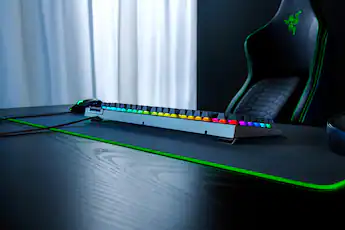
Best for: Macro controls and mechanical gaming
- Dedicated macro keys
- 6
- Media controls
- 4 dedicated keys
- RGB
- Per-key Razer Chroma
- Connection
- Wired USB
- Six dedicated macro keys
- Per-key RGB customization
- Mechanical switch options
- Full-size footprint
- Wired-only connection
Is the Razer BlackWidow V4 X Mechanical Gaming Keyboard worth buying on Black Friday 2026?
The Razer BlackWidow V4 X Mechanical Gaming Keyboard is worth considering for players who use macros in games or productivity apps. Six dedicated macro keys, per-key Chroma lighting and mechanical switches make it more feature-rich than a basic full-size board.
See today’s Black Friday price on Amazon
Razer Ornata V3 vs Corsair K70 Core: which is better for gaming?
Razer Ornata V3 Gaming Keyboard and Corsair K70 Core RGB Mechanical Gaming Keyboard suit different preferences, with 10-zone lighting on the Razer and 2 sound-dampening layers on the Corsair. Razer Ornata V3 uses low-profile mecha-membrane keys that feel softer and less traditionally mechanical. Corsair K70 Core uses MLX Red linear mechanical switches for a smooth, consistent press.
Choose Razer Ornata V3 if a lower profile, included wrist rest and dedicated media keys matter most. Choose Corsair K70 Core if you prefer mechanical switches, a multifunction dial and a full-size layout. Both are wired keyboards with RGB lighting, so the decision mostly comes down to key feel, desk space and control preferences. For many PC players, the Corsair is the stronger all-rounder; Razer remains an appealing alternative for a softer typing experience.
Is Razer Ornata V3 good for typing and long gaming sessions?
Razer Ornata V3 Gaming Keyboard offers low-profile mecha-membrane keys, 10 RGB zones and an included wrist rest for gaming and everyday typing. The shorter key design gives the board a slimmer feel than conventional full-height mechanical keyboards, while dedicated media keys keep common audio controls close at hand.
Players who prefer a distinct mechanical bump or a very light linear press should compare the Corsair K70 Core instead. Razer Ornata V3 suits users who value a cushioned-feeling press and a comfortable place to rest their wrists between matches. Check the space available for its full-size layout and attached cable before choosing a desk position.
What makes the Corsair K70 Core a strong mechanical keyboard?
Corsair K70 Core RGB Mechanical Gaming Keyboard combines MLX Red linear switches, 2 sound-dampening layers and a multifunction dial in a full-size wired design. Linear switches move without a tactile bump, a feel many gamers favor for repeated key presses and fast movement inputs.
The dedicated media controls and dial add convenience for adjusting audio without leaving a game or application. The board needs more desk width than a tenkeyless model, and its wired connection will not suit buyers seeking a cable-free setup. Players comparing the Corsair against Razer Ornata V3 should focus on the mechanical key feel first; lighting and media controls are secondary differences.
Which gaming keyboard is best for a compact or wireless setup?
Logitech G515 LIGHTSPEED TKL Wireless Gaming Keyboard is the compact wireless choice in this lineup, with 87 keys and both LIGHTSPEED 2.4 GHz and Bluetooth connectivity. Its tenkeyless shape removes the number pad, leaving more room for mouse movement and making the board easier to place on a crowded desk.
Razer Ornata V3, Corsair K70 Core, Logitech G213 Prodigy, SteelSeries Apex 3, HyperX Alloy Core, Redragon K556 and Razer BlackWidow V4 X are wired options in this selection. Pick a wired model for a direct, simple connection and a wireless model for fewer desk cables. A compact keyboard also suits smaller setups, but number-pad users should stick with a full-size option.
Which alternatives are best if you do not want the Ornata or K70 Core?
Logitech G213 Prodigy, SteelSeries Apex 3 and HyperX Alloy Core give membrane fans three alternatives, while Redragon K556 offers hot-swappable mechanical switches. Logitech G213 Prodigy includes 12 programmable function keys; SteelSeries Apex 3 adds an IP32 rating and magnetic wrist rest; HyperX Alloy Core keeps the feature set straightforward with 6 RGB zones.
Redragon K556 appeals to players who want a full-size mechanical board and switch customization. Razer BlackWidow V4 X adds 6 dedicated macro keys for players who use custom commands. Logitech G515 LIGHTSPEED TKL is the pick for compact wireless play. Comparing these distinct designs helps narrow a Black Friday 2026 shortlist to the features that will actually improve your setup.
Buying Guide
Choose a switch feel that fits your play style
Mechanical switches offer a more defined key feel, while membrane and mecha-membrane designs often feel softer. Corsair K70 Core uses linear mechanical switches; Razer Ornata V3 takes a low-profile mecha-membrane approach. Match the board to your preferred sound and key response.
Check the layout against your desk
Full-size keyboards keep the number pad and take more space. Tenkeyless designs like Logitech G515 LIGHTSPEED TKL use 87 keys and free up room for mouse movement. Pick the layout that fits your desk and the keys you use regularly.
Decide whether wired or wireless matters
Wired keyboards provide a direct connection without wireless pairing. Logitech G515 LIGHTSPEED TKL supports LIGHTSPEED 2.4 GHz and Bluetooth for a more flexible setup. Consider cable routing, device compatibility and whether wireless convenience is worth prioritizing.
Compare controls and comfort extras
A wrist rest, media keys, a dial or dedicated macros can make daily use easier. Razer Ornata V3 includes a wrist rest, Corsair K70 Core has a multifunction dial and Razer BlackWidow V4 X provides 6 macro keys. Prioritize extras you will use.
Review the Black Friday 2026 listing carefully
Confirm the exact model, switch type, layout and included accessories before checkout. Product names can cover variations with different switches or connectivity. Check the seller, return terms and compatibility details so the keyboard you order matches the features in your shortlist.
FAQ
Which is better, Razer Ornata V3 or Corsair K70 Core?
Corsair K70 Core RGB Mechanical Gaming Keyboard is the stronger fit for players who want linear mechanical switches, sound dampening and a multifunction dial. Razer Ornata V3 Gaming Keyboard is better for players who prefer low-profile mecha-membrane keys, 10-zone RGB and an included wrist rest.
Is the Razer Ornata V3 a mechanical keyboard?
Razer Ornata V3 Gaming Keyboard uses low-profile mecha-membrane switches rather than conventional mechanical switches. The design combines membrane-style key action with mechanical-inspired feedback. Players seeking a traditional mechanical switch feel should compare options such as Corsair K70 Core or Redragon K556.
Does the Corsair K70 Core have mechanical switches?
Corsair K70 Core RGB Mechanical Gaming Keyboard uses Corsair MLX Red linear mechanical switches. The linear action moves without a tactile bump, and the keyboard adds 2 layers of sound-dampening material, a multifunction dial and dedicated media controls.
Which keyboard is best for a smaller gaming desk?
Logitech G515 LIGHTSPEED TKL Wireless Gaming Keyboard is the best compact pick in this guide, with an 87-key tenkeyless layout. The missing number pad leaves more room for mouse movement. Players who need a number pad should choose a full-size model instead.
What should I look for in a Black Friday 2026 gaming keyboard?
Compare switch style, layout, connectivity and useful extras before selecting a Black Friday 2026 gaming keyboard. Confirm the exact model and switch variant on the listing, then check included accessories and return terms. Razer Ornata V3 and Corsair K70 Core serve different key-feel preferences.