

As an Amazon Associate we earn from qualifying purchases.
- Best overall: Philips Evnia 27M2N8500 27-inch QD-OLED Gaming Monitor
- Best budget: Lenovo Legion Y27QY 27-inch QHD Gaming Monitor
- Best premium: ASUS ROG Swift OLED PG27AQDP 27-inch QHD Gaming Monitor
- Best for QD-OLED color: MSI MPG 271QRX QD-OLED 27-inch Gaming Monitor
- The Philips Evnia 27M2N8500 is a strong QD-OLED pick, with a 27-inch QHD screen and 360Hz refresh rate.
- The Lenovo Legion Y27QY targets players who want a fast QHD IPS monitor and an LCD panel.
- The ASUS ROG Swift OLED PG27AQDP stands out for competitive play with a 480Hz refresh rate.
- Compare panel type, refresh rate, connection options and warranty before choosing a Black Friday monitor.
- Check your graphics card and desk setup against each monitor’s resolution, refresh rate and stand dimensions.
The Lenovo Legion Y27QY and Philips Evnia 27M2N8500 are 27-inch QHD gaming monitors, but their panel technologies make them very different Black Friday 2026 picks. The Lenovo Legion Y27QY uses an IPS panel aimed at fast, responsive play, while the Philips Evnia 27M2N8500 pairs QD-OLED contrast with a 360Hz refresh rate.
I researched and compared specs, reviews and owner feedback to build this guide for PC and console players. Here's the bottom line: pick IPS for a familiar LCD experience and QD-OLED for deep blacks and vivid color. The six alternatives below add more options for esports, premium OLED gaming and everyday use.
How We Picked
- Compared resolution, refresh rate and advertised response time to identify monitors suited to fast-paced games.
- Separated IPS, OLED and QD-OLED panels so readers can weigh motion, contrast and color priorities.
- Reviewed manufacturer specifications, professional reviews and owner feedback for recurring strengths and trade-offs.
- Considered console and PC connections, adaptive sync support, ergonomics and the practical needs of different gaming setups.
- Selected distinct alternatives instead of filling the list with monitors that serve the same player.
Comparison Table
| Product | Best for | Refresh rate | Resolution | Panel |
|---|---|---|---|---|
| Lenovo Legion Y27QY 27-inch QHD Gaming Monitor | High-refresh IPS gaming | 240Hz | 2560 × 1440 | IPS |
| Philips Evnia 27M2N8500 27-inch QD-OLED Gaming Monitor | QD-OLED color and speed | 360Hz | 2560 × 1440 | QD-OLED |
| ASUS ROG Swift OLED PG27AQDP 27-inch QHD Gaming Monitor | Competitive esports | 480Hz | 2560 × 1440 | OLED |
| MSI MPG 271QRX QD-OLED 27-inch Gaming Monitor | QD-OLED and USB-C connectivity | 360Hz | 2560 × 1440 | QD-OLED |
| Alienware AW2725DF 27-inch QD-OLED Gaming Monitor | Premium QD-OLED gaming | 360Hz | 2560 × 1440 | QD-OLED |
| Samsung Odyssey OLED G6 G60SD 27-inch Gaming Monitor | Matte QD-OLED gaming | 360Hz | 2560 × 1440 | QD-OLED |
| LG UltraGear 27GS95QE-B 27-inch OLED Gaming Monitor | 240Hz OLED gaming | 240Hz | 2560 × 1440 | OLED |
Best Picks Reviewed
#1
Lenovo Legion Y27QY 27-inch QHD Gaming Monitor
The Lenovo Legion Y27QY 27-inch QHD Gaming Monitor is the best IPS pick for players who want fast 1440p gaming without an OLED panel. The Lenovo Legion Y27QY 27-inch QHD Gaming Monitor's 240Hz refresh rate gives competitive PC games plenty of motion headroom.

Best for: Players who prefer a high-refresh IPS monitor
- Screen size
- 27 inches
- Resolution
- 2560 × 1440
- Refresh rate
- 240Hz
- Panel
- IPS
- High 240Hz refresh rate
- QHD resolution suits a 27-inch screen
- IPS panel avoids OLED burn-in concerns
- IPS contrast does not match OLED black levels
Is the Lenovo Legion Y27QY 27-inch QHD Gaming Monitor worth buying on Black Friday 2026?
The Lenovo Legion Y27QY 27-inch QHD Gaming Monitor is worth considering for players who want a 27-inch QHD IPS display with 240Hz motion. Choose it for fast LCD gaming, and compare its features with OLED rivals if contrast is your priority.
See today’s Black Friday price on Amazon
#2 · Top pick
Philips Evnia 27M2N8500 27-inch QD-OLED Gaming Monitor
The Philips Evnia 27M2N8500 27-inch QD-OLED Gaming Monitor is the best overall pick for players who want vivid color and deep blacks. The Philips Evnia 27M2N8500 27-inch QD-OLED Gaming Monitor's 360Hz refresh rate pairs premium OLED contrast with highly fluid PC gameplay.
Best for: Players who want QD-OLED color and speed
- Screen size
- 27 inches
- Resolution
- 2560 × 1440
- Refresh rate
- 360Hz
- Response time
- 0.03ms
- QD-OLED contrast and color
- Fast 360Hz refresh rate
- QHD resolution fits competitive PC gaming
- OLED care and static-image habits need consideration
Is the Philips Evnia 27M2N8500 27-inch QD-OLED Gaming Monitor worth buying on Black Friday 2026?
The Philips Evnia 27M2N8500 27-inch QD-OLED Gaming Monitor is a strong buy for players seeking QHD resolution, 360Hz motion and OLED contrast. Check the warranty and OLED care guidance, then compare its features with other premium gaming monitors.
See today’s Black Friday price on Amazon
#3
ASUS ROG Swift OLED PG27AQDP 27-inch QHD Gaming Monitor
The ASUS ROG Swift OLED PG27AQDP 27-inch QHD Gaming Monitor is the best premium pick for esports players who value maximum refresh speed. The ASUS ROG Swift OLED PG27AQDP 27-inch QHD Gaming Monitor's 480Hz OLED panel brings exceptionally fluid motion to competitive PC games.
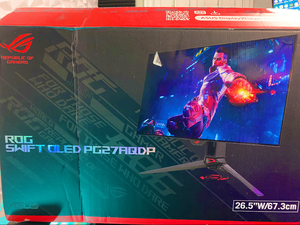
Best for: Competitive players prioritizing refresh rate
- Screen size
- 27 inches
- Resolution
- 2560 × 1440
- Refresh rate
- 480Hz
- Response time
- 0.03ms
- Standout 480Hz refresh rate
- OLED contrast and fast response
- QHD detail for a 27-inch display
- Demands a powerful PC to take advantage of 480Hz
Is the ASUS ROG Swift OLED PG27AQDP 27-inch QHD Gaming Monitor worth buying on Black Friday 2026?
The ASUS ROG Swift OLED PG27AQDP 27-inch QHD Gaming Monitor is worth a look for serious esports players with a PC that can drive very high frame rates. The ASUS ROG Swift OLED PG27AQDP 27-inch QHD Gaming Monitor's 480Hz QHD OLED panel prioritizes speed and contrast over broad, casual-use value.
See today’s Black Friday price on Amazon
#4
MSI MPG 271QRX QD-OLED 27-inch Gaming Monitor
The MSI MPG 271QRX QD-OLED 27-inch Gaming Monitor is the best pick for players who want premium QD-OLED performance and a useful connection set. The MSI MPG 271QRX QD-OLED 27-inch Gaming Monitor's 360Hz refresh rate delivers smooth action at QHD resolution.
Best for: PC players seeking QD-OLED with flexible connectivity
- Screen size
- 27 inches
- Resolution
- 2560 × 1440
- Refresh rate
- 360Hz
- Response time
- 0.03ms
- 360Hz QD-OLED panel
- QHD resolution and sharp motion
- USB-C connectivity with power delivery
- OLED safeguards matter for long desktop sessions
Is the MSI MPG 271QRX QD-OLED 27-inch Gaming Monitor worth buying on Black Friday 2026?
The MSI MPG 271QRX QD-OLED 27-inch Gaming Monitor suits PC players who want 360Hz QHD gaming, OLED contrast and USB-C connectivity. Review the port specifications and warranty terms to confirm the monitor fits your system and everyday setup.
See today’s Black Friday price on Amazon
#5
Alienware AW2725DF 27-inch QD-OLED Gaming Monitor
The Alienware AW2725DF 27-inch QD-OLED Gaming Monitor is the best pick for players who want a polished 360Hz QD-OLED experience. The Alienware AW2725DF 27-inch QD-OLED Gaming Monitor's 0.03ms response-time specification complements its sharp QHD resolution and rich panel contrast.
Best for: Players who want a premium QD-OLED gaming display
- Screen size
- 27 inches
- Resolution
- 2560 × 1440
- Refresh rate
- 360Hz
- Response time
- 0.03ms
- 360Hz QD-OLED performance
- QHD resolution with deep blacks
- Fast advertised response time
- Premium panel needs sensible OLED care
Is the Alienware AW2725DF 27-inch QD-OLED Gaming Monitor worth buying on Black Friday 2026?
The Alienware AW2725DF 27-inch QD-OLED Gaming Monitor is a compelling choice for PC players who want QHD resolution, 360Hz refresh and OLED contrast. Compare its connectivity and warranty with competing QD-OLED models before deciding.
See today’s Black Friday price on Amazon
#6
Samsung Odyssey OLED G6 G60SD 27-inch Gaming Monitor
The Samsung Odyssey OLED G6 G60SD 27-inch Gaming Monitor is the best pick for players who want a matte OLED screen with high refresh speed. The Samsung Odyssey OLED G6 G60SD 27-inch Gaming Monitor's 360Hz QHD panel brings smooth movement to competitive gaming.
Best for: Players who prefer a matte OLED finish
- Screen size
- 27 inches
- Resolution
- 2560 × 1440
- Refresh rate
- 360Hz
- Panel
- QD-OLED
- 360Hz QHD gaming
- Matte screen finish
- OLED contrast and color
- Matte coating changes the look of bright reflections and colors
Is the Samsung Odyssey OLED G6 G60SD 27-inch Gaming Monitor worth buying on Black Friday 2026?
The Samsung Odyssey OLED G6 G60SD 27-inch Gaming Monitor is worth considering if you want QD-OLED contrast, 360Hz gaming and a matte finish. Compare coating preferences, available connections and OLED warranty coverage with other 27-inch options.
See today’s Black Friday price on Amazon
#7
LG UltraGear 27GS95QE-B 27-inch OLED Gaming Monitor
The LG UltraGear 27GS95QE-B 27-inch OLED Gaming Monitor is the best OLED pick for players who want QHD detail and a fast 240Hz refresh rate. The LG UltraGear 27GS95QE-B 27-inch OLED Gaming Monitor's 0.03ms response-time specification suits quick action games.
Best for: Players seeking 240Hz OLED gaming
- Screen size
- 27 inches
- Resolution
- 2560 × 1440
- Refresh rate
- 240Hz
- Response time
- 0.03ms
- 240Hz OLED panel
- QHD resolution
- Fast advertised response time
- OLED panel care is important for static content
Is the LG UltraGear 27GS95QE-B 27-inch OLED Gaming Monitor worth buying on Black Friday 2026?
The LG UltraGear 27GS95QE-B 27-inch OLED Gaming Monitor is a good fit for players who want QHD OLED contrast and 240Hz motion. Consider it alongside 360Hz models if you want a balance of high refresh speed and OLED image quality.
See today’s Black Friday price on Amazon
Which is better, Lenovo Legion Y27QY or Philips Evnia 27M2N8500?
The Lenovo Legion Y27QY 27-inch QHD Gaming Monitor and Philips Evnia 27M2N8500 27-inch QD-OLED Gaming Monitor both target 27-inch, 1440p gaming, but their panels suit different priorities. Lenovo’s IPS design favors a traditional LCD experience. Philips’ QD-OLED panel brings deeper blacks and more vivid contrast.
Choose Lenovo if an IPS panel and 240Hz refresh rate match your needs. Choose Philips if QD-OLED image quality and 360Hz refresh are the bigger draw. For either monitor, check the exact model specification, input options and warranty before purchase. A high refresh number only helps when your PC or console can deliver compatible output.
Is QD-OLED better than IPS for gaming?
The Philips Evnia 27M2N8500 QD-OLED and Lenovo Legion Y27QY IPS monitors offer different strengths at 27 inches and QHD resolution. QD-OLED gives games deep blacks and strong contrast, while IPS offers a familiar LCD experience without OLED pixel-care routines.
Fast IPS monitors remain excellent for competitive play, and OLED models also deliver rapid pixel response. Think about the games you play, room lighting and desktop use. Long stretches of static windows call for extra OLED care. Dark, cinematic games bring out the contrast advantage of OLED and QD-OLED panels.
Is 360Hz worth choosing over 240Hz?
The Philips Evnia 27M2N8500 360Hz monitor and Lenovo Legion Y27QY 240Hz monitor suit different performance targets. A 360Hz panel refreshes more often than a 240Hz panel, but the benefit depends on game frame rates, system performance and how sensitive the player is to motion.
For esports titles and a powerful PC, 360Hz gives more refresh headroom. For mixed gaming, 240Hz already offers smooth motion and can be the more balanced match. Check the monitor’s supported refresh rates over the connection you plan to use, then confirm your graphics card can output the desired resolution and rate.
Are these 27-inch gaming monitors good for PS5 and Xbox?
The Philips Evnia 27M2N8500 and Lenovo Legion Y27QY are 27-inch QHD monitors, while PS5 and Xbox players should confirm console resolution and refresh support before buying. Their high PC refresh rates do not mean a console will use every available hertz.
Check HDMI versions, supported console output modes, variable refresh rate support and audio needs on the exact model listing. Consoles can be a strong match for QHD displays, but features vary by game and connection. PC players should also review DisplayPort support, especially when aiming for the highest refresh rate.
What should I check before buying a gaming monitor on Black Friday?
The Lenovo Legion Y27QY, Philips Evnia 27M2N8500 and five alternatives in this guide all offer 27-inch screens, but buyers should compare panel, refresh rate and connection details first. Confirm the full model name to avoid mixing up similar product numbers or configurations.
Review the return window, warranty, dead-pixel policy and OLED coverage. Check stand adjustment, VESA mounting, desk depth and port placement as well. A monitor is a long-term part of the setup, so compatibility and service matter just as much as a headline specification.
Buying Guide
Choose the panel type
Pick IPS for a conventional LCD experience and QD-OLED or OLED for stronger contrast and deep blacks. OLED care guidance matters when a monitor displays static desktop elements for long sessions.
Match refresh rate to your games
A 240Hz display suits fast gaming, while 360Hz and 480Hz models target players and PCs chasing higher frame rates. Check your computer’s output before paying for refresh speed you cannot use.
Confirm resolution and connections
All seven picks offer QHD resolution. Verify HDMI and DisplayPort versions, supported refresh modes, adaptive sync and USB-C needs against your PC, console, dock or laptop.
Check ergonomics and fit
Measure desk space and confirm stand height, tilt, swivel and VESA mounting support. A 27-inch screen needs comfortable viewing distance and a stand that fits the setup.
Review warranty and return terms
Before ordering, read the seller’s return window and the manufacturer’s warranty. OLED buyers should check the exact coverage for panel care and image retention.
FAQ
What is the main difference between Lenovo Legion Y27QY and Philips Evnia 27M2N8500?
The Lenovo Legion Y27QY 27-inch QHD Gaming Monitor uses an IPS panel and a 240Hz refresh rate. The Philips Evnia 27M2N8500 27-inch QD-OLED Gaming Monitor uses QD-OLED technology and runs at 360Hz, making contrast and panel type the key differences.
Is the Philips Evnia 27M2N8500 good for competitive gaming?
The Philips Evnia 27M2N8500 27-inch QD-OLED Gaming Monitor is a strong competitive gaming choice, with QHD resolution, a 360Hz refresh rate and a 0.03ms response-time specification. Pair it with a PC that can deliver high frame rates in your chosen games.
Is the Lenovo Legion Y27QY an OLED monitor?
The Lenovo Legion Y27QY 27-inch QHD Gaming Monitor is an IPS LCD monitor, not an OLED monitor. Its 240Hz refresh rate targets fast gaming, while its LCD panel avoids the OLED-specific pixel-care considerations associated with static on-screen content.
Which monitor is best for PS5?
The Philips Evnia 27M2N8500, Lenovo Legion Y27QY and other 27-inch QHD picks can suit PS5 setups, but check HDMI support and the console’s supported output modes first. Console games do not automatically use a monitor’s full 240Hz, 360Hz or 480Hz refresh rate.
Should I buy a QHD 240Hz or QHD 360Hz gaming monitor?
Choose a QHD 240Hz monitor such as the Lenovo Legion Y27QY for a fast, balanced PC display. Choose a QHD 360Hz model such as the Philips Evnia 27M2N8500 if your PC can deliver higher frame rates and competitive motion is a priority.
Is OLED burn-in a concern on gaming monitors?
OLED gaming monitors need sensible care around static images, such as desktop taskbars and fixed interface elements. Follow the manufacturer’s panel-care instructions and review warranty coverage. Players who want an LCD panel can consider the IPS-based Lenovo Legion Y27QY.