

As an Amazon Associate we earn from qualifying purchases.
- Best overall: TP-Link Archer BE550 BE9300 Tri-Band Wi-Fi 7 Router
- Best budget: TP-Link Archer AX3000 AX55 Dual-Band Wi-Fi 6 Router
- Best premium: TP-Link Archer BE800 BE19000 Tri-Band Wi-Fi 7 Router
- TP-Link Deco BE63 BE10000 Tri-Band Wi-Fi 7 Mesh System (3-Pack): TP-Link Archer BE230 BE3600 Dual-Band Wi-Fi 7 Router
- The TP-Link Archer BE550 BE9300 Tri-Band Wi-Fi 7 Router offers newer Wi-Fi 7 support, a 6 GHz band and five 2.5 Gbps ports.
- The TP-Link Archer AX3000 AX55 Dual-Band Wi-Fi 6 Router is a practical choice for everyday home internet and Wi-Fi 6 devices.
- Wi-Fi 7 benefits are clearest with compatible devices and a fast internet plan; Wi-Fi 6 remains capable for many households.
- Compare port needs, home layout and connected-device support before choosing a Black Friday 2026 router.
The TP-Link Archer BE550 BE9300 Tri-Band Wi-Fi 7 Router is the stronger Black Friday 2026 pick for multi-gig homes, while the TP-Link Archer AX3000 AX55 Dual-Band Wi-Fi 6 Router suits everyday Wi-Fi needs. Both are standalone routers, but their wireless generations, bands and wired connections serve different homes.
We researched and compared specs, reviews and owner feedback to make the choice easier. The guide also covers six alternatives, from budget Wi-Fi 7 to mesh and premium routers, so shoppers can match a router to their internet plan, home size and devices.
How We Picked
- Compared Wi-Fi generation, frequency bands and stated combined wireless class to clarify each router's intended performance tier.
- Reviewed Ethernet port types and counts, with attention to multi-gig connections for fast internet plans and wired devices.
- Considered whether each router fits a small apartment, typical family home, demanding connected household or mesh setup.
- Used manufacturer specifications alongside owner feedback and review themes; no product is presented as personally compared.
- Selected alternatives that give shoppers meaningful choices across budget, premium, Wi-Fi 7 and whole-home coverage needs.
Comparison Table
| Product | Best for | Wi-Fi class | Bands | Multi-gig Ethernet |
|---|---|---|---|---|
| TP-Link Archer BE550 BE9300 Tri-Band Wi-Fi 7 Router | Multi-gig Wi-Fi 7 homes | BE9300 | Tri-band | 5 × 2.5 Gbps |
| TP-Link Archer AX3000 AX55 Dual-Band Wi-Fi 6 Router | Everyday Wi-Fi 6 | AX3000 | Dual-band | Gigabit Ethernet |
| TP-Link Archer BE230 BE3600 Dual-Band Wi-Fi 7 Router | Entry-level Wi-Fi 7 | BE3600 | Dual-band | 2.5 Gbps WAN |
| TP-Link Archer BE800 BE19000 Tri-Band Wi-Fi 7 Router | Premium multi-gig networking | BE19000 | Tri-band | Includes 10 Gbps |
| ASUS RT-BE88U Dual-Band WiFi 7 Router | Fast wired networks | BE7200 | Dual-band | Includes 10 Gbps |
| NETGEAR Nighthawk RS300 Tri-Band WiFi 7 Router | NETGEAR Wi-Fi 7 shoppers | BE9300 | Tri-band | 2.5 Gbps |
| TP-Link Deco BE63 BE10000 Tri-Band Wi-Fi 7 Mesh System (3-Pack) | Whole-home mesh coverage | BE10000 | Tri-band | Multi-gig ports |
Best Picks Reviewed
#1 · Top pick
TP-Link Archer BE550 BE9300 Tri-Band Wi-Fi 7 Router
The TP-Link Archer BE550 BE9300 Tri-Band Wi-Fi 7 Router is the best overall choice for multi-gig homes that want Wi-Fi 7 and 2.5 Gbps wired connections. The TP-Link Archer BE550 BE9300 Tri-Band Wi-Fi 7 Router's BE9300 class and five 2.5 Gbps ports make it a substantial upgrade path.

Best for: Wi-Fi 7 households with multi-gig wired devices
- Wi-Fi class
- BE9300
- Bands
- Tri-band: 2.4, 5 and 6 GHz
- Ethernet ports
- 5 × 2.5 Gbps
- USB
- 1 × USB 3.0
- Wi-Fi 7 includes the 6 GHz band
- Five 2.5 Gbps Ethernet ports
- Tri-band design helps accommodate busy networks
- Compatible Wi-Fi 7 devices are needed to use its newest wireless features
Is the TP-Link Archer BE550 BE9300 Tri-Band Wi-Fi 7 Router worth buying on Black Friday 2026?
Yes. The TP-Link Archer BE550 BE9300 Tri-Band Wi-Fi 7 Router is a strong Black Friday 2026 choice for homes ready for Wi-Fi 7, with tri-band wireless and five 2.5 Gbps Ethernet ports for fast wired connections.
See today’s Black Friday price on Amazon
#2
TP-Link Archer AX3000 AX55 Dual-Band Wi-Fi 6 Router
The TP-Link Archer AX3000 AX55 Dual-Band Wi-Fi 6 Router is the best value choice for households with ordinary broadband and Wi-Fi 6 devices. The TP-Link Archer AX3000 AX55 Dual-Band Wi-Fi 6 Router's AX3000 class pairs 2402 Mbps on 5 GHz with 574 Mbps on 2.4 GHz.
Best for: Everyday Wi-Fi 6 and standard broadband
- Wi-Fi class
- AX3000
- Bands
- Dual-band: 2.4 and 5 GHz
- 5 GHz speed
- Up to 2402 Mbps
- Ethernet
- 1 Gbps ports
- Wi-Fi 6 for current everyday devices
- Gigabit Ethernet for wired connections
- A straightforward alternative to a Wi-Fi 7 upgrade
- No 6 GHz band or 2.5 Gbps Ethernet
Is the TP-Link Archer AX3000 AX55 Dual-Band Wi-Fi 6 Router worth buying on Black Friday 2026?
Yes. The TP-Link Archer AX3000 AX55 Dual-Band Wi-Fi 6 Router is a sensible Black Friday 2026 buy for standard broadband, streaming and everyday connected devices. The TP-Link Archer AX3000 AX55 Dual-Band Wi-Fi 6 Router's AX3000 Wi-Fi 6 class is less suited to households seeking 6 GHz or multi-gig ports.
See today’s Black Friday price on Amazon
#3
TP-Link Archer BE230 BE3600 Dual-Band Wi-Fi 7 Router
The TP-Link Archer BE230 BE3600 Dual-Band Wi-Fi 7 Router is the best entry point for households seeking Wi-Fi 7 without a tri-band router. The TP-Link Archer BE230 BE3600 Dual-Band Wi-Fi 7 Router's BE3600 class and 2.5 Gbps WAN port offer a useful mix for compatible devices and fast broadband.
Best for: Budget-conscious Wi-Fi 7 upgrades
- Wi-Fi class
- BE3600
- Bands
- Dual-band: 2.4 and 5 GHz
- WAN
- 1 × 2.5 Gbps
- Wi-Fi generation
- Wi-Fi 7
- Wi-Fi 7 support at a simpler tier
- 2.5 Gbps WAN connection
- Useful for homes without a need for 6 GHz
- Dual-band design lacks a dedicated 6 GHz band
Is the TP-Link Archer BE230 BE3600 Dual-Band Wi-Fi 7 Router worth buying on Black Friday 2026?
Yes. The TP-Link Archer BE230 BE3600 Dual-Band Wi-Fi 7 Router is a good Black Friday 2026 option for shoppers who want Wi-Fi 7 and a 2.5 Gbps WAN port without moving to a tri-band router. Check that dual-band coverage fits your home.
See today’s Black Friday price on Amazon
#4
TP-Link Archer BE800 BE19000 Tri-Band Wi-Fi 7 Router
The TP-Link Archer BE800 BE19000 Tri-Band Wi-Fi 7 Router is the best premium choice for demanding homes with many high-bandwidth devices. The TP-Link Archer BE800 BE19000 Tri-Band Wi-Fi 7 Router's BE19000 class and 10 Gbps Ethernet port target fast wired networks and advanced Wi-Fi 7 use.

Best for: Premium multi-gig and high-device-count homes
- Wi-Fi class
- BE19000
- Bands
- Tri-band: 2.4, 5 and 6 GHz
- Ethernet
- Includes 10 Gbps port
- Wi-Fi generation
- Wi-Fi 7
- High-tier tri-band Wi-Fi 7
- 10 Gbps wired connection option
- Designed for demanding connected homes
- Advanced hardware is unnecessary for many basic internet plans
Is the TP-Link Archer BE800 BE19000 Tri-Band Wi-Fi 7 Router worth buying on Black Friday 2026?
Yes. The TP-Link Archer BE800 BE19000 Tri-Band Wi-Fi 7 Router suits shoppers who can use its high-tier Wi-Fi 7 and 10 Gbps Ethernet. For a basic broadband plan, a less advanced router offers a closer match to everyday needs.
See today’s Black Friday price on Amazon
#5
ASUS RT-BE88U Dual-Band WiFi 7 Router
The ASUS RT-BE88U Dual-Band WiFi 7 Router is the best fit for homes prioritizing flexible, fast wired networking alongside Wi-Fi 7. The ASUS RT-BE88U Dual-Band WiFi 7 Router's BE7200 class and 10 Gbps Ethernet connections make it a compelling wired-network alternative.
Best for: Wi-Fi 7 homes with extensive wired networking
- Wi-Fi class
- BE7200
- Bands
- Dual-band
- Ethernet
- Includes 10 Gbps ports
- Wi-Fi generation
- Wi-Fi 7
- Wi-Fi 7 support
- Fast multi-gig Ethernet options
- Useful for homes with several wired devices
- Dual-band design does not include 6 GHz
Is the ASUS RT-BE88U Dual-Band WiFi 7 Router worth buying on Black Friday 2026?
Yes. The ASUS RT-BE88U Dual-Band WiFi 7 Router is worth considering for Wi-Fi 7 households that also need fast wired connections, including 10 Gbps Ethernet. The ASUS RT-BE88U Dual-Band WiFi 7 Router's dual-band design makes it a different fit from tri-band routers with a 6 GHz band.
See today’s Black Friday price on Amazon
#6
NETGEAR Nighthawk RS300 Tri-Band WiFi 7 Router
The NETGEAR Nighthawk RS300 Tri-Band WiFi 7 Router is the best alternative for shoppers seeking a tri-band Wi-Fi 7 router from NETGEAR. The NETGEAR Nighthawk RS300 Tri-Band WiFi 7 Router's BE9300 class and 2.5 Gbps Ethernet connection suit fast home broadband and compatible devices.
Best for: NETGEAR shoppers seeking tri-band Wi-Fi 7
- Wi-Fi class
- BE9300
- Bands
- Tri-band: 2.4, 5 and 6 GHz
- Ethernet
- 2.5 Gbps port
- Wi-Fi generation
- Wi-Fi 7
- Tri-band Wi-Fi 7
- Includes a 2.5 Gbps Ethernet connection
- A clear alternative to TP-Link options
- Compare port count with the TP-Link Archer BE550 before choosing
Is the NETGEAR Nighthawk RS300 Tri-Band WiFi 7 Router worth buying on Black Friday 2026?
Yes. The NETGEAR Nighthawk RS300 Tri-Band WiFi 7 Router is a capable Black Friday 2026 pick for shoppers who want tri-band Wi-Fi 7 and a 2.5 Gbps Ethernet connection. Compare its wired-port needs with other routers before choosing.
See today’s Black Friday price on Amazon
#7
TP-Link Deco BE63 BE10000 Tri-Band Wi-Fi 7 Mesh System (3-Pack)
The TP-Link Deco BE63 BE10000 Tri-Band Wi-Fi 7 Mesh System (3-Pack) is the best whole-home coverage choice for larger homes with Wi-Fi dead zones. The TP-Link Deco BE63 BE10000 Tri-Band Wi-Fi 7 Mesh System (3-Pack)'s BE10000 class and three mesh units create a multi-node option instead of relying on one router.
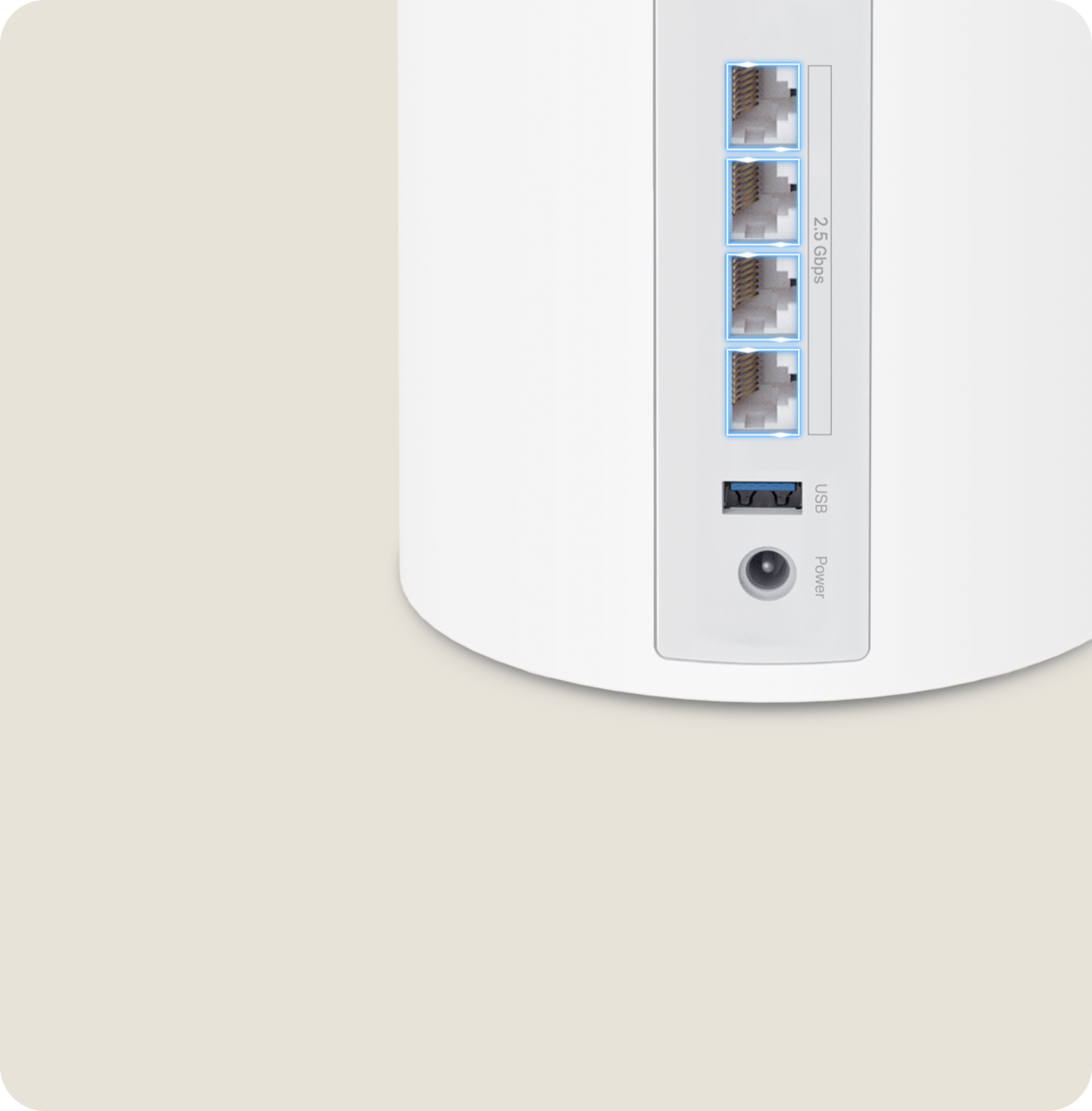
Best for: Larger homes needing whole-home mesh coverage
- Wi-Fi class
- BE10000
- System
- 3-pack mesh
- Bands
- Tri-band
- Wi-Fi generation
- Wi-Fi 7
- Three nodes for broader home coverage
- Tri-band Wi-Fi 7
- Mesh layout helps address dead zones
- A multi-unit system is unnecessary for many small homes
Is the TP-Link Deco BE63 BE10000 Tri-Band Wi-Fi 7 Mesh System (3-Pack) worth buying on Black Friday 2026?
Yes. The TP-Link Deco BE63 BE10000 Tri-Band Wi-Fi 7 Mesh System (3-Pack) is a strong choice for larger homes where a single router leaves dead zones. Smaller homes with reliable coverage can choose a standalone router instead.
See today’s Black Friday price on Amazon
Which router is better, the TP-Link Archer BE550 or TP-Link Archer AX3000?
The TP-Link Archer BE550 BE9300 Tri-Band Wi-Fi 7 Router is better for Wi-Fi 7 devices and multi-gig wired networking, while the TP-Link Archer AX3000 AX55 Dual-Band Wi-Fi 6 Router is better for standard home use. The BE550 adds a 6 GHz band and five 2.5 Gbps Ethernet ports; the AX3000 uses dual-band Wi-Fi 6 and gigabit Ethernet.
Choose the TP-Link Archer BE550 BE9300 Tri-Band Wi-Fi 7 Router when the home has compatible Wi-Fi 7 devices, a fast internet plan or wired equipment that benefits from 2.5 Gbps ports. Choose the TP-Link Archer AX3000 AX55 Dual-Band Wi-Fi 6 Router when reliable Wi-Fi 6 coverage and everyday streaming, browsing and video calls are the priority.
A newer Wi-Fi generation does not automatically improve every connection. Devices and internet service both shape the results, so the right choice depends on the equipment already in the home.
Is Wi-Fi 7 worth choosing over Wi-Fi 6 in 2026?
Wi-Fi 7 is worth choosing in 2026 when a household has compatible devices, multi-gig internet or a clear upgrade plan. The TP-Link Archer BE550 BE9300 Tri-Band Wi-Fi 7 Router offers a 6 GHz band and 2.5 Gbps ports, while the TP-Link Archer AX3000 AX55 Dual-Band Wi-Fi 6 Router serves everyday Wi-Fi 6 needs.
Wi-Fi 7 brings newer capabilities, including Multi-Link Operation on compatible equipment, and 6 GHz spectrum on tri-band models. Those features are most relevant in busy homes with modern phones, computers and streaming devices. Devices using older Wi-Fi standards still connect, but do not gain Wi-Fi 7 capabilities.
For a home with a standard broadband plan and mostly Wi-Fi 5 or Wi-Fi 6 devices, Wi-Fi 6 remains a sensible fit. For a planned device refresh, a Wi-Fi 7 router provides a more current platform.
What internet speed and ports should a Black Friday router have?
A Black Friday 2026 router should have Ethernet ports that match the internet plan and wired devices, with 2.5 Gbps or faster connections useful for multi-gig service. The TP-Link Archer BE550 BE9300 Tri-Band Wi-Fi 7 Router has five 2.5 Gbps ports, while the TP-Link Archer AX3000 AX55 Dual-Band Wi-Fi 6 Router uses gigabit Ethernet.
A faster Wi-Fi class does not raise the speed delivered by an internet plan. Router ports also matter: a gigabit WAN port can limit a faster-than-gigabit service, while multi-gig LAN connections help connect a network switch, desktop computer or network-attached storage.
Count the wired devices at home before buying. Check whether the router has enough LAN ports, whether the WAN port matches the broadband plan, and whether a separate switch is needed.
Should I buy a standalone router or a mesh Wi-Fi system?
A standalone router suits many apartments and smaller homes, while mesh Wi-Fi is a better fit when one router leaves dead zones across a larger layout. The TP-Link Archer BE550 BE9300 Tri-Band Wi-Fi 7 Router is a single-router option; the TP-Link Deco BE63 BE10000 Tri-Band Wi-Fi 7 Mesh System (3-Pack) offers three nodes.
Mesh systems spread access points around the home and can improve coverage in rooms far from the main router. Placement matters: nodes need a usable connection to each other, and walls, floors and interference affect coverage. A mesh system does not guarantee a particular speed in every room.
For a compact floor plan with good existing coverage, start with a standalone router. For multiple floors, long layouts or persistent dead zones, compare a mesh kit and plan where each node will sit.
Which router is the best Black Friday 2026 value?
The TP-Link Archer AX3000 AX55 Dual-Band Wi-Fi 6 Router is the value pick for everyday households, while the TP-Link Archer BE550 BE9300 Tri-Band Wi-Fi 7 Router is the upgrade pick for multi-gig homes. A useful value comparison weighs features against the needs of your devices, broadband plan and home layout.
A lower-tier router is often a better match when the internet plan is below gigabit and the household mainly streams, browses and attends video calls. Paying for Wi-Fi 7 or 10 Gbps ports makes more sense when compatible equipment can use those features.
Before checkout, compare the exact model name, included accessories, return terms and current product specifications. Black Friday shopping is a good time to choose the router that addresses a real network need rather than buying the highest listed class.
Buying Guide
Match the router to your broadband plan
Choose WAN and LAN ports that match your internet speed and wired equipment. A 2.5 Gbps port is useful for multi-gig service; gigabit ports suit many standard plans.
Check device compatibility
Wi-Fi 7 features require compatible client devices. Count the phones, laptops and consoles that connect most often, then decide whether Wi-Fi 7 or Wi-Fi 6 fits the household.
Choose bands for your home
Tri-band routers add a 6 GHz band when specified, while dual-band routers use 2.4 and 5 GHz. Consider device support, range needs and how busy the local wireless environment is.
Plan for coverage and placement
A central, open router location supports better coverage. For large or multi-floor homes with dead zones, compare a mesh kit such as the TP-Link Deco BE63 BE10000 Tri-Band Wi-Fi 7 Mesh System (3-Pack).
Compare the exact model and ports
Router names can be similar across product generations. Confirm the complete model, Wi-Fi class, port count and warranty details on the listing before placing an order.
FAQ
Is the TP-Link Archer BE550 faster than the TP-Link Archer AX3000?
The TP-Link Archer BE550 BE9300 Tri-Band Wi-Fi 7 Router has a higher wireless class and adds a 6 GHz band, while the TP-Link Archer AX3000 AX55 Dual-Band Wi-Fi 6 Router is an AX3000 dual-band model. Actual connection speed also depends on the device, distance and internet plan.
Does the TP-Link Archer BE550 support Wi-Fi 7?
Yes. The TP-Link Archer BE550 BE9300 Tri-Band Wi-Fi 7 Router supports Wi-Fi 7 and includes 2.4 GHz, 5 GHz and 6 GHz bands. Compatible Wi-Fi 7 devices are needed to use Wi-Fi 7-specific capabilities; older devices connect using supported standards.
Is the TP-Link Archer AX3000 AX55 good for gaming?
The TP-Link Archer AX3000 AX55 Dual-Band Wi-Fi 6 Router can serve gaming households with standard broadband and a wired or nearby wireless connection. For lower latency, connect a console or PC by Ethernet and consider a router with ports that match a multi-gig internet plan.
Do I need a 2.5 Gbps port on a new router?
A 2.5 Gbps port is useful when the internet plan exceeds gigabit speeds or a wired device needs a faster local connection. The TP-Link Archer BE550 BE9300 Tri-Band Wi-Fi 7 Router includes five 2.5 Gbps ports; gigabit networking remains suitable for many homes.
Is a mesh system better than one router for a large home?
A mesh system is a practical choice when one router cannot cover a large home or multiple floors. The TP-Link Deco BE63 BE10000 Tri-Band Wi-Fi 7 Mesh System (3-Pack) includes three nodes, while a standalone router is simpler for homes with reliable coverage.