

As an Amazon Associate we earn from qualifying purchases.
- Best overall: Roku Streambar 4K Streaming Media Player and Premium Audio
- Best budget: Roku Streaming Stick 4K
- Best premium: Apple TV 4K (3rd generation) Wi-Fi + Ethernet 128GB
- Best for Google TV: Google TV Streamer (4K)
- Roku Streambar combines a 4K streaming player and a four-driver, 2.0-channel soundbar in one device.
- Google TV Streamer (4K) is the better fit for shoppers who want a standalone 4K streamer, 32GB of storage and Ethernet.
- Roku Streambar SE adds compact TV audio and 4K streaming for smaller rooms and straightforward setups.
- Roku Ultra, Roku Streaming Stick 4K, Amazon Fire TV Stick 4K Max (2nd Gen) and Apple TV 4K serve different streaming preferences.
- Choose based on whether better TV sound, a particular streaming interface or a more capable remote matters most.
The Roku Streambar is the better all-in-one pick for viewers who want 4K streaming and improved TV sound, while the Google TV Streamer (4K) is the stronger standalone streamer. For Black Friday 2026, the right choice depends on whether you want a built-in soundbar or more storage, Ethernet and Google TV features.
I researched and compared specs, reviews and owner feedback to build this guide around practical differences, not headline claims. The seven picks cover Roku, Google, Amazon and Apple, from compact streaming sticks to a premium box and two soundbar streamers. My pick for most people is the Roku Streambar when TV speakers need an upgrade; Google TV Streamer (4K) is the better choice when sound is already covered.
How We Picked
- Compared supported video formats, including 4K, Dolby Vision and HDR10+ where listed by the manufacturer.
- Checked audio features and whether each device includes built-in speakers or depends on a separate sound system.
- Considered storage, Wi-Fi, Ethernet and other connections that affect everyday streaming and setup.
- Reviewed interface, remote and ecosystem features to distinguish Roku, Google TV, Fire TV and Apple TV options.
- Prioritized clear use cases so shoppers can match a device to their room, TV and preferred streaming platform.
Comparison Table
| Product | Best for | Max video resolution | Audio setup | Network |
|---|---|---|---|---|
| Roku Streambar 4K Streaming Media Player and Premium Audio | Soundbar and streamer in one | 4K HDR | 2.0-channel, 4 drivers | Wi-Fi, HDMI ARC |
| Google TV Streamer (4K) | Google TV and storage | 4K HDR | No built-in speakers | Wi-Fi, Ethernet |
| Roku Streambar SE 4K Streaming Media Player | Small-room audio and streaming | 4K HDR | 2 built-in speakers | Wi-Fi, HDMI ARC |
| Roku Ultra 4K Streaming Player | Roku box and upgraded remote | 4K | No built-in speakers | Wi-Fi 6, Ethernet |
| Roku Streaming Stick 4K | Portable Roku streaming | 4K | No built-in speakers | Wi-Fi |
| Amazon Fire TV Stick 4K Max (2nd Gen) | Alexa and Fire TV | 4K | No built-in speakers | Wi-Fi 6E |
| Apple TV 4K (3rd generation) Wi-Fi + Ethernet 128GB | Apple ecosystem | 4K | No built-in speakers | Wi-Fi, Ethernet |
Best Picks Reviewed
#1 · Top pick
Roku Streambar 4K Streaming Media Player and Premium Audio
The Roku Streambar 4K Streaming Media Player and Premium Audio is the best all-in-one upgrade for viewers who want a soundbar and streamer, with four built-in drivers in a 2.0-channel setup.

Best for: Adding clearer TV sound and 4K streaming with one compact device
- Max video resolution
- 4K HDR
- Audio setup
- 2.0-channel, 4 drivers
- Connectivity
- Wi-Fi, HDMI ARC
- Voice control
- Roku Voice Remote
- Combines streaming and a soundbar, reducing device clutter.
- Supports 4K HDR video and Dolby Audio.
- Compact design suits TVs in smaller rooms.
- Does not provide the fuller bass of a separate subwoofer.
- Lacks Dolby Vision support.
Is the Roku Streambar 4K Streaming Media Player and Premium Audio worth buying on Black Friday 2026?
The Roku Streambar 4K Streaming Media Player and Premium Audio is worth considering when a TV needs both better sound and 4K streaming. Four built-in drivers simplify setup, while a separate subwoofer is needed for stronger bass.
See today’s Black Friday price on Amazon
#2
Google TV Streamer (4K)
The Google TV Streamer (4K) is the best standalone streamer for Google TV households, with 32GB of storage for apps and an Ethernet port for a wired network connection.
Best for: Google TV users who want more app storage and wired networking
- Max video resolution
- 4K HDR
- Storage
- 32GB
- Memory
- 4GB
- Connectivity
- Wi-Fi, Ethernet, HDMI
- Google TV brings streaming apps and recommendations together.
- Supports Dolby Vision, HDR10+ and Dolby Atmos passthrough.
- Ethernet provides a wired alternative to Wi-Fi.
- Does not include a soundbar or speakers.
- Requires an HDMI cable and a separate TV audio solution.
Is the Google TV Streamer (4K) worth buying on Black Friday 2026?
The Google TV Streamer (4K) is worth buying for viewers who want Google TV, 4K HDR playback and more onboard storage. The Google TV Streamer (4K)'s 32GB capacity and Ethernet connection are useful upgrades, but the device does not improve TV sound.
See today’s Black Friday price on Amazon
#3
Roku Streambar SE 4K Streaming Media Player
The Roku Streambar SE 4K Streaming Media Player is the best compact Roku soundbar streamer for small spaces, with 4K HDR playback and two built-in speakers.
Best for: Small rooms and simple Roku streaming with built-in TV audio
- Max video resolution
- 4K HDR
- Audio setup
- 2 built-in speakers
- Connection
- HDMI ARC
- Platform
- Roku OS
- Combines streaming and basic soundbar audio.
- Compact size works well beneath smaller TVs.
- Roku interface keeps app access simple.
- Does not include the more expansive audio setup of the Roku Streambar.
- Not designed to replace a separate home theater system.
Is the Roku Streambar SE 4K Streaming Media Player worth buying on Black Friday 2026?
The Roku Streambar SE 4K Streaming Media Player is a sensible pick for a small room that needs 4K Roku streaming and a simple audio improvement. Choose a larger soundbar or separate speakers when stronger bass or room-filling sound is a priority.
See today’s Black Friday price on Amazon
#4
Roku Ultra 4K Streaming Player
The Roku Ultra 4K Streaming Player is the best Roku box for viewers who want a premium remote and wired networking, with support for 4K Dolby Vision playback.
Best for: Roku users who want a capable set-top box and upgraded remote
- Max video resolution
- 4K
- HDR formats
- Dolby Vision, HDR10+
- Network options
- Wi-Fi 6, Ethernet
- Remote
- Rechargeable Voice Remote Pro
- Supports Dolby Vision, HDR10+ and Dolby Atmos.
- Ethernet offers a wired network option.
- Remote includes hands-free voice and a lost-remote finder.
- Does not include built-in speakers.
- A streaming stick is easier to conceal behind a TV.
Is the Roku Ultra 4K Streaming Player worth buying on Black Friday 2026?
The Roku Ultra 4K Streaming Player is worth considering for Roku viewers who want Dolby Vision, Ethernet and an upgraded rechargeable remote. The box is a better fit than a soundbar streamer when the TV already has a separate audio system.
See today’s Black Friday price on Amazon
#5
Roku Streaming Stick 4K
The Roku Streaming Stick 4K is the best compact Roku option for travelers and tidy TV setups, with 4K playback and Dolby Vision support.
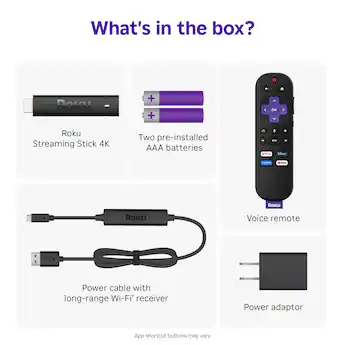
Best for: Portable Roku streaming and TVs with limited space
- Max video resolution
- 4K
- HDR formats
- Dolby Vision, HDR10+
- Connection
- HDMI
- Power
- USB
- Small stick plugs directly into a TV HDMI port.
- Supports 4K, Dolby Vision and HDR10+.
- Roku interface and voice remote keep operation familiar.
- Does not improve TV audio.
- No Ethernet port for a wired network.
Is the Roku Streaming Stick 4K worth buying on Black Friday 2026?
The Roku Streaming Stick 4K is a good fit for viewers who want a compact 4K Roku player without adding a box or soundbar. Dolby Vision support is a plus, while the stick relies on the TV or another system for sound.
See today’s Black Friday price on Amazon
#6
Amazon Fire TV Stick 4K Max (2nd Gen)
The Amazon Fire TV Stick 4K Max (2nd Gen) is the best Fire TV stick for viewers invested in Alexa, with 16GB of storage and Wi-Fi 6E support.
Best for: Alexa households and Fire TV app users
- Max video resolution
- 4K
- Storage
- 16GB
- Wi-Fi
- Wi-Fi 6E
- HDR formats
- Dolby Vision, HDR10+
- Alexa Voice Remote controls streaming and compatible smart-home devices.
- Supports Dolby Vision and Dolby Atmos.
- Compact stick design keeps the setup uncluttered.
- Does not include Ethernet.
- The Fire TV interface is distinct from Roku and Google TV.
Is the Amazon Fire TV Stick 4K Max (2nd Gen) worth buying on Black Friday 2026?
The Amazon Fire TV Stick 4K Max (2nd Gen) is a strong fit for Alexa households that want a compact 4K streamer. The Amazon Fire TV Stick 4K Max (2nd Gen)'s 16GB storage and Wi-Fi 6E support stand out, but shoppers should prefer Roku or Google TV if those interfaces suit them better.
See today’s Black Friday price on Amazon
#7
Apple TV 4K (3rd generation) Wi-Fi + Ethernet 128GB
The Apple TV 4K (3rd generation) Wi-Fi + Ethernet 128GB is the best premium streamer for Apple households, with an A15 Bionic chip and 128GB of storage.
Best for: Apple users who want a premium streaming box and Ethernet
- Max video resolution
- 4K
- Processor
- A15 Bionic
- Storage
- 128GB
- Connectivity
- Wi-Fi, Ethernet
- Supports Dolby Vision, HDR10+ and Dolby Atmos.
- Integrates with Apple services and compatible smart-home devices.
- Ethernet and 128GB storage suit a feature-rich setup.
- Does not include built-in speakers.
- Apple TV is less integrated with Google and Amazon ecosystems.
Is the Apple TV 4K (3rd generation) Wi-Fi + Ethernet 128GB worth buying on Black Friday 2026?
The Apple TV 4K (3rd generation) Wi-Fi + Ethernet 128GB is worth considering for Apple households that want a premium 4K streamer with Ethernet. The Apple TV 4K (3rd generation) Wi-Fi + Ethernet 128GB's 128GB storage and A15 Bionic chip are standouts, but it is not a soundbar replacement.
See today’s Black Friday price on Amazon
What is the difference between Roku Streambar and Google TV Streamer 4K?
Roku Streambar combines 4K streaming with a four-driver, 2.0-channel soundbar. Google TV Streamer (4K) is a standalone player with 32GB of storage and Ethernet, but no speakers.
Choose Roku Streambar for simpler setup and improved TV audio. Choose Google TV Streamer (4K) for Google TV, wired networking or a room with an existing sound system.
Is the Roku Streambar better than the Google TV Streamer for sound?
Roku Streambar provides built-in audio; Google TV Streamer (4K) sends sound to the TV, soundbar or receiver. The Streambar suits bedrooms and smaller rooms where a separate audio unit would add clutter.
For deep bass or surround sound, compare a dedicated soundbar system. Google TV Streamer (4K) fits rooms that already have capable audio.
Which device is better for 4K streaming and HDR?
Google TV Streamer (4K) supports Dolby Vision, HDR10+ and Dolby Atmos. Roku Streambar offers 4K HDR and Dolby Audio. Check your TV’s supported formats before choosing.
Roku Ultra 4K Streaming Player, Roku Streaming Stick 4K, Amazon Fire TV Stick 4K Max (2nd Gen) and Apple TV 4K also offer 4K streaming. Compare HDR support, network options and compatibility with your TV.
Which Roku and Fire TV alternatives should shoppers compare?
Roku Streambar SE combines compact audio and streaming; Roku Ultra 4K Streaming Player adds Ethernet and Wi-Fi 6; Roku Streaming Stick 4K keeps installation discreet. Amazon Fire TV Stick 4K Max (2nd Gen) offers 16GB of storage, Wi-Fi 6E and Alexa controls.
Choose based on room size, preferred interface and voice assistant. Roku Streambar SE suits small rooms, while Roku Streaming Stick 4K adds no audio hardware.
How should you choose a Black Friday 2026 streaming upgrade?
Choose Roku Streambar for streaming and built-in sound, Google TV Streamer (4K) for Google TV and Ethernet, or Apple TV 4K for an Apple-centered setup.
First decide whether your TV needs better audio. Then compare standalone players by interface, HDR support, storage, remote and network connections. Confirm HDMI and video-format compatibility before buying.
Buying Guide
Choose a streamer or a soundbar streamer
Roku Streambar 4K Streaming Media Player and Premium Audio and Roku Streambar SE 4K Streaming Media Player include speakers. Other listed streamers need a separate audio system.
Match HDR support to your television
Check your TV’s 4K, Dolby Vision and HDR10+ support. Compare those formats with the streamer’s specifications.
Pick the streaming interface you prefer
Roku uses the Roku interface, Google TV Streamer (4K) uses Google TV, Amazon Fire TV Stick 4K Max (2nd Gen) suits Alexa users, and Apple TV 4K integrates with Apple services.
Decide whether Ethernet and storage matter
Google TV Streamer (4K) has 32GB of storage and Ethernet. Apple TV 4K (3rd generation) Wi-Fi + Ethernet 128GB and Roku Ultra 4K Streaming Player also offer Ethernet.
Check room size and setup needs
Roku Streambar SE suits smaller spaces; Roku Streambar has four drivers and 2.0-channel audio. Standalone streamers suit setups with existing speakers.
FAQ
Roku Streambar vs Google TV Streamer 4K: which should I buy?
Buy the Roku Streambar 4K Streaming Media Player and Premium Audio when you want a soundbar and 4K streamer together. Choose Google TV Streamer (4K) when you already have audio covered and prefer Google TV, 32GB of storage and an Ethernet port.
Does the Google TV Streamer (4K) have a soundbar?
No. Google TV Streamer (4K) is a standalone streaming device and does not include built-in speakers or a soundbar. Connect it to a television, soundbar or receiver for audio. Roku Streambar combines a 4K streamer with four built-in drivers.
Does Roku Streambar support 4K?
Yes. Roku Streambar 4K Streaming Media Player and Premium Audio supports 4K HDR streaming and includes a 2.0-channel soundbar with four built-in drivers. Check the television’s resolution and HDMI compatibility to get the intended picture quality.
Is Roku Streambar better than Roku Streambar SE?
Roku Streambar 4K Streaming Media Player and Premium Audio is the stronger all-in-one audio option, with four drivers in a 2.0-channel design. Roku Streambar SE 4K Streaming Media Player is a compact alternative with two speakers for simpler small-room setups.
Which streamer is best for Dolby Vision?
Google TV Streamer (4K), Roku Ultra 4K Streaming Player, Roku Streaming Stick 4K, Amazon Fire TV Stick 4K Max (2nd Gen) and Apple TV 4K support Dolby Vision. The television must also support Dolby Vision to display compatible content in that format.
Can I use the Roku Streambar with a separate TV?
Yes. Roku Streambar 4K Streaming Media Player and Premium Audio connects to a compatible television through HDMI ARC and provides Roku streaming plus built-in sound. Confirm the television has the required HDMI connection and place the soundbar where its speakers are unobstructed.