

As an Amazon Associate we earn from qualifying purchases.
- Best overall: Wooting 60HE+ ANSI Gaming Keyboard
- Best budget: HyperX Alloy Origins 60 Mechanical Gaming Keyboard
- Best premium: Wooting 80HE ANSI Gaming Keyboard
- Best for travel: SteelSeries Apex Pro Mini Wireless Gaming Keyboard
- Wooting 60HE+ ANSI Gaming Keyboard stands out for adjustable Hall effect actuation and Rapid Trigger.
- HyperX Alloy Origins 60 Mechanical Gaming Keyboard is a compact, straightforward pick with a 60% layout.
- Wooting 80HE ANSI Gaming Keyboard adds an 80% layout and up to 8,000 Hz polling for competitive play.
- HyperX Alloy Origins Core Tenkeyless Mechanical Gaming Keyboard keeps dedicated function and arrow keys.
- Choose by layout, switch behavior and connection needs before comparing Black Friday 2026 offers.
Wooting 60HE+ ANSI Gaming Keyboard and HyperX Alloy Origins 60 Mechanical Gaming Keyboard suit different kinds of players. Wooting focuses on adjustable magnetic switches, Rapid Trigger and fine-grained control. HyperX focuses on a familiar mechanical feel, bright RGB and a compact frame. The right choice depends on whether you want advanced input tuning or a simple, dependable gaming keyboard.
For this Black Friday 2026 guide, I researched and compared specs, reviews and owner feedback across seven gaming keyboards. The list includes compact 60% boards, tenkeyless and full-size options, plus magnetic-switch alternatives. Here's the bottom line: choose Wooting for customizable actuation and HyperX for traditional mechanical simplicity. Check the layout and connection details before you buy.
How We Picked
- Compared switch technology, including Hall effect magnetic switches, optical switches and conventional mechanical switches.
- Checked layout size and practical key access, from 60% compact boards to full-size keyboards.
- Reviewed listed actuation, polling and connectivity specifications where the manufacturer provides clear figures.
- Considered owner feedback and common preferences for gaming feel, build quality, lighting and everyday use.
- Selected products that offer distinct strengths, so shoppers can match a keyboard to their setup instead of choosing by brand alone.
Comparison Table
| Product | Best for | Layout | Polling rate | Actuation |
|---|---|---|---|---|
| Wooting 60HE+ ANSI Gaming Keyboard | Competitive compact setups | 60% | 1,000 Hz | 0.1–4.0 mm adjustable |
| HyperX Alloy Origins 60 Mechanical Gaming Keyboard | Traditional 60% mechanical feel | 60% | 1,000 Hz | 1.8 mm |
| HyperX Alloy Origins Core Tenkeyless Mechanical Gaming Keyboard | Arrow keys without a number pad | Tenkeyless | 1,000 Hz | 1.8 mm |
| HyperX Alloy Origins Full-Size Mechanical Gaming Keyboard | Number-pad users | Full-size, 104 keys | 1,000 Hz | 1.8 mm |
| Wooting 80HE ANSI Gaming Keyboard | Premium magnetic-switch gaming | 80% | Up to 8,000 Hz | 0.1–4.0 mm adjustable |
| SteelSeries Apex Pro Mini Wireless Gaming Keyboard | Wireless compact gaming | 60% | 1,000 Hz | 0.1–4.0 mm adjustable |
| Razer Huntsman Mini 60% Optical Gaming Keyboard | Optical-switch compact gaming | 60% | 1,000 Hz | 1.5 mm |
Best Picks Reviewed
#1 · Top pick
Wooting 60HE+ ANSI Gaming Keyboard
The Wooting 60HE+ ANSI Gaming Keyboard is the best compact Hall effect pick for competitive players who want adjustable inputs, with 0.1–4.0 mm actuation range.

Best for: Competitive play and adjustable magnetic switches
- Layout
- 60%
- Polling rate
- 1,000 Hz
- Actuation
- 0.1–4.0 mm adjustable
- Switch type
- Lekker Hall effect
- Rapid Trigger supports responsive key reset behavior.
- Adjustable actuation lets players tune key response.
- Compact frame leaves more room for mouse movement.
- The 60% layout omits dedicated arrow and function-key rows.
Is the Wooting 60HE+ ANSI Gaming Keyboard worth buying on Black Friday 2026?
Yes. The Wooting 60HE+ ANSI Gaming Keyboard is a strong Black Friday 2026 choice for players who want magnetic switches, Rapid Trigger and adjustable 0.1–4.0 mm actuation in a compact 60% layout.
See today’s Black Friday price on Amazon
#2
HyperX Alloy Origins 60 Mechanical Gaming Keyboard
The HyperX Alloy Origins 60 Mechanical Gaming Keyboard is the best compact traditional mechanical pick for players who want a familiar switch feel, with a space-saving 60% layout.
Best for: Compact setups and conventional mechanical switches
- Layout
- 60%
- Polling rate
- 1,000 Hz
- Actuation
- 1.8 mm
- Connection
- Wired USB-C
- Small footprint suits compact desks.
- RGB lighting is customizable through HyperX software.
- Aluminum body gives the keyboard a sturdy feel.
- Missing dedicated arrow keys takes adjustment.
Is the HyperX Alloy Origins 60 Mechanical Gaming Keyboard worth buying on Black Friday 2026?
Yes. The HyperX Alloy Origins 60 Mechanical Gaming Keyboard is worth considering for compact gaming setups that favor conventional mechanical switches, onboard lighting and a sturdy aluminum body over adjustable Hall effect features.
See today’s Black Friday price on Amazon
#3
HyperX Alloy Origins Core Tenkeyless Mechanical Gaming Keyboard
The HyperX Alloy Origins Core Tenkeyless Mechanical Gaming Keyboard is the best HyperX pick for players who want arrow keys without a number pad, with a space-saving TKL layout.
Best for: Tenkeyless gaming and daily typing
- Layout
- Tenkeyless
- Polling rate
- 1,000 Hz
- Actuation
- 1.8 mm
- Connection
- Wired USB-C
- Keeps dedicated arrow and function keys.
- Aluminum frame offers a solid base.
- RGB effects and profiles are customizable.
- Wired-only use will not suit players seeking wireless freedom.
Is the HyperX Alloy Origins Core Tenkeyless Mechanical Gaming Keyboard worth buying on Black Friday 2026?
Yes. The HyperX Alloy Origins Core Tenkeyless Mechanical Gaming Keyboard is a practical pick for gamers who want a traditional mechanical board, dedicated arrow keys and a smaller footprint than a full-size keyboard.
See today’s Black Friday price on Amazon
#4
HyperX Alloy Origins Full-Size Mechanical Gaming Keyboard
The HyperX Alloy Origins Full-Size Mechanical Gaming Keyboard is the best full-layout HyperX pick for players who use a number pad, with a complete 104-key layout.
Best for: Full-size gaming, work and number-pad use
- Layout
- Full-size, 104 keys
- Polling rate
- 1,000 Hz
- Actuation
- 1.8 mm
- Connection
- Wired USB-C
- Number pad suits productivity and games with keybinds.
- RGB lighting adds a customizable setup accent.
- Aluminum construction feels robust on a desk.
- Full-size dimensions use more desk space.
Is the HyperX Alloy Origins Full-Size Mechanical Gaming Keyboard worth buying on Black Friday 2026?
Yes. The HyperX Alloy Origins Full-Size Mechanical Gaming Keyboard makes sense for players who need a number pad and dedicated navigation keys, while keeping the familiar mechanical design and wired connection.
See today’s Black Friday price on Amazon
#5
Wooting 80HE ANSI Gaming Keyboard
The Wooting 80HE ANSI Gaming Keyboard is the best premium magnetic keyboard for players who want more keys and rapid input control, with up to 8,000 Hz polling.
Best for: Competitive players who want an expanded magnetic layout
- Layout
- 80%
- Polling rate
- Up to 8,000 Hz
- Actuation
- 0.1–4.0 mm adjustable
- Switch type
- Lekker Hall effect
- Rapid Trigger and adjustable actuation offer extensive tuning.
- Expanded layout keeps more keys than a 60% board.
- High polling option targets competitive responsiveness.
- Advanced tuning features are more than casual players need.
Is the Wooting 80HE ANSI Gaming Keyboard worth buying on Black Friday 2026?
Yes. The Wooting 80HE ANSI Gaming Keyboard is a strong premium choice for competitive players who want Hall effect switches, adjustable actuation, an 80% layout and polling up to 8,000 Hz.
See today’s Black Friday price on Amazon
#6
SteelSeries Apex Pro Mini Wireless Gaming Keyboard
The SteelSeries Apex Pro Mini Wireless Gaming Keyboard is the best wireless compact pick for players who want adjustable magnetic switches, with 0.1–4.0 mm actuation.
Best for: Wireless compact gaming and adjustable key response
- Layout
- 60%
- Polling rate
- 1,000 Hz
- Actuation
- 0.1–4.0 mm adjustable
- Connection
- 2.4 GHz, Bluetooth, wired
- Three connection modes suit varied setups.
- Adjustable magnetic switches support custom response.
- Compact layout saves desk space.
- Small layout requires function-layer shortcuts.
Is the SteelSeries Apex Pro Mini Wireless Gaming Keyboard worth buying on Black Friday 2026?
Yes. The SteelSeries Apex Pro Mini Wireless Gaming Keyboard suits players who want a compact magnetic-switch board with 2.4 GHz, Bluetooth and wired connectivity, plus adjustable actuation for different games.
See today’s Black Friday price on Amazon
#7
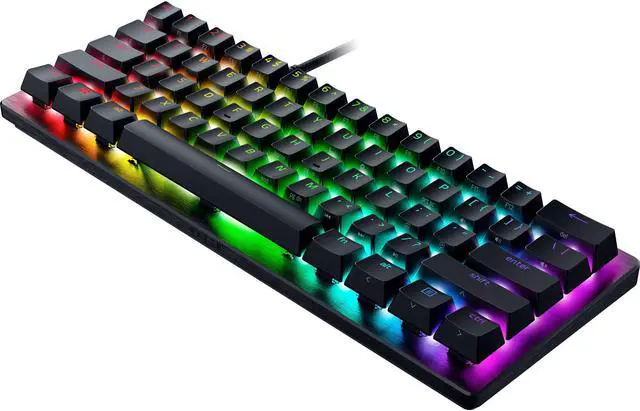
Razer Huntsman Mini 60% Optical Gaming Keyboard
The Razer Huntsman Mini 60% Optical Gaming Keyboard is the best optical-switch alternative for players who want a compact wired board, with 1.5 mm actuation.
Best for: Compact gaming with optical switches
- Layout
- 60%
- Polling rate
- 1,000 Hz
- Actuation
- 1.5 mm
- Connection
- Wired USB-C
- Optical switches deliver a distinct alternative to magnetic and mechanical designs.
- Compact body leaves extra mouse space.
- Chroma RGB supports customizable lighting.
- No adjustable magnetic actuation or wireless connection.
Is the Razer Huntsman Mini 60% Optical Gaming Keyboard worth buying on Black Friday 2026?
Yes. The Razer Huntsman Mini 60% Optical Gaming Keyboard is a good fit for gamers who want a compact wired board with optical switches, fast 1.5 mm actuation and customizable RGB lighting.
See today’s Black Friday price on Amazon
Wooting 60HE vs HyperX Alloy: which keyboard is better for gaming?
Wooting 60HE+ ANSI Gaming Keyboard and HyperX Alloy Origins 60 Mechanical Gaming Keyboard serve two different gaming priorities: adjustable magnetic input and traditional mechanical simplicity. Wooting’s Hall effect switches support adjustable actuation and Rapid Trigger, features aimed at players who want to tune movement and repeated key presses. HyperX’s 60% board offers a familiar mechanical setup with a compact footprint and straightforward controls.
For fast competitive games, Wooting 60HE+ ANSI Gaming Keyboard is the stronger feature pick. For players who want a compact wired keyboard without learning magnetic-switch settings, HyperX Alloy Origins 60 Mechanical Gaming Keyboard is easier to approach. Worth it for most players? The best value comes from matching the keyboard to the games and layout you actually use, rather than chasing the longest feature list.
What is the difference between Wooting Hall effect and HyperX mechanical switches?
Wooting 60HE+ ANSI Gaming Keyboard uses Hall effect magnetic switches with adjustable actuation from 0.1 to 4.0 mm, while HyperX Alloy Origins 60 Mechanical Gaming Keyboard uses conventional mechanical switches with 1.8 mm actuation. That difference shapes how much control you get over the point where a key registers.
Wooting 60HE+ ANSI Gaming Keyboard also supports Rapid Trigger, which changes how quickly a key resets as it moves. HyperX Alloy Origins 60 Mechanical Gaming Keyboard keeps the classic fixed-actuation approach. Magnetic tuning rewards players who enjoy customizing controls, while traditional switches suit gamers who prefer a consistent response without extra setup. Neither switch type replaces the importance of comfort, key layout or personal preference.
Should you choose a 60%, 80%, tenkeyless or full-size gaming keyboard?
Wooting 60HE+ ANSI Gaming Keyboard and HyperX Alloy Origins 60 Mechanical Gaming Keyboard use 60% layouts, while Wooting 80HE ANSI Gaming Keyboard, HyperX Alloy Origins Core Tenkeyless Mechanical Gaming Keyboard and HyperX Alloy Origins Full-Size Mechanical Gaming Keyboard offer progressively more keys. A 60% board saves the most space but relies on layers for many functions.
Tenkeyless designs preserve arrow keys and a function row while dropping the number pad. An 80% layout gives players a broader key selection in a smaller footprint than a full-size board. Full-size keyboards make number entry and navigation direct, but take more room. Measure your desk and consider your game binds before deciding. Players who frequently use arrows, function keys or a number pad should favor a larger layout.
Which Black Friday 2026 gaming keyboard is best for a small desk?
HyperX Alloy Origins 60 Mechanical Gaming Keyboard, Wooting 60HE+ ANSI Gaming Keyboard, SteelSeries Apex Pro Mini Wireless Gaming Keyboard and Razer Huntsman Mini 60% Optical Gaming Keyboard are the most compact picks in this guide, each with a 60% layout. Compact boards free desk space for mouse movement and fit small gaming stations.
Pick HyperX Alloy Origins 60 Mechanical Gaming Keyboard for a conventional mechanical switch experience. Choose Wooting 60HE+ ANSI Gaming Keyboard for magnetic actuation controls. SteelSeries Apex Pro Mini Wireless Gaming Keyboard adds wireless connections, while Razer Huntsman Mini 60% Optical Gaming Keyboard offers optical switches. Remember that compact layouts remove dedicated keys. Players who depend on arrow keys or function keys should check the keyboard’s layer shortcuts before choosing a 60% model.
Are Wooting and HyperX keyboards suitable for everyday typing?
HyperX Alloy Origins Core Tenkeyless Mechanical Gaming Keyboard and HyperX Alloy Origins Full-Size Mechanical Gaming Keyboard are convenient for everyday typing because both keep dedicated navigation keys, with the full-size model adding a number pad. Wooting 80HE ANSI Gaming Keyboard also offers a larger layout than a 60% keyboard while retaining adjustable magnetic switches.
Wooting 60HE+ ANSI Gaming Keyboard and HyperX Alloy Origins 60 Mechanical Gaming Keyboard can handle regular typing, but their compact layouts put more functions behind key combinations. Consider switch feel, keyboard noise, layout familiarity and the software controls you want to manage. For a shared desk or school and work use, full-size and tenkeyless choices reduce dependence on shortcuts. Gamers focused on mouse room and compact setups can trade those dedicated keys for a smaller frame.
Buying Guide
Choose the switch technology
Hall effect switches in Wooting 60HE+ ANSI Gaming Keyboard and Wooting 80HE ANSI Gaming Keyboard offer adjustable actuation and Rapid Trigger. HyperX Alloy Origins keyboards use conventional mechanical switches. Razer Huntsman Mini 60% Optical Gaming Keyboard uses optical switches. Pick the feel and control style that suits your games.
Match the layout to your desk
A 60% layout saves the most room but removes dedicated keys. Tenkeyless boards keep arrows and function keys, while full-size designs add a number pad. Compare your current keyboard and note which keys you use every day before moving to a smaller format.
Check your preferred connection
Most HyperX Alloy Origins and Wooting options here are wired. SteelSeries Apex Pro Mini Wireless Gaming Keyboard supports 2.4 GHz, Bluetooth and wired modes. Choose wireless for a flexible setup, or wired for a simple connection without managing wireless modes.
Prioritize the features you will use
Rapid Trigger and adjustable actuation have clear appeal for competitive players who tune inputs. RGB lighting, dedicated keys and familiar switches can matter more for everyday play. Avoid paying attention to a specification unless it improves the games or tasks you actually handle.
Compare Black Friday 2026 listings carefully
Check the exact model name, switch variant, keyboard layout and seller before placing an order. Product families can include different switch types or regional layouts. Confirm the return terms and included accessories, then compare the listed offer against the features that matter to your setup.
FAQ
Wooting 60HE vs HyperX Alloy Origins 60: which should I buy?
Choose Wooting 60HE+ ANSI Gaming Keyboard for adjustable Hall effect actuation, Rapid Trigger and competitive input tuning. Choose HyperX Alloy Origins 60 Mechanical Gaming Keyboard for conventional mechanical switches and a simpler compact setup. Both use a space-saving 60% layout.
Is the Wooting 60HE+ ANSI Gaming Keyboard good for FPS games?
Yes. Wooting 60HE+ ANSI Gaming Keyboard suits FPS players who want adjustable 0.1–4.0 mm actuation and Rapid Trigger. The compact 60% layout also leaves extra room for mouse movement, though players need to learn its function-layer shortcuts.
Does the HyperX Alloy Origins 60 Mechanical Gaming Keyboard have arrow keys?
HyperX Alloy Origins 60 Mechanical Gaming Keyboard does not have dedicated arrow keys in its 60% layout. Arrow functions are accessed through keyboard layers and shortcuts. Players who want dedicated arrows should consider HyperX Alloy Origins Core Tenkeyless Mechanical Gaming Keyboard.
What is the best wireless keyboard in this Black Friday 2026 guide?
SteelSeries Apex Pro Mini Wireless Gaming Keyboard is the wireless pick in this guide. The compact 60% keyboard supports 2.4 GHz, Bluetooth and wired connection modes, along with adjustable magnetic-switch actuation for players who want more control over key response.
Is Wooting 80HE better than Wooting 60HE+?
Wooting 80HE ANSI Gaming Keyboard offers an 80% layout and polling up to 8,000 Hz, while Wooting 60HE+ ANSI Gaming Keyboard is smaller and uses a 60% layout. Both offer adjustable Hall effect actuation. Choose by preferred size and feature needs.
Which HyperX Alloy Origins keyboard should I choose?
Choose HyperX Alloy Origins 60 Mechanical Gaming Keyboard for the smallest footprint, HyperX Alloy Origins Core Tenkeyless Mechanical Gaming Keyboard for arrows without a number pad, or HyperX Alloy Origins Full-Size Mechanical Gaming Keyboard when a number pad and full key set matter.