

As an Amazon Associate we earn from qualifying purchases.
- Best overall: Dell UltraSharp U2723QE 27-inch 4K USB-C Hub Monitor
- Best budget: Samsung ViewFinity S5 S34C500GAN 34-inch Ultra-WQHD Monitor
- Best premium: ASUS ROG Swift OLED PG27AQDM 27-inch QHD 240Hz Gaming Monitor
- Best for ultrawide office multitasking: LG 34WN80C-B 34-inch UltraWide QHD Curved USB-C Monitor
- A 27-inch monitor suits focused work, smaller desks and sharp 4K viewing; a 34-inch ultrawide suits side-by-side windows and immersive gaming.
- The Dell UltraSharp U2723QE 27-inch 4K USB-C Hub Monitor is the best overall work pick, with 4K resolution and 90W USB-C power delivery.
- The MSI MAG 342CQR E2 34-inch UWQHD 180Hz Curved Gaming Monitor offers a spacious gaming view and a 180Hz refresh rate.
- Compare resolution, refresh rate, ports and desk depth before choosing by screen size alone.
- Check stand dimensions and mounting support before ordering a 34-inch curved monitor for a compact desk.
A 27-inch monitor is the better fit for compact desks and detailed 4K work, while a 34-inch ultrawide gives you more horizontal room for multitasking and gaming. For Black Friday 2026, the right choice depends on how you use your screen, how far you sit from it and whether your desk can accommodate a wider display.
I’m Marcus Reed, and we researched and compared specs, reviews and owner feedback to find useful options across both sizes. My pick for most people is a 27-inch screen for general work and a 34-inch ultrawide for immersive games or a multi-window setup. The product picks below cover office use, high-refresh gaming and different budgets without treating screen size as the only deciding factor.
How We Picked
- Resolution and screen size: we compared 27-inch QHD and 4K panels with 34-inch ultrawide WQHD displays.
- Refresh rate and motion: we considered standard office refresh rates alongside gaming options reaching 180Hz or 240Hz.
- Connectivity: we prioritized useful connections such as USB-C power delivery, DisplayPort and HDMI.
- Owner feedback and reliability signals: we researched and compared reviews for recurring comments on image quality, setup and usability.
- Desk fit and value: we weighed screen width, curve, stand footprint and the features each monitor offers for its intended use.
Comparison Table
| Product | Best for | Resolution | Refresh rate | Panel and key feature |
|---|---|---|---|---|
| Dell UltraSharp U2723QE 27-inch 4K USB-C Hub Monitor | 4K productivity | 3840 x 2160 | 60Hz | IPS Black; 90W USB-C |
| LG 27GP850-B 27-inch QHD Nano IPS 165Hz Gaming Monitor | QHD gaming | 2560 x 1440 | 165Hz native | Nano IPS |
| ASUS ROG Swift OLED PG27AQDM 27-inch QHD 240Hz Gaming Monitor | Premium gaming | 2560 x 1440 | 240Hz | OLED |
| Dell S3422DWG 34-inch WQHD 144Hz Curved Gaming Monitor | Curved gaming | 3440 x 1440 | 144Hz | VA; 1800R |
| LG 34WN80C-B 34-inch UltraWide QHD Curved USB-C Monitor | Office multitasking | 3440 x 1440 | 60Hz | IPS; 60W USB-C |
| Samsung ViewFinity S5 S34C500GAN 34-inch Ultra-WQHD Monitor | Everyday ultrawide use | 3440 x 1440 | 100Hz | 21:9 aspect ratio |
| MSI MAG 342CQR E2 34-inch UWQHD 180Hz Curved Gaming Monitor | High-refresh ultrawide gaming | 3440 x 1440 | 180Hz | VA; 1500R |
Best Picks Reviewed
#1 · Top pick
Dell UltraSharp U2723QE 27-inch 4K USB-C Hub Monitor
The Dell UltraSharp U2723QE 27-inch 4K USB-C Hub Monitor is the best overall monitor for productivity-focused buyers, and its 3840 x 2160 resolution keeps text and fine details crisp.

Best for: Office work, detailed 4K viewing and USB-C laptop setups
- Screen size
- 27 inches
- Resolution
- 3840 x 2160
- Refresh rate
- 60Hz
- USB-C power delivery
- Up to 90W
- Sharp 4K image for text and detailed content
- USB-C hub functionality with laptop charging
- IPS Black panel supports strong contrast for an IPS display
- 60Hz refresh rate is not aimed at high-refresh gaming
Is the Dell UltraSharp U2723QE 27-inch 4K USB-C Hub Monitor worth buying on Black Friday 2026?
Yes. The Dell UltraSharp U2723QE 27-inch 4K USB-C Hub Monitor is a strong Black Friday 2026 choice for office work, detailed 4K content and a cleaner USB-C laptop setup. The Dell UltraSharp U2723QE 27-inch 4K USB-C Hub Monitor's 90W power delivery reduces cable clutter.
See today’s Black Friday price on Amazon
#2
LG 27GP850-B 27-inch QHD Nano IPS 165Hz Gaming Monitor
The LG 27GP850-B 27-inch QHD Nano IPS 165Hz Gaming Monitor is the best 27-inch gaming monitor for fast-paced play, with a 165Hz native refresh rate and QHD resolution.

Best for: QHD gaming at high refresh rates
- Screen size
- 27 inches
- Resolution
- 2560 x 1440
- Refresh rate
- 165Hz native, up to 180Hz overclocked
- Panel
- Nano IPS
- Fast refresh rate for responsive gaming
- QHD resolution balances detail and performance
- Wide viewing angles from its IPS panel
- Does not provide the extra horizontal workspace of a 34-inch ultrawide
Is the LG 27GP850-B 27-inch QHD Nano IPS 165Hz Gaming Monitor worth buying on Black Friday 2026?
Yes. The LG 27GP850-B 27-inch QHD Nano IPS 165Hz Gaming Monitor is a smart pick for players seeking a compact QHD gaming setup. The LG 27GP850-B 27-inch QHD Nano IPS 165Hz Gaming Monitor's 165Hz native refresh rate supports smooth motion, while the 27-inch size fits many standard desks.
See today’s Black Friday price on Amazon
#3
ASUS ROG Swift OLED PG27AQDM 27-inch QHD 240Hz Gaming Monitor
The ASUS ROG Swift OLED PG27AQDM 27-inch QHD 240Hz Gaming Monitor is the best premium 27-inch gaming choice for players who value OLED contrast, with a 240Hz refresh rate.

Best for: Premium competitive and visually rich gaming
- Screen size
- 27 inches
- Resolution
- 2560 x 1440
- Refresh rate
- 240Hz
- Panel
- OLED
- OLED panel produces deep blacks and vivid contrast
- 240Hz refresh rate supports fast gameplay
- QHD resolution is a practical fit for 27 inches
- Premium OLED features need careful consideration for static desktop use
Is the ASUS ROG Swift OLED PG27AQDM 27-inch QHD 240Hz Gaming Monitor worth buying on Black Friday 2026?
Yes. The ASUS ROG Swift OLED PG27AQDM 27-inch QHD 240Hz Gaming Monitor is worth considering for premium gaming when contrast and high refresh rates matter. The ASUS ROG Swift OLED PG27AQDM 27-inch QHD 240Hz Gaming Monitor's 240Hz panel is a better fit for demanding play than everyday office tasks.
See today’s Black Friday price on Amazon
#4
Dell S3422DWG 34-inch WQHD 144Hz Curved Gaming Monitor
The Dell S3422DWG 34-inch WQHD 144Hz Curved Gaming Monitor is the best value-oriented 34-inch gaming pick for players who want an immersive ultrawide view, with a 144Hz refresh rate.
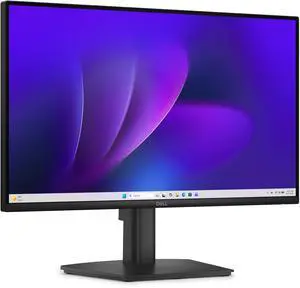
Best for: Curved ultrawide gaming and entertainment
- Screen size
- 34 inches
- Resolution
- 3440 x 1440
- Refresh rate
- 144Hz
- Curve
- 1800R
- Wide WQHD view adds room for games and apps
- 144Hz refresh rate suits gaming
- Curved screen helps keep the wide image in view
- Wide stand and panel need more desk space than a 27-inch monitor
Is the Dell S3422DWG 34-inch WQHD 144Hz Curved Gaming Monitor worth buying on Black Friday 2026?
Yes. The Dell S3422DWG 34-inch WQHD 144Hz Curved Gaming Monitor is a compelling pick for players who want an ultrawide screen without moving to a premium OLED model. The Dell S3422DWG 34-inch WQHD 144Hz Curved Gaming Monitor's 3440 x 1440 resolution and 144Hz refresh rate balance immersion and speed.
See today’s Black Friday price on Amazon
#5
LG 34WN80C-B 34-inch UltraWide QHD Curved USB-C Monitor
The LG 34WN80C-B 34-inch UltraWide QHD Curved USB-C Monitor is the best 34-inch monitor for office multitasking, with a 3440 x 1440 workspace and 60W USB-C power delivery.

Best for: Wide office layouts and laptop connectivity
- Screen size
- 34 inches
- Resolution
- 3440 x 1440
- Refresh rate
- 60Hz
- USB-C power delivery
- Up to 60W
- Ultrawide workspace suits side-by-side windows
- USB-C connection can carry video and laptop power
- Color-focused IPS display works well for general creative tasks
- 60Hz refresh rate is less suited to high-refresh gaming
Is the LG 34WN80C-B 34-inch UltraWide QHD Curved USB-C Monitor worth buying on Black Friday 2026?
Yes. The LG 34WN80C-B 34-inch UltraWide QHD Curved USB-C Monitor is a useful office upgrade for people who keep several windows open at once. The LG 34WN80C-B 34-inch UltraWide QHD Curved USB-C Monitor's 3440 x 1440 resolution and 60W USB-C power delivery support a tidy laptop workspace.
See today’s Black Friday price on Amazon
#6
Samsung ViewFinity S5 S34C500GAN 34-inch Ultra-WQHD Monitor
The Samsung ViewFinity S5 S34C500GAN 34-inch Ultra-WQHD Monitor is the best straightforward ultrawide for everyday productivity, with a 100Hz refresh rate and 3440 x 1440 resolution.
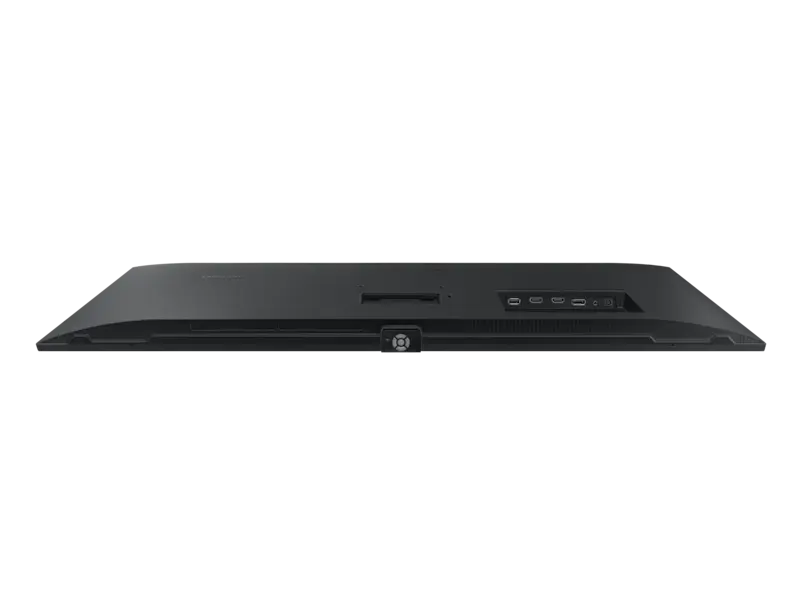
Best for: Everyday multitasking and mixed-use viewing
- Screen size
- 34 inches
- Resolution
- 3440 x 1440
- Refresh rate
- 100Hz
- Aspect ratio
- 21:9
- Wide workspace accommodates multiple windows
- 100Hz refresh rate feels smooth for everyday use
- Ultrawide format is useful for timelines and spreadsheets
- No USB-C laptop charging feature
Is the Samsung ViewFinity S5 S34C500GAN 34-inch Ultra-WQHD Monitor worth buying on Black Friday 2026?
Yes. The Samsung ViewFinity S5 S34C500GAN 34-inch Ultra-WQHD Monitor is a solid everyday ultrawide for spreadsheets, browsing and mixed use. The Samsung ViewFinity S5 S34C500GAN 34-inch Ultra-WQHD Monitor's 100Hz refresh rate is smoother than a basic 60Hz display, and its 21:9 format gives apps extra horizontal room.
See today’s Black Friday price on Amazon
#7
MSI MAG 342CQR E2 34-inch UWQHD 180Hz Curved Gaming Monitor
The MSI MAG 342CQR E2 34-inch UWQHD 180Hz Curved Gaming Monitor is the best high-refresh 34-inch pick for immersive gaming, with a 180Hz refresh rate and 1500R curve.

Best for: High-refresh ultrawide gaming
- Screen size
- 34 inches
- Resolution
- 3440 x 1440
- Refresh rate
- 180Hz
- Curve
- 1500R
- 180Hz refresh rate supports smooth gaming
- UWQHD resolution fills a broad field of view
- Curved screen supports an immersive setup
- Requires a wider desk and a graphics card suited to UWQHD gaming
Is the MSI MAG 342CQR E2 34-inch UWQHD 180Hz Curved Gaming Monitor worth buying on Black Friday 2026?
Yes. The MSI MAG 342CQR E2 34-inch UWQHD 180Hz Curved Gaming Monitor is a strong match for players who want a fast, immersive ultrawide. The MSI MAG 342CQR E2 34-inch UWQHD 180Hz Curved Gaming Monitor's 180Hz refresh rate and 3440 x 1440 resolution pair well with a capable gaming PC.
See today’s Black Friday price on Amazon
Is a 27-inch or 34-inch monitor better for most people?
A 27-inch monitor suits compact desks and focused work; a 34-inch ultrawide adds horizontal room for side-by-side apps and immersive gaming. For sharp text, a 27-inch 4K model offers greater pixel density.
The Dell UltraSharp U2723QE 27-inch 4K USB-C Hub Monitor favors office work, while the LG 34WN80C-B 34-inch UltraWide QHD Curved USB-C Monitor supports a broad, multi-window layout. Choose by workload and available desk width.
What is the difference between 27-inch and 34-inch monitor resolution?
A 27-inch 4K monitor has 3840 x 2160 pixels. Many 34-inch ultrawides use 3440 x 1440 pixels in a 21:9 format, trading vertical resolution for horizontal workspace.
The Dell UltraSharp U2723QE 27-inch 4K USB-C Hub Monitor suits detailed content; the Samsung ViewFinity S5 S34C500GAN 34-inch Ultra-WQHD Monitor offers more room for open windows. Compare pixel dimensions, scaling and panel quality for your work.
Is a 34-inch ultrawide monitor good for gaming?
A 34-inch ultrawide offers a wide field of view, with models in this guide ranging from 100Hz to 180Hz. Confirm your PC can run games smoothly at 3440 x 1440.
The MSI MAG 342CQR E2 34-inch UWQHD 180Hz Curved Gaming Monitor targets high-refresh gaming; the Dell S3422DWG 34-inch WQHD 144Hz Curved Gaming Monitor offers a lower refresh rate. Check ultrawide support in your games. The LG 27GP850-B 27-inch QHD Nano IPS 165Hz Gaming Monitor suits smaller setups and is easier to drive at high frame rates.
How much desk space does a 34-inch monitor need?
A 34-inch ultrawide takes more desk width than a 27-inch monitor, and its stand can have a broad footprint. Measure desk width and depth, allowing room for other equipment and a comfortable viewing distance.
Check the Dell S3422DWG 34-inch WQHD 144Hz Curved Gaming Monitor’s stand dimensions and weight. A compatible monitor arm can free desk space; verify its mount and capacity.
What should I compare for Black Friday 2026 monitor shopping?
Compare resolution, refresh rate, ports and dimensions against your computer and daily tasks. The Dell UltraSharp U2723QE 27-inch 4K USB-C Hub Monitor provides up to 90W USB-C power delivery; the LG 34WN80C-B 34-inch UltraWide QHD Curved USB-C Monitor provides up to 60W. Check your laptop’s charging needs.
For gaming, match resolution and refresh rate to your graphics hardware. For office work, prioritize text clarity, ergonomics and screen area. Verify the exact model and variant, including ports and panel specifications.
Buying Guide
Choose a screen size for your desk
A 27-inch monitor fits narrower desks; a 34-inch ultrawide offers more horizontal workspace. Measure the desk and viewing distance before choosing.
Match resolution to your work
The Dell UltraSharp U2723QE 27-inch 4K USB-C Hub Monitor emphasizes pixel detail; a 34-inch 3440 x 1440 monitor provides a wider workspace. Consider text scaling and app layout.
Pick refresh rate for your games
Choose a refresh rate your computer can support at the monitor’s native resolution, and check your games’ frame rates. Models in this guide range from 144Hz to 180Hz for gaming.
Check ports and laptop power
Compare USB-C power delivery with your laptop’s needs, then confirm HDMI, DisplayPort and USB hub requirements.
Compare exact variants during Black Friday
Search the full brand and model name, then verify resolution, panel, refresh rate, stand features and return terms in the listing.
FAQ
Is a 27-inch monitor better than a 34-inch monitor for work?
A 27-inch monitor is better for a compact setup or detailed 4K work, while a 34-inch ultrawide is better for keeping multiple windows open side by side. Choose the Dell UltraSharp U2723QE 27-inch 4K USB-C Hub Monitor for 4K detail or the LG 34WN80C-B 34-inch UltraWide QHD Curved USB-C Monitor for workspace.
Is a 34-inch monitor too big for a desk?
A 34-inch monitor fits a desk with enough width and depth for its screen, stand and comfortable viewing distance. Measure your usable surface first. A curved model such as the Dell S3422DWG 34-inch WQHD 144Hz Curved Gaming Monitor needs more room than many 27-inch displays.
Is 4K better than ultrawide QHD for a monitor?
4K offers more pixels for crisp detail, while ultrawide QHD offers more horizontal workspace. The Dell UltraSharp U2723QE 27-inch 4K USB-C Hub Monitor suits detailed content and the LG 34WN80C-B 34-inch UltraWide QHD Curved USB-C Monitor suits side-by-side windows. Your apps and desk space determine the better fit.
What is the best 34-inch monitor for gaming?
The MSI MAG 342CQR E2 34-inch UWQHD 180Hz Curved Gaming Monitor is the top high-refresh 34-inch gaming pick in this guide. Its 3440 x 1440 resolution, 180Hz refresh rate and 1500R curve suit immersive play, provided your computer can drive the screen at your preferred frame rate.
What is the best 27-inch monitor for gaming?
The LG 27GP850-B 27-inch QHD Nano IPS 165Hz Gaming Monitor is a strong QHD gaming choice with a 165Hz native refresh rate. For an OLED panel and a 240Hz refresh rate, choose the ASUS ROG Swift OLED PG27AQDM 27-inch QHD 240Hz Gaming Monitor.
What should I look for in a Black Friday 2026 monitor?
Compare the exact model, screen size, resolution, refresh rate, panel type, ports and stand dimensions. Laptop owners should check USB-C power delivery, while gamers should match resolution and refresh rate to their graphics hardware. Read the listing carefully to confirm the variant has the features you need.