

As an Amazon Associate we earn from qualifying purchases.
- Best overall: ASUS ProArt Display PA278CFRV 27-inch QHD Monitor
- Best budget: GIGABYTE M32U 32-inch 4K Gaming Monitor
- Best premium: ASUS ROG Swift OLED PG32UCDM 32-inch 4K Gaming Monitor
- Best for USB-C laptop desks: Dell UltraSharp U2723QE 27-inch 4K USB-C Hub Monitor
- ASUS ProArt Display PA278CFRV is the practical fit for color-focused work, everyday productivity and a 27-inch QHD screen.
- MSI MAG 321UPX QD-OLED is the stronger pick for 32-inch 4K gaming at 240Hz and fast OLED response.
- Choose the ProArt for its USB-C charging and creator-focused specifications; choose the MSI for its higher resolution, refresh rate and contrast.
- GIGABYTE M32U offers a versatile 32-inch 4K gaming alternative, while Dell UltraSharp U2723QE suits a USB-C office setup.
- Compare panel type, resolution, refresh rate and connectivity before choosing a Black Friday 2026 monitor.
The ASUS ProArt Display PA278CFRV and MSI MAG 321UPX QD-OLED serve different priorities: the 27-inch ProArt is a creator-friendly QHD monitor with USB-C charging, while the 32-inch MSI is a 4K QD-OLED gaming display with a 240Hz refresh rate. The right choice depends on whether your work centers on color-conscious productivity or immersive, high-speed gaming.
For this Black Friday 2026 buying guide, I researched and compared specs, reviews and owner feedback across seven monitors. My pick for most people who do creative and office work is the ASUS ProArt Display PA278CFRV; dedicated PC gamers should start with the MSI MAG 321UPX QD-OLED. The alternatives below cover 4K productivity, console-friendly gaming and premium OLED options.
How We Picked
- Compared resolution, refresh rate, panel type and response specifications for each monitor.
- Checked color coverage, creator features and USB-C power delivery where the manufacturer lists them.
- Considered desk fit, screen size and the type of work or games each model suits.
- Reviewed owner feedback and product information to identify recurring strengths and trade-offs.
- Selected monitors across different use cases rather than ranking every model for the same buyer.
Comparison Table
| Product | Best for | Resolution | Refresh rate | Panel |
|---|---|---|---|---|
| ASUS ProArt Display PA278CFRV 27-inch QHD Monitor | Creative work and USB-C laptop setups | 2560 × 1440 | 100Hz | IPS |
| MSI MAG 321UPX QD-OLED 32-inch 4K Gaming Monitor | High-refresh-rate 4K gaming | 3840 × 2160 | 240Hz | QD-OLED |
| ASUS ProArt Display PA279CRV 27-inch 4K HDR Monitor | Compact 4K creative work | 3840 × 2160 | 60Hz | IPS |
| GIGABYTE M32U 32-inch 4K Gaming Monitor | Versatile 4K gaming | 3840 × 2160 | 144Hz | IPS |
| Dell UltraSharp U2723QE 27-inch 4K USB-C Hub Monitor | Office work and laptop docking | 3840 × 2160 | 60Hz | IPS Black |
| ASUS ROG Swift OLED PG32UCDM 32-inch 4K Gaming Monitor | Premium OLED gaming | 3840 × 2160 | 240Hz | QD-OLED |
| LG UltraGear OLED 32GS95UE-B 32-inch 4K Gaming Monitor | Dual-mode competitive gaming | 3840 × 2160 | 240Hz; 480Hz at 1080p | OLED |
Best Picks Reviewed
#1 · Top pick
ASUS ProArt Display PA278CFRV 27-inch QHD Monitor
The ASUS ProArt Display PA278CFRV 27-inch QHD Monitor is the best creator-focused monitor for editors and hybrid workers, with a 100Hz refresh rate and USB-C power delivery up to 96W.

Best for: Color-conscious work and USB-C laptop desks
- Resolution
- 2560 × 1440
- Refresh rate
- 100Hz
- USB-C power delivery
- Up to 96W
- Color coverage
- 100% sRGB
- USB-C supports display, data and laptop charging through one connection.
- Factory-calibrated color features suit creative workflows.
- 100Hz refresh rate feels smoother than a standard 60Hz office display.
- QHD resolution is less detailed than a 4K screen of similar size.
- Not designed for high-refresh-rate 4K gaming.
Is the ASUS ProArt Display PA278CFRV 27-inch QHD Monitor worth buying on Black Friday 2026?
Yes. The ASUS ProArt Display PA278CFRV 27-inch QHD Monitor is a strong Black Friday 2026 choice for creators and laptop users who value accurate color, a 100Hz refresh rate and up to 96W USB-C charging.
See today’s Black Friday price on Amazon
#2
MSI MAG 321UPX QD-OLED 32-inch 4K Gaming Monitor
The MSI MAG 321UPX QD-OLED 32-inch 4K Gaming Monitor is the best high-end gaming monitor for PC players seeking a 32-inch 4K OLED screen, with a 240Hz refresh rate.
Best for: PC gaming, HDR contrast and fast motion
- Resolution
- 3840 × 2160
- Refresh rate
- 240Hz
- Response time
- 0.03ms
- Panel
- QD-OLED
- QD-OLED delivers deep blacks and high-contrast images.
- 4K at 240Hz targets demanding PC gaming setups.
- HDMI 2.1 supports current-generation consoles and compatible graphics hardware.
- OLED care and static desktop use deserve consideration.
- Requires powerful PC hardware to make the most of 4K at high refresh rates.
Is the MSI MAG 321UPX QD-OLED 32-inch 4K Gaming Monitor worth buying on Black Friday 2026?
Yes. The MSI MAG 321UPX QD-OLED 32-inch 4K Gaming Monitor makes sense for gamers who want 4K detail, a 240Hz refresh rate and OLED contrast in one display. Check desk space and PC capability before choosing it.
See today’s Black Friday price on Amazon
#3
ASUS ProArt Display PA279CRV 27-inch 4K HDR Monitor
The ASUS ProArt Display PA279CRV 27-inch 4K HDR Monitor is the best compact 4K creator monitor for photographers and designers, with a 3840 × 2160 resolution and up to 96W USB-C charging.
Best for: Detailed creative work in a compact setup
- Resolution
- 3840 × 2160
- Refresh rate
- 60Hz
- USB-C power delivery
- Up to 96W
- Color coverage
- 99% DCI-P3
- 4K resolution gives fine detail on a 27-inch panel.
- USB-C charging helps simplify a laptop workstation.
- Creator-oriented color specifications fit photo and design tasks.
- 60Hz refresh rate is less suited to fast gaming.
- A 27-inch 4K desktop can require scaling for comfortable text size.
Is the ASUS ProArt Display PA279CRV 27-inch 4K HDR Monitor worth buying on Black Friday 2026?
Yes. The ASUS ProArt Display PA279CRV 27-inch 4K HDR Monitor is a capable choice for detail-focused creators who want a compact 4K screen, 99% DCI-P3 color coverage and USB-C charging up to 96W.
See today’s Black Friday price on Amazon
#4
GIGABYTE M32U 32-inch 4K Gaming Monitor
The GIGABYTE M32U 32-inch 4K Gaming Monitor is the best value-oriented all-rounder for buyers who want 4K gaming and general desktop use, with a 144Hz refresh rate.
Best for: Mixed PC and console gaming
- Resolution
- 3840 × 2160
- Refresh rate
- 144Hz
- Response time
- 1ms
- Panel
- IPS
- 4K resolution and 144Hz suit a wide range of games.
- IPS panel supports broad viewing angles.
- HDMI 2.1 supports compatible console gaming.
- IPS contrast does not match an OLED panel in dark scenes.
- USB-C power delivery is limited compared with creator monitors.
Is the GIGABYTE M32U 32-inch 4K Gaming Monitor worth buying on Black Friday 2026?
Yes. The GIGABYTE M32U 32-inch 4K Gaming Monitor is a balanced Black Friday 2026 option for buyers who want a 32-inch 4K IPS panel, 144Hz gaming and HDMI 2.1 without choosing an OLED display.
See today’s Black Friday price on Amazon
#5
Dell UltraSharp U2723QE 27-inch 4K USB-C Hub Monitor
The Dell UltraSharp U2723QE 27-inch 4K USB-C Hub Monitor is the best office monitor for laptop users who need a sharp 27-inch screen, with up to 90W USB-C power delivery.
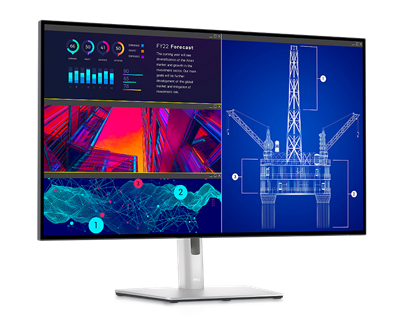
Best for: Office productivity and laptop docking
- Resolution
- 3840 × 2160
- Refresh rate
- 60Hz
- USB-C power delivery
- Up to 90W
- Panel
- IPS Black
- USB-C hub features help reduce desk cable clutter.
- 4K resolution provides a detailed workspace.
- IPS Black panel technology improves contrast over standard IPS.
- 60Hz is aimed at productivity rather than high-refresh gaming.
- Not a dedicated creator display with a high refresh rate.
Is the Dell UltraSharp U2723QE 27-inch 4K USB-C Hub Monitor worth buying on Black Friday 2026?
Yes. The Dell UltraSharp U2723QE 27-inch 4K USB-C Hub Monitor is a sensible productivity choice for laptop owners who value a 4K workspace, a built-in hub and up to 90W USB-C charging.
See today’s Black Friday price on Amazon
#6
ASUS ROG Swift OLED PG32UCDM 32-inch 4K Gaming Monitor
The ASUS ROG Swift OLED PG32UCDM 32-inch 4K Gaming Monitor is the best premium gaming pick for enthusiasts who want a 32-inch QD-OLED panel, with a 240Hz refresh rate.
Best for: Premium PC and console gaming
- Resolution
- 3840 × 2160
- Refresh rate
- 240Hz
- Response time
- 0.03ms
- Panel
- QD-OLED
- 4K QD-OLED combines detailed images with deep blacks.
- 240Hz refresh rate targets competitive and high-end PC gaming.
- HDMI 2.1 supports modern consoles.
- Premium features are excessive for basic office work.
- OLED care is important for long sessions with static elements.
Is the ASUS ROG Swift OLED PG32UCDM 32-inch 4K Gaming Monitor worth buying on Black Friday 2026?
Yes. The ASUS ROG Swift OLED PG32UCDM 32-inch 4K Gaming Monitor is worth considering for enthusiasts who want a 240Hz 4K QD-OLED display, HDMI 2.1 and premium gaming features in a 32-inch format.
See today’s Black Friday price on Amazon
#7
LG UltraGear OLED 32GS95UE-B 32-inch 4K Gaming Monitor
The LG UltraGear OLED 32GS95UE-B 32-inch 4K Gaming Monitor is the best dual-mode pick for competitive players who switch between 4K detail and full HD speed, with up to 480Hz refresh at 1080p.
Best for: Competitive gaming and dual-mode play
- 4K refresh rate
- 240Hz
- Full HD refresh rate
- 480Hz
- Resolution modes
- 3840 × 2160 and 1920 × 1080
- Panel
- OLED
- Dual-mode operation supports both detailed and high-speed play.
- OLED panel delivers strong contrast.
- 240Hz 4K mode suits powerful gaming PCs.
- Full HD mode has lower image detail than native 4K.
- The LG UltraGear OLED 32GS95UE-B 32-inch 4K Gaming Monitor's gaming-focused feature set is unnecessary for office-first buyers.
Is the LG UltraGear OLED 32GS95UE-B 32-inch 4K Gaming Monitor worth buying on Black Friday 2026?
Yes. The LG UltraGear OLED 32GS95UE-B 32-inch 4K Gaming Monitor stands out for players who want 4K at 240Hz and a 1080p mode reaching 480Hz. Choose it for gaming versatility rather than routine office work.
See today’s Black Friday price on Amazon
Which is better for creative work, ASUS ProArt PA278CFRV or MSI MAG 321UPX?
The ASUS ProArt Display PA278CFRV 27-inch QHD Monitor is better suited to color-focused work, with full sRGB coverage, a 100Hz refresh rate and up to 96W USB-C charging. The MSI MAG 321UPX QD-OLED 32-inch 4K Gaming Monitor prioritizes 4K gaming, contrast and speed. Choose the ProArt for a creator-focused laptop desk or the MSI for gaming and entertainment.
Which monitor is better for 4K gaming?
The MSI MAG 321UPX QD-OLED 32-inch 4K Gaming Monitor pairs 4K resolution with a 240Hz refresh rate and a 0.03ms response-time specification. The ASUS ProArt Display PA278CFRV 27-inch QHD Monitor is better suited to productivity, with QHD resolution and a 100Hz refresh rate. For mixed use, the GIGABYTE M32U 32-inch 4K Gaming Monitor offers 4K resolution and 144Hz refresh. Match the display to your computer’s capabilities.
Is the ASUS ProArt PA278CFRV good for a laptop desk?
The ASUS ProArt Display PA278CFRV 27-inch QHD Monitor supports a one-cable laptop setup with USB-C video and up to 96W charging. Confirm your laptop supports video over USB-C and fits the monitor’s power delivery. For 4K and USB-C charging, compare the ASUS ProArt Display PA279CRV 27-inch 4K HDR Monitor. The Dell UltraSharp U2723QE 27-inch 4K USB-C Hub Monitor is another option for a hub-centered desk.
Should I choose an OLED or IPS monitor?
Choose the MSI MAG 321UPX QD-OLED 32-inch 4K Gaming Monitor for deep blacks and fast gaming, or the ASUS ProArt Display PA278CFRV 27-inch QHD Monitor for creator-focused color and USB-C charging. OLED suits dark games and video; follow the manufacturer’s screen-care guidance during long sessions with static content. IPS suits productivity and broad viewing angles. The GIGABYTE M32U 32-inch 4K Gaming Monitor adds 144Hz gaming.
What should I compare before buying a monitor on Black Friday 2026?
Compare resolution, refresh rate, panel type, connectivity and desk fit. The ASUS ProArt Display PA278CFRV 27-inch QHD Monitor emphasizes creative work and USB-C, while the MSI MAG 321UPX QD-OLED 32-inch 4K Gaming Monitor emphasizes 4K OLED gaming at 240Hz. Check your computer’s support for the desired resolution and refresh rate, laptop charging needs, available ports, warranty and return terms.
Buying Guide
Choose resolution for screen size and workload
QHD suits a 27-inch workspace; 4K adds detail for editing and larger screens. Compare the ASUS ProArt Display PA278CFRV 27-inch QHD Monitor with the MSI MAG 321UPX QD-OLED 32-inch 4K Gaming Monitor.
Match refresh rate to games and hardware
Choose a refresh rate your computer or console can support at your selected resolution. The MSI MAG 321UPX QD-OLED 32-inch 4K Gaming Monitor offers 240Hz; the GIGABYTE M32U 32-inch 4K Gaming Monitor offers 144Hz.
Compare USB-C charging and hub needs
Check USB-C video support and charging power. The ASUS ProArt Display PA278CFRV 27-inch QHD Monitor provides up to 96W charging; the Dell UltraSharp U2723QE 27-inch 4K USB-C Hub Monitor provides up to 90W.
Decide whether OLED fits your routine
OLED offers strong contrast for games and video. Review screen-care guidance and warranty coverage if static desktop elements stay onscreen for long periods.
Measure the setup before checkout
Check desk space, viewing distance, stand adjustment, ports, warranty and included cables. Compare the complete feature set for Black Friday 2026, not just one specification.
FAQ
ASUS ProArt PA278CFRV vs MSI MAG 321UPX: which is better?
The ASUS ProArt Display PA278CFRV 27-inch QHD Monitor is better for creator work and USB-C laptop use, with 100Hz and up to 96W charging. The MSI MAG 321UPX QD-OLED 32-inch 4K Gaming Monitor is better for 4K gaming, with a 240Hz QD-OLED panel.
Is the ASUS ProArt Display PA278CFRV good for photo editing?
The ASUS ProArt Display PA278CFRV 27-inch QHD Monitor is suited to photo editing and color-conscious work, with 100% sRGB coverage and creator-focused calibration features. Its 27-inch QHD IPS screen and USB-C charging also make it a practical everyday workstation monitor.
Does the MSI MAG 321UPX support 4K at 240Hz?
Yes. The MSI MAG 321UPX QD-OLED 32-inch 4K Gaming Monitor supports 3840 × 2160 resolution at up to 240Hz. A compatible gaming PC and connection are needed to drive that combination, so check your graphics hardware and cable specifications before purchase.
Is a 32-inch 4K monitor better than a 27-inch QHD monitor?
A 32-inch 4K monitor offers a larger screen and more image detail, while a 27-inch QHD monitor takes up less desk space and asks less of gaming hardware. Choose based on viewing distance, work needs, computer capability and preferred screen size.
Which monitor is best for a USB-C laptop setup?
The ASUS ProArt Display PA278CFRV 27-inch QHD Monitor is a strong USB-C laptop choice, with power delivery up to 96W. The Dell UltraSharp U2723QE 27-inch 4K USB-C Hub Monitor is another option for buyers who want a 4K office display with hub features.
Should I buy an OLED monitor for office work?
An OLED monitor can handle office work, but buyers should consider how many hours static desktop elements remain on screen and follow the manufacturer's care guidance. IPS options such as the ASUS ProArt Display PA278CFRV 27-inch QHD Monitor focus more directly on productivity and creator workflows.