

As an Amazon Associate we earn from qualifying purchases.
- Best overall: ASUS ROG Strix G16 (RTX 4070, 16GB RAM, 1TB SSD configuration)
- Best budget: ASUS TUF Gaming F15 (RTX 4060, 16GB RAM, 1TB SSD configuration)
- Best premium: ASUS ROG Strix SCAR 18 (RTX 4090, 32GB RAM, 2TB SSD configuration)
- Best for travel: ASUS ROG Zephyrus G16 (RTX 4070, 16GB RAM, 1TB SSD OLED configuration)
- ASUS ROG Strix SCAR 18 with RTX 4090 graphics is the premium pick for high-end gaming and an 18-inch display.
- ASUS TUF Gaming F15 with RTX 4060 graphics is the value-focused choice for 1080p gaming.
- A 240Hz display suits players who prioritize fast motion; a 144Hz display is a practical fit for mainstream gaming.
- Compare GPU, screen size, memory and storage before choosing a Black Friday 2026 laptop.
ASUS ROG Strix SCAR 18 with RTX 4090 graphics is the premium choice, while ASUS TUF Gaming F15 with RTX 4060 graphics is the sensible pick for mainstream 1080p gaming. The right Black Friday 2026 laptop depends on whether you want maximum graphics headroom or a more portable, practical setup.
We researched and compared specs, reviews and owner feedback across seven ASUS gaming laptop configurations. Here's the bottom line: the SCAR 18 serves players who want a huge screen and top-tier graphics, while the TUF F15 delivers the core gaming experience without the premium-class hardware. The guide also compares nearby ROG and TUF options for different screen sizes, budgets and play styles.
How We Picked
- Graphics performance: we compared GPU tiers and their fit for demanding games, high settings and competitive play.
- Screen and refresh rate: we prioritized panel size and refresh rate as key parts of the gaming experience.
- Memory and storage: we checked listed configurations for capacity suited to modern games and everyday multitasking.
- Product fit: we considered portability, premium features and value-focused hardware across ROG and TUF families.
- Ownership context: we researched specs, reviews and owner feedback, and favored clear configuration details over vague model-family claims.
Comparison Table
| Product | Best for | Display | Graphics | Memory |
|---|---|---|---|---|
| ASUS ROG Strix SCAR 18 (RTX 4090, 32GB RAM, 2TB SSD configuration) | Premium gaming | 18-inch, 240Hz | RTX 4090 | 32GB |
| ASUS TUF Gaming F15 (RTX 4060, 16GB RAM, 1TB SSD configuration) | Mainstream 1080p gaming | 15.6-inch, 144Hz | RTX 4060 | 16GB |
| ASUS ROG Strix G18 (RTX 4080, 32GB RAM, 1TB SSD configuration) | Large-screen gaming | 18-inch, 240Hz | RTX 4080 | 32GB |
| ASUS ROG Strix G16 (RTX 4070, 16GB RAM, 1TB SSD configuration) | Balanced ROG gaming | 16-inch, 240Hz | RTX 4070 | 16GB |
| ASUS ROG Zephyrus G16 (RTX 4070, 16GB RAM, 1TB SSD OLED configuration) | Portable OLED gaming | 16-inch OLED, 240Hz | RTX 4070 | 16GB |
| ASUS TUF Gaming A15 (RTX 4060, 16GB RAM, 1TB SSD configuration) | Everyday gaming | 15.6-inch, 144Hz | RTX 4060 | 16GB |
| ASUS TUF Gaming F17 (RTX 4060, 16GB RAM, 1TB SSD configuration) | Larger-screen value gaming | 17.3-inch, 144Hz | RTX 4060 | 16GB |
Best Picks Reviewed
#1
ASUS ROG Strix SCAR 18 (RTX 4090, 32GB RAM, 2TB SSD configuration)
The ASUS ROG Strix SCAR 18 (RTX 4090, 32GB RAM, 2TB SSD configuration) is the best premium gaming laptop for players who want top-tier graphics and a huge display. The ASUS ROG Strix SCAR 18 (RTX 4090, 32GB RAM, 2TB SSD configuration)'s 18-inch, 240Hz screen gives fast-paced games generous room to shine.

Best for: Premium gaming and large-screen play
- Display
- 18-inch, 240Hz
- Graphics
- NVIDIA GeForce RTX 4090
- Memory
- 32GB RAM
- Storage
- 2TB SSD
- High-end GPU for demanding games
- Large, fast 240Hz display
- 32GB memory and 2TB storage
- Large chassis is less suited to frequent travel
Is the ASUS ROG Strix SCAR 18 (RTX 4090, 32GB RAM, 2TB SSD configuration) worth buying on Black Friday 2026?
The ASUS ROG Strix SCAR 18 is worth buying for players who want premium gaming performance, an 18-inch screen and high-end graphics. The RTX 4090 and 240Hz panel make this configuration a strong desktop-replacement choice.
See today’s Black Friday price on Amazon
#2
ASUS TUF Gaming F15 (RTX 4060, 16GB RAM, 1TB SSD configuration)
The ASUS TUF Gaming F15 (RTX 4060, 16GB RAM, 1TB SSD configuration) is the best value-focused gaming laptop for players who want capable 1080p performance. The ASUS TUF Gaming F15 (RTX 4060, 16GB RAM, 1TB SSD configuration)'s 15.6-inch, 144Hz display pairs a familiar screen size with smooth gameplay.

Best for: Mainstream 1080p gaming
- Display
- 15.6-inch, 144Hz
- Graphics
- NVIDIA GeForce RTX 4060
- Memory
- 16GB RAM
- Storage
- 1TB SSD
- Practical screen size for gaming and everyday use
- 144Hz refresh rate supports smooth motion
- 16GB memory and 1TB storage suit a broad game library
- Less graphics headroom than the SCAR 18
Is the ASUS TUF Gaming F15 (RTX 4060, 16GB RAM, 1TB SSD configuration) worth buying on Black Friday 2026?
The ASUS TUF Gaming F15 is worth buying for players seeking a balanced laptop for everyday gaming. The RTX 4060, 144Hz display, 16GB RAM and 1TB SSD provide a useful combination for mainstream gaming and general use.
See today’s Black Friday price on Amazon
#3
ASUS ROG Strix G18 (RTX 4080, 32GB RAM, 1TB SSD configuration)
The ASUS ROG Strix G18 (RTX 4080, 32GB RAM, 1TB SSD configuration) is the best large-screen alternative for players who want strong graphics below the SCAR tier. The ASUS ROG Strix G18 (RTX 4080, 32GB RAM, 1TB SSD configuration)'s 18-inch, 240Hz display gives competitive games a broad, responsive canvas.

Best for: Large-screen gaming with high-end graphics
- Display
- 18-inch, 240Hz
- Graphics
- NVIDIA GeForce RTX 4080
- Memory
- 32GB RAM
- Storage
- 1TB SSD
- Large screen suits immersive games
- 240Hz refresh rate supports fast gameplay
- 32GB RAM supports multitasking
- 18-inch size is cumbersome for daily commuting
Is the ASUS ROG Strix G18 (RTX 4080, 32GB RAM, 1TB SSD configuration) worth buying on Black Friday 2026?
The ASUS ROG Strix G18 is worth buying for gamers who want an 18-inch screen and high-end RTX 4080 graphics. The 240Hz display and 32GB RAM make this configuration a strong fit for demanding play and multitasking.
See today’s Black Friday price on Amazon
#4 · Top pick
ASUS ROG Strix G16 (RTX 4070, 16GB RAM, 1TB SSD configuration)
The ASUS ROG Strix G16 (RTX 4070, 16GB RAM, 1TB SSD configuration) is the best balanced ROG pick for players who want strong graphics in a 16-inch design. The ASUS ROG Strix G16 (RTX 4070, 16GB RAM, 1TB SSD configuration)'s 240Hz display prioritizes fast, fluid motion.
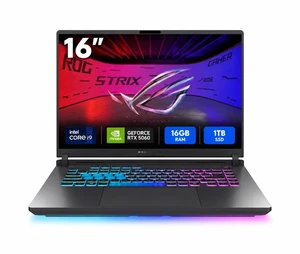
Best for: Fast-paced gaming in a mid-size chassis
- Display
- 16-inch, 240Hz
- Graphics
- NVIDIA GeForce RTX 4070
- Memory
- 16GB RAM
- Storage
- 1TB SSD
- 16-inch screen balances immersion and portability
- 240Hz refresh rate suits competitive games
- 1TB SSD provides useful game storage
- 16GB RAM is less than the 32GB configurations
Is the ASUS ROG Strix G16 (RTX 4070, 16GB RAM, 1TB SSD configuration) worth buying on Black Friday 2026?
The ASUS ROG Strix G16 is worth buying for players who want a fast 16-inch gaming laptop without moving to an 18-inch chassis. The ASUS ROG Strix G16 (RTX 4070, 16GB RAM, 1TB SSD configuration)'s RTX 4070 graphics and 240Hz display make it a balanced choice for demanding games.
See today’s Black Friday price on Amazon
#5
ASUS ROG Zephyrus G16 (RTX 4070, 16GB RAM, 1TB SSD OLED configuration)
The ASUS ROG Zephyrus G16 (RTX 4070, 16GB RAM, 1TB SSD OLED configuration) is the best portable premium pick for players who value a vibrant OLED screen. The ASUS ROG Zephyrus G16 (RTX 4070, 16GB RAM, 1TB SSD OLED configuration)'s 16-inch, 240Hz panel combines a quick refresh rate with an immersive display type.

Best for: Portable gaming and OLED visuals
- Display
- 16-inch OLED, 240Hz
- Graphics
- NVIDIA GeForce RTX 4070
- Memory
- 16GB RAM
- Storage
- 1TB SSD
- OLED panel delivers vivid contrast
- 16-inch design is easier to carry than 18-inch models
- 240Hz refresh rate supports fluid gaming
- Graphics tier sits below the RTX 4080 and RTX 4090 picks
Is the ASUS ROG Zephyrus G16 (RTX 4070, 16GB RAM, 1TB SSD OLED configuration) worth buying on Black Friday 2026?
The ASUS ROG Zephyrus G16 is worth buying for players who want portable premium gaming with OLED visuals. The 16-inch, 240Hz screen and RTX 4070 graphics make it a flexible option for gaming and everyday computing.
See today’s Black Friday price on Amazon
#6
ASUS TUF Gaming A15 (RTX 4060, 16GB RAM, 1TB SSD configuration)
The ASUS TUF Gaming A15 (RTX 4060, 16GB RAM, 1TB SSD configuration) is the best AMD-platform TUF alternative for players seeking mainstream gaming specs. The ASUS TUF Gaming A15 (RTX 4060, 16GB RAM, 1TB SSD configuration)'s 15.6-inch, 144Hz display keeps the setup familiar and gameplay smooth.

Best for: Mainstream gaming in a 15.6-inch format
- Display
- 15.6-inch, 144Hz
- Graphics
- NVIDIA GeForce RTX 4060
- Memory
- 16GB RAM
- Storage
- 1TB SSD
- Accessible 15.6-inch form factor
- 144Hz refresh rate suits everyday gaming
- 16GB RAM and 1TB SSD are practical capacities
- Screen is smaller than the 17-inch and 18-inch options
Is the ASUS TUF Gaming A15 (RTX 4060, 16GB RAM, 1TB SSD configuration) worth buying on Black Friday 2026?
The ASUS TUF Gaming A15 is worth buying for players who want mainstream gaming hardware in a familiar 15.6-inch format. The ASUS TUF Gaming A15 (RTX 4060, 16GB RAM, 1TB SSD configuration)'s RTX 4060 graphics, 144Hz display and 1TB SSD make it a practical all-rounder.
See today’s Black Friday price on Amazon
#7
ASUS TUF Gaming F17 (RTX 4060, 16GB RAM, 1TB SSD configuration)
The ASUS TUF Gaming F17 (RTX 4060, 16GB RAM, 1TB SSD configuration) is the best TUF pick for players who want a larger screen at a mainstream graphics tier. The ASUS TUF Gaming F17 (RTX 4060, 16GB RAM, 1TB SSD configuration)'s 17.3-inch, 144Hz display gives games more room than the F15 panel.
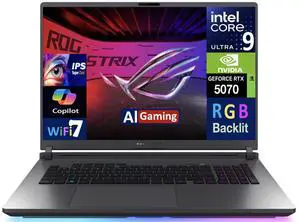
Best for: A larger screen on a mainstream gaming laptop
- Display
- 17.3-inch, 144Hz
- Graphics
- NVIDIA GeForce RTX 4060
- Memory
- 16GB RAM
- Storage
- 1TB SSD
- Larger display than the TUF Gaming F15
- 144Hz refresh rate supports responsive play
- 16GB RAM and 1TB SSD suit everyday gaming
- Larger screen makes the laptop less compact
Is the ASUS TUF Gaming F17 (RTX 4060, 16GB RAM, 1TB SSD configuration) worth buying on Black Friday 2026?
The ASUS TUF Gaming F17 is worth buying for players who want a larger display without stepping up to an 18-inch premium laptop. The 17.3-inch, 144Hz screen and RTX 4060 graphics suit mainstream gaming.
See today’s Black Friday price on Amazon
Which is better, ASUS ROG Strix SCAR 18 or ASUS TUF Gaming F15?
ASUS ROG Strix SCAR 18 with RTX 4090 graphics is the stronger premium gaming laptop, while ASUS TUF Gaming F15 with RTX 4060 graphics is the practical mainstream choice. The SCAR 18 has an 18-inch, 240Hz display; the F15 has a 15.6-inch, 144Hz display.
Pick the SCAR 18 when you want top-tier graphics, a larger screen and more memory for demanding games. Pick the TUF F15 when a more compact screen and RTX 4060 performance fit your play style. The F15 also makes more sense for students or gamers balancing play with everyday computing.
For Black Friday 2026, compare the exact configuration rather than the family name alone. GPU, RAM, SSD capacity and display specifications vary between listings, so check each item before choosing.
Is the ASUS ROG Strix SCAR 18 worth choosing for Black Friday 2026?
ASUS ROG Strix SCAR 18 with RTX 4090 graphics is worth choosing for players who want a premium 18-inch gaming laptop. The featured configuration pairs a 240Hz panel with 32GB RAM and a 2TB SSD.
That combination is well suited to demanding games, multitasking and players who keep a large library installed. The wide screen also feels at home as part of a stationary gaming setup. Its tradeoff is size: an 18-inch machine is less convenient to carry than a 15.6-inch TUF model.
Compare the SCAR 18 with the ROG Strix G18 if you want a large screen but prefer an RTX 4080 configuration. The TUF F15 is the more sensible match for players who prioritize everyday value over premium graphics.
Is the ASUS TUF Gaming F15 a good Black Friday gaming laptop?
ASUS TUF Gaming F15 with RTX 4060 graphics is a good Black Friday pick for mainstream gaming, with a 15.6-inch, 144Hz display. Its 16GB RAM and 1TB SSD configuration gives players a straightforward starting point for a gaming library.
The F15 suits gamers who want a familiar laptop size for a desk, shared space or occasional travel. RTX 4060 graphics target a different buyer from the SCAR 18's RTX 4090: the F15 is about practical performance, while the SCAR 18 is about premium headroom.
Check the listing for the exact GPU, display refresh rate, memory and storage. TUF configurations differ, and those details affect how well a particular laptop matches your favorite games and everyday tasks.
What screen size and refresh rate should gaming laptop buyers choose?
ASUS ROG Strix G16 has a 16-inch, 240Hz display, while ASUS TUF Gaming F17 has a 17.3-inch, 144Hz display. The first is a strong middle ground; the second gives players more screen space at a mainstream refresh rate.
A 240Hz panel is a good fit for players who value fast motion and competitive play. A 144Hz screen still delivers smooth gameplay and is a practical match for many genres. Screen size is just as personal: 15.6 inches is easier to fit in a bag, while 18 inches favors an immersive desk setup.
OLED shoppers should compare the ASUS ROG Zephyrus G16 configuration for its 16-inch OLED panel. Screen technology, resolution and refresh rate can vary by exact model, so confirm the panel details on the product listing.
How should you compare ASUS ROG and TUF gaming laptops?
ASUS ROG models target premium gaming features, while ASUS TUF models focus on practical gaming configurations. The ROG Strix SCAR 18 offers RTX 4090 graphics and an 18-inch display; the TUF Gaming F15 pairs RTX 4060 graphics with a 15.6-inch panel.
Start with the GPU because graphics hardware shapes gaming performance. Then check screen size and refresh rate, followed by RAM and SSD capacity. These specifications show whether a laptop suits high-demand games, a competitive setup or a broader mix of gaming and daily use.
Read the full configuration name before buying. A model family can include multiple processors, GPUs and displays. Confirming the listed components helps you compare like with like and avoid choosing based on a product-series label alone.
Buying Guide
Choose the GPU for your games
ASUS ROG Strix SCAR 18 with RTX 4090 graphics is the premium option, while ASUS TUF Gaming F15 with RTX 4060 graphics suits mainstream play. Match the GPU tier to the games and graphics settings you care about.
Match screen size to your setup
ASUS TUF Gaming F15 has a 15.6-inch display, while ASUS ROG Strix SCAR 18 has an 18-inch screen. Choose a smaller chassis for portability and a larger panel for a more immersive desk setup.
Compare refresh rates
ASUS ROG Strix G16 offers a 240Hz display in this configuration, while ASUS TUF Gaming F15 uses a 144Hz panel. A higher refresh rate is a useful priority for players who value smooth motion.
Check RAM and SSD capacity
ASUS ROG Strix SCAR 18 lists 32GB RAM and a 2TB SSD, while ASUS TUF Gaming F15 lists 16GB RAM and a 1TB SSD. Compare the exact capacities against your multitasking needs and game library.
Verify the exact configuration
ASUS TUF Gaming F15 and ASUS ROG Strix G16 each have configuration differences across listings. Confirm the GPU, display, memory and storage shown for the specific Black Friday 2026 product before ordering.
FAQ
Which is better for gaming, ASUS ROG Strix SCAR 18 or ASUS TUF Gaming F15?
ASUS ROG Strix SCAR 18 is better for premium gaming performance, with RTX 4090 graphics and an 18-inch, 240Hz screen. ASUS TUF Gaming F15 is the practical choice for mainstream play, with RTX 4060 graphics and a 15.6-inch, 144Hz display.
Is ASUS TUF Gaming F15 good for gaming?
ASUS TUF Gaming F15 with RTX 4060 graphics is a good fit for mainstream gaming. The 15.6-inch, 144Hz screen, 16GB RAM and 1TB SSD configuration offers a useful mix for gaming and everyday computing.
Is ASUS ROG Strix SCAR 18 good for gaming?
ASUS ROG Strix SCAR 18 with RTX 4090 graphics is a premium gaming laptop for players who want high-end graphics and a large display. Its 18-inch, 240Hz panel, 32GB RAM and 2TB SSD suit demanding play.
Should I choose a 144Hz or 240Hz gaming laptop?
Choose a 240Hz laptop such as ASUS ROG Strix G16 if fast motion is a priority. Choose a 144Hz option such as ASUS TUF Gaming F15 for smooth everyday gaming. Also compare GPU, panel type and screen size.
Which ASUS gaming laptop is best for travel?
ASUS ROG Zephyrus G16 is the best travel-oriented pick in this guide, with a 16-inch OLED screen and RTX 4070 graphics. The 16-inch format is a more portable fit than 17.3-inch and 18-inch gaming laptops.
What should I check before buying an ASUS gaming laptop on Black Friday 2026?
Check the exact GPU, screen size, refresh rate, RAM and SSD capacity on the ASUS listing. ASUS ROG Strix and TUF model families include multiple configurations, so confirm the specifications match the product name and your gaming needs.