

As an Amazon Associate we earn from qualifying purchases.
- Best overall: ASUS ROG Strix Scope II 96 Wireless Gaming Keyboard
- Best budget: Akko 5075S VIA Mechanical Keyboard
- Best premium: Keychron Q1 Max QMK/VIA Wireless Custom Mechanical Keyboard
- Best for adjustable actuation: SteelSeries Apex Pro TKL Gen 3 Gaming Keyboard
- The ASUS ROG Strix Scope II 96 Wireless suits gamers who want a compact layout with a number pad and wireless connectivity.
- The Akko 5075S VIA is the wired 75% pick for buyers who value customization and a gasket-mounted design.
- The Keychron V1 Max balances 75% keys, wireless modes and QMK/VIA remapping.
- The SteelSeries Apex Pro TKL Gen 3 and Corsair K70 MAX prioritize adjustable actuation for competitive play.
The ASUS ROG Strix Scope II 96 Wireless has a 96% layout, while the Akko 5075S VIA uses a compact 75% layout. Those are the key differences for Black Friday 2026 shoppers choosing between the two: number-pad access and wireless flexibility versus a smaller wired board built for customization.
I researched and compared specs, reviews and owner feedback to build this guide around real buying priorities, not just brand hype. You’ll also find alternatives for different budgets, layouts and gaming styles. Here's the bottom line: pick the ASUS for wireless play and a number pad; pick the Akko for a customizable desk setup. Worth it for most players. Check each keyboard’s layout, switch type and connection before choosing.
How We Picked
- Compared keyboard layouts, including 75%, 96%, tenkeyless and full-size designs.
- Prioritized documented gaming features such as wireless modes, adjustable actuation and polling-rate support.
- Considered customization options, including hot-swappable switches, QMK/VIA support and adjustable actuation.
- Reviewed manufacturer specifications alongside owner feedback and independent reviews.
- Selected keyboards that serve distinct use cases instead of repeating the same feature set.
Comparison Table
| Product | Best for | Layout | Connection | Standout feature |
|---|---|---|---|---|
| ASUS ROG Strix Scope II 96 Wireless Gaming Keyboard | Wireless gaming with a number pad | 96% | 2.4GHz, Bluetooth, USB | Hot-swappable ROG NX switches |
| Akko 5075S VIA Mechanical Keyboard | Wired customization and compact desks | 75% | USB-C wired | Gasket mount, VIA compatible |
| Akko 5075B Plus Mechanical Keyboard | Wireless 75% gaming | 75% | 2.4GHz, Bluetooth, USB-C | 3000mAh battery |
| Keychron V1 Max QMK/VIA Wireless Custom Mechanical Keyboard | Custom layouts with wireless flexibility | 75% | 2.4GHz, Bluetooth 5.1, USB-C | QMK/VIA |
| Keychron Q1 Max QMK/VIA Wireless Custom Mechanical Keyboard | Premium custom keyboard builds | 75% | 2.4GHz, Bluetooth 5.1, USB-C | Aluminum case |
| Logitech G PRO X TKL LIGHTSPEED Wireless Gaming Keyboard | Competitive wireless gaming | Tenkeyless | LIGHTSPEED, Bluetooth, USB | Doubleshot PBT keycaps |
| SteelSeries Apex Pro TKL Gen 3 Gaming Keyboard | Adjustable actuation for competitive play | Tenkeyless | Wired | 0.1mm–4.0mm actuation |
| Corsair K70 MAX RGB Magnetic-Mechanical Gaming Keyboard | Full-size gaming and adjustable actuation | Full-size | Wired | 0.4mm–3.6mm actuation |
Best Picks Reviewed
#1 · Top pick
ASUS ROG Strix Scope II 96 Wireless Gaming Keyboard
The ASUS ROG Strix Scope II 96 Wireless Gaming Keyboard is the best all-around pick for gamers who want a number pad in a compact footprint. The ASUS ROG Strix Scope II 96 Wireless Gaming Keyboard's 96% layout keeps the number pad while trimming the space between key clusters.

Best for: Wireless gaming with a number pad
- Layout
- 96%
- Connection
- 2.4GHz, Bluetooth, USB
- Switches
- ROG NX mechanical
- Keycaps
- Doubleshot PBT
- Three connection modes
- Compact number-pad layout
- Hot-swappable switches
- Larger than 75% and tenkeyless boards
- Feature set is focused on gaming rather than QMK/VIA customization
Is the ASUS ROG Strix Scope II 96 Wireless Gaming Keyboard worth buying on Black Friday 2026?
Yes. The ASUS ROG Strix Scope II 96 Wireless Gaming Keyboard is a strong choice for wireless gaming, and its 96% layout retains a number pad. Choose it when desk space matters but number entry and dedicated gaming features still rank high.
See today’s Black Friday price on Amazon
#2
Akko 5075S VIA Mechanical Keyboard
The Akko 5075S VIA Mechanical Keyboard is the best wired pick for customization-minded gamers who want a compact layout. The Akko 5075S VIA Mechanical Keyboard's 75% design combines arrow keys and a function row with QMK/VIA remapping support.
Best for: Wired customization and compact desks
- Layout
- 75%
- Connection
- USB-C wired
- Mount
- Gasket mount
- Remapping
- VIA compatible
- Compact layout keeps arrow keys
- Gasket-mounted construction
- Customizable key mapping
- No wireless connection
- Exact switch and keycap configuration varies by listing
Is the Akko 5075S VIA Mechanical Keyboard worth buying on Black Friday 2026?
Yes. The Akko 5075S VIA Mechanical Keyboard makes sense for players who prefer a wired 75% board with customization. The Akko 5075S VIA Mechanical Keyboard's gasket mount and VIA compatibility stand out, while the wired-only connection is the main trade-off for a gaming desk.
See today’s Black Friday price on Amazon
#3
Akko 5075B Plus Mechanical Keyboard
The Akko 5075B Plus Mechanical Keyboard is the best Akko alternative for gamers who want a 75% layout with wireless modes. The Akko 5075B Plus Mechanical Keyboard's tri-mode connection supports 2.4GHz, Bluetooth and USB-C play.
Best for: Wireless 75% gaming
- Layout
- 75%
- Connection
- 2.4GHz, Bluetooth, USB-C
- Mount
- Gasket mount
- Battery
- 3000mAh
- Three connection options
- Compact layout with arrow keys
- Gasket-mounted design
- Configuration details vary between editions
- No number pad
Is the Akko 5075B Plus Mechanical Keyboard worth buying on Black Friday 2026?
Yes. The Akko 5075B Plus Mechanical Keyboard is a good fit for players who want a wireless 75% board without giving up Bluetooth or a 2.4GHz receiver. Confirm the exact switch and keycap configuration on the listing before buying.
See today’s Black Friday price on Amazon
#4
Keychron V1 Max QMK/VIA Wireless Custom Mechanical Keyboard
The Keychron V1 Max QMK/VIA Wireless Custom Mechanical Keyboard is the best flexible pick for gamers who want a customizable 75% board. The Keychron V1 Max QMK/VIA Wireless Custom Mechanical Keyboard's three connection options cover 2.4GHz, Bluetooth 5.1 and wired USB-C.
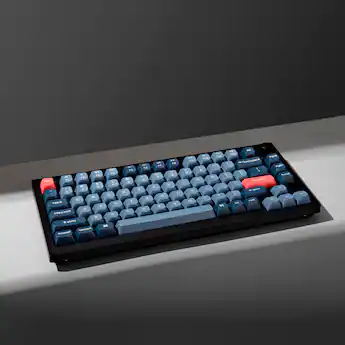
Best for: Custom layouts with wireless flexibility
- Layout
- 75%
- Connection
- 2.4GHz, Bluetooth 5.1, USB-C
- Battery
- 4000mAh
- Firmware
- QMK/VIA
- Three connection modes
- QMK/VIA remapping
- Hot-swappable switch support
- No number pad
- Custom keyboard features take time to configure
Is the Keychron V1 Max QMK/VIA Wireless Custom Mechanical Keyboard worth buying on Black Friday 2026?
Yes. The Keychron V1 Max QMK/VIA Wireless Custom Mechanical Keyboard is a versatile 75% option for gamers who want remapping and three connection modes. Choose it for a blend of customization and desk flexibility rather than dedicated gaming-brand software.
See today’s Black Friday price on Amazon
#5
Keychron Q1 Max QMK/VIA Wireless Custom Mechanical Keyboard
The Keychron Q1 Max QMK/VIA Wireless Custom Mechanical Keyboard is the best premium custom-board pick for enthusiasts who want an aluminum 75% keyboard. The Keychron Q1 Max QMK/VIA Wireless Custom Mechanical Keyboard's 4000mAh battery supports a wireless setup with QMK/VIA customization.

Best for: Premium custom keyboard builds
- Layout
- 75%
- Connection
- 2.4GHz, Bluetooth 5.1, USB-C
- Battery
- 4000mAh
- Case
- Aluminum
- Aluminum case construction
- QMK/VIA support
- Three connection modes
- Premium build is heavier than plastic boards
- No dedicated number pad
Is the Keychron Q1 Max QMK/VIA Wireless Custom Mechanical Keyboard worth buying on Black Friday 2026?
Yes. The Keychron Q1 Max QMK/VIA Wireless Custom Mechanical Keyboard suits buyers who want an aluminum 75% board with wireless connectivity and deep remapping. The Keychron Q1 Max QMK/VIA Wireless Custom Mechanical Keyboard's weight and enthusiast-focused feature set make it less suited to frequent travel.
See today’s Black Friday price on Amazon
#6
Logitech G PRO X TKL LIGHTSPEED Wireless Gaming Keyboard
The Logitech G PRO X TKL LIGHTSPEED Wireless Gaming Keyboard is the best tournament-style pick for competitive players who want a compact wireless board. The Logitech G PRO X TKL LIGHTSPEED Wireless Gaming Keyboard's tenkeyless layout leaves the mouse area open while keeping a dedicated function row.
Best for: Competitive wireless gaming
- Layout
- Tenkeyless
- Connection
- LIGHTSPEED wireless, Bluetooth, USB
- Keycaps
- Doubleshot PBT
- Controls
- Media keys and volume roller
- Compact tenkeyless footprint
- LIGHTSPEED wireless connection
- Dedicated media controls
- No number pad
- Switch customization is more limited than on custom boards
Is the Logitech G PRO X TKL LIGHTSPEED Wireless Gaming Keyboard worth buying on Black Friday 2026?
Yes. The Logitech G PRO X TKL LIGHTSPEED Wireless Gaming Keyboard is a focused option for competitive play, with a tenkeyless layout and LIGHTSPEED wireless. Pick it for a clean gaming setup, not for number-pad access or extensive firmware customization.
See today’s Black Friday price on Amazon
#7
SteelSeries Apex Pro TKL Gen 3 Gaming Keyboard
The SteelSeries Apex Pro TKL Gen 3 Gaming Keyboard is the best pick for players who want adjustable key response in a compact layout. The SteelSeries Apex Pro TKL Gen 3 Gaming Keyboard's OmniPoint 3.0 switches offer adjustable actuation from 0.1mm to 4.0mm.
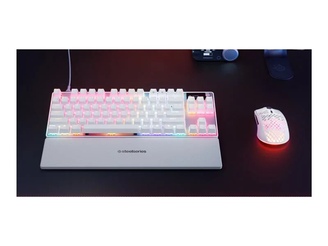
Best for: Adjustable actuation for competitive play
- Layout
- Tenkeyless
- Switches
- OmniPoint 3.0 adjustable
- Actuation
- 0.1mm–4.0mm
- Display
- OLED smart display
- Adjustable actuation range
- OLED smart display
- Compact gaming layout
- No number pad
- Feature-rich software adds setup steps
Is the SteelSeries Apex Pro TKL Gen 3 Gaming Keyboard worth buying on Black Friday 2026?
Yes. The SteelSeries Apex Pro TKL Gen 3 Gaming Keyboard is worth considering when adjustable actuation is a priority. The SteelSeries Apex Pro TKL Gen 3 Gaming Keyboard's 0.1mm–4.0mm range supports different key-response preferences, and its tenkeyless layout keeps the mouse side of a gaming desk open.
See today’s Black Friday price on Amazon
#8
Corsair K70 MAX RGB Magnetic-Mechanical Gaming Keyboard
The Corsair K70 MAX RGB Magnetic-Mechanical Gaming Keyboard is the best full-size pick for players who want adjustable magnetic switches and a number pad. The Corsair K70 MAX RGB Magnetic-Mechanical Gaming Keyboard's MGX switches support adjustable actuation from 0.4mm to 3.6mm.

Best for: Full-size gaming and adjustable actuation
- Layout
- Full-size
- Switches
- MGX magnetic-mechanical
- Actuation
- 0.4mm–3.6mm
- Polling rate
- Up to 8000Hz
- Full-size number pad
- Adjustable magnetic switch actuation
- Dedicated media controls
- Needs more desk space than compact boards
- Wired connection
Is the Corsair K70 MAX RGB Magnetic-Mechanical Gaming Keyboard worth buying on Black Friday 2026?
Yes. The Corsair K70 MAX RGB Magnetic-Mechanical Gaming Keyboard is a strong full-size choice for players who want a number pad and adjustable magnetic switches. The Corsair K70 MAX RGB Magnetic-Mechanical Gaming Keyboard's wired connection and larger footprint suit a fixed gaming desk better than a portable setup.
See today’s Black Friday price on Amazon
ASUS ROG Strix Scope II 96 Wireless vs Akko 5075S VIA: which is better?
The ASUS ROG Strix Scope II 96 Wireless Gaming Keyboard suits wireless play and number-pad use. The Akko 5075S VIA Mechanical Keyboard offers a smaller, wired layout with gasket mounting and VIA remapping.
Choose the ASUS for 2.4GHz wireless, Bluetooth and a number pad. Choose the Akko for wired customization in a compact 75-percent layout. Both have hot-swappable switches, so you can change compatible switches to alter typing feel.
Compare the exact switch configuration and included accessories on each Black Friday 2026 listing.
Which keyboard layout is best for gaming and everyday use?
A 75-percent layout saves desk space while retaining arrow and function keys. A 96-percent layout adds a number pad, while tenkeyless boards leave more room for mouse movement. Full-size boards keep all keys and dedicated controls.
Choose a layout based on your desk and daily tasks. Measure your available space and consider whether removing the number pad or navigation keys would interrupt your workflow.
Are wireless gaming keyboards a good Black Friday 2026 buy?
The ASUS ROG Strix Scope II 96 Wireless Gaming Keyboard, Akko 5075B Plus and Keychron V1 Max offer multiple connection modes. A 2.4GHz receiver suits gaming, Bluetooth supports other devices, and USB provides a wired option.
Wireless boards require charging and a place for the receiver. Wired models such as the Akko 5075S VIA Mechanical Keyboard and Corsair K70 MAX avoid battery upkeep. Check that the listing includes the receiver and cable you need.
What features matter most on a gaming keyboard?
Prioritize layout, connection, switch behavior and customization. The SteelSeries Apex Pro TKL Gen 3 and Corsair K70 MAX offer adjustable actuation. Keychron models focus on remapping, while the ASUS ROG Strix Scope II 96 Wireless Gaming Keyboard combines wireless options with a number pad.
The SteelSeries offers a 0.1mm to 4.0mm actuation range; the Corsair offers 0.4mm to 3.6mm. Hot-swappable switches and QMK/VIA support suit buyers who want to change switches or key behavior. Media controls and PBT keycaps add everyday convenience.
Which keyboard offers the best value for different gamers?
The Akko 5075S VIA Mechanical Keyboard suits wired customization; the Akko 5075B Plus offers wireless gaming in a 75-percent layout; and the ASUS ROG Strix Scope II 96 Wireless Gaming Keyboard combines wireless play with a number pad.
The Keychron V1 Max adds QMK/VIA and three connection modes. The Keychron Q1 Max has an aluminum case. Compare the SteelSeries Apex Pro TKL Gen 3 and Corsair K70 MAX if adjustable actuation matters to you.
For Black Friday 2026, verify the full product name, switch type, layout and included accessories on the listing.
Buying Guide
Choose a layout that fits your desk
A 75-percent board saves space, a 96-percent board keeps a number pad, and tenkeyless leaves room for mouse movement. Full-size suits buyers who need every key.
Pick wired or wireless connectivity
A 2.4GHz receiver suits wireless gaming; Bluetooth connects other devices. USB avoids battery upkeep, while tri-mode boards offer all three options.
Decide whether switch customization matters
Hot-swappable switches are replaceable without soldering. QMK/VIA supports key remapping. Choose these features when you plan to customize your keyboard.
Compare switch actuation features
Adjustable actuation changes key response. The SteelSeries Apex Pro TKL Gen 3 ranges from 0.1mm to 4.0mm; the Corsair K70 MAX ranges from 0.4mm to 3.6mm.
Verify the exact product configuration
Check the full model name, switch type, keycap material, layout and included receiver on the Black Friday 2026 listing. Variants can differ in these details.
FAQ
What is the main difference between ASUS ROG Strix Scope II 96 Wireless and Akko 5075S VIA?
The ASUS ROG Strix Scope II 96 Wireless Gaming Keyboard has a 96% layout, a number pad and wireless connections. The Akko 5075S VIA Mechanical Keyboard has a smaller 75% wired layout, a gasket mount and VIA-compatible remapping.
Is the Akko 5075S VIA a wireless keyboard?
No. The Akko 5075S VIA Mechanical Keyboard uses a wired USB-C connection. Buyers who want a wireless Akko 75% board should compare the Akko 5075B Plus Mechanical Keyboard, which supports 2.4GHz, Bluetooth and USB-C connections.
Which keyboard in this guide has a number pad?
The ASUS ROG Strix Scope II 96 Wireless Gaming Keyboard and Corsair K70 MAX RGB Magnetic-Mechanical Gaming Keyboard have number pads. The ASUS packs the number pad into a 96% layout, while the Corsair uses a full-size layout.
Which keyboard is best for adjustable actuation?
The SteelSeries Apex Pro TKL Gen 3 Gaming Keyboard and Corsair K70 MAX RGB Magnetic-Mechanical Gaming Keyboard both offer adjustable actuation. SteelSeries lists a 0.1mm–4.0mm range, and Corsair lists a 0.4mm–3.6mm range.
Is a 75% keyboard good for gaming?
Yes. A 75% keyboard such as the Akko 5075S VIA Mechanical Keyboard or Keychron V1 Max keeps arrow keys and a function row while taking less desk space than full-size models. Choose a larger layout if you regularly use a number pad.
What should I compare when buying a keyboard on Black Friday 2026?
Compare the exact layout, switch configuration, connection modes and customization features. Confirm that the product listing matches the model name you want, especially when a keyboard has multiple versions. Prioritize features that fit your desk and gaming routine.