

As an Amazon Associate we earn from qualifying purchases.
- Best overall: ASUS ROG Strix Scope II 96 Wireless Gaming Keyboard
- Best budget: EPOMAKER TH80 Pro 75% Wireless Mechanical Keyboard
- Best premium: SteelSeries Apex Pro TKL Gen 3 Gaming Keyboard
- Best for travel: EPOMAKER TH80 Pro 75% Wireless Mechanical Keyboard
- ASUS ROG Strix Scope II 96 Wireless Gaming Keyboard suits players who want a compact layout with a number pad.
- EPOMAKER TH80 Pro 75% Wireless Mechanical Keyboard is a flexible pick for customizable wireless gaming.
- ASUS ROG Strix Scope II TKL Gaming Keyboard favors a straightforward wired gaming setup.
- Compare layout, connection options and switch features before choosing a Black Friday 2026 keyboard.
Choosing between the ASUS ROG Strix Scope and EPOMAKER TH80 comes down to layout, connectivity and how much customization you want. The Scope range covers gaming-first boards, including compact wireless and wired TKL options. The TH80 family focuses on compact layouts and flexible mechanical-keyboard features.
For this Black Friday 2026 guide, we researched and compared specs, reviews and owner feedback across seven keyboards. Here's the bottom line: the ASUS ROG Strix Scope II 96 Wireless Gaming Keyboard is a strong all-rounder for players who want a number pad, while the EPOMAKER TH80 Pro 75% Wireless Mechanical Keyboard offers the compact, customizable experience many desktop gamers want. Check the feature differences before settling on a deal.
How We Picked
- Compared layouts and key counts to show how much desk space each model uses.
- Prioritized clear connection details, including wired, Bluetooth and 2.4 GHz options.
- Reviewed switch, hot-swap and customization features for players who value tuning.
- Considered gaming-focused extras such as polling, adjustable actuation and low-profile keys.
- Used product specifications, reviews and owner feedback rather than personal testing.
Comparison Table
| Product | Best for | Layout | Connection | Standout feature |
|---|---|---|---|---|
| ASUS ROG Strix Scope II 96 Wireless Gaming Keyboard | Keeping a number pad in a compact setup | 96% | 2.4 GHz, Bluetooth, USB | ROG NX mechanical switches |
| EPOMAKER TH80 Pro 75% Wireless Mechanical Keyboard | Wireless customization | 75% | 2.4 GHz, Bluetooth, USB-C | 5-pin hot-swap support |
| ASUS ROG Strix Scope II TKL Gaming Keyboard | Wired TKL gaming | TKL, 87 keys | Wired USB | ROG NX mechanical switches |
| EPOMAKER TH80-X 75% Wireless Mechanical Keyboard | Compact switch customization | 75% | 2.4 GHz, Bluetooth, USB-C | Hot-swappable switches |
| Keychron K2 Pro QMK/VIA Wireless Mechanical Keyboard | Programmable keys | 75%, 84 keys | Bluetooth 5.1, USB-C | QMK and VIA |
| Logitech G515 LIGHTSPEED TKL Wireless Gaming Keyboard | Low-profile wireless play | TKL, 87 keys | LIGHTSPEED 2.4 GHz, Bluetooth | Up to 36 hours with RGB |
| SteelSeries Apex Pro TKL Gen 3 Gaming Keyboard | Adjustable actuation | TKL | Wired USB | 0.1–4.0 mm actuation |
Best Picks Reviewed
#1 · Top pick
ASUS ROG Strix Scope II 96 Wireless Gaming Keyboard
The ASUS ROG Strix Scope II 96 Wireless Gaming Keyboard is the best compact all-rounder for players who want a number pad, with a space-saving 96% layout and tri-mode connectivity.

Best for: Compact desk setups that still need a number pad
- Layout
- 96%
- Connection modes
- 3: 2.4 GHz, Bluetooth, USB
- Switch options
- ROG NX mechanical switches
- Keeps a number pad in a compact footprint
- Offers wired and wireless connections
- Designed for gaming and everyday typing
- Costs more desk space than a 75% board
Is the ASUS ROG Strix Scope II 96 Wireless Gaming Keyboard worth buying on Black Friday 2026?
The ASUS ROG Strix Scope II 96 Wireless Gaming Keyboard is worth considering for players who need a number pad without a full-size footprint. The ASUS ROG Strix Scope II 96 Wireless Gaming Keyboard's 96% layout and three connection modes make it a versatile choice for gaming and work.
See today’s Black Friday price on Amazon
#2
EPOMAKER TH80 Pro 75% Wireless Mechanical Keyboard
The EPOMAKER TH80 Pro 75% Wireless Mechanical Keyboard is the best customizable compact pick for players who want wireless flexibility, with a 75% layout and three connection modes.
Best for: Wireless gaming and mechanical-keyboard customization
- Layout
- 75%
- Connection modes
- 3: 2.4 GHz, Bluetooth, USB-C
- Hot-swap support
- 5-pin switches
- Compact layout retains arrow keys
- Supports three connection types
- Hot-swap design supports switch changes
- Does not include a number pad
Is the EPOMAKER TH80 Pro 75% Wireless Mechanical Keyboard worth buying on Black Friday 2026?
The EPOMAKER TH80 Pro 75% Wireless Mechanical Keyboard is a strong option for players who want a compact wireless board with room to customize. The EPOMAKER TH80 Pro 75% Wireless Mechanical Keyboard's 75% layout, three connection modes and 5-pin hot-swap support cover the essentials.
See today’s Black Friday price on Amazon
#3
ASUS ROG Strix Scope II TKL Gaming Keyboard
The ASUS ROG Strix Scope II TKL Gaming Keyboard is the best wired TKL pick for players who want a gaming-focused layout, with an 87-key tenkeyless design.
Best for: Wired PC gaming and a clean desk
- Layout
- TKL, 87 keys
- Connection
- Wired USB
- Switch family
- ROG NX mechanical switches
- Tenkeyless layout leaves more mouse room
- Simple wired connection
- Gaming-focused design and switch options
- No wireless connection
Is the ASUS ROG Strix Scope II TKL Gaming Keyboard worth buying on Black Friday 2026?
The ASUS ROG Strix Scope II TKL Gaming Keyboard is worth a look for desktop players who prefer a wired setup. The ASUS ROG Strix Scope II TKL Gaming Keyboard's 87-key layout frees space for mouse movement, while the ROG NX switch family keeps the design focused on gaming.
See today’s Black Friday price on Amazon
#4
EPOMAKER TH80-X 75% Wireless Mechanical Keyboard
The EPOMAKER TH80-X 75% Wireless Mechanical Keyboard is the best compact customization pick for players who want a distinctive mechanical board, with a 75% layout.
Best for: Compact setups with a customizable feel
- Layout
- 75%
- Connection modes
- 3: 2.4 GHz, Bluetooth, USB-C
- Switch support
- Hot-swappable switches
- Compact layout keeps arrow keys
- Offers wired and wireless connections
- Hot-swap support adds switch flexibility
- No dedicated number pad
Is the EPOMAKER TH80-X 75% Wireless Mechanical Keyboard worth buying on Black Friday 2026?
The EPOMAKER TH80-X 75% Wireless Mechanical Keyboard is a solid fit for players who want a compact board and switch customization. The 75% layout saves desk space, and its three connection modes suit both desktop and multi-device setups.
See today’s Black Friday price on Amazon
#5
Keychron K2 Pro QMK/VIA Wireless Mechanical Keyboard
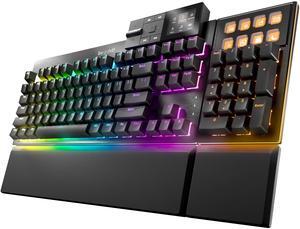
The Keychron K2 Pro QMK/VIA Wireless Mechanical Keyboard is the best programming-friendly pick for players who value remapping, with an 84-key 75% layout.
Best for: Key remapping and multi-device use
- Layout
- 75%, 84 keys
- Battery capacity
- 4000 mAh
- Wireless
- Bluetooth 5.1
- Customization
- QMK and VIA
- QMK and VIA support key remapping
- Compact layout includes arrow keys
- Works over Bluetooth or USB-C
- No 2.4 GHz wireless connection
Is the Keychron K2 Pro QMK/VIA Wireless Mechanical Keyboard worth buying on Black Friday 2026?
The Keychron K2 Pro QMK/VIA Wireless Mechanical Keyboard is worth considering for players who want programmable keys in a compact format. The Keychron K2 Pro QMK/VIA Wireless Mechanical Keyboard's 84-key layout, Bluetooth 5.1 and QMK/VIA support balance gaming use with work and custom layouts.
See today’s Black Friday price on Amazon
#6
Logitech G515 LIGHTSPEED TKL Wireless Gaming Keyboard
The Logitech G515 LIGHTSPEED TKL Wireless Gaming Keyboard is the best low-profile wireless pick for players who want a slim board, with an 87-key TKL layout.
Best for: Low-profile wireless gaming
- Layout
- TKL, 87 keys
- Wireless
- LIGHTSPEED 2.4 GHz and Bluetooth
- Battery life
- Up to 36 hours with RGB lighting
- Slim low-profile design
- Offers LIGHTSPEED and Bluetooth
- Compact TKL layout
- Low-profile key feel differs from standard-height boards
Is the Logitech G515 LIGHTSPEED TKL Wireless Gaming Keyboard worth buying on Black Friday 2026?
The Logitech G515 LIGHTSPEED TKL Wireless Gaming Keyboard is a strong pick for players who want a slim wireless board. The Logitech G515 LIGHTSPEED TKL Wireless Gaming Keyboard's TKL layout, LIGHTSPEED connection and Bluetooth pairing suit gaming desks where cable-free play and a low-profile feel matter.
See today’s Black Friday price on Amazon
#7
SteelSeries Apex Pro TKL Gen 3 Gaming Keyboard
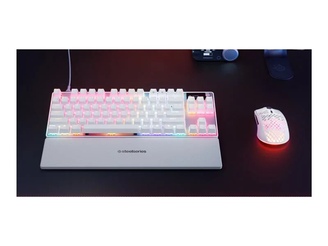
The SteelSeries Apex Pro TKL Gen 3 Gaming Keyboard is the best adjustable-actuation pick for competitive players, with switch actuation adjustable from 0.1 to 4.0 mm.
Best for: Competitive players who want adjustable actuation
- Layout
- TKL
- Actuation range
- 0.1–4.0 mm
- Connection
- Wired USB
- Adjustable actuation range
- Compact TKL footprint
- Includes gaming-focused controls
- Wired-only design
Is the SteelSeries Apex Pro TKL Gen 3 Gaming Keyboard worth buying on Black Friday 2026?
The SteelSeries Apex Pro TKL Gen 3 Gaming Keyboard is worth considering for competitive players who want to tune key response. The SteelSeries Apex Pro TKL Gen 3 Gaming Keyboard's adjustable 0.1–4.0 mm actuation range gives players control over how far keys travel before registering.
See today’s Black Friday price on Amazon
Which keyboard is better: ASUS ROG Strix Scope or EPOMAKER TH80?
The ASUS ROG Strix Scope II 96 Wireless Gaming Keyboard and EPOMAKER TH80 Pro 75% Wireless Mechanical Keyboard suit different priorities: the ASUS board has a 96% layout, while the EPOMAKER board uses a smaller 75% layout.
Choose the ASUS ROG Strix Scope II 96 Wireless Gaming Keyboard if a number pad matters and you want wired, Bluetooth and 2.4 GHz connections. Choose the EPOMAKER TH80 Pro 75% Wireless Mechanical Keyboard if you want to save more desk space, keep arrow keys and swap compatible switches. Both fit gaming and everyday use, but the layout difference is the quickest way to narrow the choice. Worth it for most players comes down to choosing the right size first.
Which ASUS ROG Strix Scope keyboard should you choose?
The ASUS ROG Strix Scope II 96 Wireless Gaming Keyboard is the better ASUS pick for players who need a number pad, while the ASUS ROG Strix Scope II TKL Gaming Keyboard suits wired TKL setups.
The 96 Wireless model brings three connection modes and a compact number-pad layout, making it useful for mixed gaming and productivity. The TKL model drops the number pad and uses a direct USB connection, which keeps the setup simple and opens more room for mouse movement. Think about desk space and wireless needs before comparing switch feel or lighting. Both are gaming-oriented options from the same ROG Strix Scope line, but their layouts make them distinct picks.
What makes the EPOMAKER TH80 Pro different from the TH80-X?
The EPOMAKER TH80 Pro 75% Wireless Mechanical Keyboard and EPOMAKER TH80-X 75% Wireless Mechanical Keyboard both offer compact 75% layouts, wireless options and hot-swap flexibility.
The TH80 Pro is a sensible starting point for players seeking a compact mechanical keyboard with several connection types and switch customization. The TH80-X also targets users who want a small board with customization options, so check the exact listing for included switches, keycaps and layout details before choosing. For either model, the 75% format keeps arrow keys while removing the number pad. That balance helps preserve desk space without moving to an ultra-compact layout.
Are wireless keyboards good for gaming?
The ASUS ROG Strix Scope II 96 Wireless Gaming Keyboard, EPOMAKER TH80 Pro 75% Wireless Mechanical Keyboard and Logitech G515 LIGHTSPEED TKL Wireless Gaming Keyboard each provide wireless connection options for gaming setups.
Connection technology matters more than the word wireless alone. A dedicated 2.4 GHz receiver is built for responsive desktop use, while Bluetooth is handy for switching between supported devices. Wired USB remains a simple option when you want a direct connection or need to charge a compatible board. Check the included receiver, battery details and supported modes on the exact model listing. Players who want a cable-free desk can still prioritize gaming-focused wireless features.
Which layout is best for gaming and everyday work?
The ASUS ROG Strix Scope II 96 Wireless Gaming Keyboard keeps a number pad, while the EPOMAKER TH80 Pro 75% Wireless Mechanical Keyboard and tenkeyless models save more space.
A 96% board suits players who use number-pad shortcuts, spreadsheets or frequent number entry. A 75% keyboard keeps arrow keys and common navigation keys in a smaller footprint. A TKL board removes the number pad and gives mouse movement more room, a useful trade-off for low-sensitivity gaming. If portability and desk space lead your checklist, start with 75% or TKL. If your keyboard doubles as a work tool, consider the extra keys before choosing.
Buying Guide
Choose a layout that fits your desk
A 96% keyboard keeps a number pad in a compact design. A 75% board retains arrow keys but cuts more width. A TKL layout drops the number pad and leaves extra space for mouse movement.
Pick wired or wireless connections
Wired USB keeps the setup straightforward. Bluetooth supports compatible devices, while 2.4 GHz receivers focus on desktop wireless play. Tri-mode keyboards offer more choice across those connections.
Check switch and customization features
Hot-swap support lets owners change compatible switches without soldering. QMK and VIA support remapping on compatible boards. Read the exact model specifications to confirm switch compatibility and included accessories.
Match the keyboard to your game style
Competitive players can prioritize TKL layouts, fast connection options and adjustable actuation. MMO and strategy players often value additional keys or a number pad. Typing feel remains personal, so review switch descriptions before buying.
Compare the exact Black Friday listing
Check the model name, layout, switch type, connection mode and included keycaps on the retailer page. Similar product names can refer to different configurations, so compare the full model details before checkout.
FAQ
ASUS ROG Strix Scope vs EPOMAKER TH80: which is better for gaming?
The ASUS ROG Strix Scope II 96 Wireless Gaming Keyboard suits players who want a number pad and three connection modes. The EPOMAKER TH80 Pro 75% Wireless Mechanical Keyboard is better for a compact setup with hot-swap flexibility. Choose by layout and customization needs.
Is a 75% keyboard good for gaming?
The EPOMAKER TH80 Pro 75% Wireless Mechanical Keyboard shows why 75% boards suit many gaming desks: the layout keeps arrow keys while saving space. Players who need a number pad should choose a larger keyboard, such as the ASUS ROG Strix Scope II 96 Wireless Gaming Keyboard.
Does the EPOMAKER TH80 Pro support wireless gaming?
The EPOMAKER TH80 Pro 75% Wireless Mechanical Keyboard supports 2.4 GHz wireless, Bluetooth and USB-C connections. Players can choose a wireless connection for a cleaner desk or USB-C for a wired setup. Check the product listing for the specific configuration and included accessories.
Is the ASUS ROG Strix Scope II 96 Wireless worth buying?
The ASUS ROG Strix Scope II 96 Wireless Gaming Keyboard is a strong choice for players who want a number pad without the footprint of a full-size layout. Its 96% design and three connection modes make it useful for gaming, typing and mixed-device setups.
What is the difference between a 75% and TKL keyboard?
A 75% keyboard, such as the EPOMAKER TH80 Pro 75% Wireless Mechanical Keyboard, keeps arrow keys in a compact layout. A TKL keyboard, such as the ASUS ROG Strix Scope II TKL Gaming Keyboard, removes the number pad but uses a wider arrangement with more dedicated keys.
Which keyboard is best for a compact gaming desk?
The EPOMAKER TH80 Pro 75% Wireless Mechanical Keyboard is a strong compact-desk pick because its 75% layout keeps arrow keys and saves space. The ASUS ROG Strix Scope II 96 Wireless Gaming Keyboard is a better fit when a number pad matters more than the smallest footprint.