

As an Amazon Associate we earn from qualifying purchases.
- Best overall: ASUS TUF Gaming VG27AQML1A
- Best budget: ASUS TUF Gaming VG27AQ1A
- Best premium: ASUS ROG Swift OLED PG27AQDM
- Best for large-screen QHD gaming: ASUS TUF Gaming VG32AQL1A
- The ASUS ROG Swift OLED PG27AQDM pairs a 27-inch QHD OLED panel with a 240Hz refresh rate for premium PC gaming.
- The ASUS TUF Gaming VG27AQML1A delivers a 27-inch QHD IPS display and up to 260Hz for fast competitive play.
- The ASUS TUF Gaming VG27AQ3A is a strong all-rounder with a 180Hz refresh rate and QHD resolution.
- Choose based on panel type, refresh rate, screen size and the connections your gaming system needs.
Shopping the ASUS ROG Swift PG27AQDM versus ASUS TUF Gaming monitor lineup for Black Friday 2026? The main call is simple: the ROG Swift OLED PG27AQDM prioritizes OLED contrast and a 240Hz refresh rate, while TUF Gaming models offer more panel and size options. I researched and compared specs, reviews and owner feedback to make the differences easier to act on.
Here's the bottom line: pick the ASUS ROG Swift OLED PG27AQDM for deep blacks and premium image quality, or a TUF Gaming model for a high-refresh IPS screen and a wider range of configurations. The list covers seven ASUS monitors, from QHD esports displays to a 4K OLED upgrade. Use the comparison table and buying advice to match a screen to your PC or console.
How We Picked
- Compared resolution, panel type and refresh rate to separate image-quality picks from speed-focused displays.
- Reviewed response-time claims and gaming features, including ELMB Sync and variable refresh rate support.
- Considered screen size and resolution together, especially for desk distance and console use.
- Checked listed connections and core compatibility details so the recommendations suit a range of gaming setups.
- Used product specifications, reviews and owner feedback to judge each monitor’s practical fit, not just its headline number.
Comparison Table
| Product | Best for | Resolution | Refresh rate | Panel type |
|---|---|---|---|---|
| ASUS ROG Swift OLED PG27AQDM | OLED QHD gaming | 2560 × 1440 | 240Hz | OLED |
| ASUS TUF Gaming VG27AQML1A | High-refresh QHD gaming | 2560 × 1440 | Up to 260Hz | IPS |
| ASUS TUF Gaming VG27AQ3A | Balanced QHD play | 2560 × 1440 | 180Hz | IPS |
| ASUS TUF Gaming VG27AQ1A | Straightforward QHD gaming | 2560 × 1440 | Up to 170Hz | IPS |
| ASUS TUF Gaming VG27AQL3A | QHD with HDR support | 2560 × 1440 | 180Hz | IPS |
| ASUS TUF Gaming VG32AQL1A | Large-screen QHD gaming | 2560 × 1440 | Up to 170Hz | IPS |
| ASUS ROG Swift OLED PG32UCDM | Premium 4K OLED gaming | 3840 × 2160 | 240Hz | QD-OLED |
Best Picks Reviewed
#1
ASUS ROG Swift OLED PG27AQDM
The ASUS ROG Swift OLED PG27AQDM is the best premium QHD gaming monitor for players who want OLED contrast and speed. The ASUS ROG Swift OLED PG27AQDM's 27-inch panel runs at 240Hz for sharp motion in demanding PC games.
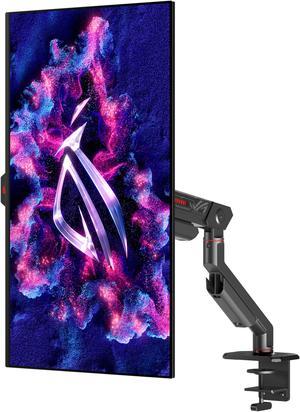
Best for: Premium QHD gaming and OLED contrast
- Screen size
- 27 inches
- Resolution
- 2560 × 1440
- Refresh rate
- 240Hz
- Response time
- 0.03ms GtG
- OLED delivers deep blacks and vivid contrast.
- 240Hz refresh rate suits fast PC play.
- QHD resolution balances detail and frame rate.
- OLED care and brightness behavior deserve consideration for static desktop use.
Is the ASUS ROG Swift OLED PG27AQDM worth buying on Black Friday 2026?
The ASUS ROG Swift OLED PG27AQDM is worth considering for players who prioritize OLED contrast, a 240Hz refresh rate and QHD sharpness. The 27-inch format fits a typical gaming desk, while its OLED panel stands apart from the IPS-based TUF options.
See today’s Black Friday price on Amazon
#2 · Top pick
ASUS TUF Gaming VG27AQML1A
The ASUS TUF Gaming VG27AQML1A is the best high-refresh QHD monitor for competitive players who prefer IPS. The ASUS TUF Gaming VG27AQML1A's 27-inch screen supports up to 260Hz, giving fast-action games plenty of refresh-rate headroom.

Best for: Competitive PC players who want high refresh
- Screen size
- 27 inches
- Resolution
- 2560 × 1440
- Refresh rate
- Up to 260Hz
- Response time
- 1ms GTG
- 260Hz maximum refresh rate targets esports.
- QHD resolution offers more detail than Full HD.
- IPS panel supports broad viewing angles.
- Reaching the maximum refresh rate requires a suitably capable PC.
Is the ASUS TUF Gaming VG27AQML1A worth buying on Black Friday 2026?
The ASUS TUF Gaming VG27AQML1A is a strong choice for competitive PC players who want a 27-inch QHD IPS monitor with up to 260Hz. The ASUS TUF Gaming VG27AQML1A's refresh-rate ceiling exceeds the ASUS ROG Swift OLED PG27AQDM, though the ROG model uses OLED.
See today’s Black Friday price on Amazon
#3
ASUS TUF Gaming VG27AQ3A
The ASUS TUF Gaming VG27AQ3A is the best balanced QHD monitor for players seeking a fast IPS display without going to an extreme refresh rate. The ASUS TUF Gaming VG27AQ3A's 27-inch screen supports 180Hz for smooth PC gaming.
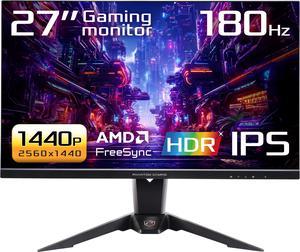
Best for: Everyday QHD gaming across genres
- Screen size
- 27 inches
- Resolution
- 2560 × 1440
- 180Hz refresh rate works well for fast games.
- QHD resolution gives games crisp detail.
- IPS technology supports flexible viewing positions.
- The ASUS TUF Gaming VG27AQ3A does not match the OLED contrast of the ROG Swift.
Is the ASUS TUF Gaming VG27AQ3A worth buying on Black Friday 2026?
The ASUS TUF Gaming VG27AQ3A is a sensible all-round QHD pick for PC players who want an IPS panel and 180Hz refresh. The 27-inch format suits most desks, and its feature mix covers competitive games without making OLED the deciding factor.
See today’s Black Friday price on Amazon
#4
ASUS TUF Gaming VG27AQ1A
The ASUS TUF Gaming VG27AQ1A is the best straightforward QHD option for players who want a 27-inch IPS gaming screen. The ASUS TUF Gaming VG27AQ1A's refresh rate reaches 170Hz, which gives fast games a smooth presentation.

Best for: Players upgrading to QHD on a simple setup
- Screen size
- 27 inches
- Resolution
- 2560 × 1440
- Refresh rate
- Up to 170Hz
- Response time
- 1ms MPRT
- QHD resolution is a useful step up in detail.
- 170Hz refresh rate supports responsive play.
- IPS panel suits shared viewing.
- The 170Hz ceiling is lower than newer high-refresh TUF choices.
Is the ASUS TUF Gaming VG27AQ1A worth buying on Black Friday 2026?
The ASUS TUF Gaming VG27AQ1A is a good fit for players who want QHD resolution, an IPS panel and refresh rates up to 170Hz. Compare it with newer 180Hz TUF models if a few extra refreshes and updated features are priorities.
See today’s Black Friday price on Amazon
#5
ASUS TUF Gaming VG27AQL3A
The ASUS TUF Gaming VG27AQL3A is the best QHD IPS pick for players who value a high-refresh screen with HDR support. The ASUS TUF Gaming VG27AQL3A's 27-inch panel reaches 180Hz and carries a DisplayHDR 400 certification.

Best for: QHD gaming with HDR support
- Screen size
- 27 inches
- Resolution
- 2560 × 1440
- Refresh rate
- 180Hz
- HDR certification
- DisplayHDR 400
- 180Hz refresh rate supports smooth gameplay.
- DisplayHDR 400 certification adds HDR compatibility.
- QHD IPS panel fits a versatile gaming setup.
- HDR 400 does not provide OLED-level contrast.
Is the ASUS TUF Gaming VG27AQL3A worth buying on Black Friday 2026?
The ASUS TUF Gaming VG27AQL3A is worth a look for players seeking a 27-inch QHD IPS monitor with 180Hz and DisplayHDR 400. The ASUS TUF Gaming VG27AQL3A adds HDR support to a balanced gaming feature set, while OLED remains the stronger choice for black levels.
See today’s Black Friday price on Amazon
#6
ASUS TUF Gaming VG32AQL1A
The ASUS TUF Gaming VG32AQL1A is the best large-screen QHD pick for players who want a 32-inch gaming display. The ASUS TUF Gaming VG32AQL1A's IPS panel reaches 170Hz, combining a roomy view with a fast refresh rate.

Best for: Large-screen QHD gaming
- Screen size
- 32 inches
- Resolution
- 2560 × 1440
- Refresh rate
- Up to 170Hz
- Response time
- 1ms MPRT
- 32-inch screen creates an expansive game view.
- 170Hz refresh rate supports fast play.
- QHD resolution keeps the hardware load below 4K.
- QHD pixels look less dense on 32 inches than on 27 inches.
Is the ASUS TUF Gaming VG32AQL1A worth buying on Black Friday 2026?
The ASUS TUF Gaming VG32AQL1A is a strong option for players who prefer a 32-inch QHD screen and up to 170Hz. The larger panel suits immersive gaming, while players seeking sharper pixel density should compare 27-inch QHD or 4K models.
See today’s Black Friday price on Amazon
#7
ASUS ROG Swift OLED PG32UCDM
The ASUS ROG Swift OLED PG32UCDM is the best premium 4K monitor for players who want a large OLED screen and top-tier refresh. The ASUS ROG Swift OLED PG32UCDM's 32-inch QD-OLED panel combines 3840 × 2160 resolution with 240Hz.
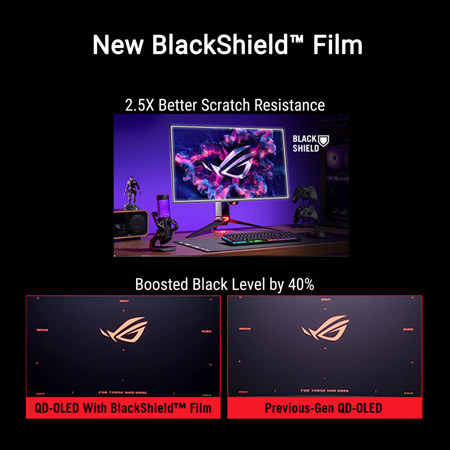
Best for: Premium 4K PC gaming
- Screen size
- 32 inches
- Resolution
- 3840 × 2160
- Refresh rate
- 240Hz
- Panel type
- QD-OLED
- 4K resolution delivers high pixel detail.
- QD-OLED combines rich contrast and color.
- 240Hz supports high-frame-rate PC gaming.
- A high-end graphics card is needed to make full use of 4K at high refresh.
Is the ASUS ROG Swift OLED PG32UCDM worth buying on Black Friday 2026?
The ASUS ROG Swift OLED PG32UCDM is a premium choice for PC players who want 4K detail, QD-OLED contrast and 240Hz in a 32-inch format. The ASUS ROG Swift OLED PG32UCDM's capabilities suit powerful gaming systems better than entry-level or older PCs.
See today’s Black Friday price on Amazon
Is the ASUS ROG Swift OLED PG27AQDM better than ASUS TUF Gaming monitors?
The ASUS ROG Swift OLED PG27AQDM is the stronger pick for OLED contrast, with a 27-inch QHD panel and 240Hz refresh rate. ASUS TUF Gaming monitors favor IPS panels, a broader range of configurations and, in the VG27AQML1A, refresh rates up to 260Hz.
Choose ROG Swift for deep blacks, vibrant highlights and a premium OLED experience. Choose TUF Gaming when IPS suits your needs, or when screen size and refresh-rate options matter more. Worth it for most players: start with the ASUS TUF Gaming VG27AQ3A if you want a balanced 180Hz QHD screen. The ASUS ROG Swift OLED PG27AQDM is the upgrade for OLED-focused players.
Which ASUS gaming monitor is best for competitive gaming?
The ASUS TUF Gaming VG27AQML1A is the fastest QHD option here, with a 27-inch IPS panel and up to 260Hz. The ASUS ROG Swift OLED PG27AQDM reaches 240Hz and has a 0.03ms GtG response-time specification, making it a compelling alternative for players who want OLED.
Refresh rate matters most when a PC can produce enough frames to use it. Check the graphics card, game settings and the monitor’s connection requirements before choosing. Players who split time between esports and varied genres can also consider the ASUS TUF Gaming VG27AQ3A: its 180Hz refresh rate offers a fast experience without centering the purchase on the very highest refresh-rate number.
Which ASUS monitor is best for PS5 and Xbox gaming?
The ASUS TUF Gaming VG27AQ3A is a practical console-friendly pick for players who want a 27-inch QHD screen and 180Hz maximum refresh rate. Console output and supported refresh modes depend on the console, game and connection, so check those details against the monitor’s inputs before buying.
For a more premium console-and-PC setup, the ASUS ROG Swift OLED PG32UCDM offers a 32-inch 4K QD-OLED panel and HDMI 2.1 connectivity. The ASUS TUF Gaming VG32AQL1A suits players who want a larger 32-inch view at QHD resolution. Match the monitor to the resolution and refresh modes your system supports, not just the panel’s maximum headline figure.
Should you choose 27-inch QHD or 32-inch QHD?
The ASUS TUF Gaming VG27AQ3A gives QHD resolution a sharper 27-inch format, while the ASUS TUF Gaming VG32AQL1A spreads the same 2560 × 1440 pixels across 32 inches. A 27-inch display is a familiar fit for a standard desk and keeps details crisp at typical sitting distances.
The 32-inch option delivers a larger, more immersive view for games and media. In return, text and fine details have lower pixel density than on a 27-inch QHD screen. Pick 27 inches for a balance of clarity and desk space; choose 32 inches when screen size matters more. For 4K at 32 inches, the ASUS ROG Swift OLED PG32UCDM is the premium alternative.
Is OLED worth choosing over IPS for gaming?
The ASUS ROG Swift OLED PG27AQDM and ASUS ROG Swift OLED PG32UCDM are the OLED choices here, with deep blacks and high contrast as their defining strengths. IPS models such as the ASUS TUF Gaming VG27AQML1A offer a different balance, including multiple sizes and refresh-rate options.
OLED makes sense for players who prioritize image depth and cinematic scenes. IPS suits buyers who want a range of screen sizes, QHD configurations and fast refresh rates. Consider the games you play, how long static desktop elements stay onscreen and the monitor’s care guidance. For a speed-first IPS setup, the ASUS TUF Gaming VG27AQML1A leads the TUF group; for OLED QHD, the ASUS ROG Swift OLED PG27AQDM is the direct match.
Buying Guide
Choose a resolution that fits your PC
The ASUS TUF Gaming VG27AQ3A offers 2560 × 1440 resolution, a strong match for many gaming PCs. The ASUS ROG Swift OLED PG32UCDM steps up to 3840 × 2160, which asks more of a graphics card. Check your system’s performance at the resolution you plan to use.
Match refresh rate to your games
The ASUS TUF Gaming VG27AQML1A reaches 260Hz, while the ASUS ROG Swift OLED PG27AQDM reaches 240Hz. Both target fluid play. Competitive players benefit most when their PC can deliver high frame rates; slower-paced games put more emphasis on image quality.
Compare OLED and IPS priorities
The ASUS ROG Swift OLED PG27AQDM uses OLED for deep blacks and contrast. ASUS TUF Gaming choices use IPS panels and span several screen sizes. Consider visual priorities, desk habits and the manufacturer’s care instructions before choosing OLED.
Check your system connections
The ASUS ROG Swift OLED PG32UCDM includes HDMI 2.1 connections, useful for compatible systems and display modes. Check each monitor’s port list against your console, PC and intended resolution. A cable and port must both support the mode you want.
Pick a screen size for your setup
The ASUS TUF Gaming VG27AQ3A is 27 inches; the ASUS TUF Gaming VG32AQL1A is 32 inches. Measure desk depth and viewing distance before deciding. A larger screen adds presence, while a smaller QHD panel keeps pixels denser.
FAQ
ASUS ROG Swift PG27AQDM vs ASUS TUF Gaming monitor: which is better?
The ASUS ROG Swift OLED PG27AQDM is better for players who prioritize OLED contrast and a 240Hz refresh rate. ASUS TUF Gaming monitors suit players seeking IPS options, multiple sizes and varied refresh rates, including up to 260Hz on the VG27AQML1A.
What is the best ASUS TUF Gaming monitor for Black Friday 2026?
The ASUS TUF Gaming VG27AQML1A is the top speed-focused choice, with QHD resolution and up to 260Hz. The ASUS TUF Gaming VG27AQ3A is a balanced alternative at 180Hz, while the ASUS TUF Gaming VG32AQL1A brings a larger 32-inch screen.
Is the ASUS ROG Swift OLED PG27AQDM good for PC gaming?
The ASUS ROG Swift OLED PG27AQDM is a strong PC gaming monitor, pairing a 27-inch QHD OLED panel with a 240Hz refresh rate and 0.03ms GtG response-time specification. The setup is especially appealing to players who want fast motion and OLED contrast.
Which ASUS gaming monitor has the highest refresh rate?
The ASUS TUF Gaming VG27AQML1A has the highest listed refresh rate in this guide, reaching up to 260Hz. The ASUS ROG Swift OLED PG27AQDM and ASUS ROG Swift OLED PG32UCDM both reach 240Hz, while other TUF options top out between 170Hz and 180Hz.
Is a 32-inch QHD ASUS monitor a good choice?
The ASUS TUF Gaming VG32AQL1A is a good choice for players who want a 32-inch QHD gaming display with up to 170Hz. QHD looks less dense at 32 inches than at 27 inches, so choose the larger screen for immersion and consider 4K for extra pixel detail.