

As an Amazon Associate we earn from qualifying purchases.
- Best overall: ASUS ProArt Display PA278CFRV
- Best budget: ASUS TUF Gaming VG27AQ
- Best premium: ASUS ROG Swift OLED PG27AQDM
- Best for competitive gaming: ASUS TUF Gaming VG27AQML1A
- ASUS TUF Gaming VG27AQML1A prioritizes fast QHD gaming with a 260Hz maximum refresh rate.
- ASUS ProArt Display PA278CFRV is the stronger pick for color-focused work, USB-C charging and a 100Hz refresh rate.
- ASUS ROG Strix XG27ACS offers a balanced QHD gaming feature set, including a 180Hz refresh rate.
- Dell UltraSharp 27 Monitor U2724D suits office users seeking a QHD screen with a 120Hz refresh rate.
- Compare panel type, refresh rate, color coverage and connectivity before choosing a Black Friday 2026 monitor.
ASUS TUF Gaming VG27AQML1A is the better Black Friday 2026 pick for high-refresh gaming, while ASUS ProArt Display PA278CFRV is the better match for color-focused work and USB-C laptop setups. Both are 27-inch QHD monitors, but their refresh rates and feature priorities serve different buyers.
I researched and compared specs, reviews and owner feedback to build this guide around real use cases, not a single headline specification. Alongside the two ASUS models, the selections cover OLED gaming, office work, creative projects and lower-cost gaming alternatives. My pick for most people depends on the workload: choose a gaming-focused screen for speed, or a color and connectivity-focused model for everyday productivity.
How We Picked
- Compared resolution, panel size and refresh rate to separate gaming, creative and office use cases.
- Reviewed published color coverage, panel technologies and factory calibration claims where available.
- Considered useful connections, including USB-C video, laptop charging, USB hubs and DisplayPort.
- Researched and compared specs, reviews and owner feedback rather than claiming detailed use.
- Selected alternatives with distinct strengths so readers can compare beyond the two headline ASUS monitors.
Comparison Table
| Product | Best for | Resolution | Maximum refresh rate | USB-C power delivery |
|---|---|---|---|---|
| ASUS TUF Gaming VG27AQML1A | Competitive QHD gaming | 2560 × 1440 | 260Hz | No |
| ASUS ProArt Display PA278CFRV | Creative work and USB-C laptop setups | 2560 × 1440 | 100Hz | Up to 96W |
| ASUS TUF Gaming VG27AQ | Everyday QHD gaming | 2560 × 1440 | 165Hz | No |
| ASUS ROG Swift OLED PG27AQDM | Premium OLED gaming | 2560 × 1440 | 240Hz | No |
| ASUS ROG Strix XG27ACS | Gaming with flexible device connections | 2560 × 1440 | 180Hz | 7.5W |
| Dell UltraSharp 27 Monitor U2724D | Office work and everyday productivity | 2560 × 1440 | 120Hz | No |
| BenQ PD Series PD2705Q | Design work and USB-C productivity | 2560 × 1440 | 60Hz | Up to 65W |
| LG UltraGear 27GP850-B | Fast IPS gaming | 2560 × 1440 | 165Hz native, 180Hz overclocked | No |
Best Picks Reviewed
#1
ASUS TUF Gaming VG27AQML1A
The ASUS TUF Gaming VG27AQML1A is the best high-refresh QHD gaming monitor for competitive players, with a 260Hz maximum refresh rate. The ASUS TUF Gaming VG27AQML1A prioritizes motion clarity and gaming responsiveness over creator-focused connections.

Best for: Competitive QHD gaming
- Screen size
- 27 inches
- Resolution
- 2560 × 1440
- Maximum refresh rate
- 260Hz
- Panel type
- Fast IPS
- High refresh rate for fast-paced play
- QHD resolution balances detail and frame rate
- Adaptive-Sync support helps reduce tearing
- No USB-C laptop charging
- Color workflow features are less extensive than the ProArt model
Is the ASUS TUF Gaming VG27AQML1A worth buying on Black Friday 2026?
The ASUS TUF Gaming VG27AQML1A is worth considering for players who can benefit from its 260Hz maximum refresh rate and QHD resolution. The ASUS TUF Gaming VG27AQML1A's gaming-first feature set is a better fit for fast action than color-critical professional work.
See today’s Black Friday price on Amazon
#2 · Top pick
ASUS ProArt Display PA278CFRV
The ASUS ProArt Display PA278CFRV is the best 27-inch monitor for creative work and laptop connectivity, with 100Hz refresh and USB-C charging up to 96W. The ASUS ProArt Display PA278CFRV gives color-focused users a more balanced tool than a high-refresh gaming panel.

Best for: Creative work and USB-C laptop setups
- Screen size
- 27 inches
- Resolution
- 2560 × 1440
- Refresh rate
- 100Hz
- USB-C power delivery
- Up to 96W
- Color coverage
- 95% DCI-P3
- USB-C carries video and laptop power
- Factory color accuracy focus suits creative tasks
- 100Hz feels smoother than standard 60Hz office displays
- Not designed for very high-refresh competitive gaming
- QHD provides less workspace than a 4K monitor
Is the ASUS ProArt Display PA278CFRV worth buying on Black Friday 2026?
The ASUS ProArt Display PA278CFRV is worth buying for creative users who value QHD detail, 95% DCI-P3 coverage and USB-C charging up to 96W. The 100Hz panel also makes scrolling and general desktop movement feel smoother than a basic office display.
See today’s Black Friday price on Amazon
#3
ASUS TUF Gaming VG27AQ
The ASUS TUF Gaming VG27AQ is the best straightforward QHD gaming monitor for players who want a 165Hz refresh rate without chasing the highest possible specification. The ASUS TUF Gaming VG27AQ pairs a familiar 27-inch IPS format with gaming-focused adaptive sync.
Best for: Everyday QHD gaming
- Screen size
- 27 inches
- Resolution
- 2560 × 1440
- Refresh rate
- 165Hz
- Panel type
- IPS
- QHD resolution is a strong fit for 27 inches
- 165Hz supports responsive gaming
- IPS viewing angles work well for shared viewing
- Lacks the 260Hz ceiling of ASUS TUF Gaming VG27AQML1A
- No USB-C laptop charging
Is the ASUS TUF Gaming VG27AQ worth buying on Black Friday 2026?
The ASUS TUF Gaming VG27AQ is a sensible gaming choice for players seeking QHD resolution and a 165Hz refresh rate. The ASUS TUF Gaming VG27AQ delivers a well-rounded gaming setup, though buyers seeking the fastest listed refresh rate should compare the VG27AQML1A.
See today’s Black Friday price on Amazon
#4
ASUS ROG Swift OLED PG27AQDM
The ASUS ROG Swift OLED PG27AQDM is the best premium gaming pick for buyers who prioritize OLED contrast and a 240Hz refresh rate. The ASUS ROG Swift OLED PG27AQDM combines QHD resolution with the near-instant pixel response associated with OLED panels.
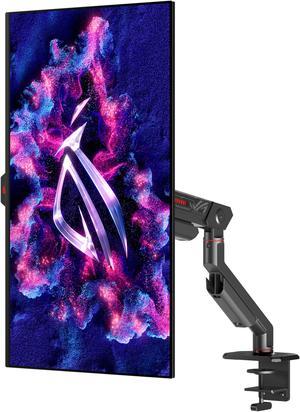
Best for: Premium OLED gaming
- Screen size
- 26.5 inches
- Resolution
- 2560 × 1440
- Refresh rate
- 240Hz
- Panel type
- OLED
- OLED contrast creates deep blacks
- 240Hz supports fast competitive play
- QHD resolution suits modern gaming PCs
- OLED care and static-image habits deserve consideration
- Fewer productivity connections than ASUS ProArt Display PA278CFRV
Is the ASUS ROG Swift OLED PG27AQDM worth buying on Black Friday 2026?
The ASUS ROG Swift OLED PG27AQDM is worth considering for gamers who want OLED contrast, QHD resolution and a 240Hz refresh rate. The ASUS ROG Swift OLED PG27AQDM is a gaming-first premium screen, not the most practical choice for USB-C laptop docking.
See today’s Black Friday price on Amazon
#5
ASUS ROG Strix XG27ACS
The ASUS ROG Strix XG27ACS is the best balanced QHD gaming monitor for players who want a 180Hz refresh rate and USB-C video input. The ASUS ROG Strix XG27ACS combines a fast IPS panel with a useful connection for compatible laptops and tablets.
Best for: Gaming with flexible device connections
- Screen size
- 27 inches
- Resolution
- 2560 × 1440
- Refresh rate
- 180Hz
- USB-C power delivery
- 7.5W
- 180Hz refresh rate suits fast games
- USB-C supports video from compatible devices
- QHD Fast IPS display balances speed and clarity
- USB-C power is not laptop-charging class
- Not a color-workstation substitute for the ProArt model
Is the ASUS ROG Strix XG27ACS worth buying on Black Friday 2026?
The ASUS ROG Strix XG27ACS is a strong fit for players seeking QHD gaming at up to 180Hz with USB-C video input. The ASUS ROG Strix XG27ACS offers connection flexibility, but its 7.5W USB-C output does not replace a laptop charger.
See today’s Black Friday price on Amazon
#6
Dell UltraSharp 27 Monitor U2724D
The Dell UltraSharp 27 Monitor U2724D is the best office-focused choice for smooth desktop work, with a 120Hz refresh rate and QHD resolution. The Dell UltraSharp 27 Monitor U2724D is designed around productivity and viewing comfort rather than competitive gaming.
Best for: Office work and everyday productivity
- Screen size
- 27 inches
- Resolution
- 2560 × 1440
- Refresh rate
- 120Hz
- Panel type
- IPS Black
- 120Hz improves desktop scrolling smoothness
- IPS Black panel targets stronger contrast
- QHD is practical for office documents and browsing
- No 4K resolution
- Gaming features are less extensive than ASUS TUF Gaming VG27AQML1A
Is the Dell UltraSharp 27 Monitor U2724D worth buying on Black Friday 2026?
The Dell UltraSharp 27 Monitor U2724D is worth considering for office users who want a QHD display, IPS Black contrast and a 120Hz refresh rate. The Dell UltraSharp 27 Monitor U2724D is a productivity monitor, not a high-refresh esports specialist.
See today’s Black Friday price on Amazon
#7
BenQ PD Series PD2705Q
The BenQ PD Series PD2705Q is the best entry-level creative monitor in this selection for users who value QHD resolution and USB-C charging up to 65W. The BenQ PD Series PD2705Q favors color-focused desktop work over high-refresh gaming.
Best for: Design work and USB-C productivity
- Screen size
- 27 inches
- Resolution
- 2560 × 1440
- Refresh rate
- 60Hz
- USB-C power delivery
- Up to 65W
- Color coverage
- 100% sRGB
- USB-C supports display and laptop charging
- 100% sRGB coverage suits standard design work
- QHD resolution offers useful desktop space
- 60Hz is less smooth than faster alternatives
- Not intended for competitive gaming
Is the BenQ PD Series PD2705Q worth buying on Black Friday 2026?
The BenQ PD Series PD2705Q is worth considering for designers who want QHD resolution, 100% sRGB coverage and USB-C charging up to 65W. The BenQ PD Series PD2705Q is less suitable for fast gaming because its refresh rate is 60Hz.
See today’s Black Friday price on Amazon
#8
LG UltraGear 27GP850-B
The LG UltraGear 27GP850-B is the best fast IPS alternative for QHD gaming, with a 165Hz refresh rate and an overclocked 180Hz mode. The LG UltraGear 27GP850-B pairs a Nano IPS panel with a gaming-focused design.
Best for: Fast IPS gaming
- Screen size
- 27 inches
- Resolution
- 2560 × 1440
- Refresh rate
- 165Hz native, 180Hz overclocked
- Panel type
- Nano IPS
- Overclocked refresh reaches 180Hz
- Nano IPS supports vivid color
- QHD detail works well for gaming and general use
- No USB-C laptop charging
- Lower maximum refresh rate than ASUS TUF Gaming VG27AQML1A
Is the LG UltraGear 27GP850-B worth buying on Black Friday 2026?
The LG UltraGear 27GP850-B is a good fit for players seeking a QHD Nano IPS screen with a 165Hz native refresh rate and 180Hz overclocked mode. The LG UltraGear 27GP850-B prioritizes gaming performance over USB-C productivity features.
See today’s Black Friday price on Amazon
What is the difference between ASUS TUF Gaming VG27AQML1A and ASUS ProArt Display PA278CFRV?
Both are 27-inch QHD IPS monitors. ASUS TUF Gaming VG27AQML1A reaches 260Hz for gaming; ASUS ProArt Display PA278CFRV offers 100Hz, 95 percent DCI-P3 coverage and USB-C charging up to 96W.
Choose the TUF model for fast-paced games and the ProArt model for color-focused work or a simpler laptop setup.
Which monitor is better for gaming?
ASUS TUF Gaming VG27AQML1A leads with a 260Hz QHD refresh rate. ASUS ROG Swift OLED PG27AQDM pairs 240Hz with OLED contrast, while ASUS ROG Strix XG27ACS offers 180Hz. ASUS TUF Gaming VG27AQ and LG UltraGear 27GP850-B are other fast IPS options.
Match the refresh rate to the frame rates your PC delivers. Choose an OLED model with its care requirements in mind.
Which monitor is better for creative work?
ASUS ProArt Display PA278CFRV suits creative work with 95 percent DCI-P3 coverage, 100Hz refresh and USB-C charging up to 96W. BenQ PD Series PD2705Q offers 100 percent sRGB coverage and 65W charging.
Both provide a 27-inch QHD workspace. Check required color coverage and laptop power needs; choose a 4K monitor when projects demand more pixel detail.
Do these monitors support USB-C laptop charging?
ASUS ProArt Display PA278CFRV supplies up to 96W over USB-C, and BenQ PD Series PD2705Q supplies up to 65W. ASUS ROG Strix XG27ACS supports USB-C video but provides only 7.5W.
ASUS TUF Gaming VG27AQML1A, ASUS TUF Gaming VG27AQ, ASUS ROG Swift OLED PG27AQDM, Dell UltraSharp 27 Monitor U2724D and LG UltraGear 27GP850-B lack equivalent USB-C laptop charging. Check charging wattage and connections against your laptop.
Which monitor is the best overall Black Friday 2026 pick?
ASUS ProArt Display PA278CFRV is a strong all-purpose choice with QHD, 100Hz refresh and USB-C charging up to 96W. Competitive gamers should consider ASUS TUF Gaming VG27AQML1A or ASUS ROG Swift OLED PG27AQDM; office users can compare Dell UltraSharp 27 Monitor U2724D.
Choose based on your main task: color and connectivity, gaming speed or office productivity.
Buying Guide
Match refresh rate to your games
ASUS TUF Gaming VG27AQML1A reaches 260Hz. Choose a refresh rate your PC can support in the games you play.
Check color coverage for creative work
ASUS ProArt Display PA278CFRV covers 95 percent DCI-P3; BenQ PD Series PD2705Q covers 100 percent sRGB. Match the color space to your work.
Confirm USB-C power delivery
ASUS ProArt Display PA278CFRV supplies up to 96W, BenQ PD Series PD2705Q up to 65W, and ASUS ROG Strix XG27ACS 7.5W. Verify laptop charging needs.
Choose QHD or 4K for your workspace
All eight monitors use 2560 × 1440 QHD resolution. Compare 4K models if you need more detail or workspace.
Compare stand and desk requirements
Check stand adjustment, mount compatibility and desk depth for ASUS ProArt Display PA278CFRV, Dell UltraSharp 27 Monitor U2724D or ASUS ROG Swift OLED PG27AQDM.
FAQ
Is ASUS TUF Gaming VG27AQML1A better than ASUS ProArt Display PA278CFRV?
ASUS TUF Gaming VG27AQML1A is better for high-refresh gaming, with a 260Hz maximum refresh rate. ASUS ProArt Display PA278CFRV is better for creative work and laptop connections, with 95% DCI-P3 coverage, a 100Hz refresh rate and USB-C charging up to 96W.
What is the refresh rate of ASUS ProArt Display PA278CFRV?
ASUS ProArt Display PA278CFRV has a 100Hz refresh rate and a 2560 × 1440 QHD resolution. ASUS ProArt Display PA278CFRV is aimed at color-focused work and general productivity, rather than the extreme refresh rates offered by gaming monitors.
Does ASUS TUF Gaming VG27AQML1A have USB-C?
ASUS TUF Gaming VG27AQML1A does not offer USB-C laptop charging. ASUS TUF Gaming VG27AQML1A focuses on gaming features, including QHD resolution and a maximum refresh rate of 260Hz, while ASUS ProArt Display PA278CFRV is the better fit for a USB-C laptop desk.
Which monitor is best for a MacBook or USB-C laptop?
ASUS ProArt Display PA278CFRV is the strongest laptop choice in this guide, with USB-C video and power delivery up to 96W. BenQ PD Series PD2705Q also supports USB-C charging up to 65W, while ASUS ROG Strix XG27ACS provides only 7.5W.
Is a 27-inch QHD monitor good for gaming?
A 27-inch QHD monitor offers a useful balance of image detail and gaming performance. ASUS TUF Gaming VG27AQML1A pairs 2560 × 1440 resolution with a 260Hz maximum refresh rate, while ASUS TUF Gaming VG27AQ offers a more moderate 165Hz option.
Which monitor has the highest refresh rate in this guide?
ASUS TUF Gaming VG27AQML1A has the highest listed maximum refresh rate in this guide at 260Hz. ASUS ROG Swift OLED PG27AQDM follows at 240Hz, and ASUS ROG Strix XG27ACS reaches 180Hz.
Which monitor is best for color-accurate design work?
ASUS ProArt Display PA278CFRV is the strongest color-focused option here, with stated 95% DCI-P3 coverage and a 100Hz refresh rate. BenQ PD Series PD2705Q offers 100% sRGB coverage and USB-C charging up to 65W for design workflows.