

As an Amazon Associate we earn from qualifying purchases.
- Best overall: ASUS ZenWiFi XT9 (2-Pack)
- Best budget: ASUS RT-AX82U (WiFi 6 Router)
- Best premium: ASUS ZenWiFi XT12 (2-Pack)
- Best for gaming: ASUS RT-AX86U Pro (WiFi 6 Router)
- Choose the ASUS ZenWiFi XT9 (2-Pack) for tri-band mesh coverage across multiple rooms and floors.
- Choose the ASUS RT-AX86U Pro (WiFi 6 Router) for a powerful single-router setup with a 2.5 Gbps port.
- The ASUS ZenWiFi XT12 (2-Pack) adds an AX11000 tri-band class for larger, demanding homes.
- Match your router to your home's layout, wired connections and Wi-Fi generation before choosing a Black Friday 2026 pick.
For Black Friday 2026, the ASUS ZenWiFi XT9 (2-Pack) is the stronger whole-home mesh choice, while the ASUS RT-AX86U Pro (WiFi 6 Router) is the better fit for a single-room-centered setup. The key difference is simple: the XT9 uses two tri-band nodes to spread coverage, and the RT-AX86U Pro uses one high-performance router with a 2.5 Gbps port.
I researched and compared specs, reviews and owner feedback to identify which ASUS models suit different homes, devices and budgets. The lineup below includes mesh systems for broad coverage and standalone routers for gaming, wired devices and smaller layouts. Start with your home's floor plan and internet plan, then compare wireless bands, port counts and setup needs. For most homes with coverage gaps, the XT9 is the Best bet; for a single router near the main devices, the RT-AX86U Pro is an Easy recommendation.
How We Picked
- Compared advertised Wi-Fi class, band configuration and support for Wi-Fi 6 or Wi-Fi 6E.
- Prioritized mesh kits for homes that need coverage across multiple rooms or floors.
- Reviewed Ethernet port options, including 2.5 Gbps ports and higher port counts for wired devices.
- Considered owner feedback and common use cases such as gaming, streaming and connecting smart-home devices.
- Selected distinct models so shoppers can compare coverage, wireless capacity and single-router convenience.
Comparison Table
| Product | Best for | Wi-Fi class | Bands | Ethernet highlights |
|---|---|---|---|---|
| ASUS ZenWiFi XT9 (2-Pack) | Multi-room mesh | AX7800 | 3 | 2.5 Gbps port |
| ASUS RT-AX86U Pro (WiFi 6 Router) | Gaming and one central router | AX5700 | 2 | 2.5 Gbps port |
| ASUS ZenWiFi XT8 (2-Pack) | Tri-band mesh | AX6600 | 3 | 2.5 Gbps port |
| ASUS ZenWiFi XT12 (2-Pack) | Premium mesh capacity | AX11000 | 3 | 2 x 2.5 Gbps per node |
| ASUS ZenWiFi ET8 (2-Pack) | Wi-Fi 6E mesh | AXE6600 | 3 | 6 GHz band |
| ASUS RT-AX88U Pro (WiFi 6 Router) | Wired devices | AX6000 | 2 | 8 LAN ports; 2.5 Gbps port |
| ASUS RT-AX82U (WiFi 6 Router) | Smaller homes | AX5400 | 2 | 4 LAN ports |
Best Picks Reviewed
#1 · Top pick
ASUS ZenWiFi XT9 (2-Pack)
The ASUS ZenWiFi XT9 (2-Pack) is the best mesh system for households that need broad coverage, with an AX7800 tri-band wireless class and two nodes.
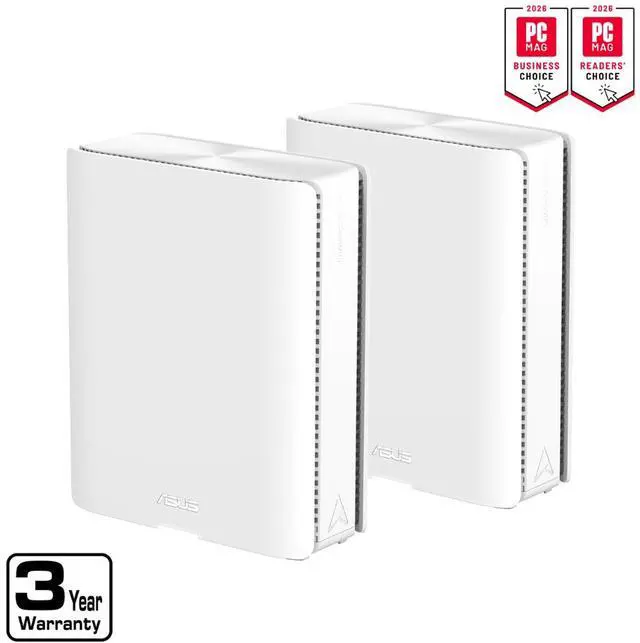
Best for: Multi-room and multi-floor homes
- Wi-Fi class
- AX7800
- Bands
- 3
- Pack size
- 2 nodes
- Multi-gig port
- 2.5 Gbps
- Two nodes help extend coverage beyond one router's location.
- Tri-band design provides a dedicated additional wireless band.
- Includes a 2.5 Gbps port for a compatible internet plan or wired connection.
- Two nodes need suitable placement and access to power.
Is the ASUS ZenWiFi XT9 (2-Pack) worth buying on Black Friday 2026?
Yes. The ASUS ZenWiFi XT9 (2-Pack) is a strong Black Friday 2026 pick for homes with dead zones or multiple floors. The ASUS ZenWiFi XT9 (2-Pack)'s two-node, AX7800 tri-band design focuses on spreading coverage rather than relying on one router.
See today’s Black Friday price on Amazon
#2
ASUS RT-AX86U Pro (WiFi 6 Router)
The ASUS RT-AX86U Pro (WiFi 6 Router) is the best single-router choice for gamers and busy households, with AX5700 Wi-Fi 6 and a 2.5 Gbps port.

Best for: Gaming and a central router location
- Wi-Fi class
- AX5700
- Bands
- 2
- Ethernet port
- 2.5 Gbps
- Wi-Fi generation
- Wi-Fi 6
- Strong single-router feature set for gaming and streaming.
- 2.5 Gbps port supports a compatible multi-gig connection.
- Useful wired connectivity for consoles, PCs and storage devices.
- One router does not provide the same placement flexibility as a mesh kit.
Is the ASUS RT-AX86U Pro (WiFi 6 Router) worth buying on Black Friday 2026?
Yes. The ASUS RT-AX86U Pro (WiFi 6 Router) is a smart fit for gamers and households with a central router location. AX5700 Wi-Fi 6 and a 2.5 Gbps port support fast wireless and wired networking.
See today’s Black Friday price on Amazon
#3
ASUS ZenWiFi XT8 (2-Pack)
The ASUS ZenWiFi XT8 (2-Pack) is the best mesh alternative for households seeking tri-band coverage, with an AX6600 wireless class and two nodes.
Best for: Whole-home mesh at a lower feature tier
- Wi-Fi class
- AX6600
- Bands
- 3
- Pack size
- 2 nodes
- Multi-gig port
- 2.5 Gbps
- Two-node mesh setup can cover rooms beyond the main router.
- Tri-band design supports multiple connected devices.
- 2.5 Gbps port adds a multi-gig wired option.
- AX6600 class is below the XT9's AX7800 class.
Is the ASUS ZenWiFi XT8 (2-Pack) a good Black Friday 2026 mesh router?
Yes. The ASUS ZenWiFi XT8 (2-Pack) is a good choice for shoppers who want a two-node tri-band mesh system. AX6600 Wi-Fi and a 2.5 Gbps port give it a capable feature set for streaming, work and connected devices.
See today’s Black Friday price on Amazon
#4
ASUS ZenWiFi XT12 (2-Pack)
The ASUS ZenWiFi XT12 (2-Pack) is the best premium Wi-Fi 6 mesh pick for demanding homes, with AX11000 tri-band capacity and two nodes.
Best for: Large homes with many demanding devices
- Wi-Fi class
- AX11000
- Bands
- 3
- Pack size
- 2 nodes
- Multi-gig ports
- 2 per node
- High AX11000 class suits busy networks.
- Two nodes extend mesh coverage across more than one area.
- Two 2.5 Gbps ports per node support flexible wired connections.
- The premium capacity is more than a small household needs.
Is the ASUS ZenWiFi XT12 (2-Pack) worth buying on Black Friday 2026?
Yes. The ASUS ZenWiFi XT12 (2-Pack) is a premium mesh option for homes with many active devices and demanding network use. The ASUS ZenWiFi XT12 (2-Pack)'s AX11000 tri-band class and two 2.5 Gbps ports per node offer substantial wireless and wired capacity.
See today’s Black Friday price on Amazon
#5
ASUS ZenWiFi ET8 (2-Pack)
The ASUS ZenWiFi ET8 (2-Pack) is the best mesh pick for households seeking Wi-Fi 6E, with AXE6600 tri-band networking and a 6 GHz band.
Best for: Wi-Fi 6E devices and multi-room coverage
- Wi-Fi class
- AXE6600
- Bands
- 3
- Pack size
- 2 nodes
- Additional band
- 6 GHz
- 6 GHz band supports compatible Wi-Fi 6E devices.
- Two nodes suit homes that need mesh coverage.
- Tri-band design accommodates a broad range of connected devices.
- Older Wi-Fi devices do not use the 6 GHz band.
Is the ASUS ZenWiFi ET8 (2-Pack) a good Wi-Fi 6E mesh system?
Yes. The ASUS ZenWiFi ET8 (2-Pack) suits homes that want mesh coverage and have Wi-Fi 6E devices. The AXE6600 tri-band system includes a 6 GHz band, while its two-node layout helps serve separate areas of a home.
See today’s Black Friday price on Amazon
#6
ASUS RT-AX88U Pro (WiFi 6 Router)
The ASUS RT-AX88U Pro (WiFi 6 Router) is the best wired-device choice for homes needing many Ethernet connections, with AX6000 Wi-Fi and 8 LAN ports.
Best for: Wired home networks and gaming setups
- Wi-Fi class
- AX6000
- Bands
- 2
- LAN ports
- 8
- Multi-gig port
- 2.5 Gbps
- Eight LAN ports help connect multiple wired devices.
- 2.5 Gbps port supports compatible multi-gig equipment.
- Wi-Fi 6 provides a modern connection for compatible devices.
- A single router is less flexible than a mesh system for distant rooms.
Is the ASUS RT-AX88U Pro (WiFi 6 Router) good for wired devices?
Yes. The ASUS RT-AX88U Pro (WiFi 6 Router) is a strong option when a home has several consoles, computers or other wired devices. Eight LAN ports reduce the need for an additional switch, and AX6000 Wi-Fi serves wireless clients.
See today’s Black Friday price on Amazon
#7
ASUS RT-AX82U (WiFi 6 Router)
The ASUS RT-AX82U (WiFi 6 Router) is the best straightforward pick for a smaller home, with AX5400 dual-band Wi-Fi 6 and 4 LAN ports.
Best for: Smaller homes and everyday Wi-Fi 6
- Wi-Fi class
- AX5400
- Bands
- 2
- LAN ports
- 4
- Wi-Fi generation
- Wi-Fi 6
- Wi-Fi 6 supports compatible phones, laptops and smart-home devices.
- Four LAN ports provide wired options for key devices.
- A single-router setup keeps installation simple.
- Dual-band Wi-Fi lacks a third band for mesh backhaul.
Is the ASUS RT-AX82U (WiFi 6 Router) worth buying on Black Friday 2026?
Yes. The ASUS RT-AX82U (WiFi 6 Router) is worth considering for a smaller home that needs everyday Wi-Fi 6 and a simple single-router setup. AX5400 dual-band networking and 4 LAN ports cover common wireless and wired needs.
See today’s Black Friday price on Amazon
Which is better, ASUS ZenWiFi XT9 or ASUS RT-AX86U Pro?
The ASUS ZenWiFi XT9 (2-Pack) is better for multi-room coverage, while the ASUS RT-AX86U Pro (WiFi 6 Router) is better for a central single-router setup. The XT9 combines two mesh nodes with AX7800 tri-band Wi-Fi; the RT-AX86U Pro delivers AX5700 dual-band Wi-Fi from one router.
Choose the XT9 when Wi-Fi drops in rooms far from the modem, across floors or behind multiple walls. A mesh kit lets you position a second node to extend coverage. Choose the RT-AX86U Pro when one well-placed router can serve the home and you want strong performance for gaming, streaming or wired equipment.
Both models include a 2.5 Gbps connection, so compare the rest of your needs rather than treating that port as the deciding factor. For Black Friday 2026, pick the router architecture that fixes your actual problem: coverage or single-location performance.
Is mesh Wi-Fi better than a single ASUS router?
A two-node ASUS mesh system is better than one router when a home has coverage gaps across multiple rooms or floors. The ASUS ZenWiFi XT9 (2-Pack) uses 2 nodes, while the ASUS RT-AX86U Pro (WiFi 6 Router) is a single-router solution.
Mesh equipment lets you place a second node nearer to the rooms that need a stronger connection. The nodes work as one network, reducing the need to switch manually between separate network names as you move around. Placement still matters: a node needs a usable connection to the main unit to extend service effectively.
A single router is simpler when your home is compact and the modem sits near the devices that use the most bandwidth. A standalone model also makes sense when wired connections and a strong central signal matter more than extending coverage. Review your home's layout before paying for mesh features you do not need.
Which ASUS router is best for gaming in 2026?
The ASUS RT-AX86U Pro (WiFi 6 Router) is the best gaming pick for a central setup, with AX5700 Wi-Fi 6 and a 2.5 Gbps port. The ASUS RT-AX88U Pro (WiFi 6 Router) is a better alternative when 8 LAN ports are useful for consoles and computers.
A router cannot control every factor affecting game performance: the internet connection, distance, interference and the game server all matter. Connect a stationary gaming PC or console by Ethernet when practical, then position the router away from obstructions and interference sources.
Homes with gaming devices in distant rooms should consider mesh instead of buying a more powerful single router alone. The ASUS ZenWiFi XT9 (2-Pack) provides two nodes and tri-band Wi-Fi, making it a good fit when coverage across the home matters as much as a strong connection near the router.
Should you choose Wi-Fi 6 or Wi-Fi 6E?
Choose Wi-Fi 6E when your household has compatible devices that can use 6 GHz; choose Wi-Fi 6 for broad compatibility and value. The ASUS ZenWiFi ET8 (2-Pack) is an AXE6600, 3-band Wi-Fi 6E mesh system, while the ASUS RT-AX86U Pro (WiFi 6 Router) is a Wi-Fi 6 model.
The 6 GHz band gives compatible Wi-Fi 6E devices another band for wireless communication. Devices that support only Wi-Fi 6 or earlier generations do not use that band, so check your phones, laptops and tablets before selecting a 6E system.
For shoppers focused on reliable home coverage, a well-placed mesh system can be a more useful upgrade than a newer wireless band. For a mixed household with many device generations, Wi-Fi 6 models remain sensible choices. Consider both device compatibility and the home's layout.
What should you compare before buying an ASUS router on Black Friday?
Compare Wi-Fi class, band count, Ethernet ports and system type before choosing an ASUS router for Black Friday 2026. The ASUS ZenWiFi XT9 (2-Pack) offers a 2-node tri-band mesh setup, while the ASUS RT-AX88U Pro (WiFi 6 Router) provides 8 LAN ports in a single-router design.
Start with coverage: mark the rooms where Wi-Fi is weak and note the number of floors. Next, check whether your internet plan or network equipment uses a multi-gig Ethernet connection, then count the devices you want to connect by cable. Those details narrow the choice quickly.
Finally, match wireless features to your devices. AXE6600 Wi-Fi 6E makes sense when compatible 6 GHz devices are part of your household; AX-class Wi-Fi 6 remains broadly useful. A feature-rich router is not automatically the best buy if its strengths do not match your home.
Buying Guide
Map your coverage needs
Write down the rooms and floors where your current signal falls short. Choose a two-node mesh system such as the ASUS ZenWiFi XT9 (2-Pack) for broader coverage; choose one router if a central location already serves the home.
Check your internet connection
Compare the router's Ethernet ports with your modem, internet plan and other network equipment. A 2.5 Gbps port is useful with compatible multi-gig gear, but a matching port alone does not raise the speed of a slower internet plan.
Count wired devices
List consoles, desktop computers, televisions and storage devices you want to connect by cable. The ASUS RT-AX88U Pro (WiFi 6 Router) has 8 LAN ports; models with fewer ports suit simpler wired setups.
Match Wi-Fi to your devices
Check device support before choosing Wi-Fi 6E. The ASUS ZenWiFi ET8 (2-Pack) adds a 6 GHz band for compatible devices, while Wi-Fi 6 models serve a wide range of current and older wireless equipment.
Pick the right Black Friday 2026 fit
Decide which feature solves a real problem before comparing retailer listings: mesh coverage, gaming, Wi-Fi 6E or extra Ethernet ports. Confirm the listing's exact model and pack size so the product matches your comparison.
FAQ
ASUS ZenWiFi XT9 vs RT-AX86U Pro: which should I buy?
The ASUS ZenWiFi XT9 (2-Pack) is the better choice for multi-room coverage, with 2 nodes and AX7800 tri-band Wi-Fi. The ASUS RT-AX86U Pro (WiFi 6 Router) suits a central single-router setup with AX5700 Wi-Fi 6 and a 2.5 Gbps port.
Is the ASUS ZenWiFi XT9 a mesh system?
Yes. The ASUS ZenWiFi XT9 (2-Pack) is a mesh system with 2 nodes and AX7800 tri-band Wi-Fi. The two units work together to extend coverage across a home, making the kit more suitable for multiple rooms or floors than a single-router setup.
Is the ASUS RT-AX86U Pro good for gaming?
Yes. The ASUS RT-AX86U Pro (WiFi 6 Router) is a good gaming choice for homes where one centrally placed router can serve the devices. AX5700 Wi-Fi 6 and a 2.5 Gbps port support wireless and wired connections for compatible equipment.
Does the ASUS ZenWiFi ET8 support Wi-Fi 6E?
Yes. The ASUS ZenWiFi ET8 (2-Pack) is an AXE6600 tri-band Wi-Fi 6E mesh system with a 6 GHz band. Compatible devices can use that band; older devices continue to connect using supported Wi-Fi bands.
Which ASUS router has the most Ethernet ports?
The ASUS RT-AX88U Pro (WiFi 6 Router) has 8 LAN ports, making it a strong pick for homes with several wired devices. The router also has AX6000 dual-band Wi-Fi 6 and a 2.5 Gbps port for compatible network equipment.