

As an Amazon Associate we earn from qualifying purchases.
- Best overall: August Wi-Fi Smart Lock (4th Generation)
- Best budget: Yale Assure Lock 2 Key-Free Touchscreen with Bluetooth
- Best premium: Yale Assure Lock 2 Key-Free Touchscreen with Wi-Fi
- Best for a physical key backup: Yale Assure Lock 2 Keyed Touchscreen with Wi-Fi
- August Wi-Fi Smart Lock (4th Generation) adds smart access to a compatible existing deadbolt, keeping the outside hardware and key.
- Yale Assure Lock 2 offers keypad and touchscreen choices, with keyed and key-free versions across selected models.
- Choose a Wi-Fi model for remote access; Bluetooth models focus on phone control when you are near the lock.
- The best Black Friday 2026 choice depends on your door, preferred entry method and smart-home setup—not just the sale label.
August Smart Lock vs Yale Assure Lock 2 Black Friday 2026 comes down to a practical choice: keep your current deadbolt and add smart features, or replace the deadbolt with a keypad or touchscreen lock. We researched and compared specs, reviews and owner feedback to help you match the right format to your home, entry routine and connected devices.
August Wi-Fi Smart Lock (4th Generation) is the standout retrofit option, while Yale Assure Lock 2 has more ways to enter, including a keypad, touchscreen or physical key on select versions. Black Friday shopping is a useful time to compare these models side by side. Our guide covers the leading variants, their differences and who each one suits best.
How We Picked
- We compared retrofit and full-deadbolt designs, including whether each model keeps a physical keyway.
- We reviewed included entry methods such as phone access, keypad codes, touchscreen controls and keys.
- We separated built-in Wi-Fi models from Bluetooth models so remote access expectations are clear.
- We considered battery requirements, door compatibility and the everyday convenience features described by manufacturers and owners.
- We prioritized distinct options from the August and Yale Assure Lock 2 ranges, rather than treating every finish as a separate recommendation.
Comparison Table
| Product | Best for | Power | Entry method | Connectivity |
|---|---|---|---|---|
| August Wi-Fi Smart Lock (4th Generation) | Keeping existing deadbolt hardware | 4 AA batteries | Phone app and existing key | Built-in Wi-Fi and Bluetooth |
| Yale Assure Lock 2 Key-Free Touchscreen with Wi-Fi | Key-free touchscreen and remote access | 4 AA batteries | Touchscreen, up to 250 codes | Built-in Wi-Fi and Bluetooth |
| Yale Assure Lock 2 Keyed Touchscreen with Wi-Fi | Touchscreen codes plus keyway | 4 AA batteries | Touchscreen, keyway, up to 250 codes | Built-in Wi-Fi and Bluetooth |
| Yale Assure Lock 2 Key-Free Keypad with Wi-Fi | Key-free numbered keypad | 4 AA batteries | Keypad, up to 250 codes | Built-in Wi-Fi and Bluetooth |
| Yale Assure Lock 2 Keyed Keypad with Wi-Fi | Keypad plus physical key | 4 AA batteries | Keypad, keyway, up to 250 codes | Built-in Wi-Fi and Bluetooth |
| Yale Assure Lock 2 Key-Free Touchscreen with Bluetooth | Key-free local phone control | 4 AA batteries | Touchscreen, up to 250 codes | Bluetooth |
| Yale Assure Lock 2 Keyed Touchscreen with Bluetooth | Local control plus physical key | 4 AA batteries | Touchscreen, keyway, up to 250 codes | Bluetooth |
Best Picks Reviewed
#1 · Top pick
August Wi-Fi Smart Lock (4th Generation)
The August Wi-Fi Smart Lock (4th Generation) is the best retrofit pick for homeowners who want smart access with 4 AA batteries and their existing exterior deadbolt hardware.
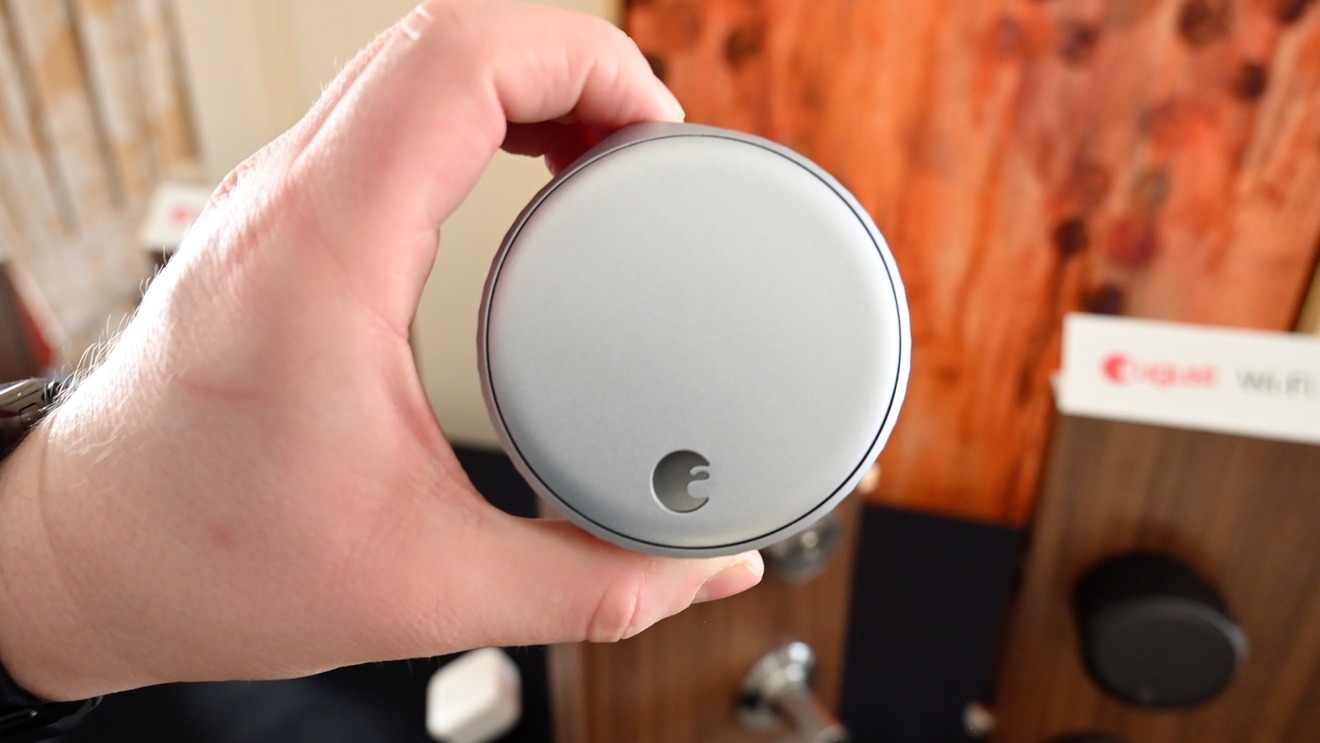
Best for: Keeping your existing deadbolt and key
- Power
- 4 AA batteries
- Lock style
- Interior retrofit for 1 deadbolt
- Connectivity
- Built-in Wi-Fi and Bluetooth
- Retains the existing exterior hardware and physical key.
- Built-in Wi-Fi supports remote access without a separate bridge.
- Auto-lock and DoorSense features help manage the door.
- Requires a compatible single-cylinder deadbolt.
- Does not add an exterior keypad.
Is the August Wi-Fi Smart Lock (4th Generation) worth buying on Black Friday 2026?
The August Wi-Fi Smart Lock (4th Generation) is worth considering if you want app-based smart access without replacing the exterior deadbolt. Built-in Wi-Fi and support for 4 AA batteries make it a straightforward retrofit choice for compatible doors.
See today’s Black Friday price on Amazon
#2
Yale Assure Lock 2 Key-Free Touchscreen with Wi-Fi
The Yale Assure Lock 2 Key-Free Touchscreen with Wi-Fi is the best key-free touchscreen pick for connected households that want a built-in keypad and remote access.

Best for: Key-free entry with remote access
- Power
- 4 AA batteries
- Entry method
- Touchscreen keypad with up to 250 codes
- Connectivity
- Built-in Wi-Fi and Bluetooth
- Touchscreen entry avoids carrying a physical key.
- Wi-Fi enables remote lock management through the app.
- Multiple codes support household and guest access.
- Key-free design has no traditional keyway.
- Replacing a deadbolt takes more installation work than a retrofit lock.
Is the Yale Assure Lock 2 Key-Free Touchscreen with Wi-Fi worth buying on Black Friday 2026?
The Yale Assure Lock 2 Key-Free Touchscreen with Wi-Fi is a strong choice for households that want code entry and remote app control in one lock. The Yale Assure Lock 2 Key-Free Touchscreen with Wi-Fi's touchscreen supports up to 250 codes, and the key-free design suits people who prefer not to use keys.
See today’s Black Friday price on Amazon
#3
Yale Assure Lock 2 Keyed Touchscreen with Wi-Fi
The Yale Assure Lock 2 Keyed Touchscreen with Wi-Fi is the best connected touchscreen pick for households that want code entry, remote access and a physical keyway.
Best for: A touchscreen plus backup key
- Power
- 4 AA batteries
- Entry method
- Touchscreen, keyway and up to 250 codes
- Connectivity
- Built-in Wi-Fi and Bluetooth
- Combines touchscreen codes with a physical key.
- Remote app control is built in through Wi-Fi.
- Code access is useful for family and visitors.
- The touchscreen and keyway require a full deadbolt replacement.
- More entry options can mean more setup choices.
Is the Yale Assure Lock 2 Keyed Touchscreen with Wi-Fi worth buying on Black Friday 2026?
The Yale Assure Lock 2 Keyed Touchscreen with Wi-Fi is worth a look if you want both code access and a traditional key backup. Built-in Wi-Fi adds remote management, while the touchscreen can store up to 250 access codes.
See today’s Black Friday price on Amazon
#4
Yale Assure Lock 2 Key-Free Keypad with Wi-Fi
The Yale Assure Lock 2 Key-Free Keypad with Wi-Fi is the best simple keypad pick for key-free households that want remote access and up to 250 entry codes.
Best for: Everyday keypad entry without a key
- Power
- 4 AA batteries
- Entry method
- Keypad with up to 250 codes
- Connectivity
- Built-in Wi-Fi and Bluetooth
- Dedicated number buttons offer direct code entry.
- Built-in Wi-Fi supports remote app access.
- Key-free format removes the traditional keyway.
- No physical key backup is included.
- Door preparation must suit a replacement deadbolt.
Is the Yale Assure Lock 2 Key-Free Keypad with Wi-Fi worth buying on Black Friday 2026?
The Yale Assure Lock 2 Key-Free Keypad with Wi-Fi is a good fit for households that prefer numbered buttons to a touchscreen. Built-in Wi-Fi enables remote app control, and the keypad stores up to 250 codes for household or guest access.
See today’s Black Friday price on Amazon
#5
Yale Assure Lock 2 Keyed Keypad with Wi-Fi
The Yale Assure Lock 2 Keyed Keypad with Wi-Fi is the best flexible keypad pick for households that want remote access, code entry and a physical keyway.
Best for: Keypad convenience with a key backup
- Power
- 4 AA batteries
- Entry method
- Keypad, keyway and up to 250 codes
- Connectivity
- Built-in Wi-Fi and Bluetooth
- Physical keys remain an entry option.
- Keypad codes simplify access for guests.
- Wi-Fi supports remote lock management.
- The replacement installation is less minimal than August's retrofit.
- The keyed exterior is not a key-free design.
Is the Yale Assure Lock 2 Keyed Keypad with Wi-Fi worth buying on Black Friday 2026?
The Yale Assure Lock 2 Keyed Keypad with Wi-Fi is worth considering for homes that want both numeric entry and a familiar keyway. The model combines remote Wi-Fi control with keypad access for up to 250 codes.
See today’s Black Friday price on Amazon
#6
Yale Assure Lock 2 Key-Free Touchscreen with Bluetooth
The Yale Assure Lock 2 Key-Free Touchscreen with Bluetooth is the best nearby-control pick for key-free homes that want touchscreen entry and up to 250 codes.
Best for: Touchscreen entry without built-in Wi-Fi
- Power
- 4 AA batteries
- Entry method
- Touchscreen with up to 250 codes
- Connectivity
- Bluetooth
- Touchscreen codes provide key-free entry.
- Bluetooth supports phone control near the lock.
- Supports up to 250 access codes.
- Bluetooth does not provide the same built-in remote access as Wi-Fi.
- No physical keyway is included.
Is the Yale Assure Lock 2 Key-Free Touchscreen with Bluetooth worth buying on Black Friday 2026?
The Yale Assure Lock 2 Key-Free Touchscreen with Bluetooth is a sensible pick when local phone control and code entry are enough. The touchscreen supports up to 250 codes; choose a Wi-Fi version instead when remote access away from home is a priority.
See today’s Black Friday price on Amazon
#7
Yale Assure Lock 2 Keyed Touchscreen with Bluetooth
The Yale Assure Lock 2 Keyed Touchscreen with Bluetooth is the best Bluetooth touchscreen pick for households that want 2 entry choices: a code or a physical key.
Best for: Touchscreen codes with a keyway
- Power
- 4 AA batteries
- Entry method
- Touchscreen, keyway and up to 250 codes
- Connectivity
- Bluetooth
- Offers both touchscreen and physical-key entry.
- Bluetooth supports nearby app control.
- Code capacity reaches up to 250 entries.
- Built-in Wi-Fi is not included in this version.
- Installation replaces the existing deadbolt.
Is the Yale Assure Lock 2 Keyed Touchscreen with Bluetooth worth buying on Black Friday 2026?
The Yale Assure Lock 2 Keyed Touchscreen with Bluetooth is a good match for people who want code access and a keyway without built-in Wi-Fi. The model supports up to 250 codes and Bluetooth control when your phone is near the lock.
See today’s Black Friday price on Amazon
Which is better, August Smart Lock or Yale Assure Lock 2?
August Wi-Fi Smart Lock (4th Generation) is the better retrofit choice, while Yale Assure Lock 2 is the better replacement lock for keypad or touchscreen entry. The right pick depends first on whether you want to keep your current deadbolt hardware. August installs on the interior side of a compatible deadbolt, so the outside appearance and physical key stay in place.
Yale Assure Lock 2 replaces the deadbolt and gives you more entry formats, including keyed and key-free models. Wi-Fi versions suit shoppers who want remote access through an app; Bluetooth versions suit nearby phone control and code entry. Best bet: choose August for a lower-disruption upgrade, and choose Yale when a built-in keypad or touchscreen is the main reason you are shopping.
Does August Wi-Fi Smart Lock work with an existing deadbolt?
August Wi-Fi Smart Lock (4th Generation) works as an interior retrofit on a compatible single-cylinder deadbolt, keeping the existing exterior key hardware. That design is useful for renters with permission to add a smart lock, homeowners who like their current hardware and anyone who wants to preserve key access. Check the door and deadbolt requirements before ordering.
Yale Assure Lock 2 models replace the deadbolt rather than simply attaching over the interior thumb turn. Installation involves matching the lock to the door and selecting a keyed or key-free exterior. As a result, August and Yale solve different installation problems even when both offer app control, auto-lock features and access for multiple household members.
Which Yale Assure Lock 2 version should you choose?
Yale Assure Lock 2 has 2 core choices to make: keyed or key-free, then keypad or touchscreen. Keyed variants preserve a physical keyway, while key-free versions rely on codes and connected access. A touchscreen gives a smooth, flush number-entry surface; a keypad uses dedicated physical buttons for entering codes.
Connectivity is the next decision. Yale Assure Lock 2 Wi-Fi models include built-in Wi-Fi for remote app access, while Bluetooth versions focus on nearby phone control. Choose a Wi-Fi model when you want to manage the lock away from home. Choose Bluetooth when local control and keypad access cover your needs. Easy recommendation: write down your must-have entry method before comparing model names.
Do August and Yale smart locks need a hub?
August Wi-Fi Smart Lock (4th Generation) includes Wi-Fi connectivity, and Yale Assure Lock 2 Wi-Fi variants include Wi-Fi for remote app access. Those product versions do not require a separate Wi-Fi bridge for the basic remote-control role. A home network and app setup are still part of getting connected features working.
Yale Assure Lock 2 Bluetooth variants use Bluetooth for nearby phone control, so shoppers should not expect the same built-in away-from-home access as a Wi-Fi model. Smart-home integration depends on the exact lock version, app, platform and any additional accessories. Check compatibility against the devices and services already in your home before choosing based on a voice assistant or connected-home feature.
What should Black Friday 2026 smart-lock shoppers compare?
Black Friday 2026 smart-lock shoppers should compare the exact model, included connectivity and entry hardware before choosing a listing. Yale Assure Lock 2 names can differ by keyway, keypad or touchscreen, and Wi-Fi or Bluetooth. A similar-looking model name does not guarantee the same remote-access features or physical-key option.
For August Wi-Fi Smart Lock (4th Generation), confirm that the existing deadbolt is compatible and that a retrofit design fits your installation plan. For Yale Assure Lock 2, check door measurements and whether you want keyed or key-free access. Compare the full model name, included parts, warranty information and return policy. The strongest deal is the model that fits your door and routine, not simply the listing with the biggest promotion.
Buying Guide
Start with your existing deadbolt
Choose August Wi-Fi Smart Lock (4th Generation) if you want an interior retrofit that keeps compatible exterior hardware. Choose Yale Assure Lock 2 if you are ready to replace the deadbolt for an integrated keypad or touchscreen.
Pick keyed or key-free entry
Keyed Yale Assure Lock 2 versions retain a traditional keyway. Key-free versions depend on codes and connected entry. August keeps the existing deadbolt key as part of its retrofit design.
Match connectivity to your routine
Wi-Fi models support remote app access, while Bluetooth models focus on local phone control. Check each exact variant rather than assuming every Yale Assure Lock 2 offers the same connection options.
Compare keypad and touchscreen styles
A keypad has individual physical buttons; a touchscreen uses a flat digital surface. Consider who uses the door, which interface feels clear for your household and whether physical buttons are a priority.
Verify door fit and included parts
Before checkout, review the manufacturer's compatibility details, installation instructions and package contents. Confirm that the lock matches your door, deadbolt setup and preferred smart-home platform.
FAQ
August smart lock vs Yale Assure Lock 2: which is better for Black Friday 2026?
August Wi-Fi Smart Lock (4th Generation) is the better pick for a retrofit that keeps your existing key and exterior hardware. Yale Assure Lock 2 is the better fit for shoppers who want a new deadbolt with keypad or touchscreen entry.
Does August Wi-Fi Smart Lock (4th Generation) need a bridge?
August Wi-Fi Smart Lock (4th Generation) has built-in Wi-Fi, so basic remote app access does not require a separate Wi-Fi bridge. Confirm your network and app compatibility during setup, and check the product listing for the exact included accessories.
Can Yale Assure Lock 2 work without Wi-Fi?
Yale Assure Lock 2 Bluetooth models support nearby phone control and keypad or touchscreen access without built-in Wi-Fi. Remote app access away from home is a reason to select a Wi-Fi version instead. Check the exact variant name before buying.
Does Yale Assure Lock 2 have a physical key?
Yale Assure Lock 2 keyed models include a physical keyway, while key-free versions do not. Choose the keyed touchscreen or keyed keypad when you want a traditional key backup alongside codes and connected controls.
Does August Wi-Fi Smart Lock (4th Generation) keep my existing key?
August Wi-Fi Smart Lock (4th Generation) attaches to the interior of a compatible single-cylinder deadbolt and keeps the exterior hardware in place. That setup preserves the existing physical key, unlike key-free Yale Assure Lock 2 models.
Which Yale Assure Lock 2 is best for remote access?
Yale Assure Lock 2 Wi-Fi variants are the best choices for remote app access. Select the keyed or key-free version based on whether you want a physical keyway, then choose the keypad or touchscreen interface that suits your household.