

As an Amazon Associate we earn from qualifying purchases.
- The LG 28MQ780-B DualUp Ergo Monitor suits people who want a tall workspace for multitasking, coding, document editing or split-screen work.
- Key specs include a 28-inch Nano IPS display, 16:18 aspect ratio, 2560 × 2880 resolution, 60Hz refresh rate and USB-C power delivery up to 90W.
- For Black Friday 2026, compare retailer bundles, included cables, color availability, stock and return windows before choosing a listing.
- The LG 28MQ780-B DualUp Ergo Monitor is a distinctive productivity display; choose it for vertical workspace rather than high-refresh gaming.
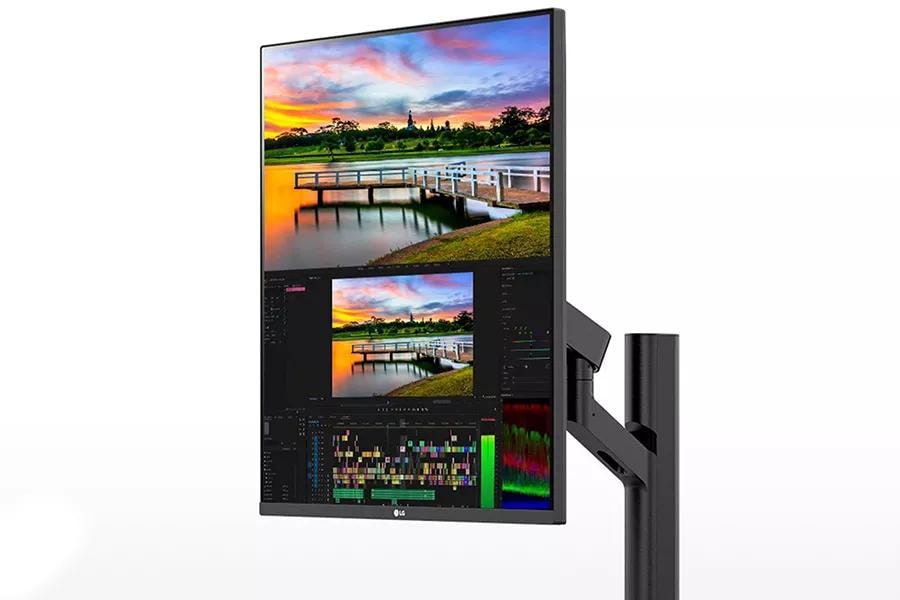
- The LG 28MQ780-B DualUp Ergo Monitor uses a 16:18 screen that stacks more workspace vertically than a conventional widescreen monitor.
- Its 2560 × 2880 Nano IPS panel is designed for productivity, while the 60Hz refresh rate is not aimed at high-frame-rate gaming.
- The included Ergo stand supports flexible positioning, and USB-C delivers up to 90W of power to a connected laptop.
- Black Friday 2026 shoppers should check the exact 28MQ780-B model, included accessories, retailer return terms and stock.
The LG 28MQ780-B DualUp Ergo Monitor is a 28-inch productivity display built around an unusual 16:18 screen, giving office work and multitasking more vertical room. For Black Friday 2026, I researched and compared specs, reviews and owner feedback to identify what makes this monitor stand out and what shoppers should check before buying. The key appeal is a high-resolution workspace that can show two stacked windows without the extra width of a superwide display.
The LG 28MQ780-B DualUp Ergo Monitor is best suited to people who spend long sessions with documents, code, research, spreadsheets or creative applications open side by side. The 2560 × 2880 Nano IPS panel, USB-C laptop charging and adjustable Ergo stand make it a flexible desk centerpiece. My pick for most people who specifically want a tall, split-screen workspace is the DualUp, but a conventional widescreen monitor suits gaming and movie viewing better.
How We Picked
- Compared the LG 28MQ780-B DualUp Ergo Monitor's resolution, aspect ratio, panel type, refresh rate and brightness against its intended productivity use.
- Reviewed connectivity details, including USB-C power delivery and the monitor's available video inputs, to assess laptop-dock convenience.
- Considered the practical value of the included Ergo stand and the screen's fit for common desk layouts and multitasking workflows.
- Prioritized Black Friday 2026 shopping checks such as correct model identification, retailer bundles, stock, included accessories and return policies.
Our Verdict
#1 · Top pick
LG 28MQ780-B DualUp Ergo Monitor
The LG 28MQ780-B DualUp Ergo Monitor is a productivity-first display for shoppers who want a tall, high-resolution workspace and flexible positioning. Choose it for stacked windows and laptop connectivity, not for fast-refresh gaming.
Best for: Vertical multitasking, office work and laptop-based desks
- Screen size
- 28 inches
- Aspect ratio
- 16:18
- Resolution
- 2560 × 2880
- Panel and refresh rate
- Nano IPS, 60Hz
- Response time
- 5ms GTG
- USB-C power delivery
- Up to 90W
- Tall 16:18 format gives stacked apps room without a superwide footprint.
- 2560 × 2880 resolution supports detailed text and spacious desktop layouts.
- USB-C power delivery simplifies a compatible laptop setup with one cable.
- Ergo stand offers flexible positioning for different desk arrangements.
- The 60Hz refresh rate is a limitation for high-frame-rate gaming.
- The unusual aspect ratio is less suited to movies and conventional widescreen content.
Is the LG 28MQ780-B DualUp Ergo Monitor worth buying on Black Friday 2026?
The LG 28MQ780-B DualUp Ergo Monitor is worth considering on Black Friday 2026 if vertical workspace, clear text and USB-C laptop charging matter more than a high refresh rate. Check the exact model, included accessories, retailer return terms and stock before purchasing.
See today’s Black Friday price on Amazon
What makes the LG 28MQ780-B DualUp Ergo Monitor different?
The LG 28MQ780-B DualUp Ergo Monitor stands apart with its 28-inch 16:18 screen and 2560 × 2880 resolution. The taller-than-wide format is close to placing two conventional screens on top of each other, giving users a roomy area for documents, reference material, chats and editing timelines. The layout keeps more content visible vertically without requiring a wide desk.
The format is especially practical for people who regularly compare two windows or scroll through long pages. A researcher can keep source material above notes, while a programmer can view more code alongside a working panel. The DualUp also supports conventional video and app use, but widescreen movies and games do not fill the screen in the same way they do on a 16:9 display. Buyers should choose the unusual shape for its workflow benefits, not simply because it has a distinctive design.
Is the LG 28MQ780-B DualUp Ergo Monitor good for work?
The LG 28MQ780-B DualUp Ergo Monitor is well suited to office and creative workflows that benefit from a 16:18 screen and 2560 × 2880 resolution. The Nano IPS panel and generous vertical space make it easier to keep a document, spreadsheet, browser or creative tool visible while working in another window.
The 28-inch size gives the panel a substantial work area without demanding the width of a large ultrawide monitor. USB-C connectivity with up to 90W power delivery also makes the display appealing for compatible laptop users who want fewer desk cables. Workflows that depend on a standard widescreen preview should account for the different proportions, and users who need a high refresh rate for competitive play should look elsewhere. For text-heavy multitasking, the DualUp's defining strength is the space it gives each stacked window.
What are the LG DualUp's display specifications?
The LG 28MQ780-B DualUp Ergo Monitor combines a 28-inch Nano IPS panel, 16:18 aspect ratio and 2560 × 2880 resolution with a 60Hz refresh rate. The high vertical pixel count supports detailed text and a generous working area, while the Nano IPS panel is intended for clear, colorful everyday viewing.
LG lists a 5ms GTG response time and 300 nits of typical brightness for the display. Those specifications suit general productivity and mixed desk use, rather than the extreme motion performance or brightness targets shoppers seek for specialized gaming or bright-room displays. The 60Hz ceiling is an important part of the buying decision: it is fine for ordinary desktop movement and video playback, but it does not provide the smooth high-frame-rate motion associated with faster gaming monitors. Check the model number on listings to confirm the 28MQ780-B configuration.
How does USB-C work on the LG 28MQ780-B DualUp Ergo Monitor?
The LG 28MQ780-B DualUp Ergo Monitor supports USB-C power delivery up to 90W, which lets compatible laptops receive power through the display while sending video over one cable. The arrangement can reduce cable clutter and makes the DualUp convenient as a central work monitor for a laptop desk.
The monitor also includes HDMI and DisplayPort connections, so desktop computers and other compatible sources have standard video-input options. Check the exact input and USB-port configuration in the retailer listing before ordering, especially if the desk setup depends on a specific hub function or cable. USB-C charging performance depends on the connected laptop and cable, so confirm the laptop's charging requirements and use a suitable cable. A one-cable setup is a convenience feature, not a guarantee that every connected device will use every monitor function.
What should shoppers check for Black Friday 2026?
Black Friday 2026 shoppers should verify that a listing is for the LG 28MQ780-B DualUp Ergo Monitor and compare the included accessories, retailer terms and stock before ordering. Similar monitor listings and product images can make model differences easy to miss, so check the model code in the title and specifications.
Review whether the retailer includes the expected stand, power cable and relevant connection accessories, and read the return window and shipping details. Bundle offers are useful only when the added items fit the planned setup. Keep an eye on color availability and stock across retailers, since a preferred configuration or bundle can sell through quickly. Comparing the listing with the monitor's specifications and the retailer's own product page helps avoid choosing a different LG display by mistake.
Who should buy the LG 28MQ780-B DualUp Ergo Monitor?
The LG 28MQ780-B DualUp Ergo Monitor is a strong match for people who want a tall desk display for writing, coding, research, spreadsheets or split-screen work. Its 16:18 format and 2560 × 2880 resolution support a vertically roomy workspace, while the Ergo stand and USB-C power delivery help it fit into a flexible laptop setup.
Skip it if a high refresh rate, standard widescreen proportions or a display built primarily for gaming is more important than vertical multitasking. The distinctive screen shape is also less compelling for users who mainly watch widescreen video. Before buying, measure the desk and confirm the stand's movement suits the available space. Buyers who have a specific laptop or dock should also verify their USB-C charging and video requirements. The DualUp makes the most sense when its unusual layout solves a real daily workflow problem.
Buying Guide
Confirm the model number
The LG 28MQ780-B DualUp Ergo Monitor is identified by the 28MQ780-B model code. Match that code in the product title and specifications before checking out, and make sure the listing is for the DualUp rather than another LG monitor.
Compare bundles and included accessories
The LG 28MQ780-B DualUp Ergo Monitor should be compared by its included stand, power cable and any bundled connection accessories. Check bundle contents carefully so an add-on is useful for your desk rather than an unnecessary extra.
Check stock, shipping and returns
The LG 28MQ780-B DualUp Ergo Monitor's retailer listing should clearly state availability, shipping details and the return window. Compare those terms across sellers, and review the policy for large displays before placing an order.
Match the monitor to your setup
The LG 28MQ780-B DualUp Ergo Monitor works best when the 16:18 layout and USB-C power delivery fit your desk and laptop. Confirm laptop charging needs, available ports, cable compatibility and space for the Ergo stand.
Alternatives to Consider
- Dell UltraSharp U2723QE 27-inch 4K USB-C Hub Monitor: Choose the Dell UltraSharp U2723QE if you prefer a conventional 16:9 4K layout with a USB-C hub. The LG DualUp is the better fit when vertical workspace is the priority.
- ASUS ProArt Display PA278CV 27-inch WQHD Monitor: Choose the ASUS ProArt Display PA278CV if your desk needs a standard 16:9 screen for color-focused creative work. The LG DualUp offers a taller work area and a higher vertical resolution.
- LG 32UN880-B Ergo 32-inch 4K Monitor: Choose the LG 32UN880-B if you want a larger 16:9 4K display with an ergonomic arm-style stand. The LG DualUp suits people who prefer a compact footprint with a near-square, vertically oriented workspace.
FAQ
What is the screen resolution of the LG DualUp?
The LG 28MQ780-B DualUp Ergo Monitor has a 2560 × 2880 resolution on a 28-inch Nano IPS panel. Its 16:18 aspect ratio provides more vertical workspace than a conventional widescreen monitor, which helps with stacked windows, long documents and code.
Does the LG 28MQ780-B DualUp Ergo Monitor charge a laptop?
The LG 28MQ780-B DualUp Ergo Monitor provides USB-C power delivery up to 90W for compatible laptops. A single USB-C cable can carry video and power when the laptop, cable and monitor connection support the required functions; verify your laptop's charging needs before purchase.
Is the LG 28MQ780-B DualUp Ergo Monitor good for gaming?
The LG 28MQ780-B DualUp Ergo Monitor has a 60Hz refresh rate and 5ms GTG response time, so it is better suited to productivity than high-frame-rate gaming. Casual gaming is an option, but its 16:18 format is less suited to conventional widescreen games.
What should I look for in LG DualUp Black Friday deals?
For Black Friday 2026, confirm the LG 28MQ780-B DualUp Ergo Monitor model code, included accessories, bundle contents, retailer stock and return policy. Compare the full listing details rather than relying on product photos, and check that the USB-C and display connections fit your setup.
Can the LG 28MQ780-B DualUp Ergo Monitor replace two monitors?
The LG 28MQ780-B DualUp Ergo Monitor can provide a tall 16:18 workspace for two stacked windows, making it a practical alternative to some dual-monitor arrangements. Whether it replaces two displays depends on your apps, preferred window sizes and need to view content side by side.
Does the LG 28MQ780-B DualUp Ergo Monitor have an adjustable stand?
The LG 28MQ780-B DualUp Ergo Monitor includes an Ergo stand designed for flexible positioning. Check the retailer's listing for the included stand configuration and review desk-clearance needs, since available movement and fit depend on your specific workspace.