

As an Amazon Associate we earn from qualifying purchases.
- Best overall: Logitech MX Brio Ultra HD 4K Webcam
- Best budget: Logitech C920x Pro HD Webcam
- Best premium: Razer Kiyo Pro Ultra 4K Webcam
- Best for travel: Logitech Brio 4K Webcam
- Logitech MX Brio Ultra HD 4K Webcam is the strongest all-around choice for sharp video calls and creator setups.
- Logitech C920x Pro HD Webcam is a practical budget pick with Full HD 1080p video and simple USB setup.
- Razer Kiyo Pro Ultra 4K Webcam suits streamers who prioritize a large sensor and detailed image quality.
- Insta360 Link 2 4K Webcam and OBSBOT Tiny 2 Lite 4K Webcam add gimbal-based tracking for presenters.
- Match resolution, field of view, microphone needs and mounting options to your desk before choosing a webcam.
Webcam Black Friday deals in 2026 span straightforward 1080p cameras, creator-focused 4K models and tracking webcams for presentations. The best choice depends on what appears in frame, how much room you have and whether your computer already has a capable microphone. A sharper camera is not automatically a better fit if you only need a dependable picture for work calls.
I researched and compared specs, reviews and owner feedback to identify seven webcams for different budgets and uses. My pick for most people is the Logitech MX Brio Ultra HD 4K Webcam, while the Logitech C920x Pro HD Webcam keeps the basics simple. Consider the Razer Kiyo Pro Ultra for streaming, or a gimbal model if you move around while presenting.
How We Picked
- We compared published video resolutions and frame rates to separate everyday meeting cameras from higher-resolution creator options.
- We reviewed field-of-view choices, autofocus features and tracking functions for different desk sizes and presentation styles.
- We considered microphone inclusion, privacy features, mounting flexibility and connection type as part of everyday usability.
- We researched and compared specs, reviews and owner feedback, giving priority to useful features rather than headline resolution alone.
Comparison Table
| Product | Best for | Maximum resolution | Maximum frame rate | Field of view |
|---|---|---|---|---|
| Logitech MX Brio Ultra HD 4K Webcam | Work calls and creator setups | 4K | 60 fps at 1080p | 65° / 78° / 90° |
| Logitech C920x Pro HD Webcam | Budget-friendly video calls | 1080p | 30 fps | 78° |
| Logitech Brio 4K Webcam | Clear calls with adjustable framing | 4K | 60 fps at 1080p | Adjustable framing |
| Anker PowerConf C200 2K Webcam | Compact home-office setups | 2K | 30 fps | 65° / 78° / 95° |
| Razer Kiyo Pro Ultra 4K Webcam | Premium streaming and creator video | 4K | 60 fps at 1080p | Not specified |
| Elgato Facecam MK.2 1080p60 Webcam | Smooth Full HD streaming | 1080p | 60 fps | 84° |
| Insta360 Link 2 4K Webcam | Presentations and movement tracking | 4K | 60 fps at 1080p | Gimbal tracking |
Best Picks Reviewed
#1 · Top pick
Logitech MX Brio Ultra HD 4K Webcam
The Logitech MX Brio Ultra HD 4K Webcam is the best all-around webcam for professionals and creators who want flexible framing, with 4K video at 30 frames per second.

Best for: Work calls and creator setups
- Maximum resolution
- 4K at 30 fps
- Full HD frame rate
- 1080p at 60 fps
- Field of view
- 65°, 78° or 90°
- Microphones
- 2 beamforming microphones
- Offers both 4K detail and a 1080p 60 fps option.
- Three field-of-view settings suit different desk layouts.
- Privacy shutter is built into the webcam.
- Higher resolution benefits most from good lighting and a capable computer.
Is the Logitech MX Brio Ultra HD 4K Webcam worth buying on Black Friday 2026?
Yes. The Logitech MX Brio Ultra HD 4K Webcam is a strong upgrade for frequent video calls and creator work, pairing 4K at 30 fps with a 1080p 60 fps mode, adjustable framing and two built-in microphones.
See today’s Black Friday price on Amazon
#2
Logitech C920x Pro HD Webcam
The Logitech C920x Pro HD Webcam is the best affordable webcam for everyday meetings, with Full HD 1080p video at 30 frames per second.
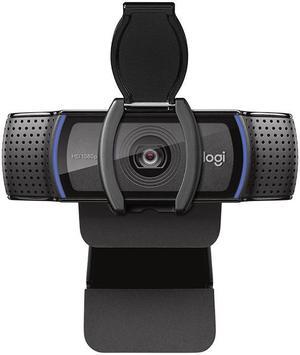
Best for: Budget-friendly video calls
- Maximum resolution
- 1080p at 30 fps
- Field of view
- 78°
- Microphones
- 2 stereo microphones
- Connection
- USB-A
- A simple choice for common video meeting apps.
- Stereo microphones are built into the camera.
- Compact clip supports typical monitor mounting.
- Does not offer 4K resolution or 60 fps video.
Is the Logitech C920x Pro HD Webcam worth buying on Black Friday 2026?
Yes. The Logitech C920x Pro HD Webcam is a sensible pick for everyday calls if Full HD video is enough. The Logitech C920x Pro HD Webcam's 78-degree view, stereo microphones and straightforward USB-A connection cover common home-office needs without extra camera controls.
See today’s Black Friday price on Amazon
#3
Logitech Brio 4K Webcam
The Logitech Brio 4K Webcam is the best webcam for shoppers who want a familiar 4K model with flexible framing, supporting 4K video at 30 frames per second.
Best for: Clear calls with adjustable framing
- Maximum resolution
- 4K at 30 fps
- Full HD frame rate
- 1080p at 60 fps
- Digital zoom
- Up to 5x
- Microphones
- 2 omnidirectional microphones
- Provides a high-resolution option for detailed calls.
- Offers up to 5x digital zoom for tighter framing.
- Includes a privacy shutter.
- Digital zoom reduces the image area available to the camera.
Is the Logitech Brio 4K Webcam worth buying on Black Friday 2026?
Yes. The Logitech Brio 4K Webcam is worth considering for sharp calls and flexible framing, with 4K at 30 fps, 1080p at 60 fps and up to 5x digital zoom. The Logitech Brio 4K Webcam also has two built-in microphones and a privacy shutter.
See today’s Black Friday price on Amazon
#4
Anker PowerConf C200 2K Webcam
The Anker PowerConf C200 2K Webcam is the best compact webcam for home-office users who want more detail than basic Full HD, with 2K video at 30 frames per second.
Best for: Compact home-office setups
- Maximum resolution
- 2K at 30 fps
- Field of view
- 65°, 78° or 95°
- Microphones
- 2 built-in microphones
- Connection
- USB-C
- Three view settings help control how much of a room appears.
- Compact design suits smaller desks and monitor setups.
- Built-in privacy cover adds a simple physical safeguard.
- Does not provide 4K capture.
Is the Anker PowerConf C200 2K Webcam worth buying on Black Friday 2026?
Yes. The Anker PowerConf C200 2K Webcam suits home offices that need a compact camera with a step up from standard 1080p. The Anker PowerConf C200 2K Webcam's 2K capture, three field-of-view settings, USB-C connection and privacy cover make it a practical desk companion.
See today’s Black Friday price on Amazon
#5
Razer Kiyo Pro Ultra 4K Webcam
The Razer Kiyo Pro Ultra 4K Webcam is the best premium webcam for streamers who value a large sensor and detailed video, with a 1/1.2-inch sensor and 4K capture at 30 frames per second.
Best for: Premium streaming and creator video
- Maximum resolution
- 4K at 30 fps
- Full HD frame rate
- 1080p at 60 fps
- Sensor size
- 1/1.2 inch
- Aperture
- f/1.7
- Large sensor is a standout feature for a webcam.
- Supports 1080p at 60 fps as an alternative to 4K.
- Designed for streaming and creator-oriented setups.
- The Razer Kiyo Pro Ultra 4K Webcam's premium feature set is more than basic meeting users need.
Is the Razer Kiyo Pro Ultra 4K Webcam worth buying on Black Friday 2026?
Yes. The Razer Kiyo Pro Ultra 4K Webcam is a compelling premium option for streamers who want detailed video and a large 1/1.2-inch sensor. The Razer Kiyo Pro Ultra 4K Webcam records at 4K 30 fps or 1080p 60 fps, giving creators two useful resolution choices.
See today’s Black Friday price on Amazon
#6
Elgato Facecam MK.2 1080p60 Webcam
The Elgato Facecam MK.2 1080p60 Webcam is the best webcam for streamers who prioritize smooth Full HD video, with capture up to 1080p at 60 frames per second.
Best for: Smooth Full HD streaming
- Maximum resolution
- 1080p at 60 fps
- Field of view
- 84°
- HDR
- Supported
- Microphone
- No built-in microphone
- Smooth 60 fps capture suits lively streams.
- HDR support adds a useful image-control option.
- Camera-first design pairs well with a separate microphone.
- A separate microphone is needed for audio.
Is the Elgato Facecam MK.2 1080p60 Webcam worth buying on Black Friday 2026?
Yes. The Elgato Facecam MK.2 1080p60 Webcam is a good fit for streamers who value smooth Full HD video and already use a separate microphone. The Elgato Facecam MK.2 1080p60 Webcam's 60 fps capture, 84-degree field of view and HDR support focus on creator needs.
See today’s Black Friday price on Amazon
#7
Insta360 Link 2 4K Webcam
The Insta360 Link 2 4K Webcam is the best tracking webcam for presenters who move around on camera, with 4K capture at 30 frames per second and a two-axis gimbal.
Best for: Presentations and movement tracking
- Maximum resolution
- 4K at 30 fps
- Full HD frame rate
- 1080p at 60 fps
- Gimbal
- 2-axis movement
- Sensor size
- 1/2 inch
- Gimbal movement follows presenters across a space.
- Supports 4K and 1080p 60 fps capture.
- Useful for demonstrations and standing presentations.
- Tracking features are less important for fixed-seat calls.
Is the Insta360 Link 2 4K Webcam worth buying on Black Friday 2026?
Yes. The Insta360 Link 2 4K Webcam is worth a look for presenters who move while speaking. The Insta360 Link 2 4K Webcam's two-axis gimbal follows movement, while 4K at 30 fps and 1080p at 60 fps provide flexible video modes for meetings and demonstrations.
See today’s Black Friday price on Amazon
Which webcam is the best overall pick?
The Logitech MX Brio Ultra HD 4K Webcam is the strongest all-around pick, with 4K video at 30 fps and a 1080p 60 fps option.
Its three field-of-view settings help tailor the picture to a tight desk, a shared workspace or a wider creator frame. Two built-in microphones and a privacy shutter also make it a ready-to-use choice for regular calls. Buyers who only need standard video meetings can save complexity with the Logitech C920x Pro HD Webcam. Choose the MX Brio when resolution options and adjustable framing matter more than a basic camera setup.
Are 4K webcams worth choosing for video calls?
Logitech MX Brio Ultra HD 4K Webcam and Logitech Brio 4K Webcam both offer 4K capture at 30 fps, giving detail-focused callers two established options.
A 4K webcam makes the most sense for creator recordings, high-resolution meetings and flexible digital framing. Streaming and meeting software can limit the final image, so a higher resolution does not guarantee a visibly sharper call in every app. The Logitech C920x Pro HD Webcam remains a practical choice when Full HD 1080p meets the need. Check computer performance, lighting and the video services you use before paying for resolution you will rarely access.
Which webcam is best for streaming?
Razer Kiyo Pro Ultra 4K Webcam is the best premium streaming pick, with a 1/1.2-inch sensor, 4K capture at 30 fps and 1080p video at 60 fps.
Elgato Facecam MK.2 1080p60 Webcam is a strong alternative for streamers who prefer smooth Full HD video and already own a dedicated microphone. The Razer model combines high resolution with a large sensor, while Elgato focuses on a camera-first setup with HDR support. Match the camera to your streaming software, lighting and audio gear. A clear microphone and stable light are as important to a polished stream as extra pixels.
Which webcam is best for work meetings?
Logitech C920x Pro HD Webcam is a practical work-meeting choice, with 1080p video at 30 fps, a 78-degree view and two stereo microphones.
The Anker PowerConf C200 2K Webcam suits users who want a compact camera with selectable 65-, 78- or 95-degree framing. A narrower view can keep a busy room out of frame, while a wider view accommodates more than one person. For most individual callers, Full HD video and a reliable microphone are enough. Consider a separate headset or desktop mic if clear speech matters more than the convenience of camera-mounted audio.
Are tracking webcams good for presentations?
Insta360 Link 2 4K Webcam is a strong presentation camera, combining 4K at 30 fps with a two-axis gimbal that follows movement.
OBSBOT Tiny 2 Lite 4K Webcam is another gimbal-style choice for presenters who want a camera to follow their position. Tracking is useful for lessons, product demonstrations and standing talks, but a fixed camera is simpler for someone seated at a desk. Think about the size of your presentation area and how much you move before choosing. Both tracking options add functionality beyond a conventional clip-on webcam, so their extra features matter most when your routine uses them.
Buying Guide
Choose a resolution that fits your calls
Full HD 1080p is enough for typical meetings and keeps setup straightforward. Choose 2K or 4K when you record, stream or want extra room to crop. Check the frame rate attached to each resolution, since some cameras offer their smoothest video at 1080p rather than 4K.
Match the field of view to your desk
A narrower view keeps attention on one person and hides more of the room. A wider setting fits a shared desk or presentation. Adjustable framing, such as the Logitech MX Brio Ultra HD 4K Webcam's 65-, 78- and 90-degree options, provides more flexibility as your setup changes.
Decide whether you need tracking
Gimbal webcams follow movement and suit presenters who stand, teach or demonstrate products. Fixed webcams are simpler for seated calls. Choose tracking only when movement is part of your routine, and confirm the camera has room to pan without hitting a monitor or nearby object.
Plan for audio and lighting
Built-in microphones are convenient, but a headset or separate microphone offers another audio option. Good, even lighting helps cameras produce a clearer image. Streamers should budget desk space for their microphone and light, not just the camera.
Check the mount and connection
Confirm that the clip fits your monitor and that the cable reaches your computer. Check USB-A or USB-C compatibility before ordering. A privacy shutter, tripod mount or compact body adds practical value when it suits your workspace.
FAQ
What are the best black friday webcam deals in 2026?
The best webcam pick depends on your setup: Logitech MX Brio Ultra HD 4K Webcam is the all-around option, Logitech C920x Pro HD Webcam is the budget choice, and Razer Kiyo Pro Ultra 4K Webcam suits premium streaming. Compare resolution, framing and microphone needs.
Which webcam black friday deals are best for a laptop?
Logitech C920x Pro HD Webcam is a straightforward laptop companion for Full HD calls, while Anker PowerConf C200 2K Webcam offers compact sizing and adjustable framing. Check the laptop's available USB port and place the camera near eye level for a natural view.
Is a 4K webcam better than a 1080p webcam?
A 4K model records more detail than a 1080p model, but the difference matters most for recording, streaming or cropping. Logitech Brio 4K Webcam offers 4K capture, while Logitech C920x Pro HD Webcam is a suitable Full HD choice for everyday calls.
What is the best webcam for streaming?
Razer Kiyo Pro Ultra 4K Webcam is a premium streaming choice with a 1/1.2-inch sensor and 4K at 30 fps. Elgato Facecam MK.2 1080p60 Webcam suits streamers who prioritize 60 fps Full HD and already have a separate microphone.
Which webcam is best for presentations and tracking?
Insta360 Link 2 4K Webcam is a strong fit for presenters who move, thanks to its two-axis gimbal and 4K capture. OBSBOT Tiny 2 Lite 4K Webcam is another tracking option. A fixed camera is simpler for presenters who remain seated.