

As an Amazon Associate we earn from qualifying purchases.
- Best overall: Prusa MK4S 3D Printer
- Best budget: Creality Ender-3 V3 SE 3D Printer
- Best premium: Prusa CORE One 3D Printer
- Best for speed: Creality Ender-3 V3 3D Printer
- Creality Ender-3 V3 SE 3D Printer is the value pick, with a 220 × 220 × 250 mm build volume and automatic leveling.
- Prusa MK4S 3D Printer is a strong all-around choice for owners who value a polished workflow and a 250 × 210 × 220 mm build area.
- Creality Ender-3 V3 KE 3D Printer and Creality Ender-3 V3 3D Printer prioritize high advertised speeds of up to 500 and 600 mm/s.
- Prusa CORE One 3D Printer stands out for a fully enclosed design and a 250 × 220 × 270 mm build volume.
- Compare setup, enclosure, materials and support alongside headline speed when choosing a 3D printer for Black Friday 2026.
Creality Ender-3 V3 SE 3D Printer and Prusa MK4S 3D Printer represent two different approaches to desktop 3D printing: value-focused hardware and a more refined ownership experience. We researched and compared specs, reviews and owner feedback to make the Creality Ender 3 vs Prusa MK4 Black Friday 2026 choice easier.
My pick for most people is the Prusa MK4S 3D Printer for a dependable, streamlined setup; the Creality Ender-3 V3 SE 3D Printer is the better fit for buyers prioritizing accessible value. The picks below also cover faster Creality models, a compact Prusa option and an enclosed premium printer.
How We Picked
- Compared build volume, nozzle capability and advertised speed using manufacturer specifications.
- Considered setup and leveling features for first-time owners and people who want less adjustment.
- Reviewed owner feedback and product documentation for information about maintenance, support and the printing workflow.
- Included both open-frame and enclosed designs to suit different materials, rooms and project types.
- Balanced performance and features against each printer’s intended audience, rather than ranking by speed alone.
Comparison Table
| Product | Best for | Build volume | Maximum listed speed | Maximum nozzle temperature |
|---|---|---|---|---|
| Creality Ender-3 V3 SE 3D Printer | First-time buyers seeking value | 220 × 220 × 250 mm | 250 mm/s | 260°C |
| Creality Ender-3 V3 KE 3D Printer | Speed-focused value buyers | 220 × 220 × 240 mm | 500 mm/s | 300°C |
| Creality Ender-3 V3 3D Printer | Fast open-frame printing | 220 × 220 × 250 mm | 600 mm/s | 300°C |
| Creality Ender-3 S1 Pro 3D Printer | Flexible filament and varied projects | 220 × 220 × 270 mm | 150 mm/s | 300°C |
| Prusa MK4S 3D Printer | Reliable everyday printing | 250 × 210 × 220 mm | 500 mm/s | 290°C |
| Prusa MK4S 3D Printer Kit | detailed assembly and learning | 250 × 210 × 220 mm | 500 mm/s | 290°C |
| Prusa MINI+ 3D Printer | Compact spaces and smaller prints | 180 × 180 × 180 mm | 200 mm/s | 280°C |
| Prusa CORE One 3D Printer | Enclosed, premium printing | 250 × 220 × 270 mm | 500 mm/s | 300°C |
Best Picks Reviewed
#1
Creality Ender-3 V3 SE 3D Printer
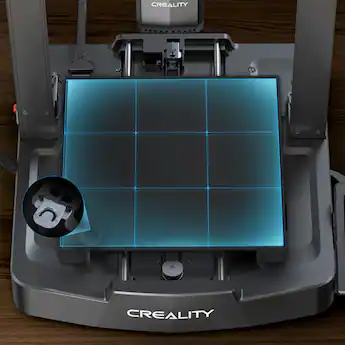
The Creality Ender-3 V3 SE 3D Printer is the best budget-friendly starter for new makers, with a 220 × 220 × 250 mm build volume and automatic bed leveling.
Best for: First-time buyers seeking value
- Build volume
- 220 × 220 × 250 mm
- Maximum listed speed
- 250 mm/s
- Maximum nozzle temperature
- 260°C
- Automatic leveling reduces setup work.
- Direct-drive extruder handles flexible filament.
- Large community provides setup guidance.
- Open frame offers less temperature control than an enclosure.
- Advertised speed is lower than newer V3 models.
Is the Creality Ender-3 V3 SE 3D Printer worth buying on Black Friday 2026?
Yes. The Creality Ender-3 V3 SE 3D Printer is a practical first 3D printer for everyday PLA and PETG projects, with automatic leveling and a useful 220 × 220 × 250 mm build area. Choose it for value over top speed.
See today’s Black Friday price on Amazon
#2
Creality Ender-3 V3 KE 3D Printer
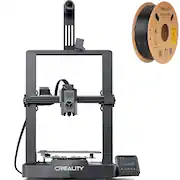
The Creality Ender-3 V3 KE 3D Printer is the best fast-value pick for makers who want a 500 mm/s advertised maximum and a 300°C hotend.
Best for: Speed-focused value buyers
- Build volume
- 220 × 220 × 240 mm
- Maximum listed speed
- 500 mm/s
- Maximum nozzle temperature
- 300°C
- High advertised speed suits short production runs.
- Hotend supports a wider range of common filaments.
- Automatic leveling simplifies preparation.
- Open-frame construction is less controlled than an enclosed printer.
- Fast printing still requires suitable models and tuning.
Is the Creality Ender-3 V3 KE 3D Printer worth buying on Black Friday 2026?
Yes. The Creality Ender-3 V3 KE 3D Printer is a compelling choice for buyers seeking a fast open-frame machine, with an advertised maximum of 500 mm/s and a 300°C hotend. Allow time to tune settings for print quality.
See today’s Black Friday price on Amazon
#3
Creality Ender-3 V3 3D Printer
The Creality Ender-3 V3 3D Printer is the best high-speed open-frame pick for experienced hobbyists, with a 600 mm/s advertised maximum.

Best for: Fast open-frame printing
- Build volume
- 220 × 220 × 250 mm
- Maximum listed speed
- 600 mm/s
- Maximum nozzle temperature
- 300°C
- CoreXZ motion system is designed for fast printing.
- Automatic leveling reduces manual setup.
- Build volume suits many home projects.
- The speed headline does not guarantee every model prints well at that rate.
- Open frame is not ideal for every material.
Is the Creality Ender-3 V3 3D Printer worth buying on Black Friday 2026?
Yes. The Creality Ender-3 V3 3D Printer suits makers who want a fast open-frame machine and are comfortable adjusting print settings. The Creality Ender-3 V3 3D Printer's 600 mm/s advertised maximum is a standout, while its 220 × 220 × 250 mm build volume covers common projects.
See today’s Black Friday price on Amazon
#4
Creality Ender-3 S1 Pro 3D Printer
The Creality Ender-3 S1 Pro 3D Printer is the best established-feature pick for hobbyists who want a 300°C nozzle and a 220 × 220 × 270 mm build volume.
Best for: Flexible filament and varied projects
- Build volume
- 220 × 220 × 270 mm
- Maximum listed speed
- 150 mm/s
- Maximum nozzle temperature
- 300°C
- Direct-drive extruder supports flexible filament.
- Higher build height accommodates taller models.
- Touchscreen offers a straightforward control interface.
- Listed speed trails newer Ender-3 V3 models.
- Open frame provides limited temperature control.
Is the Creality Ender-3 S1 Pro 3D Printer worth buying on Black Friday 2026?
Yes. The Creality Ender-3 S1 Pro 3D Printer remains a useful option for varied hobby projects, particularly when a 300°C nozzle, direct drive and 270 mm of build height matter more than headline speed.
See today’s Black Friday price on Amazon
#5 · Top pick
Prusa MK4S 3D Printer
The Prusa MK4S 3D Printer is the best overall choice for owners who value a polished workflow, with a 250 × 210 × 220 mm build volume.
Best for: Reliable everyday printing
- Build volume
- 250 × 210 × 220 mm
- Maximum listed speed
- 500 mm/s
- Maximum nozzle temperature
- 290°C
- Input shaping supports faster printing.
- Prusa ecosystem offers integrated software and documentation.
- Automatic calibration reduces routine setup.
- Open-frame design is less suited to temperature-sensitive materials.
- Build area is smaller than some larger-format printers.
Is the Prusa MK4S 3D Printer worth buying on Black Friday 2026?
Yes. The Prusa MK4S 3D Printer is a strong all-around option for buyers who prioritize a cohesive software and printer experience. The Prusa MK4S 3D Printer's 250 × 210 × 220 mm build volume handles many household and hobby projects without requiring a large footprint.
See today’s Black Friday price on Amazon
#6
Prusa MK4S 3D Printer Kit
The Prusa MK4S 3D Printer Kit is the best assembly-focused pick for makers who want to learn the machine while building it, with a 250 × 210 × 220 mm build volume.
Best for: detailed assembly and learning
- Build volume
- 250 × 210 × 220 mm
- Maximum listed speed
- 500 mm/s
- Maximum nozzle temperature
- 290°C
- Assembly offers a closer understanding of printer components.
- Shares the MK4S feature set and ecosystem.
- Build volume handles a broad mix of projects.
- Assembly takes more time than choosing a ready-built printer.
- Open frame is not an enclosed-material solution.
Is the Prusa MK4S 3D Printer Kit worth buying on Black Friday 2026?
Yes. The Prusa MK4S 3D Printer Kit is a good fit for buyers who enjoy assembling equipment and want to understand their printer’s parts. The 250 × 210 × 220 mm build volume and MK4S workflow suit regular hobby use.
See today’s Black Friday price on Amazon
#7
Prusa MINI+ 3D Printer
The Prusa MINI+ 3D Printer is the best compact choice for small projects and limited workspaces, with a 180 × 180 × 180 mm build volume.
Best for: Compact spaces and smaller prints
- Build volume
- 180 × 180 × 180 mm
- Maximum listed speed
- 200 mm/s
- Maximum nozzle temperature
- 280°C
- Compact footprint fits a desk or small work area.
- Prusa software and documentation support the workflow.
- Good match for small models and functional parts.
- Build area limits larger prints.
- Open-frame design is not enclosed.
Is the Prusa MINI+ 3D Printer worth buying on Black Friday 2026?
Yes. The Prusa MINI+ 3D Printer is worth considering for a compact workspace or small-print projects. The Prusa MINI+ 3D Printer's 180 × 180 × 180 mm build volume is smaller than the other picks, so check model dimensions before choosing it.
See today’s Black Friday price on Amazon
#8
Prusa CORE One 3D Printer
The Prusa CORE One 3D Printer is the best premium enclosed pick for makers printing a broad range of materials, with a 250 × 220 × 270 mm build volume.

Best for: Enclosed, premium printing
- Build volume
- 250 × 220 × 270 mm
- Maximum listed speed
- 500 mm/s
- Maximum nozzle temperature
- 300°C
- Enclosed design helps manage the print environment.
- Build area accommodates taller models.
- Prusa ecosystem supports a connected workflow.
- Larger than a compact open-frame printer.
- Premium feature set is unnecessary for simple PLA projects.
Is the Prusa CORE One 3D Printer worth buying on Black Friday 2026?
Yes. The Prusa CORE One 3D Printer is a strong premium choice for makers who want an enclosed machine, a 300°C nozzle and a 250 × 220 × 270 mm build area. Choose it for material flexibility and enclosure benefits.
See today’s Black Friday price on Amazon
Which is better, Creality Ender 3 or Prusa MK4?
The Prusa MK4S 3D Printer offers a streamlined workflow; the Creality Ender-3 V3 SE 3D Printer is an accessible entry point with a 220 × 220 × 250 mm build volume. Creality’s Ender-3 V3 KE and Ender-3 V3 models offer different features, so compare exact models.
Choose the Prusa MK4S 3D Printer for guided ownership. Choose the Creality Ender-3 V3 KE 3D Printer or Creality Ender-3 V3 3D Printer when advertised speed is a priority.
Which 3D printer is best for beginners?
The Creality Ender-3 V3 SE 3D Printer and Prusa MK4S 3D Printer offer automatic leveling. Their build volumes are 220 × 220 × 250 mm and 250 × 210 × 220 mm, respectively.
Choose Creality for a value-focused start with community resources, or Prusa for manufacturer documentation and a connected software workflow. Every FDM printer requires learning about filament, model orientation and settings; begin with common PLA projects.
Does advertised print speed tell the whole story?
The Creality Ender-3 V3 3D Printer advertises up to 600 mm/s, compared with up to 500 mm/s for the Prusa MK4S 3D Printer. Geometry, filament, layer height and quality settings affect actual print times.
Detailed parts often need slower settings, while simple, larger models suit faster profiles. Compare print quality and maintenance alongside advertised speed.
When should you choose an enclosed 3D printer?
The enclosed Prusa CORE One 3D Printer has a 250 × 220 × 270 mm build volume and a 300°C maximum nozzle temperature. Its enclosure helps manage the printing environment for materials that benefit from steadier conditions.
Open-frame printers such as the Creality Ender-3 V3 KE 3D Printer and Prusa MK4S 3D Printer suit common PLA projects. Check material, bed and ventilation requirements before choosing a filament.
What should you compare for Black Friday 2026?
The Creality Ender-3 V3 SE 3D Printer, Prusa MK4S 3D Printer and Prusa CORE One 3D Printer serve different priorities: entry-level value, open-frame printing and an enclosed setup.
Confirm the exact model, assembly status and included accessories. Compare build volume, leveling, support, enclosure and filament compatibility—not just advertised speed.
Buying Guide
Match the build volume to your models
The Creality Ender-3 V3 SE 3D Printer has a 220 × 220 × 250 mm build volume. The Prusa MINI+ 3D Printer is smaller, at 180 × 180 × 180 mm; check your largest planned model before buying.
Treat speed as a maximum, not a promise
The Creality Ender-3 V3 3D Printer advertises up to 600 mm/s. Compare that figure with recommended profiles, print quality and owner feedback.
Choose a kit or assembled printer
The Prusa MK4S 3D Printer Kit involves assembly. The assembled Prusa MK4S 3D Printer offers a simpler route to printing.
Plan around materials and enclosure
The enclosed Prusa CORE One 3D Printer helps manage the print environment. Check nozzle and bed specifications, ventilation and material-handling guidance.
Check the exact model and included items
The Creality Ender-3 V3 SE, Creality Ender-3 V3 KE and Creality Ender-3 V3 have different specifications. Confirm the full model name, assembly status, included components and support details for Black Friday 2026.
FAQ
Is the Creality Ender 3 better than the Prusa MK4?
The Prusa MK4S 3D Printer is the stronger fit for buyers who value an integrated workflow and support resources. The Creality Ender-3 V3 SE 3D Printer is a better value-oriented choice, while the Ender-3 V3 KE and V3 prioritize higher advertised speeds.
Which Creality Ender-3 model is best for a beginner?
The Creality Ender-3 V3 SE 3D Printer is the best starting point for a first-time buyer seeking an accessible machine. Its automatic leveling and 220 × 220 × 250 mm build volume suit common hobby projects, while its lower advertised speed keeps the focus on everyday use.
Is the Prusa MK4S worth buying in 2026?
Yes. The Prusa MK4S 3D Printer remains a strong choice for owners who want a well-supported printer and a 250 × 210 × 220 mm build area. Choose the assembled version for convenience or the Prusa MK4S 3D Printer Kit to assemble the machine yourself.
Which printer is best for fast 3D printing?
The Creality Ender-3 V3 3D Printer has the highest advertised maximum in this guide at 600 mm/s. Actual print time depends on the model, filament and quality settings, so compare print profiles and owner feedback rather than relying on the maximum figure alone.
Should I buy an enclosed 3D printer?
The Prusa CORE One 3D Printer is the enclosed choice here, with a 250 × 220 × 270 mm build volume. An enclosure is useful when your materials benefit from a more controlled print environment; common PLA projects can also suit an open-frame printer.