

As an Amazon Associate we earn from qualifying purchases.
- Best overall: Creality K1C 3D Printer
- Best budget: Creality Ender-3 V3 KE 3D Printer
- Best premium: Creality K1 Max 3D Printer
- Best for enclosed carbon-fiber printing: Creality K1C 3D Printer
- Creality K1C 3D Printer offers an enclosed 220 × 220 × 250 mm build area for compact prints and abrasive materials.
- Creality K1 Max 3D Printer has a larger 300 × 300 × 300 mm build area for bigger models and batch printing.
- Creality K1C 3D Printer is the more space-conscious pick; Creality K1 Max 3D Printer suits projects that need extra room.
- Compare the complete printer bundle, warranty, included accessories and return terms before choosing a Black Friday 2026 listing.
Creality K1C 3D Printer and Creality K1 Max 3D Printer are the two leading choices in this Black Friday 2026 comparison: the K1C fits compact enclosed printing, while the K1 Max offers a substantially larger build volume. We researched and compared specs, reviews and owner feedback to identify which printer fits different budgets, materials and project sizes.
The K1C’s 220 × 220 × 250 mm build area is ample for many household parts, figures and prototypes. The K1 Max’s 300 × 300 × 300 mm area accommodates larger models and more pieces per print. Our shortlist also includes seven alternatives for shoppers weighing enclosure, multicolor printing, setup and workspace. My pick for most people is the K1C when its build area fits the job; choose the K1 Max when print size is the priority.
How We Picked
- Compared published build volumes, maximum print speeds and hotend temperatures.
- Prioritized enclosure design and material compatibility for shoppers considering technical filaments.
- Reviewed owner feedback for setup, software workflow, noise and routine maintenance themes.
- Included alternatives across different footprints, printer styles and multicolor capabilities.
- Considered the complete Black Friday 2026 purchase: bundle contents, seller, warranty and return terms.
Comparison Table
| Product | Best for | Build volume | Maximum speed | Printer style |
|---|---|---|---|---|
| Creality K1C 3D Printer | Compact enclosed printing | 220 × 220 × 250 mm | 600 mm/s | Enclosed CoreXY |
| Creality K1 Max 3D Printer | Large enclosed prints | 300 × 300 × 300 mm | 600 mm/s | Enclosed CoreXY |
| Creality K1 SE 3D Printer | Open-frame CoreXY printing | 220 × 220 × 250 mm | 600 mm/s | Open-frame CoreXY |
| Creality Ender-3 V3 KE 3D Printer | First-time printing | 220 × 220 × 240 mm | 500 mm/s | Open-frame bed-slinger |
| Bambu Lab P1S 3D Printer | Enclosed workflow and upgrades | 256 × 256 × 256 mm | 500 mm/s | Enclosed CoreXY |
| Bambu Lab A1 3D Printer | Open-frame multicolor printing | 256 × 256 × 256 mm | 500 mm/s | Open-frame bed-slinger |
| Anycubic Kobra 3 Combo 3D Printer | Bundled multicolor printing | 250 × 250 × 260 mm | 600 mm/s | Open-frame bed-slinger |
Best Picks Reviewed
#1 · Top pick
Creality K1C 3D Printer
The Creality K1C 3D Printer is the best enclosed value pick for makers who want a compact, fast printer, with a 220 × 220 × 250 mm build volume.
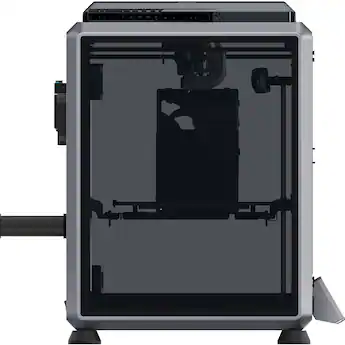
Best for: Enclosed printing, compact workspaces and carbon-fiber-reinforced filament projects
- Build volume
- 220 × 220 × 250 mm
- Maximum speed
- 600 mm/s
- Maximum nozzle temperature
- 300°C
- Printer style
- Enclosed CoreXY
- Enclosed design helps manage drafts and heat.
- Supports abrasive filament types with a suitable nozzle.
- Compact footprint compared with the K1 Max.
- Smaller build area than the K1 Max.
- Enclosure limits access compared with open-frame printers.
Is the Creality K1C 3D Printer worth buying on Black Friday 2026?
Yes. Creality K1C 3D Printer is a strong choice for shoppers who want an enclosed CoreXY machine without the K1 Max footprint. The Creality K1C 3D Printer's 220 × 220 × 250 mm build area handles many everyday projects, while its 300°C hotend supports a broad range of materials.
See today’s Black Friday price on Amazon
#2
Creality K1 Max 3D Printer
The Creality K1 Max 3D Printer is the best large-format enclosed pick for makers producing oversized parts, with a 300 × 300 × 300 mm build volume.

Best for: Large models, batch printing and enclosed production work
- Build volume
- 300 × 300 × 300 mm
- Maximum speed
- 600 mm/s
- Maximum nozzle temperature
- 300°C
- Printer style
- Enclosed CoreXY
- Large build area suits bigger single prints.
- Enclosure supports temperature-sensitive materials.
- Camera and lidar features support print monitoring and calibration.
- Takes up more desk or bench space.
- Large projects use more filament.
Is the Creality K1 Max 3D Printer worth buying on Black Friday 2026?
Yes. Creality K1 Max 3D Printer makes sense when a standard-size printer repeatedly forces models to be split into pieces. The Creality K1 Max 3D Printer's 300 mm cubed build area, enclosed CoreXY design and 300°C hotend serve large prints and demanding workshop projects.
See today’s Black Friday price on Amazon
#3
Creality K1 SE 3D Printer
The Creality K1 SE 3D Printer is the best open-frame speed pick for shoppers who want a simpler CoreXY setup, with a 220 × 220 × 250 mm build area.
Best for: Fast everyday printing in a ventilated workspace
- Build volume
- 220 × 220 × 250 mm
- Maximum speed
- 600 mm/s
- Maximum nozzle temperature
- 300°C
- Printer style
- Open-frame CoreXY
- Open frame gives easier access to the print.
- Fast CoreXY motion system.
- Smaller build footprint than the K1 Max.
- No enclosure for temperature-sensitive materials.
- Open frame offers less protection from drafts.
Is the Creality K1 SE 3D Printer worth buying on Black Friday 2026?
Yes. Creality K1 SE 3D Printer is a practical option for shoppers who value a fast CoreXY layout and easy access over an enclosure. The 220 × 220 × 250 mm build area suits common projects, while open-frame construction makes workspace conditions more important.
See today’s Black Friday price on Amazon
#4
Creality Ender-3 V3 KE 3D Printer
The Creality Ender-3 V3 KE 3D Printer is the best compact bed-slinger pick for budget-minded beginners, with a 220 × 220 × 240 mm build volume.
Best for: First-time printing and straightforward PLA projects
- Build volume
- 220 × 220 × 240 mm
- Maximum speed
- 500 mm/s
- Maximum nozzle temperature
- 300°C
- Printer style
- Open-frame bed-slinger
- Accessible format for learning printer basics.
- Useful touchscreen interface.
- Compact size for a home workspace.
- Open frame is less suited to sensitive filaments.
- Moving bed can limit tall-print performance.
Is the Creality Ender-3 V3 KE 3D Printer worth buying on Black Friday 2026?
Yes. Creality Ender-3 V3 KE 3D Printer is a sensible entry point for shoppers who want an accessible open-frame machine. The Creality Ender-3 V3 KE 3D Printer's 220 × 220 × 240 mm build area handles common small projects, and its 300°C hotend gives room to explore different materials.
See today’s Black Friday price on Amazon
#5
Bambu Lab P1S 3D Printer
The Bambu Lab P1S 3D Printer is the best enclosed alternative for shoppers seeking a polished workflow, with a 256 × 256 × 256 mm build volume.
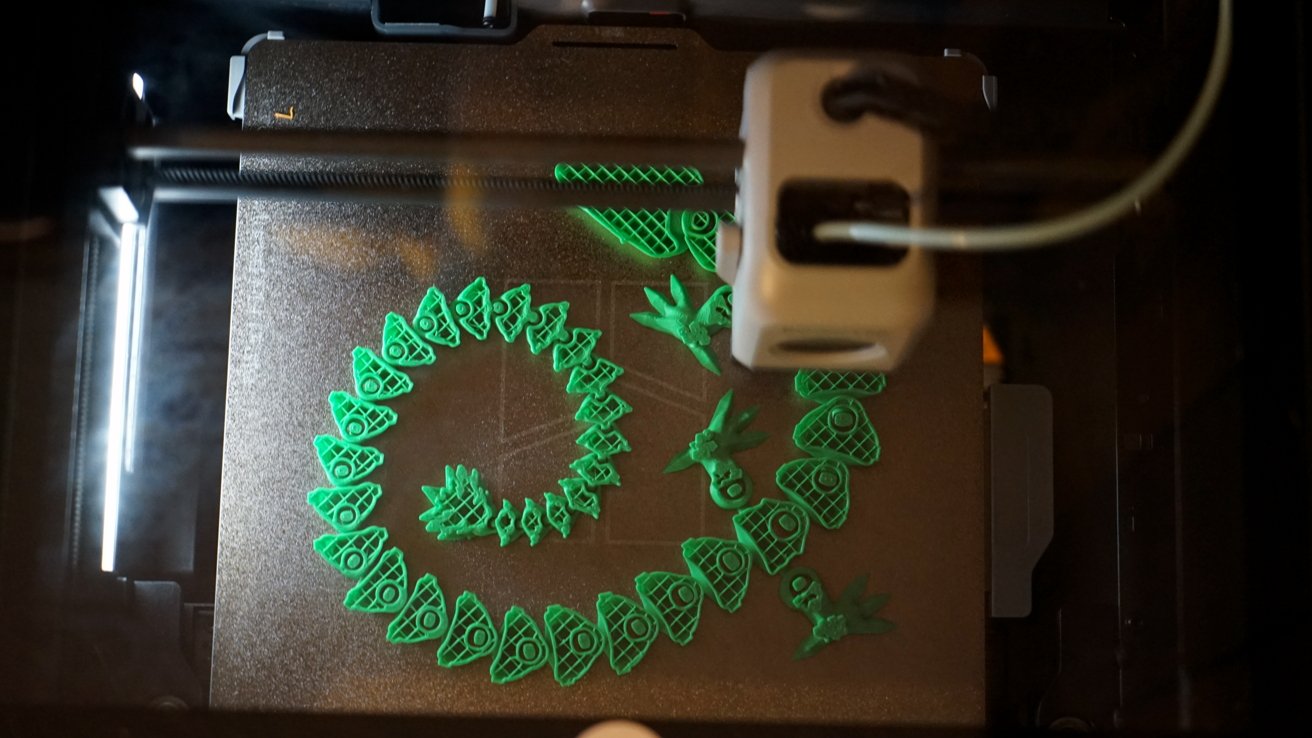
Best for: Enclosed printing and optional multicolor expansion
- Build volume
- 256 × 256 × 256 mm
- Maximum speed
- 500 mm/s
- Maximum nozzle temperature
- 300°C
- Printer style
- Enclosed CoreXY
- Enclosure supports a broad range of projects.
- Optional AMS supports multicolor printing.
- Balanced build volume for home use.
- Some advanced features require compatible add-ons.
- Closed ecosystem offers less hardware customization.
Is the Bambu Lab P1S 3D Printer worth buying on Black Friday 2026?
Yes. Bambu Lab P1S 3D Printer is a strong alternative for shoppers who want an enclosed CoreXY machine and an established multicolor upgrade path. The Bambu Lab P1S 3D Printer's 256 mm cubed build area lands between the K1C and K1 Max in overall capacity.
See today’s Black Friday price on Amazon
#6
Bambu Lab A1 3D Printer
The Bambu Lab A1 3D Printer is the best open-frame multicolor pick for home makers, with a 256 × 256 × 256 mm build volume.
Best for: Accessible multicolor printing and general-purpose projects
- Build volume
- 256 × 256 × 256 mm
- Maximum speed
- 500 mm/s
- Maximum nozzle temperature
- 300°C
- Printer style
- Open-frame bed-slinger
- Optional AMS Lite enables multicolor printing.
- Useful build area for an open-frame machine.
- Automatic calibration features simplify setup.
- Open frame is less suited to temperature-sensitive filament.
- Multicolor printing requires a compatible accessory.
Is the Bambu Lab A1 3D Printer worth buying on Black Friday 2026?
Yes. Bambu Lab A1 3D Printer suits shoppers who want an approachable open-frame printer with an optional multicolor system. The Bambu Lab A1 3D Printer's 256 × 256 × 256 mm build volume provides more room than the K1C, though the open design is not an enclosed-material solution.
See today’s Black Friday price on Amazon
#7
Anycubic Kobra 3 Combo 3D Printer
The Anycubic Kobra 3 Combo 3D Printer is the best bundled multicolor option for shoppers prioritizing color changes, with a 250 × 250 × 260 mm build volume.
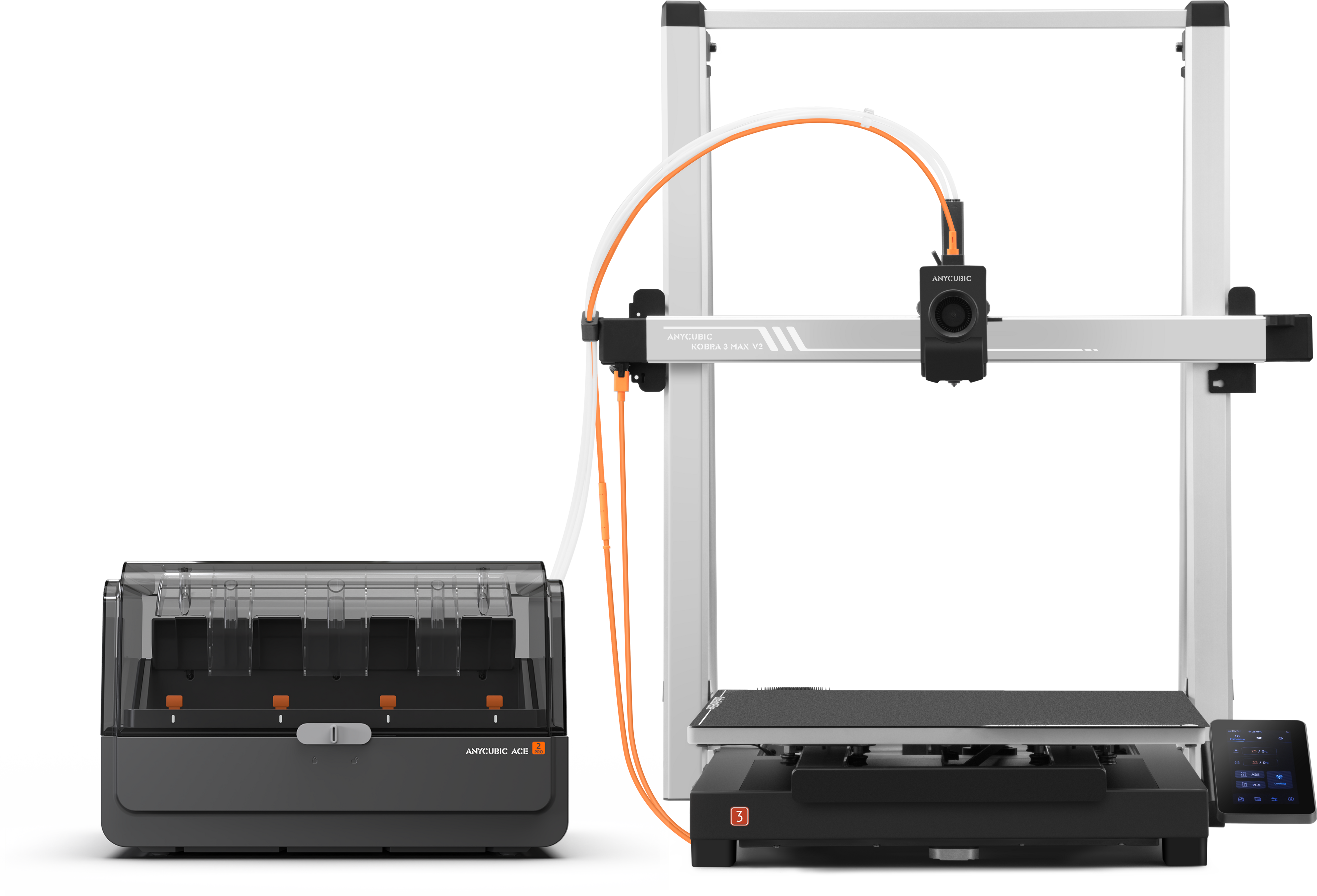
Best for: Multicolor printing with an included ACE Pro system
- Build volume
- 250 × 250 × 260 mm
- Maximum speed
- 600 mm/s
- Color system
- ACE Pro multicolor system
- Printer style
- Open-frame bed-slinger
- Combo bundle includes a multicolor system.
- Build area exceeds the K1C in each dimension.
- Fast advertised maximum speed.
- Open frame does not provide an enclosure.
- Multicolor printing adds filament changes and waste.
Is the Anycubic Kobra 3 Combo 3D Printer worth buying on Black Friday 2026?
Yes. Anycubic Kobra 3 Combo 3D Printer is worth considering when multicolor output is central to the buying decision. The Anycubic Kobra 3 Combo 3D Printer's 250 × 250 × 260 mm build area and included ACE Pro system provide a ready-made path to multicolor projects without buying that system separately.
See today’s Black Friday price on Amazon
Creality K1C vs Creality K1 Max: which should you buy?
Creality K1C 3D Printer is the better fit for compact enclosed printing, while Creality K1 Max 3D Printer wins on build size with a 300 mm cubed volume. The K1C’s 220 × 220 × 250 mm area meets the needs of many functional parts, desk accessories and models without claiming as much bench space.
Choose the K1 Max when full-size props, larger housings or batches of parts are part of the plan. The K1C makes more sense when most projects fit within its smaller area and enclosure is still important. Both offer advertised speeds up to 600 mm/s and a 300°C maximum nozzle temperature. Skip it if the K1 Max’s extra capacity would sit unused: the K1C is the more space-conscious purchase.
What are the main differences between the K1C and K1 Max?
Creality K1 Max 3D Printer provides 27 liters of build volume, compared with about 12 liters for Creality K1C 3D Printer. The difference is more than a wider bed: the Max adds room in all three dimensions, which helps when printing larger pieces in one go.
Creality K1C 3D Printer is built around a more compact footprint and carbon-fiber filament support with a suitable wear-resistant nozzle. Creality K1 Max 3D Printer adds features such as lidar-assisted calibration and a camera for monitoring. Both are enclosed CoreXY printers, but enclosure alone does not guarantee ideal results with every filament. Check the material maker’s requirements and the printer’s current bundle details before ordering.
Which printer is better for beginners and home use?
Creality Ender-3 V3 KE 3D Printer is the simplest budget-oriented starting point in this lineup, while Creality K1C 3D Printer gives beginners an enclosed route with a 220 × 220 × 250 mm area. The right choice depends on whether low complexity or enclosure and speed matter more.
Open-frame printers such as the Ender-3 V3 KE and Bambu Lab A1 are easy to access, but print conditions depend more on room drafts and ambient temperature. Enclosed options offer a more contained workspace and a practical path to certain technical materials. For a first printer, also budget attention for filament storage, spare nozzles and routine bed cleaning; those habits matter regardless of brand.
Which 3D printer is best for large or multicolor projects?
Creality K1 Max 3D Printer is the strongest large-format pick with its 300 × 300 × 300 mm volume, while Anycubic Kobra 3 Combo 3D Printer and Bambu Lab A1 3D Printer target multicolor work. Those priorities are separate: a larger build area does not automatically provide multicolor printing.
For large single-color props or utility parts, the K1 Max reduces the need to split designs into sections. For multicolor output, compare the Anycubic bundle’s ACE Pro system with the optional AMS Lite for the A1 and AMS options for the P1S. Multicolor jobs often consume extra filament during color changes, so consider whether color separation improves the finished object enough to justify the added workflow.
What should you check in a Black Friday 2026 printer listing?
Black Friday 2026 shoppers should compare the exact printer bundle, seller, warranty and return terms before placing an order. Product listings for the same model can include different accessories, and a multicolor system, camera or spare parts should not be assumed unless the listing names them.
Confirm the model name and build volume, then check the included nozzle, filament sample, tool kit and any required color-system components. Read the shipping and return policy, especially for a large enclosed printer. For Creality K1C 3D Printer versus Creality K1 Max 3D Printer, prioritize the capacity you will use rather than the largest specification on the page.
Buying Guide
Start with the size of your prints
Measure the largest object you expect to print and leave room for a brim or supports. Creality K1C 3D Printer’s 220 × 220 × 250 mm area covers common projects; Creality K1 Max 3D Printer’s 300 mm cubed area gives more headroom.
Choose enclosed or open-frame construction
An enclosure helps shield prints from drafts and supports temperature control. Open-frame machines offer easy access and visibility. Match the design to the materials you plan to use and the ventilation in your workspace.
Treat advertised speed as one factor
Maximum speeds such as 600 mm/s describe a capability, not a guarantee for every model, filament or print profile. Quality settings, geometry and material affect actual print time and finish.
Check multicolor bundle contents
Compare the printer alone with bundles that include a color system. Verify compatibility and included parts on the listing. Multicolor output adds convenience, but color changes often increase material use and print duration.
Review seller and ownership details
Check warranty coverage, return conditions, support access and replacement-part availability. Confirm the exact model and accessories in the order details before checkout, especially when comparing multiple Black Friday 2026 listings.
FAQ
Is the Creality K1C or K1 Max better for Black Friday 2026?
Creality K1C 3D Printer is better for compact enclosed printing and common-size projects. Creality K1 Max 3D Printer is better when a 300 × 300 × 300 mm build area is essential. Compare the precise bundle and seller terms, then choose based on the dimensions of the objects you actually print.
Can the Creality K1C print carbon-fiber filament?
Creality K1C 3D Printer supports abrasive filament types when equipped with a suitable wear-resistant nozzle and when the filament’s requirements are met. Confirm the nozzle in the specific bundle, follow material guidance and use appropriate ventilation. Printer compatibility does not mean every composite filament uses the same settings.
Is the Creality K1 Max worth choosing over the K1C?
Creality K1 Max 3D Printer is worth choosing when larger models, tall parts or batch printing need its 300 mm cubed build area. Creality K1C 3D Printer is the more practical fit when typical projects fit its smaller volume and a compact enclosed printer suits the workspace.
Which printer has the larger build volume, Creality K1C or K1 Max?
Creality K1 Max 3D Printer has the larger build volume at 300 × 300 × 300 mm. Creality K1C 3D Printer measures 220 × 220 × 250 mm. The larger area supports bigger single-piece models, while the K1C uses less workspace and meets many everyday printing needs.
Is the Anycubic Kobra 3 Combo a good multicolor alternative?
Anycubic Kobra 3 Combo 3D Printer is a good alternative for shoppers who want a multicolor system included in the bundle. Its ACE Pro setup distinguishes it from the enclosed K1C and K1 Max. Compare bundle contents, color workflow and the open-frame design before selecting it for your projects.
What should I compare before buying a 3D printer on Black Friday 2026?
Compare the exact model, build volume, included accessories, compatible materials, seller, warranty and return terms. For multicolor printers, confirm that the color system is included rather than sold separately. For enclosed printers, check workspace dimensions and material requirements as well as the headline speed.