

As an Amazon Associate we earn from qualifying purchases.
- Best overall: Elgato Facecam MK.2
- Best budget: Elgato Facecam Neo
- Best premium: Elgato Facecam Pro
- Best for moving presentations: Insta360 Link 2 4K Webcam
- Elgato Facecam Pro is the pick for creators who prioritize 4K at 60 frames per second.
- Elgato Facecam MK.2 balances 4K recording at 30 frames per second with 1080p at 60 frames per second.
- Elgato Facecam Neo is a simpler 1080p60 option for calls and starter streaming setups.
- Logitech MX Brio 4K Ultra HD Webcam and Insta360 Link 2 4K Webcam offer useful alternatives beyond Elgato.
- Match resolution, frame rate, focus, and connection type to your setup before choosing a webcam.
Elgato Facecam Pro and Elgato Facecam MK.2 are two strong Black Friday 2026 webcam picks, but they suit different creator needs. Elgato Facecam Pro records up to 4K at 60 frames per second, while Elgato Facecam MK.2 offers 4K at 30 frames per second and 1080p at 60 frames per second. The Pro is the Best bet for detailed, high-motion video; the MK.2 is a balanced choice for streaming and video calls.
We researched and compared specs, reviews and owner feedback to build a practical shortlist, including Elgato alternatives and two competing webcams. The guide focuses on image formats, frame rates, setup needs, and everyday use rather than discounts or price claims. Check the product details against your computer, lighting, and streaming software before deciding.
How We Picked
- Resolution and frame-rate options: We compared each webcam’s published maximum recording modes and the trade-offs between them.
- Setup and compatibility: We considered connection type, software support, and how easily each model fits a desktop streaming or meeting setup.
- Focus and framing: We assessed whether the product’s focus approach and framing features suit a fixed desk, shared room, or changing subject position.
- Owner feedback and practical use: We researched and compared specs, reviews and owner feedback to identify recurring strengths and setup considerations.
- Value by use case: We separated entry-level, everyday, and premium picks so shoppers can prioritize the features they will use.
Comparison Table
| Product | Best for | Maximum resolution | Maximum frame rate | Focus or framing feature |
|---|---|---|---|---|
| Elgato Facecam Pro | Premium streaming | 4K | 60 fps | Fixed desk framing |
| Elgato Facecam MK.2 | Balanced streaming and calls | 4K | 60 fps at 1080p | Camera Hub controls |
| Elgato Facecam Neo | Starter setups | 1080p | 60 fps | Simple desk framing |
| Elgato Facecam 4K | High-resolution recording | 4K | 60 fps | Camera Hub controls |
| Elgato Facecam | Fixed-desk streaming | 1080p | 60 fps | Fixed desk framing |
| Logitech MX Brio 4K Ultra HD Webcam | Work calls | 4K | 60 fps at 1080p | Autofocus |
| Insta360 Link 2 4K Webcam | Moving presentations | 4K | 30 fps | 2-axis gimbal tracking |
Best Picks Reviewed
#1
Elgato Facecam Pro
The Elgato Facecam Pro is the best premium webcam for streamers who want 4K video at 60 frames per second. The Elgato Facecam Pro's high frame rate suits detailed creator footage and smooth motion.

Best for: Premium streaming and creator video
- Maximum resolution
- 4K
- Maximum frame rate
- 60 fps
- Connection
- USB-C
- Records up to 4K at 60 fps
- Designed for detailed streaming video
- Works with Elgato Camera Hub
- Premium features exceed basic video-call needs
Is the Elgato Facecam Pro worth buying on Black Friday 2026?
Yes. Elgato Facecam Pro is a strong Black Friday 2026 choice for creators who need 4K at 60 frames per second. The Elgato Facecam Pro's premium resolution and smooth motion are best used with a capable computer and a well-planned desk setup.
See today’s Black Friday price on Amazon
#2 · Top pick
Elgato Facecam MK.2
The Elgato Facecam MK.2 is the best webcam for streamers who want flexible resolution modes, with 4K at 30 frames per second and 1080p at 60 frames per second. The two formats suit both detailed recordings and smoother live video.
Best for: Balanced streaming and calls
- Maximum resolution
- 4K
- Maximum frame rate
- 60 fps at 1080p
- HDR recording
- 1080p
- Offers 4K30 and 1080p60 modes
- HDR support at 1080p
- Camera Hub provides image controls
- 4K recording tops out at 30 fps
Is the Elgato Facecam MK.2 worth buying on Black Friday 2026?
Yes. Elgato Facecam MK.2 is a practical Black Friday 2026 pick for streamers who want 4K recording and 1080p at 60 frames per second. The Elgato Facecam MK.2's two modes make it a flexible match for both calls and creator video.
See today’s Black Friday price on Amazon
#3
Elgato Facecam Neo
The Elgato Facecam Neo is the best starter webcam for students and new streamers who need straightforward 1080p video at 60 frames per second. The Elgato Facecam Neo's simple feature set keeps everyday calls and broadcasts easy to manage.
Best for: Starter streaming and video calls
- Maximum resolution
- 1080p
- Maximum frame rate
- 60 fps
- Connection
- USB-C
- Delivers 1080p60 video
- Compact, straightforward setup
- Compatible with Camera Hub
- Does not offer 4K recording
Is the Elgato Facecam Neo worth buying on Black Friday 2026?
Yes. Elgato Facecam Neo is a sensible Black Friday 2026 option for calls, classes, and beginner streaming. The 1080p resolution and 60-frame-per-second mode cover everyday video needs without the extra setup focus of a premium camera.
See today’s Black Friday price on Amazon
#4
Elgato Facecam 4K
The Elgato Facecam 4K is the best webcam for creators who want 4K at 60 frames per second in a direct-to-computer setup. The Elgato Facecam 4K's high-resolution mode is suited to detailed recordings and sharp close-up framing.
Best for: High-resolution creator recording
- Maximum resolution
- 4K
- Maximum frame rate
- 60 fps
- Connection
- USB-C
- Supports 4K60 recording
- Made for desktop creator workflows
- Pairs with Elgato Camera Hub
- A 4K60 workflow needs compatible recording software
Is the Elgato Facecam 4K worth buying on Black Friday 2026?
Yes. Elgato Facecam 4K is worth considering for creators who plan to record in 4K at 60 frames per second. Confirm that your computer, software, and USB connection support the recording workflow before choosing this high-resolution webcam.
See today’s Black Friday price on Amazon
#5
Elgato Facecam
The Elgato Facecam is the best established 1080p webcam for desk-based streamers who want up to 60 frames per second. The Elgato Facecam's uncompressed video approach suits a fixed camera position and a reliable USB connection.
Best for: Fixed-desk 1080p streaming
- Maximum resolution
- 1080p
- Maximum frame rate
- 60 fps
- Video format
- Uncompressed
- Supports 1080p60 video
- Designed for fixed desk setups
- Camera Hub controls are available
- Does not record in 4K
Is the Elgato Facecam worth buying on Black Friday 2026?
Yes. Elgato Facecam remains a capable choice for desk-based streaming and meetings that need 1080p at 60 frames per second. Choose it when that format meets your needs and 4K recording is not a priority.
See today’s Black Friday price on Amazon
#6
Logitech MX Brio 4K Ultra HD Webcam
The Logitech MX Brio 4K Ultra HD Webcam is the best webcam for professionals who want autofocus and 4K video at 30 frames per second. The Logitech MX Brio 4K Ultra HD Webcam's alternate 1080p60 mode suits calls and motion-heavy presentations.
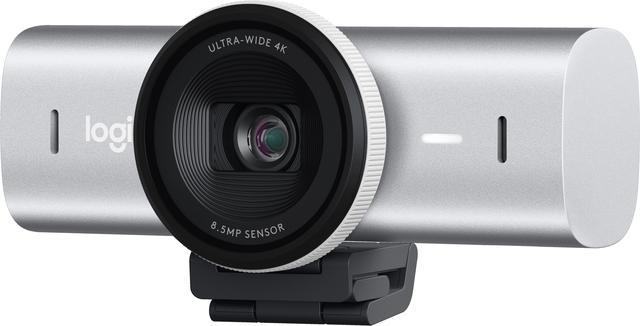
Best for: Work calls and flexible framing
- Maximum resolution
- 4K
- Maximum frame rate
- 60 fps at 1080p
- Focus
- Autofocus
- Autofocus supports changing subject distance
- Offers 4K30 and 1080p60 modes
- Includes a built-in privacy shutter
- 4K recording is limited to 30 fps
Is the Logitech MX Brio 4K Ultra HD Webcam worth buying on Black Friday 2026?
Yes. Logitech MX Brio 4K Ultra HD Webcam is a good fit for work calls and creator setups that benefit from autofocus. The Logitech MX Brio 4K Ultra HD Webcam's 4K30 and 1080p60 modes give users options for detailed meetings or smoother video.
See today’s Black Friday price on Amazon
#7
Insta360 Link 2 4K Webcam
The Insta360 Link 2 4K Webcam is the best webcam for presenters who want 4K video and subject tracking. The Insta360 Link 2 4K Webcam's 2-axis gimbal helps keep a moving speaker framed during lessons, demonstrations, and desk presentations.
Best for: Presentations and moving subjects
- Maximum resolution
- 4K
- Maximum frame rate
- 30 fps
- Gimbal movement
- 2-axis
- Subject tracking helps follow movement
- Gimbal supports repositioning
- Suitable for presenter-style video
- Tracking features add setup complexity
Is the Insta360 Link 2 4K Webcam worth buying on Black Friday 2026?
Yes. Insta360 Link 2 4K Webcam is a strong option for presenters who move around during lessons or demonstrations. The Insta360 Link 2 4K Webcam's 4K30 capture and 2-axis gimbal tracking are more useful for active framing than a fixed desk shot.
See today’s Black Friday price on Amazon
Which is better, Elgato Facecam Pro or Elgato Facecam MK.2?
Elgato Facecam Pro is the better pick for 4K at 60 frames per second, while Elgato Facecam MK.2 is the better-balanced webcam for creators who use both 4K30 and 1080p60. The deciding detail is the format you plan to use most often, not the model name alone.
Choose Elgato Facecam Pro for fast motion, crisp crops, and recordings where 4K60 matters. Choose Elgato Facecam MK.2 for streaming and calls where 1080p60 is a practical daily mode and 4K30 is useful for selected recordings. Both fit an Elgato desktop workflow, so compare computer capacity, software, and preferred image settings before adding one to your setup.
What image quality should you expect from these webcams?
Elgato Facecam Pro and Elgato Facecam 4K offer 4K video at 60 frames per second, while Elgato Facecam MK.2 offers 4K30 and 1080p60. Resolution is only one part of image quality: lighting, camera position, background, and exposure settings shape the final picture too.
A well-lit 1080p image can serve video calls and live streams effectively, while 4K gives creators more room for detail and cropping in recorded footage. Review each model’s recording modes alongside your software and available USB bandwidth. For a fixed desk, a consistent light source and eye-level camera position often bring a more noticeable improvement than simply choosing the highest resolution.
Which webcam is easiest to set up for streaming?
Elgato Facecam Neo is the simplest pick for a basic 1080p60 desktop setup, while Elgato Facecam MK.2 adds resolution and image-control options. A USB-C connection and compatible streaming software are central setup checks across the Elgato models in this guide.
Before buying, check your computer’s available ports and confirm that your preferred streaming or meeting app recognizes the webcam. Elgato Camera Hub gives compatible Elgato cameras image controls, while Logitech MX Brio 4K Ultra HD Webcam and Insta360 Link 2 4K Webcam use their own software ecosystems. Plan for a stable mount, a clear view of your face, and enough light to avoid a flat or shadowed image.
Which webcam is best for video calls, streaming, or presentations?
Elgato Facecam MK.2 is the most balanced pick for a mixed call-and-streaming setup, Elgato Facecam Neo suits basic calls, and Insta360 Link 2 4K Webcam suits presenters who move around. Each model addresses a distinct desk-camera need.
For a stationary creator, Elgato Facecam Pro offers 4K60 detail, and Logitech MX Brio 4K Ultra HD Webcam adds autofocus for changing subject distance. For presentations, Insta360 Link 2 4K Webcam’s gimbal tracking helps keep a moving speaker framed. Consider who uses the camera, how much they move, and whether sharp 4K footage or a simple, dependable call setup matters more.
What should you compare before buying a webcam on Black Friday 2026?
Compare maximum resolution, frame rate, focus, software support, and connection type across all 7 webcams before choosing a Black Friday 2026 pick. Those details show whether a model fits your computer and the video tasks you actually do.
For the Elgato Facecam Pro versus Elgato Facecam MK.2 decision, start with 4K60 versus the MK.2’s mix of 4K30 and 1080p60. Then check which recording mode your software supports and whether your computer can handle the files. A webcam is a better match when its strongest feature solves a real need, whether that means a high frame rate, autofocus, gimbal tracking, or straightforward 1080p.
Buying Guide
Choose resolution and frame rate
Elgato Facecam Pro is the pick for 4K at 60 frames per second, while Elgato Facecam MK.2 offers 4K30 and 1080p60. Choose the format that matches your stream or recording workflow.
Match focus to your camera position
Logitech MX Brio 4K Ultra HD Webcam offers autofocus for changing distances, while a fixed desk setup suits a webcam that stays in one position. Choose based on how often your framing changes.
Consider movement in the frame
Insta360 Link 2 4K Webcam pairs 4K30 video with a 2-axis gimbal for moving presenters. A fixed Elgato Facecam Neo or Elgato Facecam is simpler for a stationary desk.
Check ports and software
Elgato Facecam MK.2 works with Elgato Camera Hub, and the Elgato models here use USB-C connections. Confirm your computer has a compatible port and your video app supports the camera mode you want.
Buy for your actual use case
Elgato Facecam Neo is a practical 1080p60 choice for calls, while Elgato Facecam Pro is built for premium 4K60 creator video. Avoid paying for recording features your setup will not use.
FAQ
Elgato Facecam Pro vs Elgato Facecam MK.2: which is better for streaming?
Elgato Facecam Pro is better for streamers who need 4K at 60 frames per second. Elgato Facecam MK.2 is the more flexible all-rounder, with 4K30 recording and 1080p60 streaming modes for different creator needs.
Does Elgato Facecam MK.2 record in 4K?
Yes. Elgato Facecam MK.2 supports 4K video at 30 frames per second and 1080p video at 60 frames per second. Choose the 4K mode for detailed recordings and the 1080p60 mode for smoother motion.
Is Elgato Facecam Neo good for streaming?
Yes. Elgato Facecam Neo supports 1080p video at 60 frames per second, which suits starter streams, meetings, and classes. Shoppers who need 4K recording should compare Elgato Facecam MK.2, Elgato Facecam 4K, or Elgato Facecam Pro.
Which webcam is best for presentations where I move around?
Insta360 Link 2 4K Webcam is the strongest match for moving presentations because its 2-axis gimbal supports subject tracking. Elgato Facecam Pro and Elgato Facecam MK.2 suit more stationary desk framing.
Is a 4K webcam better than a 1080p webcam for video calls?
A 4K webcam offers more image detail, but 1080p is enough for many video calls. Elgato Facecam Neo provides 1080p60, while Elgato Facecam MK.2 adds 4K30 for recordings where extra resolution is useful.
What should I check before buying an Elgato webcam on Black Friday 2026?
Check the webcam’s resolution, frame rate, connection, software support, and fit for your desk. Elgato Facecam MK.2 offers 4K30 and 1080p60, while Elgato Facecam Pro supports 4K60 for creator workflows.