

As an Amazon Associate we earn from qualifying purchases.
- Best overall: Intel Core i7-14700F Desktop Processor
- Best budget: Intel Core i5-14600KF Desktop Processor
- Best premium: Intel Core i9-14900KF Desktop Processor
- Best for gaming-focused AM5 builds: AMD Ryzen 7 7800X3D Desktop Processor
- Intel Core i7-14700F offers 20 cores and suits gaming builds that already include a graphics card.
- Intel Core i9-14900KF adds 24 cores and a 6.0 GHz maximum turbo frequency for demanding workloads.
- Both F-series processors require a separate graphics card and an LGA1700 motherboard.
- Compare platform costs, cooling needs and the exact workload before choosing a Black Friday processor.
Intel Core i7-14700F vs Intel Core i9-14900KF is a choice between a more balanced 20-core processor and a 24-core flagship built for higher workloads. For Black Friday 2026, the right pick depends on your graphics card, motherboard, cooling setup and how much time you spend gaming, streaming or creating content.
I’m Marcus Reed, and we researched and compared specs, reviews and owner feedback to make the trade-offs clear. The guide also includes four Intel alternatives and two AMD options, so you can compare performance goals and platform requirements without relying on a single processor matchup.
How We Picked
- Compared core and thread counts, maximum boost clocks, cache and power specifications.
- Considered gaming, streaming and productivity workloads to identify meaningful use cases.
- Checked socket requirements, memory support and the need for a separate graphics card.
- Reviewed owner feedback and platform considerations, including cooling and BIOS setup.
- Selected alternatives that cover mainstream gaming, high-end gaming and multicore workloads.
Comparison Table
| Product | Best for | Cores / threads | Max boost / turbo (GHz) | Socket |
|---|---|---|---|---|
| Intel Core i7-14700F Desktop Processor | Balanced Intel gaming build | 20 / 28 | 5.4 | LGA1700 |
| Intel Core i9-14900KF Desktop Processor | Premium Intel gaming and creation | 24 / 32 | 6.0 | LGA1700 |
| Intel Core i7-14700KF Desktop Processor | Unlocked i7 performance | 20 / 28 | 5.6 | LGA1700 |
| Intel Core i9-14900F Desktop Processor | High-core-count non-overclocking builds | 24 / 32 | 5.8 | LGA1700 |
| Intel Core i5-14600KF Desktop Processor | Gaming with GPU-first spending | 14 / 20 | 5.3 | LGA1700 |
| AMD Ryzen 7 7800X3D Desktop Processor | Gaming-focused AM5 builds | 8 / 16 | 5.0 | AM5 |
| AMD Ryzen 9 7950X Desktop Processor | Multicore productivity | 16 / 32 | 5.7 | AM5 |
Best Picks Reviewed
#1 · Top pick
Intel Core i7-14700F Desktop Processor
The Intel Core i7-14700F Desktop Processor is the best value-focused choice for gamers with a discrete graphics card, with 20 cores and a maximum turbo frequency of 5.4 GHz. The Intel Core i7-14700F Desktop Processor's 65 W processor base power makes it a more restrained starting point than the higher-power K-series options.

Best for: Gaming and general productivity with a dedicated GPU
- Cores / threads
- 20 / 28
- Max turbo frequency
- 5.4 GHz
- Processor base power
- 65 W
- Socket
- LGA1700
- 20 cores support multitasking and mixed workloads.
- Lower base power than K-series alternatives.
- Works with compatible LGA1700 motherboards.
- No integrated graphics; a discrete GPU is required.
- Locked multiplier limits manual overclocking.
Is the Intel Core i7-14700F Desktop Processor worth buying on Black Friday 2026?
The Intel Core i7-14700F Desktop Processor is worth considering for a gaming or everyday PC with a separate graphics card. The Intel Core i7-14700F Desktop Processor's 20 cores and 5.4 GHz maximum turbo frequency offer strong versatility without requiring an unlocked processor.
See today’s Black Friday price on Amazon
#2
Intel Core i9-14900KF Desktop Processor
The Intel Core i9-14900KF Desktop Processor is the best high-performance Intel pick for enthusiasts running demanding games and creation workloads, with 24 cores and a 6.0 GHz maximum turbo frequency. The unlocked multiplier supports overclocking, while its power and cooling requirements call for a well-planned build.
Best for: High-end gaming and demanding multitasking
- Cores / threads
- 24 / 32
- Max turbo frequency
- 6.0 GHz
- Processor base power
- 125 W
- Max turbo power
- 253 W
- Socket
- LGA1700
- 24 cores and 32 threads suit parallel workloads.
- High 6.0 GHz maximum turbo frequency.
- Unlocked multiplier enables overclocking.
- Requires a discrete graphics card.
- Needs capable cooling and motherboard power delivery.
Is the Intel Core i9-14900KF Desktop Processor worth buying on Black Friday 2026?
The Intel Core i9-14900KF Desktop Processor is worth considering for a premium build focused on high frame rates and heavy creation tasks. The Intel Core i9-14900KF Desktop Processor's 24 cores and 6.0 GHz maximum turbo frequency come with higher cooling and power demands.
See today’s Black Friday price on Amazon
#3
Intel Core i7-14700KF Desktop Processor
The Intel Core i7-14700KF Desktop Processor is the best unlocked i7 option for enthusiasts who want 20 cores and a 5.6 GHz maximum turbo frequency. The faster boost and overclocking support are useful when the build has strong cooling and a compatible LGA1700 motherboard.
Best for: Unlocked i7 performance with a discrete GPU
- Cores / threads
- 20 / 28
- Max turbo frequency
- 5.6 GHz
- Processor base power
- 125 W
- Max turbo power
- 253 W
- 20 cores handle gaming and creator workloads.
- Unlocked multiplier supports overclocking.
- 5.6 GHz maximum turbo frequency.
- No integrated graphics.
- Higher power needs than the non-KF i7-14700F.
Is the Intel Core i7-14700KF Desktop Processor worth buying on Black Friday 2026?
The Intel Core i7-14700KF Desktop Processor is a strong option for buyers who want an unlocked 20-core processor and already have a discrete graphics card. Choose it over the i7-14700F when overclocking and its higher boost frequency matter.
See today’s Black Friday price on Amazon
#4
Intel Core i9-14900F Desktop Processor
The Intel Core i9-14900F Desktop Processor is the best non-K i9 choice for users who want 24 cores without prioritizing manual overclocking. The Intel Core i9-14900F Desktop Processor's 5.8 GHz maximum turbo frequency makes it a capable high-end option, while the F suffix means a separate graphics card remains essential.
Best for: High-core-count builds without overclocking
- Cores / threads
- 24 / 32
- Max turbo frequency
- 5.8 GHz
- Processor base power
- 65 W
- Socket
- LGA1700
- 24 cores and 32 threads for heavy multitasking.
- 5.8 GHz maximum turbo frequency.
- Lower base power than the i9-14900KF.
- No integrated graphics.
- Locked multiplier does not support manual overclocking.
Is the Intel Core i9-14900F Desktop Processor worth buying on Black Friday 2026?
The Intel Core i9-14900F Desktop Processor suits buyers who want 24 cores for demanding work but do not need an unlocked multiplier. The Intel Core i9-14900F Desktop Processor's 5.8 GHz maximum turbo frequency is attractive, but the F model requires a separate graphics card.
See today’s Black Friday price on Amazon
#5
Intel Core i5-14600KF Desktop Processor
The Intel Core i5-14600KF Desktop Processor is the best lower-tier Intel alternative for gaming-focused builds, with 14 cores and a 5.3 GHz maximum turbo frequency. The unlocked chip can pair well with a discrete graphics card when the budget is better spent on the GPU.
Best for: Gaming builds prioritizing graphics-card headroom
- Cores / threads
- 14 / 20
- Max turbo frequency
- 5.3 GHz
- Processor base power
- 125 W
- Max turbo power
- 181 W
- 14 cores support gaming and everyday multitasking.
- Unlocked multiplier supports overclocking.
- Lower tier than the i7 and i9 options.
- No integrated graphics.
- Fewer cores than the i7-14700F and i9-14900KF.
Is the Intel Core i5-14600KF Desktop Processor worth buying on Black Friday 2026?
The Intel Core i5-14600KF Desktop Processor is worth considering for gaming builds that direct more of the budget toward a graphics card. The Intel Core i5-14600KF Desktop Processor's 14 cores, 20 threads and 5.3 GHz maximum turbo frequency cover a broad range of PC workloads.
See today’s Black Friday price on Amazon
#6
AMD Ryzen 7 7800X3D Desktop Processor
The AMD Ryzen 7 7800X3D Desktop Processor is the best gaming-focused alternative for players who value its 3D V-Cache design, with 8 cores and a 5.0 GHz maximum boost clock. The AM5 platform differs from Intel LGA1700, so a motherboard change is part of the comparison.
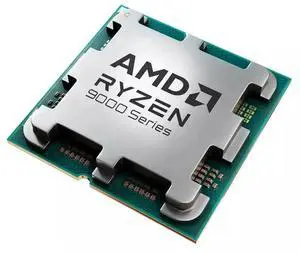
Best for: Gaming-focused AM5 builds
- Cores / threads
- 8 / 16
- Max boost frequency
- 5.0 GHz
- L3 cache
- 96 MB
- Default TDP
- 120 W
- Socket
- AM5
- 96 MB of L3 cache with 3D V-Cache.
- Gaming-oriented design.
- AM5 platform supports newer AMD desktop processors.
- 8 cores trail the Intel i7 and i9 in core count.
- Requires an AM5 motherboard.
Is the AMD Ryzen 7 7800X3D Desktop Processor worth buying on Black Friday 2026?
The AMD Ryzen 7 7800X3D Desktop Processor is a strong gaming alternative for buyers building on AM5. The AMD Ryzen 7 7800X3D Desktop Processor's 96 MB of L3 cache and 8 cores target gaming performance, while existing Intel LGA1700 owners need a different motherboard.
See today’s Black Friday price on Amazon
#7
AMD Ryzen 9 7950X Desktop Processor
The AMD Ryzen 9 7950X Desktop Processor is the best AMD option here for creators prioritizing multicore throughput, with 16 cores, 32 threads and a 5.7 GHz maximum boost clock. The AMD Ryzen 9 7950X Desktop Processor's AM5 socket and 170 W default TDP suit a carefully planned high-performance build.
Best for: Multicore productivity on AM5
- Cores / threads
- 16 / 32
- Max boost frequency
- 5.7 GHz
- Total cache
- 80 MB
- Default TDP
- 170 W
- Socket
- AM5
- 16 cores and 32 threads suit parallel workloads.
- 5.7 GHz maximum boost frequency.
- AM5 socket supports a modern AMD platform.
- Requires an AM5 motherboard.
- Higher default TDP calls for capable cooling.
Is the AMD Ryzen 9 7950X Desktop Processor worth buying on Black Friday 2026?
The AMD Ryzen 9 7950X Desktop Processor is worth considering for content creation and other heavily threaded work. The AMD Ryzen 9 7950X Desktop Processor's 16 cores and 32 threads provide substantial parallel capacity, but the AM5 motherboard and cooling requirements belong in the full build plan.
See today’s Black Friday price on Amazon
Which processor is better, Intel Core i7-14700F or Intel Core i9-14900KF?
Intel Core i7-14700F is the better balanced pick for most gaming builds, while Intel Core i9-14900KF is stronger on paper for demanding multicore work, with 24 cores and a 6.0 GHz maximum turbo frequency. The i7-14700F has 20 cores and a 5.4 GHz maximum turbo frequency.
The i9-14900KF also has an unlocked multiplier, but its 253 W maximum turbo power calls for serious cooling and capable motherboard power delivery. My pick for most people is the i7-14700F when gaming is the priority and the PC already has a discrete graphics card. Choose the i9 for workloads that use its added cores.
Which processor is better for gaming?
Intel Core i7-14700F and Intel Core i9-14900KF both make sense for gaming PCs with discrete graphics cards, but the graphics card and game resolution shape the overall experience. The i7-14700F’s 20 cores and 5.4 GHz maximum turbo frequency already suit a high-performance gaming system.
Intel Core i9-14900KF’s 24 cores and 6.0 GHz maximum turbo frequency appeal to buyers who also stream or create content. For a gaming-first AM5 build, AMD Ryzen 7 7800X3D Desktop Processor is an alternative with 96 MB of L3 cache. Compare full-platform needs rather than choosing by core count alone.
How much performance do the extra cores provide?
Intel Core i9-14900KF adds 4 cores and 4 threads over Intel Core i7-14700F, for 24 cores and 32 threads versus 20 cores and 28 threads. That extra capacity is most relevant to parallel workloads such as rendering, encoding and running several demanding applications together.
Intel Core i7-14700F remains a capable all-round processor, and a game or everyday task does not automatically gain from extra cores. Match the processor to software you use often. Skip it if your workload does not benefit from higher multicore capacity or the cost of stronger cooling and supporting hardware.
What motherboard, memory and cooling do these processors need?
Intel Core i7-14700F and Intel Core i9-14900KF both use the LGA1700 socket, but the motherboard still needs compatible firmware and suitable power delivery. Check the exact board’s CPU support list and install an appropriate BIOS before finalizing a build.
The i7-14700F has 65 W processor base power and 219 W maximum turbo power; Intel Core i9-14900KF has 125 W base power and 253 W maximum turbo power. Both F models lack integrated graphics, so include a discrete GPU. Confirm motherboard memory support, cooler clearance and case airflow before buying.
How should you choose a Black Friday 2026 processor?
Intel Core i7-14700F is a practical Black Friday 2026 target for buyers who want 20 cores and do not need an unlocked multiplier; Intel Core i9-14900KF targets premium systems with stronger cooling. Compare the whole build, not just the processor listing.
Check whether a compatible LGA1700 motherboard, cooler, memory kit and graphics card are already in your setup. Review the seller’s return terms and the exact processor suffix before checkout. F means no integrated graphics, while KF also marks an unlocked chip. A complete build match matters more than a headline specification.
Buying Guide
Choose by workload
For gaming and daily use, Intel Core i7-14700F offers 20 cores and a 5.4 GHz maximum turbo frequency. Intel Core i9-14900KF makes more sense when frequent rendering, encoding or heavy multitasking uses its extra cores.
Check the suffix
Intel Core i7-14700F and Intel Core i9-14900KF both need a discrete graphics card. The F suffix means no integrated graphics; KF also identifies an unlocked processor. Factor those details into troubleshooting and upgrade plans.
Plan cooling and power
Intel Core i9-14900KF reaches 253 W maximum turbo power, compared with 219 W for Intel Core i7-14700F. Select a cooler, power supply and motherboard that suit the complete system and its sustained workloads.
Confirm platform fit
Intel Core i7-14700F and Intel Core i9-14900KF use LGA1700; AMD Ryzen 7 7800X3D and AMD Ryzen 9 7950X use AM5. Include the motherboard and memory in comparisons when switching platforms.
Compare the full purchase
For Black Friday 2026, verify the exact model, included accessories, return policy and board compatibility. A processor is a good fit only when the cooler, graphics card and other parts match its requirements.
FAQ
Is the Intel Core i7-14700F better than the Intel Core i9-14900KF for gaming?
Intel Core i7-14700F is the better balanced gaming choice for many builds, with 20 cores and a 5.4 GHz maximum turbo frequency. Intel Core i9-14900KF has 24 cores and a higher 6.0 GHz maximum turbo frequency, making it appealing for gaming combined with demanding work.
Does the Intel Core i9-14900KF include integrated graphics?
Intel Core i9-14900KF does not include integrated graphics. The KF model requires a discrete graphics card for display output, gaming and GPU-accelerated tasks. Confirm that the graphics card is compatible with the motherboard and fits inside the case before completing the build.
What motherboard does the Intel Core i7-14700F use?
Intel Core i7-14700F uses the LGA1700 socket. Check the motherboard manufacturer’s CPU support list and BIOS requirements for the exact board revision. The processor supports compatible Intel 600- and 700-series desktop chipsets, with memory support dependent on the specific motherboard.
Is Intel Core i7-14700F or Intel Core i9-14900KF better for streaming?
Intel Core i9-14900KF has 24 cores and 32 threads, making it the stronger fit when streaming runs alongside demanding games or creation software. Intel Core i7-14700F has 20 cores and 28 threads and suits many streaming setups, especially when the graphics card handles encoding.
Should I choose AMD Ryzen 7 7800X3D over Intel Core i9-14900KF?
AMD Ryzen 7 7800X3D is a gaming-focused AM5 option with 96 MB of L3 cache and 8 cores. Intel Core i9-14900KF offers 24 cores and 32 threads for a broader mix of gaming and productivity. Choose based on workload and the motherboard platform you plan to use.