

As an Amazon Associate we earn from qualifying purchases.
- Best overall: Apple iPad (A16) Wi-Fi 128GB
- Best budget: Apple iPad (9th generation) Wi-Fi 64GB
- Best premium: Apple Magic Keyboard Folio for iPad (10th generation)
- Apple Smart Keyboard for iPad (9th generation): Logitech Combo Touch for iPad (9th generation)
- Apple Magic Keyboard Folio works with iPad (10th generation) and iPad (A16), not iPad (9th generation).
- Apple iPad (9th generation) uses a 10.2-inch display and pairs with Apple Smart Keyboard or compatible Logitech cases.
- Apple iPad (A16) offers an 11-inch display, 128GB starting storage and compatibility with Magic Keyboard Folio.
- Logitech Combo Touch adds a trackpad and detachable keyboard to compatible iPad 9th-generation, 10th-generation and A16 setups.
- Check the exact iPad generation before choosing a keyboard; similarly named folios are not interchangeable.
Apple iPad (9th generation) and Apple Magic Keyboard Folio are not a compatible tablet-and-keyboard pair: the Folio fits iPad (10th generation) and iPad (A16), while iPad (9th generation) uses different keyboard accessories. That compatibility gap is the most important detail for shoppers comparing these products for Black Friday 2026.
I researched and compared specs, reviews and owner feedback across Apple iPads and keyboard cases to identify sensible combinations for school, work and travel. My pick for most people is Apple iPad (A16) with Apple Magic Keyboard Folio for a current Apple keyboard setup; budget-focused shoppers should consider iPad (9th generation) with a keyboard made for that model. The picks below explain which accessories fit, what each device offers and what to check before choosing.
How We Picked
- Compatibility: We prioritized products with clearly identified iPad generations and keyboard fit.
- Everyday performance: We compared processor generation, display size, storage options and port type.
- Typing and navigation: We considered keyboard layout, trackpad support, stand design and detachability.
- Value and flexibility: We looked for practical setups for students, home use, travel and upgrades.
- Owner feedback: We researched and compared reviews and recurring comments about setup, portability and durability.
Comparison Table
| Product | Best for | Display | Storage | Keyboard fit |
|---|---|---|---|---|
| Apple iPad (9th generation) Wi-Fi 64GB | Budget-minded students | 10.2-inch Retina | 64GB | Smart Keyboard or compatible Logitech case |
| Apple iPad (10th generation) Wi-Fi 64GB | Entry-level Magic Keyboard Folio setup | 10.9-inch Liquid Retina | 64GB | Apple Magic Keyboard Folio |
| Apple iPad (A16) Wi-Fi 128GB | Everyday use and newer hardware | 11-inch Liquid Retina | 128GB | Apple Magic Keyboard Folio |
| Apple Magic Keyboard Folio for iPad (10th generation) | Typing with a trackpad | 14-key function row | Not applicable | iPad (10th generation) and iPad (A16) |
| Apple Smart Keyboard for iPad (9th generation) | Simple typing on iPad (9th generation) | Full-size layout | Not applicable | iPad (7th, 8th and 9th generation) |
| Logitech Combo Touch for iPad (9th generation) | Trackpad use on iPad (9th generation) | 10.2-inch fit | Not applicable | iPad (9th generation) |
| Logitech Combo Touch for iPad (10th generation) | Trackpad use on iPad (10th generation) | 10.9-inch fit | Not applicable | iPad (10th generation) |
| Logitech Slim Folio for iPad (9th generation) | Portable integrated keyboard | 10.2-inch fit | Not applicable | iPad (9th generation) |
Best Picks Reviewed
#1
Apple iPad (9th generation) Wi-Fi 64GB
The Apple iPad (9th generation) Wi-Fi 64GB is the best budget tablet for students who need familiar iPad basics, with a 10.2-inch Retina display and A13 Bionic chip.

Best for: Budget-minded students and everyday browsing
- Display
- 10.2-inch Retina
- Chip
- A13 Bionic
- Storage
- 64GB
- Connector
- Lightning
- Familiar Home button with Touch ID
- Works with keyboards designed for the 9th generation
- Front camera supports Center Stage
- Apple Magic Keyboard Folio is not compatible
- Lightning port instead of USB-C
Is Apple iPad (9th generation) Wi-Fi 64GB worth buying on Black Friday 2026?
Apple iPad (9th generation) Wi-Fi 64GB is a sound choice for basic schoolwork, video and browsing when a lower-cost iPad setup matters most. Pair it with a keyboard specifically made for the 9th generation, not Magic Keyboard Folio.
See today’s Black Friday price on Amazon
#2
Apple iPad (10th generation) Wi-Fi 64GB
The Apple iPad (10th generation) Wi-Fi 64GB is the best entry-level tablet for shoppers who want Magic Keyboard Folio support, with a 10.9-inch Liquid Retina display.
Best for: First-time iPad buyers who want Folio support
- Display
- 10.9-inch Liquid Retina
- Chip
- A14 Bionic
- Storage
- 64GB
- Connector
- USB-C
- Compatible with Apple Magic Keyboard Folio
- USB-C connection
- Landscape front camera placement
- 64GB storage can feel restrictive for large media libraries
- Magic Keyboard Folio is a separate accessory
Is Apple iPad (10th generation) Wi-Fi 64GB worth buying on Black Friday 2026?
Apple iPad (10th generation) Wi-Fi 64GB is worth considering for everyday tasks and a keyboard-first setup. The tablet supports Magic Keyboard Folio, has a 10.9-inch display and uses USB-C, making it a clearer Folio match than iPad (9th generation).
See today’s Black Friday price on Amazon
#3 · Top pick
Apple iPad (A16) Wi-Fi 128GB
The Apple iPad (A16) Wi-Fi 128GB is the best overall tablet for shoppers seeking a newer standard iPad, with an 11-inch Liquid Retina display and 128GB storage.
Best for: Most people who want a current everyday iPad
- Display
- 11-inch Liquid Retina
- Chip
- A16
- Storage
- 128GB
- Connector
- USB-C
- Compatible with Apple Magic Keyboard Folio
- Twice the starting storage of 64GB models
- USB-C supports a broad range of accessories
- Keyboard accessory adds bulk to a tablet setup
- Not compatible with older iPad 9th-generation cases
Is Apple iPad (A16) Wi-Fi 128GB worth buying on Black Friday 2026?
Apple iPad (A16) Wi-Fi 128GB is a strong all-around option for browsing, schoolwork and productivity. The 11-inch screen, A16 chip and 128GB storage give it a useful everyday foundation, and the tablet supports Apple Magic Keyboard Folio.
See today’s Black Friday price on Amazon
#4
Apple Magic Keyboard Folio for iPad (10th generation)
The Apple Magic Keyboard Folio for iPad (10th generation) is the best Apple keyboard case for iPad owners who want a trackpad, with a 14-key function row.
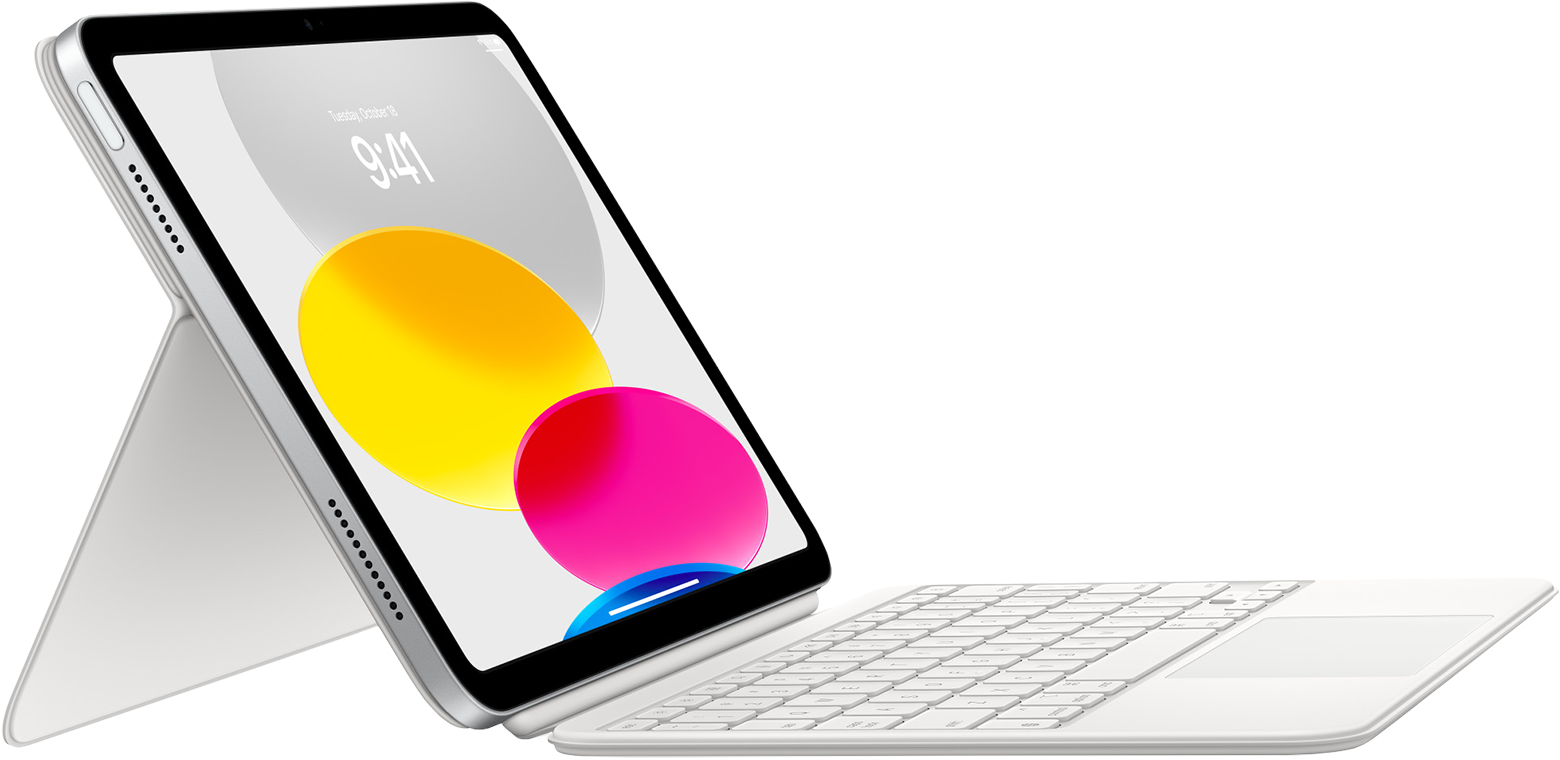
Best for: iPad (10th generation) and iPad (A16) typing
- Function row
- 14 keys
- Design
- Two-piece detachable case and keyboard
- Trackpad
- Built-in
- Compatible tablets
- iPad (10th generation) and iPad (A16)
- Detachable keyboard and adjustable stand
- Trackpad supports cursor navigation
- Connects through the Smart Connector
- Does not fit iPad (9th generation)
- Adds a keyboard accessory to the overall setup
Is Apple Magic Keyboard Folio for iPad (10th generation) worth buying on Black Friday 2026?
Apple Magic Keyboard Folio for iPad (10th generation) is worth considering for compatible tablets used for frequent typing. The detachable keyboard, built-in trackpad and 14-key function row create a laptop-style setup, but the Folio does not fit iPad (9th generation).
See today’s Black Friday price on Amazon
#5
Apple Smart Keyboard for iPad (9th generation)
The Apple Smart Keyboard for iPad (9th generation) is the best lightweight Apple typing accessory for owners who want a simple cover, with a full-size keyboard layout.
Best for: iPad (9th generation) owners who type regularly
- Keyboard
- Full-size
- Connection
- Smart Connector
- Compatibility
- iPad (7th, 8th and 9th generation)
- Designed to fit iPad (9th generation)
- No separate keyboard charging routine
- Folds into a front cover
- No trackpad
- Does not work with Apple Magic Keyboard Folio
Is Apple Smart Keyboard for iPad (9th generation) worth buying on Black Friday 2026?
Apple Smart Keyboard for iPad (9th generation) is a practical match for owners who want physical keys without changing tablets. The Smart Connector handles the connection, and the full-size layout helps with longer documents, but the accessory has no trackpad.
See today’s Black Friday price on Amazon
#6
Logitech Combo Touch for iPad (9th generation)
The Logitech Combo Touch for iPad (9th generation) is the best versatile keyboard case for students who need a trackpad, with a 10.2-inch tablet fit.
Best for: Students who want a detachable keyboard and trackpad
- Compatible display
- 10.2-inch iPad
- Keyboard
- Detachable
- Trackpad
- Built-in
- Connection
- Smart Connector
- Trackpad adds cursor control
- Kickstand supports multiple viewing positions
- Keyboard detaches for tablet use
- Fits the 9th-generation model, not iPad (A16)
- Protective case adds more bulk than a keyboard cover
Is Logitech Combo Touch for iPad (9th generation) worth buying on Black Friday 2026?
Logitech Combo Touch for iPad (9th generation) is a useful choice for students who type and navigate with a cursor. The detachable keyboard and built-in trackpad add flexibility to the 10.2-inch tablet, while the case is made for this generation.
See today’s Black Friday price on Amazon
#7
Logitech Combo Touch for iPad (10th generation)
The Logitech Combo Touch for iPad (10th generation) is the best third-party keyboard case for flexible typing on iPad (10th generation), with a 10.9-inch fit.

Best for: iPad (10th generation) users who want a trackpad alternative
- Compatible display
- 10.9-inch iPad
- Keyboard
- Detachable
- Trackpad
- Built-in
- Connection
- Smart Connector
- Detachable keyboard supports tablet-first use
- Trackpad handles cursor navigation
- Kickstand props up the iPad
- Does not fit iPad (9th generation)
- Bulkier than a keyboard without a protective case
Is Logitech Combo Touch for iPad (10th generation) worth buying on Black Friday 2026?
Logitech Combo Touch for iPad (10th generation) is a capable alternative for people who want a trackpad and detachable keyboard. The 10.9-inch fit is specific to the compatible model, so confirm the iPad generation before choosing this case.
See today’s Black Friday price on Amazon
#8
Logitech Slim Folio for iPad (9th generation)
The Logitech Slim Folio for iPad (9th generation) is the best simple keyboard case for mobile typing, with compatibility for 10.2-inch iPad models.
Best for: Travelers who want an integrated keyboard cover
- Compatible display
- 10.2-inch iPad
- Keyboard
- Integrated
- Connection
- Bluetooth
- Battery
- Two replaceable coin-cell batteries
- Keyboard and protective case stay together
- Designed for iPad (9th generation)
- A convenient option for typing away from a desk
- No built-in trackpad
- Battery-powered rather than Smart Connector-powered
Is Logitech Slim Folio for iPad (9th generation) worth buying on Black Friday 2026?
Logitech Slim Folio for iPad (9th generation) is a practical pick for travel and occasional document work. The integrated keyboard keeps the accessory simple, while its 10.2-inch fit targets compatible iPad models; it does not add a trackpad.
See today’s Black Friday price on Amazon
Does Magic Keyboard Folio work with iPad 9th generation?
Apple Magic Keyboard Folio supports iPad (10th generation) and iPad (A16), not Apple iPad (9th generation). Apple iPad (9th generation) has a different design and connector arrangement, so its keyboard options include Apple Smart Keyboard for iPad (9th generation) and generation-specific Logitech cases.
Check the model name in iPad settings or the model number on the device before ordering an accessory. A 10.2-inch screen size alone does not establish compatibility; newer and older iPads with similar dimensions use different cases and keyboard connections. For a Folio setup, choose a compatible iPad first. For an existing 9th-generation iPad, shop for an accessory that names that generation.
Which is better: iPad 9th generation or iPad A16?
Apple iPad (A16) is the stronger long-term everyday pick, with an 11-inch display, A16 chip and 128GB starting storage compared with Apple iPad (9th generation)'s 10.2-inch screen, A13 Bionic chip and 64GB base configuration. The newer model also uses USB-C and supports Apple Magic Keyboard Folio.
Apple iPad (9th generation) remains a reasonable value choice for web browsing, video, reading and school tasks when its older design fits the shopper's needs. The main decision is whether the newer screen, extra starting storage and keyboard compatibility justify choosing the more current setup. For a new purchase centered on typing, include the keyboard in the comparison rather than comparing tablet features alone.
Which keyboard should I buy for iPad 9th generation?
Apple Smart Keyboard for iPad (9th generation) is the straightforward Apple-made option, while Logitech Combo Touch for iPad (9th generation) is the stronger fit for shoppers who want a trackpad. Logitech Slim Folio for iPad (9th generation) keeps an integrated keyboard and cover together for mobile typing.
Choose based on how the tablet is used. Smart Keyboard favors a simpler cover-and-typing arrangement; Combo Touch adds cursor control and a detachable keyboard; Slim Folio provides a familiar case-style setup without a trackpad. Each named accessory is designed for the 9th-generation iPad, unlike Magic Keyboard Folio. Check the exact product listing for the model compatibility before purchase.
Is Apple Magic Keyboard Folio better than Logitech Combo Touch?
Apple Magic Keyboard Folio and Logitech Combo Touch both offer trackpad navigation and detachable typing, but each accessory fits specific iPad generations. Magic Keyboard Folio works with iPad (10th generation) and iPad (A16); Logitech Combo Touch has separate versions for iPad (9th generation), iPad (10th generation) and iPad (A16).
For an Apple-branded accessory and a two-piece design, Magic Keyboard Folio is a natural match for compatible tablets. Combo Touch is a flexible alternative for shoppers who value its kickstand and generation-specific case design. Neither accessory is a universal fit. Compare the exact iPad model, stand preferences, keyboard detachment and trackpad needs before choosing.
What should I compare for Black Friday 2026?
Black Friday 2026 comparisons should start with the complete tablet-and-keyboard combination, not a keyboard name alone. Add the iPad generation, storage capacity, connector and accessory compatibility to a shortlist before reviewing retailer listings. That process prevents an attractive keyboard case from ending up with an incompatible tablet.
For a budget setup, compare Apple iPad (9th generation) Wi-Fi 64GB with a 9th-generation keyboard. For a newer typing setup, compare Apple iPad (A16) Wi-Fi 128GB with Apple Magic Keyboard Folio or a matching Logitech Combo Touch. Review return terms and the precise model name in the listing, especially when product names differ by only one generation.
Buying Guide
Confirm the iPad generation
Identify the exact tablet before ordering a keyboard. Apple Magic Keyboard Folio fits iPad (10th generation) and iPad (A16), while iPad (9th generation) needs a different accessory. Screen size alone does not guarantee a case will fit.
Choose the typing style
A Smart Keyboard keeps the setup straightforward. A Combo Touch adds a trackpad and detachable keyboard. A Slim Folio combines a protective cover and keyboard. Pick the format that suits document work, browsing and how often the iPad is used without keys.
Match storage to your habits
Apple iPad (9th generation) Wi-Fi 64GB and Apple iPad (10th generation) Wi-Fi 64GB suit lighter app and media use. Apple iPad (A16) Wi-Fi 128GB starts with more storage for downloads, files and a larger app collection.
Think about ports and accessories
Apple iPad (9th generation) uses Lightning, while iPad (10th generation) and iPad (A16) use USB-C. Check which charging cables and peripherals already belong to the household before picking a tablet. USB-C supports a broader range of common accessories.
Compare the complete setup
Compare the tablet, keyboard, case and connectivity needs as one purchase decision. Confirm the accessory's full compatibility wording, return policy and included components. A keyboard that does not fit the chosen iPad adds no value, even when the product names look similar.
FAQ
Can I use Magic Keyboard Folio with iPad 9th generation?
No. Apple Magic Keyboard Folio is compatible with iPad (10th generation) and iPad (A16), not Apple iPad (9th generation). Choose Apple Smart Keyboard for iPad (9th generation), Logitech Combo Touch for iPad (9th generation) or another accessory that explicitly lists 9th-generation compatibility.
What is the best keyboard for Apple iPad (9th generation)?
Logitech Combo Touch for iPad (9th generation) is a strong choice for shoppers who want a detachable keyboard and trackpad. Apple Smart Keyboard for iPad (9th generation) offers a simpler Apple-made typing accessory, while Logitech Slim Folio for iPad (9th generation) combines a cover and keyboard.
Does Magic Keyboard Folio fit iPad (A16)?
Yes. Apple Magic Keyboard Folio for iPad (10th generation) is also compatible with Apple iPad (A16). The Folio provides a detachable keyboard, built-in trackpad and 14-key function row. Confirm that a listing names iPad (A16) before ordering.
Is iPad (A16) a better buy than iPad (9th generation)?
Apple iPad (A16) offers a newer A16 chip, an 11-inch display, USB-C and 128GB starting storage. Apple iPad (9th generation) remains a sensible budget option for basic everyday tasks, but it does not support Magic Keyboard Folio.
What is the difference between Magic Keyboard Folio and Smart Keyboard?
Apple Magic Keyboard Folio has a trackpad, detachable keyboard and 14-key function row for iPad (10th generation) and iPad (A16). Apple Smart Keyboard for iPad (9th generation) is a simpler full-size keyboard cover without a trackpad, made for older compatible iPad models.
Which Logitech Combo Touch fits iPad 9th generation?
Logitech Combo Touch for iPad (9th generation) is the version designed for Apple iPad (9th generation). The accessory includes a detachable keyboard, built-in trackpad and kickstand. Versions made for iPad (10th generation) or iPad (A16) use different fits.