

As an Amazon Associate we earn from qualifying purchases.
- Best overall: Keychron Q1 HE
- Best budget: Keychron V1 Max QMK Wireless Custom Mechanical Keyboard
- Best premium: Wooting 80HE
- Keychron K2 HE: Wooting 60HE+
- Wooting 60HE+ is the focused pick for compact, fast-response gaming with adjustable Hall-effect switches.
- Keychron Q1 HE pairs magnetic switches with a roomier 75% layout and wireless connectivity.
- Keychron Q1 Max and Keychron V1 Max offer conventional mechanical switches, hot-swap support and wireless options.
- Keychron K8 Pro adds a practical tenkeyless layout, while Wooting 80HE gives competitive players a larger magnetic-switch board.
- Compare layout, switch technology and connection options before choosing a Black Friday 2026 keyboard.
Wooting 60HE+ is the strongest compact gaming pick, while Keychron Q1 HE is the more versatile choice for players who want magnetic switches and a 75% layout. We researched and compared specs, reviews and owner feedback to make this Keychron keyboard vs Wooting 60HE Black Friday 2026 guide useful for real buying decisions.
The main difference is clear: Wooting focuses on rapid gaming input and adjustable Hall-effect switches, while Keychron offers a broad range of layouts, mechanical switch options and wireless models. Here's the bottom line: choose the Wooting 60HE+ for a compact competitive setup, or pick a Keychron model for more keys, flexibility or everyday use.
How We Picked
- Compared switch technology, including Hall-effect magnetic switches and conventional mechanical switches.
- Prioritized clear gaming advantages such as adjustable actuation, rapid trigger features and high polling rates where specified.
- Checked layout and desk fit, from compact 60% boards to 80% and tenkeyless options.
- Reviewed wired and wireless connectivity, hot-swap support and customization features.
- Used product specifications, reviews and owner feedback rather than claiming personal testing.
Comparison Table
| Product | Best for | Layout | Switch type | Connection |
|---|---|---|---|---|
| Wooting 60HE+ | Compact competitive gaming | 60% | Lekker L60 Hall-effect | Wired USB-C |
| Wooting 80HE | Competitive gaming with more keys | 80% | Lekker Hall-effect | Wired USB-C |
| Keychron Q1 HE | Premium wireless gaming | 75% | Gateron Double-Rail Magnetic | USB-C, 2.4 GHz, Bluetooth 5.1 |
| Keychron K2 HE | Compact wireless gaming | 75% | Hall-effect magnetic | USB-C, 2.4 GHz, Bluetooth |
| Keychron Q1 Max QMK/VIA Wireless Custom Mechanical Keyboard | Custom mechanical gaming | 75% | Mechanical | USB-C, 2.4 GHz, Bluetooth 5.1 |
| Keychron V1 Max QMK Wireless Custom Mechanical Keyboard | Wireless mechanical gaming value | 75% | Mechanical | USB-C, 2.4 GHz, Bluetooth 5.1 |
| Keychron K8 Pro QMK/VIA Wireless Mechanical Keyboard | Tenkeyless gaming and typing | TKL | Mechanical | USB-C, Bluetooth 5.1 |
Best Picks Reviewed
#1
Wooting 60HE+
The Wooting 60HE+ is the best compact gaming keyboard for competitive players who want precise input control. The Wooting 60HE+'s 60% layout saves desk space, and its Lekker L60 switches support adjustable actuation and Rapid Trigger.

Best for: Compact competitive gaming
- Layout
- 60%
- Switch type
- Lekker L60 Hall-effect
- Actuation range
- 0.1–4.0 mm
- Connection
- Wired USB-C
- Adjustable actuation and Rapid Trigger
- Compact desk-friendly footprint
- Wootility software customization
- No dedicated arrow-key cluster
- Wired connection only
Is the Wooting 60HE+ worth buying on Black Friday 2026?
The Wooting 60HE+ is worth considering for competitive players who want a compact Hall-effect keyboard. The Wooting 60HE+'s 60% layout, adjustable actuation and Rapid Trigger features give players extensive control over key response.
See today’s Black Friday price on Amazon
#2
Wooting 80HE
The Wooting 80HE is the best larger-format gaming keyboard for players who want magnetic switches without giving up arrow and navigation keys. The Wooting 80HE's 8,000 Hz polling rate supports a fast, responsive setup.
Best for: Competitive gaming with more keys
- Layout
- 80%
- Polling rate
- 8,000 Hz
- Switch type
- Lekker Hall-effect
- Connection
- Wired USB-C
- High 8,000 Hz polling rate
- Arrow and navigation keys included
- Adjustable magnetic-switch behavior
- Requires a wired setup
- Larger than a 60% keyboard
Is the Wooting 80HE worth buying on Black Friday 2026?
The Wooting 80HE is a strong fit for competitive players who want a full set of navigation keys and magnetic-switch customization. The Wooting 80HE's 80% layout and 8,000 Hz polling rate suit a performance-focused desktop.
See today’s Black Friday price on Amazon
#3 · Top pick
Keychron Q1 HE
The Keychron Q1 HE is the best premium wireless gaming keyboard for players who want magnetic switches in a 75% layout. The Keychron Q1 HE's 2.4 GHz wireless connection supports a 1,000 Hz polling rate.
Best for: Premium wireless gaming
- Layout
- 75%
- Polling rate
- 1,000 Hz
- Switch type
- Gateron Double-Rail Magnetic
- Connections
- USB-C, 2.4 GHz, Bluetooth 5.1
- Magnetic switches with adjustable actuation
- Wireless and wired connection choices
- Compact layout retains function keys
- Heavier premium-style build
- Magnetic switches limit switch choices
Is the Keychron Q1 HE worth buying on Black Friday 2026?
The Keychron Q1 HE is worth considering for players seeking a premium 75% keyboard with magnetic switches and wireless flexibility. The Keychron Q1 HE's 1,000 Hz 2.4 GHz mode and USB-C option cover both wireless and wired play.
See today’s Black Friday price on Amazon
#4
Keychron K2 HE
The Keychron K2 HE is the best compact wireless magnetic keyboard for players who want a smaller board with function and arrow keys. The Keychron K2 HE's 75% layout balances gaming controls with a tidy desktop footprint.
Best for: Compact wireless gaming
- Layout
- 75%
- Switch type
- Hall-effect magnetic
- Connections
- USB-C, 2.4 GHz, Bluetooth
- Layout keys
- 84-key layout
- Magnetic-switch actuation customization
- Three connection modes
- Arrow keys in a compact format
- Wireless performance depends on mode
- Less room for dedicated navigation keys
Is the Keychron K2 HE worth buying on Black Friday 2026?
The Keychron K2 HE is a good match for players who want magnetic-switch features in a compact wireless keyboard. The Keychron K2 HE's 75% layout keeps arrow keys and function-row access while saving space compared with a full-size board.
See today’s Black Friday price on Amazon
#5
Keychron Q1 Max QMK/VIA Wireless Custom Mechanical Keyboard
The Keychron Q1 Max QMK/VIA Wireless Custom Mechanical Keyboard is the best premium mechanical pick for players who want customization and multiple connection modes. The Keychron Q1 Max QMK/VIA Wireless Custom Mechanical Keyboard's 75% layout keeps essential keys within reach.
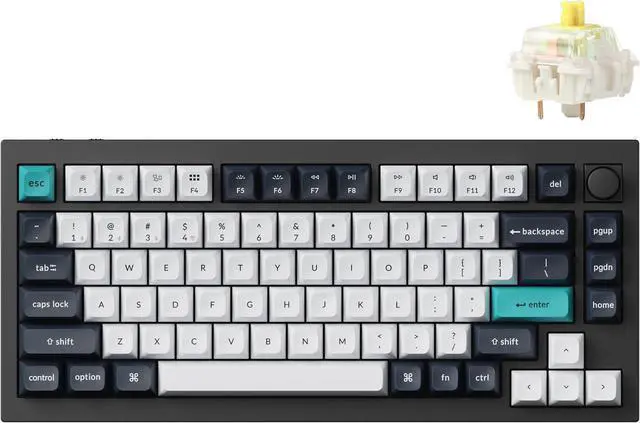
Best for: Custom mechanical gaming
- Layout
- 75%
- Polling rate
- 1,000 Hz
- Connections
- USB-C, 2.4 GHz, Bluetooth 5.1
- Customization
- QMK/VIA
- QMK/VIA remapping support
- Hot-swappable mechanical switches
- Three connection options
- Not a Hall-effect keyboard
- Premium build weighs more than compact boards
Is the Keychron Q1 Max QMK/VIA Wireless Custom Mechanical Keyboard worth buying on Black Friday 2026?
The Keychron Q1 Max QMK/VIA Wireless Custom Mechanical Keyboard suits players who value remapping and mechanical-switch choice over Hall-effect input. The Keychron Q1 Max QMK/VIA Wireless Custom Mechanical Keyboard's 75% layout, hot-swap support and three connection options make it a flexible desktop board.
See today’s Black Friday price on Amazon
#6
Keychron V1 Max QMK Wireless Custom Mechanical Keyboard
The Keychron V1 Max QMK Wireless Custom Mechanical Keyboard is the best value-focused wireless mechanical pick for players who want a configurable 75% board. The Keychron V1 Max QMK Wireless Custom Mechanical Keyboard's 1,000 Hz 2.4 GHz mode makes it game-ready.
Best for: Wireless mechanical gaming value
- Layout
- 75%
- Polling rate
- 1,000 Hz
- Connections
- USB-C, 2.4 GHz, Bluetooth 5.1
- Customization
- QMK/VIA
- Wireless and wired options
- QMK/VIA customization
- Hot-swappable mechanical switches
- No magnetic-switch actuation features
- Plastic case feels less premium than Q-series models
Is the Keychron V1 Max QMK Wireless Custom Mechanical Keyboard worth buying on Black Friday 2026?
The Keychron V1 Max QMK Wireless Custom Mechanical Keyboard is a sensible pick for players who want a customizable wireless mechanical board. The Keychron V1 Max QMK Wireless Custom Mechanical Keyboard's 75% layout, hot-swap support and 1,000 Hz 2.4 GHz mode cover gaming and daily typing.
See today’s Black Friday price on Amazon
#7
Keychron K8 Pro QMK/VIA Wireless Mechanical Keyboard
The Keychron K8 Pro QMK/VIA Wireless Mechanical Keyboard is the best tenkeyless choice for players who want more desk space without losing the function and arrow keys. The Keychron K8 Pro QMK/VIA Wireless Mechanical Keyboard's 87-key layout suits everyday gaming and typing.
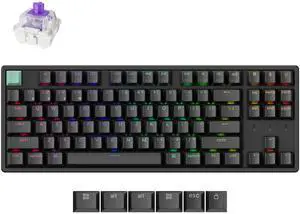
Best for: Tenkeyless gaming and typing
- Layout
- TKL
- Key count
- 87 keys
- Connections
- USB-C, Bluetooth 5.1
- Customization
- QMK/VIA
- Dedicated arrow and function keys
- Wireless Bluetooth connection
- QMK/VIA key remapping
- No 2.4 GHz wireless mode
- Larger than 75% options
Is the Keychron K8 Pro QMK/VIA Wireless Mechanical Keyboard worth buying on Black Friday 2026?
The Keychron K8 Pro QMK/VIA Wireless Mechanical Keyboard is a practical pick for players who prefer a tenkeyless layout and programmable keys. The Keychron K8 Pro QMK/VIA Wireless Mechanical Keyboard's 87-key design keeps the function row and arrow cluster while freeing space beside a mouse.
See today’s Black Friday price on Amazon
Which is better for gaming, Keychron or Wooting?
Wooting 60HE+ is the better fit for competitive players focused on magnetic-switch input, while Keychron Q1 HE suits players who want similar switch technology in a roomier 75% layout. Both brands offer gaming-ready choices, but their priorities differ.
Wooting centers its gaming boards around Hall-effect features such as adjustable actuation and Rapid Trigger. Keychron spans magnetic-switch models and conventional mechanical keyboards with wireless connectivity, hot-swap support and programmable layouts. Pick Wooting for a focused performance setup; choose Keychron when your board also needs to handle work, travel or varied play styles.
What is the difference between Hall-effect and mechanical switches?
Wooting 60HE+ and Keychron Q1 HE use Hall-effect magnetic switches, while Keychron Q1 Max uses conventional mechanical switches. Magnetic boards detect key movement without a standard physical contact point, enabling adjustable actuation and features such as Rapid Trigger.
Mechanical switches use physical contacts and come in different feel and sound profiles. Keychron Q1 Max, Keychron V1 Max and Keychron K8 Pro support mechanical customization, including hot-swap on applicable configurations. Choose magnetic switches for adjustable response controls; choose mechanical switches for a broader familiar switch ecosystem and straightforward customization.
Which keyboard layout should I choose for gaming?
Keychron K2 HE’s 75% layout is a useful middle ground, while Wooting 60HE+ uses a tighter 60% layout and Keychron K8 Pro uses a larger tenkeyless format. Layout choice changes desk space, navigation access and how much reaching a game requires.
A 60% board frees room for wide mouse movement but omits dedicated arrow and function rows. A 75% board keeps those essentials in a compact footprint. Tenkeyless adds a fuller navigation cluster without a number pad. Match the keyboard to your games, desk space and preference for dedicated keys.
Should I choose a wireless or wired gaming keyboard?
Keychron Q1 HE offers USB-C, 2.4 GHz and Bluetooth 5.1, while Wooting 60HE+ uses a wired USB-C connection. Wireless gives a cleaner desk and easy device switching; wired keeps the setup simple and avoids managing a keyboard battery.
For a wireless gaming connection, prioritize a model with 2.4 GHz support, such as Keychron V1 Max or Keychron Q1 Max. Bluetooth is convenient for everyday devices, but buyers should check the model’s connection modes before ordering. Players who want fewer variables can choose a wired Wooting board.
What should I compare before Black Friday 2026?
Wooting 80HE lists an 8,000 Hz polling rate, while Keychron Q1 HE lists a 1,000 Hz rate in 2.4 GHz mode; layout and switch type matter just as much as polling numbers. Compare the exact model and connection mode rather than relying on brand names alone.
Check whether the board includes magnetic or mechanical switches, which keys its layout retains, and whether hot-swap or QMK/VIA support matters to your setup. Black Friday 2026 is a useful time to compare product variants and retailer listings carefully. Confirm that the listed model matches the features you want.
Buying Guide
Choose your layout first
Keychron K2 HE offers a 75% layout with arrow and function keys, while Wooting 60HE+ keeps the footprint smaller at 60%. Choose the layout that fits your desk and the keys you use in your games.
Pick the switch experience
Wooting 60HE+ and Keychron Q1 HE use magnetic switches with adjustable input features. Keychron Q1 Max and Keychron V1 Max are mechanical alternatives for buyers who prioritize switch variety and hot-swap customization.
Decide how you want to connect
Keychron Q1 HE and Keychron V1 Max support wired USB-C, 2.4 GHz and Bluetooth. Wooting 80HE and Wooting 60HE+ are wired picks. Choose the connection mode that suits your gaming desk and other devices.
Match features to your games
Wooting 80HE’s 8,000 Hz polling rate and magnetic-switch controls target competitive play. Keychron K8 Pro prioritizes an 87-key tenkeyless layout, while QMK/VIA models add programmable controls for custom setups.
Check the exact product variant
Keychron Q1 HE and Keychron Q1 Max are different keyboards with different switch systems. Read the full model name, connection details and switch listing before choosing a Black Friday 2026 option.
FAQ
Is Wooting 60HE+ better than Keychron for gaming?
Wooting 60HE+ is a stronger fit for compact competitive gaming because its Hall-effect switches support adjustable actuation and Rapid Trigger. Keychron Q1 HE is a better fit when you want magnetic switches plus a 75% layout and wireless options.
Is the Wooting 60HE+ a 60% keyboard?
Yes, Wooting 60HE+ uses a 60% layout. The compact design saves desk space for mouse movement, but it does not include dedicated arrow keys or a full function row, so check that layout against your games and daily use.
Does Keychron Q1 HE have wireless connectivity?
Yes, Keychron Q1 HE supports USB-C, 2.4 GHz wireless and Bluetooth 5.1. Its 2.4 GHz mode supports a 1,000 Hz polling rate, giving players a wireless gaming option alongside the wired connection.
Which Keychron keyboard is best for wireless gaming?
Keychron Q1 HE is a strong wireless gaming choice for players who want magnetic switches, while Keychron V1 Max suits players seeking a mechanical 75% board. Both list 2.4 GHz connectivity and a 1,000 Hz polling rate.
Does the Keychron K8 Pro have a number pad?
No, Keychron K8 Pro uses an 87-key tenkeyless layout without a number pad. The design retains the function row and arrow keys, making it a practical pick for players who want navigation keys and more mouse space.
Is Wooting 80HE better than Wooting 60HE+?
Wooting 80HE is the better fit for players who want an 80% layout and an 8,000 Hz polling rate. Wooting 60HE+ is the more compact option for players who prefer a 60% board and a smaller desk footprint.