

As an Amazon Associate we earn from qualifying purchases.
- Best overall: LG UltraGear OLED 45GR95QE-B 45-inch Curved Gaming Monitor
- Best budget: LG UltraGear 27GR93U-B 27-inch 4K UHD Gaming Monitor
- Best premium: ASUS ROG Swift OLED PG32UCDM 32-inch 4K Gaming Monitor
- Best for console gaming: LG UltraGear 27GR93U-B 27-inch 4K UHD Gaming Monitor
- The LG UltraGear OLED 45GR95QE-B pairs a 45-inch curved OLED screen with a 240Hz refresh rate for immersive PC gaming.
- The LG UltraGear 27GR93U-B is a 27-inch 4K gaming monitor with a 144Hz refresh rate and a compact footprint.
- Choose the 45GR95QE-B for ultrawide immersion; choose a 27-inch 4K display for sharper detail and easier desk placement.
- The ASUS ROG Swift OLED PG32UCDM and Samsung Odyssey OLED G8 G80SD offer 32-inch 4K OLED alternatives.
- Compare screen size, resolution, refresh rate and connectivity before choosing a Black Friday 2026 monitor.
The LG UltraGear OLED 45GR95QE-B is the immersive 45-inch pick, while the LG UltraGear 27GR93U-B is the compact 27-inch 4K choice for Black Friday 2026. We researched and compared specs, reviews and owner feedback to help gamers choose between expansive ultrawide play and crisp 4K detail.
Here's the bottom line: pick the 45GR95QE-B for its 21:9 OLED screen and 240Hz refresh rate, or the 27GR93U-B for a 4K image and a more manageable desk setup. Below, you’ll find seven monitors, clear comparisons and practical advice for PC and console players.
How We Picked
- We compared resolution, screen size and aspect ratio, including 3440 × 1440 ultrawide and 3840 × 2160 4K models.
- We prioritized gaming performance, with refresh rates from 60Hz to 240Hz and reported response-time specifications.
- We reviewed panel types, including OLED, QD-OLED, Nano IPS and IPS, for contrast, color and typical gaming use.
- We considered desk fit, console compatibility, connectivity and owner feedback to distinguish each monitor’s strengths.
- We included both the LG 45-inch-versus-27-inch matchup and alternatives across 27-inch, 32-inch and 34-inch sizes.
Comparison Table
| Product | Best for | Resolution | Refresh rate | Panel type |
|---|---|---|---|---|
| LG UltraGear OLED 45GR95QE-B 45-inch Curved Gaming Monitor | Immersive ultrawide PC gaming | 3440 × 1440 | 240Hz | OLED |
| LG UltraGear 27GR93U-B 27-inch 4K UHD Gaming Monitor | 27-inch 4K gaming | 3840 × 2160 | 144Hz | IPS |
| LG UltraGear 32GR93U-B 32-inch 4K UHD Gaming Monitor | Larger 4K IPS gaming | 3840 × 2160 | 144Hz | IPS |
| LG UltraGear 27GP950-B 27-inch 4K UHD Nano IPS Gaming Monitor | Compact Nano IPS gaming | 3840 × 2160 | 144Hz | Nano IPS |
| ASUS ROG Swift OLED PG32UCDM 32-inch 4K Gaming Monitor | Premium 4K OLED gaming | 3840 × 2160 | 240Hz | QD-OLED |
| Dell Alienware AW3423DWF 34-inch QD-OLED Gaming Monitor | 34-inch ultrawide OLED gaming | 3440 × 1440 | 165Hz | QD-OLED |
| Samsung Odyssey OLED G8 G80SD 32-inch 4K UHD Gaming Monitor | 32-inch 4K OLED gaming | 3840 × 2160 | 240Hz | OLED |
Best Picks Reviewed
#1 · Top pick
LG UltraGear OLED 45GR95QE-B 45-inch Curved Gaming Monitor
The LG UltraGear OLED 45GR95QE-B 45-inch Curved Gaming Monitor is the best ultrawide OLED for PC players who want enveloping play, with a 240Hz refresh rate. The LG UltraGear OLED 45GR95QE-B 45-inch Curved Gaming Monitor's 21:9 screen offers a wider view than a standard 27-inch display.

Best for: Immersive ultrawide PC gaming
- Screen size
- 45 inches
- Resolution
- 3440 × 1440
- Refresh rate
- 240Hz
- Response time
- 0.03ms
- Large, curved 21:9 OLED screen
- Fast 240Hz refresh rate
- Deep OLED contrast
- Requires substantial desk space
- Lower pixel density than a 27-inch 4K display
Is the LG UltraGear OLED 45GR95QE-B 45-inch Curved Gaming Monitor worth buying on Black Friday 2026?
The LG UltraGear OLED 45GR95QE-B 45-inch Curved Gaming Monitor is worth considering for PC players who value immersion over 4K sharpness. The LG UltraGear OLED 45GR95QE-B 45-inch Curved Gaming Monitor's 45-inch OLED panel, 3440 × 1440 resolution and 240Hz refresh rate suit expansive, fast-paced gaming.
See today’s Black Friday price on Amazon
#2
LG UltraGear 27GR93U-B 27-inch 4K UHD Gaming Monitor
The LG UltraGear 27GR93U-B 27-inch 4K UHD Gaming Monitor is the best compact 4K gaming pick for players who want sharp detail, with a 144Hz refresh rate. The LG UltraGear 27GR93U-B 27-inch 4K UHD Gaming Monitor's smaller footprint suits desks where a 45-inch ultrawide feels oversized.
Best for: 27-inch 4K gaming
- Screen size
- 27 inches
- Resolution
- 3840 × 2160
- Refresh rate
- 144Hz
- Panel type
- IPS
- Detailed 4K image
- 144Hz refresh rate
- Compact size for a 4K gaming monitor
- IPS contrast is below OLED
- Less immersive than an ultrawide
Is the LG UltraGear 27GR93U-B 27-inch 4K UHD Gaming Monitor worth buying on Black Friday 2026?
The LG UltraGear 27GR93U-B 27-inch 4K UHD Gaming Monitor is worth considering for players who want 4K detail without a huge display. The LG UltraGear 27GR93U-B 27-inch 4K UHD Gaming Monitor's 27-inch IPS panel and 144Hz refresh rate balance clear visuals with responsive gaming.
See today’s Black Friday price on Amazon
#3
LG UltraGear 32GR93U-B 32-inch 4K UHD Gaming Monitor
The LG UltraGear 32GR93U-B 32-inch 4K UHD Gaming Monitor is the best larger-screen IPS option for players who want 4K resolution, with a 144Hz refresh rate. The LG UltraGear 32GR93U-B 32-inch 4K UHD Gaming Monitor's 32-inch panel gives games more screen presence than a 27-inch model.
Best for: Larger 4K IPS gaming
- Screen size
- 32 inches
- Resolution
- 3840 × 2160
- Refresh rate
- 144Hz
- Panel type
- IPS
- Roomy 32-inch 4K screen
- 144Hz gaming refresh rate
- Useful for gaming and general desktop work
- Needs more desk depth than a 27-inch display
- IPS black levels trail OLED
Is the LG UltraGear 32GR93U-B 32-inch 4K UHD Gaming Monitor worth buying on Black Friday 2026?
The LG UltraGear 32GR93U-B 32-inch 4K UHD Gaming Monitor is worth considering for players who want a larger 4K image and fast play. The LG UltraGear 32GR93U-B 32-inch 4K UHD Gaming Monitor's 144Hz IPS panel offers a middle ground between compact 27-inch screens and expansive ultrawides.
See today’s Black Friday price on Amazon
#4
LG UltraGear 27GP950-B 27-inch 4K UHD Nano IPS Gaming Monitor
The LG UltraGear 27GP950-B 27-inch 4K UHD Nano IPS Gaming Monitor is the best fit for players seeking a compact 4K gaming display, with a 144Hz refresh rate. The LG UltraGear 27GP950-B 27-inch 4K UHD Nano IPS Gaming Monitor's Nano IPS panel combines high resolution with a fast gaming-focused specification.
Best for: Compact Nano IPS gaming
- Screen size
- 27 inches
- Resolution
- 3840 × 2160
- Refresh rate
- 144Hz
- Panel type
- Nano IPS
- Sharp 4K resolution
- 144Hz refresh rate
- Compact size for smaller setups
- Does not provide OLED contrast
- 27-inch screens look less immersive than ultrawides
Is the LG UltraGear 27GP950-B 27-inch 4K UHD Nano IPS Gaming Monitor worth buying on Black Friday 2026?
The LG UltraGear 27GP950-B 27-inch 4K UHD Nano IPS Gaming Monitor is worth considering for gamers who want detailed 4K visuals in a compact setup. The LG UltraGear 27GP950-B 27-inch 4K UHD Nano IPS Gaming Monitor's 144Hz refresh rate supports responsive play, while Nano IPS targets vibrant color.
See today’s Black Friday price on Amazon
#5
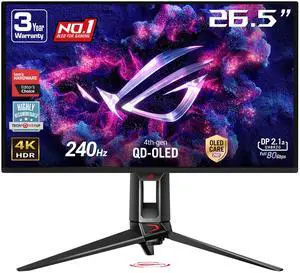
ASUS ROG Swift OLED PG32UCDM 32-inch 4K Gaming Monitor
The ASUS ROG Swift OLED PG32UCDM 32-inch 4K Gaming Monitor is the best premium 4K OLED pick for players who want high resolution and speed, with a 240Hz refresh rate. The ASUS ROG Swift OLED PG32UCDM 32-inch 4K Gaming Monitor's 32-inch OLED panel brings contrast and fine detail together.
Best for: Premium 4K OLED gaming
- Screen size
- 32 inches
- Resolution
- 3840 × 2160
- Refresh rate
- 240Hz
- Panel type
- QD-OLED
- 4K resolution and 240Hz refresh rate
- OLED contrast
- 32-inch size suits a range of desks
- Premium feature set is more than casual players need
- OLED care is worth considering for static desktop use
Is the ASUS ROG Swift OLED PG32UCDM 32-inch 4K Gaming Monitor worth buying on Black Friday 2026?
The ASUS ROG Swift OLED PG32UCDM 32-inch 4K Gaming Monitor is worth considering for players who want premium 4K OLED performance. The ASUS ROG Swift OLED PG32UCDM 32-inch 4K Gaming Monitor's 240Hz refresh rate, 3840 × 2160 resolution and QD-OLED panel combine speed with high-contrast visuals.
See today’s Black Friday price on Amazon
#6
Dell Alienware AW3423DWF 34-inch QD-OLED Gaming Monitor
The Dell Alienware AW3423DWF 34-inch QD-OLED Gaming Monitor is the best fit for players who want an ultrawide OLED alternative, with a 165Hz refresh rate. The Dell Alienware AW3423DWF 34-inch QD-OLED Gaming Monitor's 34-inch 21:9 screen offers an immersive field of view in a smaller format than a 45-inch display.
Best for: 34-inch ultrawide OLED gaming
- Screen size
- 34 inches
- Resolution
- 3440 × 1440
- Refresh rate
- 165Hz
- Panel type
- QD-OLED
- Immersive 21:9 screen
- QD-OLED contrast and color
- 165Hz refresh rate
- Not as fast as 240Hz options
- Ultrawide format is not ideal for every console game
Is the Dell Alienware AW3423DWF 34-inch QD-OLED Gaming Monitor worth buying on Black Friday 2026?
The Dell Alienware AW3423DWF 34-inch QD-OLED Gaming Monitor is worth considering for PC players who want ultrawide OLED without moving to a 45-inch screen. The Dell Alienware AW3423DWF 34-inch QD-OLED Gaming Monitor's 3440 × 1440 resolution and 165Hz refresh rate suit immersive gaming.
See today’s Black Friday price on Amazon
#7
Samsung Odyssey OLED G8 G80SD 32-inch 4K UHD Gaming Monitor
The Samsung Odyssey OLED G8 G80SD 32-inch 4K UHD Gaming Monitor is the best 32-inch 4K OLED alternative for players seeking a fast panel, with a 240Hz refresh rate. The Samsung Odyssey OLED G8 G80SD 32-inch 4K UHD Gaming Monitor's 4K resolution offers a sharper format than either ultrawide pick.
Best for: 32-inch 4K OLED gaming
- Screen size
- 32 inches
- Resolution
- 3840 × 2160
- Refresh rate
- 240Hz
- Panel type
- OLED
- 4K OLED image
- 240Hz refresh rate
- 32-inch size works for gaming and media
- Requires a capable PC to drive demanding 4K games at high frame rates
- OLED care is worth considering for static desktop use
Is the Samsung Odyssey OLED G8 G80SD 32-inch 4K UHD Gaming Monitor worth buying on Black Friday 2026?
The Samsung Odyssey OLED G8 G80SD 32-inch 4K UHD Gaming Monitor is worth considering for players who want 4K OLED detail at high refresh rates. The Samsung Odyssey OLED G8 G80SD 32-inch 4K UHD Gaming Monitor's 240Hz panel and 32-inch screen make it a strong alternative to ultrawide displays.
See today’s Black Friday price on Amazon
Which is better, the LG UltraGear OLED 45GR95QE-B or the LG UltraGear 27GR93U-B?
The LG UltraGear OLED 45GR95QE-B is better for immersive PC play, while the LG UltraGear 27GR93U-B is better for sharp 4K detail in a compact 27-inch setup. The 45GR95QE-B has a 45-inch, 3440 × 1440 OLED screen and a 240Hz refresh rate. The 27GR93U-B has a 3840 × 2160 IPS panel and a 144Hz refresh rate.
Choose the 45GR95QE-B if your games benefit from a wide field of view and your desk has room for a large curved display. Choose the 27GR93U-B if you want 4K resolution, a familiar 16:9 layout and straightforward console use. Worth it for most players: match the screen to your space and gaming library, not just the headline refresh rate.
Is OLED or IPS better for a gaming monitor?
OLED is the stronger choice for deep contrast, while IPS is a practical choice for 4K clarity and varied desktop use. The LG UltraGear OLED 45GR95QE-B has a 240Hz OLED panel, and the LG UltraGear 27GR93U-B has a 144Hz IPS panel.
OLED pixels switch individually, giving dark scenes rich blacks and bright highlights against dark backgrounds. IPS displays suit gamers who want sharp resolution and a versatile screen for everyday tasks. For a bright room or static desktop use, review each model’s care guidance and ergonomics. Compare the exact resolution and input options too, since panel type alone does not determine the right fit.
Which monitor is better for PS5 and Xbox Series X gaming?
The LG UltraGear 27GR93U-B is the better starting point for PS5 and Xbox Series X owners who want 27-inch 4K gaming. Its 3840 × 2160 resolution and 144Hz maximum refresh rate give consoles a familiar 16:9 display format.
Console output depends on the game and system settings, so a monitor’s maximum refresh rate does not mean every title runs at that speed. The LG UltraGear OLED 45GR95QE-B is geared more toward PC ultrawide play; console games designed for 16:9 do not use its full 21:9 screen. Check HDMI features, supported resolution and console game modes before buying. For a mixed console-and-PC setup, compare connections and intended use first.
How much desk space does a 45-inch ultrawide monitor need?
The LG UltraGear OLED 45GR95QE-B needs more desk width and viewing distance than the 27-inch LG UltraGear 27GR93U-B. The 45GR95QE-B has a 45-inch curved 21:9 screen, while the 27GR93U-B uses a 27-inch 16:9 panel.
Measure your desk before choosing an ultrawide. Account for the stand, keyboard placement and how far back you sit; screen width can feel overwhelming when the viewing distance is too short. A 27-inch 4K display is easier to fit and keeps its image detail concentrated in a smaller area. A 32-inch 4K screen, such as the LG UltraGear 32GR93U-B, gives a middle ground for players seeking more screen space.
What should gamers compare for Black Friday 2026 monitors?
Black Friday 2026 monitor shoppers should compare resolution, refresh rate, panel type, size and ports before choosing a model. The LG UltraGear OLED 45GR95QE-B prioritizes a 45-inch ultrawide OLED experience; the LG UltraGear 27GR93U-B prioritizes 27-inch 4K gaming.
Match the display to your system: high-resolution, high-refresh PC gaming needs suitable graphics hardware, while console users should check supported HDMI features and 16:9 compatibility. Read the full model number carefully, because related monitor names can refer to different sizes or specifications. Compare warranty terms, return windows and current retailer listings as part of your buying decision. A strong fit for your setup matters more than a longer spec sheet.
Buying Guide
Choose the right screen size
The LG UltraGear OLED 45GR95QE-B suits large desks, while the LG UltraGear 27GR93U-B fits compact gaming spaces. Measure your desk width and preferred viewing distance before selecting a screen.
Match resolution to your system
The LG UltraGear 27GR93U-B delivers 3840 × 2160 resolution, while the LG UltraGear OLED 45GR95QE-B runs at 3440 × 1440. Check that your PC or console supports your preferred resolution.
Balance refresh rate and image quality
The ASUS ROG Swift OLED PG32UCDM combines 4K with 240Hz, while the LG UltraGear 27GR93U-B pairs 4K with 144Hz. Choose based on the games you play and your system’s frame rate.
Pick a panel type for your routine
The Samsung Odyssey OLED G8 G80SD offers a 32-inch OLED panel, while the LG UltraGear 32GR93U-B uses IPS. Consider contrast, desktop use and the manufacturer’s OLED care recommendations.
Check ports and retailer terms
The LG UltraGear 27GR93U-B is a sensible console-size pick, but check its current connection details against your setup. Compare included cables, warranty coverage and return terms before completing a Black Friday 2026 purchase.
FAQ
Is the LG UltraGear OLED 45GR95QE-B better than a 27-inch 4K monitor?
The LG UltraGear OLED 45GR95QE-B is better for immersive ultrawide PC gaming, while the LG UltraGear 27GR93U-B is better for compact 4K detail. The 45-inch model has a 240Hz OLED panel; the 27-inch model has 3840 × 2160 resolution.
Is the LG UltraGear 27GR93U-B a 4K monitor?
Yes, the LG UltraGear 27GR93U-B 27-inch 4K UHD Gaming Monitor has a 3840 × 2160 resolution. Its IPS panel and 144Hz refresh rate make it a compact option for players seeking 4K gaming and a standard 16:9 screen.
Is the LG UltraGear OLED 45GR95QE-B good for console gaming?
The LG UltraGear OLED 45GR95QE-B can display console games, but its 21:9 ultrawide format is best suited to PC gaming. Console players seeking a standard 16:9 4K screen should compare the LG UltraGear 27GR93U-B.
Which 32-inch 4K gaming monitor has a 240Hz refresh rate?
The ASUS ROG Swift OLED PG32UCDM and Samsung Odyssey OLED G8 G80SD both offer 32-inch 4K panels with 240Hz refresh rates. The ASUS model uses QD-OLED, while the Samsung model is an OLED gaming display.
Is a 27-inch 4K monitor better than a 32-inch 4K monitor?
The LG UltraGear 27GR93U-B is a better fit for a compact desk, while the LG UltraGear 32GR93U-B provides a larger 32-inch view. Both offer 3840 × 2160 resolution and a 144Hz refresh rate.
What is the best Black Friday 2026 gaming monitor for 4K?
The ASUS ROG Swift OLED PG32UCDM is a premium 4K gaming pick, with a 32-inch QD-OLED panel and 240Hz refresh rate. The LG UltraGear 27GR93U-B is a compact 27-inch 4K alternative with a 144Hz IPS panel.