

As an Amazon Associate we earn from qualifying purchases.
- Best overall: Noctua NF-A12x25 PWM chromax.black.swap
- Best budget: Noctua NF-A12x25 PWM
- Best premium: Lian Li UNI FAN SL-INF 120 Triple Pack Black
- Best for near-silent builds: Noctua NF-A12x25 ULN
- Lian Li UNI FAN SL-INF 120 Triple Pack Black suits synchronized RGB builds and includes three fans plus a controller.
- Noctua NF-A12x25 PWM chromax.black.swap is a strong choice for a quiet, understated 120 mm fan setup.
- The Noctua NF-A12x25 family prioritizes focused airflow and simple connections, while Lian Li UNI FAN SL-INF adds distinctive lighting.
- Check fan size, motherboard or controller connections, radiator clearance and desired lighting before choosing a Black Friday 2026 fan.
For a Black Friday 2026 choice between the Lian Li UNI FAN SL-INF and Noctua NF-A12x25, decide whether synchronized RGB or understated cooling matters more. The Lian Li UNI FAN SL-INF 120 Triple Pack Black brings three 120 mm fans and a controller for a coordinated build; the Noctua NF-A12x25 PWM chromax.black.swap offers a clean black finish and a 2,000 RPM maximum speed.
We researched and compared specs, reviews and owner feedback to identify fans for different cases, budgets and noise preferences. Our shortlist includes single fans, multi-fan kits and quieter Noctua options, so you can match cooling to your PC instead of buying features you do not need. My pick for most people is the Noctua NF-A12x25 PWM chromax.black.swap when performance and a neutral look lead; choose Lian Li for the lighting showcase.
How We Picked
- Cooling specifications: we compared maximum speed, airflow figures and fan dimensions where manufacturers provide them.
- Acoustics: we considered published noise ratings and the purpose of slower Noctua variants.
- Lighting and setup: we checked RGB features, bundled controllers and the appeal of daisy-chain fan connections.
- Value and fit: we considered single-fan and multi-fan options, case compatibility and whether a controller adds useful convenience.
- Owner feedback: we researched recurring comments about setup, appearance, software and everyday use without presenting the guide as research.
Comparison Table
| Product | Best for | Maximum speed | Fan size | Lighting or pack feature |
|---|---|---|---|---|
| Lian Li UNI FAN SL-INF 120 Triple Pack Black | Three-fan RGB builds | 2,100 RPM | 120 x 120 x 25 mm | RGB; 3 fans and controller |
| Lian Li UNI FAN SL-INF 120 Single Pack Black | One matching RGB fan | 2,100 RPM | 120 x 120 x 25 mm | RGB; 1 fan |
| Lian Li UNI FAN SL-INF 120 Reverse Blade Single Pack Black | Visible RGB intake | 2,000 RPM | 120 x 120 x 25 mm | RGB; reverse blade |
| Lian Li UNI FAN SL-INF 140 Single Pack Black | 140 mm RGB mounts | 1,600 RPM | 140 x 140 x 25 mm | RGB; 1 fan |
| Noctua NF-A12x25 PWM chromax.black.swap | Black PWM cooling | 2,000 RPM | 120 x 120 x 25 mm | No RGB; color pads |
| Noctua NF-A12x25 PWM | Straightforward PWM cooling | 2,000 RPM | 120 x 120 x 25 mm | No RGB; low-noise adapter |
| Noctua NF-A12x25 FLX | Manual speed settings | 2,000 RPM | 120 x 120 x 25 mm | No RGB; speed adapters |
| Noctua NF-A12x25 ULN | Quiet-first builds | 1,200 RPM | 120 x 120 x 25 mm | No RGB; low-noise adapter |
Best Picks Reviewed
#1
Lian Li UNI FAN SL-INF 120 Triple Pack Black
The Lian Li UNI FAN SL-INF 120 Triple Pack Black is the best RGB fan kit for showcase PC builders; its 120 mm fans reach 2,100 RPM and the pack includes three fans with a controller.

Best for: Three-fan RGB builds with a coordinated controller
- Fan size
- 120 x 120 x 25 mm
- Maximum speed
- 2,100 RPM
- Maximum airflow
- 61.3 CFM
- Pack contents
- 3 fans and controller
- Distinctive infinity-mirror lighting
- Controller included in the triple pack
- Linked fan design helps reduce cable clutter
- RGB and controller features add setup complexity
Is the Lian Li UNI FAN SL-INF 120 Triple Pack Black worth buying on Black Friday 2026?
The Lian Li UNI FAN SL-INF 120 Triple Pack Black is worth considering for a three-fan RGB build. The Lian Li UNI FAN SL-INF 120 Triple Pack Black's 2,100 RPM maximum speed, bundled controller and linked design combine cooling hardware with a coordinated lighting setup.
See today’s Black Friday price on Amazon
#2
Lian Li UNI FAN SL-INF 120 Single Pack Black
The Lian Li UNI FAN SL-INF 120 Single Pack Black is the best add-on fan for builders expanding an existing SL-INF setup; its 120 mm frame reaches 2,100 RPM.

Best for: Adding one matching RGB fan
- Fan size
- 120 x 120 x 25 mm
- Maximum speed
- 2,100 RPM
- Maximum airflow
- 61.3 CFM
- Matches the SL-INF family’s lighting
- Useful for replacing or adding one fan
- Compact standard 120 mm size
- A controller is not included with this single-fan option
Is the Lian Li UNI FAN SL-INF 120 Single Pack Black worth buying on Black Friday 2026?
The Lian Li UNI FAN SL-INF 120 Single Pack Black is a sensible add-on when a build already uses compatible SL-INF hardware. The 2,100 RPM fan keeps the family’s RGB look, but buyers starting from scratch should compare the triple pack.
See today’s Black Friday price on Amazon
#3
Lian Li UNI FAN SL-INF 120 Reverse Blade Single Pack Black
The Lian Li UNI FAN SL-INF 120 Reverse Blade Single Pack Black is the best choice for visible intake lighting; its 120 mm reverse-blade design presents the fan’s illuminated side toward the viewer.

Best for: RGB intake positions where the fan face stays visible
- Fan size
- 120 x 120 x 25 mm
- Maximum speed
- 2,000 RPM
- Blade design
- Reverse blade
- Keeps the preferred fan face visible at intake
- Carries the SL-INF lighting style
- Useful for showcase case layouts
- Check airflow direction and fan orientation before installation
Is the Lian Li UNI FAN SL-INF 120 Reverse Blade Single Pack Black worth buying on Black Friday 2026?
The Lian Li UNI FAN SL-INF 120 Reverse Blade Single Pack Black is worth considering for an intake position where standard fan blades would hide the lit side. The Lian Li UNI FAN SL-INF 120 Reverse Blade Single Pack Black's 120 mm reverse-blade format helps preserve the intended appearance in a showcase case.
See today’s Black Friday price on Amazon
#4
Lian Li UNI FAN SL-INF 140 Single Pack Black
The Lian Li UNI FAN SL-INF 140 Single Pack Black is the best larger RGB option for compatible cases; its 140 mm fan reaches 1,600 RPM.
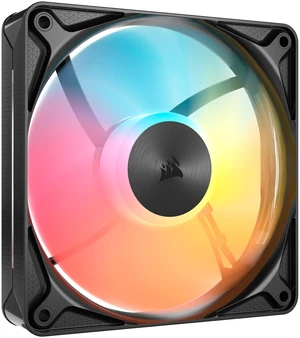
Best for: 140 mm mounts in RGB-focused builds
- Fan size
- 140 x 140 x 25 mm
- Maximum speed
- 1,600 RPM
- Pack contents
- 1 fan
- Larger 140 mm format
- SL-INF infinity-mirror lighting
- Good match for compatible case mounts
- Not compatible with 120 mm-only mounting positions
Is the Lian Li UNI FAN SL-INF 140 Single Pack Black worth buying on Black Friday 2026?
The Lian Li UNI FAN SL-INF 140 Single Pack Black is a good fit for a case with a 140 mm mount and a preference for coordinated RGB. The 1,600 RPM specification and larger frame suit a different installation than a standard 120 mm fan.
See today’s Black Friday price on Amazon
#5 · Top pick
Noctua NF-A12x25 PWM chromax.black.swap
The Noctua NF-A12x25 PWM chromax.black.swap is the best all-around black 120 mm fan for builders seeking focused cooling without RGB; its maximum speed is 2,000 RPM.

Best for: Quiet, understated cooling with PWM control
- Fan size
- 120 x 120 x 25 mm
- Maximum speed
- 2,000 RPM
- Maximum airflow
- 60.1 CFM
- Maximum noise
- 22.6 dBA
- Black finish suits understated builds
- PWM speed control
- Includes interchangeable color pads
- No built-in RGB lighting
Is the Noctua NF-A12x25 PWM chromax.black.swap worth buying on Black Friday 2026?
The Noctua NF-A12x25 PWM chromax.black.swap is a strong pick for a black, no-RGB build. The Noctua NF-A12x25 PWM chromax.black.swap's 2,000 RPM maximum, PWM control and 22.6 dBA rated noise make it a flexible option for case or radiator cooling.
See today’s Black Friday price on Amazon
#6
Noctua NF-A12x25 PWM
The Noctua NF-A12x25 PWM is the best straightforward 120 mm cooling fan for builders who value PWM control over lighting; its maximum airflow is 60.1 CFM.

Best for: Simple PWM cooling in a neutral-color build
- Fan size
- 120 x 120 x 25 mm
- Maximum speed
- 2,000 RPM
- Maximum airflow
- 60.1 CFM
- Maximum noise
- 22.6 dBA
- Four-pin PWM speed control
- Established 120 mm mounting size
- Includes low-noise adapter
- Classic brown-and-beige finish will not suit every build
Is the Noctua NF-A12x25 PWM worth buying on Black Friday 2026?
The Noctua NF-A12x25 PWM is worth considering for a practical 120 mm fan with PWM control and no lighting extras. The 2,000 RPM maximum and 60.1 CFM airflow rating suit builders who prioritize cooling specifications over a matching RGB theme.
See today’s Black Friday price on Amazon
#7
Noctua NF-A12x25 FLX
The Noctua NF-A12x25 FLX is the best choice for builders who prefer manual speed options without motherboard PWM; its maximum speed is 2,000 RPM.

Best for: Three-speed control without PWM
- Fan size
- 120 x 120 x 25 mm
- Maximum speed
- 2,000 RPM
- Maximum airflow
- 60.1 CFM
- Control
- Three speed settings
- Includes low-noise and ultra-low-noise adapters
- Does not require PWM control
- Useful for simple or older setups
- Speed adjustment is less convenient than automatic PWM control
Is the Noctua NF-A12x25 FLX worth buying on Black Friday 2026?
The Noctua NF-A12x25 FLX is a suitable choice for a system that needs a 3-pin fan and manual speed options. The Noctua NF-A12x25 FLX's 2,000 RPM maximum and included adapters provide several operating levels without requiring motherboard PWM control.
See today’s Black Friday price on Amazon
#8
Noctua NF-A12x25 ULN
The Noctua NF-A12x25 ULN is the best quiet-first option for low-noise PC builds; its maximum speed is 1,200 RPM.

Best for: Low-noise systems with modest cooling demands
- Fan size
- 120 x 120 x 25 mm
- Maximum speed
- 1,200 RPM
- Maximum airflow
- 37.3 CFM
- Maximum noise
- 12.1 dBA
- Low maximum noise rating
- Includes a low-noise adapter
- Useful when quiet operation takes priority
- Lower maximum airflow than faster A12x25 versions
Is the Noctua NF-A12x25 ULN worth buying on Black Friday 2026?
The Noctua NF-A12x25 ULN is a good match for quiet-first systems that do not need the higher airflow of a faster fan. The Noctua NF-A12x25 ULN's 1,200 RPM maximum and 12.1 dBA rating make the reduced speed the key reason to choose this version.
See today’s Black Friday price on Amazon
Which is better, Lian Li UNI FAN SL-INF or Noctua NF-A12x25?
Lian Li UNI FAN SL-INF 120 adds RGB lighting and linked-fan convenience. Noctua NF-A12x25 PWM chromax.black.swap prioritizes straightforward cooling in a standard 120 mm frame. The Lian Li UNI FAN SL-INF 120 Triple Pack reaches 2,100 RPM and includes a controller; Noctua NF-A12x25 PWM chromax.black.swap reaches 2,000 RPM and has a published 22.6 dBA noise rating.
Choose Lian Li for a visible RGB build or Noctua for understated styling and a simpler setup. Cooling depends on the case, radiator, fan curve and system layout, so published specifications are comparison points, not guarantees.
Are Lian Li UNI FAN SL-INF fans good for Black Friday builds?
Lian Li UNI FAN SL-INF 120 Triple Pack Black suits a three-fan RGB build, with three 120 mm fans and a controller included. Its linked design simplifies connections, and infinity-mirror lighting stands out through a clear side panel.
Check connection requirements and case layout, especially when adding the fans to an existing hub. Choose a single-pack model for one replacement, or a reverse-blade model when the visible fan face matters at an intake. For builds without RGB, Noctua NF-A12x25 PWM chromax.black.swap keeps the setup simpler.
Is Noctua NF-A12x25 worth choosing over RGB fans?
Noctua NF-A12x25 PWM chromax.black.swap offers a black 120 mm frame, PWM control and a published 22.6 dBA noise rating. Noctua also offers Noctua NF-A12x25 PWM in brown and beige, Noctua NF-A12x25 FLX with manual speed adapters, and Noctua NF-A12x25 ULN for lower-speed operation.
These models lack the lighting of Lian Li UNI FAN SL-INF fans. Choose by finish and control method, and check motherboard headers and cooling needs before selecting a slower model.
What should you check before buying a 120 mm or 140 mm PC fan?
Match the fan to the case, radiator or cooler mount. Lian Li UNI FAN SL-INF 120 and Noctua NF-A12x25 models fit 120 mm positions; Lian Li UNI FAN SL-INF 140 Single Pack Black requires a 140 mm position.
Check power and lighting connections, radiator clearance, and intake or exhaust direction. Noctua PWM models use PWM control, while Noctua NF-A12x25 FLX includes manual speed adapters. Lian Li UNI FAN SL-INF RGB models add controller requirements, and pack contents vary.
Which fan type offers better value for a 2026 PC build?
Value depends on fan count, lighting needs and included hardware. Lian Li UNI FAN SL-INF 120 Triple Pack Black includes three RGB fans and a controller; Noctua NF-A12x25 PWM chromax.black.swap is a straightforward single-fan option.
Compare the number of fans required and the package contents. Choose a triple pack for a new build or a single fan for a replacement. Without RGB, compare Noctua NF-A12x25 PWM, Noctua NF-A12x25 FLX and Noctua NF-A12x25 ULN by control method and speed.
Buying Guide
Choose fan size first
Match the fan to the case, radiator or cooler mount. Lian Li UNI FAN SL-INF 120 and Noctua NF-A12x25 models fit 120 mm mounts; Lian Li UNI FAN SL-INF 140 needs a 140 mm mount.
Pick RGB or a simpler setup
Choose Lian Li UNI FAN SL-INF for infinity-mirror lighting. Noctua NF-A12x25 models have no built-in RGB and use conventional fan connections.
Match speed control to your system
Noctua NF-A12x25 PWM uses motherboard PWM control, Noctua NF-A12x25 FLX includes manual speed adapters, and Noctua NF-A12x25 ULN has a 1,200 RPM maximum. Check available headers and controller connections.
Compare pack contents
Lian Li UNI FAN SL-INF 120 Triple Pack Black includes three fans and a controller. Check included cables and hardware against your build.
Plan airflow direction
Plan intake and exhaust positions before installation. Lian Li UNI FAN SL-INF reverse-blade models keep the lit face visible at selected intake positions.
FAQ
Which fan is quieter, Lian Li UNI FAN SL-INF or Noctua NF-A12x25?
Noctua NF-A12x25 models include options built around lower maximum speeds, including the ULN at 1,200 RPM with a 12.1 dBA rating. Lian Li UNI FAN SL-INF 120 reaches 2,100 RPM and prioritizes RGB presentation as well as cooling.
Does the Lian Li UNI FAN SL-INF triple pack include a controller?
Yes. Lian Li UNI FAN SL-INF 120 Triple Pack Black includes three 120 mm fans and a controller. The single-pack version is a different purchase, so check its box contents if the build does not already have compatible control hardware.
Is Noctua NF-A12x25 PWM chromax.black.swap better than the brown version?
Noctua NF-A12x25 PWM chromax.black.swap and Noctua NF-A12x25 PWM share the same core 120 mm PWM fan specifications. The chromax.black.swap version suits black builds and includes interchangeable color pads; the standard version uses Noctua’s brown-and-beige finish.
Can I use a 140 mm fan in a 120 mm case mount?
No. Lian Li UNI FAN SL-INF 140 needs a 140 mm mounting position, while Lian Li UNI FAN SL-INF 120 and Noctua NF-A12x25 use 120 mm mounts. Confirm the case or radiator specifications before choosing the fan size.
Should I buy Noctua NF-A12x25 ULN for a gaming PC?
Noctua NF-A12x25 ULN suits a gaming PC when quiet operation takes priority and the system’s cooling needs fit its 1,200 RPM maximum. For higher airflow needs, compare the standard Noctua NF-A12x25 PWM or another faster 120 mm fan.
Which Lian Li UNI FAN SL-INF version is best for intake?
Lian Li UNI FAN SL-INF 120 Reverse Blade Single Pack Black is the version to consider when an intake position should show the illuminated fan face. Check the fan’s airflow direction and controller compatibility as part of the installation plan.