

As an Amazon Associate we earn from qualifying purchases.
- Best overall: OBSBOT Tiny 2 4K PTZ Webcam
- Best budget: Logitech C922 Pro Stream Webcam
- Best premium: Razer Kiyo Pro Ultra 4K Webcam
- Best for everyday calls: Logitech Brio 500 Full HD Webcam
- Logitech C922 Pro Stream Webcam records at 1080p and 30 fps, making it a straightforward pick for traditional streaming.
- OBSBOT Tiny 2 4K PTZ Webcam offers 4K video and a motorized gimbal for creators who want camera movement and tracking.
- Insta360 Link 2 4K Webcam is another strong 4K option with a two-axis gimbal.
- Logitech Brio 500 Full HD Webcam prioritizes simple video calls, a privacy shutter and easy desk setup.
- Compare resolution, frame rate, camera movement and microphone needs before choosing a Black Friday 2026 webcam.
The Logitech C922 Pro Stream Webcam is a sensible choice for familiar 1080p streaming, while the OBSBOT Tiny 2 4K PTZ Webcam suits creators who want 4K capture and a moving camera. We researched and compared specs, reviews and owner feedback to identify the differences that matter for streaming, video calls and desk setups.
Our short version: choose the Logitech C922 Pro Stream Webcam for a simple, fixed webcam setup, or the OBSBOT Tiny 2 4K PTZ Webcam for gimbal movement and sharper capture. The guide also compares five alternatives, including budget-friendly and premium options, so you can match a webcam to your room, software and recording habits during Black Friday 2026.
How We Picked
- Video resolution and frame rates, including whether a model offers 4K or 60 fps capture.
- Camera movement, field of view, focus and framing features that affect everyday use.
- Microphone, privacy and connection details that matter for calls and streaming.
- Owner feedback and published specifications, with attention to setup and compatibility.
- Value by use case, from uncomplicated video calls to creator-focused camera control.
Comparison Table
| Product | Best for | Maximum resolution | Maximum frame rate | Camera movement |
|---|---|---|---|---|
| Logitech C922 Pro Stream Webcam | Simple streaming | 1080p | 60 fps at 720p | Fixed |
| OBSBOT Tiny 2 4K PTZ Webcam | Tracking and 4K capture | 4K | 60 fps at 1080p | 2-axis gimbal |
| Logitech Brio 4K Webcam | Fixed 4K calls | 4K | 60 fps at 1080p | Fixed |
| Logitech Brio 500 Full HD Webcam | Everyday calls | 1080p | 30 fps | Fixed |
| Razer Kiyo Pro Ultra 4K Webcam | Premium fixed streaming | 4K | 60 fps at 1080p | Fixed |
| Elgato Facecam MK.2 | Manual image controls | 1080p | 60 fps | Fixed |
| Insta360 Link 2 4K Webcam | Moving presenters | 4K | 60 fps at 1080p | 2-axis gimbal |
Best Picks Reviewed
#1
Logitech C922 Pro Stream Webcam
The Logitech C922 Pro Stream Webcam is the best straightforward streaming webcam for new and casual streamers; it records 1080p video at 30 fps.

Best for: Simple streaming and video calls
- Maximum resolution
- 1080p
- Frame rate
- 30 fps at 1080p; 60 fps at 720p
- Field of view
- 78°
- Microphones
- 2
- Familiar plug-and-play USB setup
- Offers 60 fps at 720p
- Includes stereo microphones
- No 4K capture or motorized camera movement
Is the Logitech C922 Pro Stream Webcam worth buying on Black Friday 2026?
The Logitech C922 Pro Stream Webcam is worth considering for streamers who want dependable 1080p capture without a motorized camera. The Logitech C922 Pro Stream Webcam's 720p, 60 fps mode adds smoother motion, while the fixed view suits a desk where framing stays consistent.
See today’s Black Friday price on Amazon
#2 · Top pick
OBSBOT Tiny 2 4K PTZ Webcam
The OBSBOT Tiny 2 4K PTZ Webcam is the best premium webcam for creators who want a moving camera; its 1/1.5-inch sensor supports 4K capture.
Best for: Creator setups with camera tracking
- Maximum resolution
- 4K
- Frame rate
- 30 fps at 4K; 60 fps at 1080p
- Sensor
- 1/1.5-inch
- Gimbal movement
- 2-axis
- Sharp 4K video capture
- Motorized gimbal adjusts framing
- Supports gesture and voice controls
- More features to configure than a fixed webcam
Is the OBSBOT Tiny 2 4K PTZ Webcam worth buying on Black Friday 2026?
The OBSBOT Tiny 2 4K PTZ Webcam is worth considering for creators who want 4K video and automatic camera movement. The OBSBOT Tiny 2 4K PTZ Webcam's two-axis gimbal helps keep a presenter in frame, while 1080p at 60 fps supports smoother motion.
See today’s Black Friday price on Amazon
#3
Logitech Brio 4K Webcam
The Logitech Brio 4K Webcam is the best fixed 4K webcam for professionals who want a wide framing choice; it supports 4K video at 30 fps.
Best for: Work calls and fixed 4K capture
- Maximum resolution
- 4K
- Frame rate
- 30 fps at 4K; 60 fps at 1080p
- Field of view
- Up to 90°
- Digital zoom
- 5x
- Provides 4K capture in a fixed webcam design
- Offers adjustable field-of-view settings
- Includes a privacy shutter
- Does not pan or tilt to follow movement
Is the Logitech Brio 4K Webcam worth buying on Black Friday 2026?
The Logitech Brio 4K Webcam is worth considering for work calls and recording where a fixed camera is preferred. The Logitech Brio 4K Webcam captures 4K at 30 fps, offers a field of view up to 90 degrees and includes framing options without a gimbal.
See today’s Black Friday price on Amazon
#4
Logitech Brio 500 Full HD Webcam
The Logitech Brio 500 Full HD Webcam is the best webcam for everyday calls and small home offices; it records 1080p video at 30 fps.
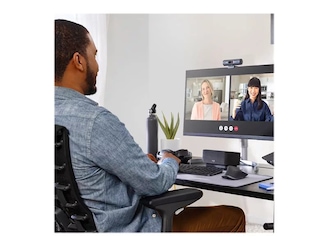
Best for: Everyday video calls
- Maximum resolution
- 1080p
- Frame rate
- 30 fps
- Field of view
- 90°
- Privacy feature
- Integrated shutter
- Built-in privacy shutter
- Wide view accommodates different desk layouts
- Show Mode tilts the camera toward a desk
- Does not offer 4K recording
Is the Logitech Brio 500 Full HD Webcam worth buying on Black Friday 2026?
The Logitech Brio 500 Full HD Webcam is worth considering for video calls, online meetings and small home offices. The Logitech Brio 500 Full HD Webcam's 1080p capture, integrated privacy shutter and Show Mode make it a practical fit for people who value simple everyday operation.
See today’s Black Friday price on Amazon
#5
Razer Kiyo Pro Ultra 4K Webcam
The Razer Kiyo Pro Ultra 4K Webcam is the best premium fixed webcam for image-focused streamers; its 1/1.2-inch sensor captures 4K video at 30 fps.
Best for: Premium fixed-camera streaming
- Maximum resolution
- 4K
- Frame rate
- 30 fps at 4K; 60 fps at 1080p
- Sensor
- 1/1.2-inch
- Aperture
- f/1.7
- Large sensor for a webcam
- Supports 1080p capture at 60 fps
- Designed for detailed streaming video
- Large body takes up more space than compact models
Is the Razer Kiyo Pro Ultra 4K Webcam worth buying on Black Friday 2026?
The Razer Kiyo Pro Ultra 4K Webcam is worth considering for streamers who prioritize image detail from a fixed camera. The 1/1.2-inch sensor and 4K capture make it a creator-focused alternative to simpler 1080p webcams.
See today’s Black Friday price on Amazon
#6
Elgato Facecam MK.2
The Elgato Facecam MK.2 is the best webcam for streamers who prefer manual image controls; it captures 1080p video at 60 fps.
Best for: Streaming with software-based image controls
- Maximum resolution
- 1080p
- Frame rate
- 60 fps
- Field of view
- 82°
- Focus
- Fixed
- Smooth 1080p, 60 fps video
- Software supports image adjustments
- Compact design for a monitor setup
- Does not include a built-in microphone
Is the Elgato Facecam MK.2 worth buying on Black Friday 2026?
The Elgato Facecam MK.2 is worth considering for streamers who use a separate microphone and want control over their picture settings. The Elgato Facecam MK.2's 1080p, 60 fps capture favors smooth motion, while fixed focus keeps the setup simple.
See today’s Black Friday price on Amazon
#7
Insta360 Link 2 4K Webcam
The Insta360 Link 2 4K Webcam is the best gimbal webcam for presenters who move around; it records 4K video at 30 fps.
Best for: Presenters and moving subjects
- Maximum resolution
- 4K
- Frame rate
- 30 fps at 4K; 60 fps at 1080p
- Sensor
- 1/2-inch
- Gimbal movement
- 2-axis
- Gimbal movement supports flexible framing
- Captures 4K video
- Offers gesture-based controls
- Costs more to set up than a basic fixed webcam
Is the Insta360 Link 2 4K Webcam worth buying on Black Friday 2026?
The Insta360 Link 2 4K Webcam is worth considering for presenters who move around during lessons, demonstrations or calls. The Insta360 Link 2 4K Webcam's two-axis gimbal follows changing framing needs, and 4K at 30 fps provides detailed video for compatible setups.
See today’s Black Friday price on Amazon
Which webcam is better, Logitech C922 or OBSBOT Tiny 2?
The Logitech C922 Pro Stream Webcam is a better fit for simple 1080p streaming, while the OBSBOT Tiny 2 4K PTZ Webcam is better for 4K capture and camera movement. The Logitech model records at 1080p and 30 fps, with a smoother 720p, 60 fps option. The OBSBOT model raises the resolution to 4K at 30 fps and adds a two-axis motorized gimbal.
Choose the Logitech C922 Pro Stream Webcam when you sit in one place and want a straightforward fixed view. Choose the OBSBOT Tiny 2 4K PTZ Webcam when you present, teach or move around in frame. A 4K monitor is not required to record 4K, but the computer, software and upload workflow should support the larger video files.
Is the OBSBOT Tiny 2 worth choosing over a basic webcam?
The OBSBOT Tiny 2 4K PTZ Webcam is worth choosing over a basic webcam when 4K video and gimbal movement improve your recording setup. Its 1/1.5-inch sensor and 4K capture give creators more image detail, and the camera can adjust its angle to keep a presenter in view.
A fixed webcam such as the Logitech C922 Pro Stream Webcam is a simpler choice for a stationary desk and routine calls. The gimbal features matter most for demonstrations, teaching and presentations where the subject changes position. Review the camera’s control options and your computer’s available USB connection before deciding.
Which webcam should streamers choose for Black Friday 2026?
The Logitech C922 Pro Stream Webcam suits entry-level streaming at 1080p, while the Elgato Facecam MK.2 suits streamers who want 60 fps and use a separate microphone. The OBSBOT Tiny 2 4K PTZ Webcam is the step-up option for streamers who need 4K resolution and a camera that moves.
Match the frame rate to the stream: 60 fps gives motion a smoother look, while 30 fps can suit a seated talking-head setup. Also check the streaming platform’s resolution limits and your upload capacity. A dedicated microphone remains an important part of a clear broadcast, especially with the Elgato Facecam MK.2, which has no built-in microphone.
Do 4K webcams make a difference for video calls?
The Logitech Brio 4K Webcam and OBSBOT Tiny 2 4K PTZ Webcam offer 4K capture, while the Logitech Brio 500 Full HD Webcam focuses on 1080p calls. Higher resolution is most useful for recording, cropping and detailed presentations; ordinary calls often display at a lower resolution set by the meeting service.
Consider room lighting, camera position and connection quality alongside resolution. A well-positioned 1080p webcam can serve everyday meetings better than a poorly framed 4K camera. Choose a gimbal model when you need movement, a fixed 4K model when you want detail, and a Full HD model when simple calls are the priority.
What should shoppers compare before buying a webcam?
Webcam shoppers should compare resolution, frame rate, field of view, focus, microphone options and camera movement before choosing a model. The Logitech C922 Pro Stream Webcam has stereo microphones and a fixed 78-degree view, while the OBSBOT Tiny 2 4K PTZ Webcam adds a motorized gimbal and 4K capture.
Check whether the webcam connects cleanly to your computer and works with your preferred meeting or streaming software. Think about whether a privacy shutter is important, whether you need a separate microphone and how much desk space is available. The best Black Friday 2026 pick is the model that matches your actual recording routine.
Buying Guide
Choose resolution for your actual use
The Logitech C922 Pro Stream Webcam records at 1080p, while the OBSBOT Tiny 2 4K PTZ Webcam captures 4K. Full HD is a practical fit for regular calls and many streams. Choose 4K when you record content, crop footage or want more detail in a supported workflow.
Compare frame rates
The Elgato Facecam MK.2 records at 1080p and 60 fps, while the Logitech C922 Pro Stream Webcam offers 60 fps at 720p. Higher frame rates help fast movement look smoother. For seated conversations, 30 fps is often sufficient.
Decide whether the camera should move
The OBSBOT Tiny 2 4K PTZ Webcam and Insta360 Link 2 4K Webcam include two-axis gimbals; fixed webcams keep the view stationary. Pick a gimbal for presentations and demonstrations, or a fixed model for a consistent desk position.
Check sound and privacy needs
The Logitech C922 Pro Stream Webcam includes 2 microphones, while the Elgato Facecam MK.2 requires a separate microphone. A privacy shutter, such as the one on the Logitech Brio 500 Full HD Webcam, is useful for a camera that stays connected between calls.
Match the camera to your setup
The Logitech Brio 4K Webcam offers a field of view up to 90 degrees, while the Logitech C922 Pro Stream Webcam has a 78-degree view. Check your desk space, USB connections, software and lighting so your chosen webcam fits the way you work.
FAQ
Logitech C922 vs OBSBOT Tiny 2: which is better for streaming?
The Logitech C922 Pro Stream Webcam is better for straightforward 1080p streaming, while the OBSBOT Tiny 2 4K PTZ Webcam suits creators who need 4K and camera movement. The C922 also records 720p at 60 fps; the OBSBOT records 1080p at 60 fps.
Is the Logitech C922 Pro Stream Webcam still good for video calls?
The Logitech C922 Pro Stream Webcam remains a practical video-call option for users who want a fixed 1080p camera with stereo microphones. Its 30 fps Full HD mode suits regular calls, while the 720p, 60 fps mode supports smoother motion.
Does the OBSBOT Tiny 2 4K PTZ Webcam follow a presenter?
The OBSBOT Tiny 2 4K PTZ Webcam uses a two-axis motorized gimbal to adjust its view as a presenter moves. The camera also supports gesture and voice controls, making it useful for presentations, demonstrations and recording in a changing frame.
Which webcam is best for streaming in 4K?
The OBSBOT Tiny 2 4K PTZ Webcam, Logitech Brio 4K Webcam, Razer Kiyo Pro Ultra 4K Webcam and Insta360 Link 2 4K Webcam all offer 4K capture. Pick the OBSBOT or Insta360 for gimbal movement, or a fixed model for stationary streaming.
Is the Logitech Brio 500 Full HD Webcam good for meetings?
The Logitech Brio 500 Full HD Webcam is a strong everyday-meeting choice with 1080p video, a 90-degree field of view and an integrated privacy shutter. Show Mode also lets users tilt the camera toward a desk to share physical notes or objects.
Does the Elgato Facecam MK.2 have a microphone?
The Elgato Facecam MK.2 does not include a built-in microphone, so pair it with a headset or separate mic for calls and streams. Its 1080p, 60 fps capture makes it a good fit for streamers who already use external audio equipment.