

As an Amazon Associate we earn from qualifying purchases.
- Best overall: Logitech Combo Touch for iPad Pro 11-inch (M4)
- Best budget: UGREEN Tablet Stand Holder for 4.7-12.9-inch Tablets
- Best premium: Apple Magic Keyboard for iPad Pro 11-inch (M4) – Black
- Best for desk viewing: Lamicall Adjustable Tablet Stand for 4.7-13-inch Tablets
- Logitech Combo Touch combines an iPad keyboard, trackpad and protective case; a tablet stand supports viewing but does not add typing controls.
- Logitech Combo Touch for iPad Pro 11-inch (M4) is the best all-around pick for a compatible iPad Pro owner who wants a removable keyboard.
- Lamicall Adjustable Tablet Stand for 4.7-13-inch Tablets is a flexible desk pick for video calls, reading and watching shows.
- Check the exact iPad generation and screen size before buying a Combo Touch or Apple Magic Keyboard.
- A Bluetooth keyboard and adjustable stand offer a versatile alternative to a keyboard case.
Logitech Combo Touch is the better Black Friday 2026 choice for iPad owners who need a keyboard, trackpad and protective case, while a tablet stand is the simpler pick for hands-free viewing. We researched and compared specs, reviews and owner feedback to find options for work, travel and home use.
My pick for most people is Logitech Combo Touch for iPad Pro 11-inch (M4), provided the iPad matches the case. For watching, video calls or reading at a desk, Lamicall Adjustable Tablet Stand for 4.7-13-inch Tablets delivers a more focused setup. The guide also compares Apple keyboards and a standalone Bluetooth keyboard.
How We Picked
- Device compatibility: We prioritized exact iPad sizes and generations because a keyboard case only fits its specified model.
- Everyday function: We compared keyboard, trackpad, kickstand, viewing-angle and portability features.
- Setup flexibility: We included keyboard cases, standalone keyboards and tablet stands for different desk and travel needs.
- Owner feedback and specifications: We researched and compared published features, reviews and recurring owner comments rather than relying on unverified performance claims.
Comparison Table
| Product | Best for | Compatible device size | Keyboard included | Trackpad included |
|---|---|---|---|---|
| Logitech Combo Touch for iPad Pro 11-inch (M4) | iPad Pro 11-inch (M4) owners | 11-inch iPad Pro | Yes, detachable | Yes |
| Logitech Combo Touch for iPad Air 11-inch (M2) | iPad Air 11-inch (M2) owners | 11-inch iPad Air | Yes, detachable | Yes |
| Logitech Combo Touch for iPad (10th generation) | iPad (10th generation) owners | 10.9-inch iPad | Yes | Yes |
| Logitech Combo Touch for iPad Pro 13-inch (M4) | iPad Pro 13-inch (M4) owners | 13-inch iPad Pro | Yes, detachable | Yes |
| Apple Magic Keyboard for iPad Pro 11-inch (M4) – Black | Premium iPad Pro typing | 11-inch iPad Pro | Yes | Yes |
| Lamicall Adjustable Tablet Stand for 4.7-13-inch Tablets | Desk viewing and calls | 4.7-13 inches | No | No |
| UGREEN Tablet Stand Holder for 4.7-12.9-inch Tablets | Simple tablet viewing | 4.7-12.9 inches | No | No |
Best Picks Reviewed
#1 · Top pick
Logitech Combo Touch for iPad Pro 11-inch (M4)
The Logitech Combo Touch for iPad Pro 11-inch (M4) is the best keyboard case for iPad Pro owners who want a detachable keyboard and trackpad. The 11-inch fit and adjustable kickstand suit work, streaming and drawing setups.

Best for: iPad Pro 11-inch (M4) owners seeking an all-in-one case
- Compatible display
- 11 inches
- Keyboard layout
- 14-key function row
- Connection
- Apple Smart Connector
- Keyboard
- Detachable, backlit
- Combines a case, keyboard and trackpad
- Detachable keyboard supports tablet-only use
- Kickstand offers adjustable viewing
- Fits only the specified iPad Pro generation and size
Is the Logitech Combo Touch for iPad Pro 11-inch (M4) worth buying on Black Friday 2026?
The Logitech Combo Touch for iPad Pro 11-inch (M4) is worth considering for compatible iPad Pro owners who type regularly. A detachable keyboard, trackpad, protective case and 14-key function row make it a flexible alternative to a separate stand and keyboard.
See today’s Black Friday price on Amazon
#2
Logitech Combo Touch for iPad Air 11-inch (M2)
The Logitech Combo Touch for iPad Air 11-inch (M2) is the best keyboard case for iPad Air owners who want typing controls without giving up a removable keyboard. The 11-inch design includes a trackpad and adjustable kickstand.
Best for: iPad Air 11-inch (M2) owners who work on the go
- Compatible display
- 11 inches
- Compatible iPad
- iPad Air (M2)
- Keyboard
- Detachable, backlit
- Controls
- Trackpad and function row
- Turns a compatible iPad Air into a laptop-style setup
- Keyboard detaches for tablet use
- Kickstand supports hands-free viewing
- Not a universal iPad case
Is the Logitech Combo Touch for iPad Air 11-inch (M2) worth buying on Black Friday 2026?
The Logitech Combo Touch for iPad Air 11-inch (M2) is worth considering when a compatible iPad Air needs a keyboard, trackpad and case in one accessory. Check the iPad model before ordering, since the 11-inch case is not a fit for every Air generation.
See today’s Black Friday price on Amazon
#3
Logitech Combo Touch for iPad (10th generation)
The Logitech Combo Touch for iPad (10th generation) is the best keyboard case for 10th-generation iPad owners who want a laptop-style setup at a desk or in class. The Logitech Combo Touch for iPad (10th generation)'s 10.9-inch fit pairs a backlit keyboard with a trackpad and kickstand.
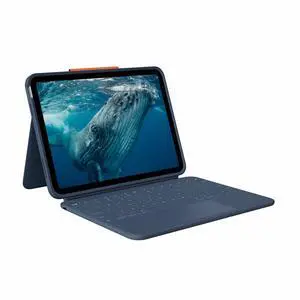
Best for: Students and everyday users with iPad (10th generation)
- Compatible display
- 10.9 inches
- Compatible iPad
- 10th generation
- Key travel
- 1 mm
- Keyboard
- Backlit with trackpad
- Keyboard and case work together as one setup
- Kickstand supports hands-free viewing
- Trackpad helps with pointer-based tasks
- Does not fit other iPad generations by default
Is the Logitech Combo Touch for iPad (10th generation) worth buying on Black Friday 2026?
The Logitech Combo Touch for iPad (10th generation) is worth considering for owners who type often and want a protective case with a trackpad. The 1 mm key travel and adjustable kickstand suit schoolwork and everyday browsing, provided the iPad is the 10th-generation model.
See today’s Black Friday price on Amazon
#4
Logitech Combo Touch for iPad Pro 13-inch (M4)
The Logitech Combo Touch for iPad Pro 13-inch (M4) is the best keyboard case for owners who want a large workspace with a detachable keyboard. The 13-inch fit, trackpad and adjustable kickstand support productivity and media use.
Best for: iPad Pro 13-inch (M4) owners who type often
- Compatible display
- 13 inches
- Keyboard layout
- 14-key function row
- Connection
- Apple Smart Connector
- Keyboard
- Detachable, backlit
- Large display suits split-screen work
- Detachable keyboard provides tablet-only flexibility
- Trackpad and kickstand are built into the setup
- Adds more bulk than using a stand alone
Is the Logitech Combo Touch for iPad Pro 13-inch (M4) worth buying on Black Friday 2026?
The Logitech Combo Touch for iPad Pro 13-inch (M4) is worth considering for compatible owners who want a large-screen typing setup. The Logitech Combo Touch for iPad Pro 13-inch (M4)'s detachable keyboard, trackpad and 14-key function row provide laptop-style controls, while the kickstand keeps the iPad useful for viewing.
See today’s Black Friday price on Amazon
#5
Apple Magic Keyboard for iPad Pro 11-inch (M4) – Black
The Apple Magic Keyboard for iPad Pro 11-inch (M4) – Black is the best premium keyboard accessory for owners who favor a floating design and a direct iPad connection. The 11-inch model adds a 14-key function row and USB-C pass-through charging.
Best for: iPad Pro 11-inch (M4) owners seeking a premium keyboard
- Compatible display
- 11 inches
- Function row
- 14 keys
- Charging port
- USB-C pass-through
- Connection
- Apple Smart Connector
- Floating cantilever design
- Trackpad and function row included
- USB-C pass-through charging
- Designed for a specific iPad Pro size and generation
Is the Apple Magic Keyboard for iPad Pro 11-inch (M4) – Black worth buying on Black Friday 2026?
The Apple Magic Keyboard for iPad Pro 11-inch (M4) – Black is worth considering for compatible iPad Pro owners who prioritize a premium floating design. The 14-key function row, trackpad and USB-C pass-through charging make it a polished alternative to a separate keyboard and stand.
See today’s Black Friday price on Amazon
#6
Lamicall Adjustable Tablet Stand for 4.7-13-inch Tablets
The Lamicall Adjustable Tablet Stand for 4.7-13-inch Tablets is the best desk stand for viewers who want hands-free tablet use without a keyboard case. The Lamicall Adjustable Tablet Stand for 4.7-13-inch Tablets's stated 4.7-to-13-inch compatibility covers a broad range of tablets.
Best for: Reading, video calls and watching at a desk
- Supported device size
- 4.7-13 inches
- Design
- Adjustable tabletop stand
- Setup
- Hands-free viewing
- Works with a range of tablet sizes
- Leaves the screen easy to view while seated
- Simple alternative to a keyboard case
- Does not add a keyboard or trackpad
Is the Lamicall Adjustable Tablet Stand for 4.7-13-inch Tablets worth buying on Black Friday 2026?
The Lamicall Adjustable Tablet Stand for 4.7-13-inch Tablets is worth considering for desk-based reading, video calls and streaming. The stand supports hands-free viewing across a broad stated size range, but buyers who need typing controls should choose a keyboard or add one separately.
See today’s Black Friday price on Amazon
#7
UGREEN Tablet Stand Holder for 4.7-12.9-inch Tablets
The UGREEN Tablet Stand Holder for 4.7-12.9-inch Tablets is the best compact stand option for users who want a simple viewing setup across several tablet sizes. The UGREEN Tablet Stand Holder for 4.7-12.9-inch Tablets's stated 4.7-to-12.9-inch range covers many popular tablets.
Best for: A basic stand for home or office viewing
- Supported device size
- 4.7-12.9 inches
- Design
- Adjustable tabletop stand
- Use
- Portrait or landscape viewing
- Compatible with a wide range of tablet sizes
- Supports hands-free viewing
- Pairs with a separate keyboard when needed
- Offers no keyboard, trackpad or device protection
Is the UGREEN Tablet Stand Holder for 4.7-12.9-inch Tablets worth buying on Black Friday 2026?
The UGREEN Tablet Stand Holder for 4.7-12.9-inch Tablets is worth considering for users who want simple hands-free viewing at home or work. The UGREEN Tablet Stand Holder for 4.7-12.9-inch Tablets's broad stated fit range suits many tablets; add a separate keyboard for writing or other tasks that need physical keys.
See today’s Black Friday price on Amazon
Is Logitech Combo Touch better than a tablet stand?
Logitech Combo Touch is better than a tablet stand for typing, pointer control and case protection, while a stand is better for simple hands-free viewing. The right choice depends on how the iPad is used most often.
A Combo Touch adds a keyboard, trackpad and kickstand in a device-specific case. Owners can detach the keyboard on supported models and use the iPad as a tablet. A stand keeps the tablet separate, so users can pair it with a Bluetooth keyboard or leave it as a screen for recipes, calls and streaming.
Choose a Combo Touch for regular writing or schoolwork. Choose a stand for a lighter, simpler desk setup.
Which Logitech Combo Touch model fits your iPad?
The Logitech Combo Touch model must match both the iPad family and generation; the 11-inch and 13-inch iPad Pro versions are not interchangeable. Check the exact model name in iPad settings before choosing a case.
Logitech Combo Touch for iPad Pro 11-inch (M4) is designed for that specific Pro size and generation, while Logitech Combo Touch for iPad Pro 13-inch (M4) fits the larger Pro. Logitech Combo Touch for iPad Air 11-inch (M2) is a separate Air model, and Logitech Combo Touch for iPad (10th generation) targets the 10th-generation standard iPad.
A similar screen diagonal does not guarantee matching camera, button or case dimensions. Verify the product compatibility listing before checkout.
Are tablet stands a good Black Friday 2026 buy?
A tablet stand is a good Black Friday 2026 buy for people who need a stable viewing position more than a built-in keyboard. Lamicall Adjustable Tablet Stand for 4.7-13-inch Tablets and UGREEN Tablet Stand Holder for 4.7-12.9-inch Tablets cover a wide range of screen sizes.
Stands suit video calls, recipes, reading and streaming, and they leave the iPad easy to remove. A separate keyboard can turn the arrangement into a flexible desk setup, but the stand alone does not provide keys, a trackpad or full case protection.
Skip it if the main goal is typing on a commute or protecting an iPad in a bag; a compatible keyboard case makes more sense for those needs.
What is the difference between Logitech Combo Touch and Apple Magic Keyboard?
Logitech Combo Touch adds a removable keyboard and protective case, while Apple Magic Keyboard for iPad Pro 11-inch (M4) – Black emphasizes a floating design and USB-C pass-through charging. Both options provide a trackpad and connect through Apple’s Smart Connector.
Combo Touch suits users who want to remove the keyboard for tablet-first tasks or use the kickstand in multiple positions. Apple Magic Keyboard suits owners who prefer a laptop-style hinge and a built-in function row. Compatibility differs by iPad model, so neither accessory is a universal keyboard.
Compare the exact tablet generation, keyboard layout and charging features before selecting a model.
What should you check before buying a tablet keyboard or stand?
Check iPad generation, screen size and accessory fit before buying any keyboard case or tablet stand. Those details determine whether the camera, buttons and connector line up correctly.
For a Combo Touch, confirm that the product name matches the iPad model exactly. For a stand, compare its supported screen-size range with the tablet and consider whether the base and viewing angle fit the desk. For a Bluetooth keyboard setup, account for the extra device to pair and carry.
Match the accessory to the routine: a case and keyboard for frequent typing, a stand for viewing, or a separate keyboard and stand for a flexible workstation.
Buying Guide
Match the case to the exact iPad
Start with the iPad’s generation and screen size, not just the product-family name. An 11-inch iPad Air case is not automatically compatible with an 11-inch iPad Pro. Read the full case name and confirm the iPad model in device settings.
Choose between a case and a stand
Pick Logitech Combo Touch for a keyboard, trackpad and case in one accessory. Pick a tablet stand for hands-free viewing with less setup. Pair a stand with a Bluetooth keyboard when desk typing matters but a device-specific case does not.
Think about how often you type
Regular note-taking, email and document work favor a keyboard case. Streaming and video calls need a stable viewing angle, not a trackpad. A detachable keyboard helps users switch between typing and tablet use.
Compare useful details, not just the name
Check keyboard layout, function-row access, trackpad, charging connection and kickstand design. For stands, verify the supported device range and whether the stand suits the desired desk position. Prioritize features that improve everyday use.
Use Black Friday 2026 to compare fit and value
Compare the complete model name and included features across retailers during Black Friday 2026. A good value is the accessory that fits the device and routine; a stand is no substitute for a keyboard case when typing is essential.
FAQ
Is Logitech Combo Touch better than a tablet stand for an iPad?
Logitech Combo Touch is better for typing, trackpad control and case protection, while a tablet stand is better for simple hands-free viewing. Choose the keyboard case for school or work tasks; choose a stand for streaming, reading or calls.
Does Logitech Combo Touch work with every iPad?
Logitech Combo Touch does not fit every iPad. Each version is made for a specific iPad family, size and generation, such as iPad Pro 11-inch (M4) or iPad (10th generation). Confirm the exact compatibility listing before buying.
Can I use Logitech Combo Touch without its keyboard?
Logitech Combo Touch models with a detachable keyboard support tablet use without the keyboard attached. The case and kickstand remain useful for viewing, reading or drawing, while the trackpad and physical keys are available again when the keyboard is connected.
Is a tablet stand enough for typing on an iPad?
A tablet stand alone is not enough for physical typing because it has no keyboard. Users can pair a Bluetooth keyboard with a stand for desk work, or choose Logitech Combo Touch for a compatible iPad when an integrated keyboard and trackpad are preferred.
Which tablet stand fits a 13-inch tablet?
Lamicall Adjustable Tablet Stand for 4.7-13-inch Tablets lists support for devices up to 13 inches. Check the exact tablet dimensions and product listing before ordering, since screen diagonal alone does not describe a device’s full width, thickness or case fit.