

As an Amazon Associate we earn from qualifying purchases.
- The Logitech G502 X LIGHTSPEED Wireless Gaming Mouse suits PC and Mac players who want a configurable wireless mouse with a large button selection.
- Key specs include a HERO 25K sensor with up to 25,600 DPI, 13 programmable controls, LIGHTSPEED wireless, and up to 140 hours of battery life.
- For Black Friday 2026, compare retailer bundles, color availability, included accessories, and stock before choosing a listing.
- The Logitech G502 X LIGHTSPEED is a feature-rich pick for players who value programmable controls and wireless performance over a lightweight minimalist design.
- The Logitech G502 X LIGHTSPEED Wireless Gaming Mouse combines LIGHTSPEED wireless with a HERO 25K sensor rated up to 25,600 DPI.
- The mouse has 13 programmable controls, including a reversible and removable DPI-shift button.
- Logitech rates battery life at up to 140 hours; actual runtime varies with use and settings.
- Black Friday shoppers should compare color options, bundles, retailer return terms, and stock for the exact LIGHTSPEED version.
The Logitech G502 X LIGHTSPEED Wireless Gaming Mouse is a configurable wireless gaming mouse built around Logitech’s HERO 25K sensor, LIGHTSPEED connection, and 13 programmable controls. I’m Jake Morrison, and I researched and compared specs, reviews, and owner feedback to see what matters for a Black Friday 2026 purchase. The big draw is the mix of familiar G502-style controls and cable-free play. The key trade-off is a fuller, more button-heavy shape than a simple lightweight mouse.
For Black Friday, focus on the exact model name before comparing listings: Logitech also sells wired G502 X and RGB-equipped G502 X PLUS versions. Check color availability, included receiver and charging cable, retailer return terms, and whether a bundle adds accessories you actually want. Here’s the bottom line: the Logitech G502 X LIGHTSPEED is a strong fit for players who use programmable inputs and want long rated battery life without switching to a smaller, stripped-back design.
How We Picked
- Compared official specifications for the Logitech G502 X LIGHTSPEED, including sensor range, control layout, connection type, and rated battery life.
- Reviewed owner feedback for recurring comments about comfort, button reach, scroll-wheel feel, and wireless use.
- Considered Black Friday listing details that affect value, including the exact model variant, color, included accessories, and bundle contents.
- Prioritized practical fit for gaming and everyday use rather than treating a lower listing price as the only measure of a good deal.
Our Verdict
#1 · Top pick
Logitech G502 X LIGHTSPEED Wireless Gaming Mouse
The Logitech G502 X LIGHTSPEED Wireless Gaming Mouse is a versatile option for players who want programmable controls, a high-resolution sensor, and a wireless connection. The Logitech G502 X LIGHTSPEED Wireless Gaming Mouse's larger feature set and shape suit players who value customization more than a minimalist, ultra-light build.
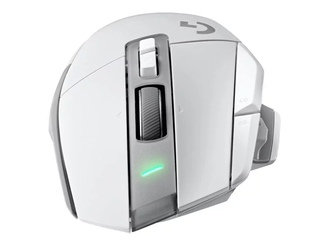
Best for: Players who want a configurable wireless mouse with multiple programmable controls
- Sensor
- HERO 25K, up to 25,600 DPI
- Controls
- 13 programmable controls
- Wireless
- LIGHTSPEED wireless, 1 ms report rate
- Battery life
- Up to 140 hours
- Weight
- 102 g
- Charging
- USB-C
- HERO 25K sensor supports up to 25,600 DPI.
- LIGHTSPEED wireless connection has a 1 ms report rate.
- 13 programmable controls provide options for game commands and shortcuts.
- Up to 140 hours of rated battery life reduces charging frequency.
- The 102 g weight is not aimed at players seeking an ultra-light mouse.
- The LIGHTSPEED version does not include the RGB lighting found on the G502 X PLUS.
Is the Logitech G502 X LIGHTSPEED Wireless Gaming Mouse worth buying on Black Friday 2026?
Yes, the Logitech G502 X LIGHTSPEED Wireless Gaming Mouse is worth considering if programmable controls, LIGHTSPEED wireless, and long rated battery life match your setup. Compare the exact model, bundle contents, color, and retailer return terms before deciding; the wired G502 X and RGB-equipped G502 X PLUS are different versions.
See today’s Black Friday price on Amazon
What are the key Logitech G502 X LIGHTSPEED specs?
The Logitech G502 X LIGHTSPEED Wireless Gaming Mouse has a HERO 25K sensor, 13 programmable controls, and a rated battery life of up to 140 hours. Those headline numbers make it a feature-forward mouse for players who want to set up game commands, media controls, or application shortcuts.
The sensor supports sensitivity up to 25,600 DPI, while LIGHTSPEED wireless uses a 1 ms report rate. Logitech lists the mouse at 102 g and includes USB-C charging. The control layout features a reversible and removable DPI-shift button, giving players a way to adapt that side position to their grip and preferences.
Treat the specifications as a starting point, not a guarantee that the shape fits every hand. Check the dimensions and button arrangement against your grip style, and remember that rated battery life depends on how the mouse is used.
Is the Logitech G502 X LIGHTSPEED good for gaming?
The Logitech G502 X LIGHTSPEED Wireless Gaming Mouse offers 13 programmable controls and a 1 ms LIGHTSPEED report rate for players who want responsive wireless play and configurable inputs. Its layout works well for games and setups where extra commands save time.
The HERO 25K sensor supports up to 25,600 DPI, giving players a wide sensitivity range to configure. Sensor specifications alone do not guarantee better aim; consistent settings and a comfortable grip matter more than choosing the highest number. The thumb-side controls are useful for assigning frequent actions, but players who prefer a simple two-button layout will not need every input.
For everyday use, the programmable controls also suit shortcuts and media commands. Worth it for most players who want a feature-rich wireless mouse, provided the fuller shape and 102 g weight feel right for their preferences.
How long does the Logitech G502 X LIGHTSPEED battery last?
The Logitech G502 X LIGHTSPEED Wireless Gaming Mouse is rated for up to 140 hours of battery life on a full charge. That figure is a useful reference for planning, but real runtime changes with usage patterns and settings.
USB-C charging gives the mouse a widely used charging connection. Check the listing for included accessories and review the product details if a cable or other item matters to your setup. Black Friday bundles can vary, so compare what is actually included rather than assuming every retailer package is identical.
Wireless convenience comes with a charging routine, even with a long rated runtime. Players who want to minimize charging should keep an eye on the battery level and connect the mouse when convenient. The Logitech G502 X LIGHTSPEED does not use a replaceable AA battery.
What is the difference between G502 X and G502 X LIGHTSPEED?
The Logitech G502 X LIGHTSPEED Wireless Gaming Mouse is the wireless member of the G502 X family, while the standard Logitech G502 X is wired. The shared naming makes variant checks especially important when scanning Black Friday search results.
The Logitech G502 X LIGHTSPEED uses LIGHTSPEED wireless and has a rated battery life of up to 140 hours. The wired Logitech G502 X avoids battery charging but connects by cable. The Logitech G502 X PLUS adds RGB lighting to the wireless family, so its name and feature set are different from the non-RGB LIGHTSPEED model.
Before adding a listing to your cart, match the full product name, connection type, color, and feature list. A product photo or shortened title is not enough to identify the exact variant. Check the model name in the listing details and confirmation page.
Is the Logitech G502 X LIGHTSPEED comfortable for different grips?
The Logitech G502 X LIGHTSPEED Wireless Gaming Mouse has a feature-rich, full-size design and weighs 102 g, so comfort depends on hand size, grip, and button reach. Players who like a substantial mouse with several thumb-side inputs will find more to work with than on a compact minimalist model.
Owner feedback is useful for spotting recurring impressions about shape and button placement, but comfort remains personal. Review product dimensions and retailer return terms before buying, especially if you have not used a G502-style shape. The reversible and removable DPI-shift button also gives players some flexibility around that control.
The weight is a clear consideration for players who favor rapid, low-effort movement with an ultra-light mouse. For players who prefer a broader control layout, the Logitech G502 X LIGHTSPEED balances a sturdy feel with wireless freedom.
What should I check in Logitech G502 X LIGHTSPEED Black Friday deals?
A Logitech G502 X LIGHTSPEED Wireless Gaming Mouse Black Friday listing is worth comparing by exact model, bundle contents, color, retailer, and stock. Those details help separate the non-RGB LIGHTSPEED version from wired and RGB-equipped G502 X variants.
Check whether the box includes the accessories you expect, confirm the return window, and review warranty information for the seller. If a bundle adds a mouse pad or other accessory, decide whether that item fits your setup rather than judging the package by its headline alone. Look closely at the listing’s full model name.
Stock and available colors can change as Black Friday shopping progresses. Save the precise product name and compare retailer pages for consistent specifications. A listing that clearly identifies the Logitech G502 X LIGHTSPEED is easier to assess than one using a shortened or ambiguous title.
Buying Guide
Confirm the exact G502 X variant
The Logitech G502 X LIGHTSPEED Wireless Gaming Mouse is the wireless, non-RGB model with up to 140 hours of rated battery life. Check the complete name on the retailer page so you do not confuse it with the wired G502 X or RGB-equipped G502 X PLUS. Verify the connection type and feature list before checkout.
Compare bundle contents
A Logitech G502 X LIGHTSPEED Black Friday bundle should list every included item clearly. Check for the receiver, USB-C cable, and any added accessories, then decide whether the extras suit your setup. Compare the contents of each listing rather than assuming packages with similar photos are identical.
Check color, stock, and seller terms
The Logitech G502 X LIGHTSPEED listing should identify its color and current availability before you buy. Confirm the seller, shipping details, return window, and warranty terms. Stock changes can affect which colors and packages remain available, so review the details on the final order page.
Match the mouse to your setup
The Logitech G502 X LIGHTSPEED provides 13 programmable controls and weighs 102 g, making grip and button reach important fit checks. Compare its dimensions and control layout with your preferences. Players who want cable-free use and customization gain the most from this model’s feature set.
Alternatives to Consider
- Logitech G502 X PLUS LIGHTSPEED Wireless RGB Gaming Mouse: Choose the Logitech G502 X PLUS LIGHTSPEED Wireless RGB Gaming Mouse if RGB lighting is a priority and you want a closely related G502 X layout. Check its exact specifications and listing details separately from the non-RGB LIGHTSPEED version.
- Razer Basilisk V3 Pro 35K Wireless Gaming Mouse: Choose the Razer Basilisk V3 Pro 35K Wireless Gaming Mouse if you prefer Razer’s software and feature ecosystem or want a different configurable wireless shape. Compare button placement and compatibility with your setup before switching.
- Corsair DARKSTAR WIRELESS RGB MMO Gaming Mouse: Choose the Corsair DARKSTAR WIRELESS RGB MMO Gaming Mouse if a broad set of side controls and Corsair’s software ecosystem are a better match for your games. Review its layout carefully if you prefer the G502 X LIGHTSPEED’s more familiar thumb-button arrangement.
FAQ
Does the Logitech G502 X LIGHTSPEED have Bluetooth?
The Logitech G502 X LIGHTSPEED Wireless Gaming Mouse uses Logitech LIGHTSPEED wireless and does not list Bluetooth as a connection option. Check the exact model details before buying, since G502 X family names can look similar across wired and wireless versions. The LIGHTSPEED version is designed for use with its wireless receiver.
How many buttons does the Logitech G502 X LIGHTSPEED have?
The Logitech G502 X LIGHTSPEED Wireless Gaming Mouse has 13 programmable controls. Players can assign supported commands and shortcuts through Logitech software, while the reversible and removable DPI-shift button offers flexibility around its placement. Check the current software support details for your operating system before setting up custom assignments.
What is the DPI of the Logitech G502 X LIGHTSPEED?
The Logitech G502 X LIGHTSPEED Wireless Gaming Mouse uses a HERO 25K sensor with sensitivity up to 25,600 DPI. Players can configure sensitivity to match their preferences rather than using the maximum setting. The sensor’s upper limit is a specification, not a recommendation for every game or display.
Does the Logitech G502 X LIGHTSPEED have RGB lighting?
The Logitech G502 X LIGHTSPEED Wireless Gaming Mouse does not include RGB lighting. Logitech’s G502 X PLUS LIGHTSPEED model is the RGB-equipped version, so compare the full product name before choosing a Black Friday listing. The two models share family branding but are distinct products with different lighting features.
How heavy is the Logitech G502 X LIGHTSPEED?
The Logitech G502 X LIGHTSPEED Wireless Gaming Mouse weighs 102 g. That weight suits players who prefer a more substantial mouse with multiple controls, while shoppers seeking an ultra-light design should consider whether it matches their movement style. Review the listed specifications for the exact model before ordering.
Is the Logitech G502 X LIGHTSPEED compatible with Mac?
The Logitech G502 X LIGHTSPEED Wireless Gaming Mouse supports use with compatible computers, but features and configuration depend on the operating system and Logitech software support. Check Logitech’s current compatibility details for your Mac and the games or applications you use. Confirm required software access before relying on custom button assignments.