

As an Amazon Associate we earn from qualifying purchases.
- Best overall: Logitech MX Brio 4K Ultra HD Webcam
- Best budget: Elgato Facecam MK.2 Full HD Webcam
- Best premium: Elgato Facecam Pro 4K60 Studio Webcam
- Best for AI tracking: Insta360 Link 2 4K AI Webcam
- Logitech MX Brio 4K Ultra HD Webcam is the strongest all-around 4K choice for creators and video calls.
- Razer Kiyo Pro Full HD Streaming Webcam prioritizes smooth 1080p60 video and adaptive lighting.
- Elgato Facecam Pro 4K60 Studio Webcam is built for creators who want 4K at 60 frames per second.
- Insta360 Link 2 4K AI Webcam adds a motorized gimbal and AI tracking for moving presenters.
- Match your webcam to your resolution, lighting, framing, and streaming software before choosing.
The Logitech MX Brio 4K Ultra HD Webcam is the better all-around 4K pick, while the Razer Kiyo Pro Full HD Streaming Webcam suits streamers who prioritize 1080p60 video and adaptive lighting. For Black Friday 2026, we researched and compared specs, reviews and owner feedback across seven webcams to help you find the right fit for gaming, meetings, and creator work.
Here's the bottom line: start with the resolution and frame rate your setup supports, then compare lighting performance, field of view, and camera movement. Logitech, Razer, Elgato, Insta360, and OBSBOT each offer a different mix of features. The guide below names clear standouts, explains the trade-offs, and gives a quick answer for each product.
How We Picked
- Image specifications: We compared supported resolutions, frame rates, fields of view, and sensor details.
- Streaming fit: We considered useful features for game streaming, video calls, and recorded content.
- Lighting and focus: We reviewed manufacturer specifications and owner feedback on low-light features, autofocus, and HDR.
- Setup and framing: We compared mounting, camera movement, tracking, and privacy features where listed.
- Value by use case: We separated practical entry-level choices from premium creator options without relying on price claims.
Comparison Table
| Product | Best for | Maximum resolution | Maximum frame rate | Standout feature |
|---|---|---|---|---|
| Logitech MX Brio 4K Ultra HD Webcam | 4K calls and creator setups | 4K | 60 fps at 1080p | Show Mode |
| Razer Kiyo Pro Full HD Streaming Webcam | Smooth Full HD streams | 1080p | 60 fps | Adaptive light sensor |
| Elgato Facecam Pro 4K60 Studio Webcam | Premium creator video | 4K | 60 fps | 90-degree field of view |
| Elgato Facecam MK.2 Full HD Webcam | Simple 1080p streaming | 1080p | 60 fps | HDR |
| Razer Kiyo Pro Ultra 4K Webcam | Large-sensor 4K video | 4K | 30 fps | 1/1.2-inch sensor |
| Insta360 Link 2 4K AI Webcam | Presenter tracking | 4K | 30 fps | 2-axis gimbal |
| OBSBOT Tiny 2 Lite 4K PTZ Webcam | Compact automated framing | 4K | 60 fps at 1080p | AI auto-tracking |
Best Picks Reviewed
#1 · Top pick
Logitech MX Brio 4K Ultra HD Webcam
The Logitech MX Brio 4K Ultra HD Webcam is the best overall webcam for creators and remote workers who want detailed video, with 4K resolution at 30 frames per second.
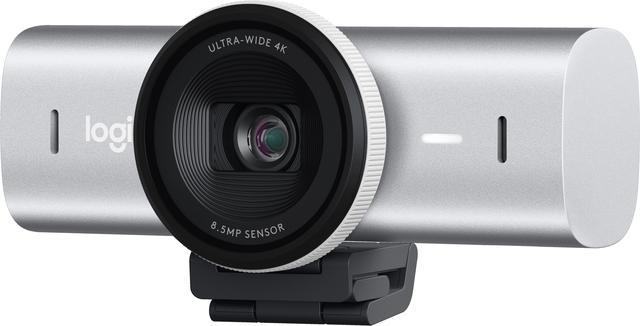
Best for: 4K video calls and creator setups
- Maximum resolution
- 4K at 30 fps
- Full HD frame rate
- 1080p at 60 fps
- Microphones
- 2 beamforming microphones
- Connection
- USB-C
- Sharp 4K image
- 1080p60 option
- Show Mode tilts the camera toward a desk
- 4K video needs more bandwidth and storage
Is the Logitech MX Brio 4K Ultra HD Webcam worth buying on Black Friday 2026?
Yes. The Logitech MX Brio 4K Ultra HD Webcam is a strong pick for detailed calls and creator video, with 4K at 30 fps and a 1080p60 mode. Choose it when image detail matters more than motorized tracking.
See today’s Black Friday price on Amazon
#2
Razer Kiyo Pro Full HD Streaming Webcam
The Razer Kiyo Pro Full HD Streaming Webcam is the best webcam for streamers who want fluid Full HD video, with 1080p resolution at 60 frames per second.

Best for: 1080p gaming streams and dim rooms
- Maximum resolution
- 1080p
- Maximum frame rate
- 60 fps
- High Dynamic Range
- HDR at 30 fps
- Field of view
- Up to 103 degrees
- Smooth 1080p60 capture
- Adaptive light sensor
- Adjustable field of view
- No 4K recording
Is the Razer Kiyo Pro Full HD Streaming Webcam worth buying on Black Friday 2026?
Yes. The Razer Kiyo Pro Full HD Streaming Webcam fits gaming streams that need smooth 1080p60 video and adaptive lighting. Choose the Logitech MX Brio 4K Ultra HD Webcam instead when 4K detail is a higher priority.
See today’s Black Friday price on Amazon
#3
Elgato Facecam Pro 4K60 Studio Webcam
The Elgato Facecam Pro 4K60 Studio Webcam is the best premium webcam for creators who want high-resolution motion, with 4K capture at 60 frames per second.
Best for: High-detail creator video
- Maximum resolution
- 4K
- Maximum frame rate
- 60 fps
- Field of view
- 90 degrees
- Focus
- Fixed focus
- 4K60 capture
- Wide field of view
- Camera Hub software controls
- Fixed focus is less flexible for changing distances
Is the Elgato Facecam Pro 4K60 Studio Webcam worth buying on Black Friday 2026?
Yes. The Elgato Facecam Pro 4K60 Studio Webcam is aimed at creators who want 4K60 capture and detailed control over their video setup. The Elgato Facecam Pro 4K60 Studio Webcam's fixed-focus design suits a stable desk position better than frequent movement.
See today’s Black Friday price on Amazon
#4
Elgato Facecam MK.2 Full HD Webcam
The Elgato Facecam MK.2 Full HD Webcam is the best straightforward webcam for budget-conscious streamers, with 1080p video at 60 frames per second.
Best for: Simple 1080p streaming
- Maximum resolution
- 1080p
- Maximum frame rate
- 60 fps
- High Dynamic Range
- HDR support
- Field of view
- Up to 84 degrees
- Smooth Full HD capture
- HDR support
- Manual image adjustments
- No 4K mode
Is the Elgato Facecam MK.2 Full HD Webcam worth buying on Black Friday 2026?
Yes. The Elgato Facecam MK.2 Full HD Webcam gives streamers a clear 1080p60 option with HDR and image controls. Choose it for a simple fixed desk setup when 4K capture and automated tracking are not essential.
See today’s Black Friday price on Amazon
#5
Razer Kiyo Pro Ultra 4K Webcam
The Razer Kiyo Pro Ultra 4K Webcam is the best Razer option for creators who want a large sensor, with 4K video at 30 frames per second.
Best for: Low-light 4K creator video
- Maximum resolution
- 4K at 30 fps
- Sensor size
- 1/1.2-inch
- Aperture
- f/1.7
- HDR frame rate
- 1080p at 30 fps
- Large webcam sensor
- 4K capture
- HDR support
- Larger design takes more desk or monitor space
Is the Razer Kiyo Pro Ultra 4K Webcam worth buying on Black Friday 2026?
Yes. The Razer Kiyo Pro Ultra 4K Webcam is a premium choice for creators seeking 4K capture and a large 1/1.2-inch sensor. The Razer Kiyo Pro Ultra 4K Webcam's feature set suits a dedicated desk setup more than a compact travel kit.
See today’s Black Friday price on Amazon
#6
Insta360 Link 2 4K AI Webcam
The Insta360 Link 2 4K AI Webcam is the best webcam for presenters who move during calls, with 4K resolution at 30 frames per second and a motorized gimbal.
Best for: AI framing and presenter movement
- Maximum resolution
- 4K at 30 fps
- Sensor size
- 1/2-inch
- Camera movement
- 2-axis gimbal
- Audio
- Dual noise-canceling microphones
- Automatic person tracking
- Gimbal framing
- Gesture controls
- Moving parts add setup complexity
Is the Insta360 Link 2 4K AI Webcam worth buying on Black Friday 2026?
Yes. The Insta360 Link 2 4K AI Webcam is a good fit for presenters who move around, thanks to 4K capture and gimbal-based tracking. Choose a fixed webcam instead for a stationary, minimal desk setup.
See today’s Black Friday price on Amazon
#7
OBSBOT Tiny 2 Lite 4K PTZ Webcam
The OBSBOT Tiny 2 Lite 4K PTZ Webcam is the best webcam for automated framing on a compact desk, with 4K resolution at 30 frames per second.
Best for: Compact AI-tracking setups
- Maximum resolution
- 4K at 30 fps
- Full HD frame rate
- 1080p at 60 fps
- Camera movement
- 2-axis PTZ
- Tracking
- AI auto-tracking
- Automated subject tracking
- 4K capture
- Pan-and-tilt framing
- Tracking features suit moving subjects better than fixed shots
Is the OBSBOT Tiny 2 Lite 4K PTZ Webcam worth buying on Black Friday 2026?
Yes. The OBSBOT Tiny 2 Lite 4K PTZ Webcam combines 4K video with automated pan-and-tilt tracking for people who move while presenting. Pick a fixed-focus model when your framing stays in one place.
See today’s Black Friday price on Amazon
Which webcam is better, Logitech MX Brio or Razer Kiyo Pro?
The Logitech MX Brio 4K Ultra HD Webcam is the better fit for 4K detail, while the Razer Kiyo Pro Full HD Streaming Webcam prioritizes 1080p60 motion. Both target streamers and video-call users, but the resolution difference is the clearest reason to choose one over the other.
The Logitech MX Brio 4K Ultra HD Webcam also supports 1080p at 60 fps, giving creators a smoother mode when 4K is unnecessary. The Razer Kiyo Pro Full HD Streaming Webcam counters with an adaptive light sensor, HDR at 30 fps, and a field of view up to 103 degrees. Choose Logitech for detailed video and desk demonstrations; choose Razer for Full HD streaming and flexible framing. For a mixed work-and-play setup, Logitech offers the broader resolution range.
Which webcam resolution and frame rate should streamers choose?
The Elgato Facecam Pro 4K60 Studio Webcam is the top pick for 4K at 60 fps, while the Razer Kiyo Pro Full HD Streaming Webcam delivers 1080p at 60 fps. Resolution determines image detail; frame rate determines how smoothly motion appears. Both factors matter for a gaming stream, but the right balance depends on your capture and upload setup.
The Logitech MX Brio 4K Ultra HD Webcam offers 4K at 30 fps alongside 1080p at 60 fps, a useful choice for switching between detailed calls and smoother streams. The Elgato Facecam MK.2 Full HD Webcam keeps the workload to 1080p60. Choose 4K for cropping and sharper presentation, and favor 1080p60 when smooth motion and a manageable stream are the priority.
Which webcams are best in low-light rooms?
The Razer Kiyo Pro Full HD Streaming Webcam and Razer Kiyo Pro Ultra 4K Webcam highlight light-sensitive features, including an adaptive light sensor and a large 1/1.2-inch sensor. A webcam's sensor and lighting controls affect how it handles a dim room, but a nearby lamp still improves the image more than software adjustments alone.
The Logitech MX Brio 4K Ultra HD Webcam provides image controls for adjusting a setup, while the Razer Kiyo Pro Ultra 4K Webcam pairs 4K capture with an f/1.7 aperture. Product features do not remove shadows or background clutter. Position a light in front of your face, avoid a bright window behind you, and use the camera's controls to fine-tune exposure. For gamers streaming at night, room lighting deserves attention before a webcam upgrade.
Which webcam is best for moving presenters and automatic framing?
The Insta360 Link 2 4K AI Webcam is the best pick for presenter movement, with 4K video and a 2-axis gimbal. The OBSBOT Tiny 2 Lite 4K PTZ Webcam also combines 4K capture with AI auto-tracking. Motorized framing keeps a moving person in view, a useful advantage for demonstrations, standing desks, and rooms where the speaker shifts position.
The Logitech MX Brio 4K Ultra HD Webcam has Show Mode for tilting the camera toward a desk, but the Insta360 Link 2 4K AI Webcam and OBSBOT Tiny 2 Lite 4K PTZ Webcam offer active camera movement. Select Insta360 for gimbal tracking and gesture controls. Select OBSBOT for compact pan-and-tilt framing. A fixed webcam such as the Elgato Facecam MK.2 Full HD Webcam is simpler when you stay seated and centered.
What should you compare before buying a webcam on Black Friday 2026?
The Logitech MX Brio 4K Ultra HD Webcam is a versatile pick for 4K calls, while the Elgato Facecam MK.2 Full HD Webcam covers straightforward 1080p60 streaming. Black Friday 2026 shopping is easier when you decide on a use case first, rather than choosing by brand or a single headline specification.
Check your computer's USB connection, streaming software support, monitor mount, and available bandwidth. Then compare resolution, frame rate, field of view, focus, and whether you want automatic tracking. The Razer Kiyo Pro Full HD Streaming Webcam suits fluid Full HD streams; the Elgato Facecam Pro 4K60 Studio Webcam targets high-resolution creator work. Pick the features you will use regularly, and confirm the exact model name before checkout.
Buying Guide
Choose a resolution that fits your stream
The Logitech MX Brio 4K Ultra HD Webcam offers 4K at 30 fps and 1080p at 60 fps for two common needs. Choose the Elgato Facecam Pro 4K60 Studio Webcam for 4K60 capture, or select a 1080p webcam when smooth Full HD video is enough.
Match the camera to your lighting
The Razer Kiyo Pro Full HD Streaming Webcam includes an adaptive light sensor, while the Razer Kiyo Pro Ultra 4K Webcam pairs a 1/1.2-inch sensor with an f/1.7 aperture. Front-facing room light helps every webcam produce a clearer image.
Decide whether you need camera tracking
The Insta360 Link 2 4K AI Webcam uses a 2-axis gimbal, and the OBSBOT Tiny 2 Lite 4K PTZ Webcam adds AI auto-tracking. Choose a fixed webcam when you remain seated; choose a tracking model for presentations and movement.
Check your computer and mounting setup
The Logitech MX Brio 4K Ultra HD Webcam connects over USB-C, so confirm your port and software support before purchase. Compare each model's mount, cable arrangement, field of view, and desk space needs with your existing gaming setup.
Prioritize features you will use often
The Elgato Facecam MK.2 Full HD Webcam focuses on 1080p60 video, while the Elgato Facecam Pro 4K60 Studio Webcam raises the ceiling to 4K60. Choose useful features such as HDR, manual controls, Show Mode, or tracking instead of buying specifications your stream will not use.
FAQ
Which is better for streaming, Logitech MX Brio or Razer Kiyo Pro?
The Logitech MX Brio 4K Ultra HD Webcam is better for 4K detail and mixed work calls, while the Razer Kiyo Pro Full HD Streaming Webcam is a strong fit for 1080p60 streams. Choose based on whether resolution or adaptive lighting matters more.
Does the Logitech MX Brio support 60 fps?
Yes. The Logitech MX Brio 4K Ultra HD Webcam supports 1080p at 60 fps, while its 4K mode runs at 30 fps. The Full HD option suits smoother motion, and the 4K mode favors detailed calls and creator video.
Is the Razer Kiyo Pro a 4K webcam?
No. The Razer Kiyo Pro Full HD Streaming Webcam records at up to 1080p and 60 fps, with HDR at 30 fps. Razer's separate Kiyo Pro Ultra 4K Webcam is the 4K model for buyers seeking higher resolution.
Which webcam is best for a moving presenter?
The Insta360 Link 2 4K AI Webcam is a strong choice for moving presenters because its 2-axis gimbal supports automatic tracking. The OBSBOT Tiny 2 Lite 4K PTZ Webcam is another 4K option with AI auto-tracking and pan-and-tilt framing.
Is 4K worth choosing over 1080p for streaming?
The Elgato Facecam Pro 4K60 Studio Webcam is suited to creators who need 4K60 detail, while the Elgato Facecam MK.2 Full HD Webcam delivers 1080p60. Pick 4K for cropping and sharper source video; pick 1080p for a simpler stream setup.
Which webcam is a good budget-friendly choice for 1080p streaming?
The Elgato Facecam MK.2 Full HD Webcam is a straightforward 1080p60 choice with HDR and manual image controls. The model is aimed at streamers who want smooth Full HD video without moving up to a 4K webcam.