

As an Amazon Associate we earn from qualifying purchases.
- Best overall: Apple Mac mini M4 10-core CPU and 10-core GPU, 24GB unified memory, 512GB SSD
- Best budget: Apple Mac mini M4 10-core CPU and 10-core GPU, 16GB unified memory, 256GB SSD
- Best premium: Apple Mac mini M4 Pro 12-core CPU and 16-core GPU, 24GB unified memory, 512GB SSD
- Best for an all-in-one desk setup: Apple iMac M4 10-core CPU and 10-core GPU, 24GB unified memory, 512GB SSD
- Apple Mac mini M4 delivers desktop performance in a compact computer, but requires a separate display, keyboard and mouse.
- Apple iMac M4 includes a 24-inch 4.5K display, keyboard and mouse in one ready-to-use desktop package.
- The Apple Mac mini M4 24GB unified memory and 512GB SSD configuration is the strongest balance of capacity and value.
- Choose an Apple Mac mini M4 Pro for demanding creative work, or an Apple iMac M4 for a tidy all-in-one workspace.
- Compare the complete setup, including peripherals and storage, when choosing between the Mac mini and iMac.
The Apple Mac mini M4 and Apple iMac M4 serve different kinds of desk setups: the Mac mini is a compact computer that connects to gear you already own, while the iMac combines the computer, screen and accessories. For Black Friday 2026, the right choice depends on the cost of the complete setup, not just the computer.
I researched and compared specs, reviews and owner feedback to identify the best configurations for everyday work, family use and creative projects. My pick for most people is an Apple Mac mini M4 with 24GB of unified memory and a 512GB SSD, provided you already have a suitable monitor. For a ready-to-use desktop, the Apple iMac M4 is the simpler choice.
How We Picked
- Compared processor, graphics, memory and storage specifications across seven Apple Mac mini M4 and iMac M4 configurations.
- Considered the full setup: built-in display and included accessories versus the separate equipment needed for a Mac mini.
- Reviewed port selection, external-display support and upgrade flexibility for common home and office workflows.
- Used review coverage and owner feedback to assess everyday usability, noise, desk space and long-term value.
- Prioritized configurations that match a clear buyer need rather than treating the most expensive option as the automatic winner.
Comparison Table
| Product | Best for | Unified memory | SSD | Display |
|---|---|---|---|---|
| Apple Mac mini M4 10-core CPU and 10-core GPU, 16GB unified memory, 256GB SSD | Budget-conscious buyers with existing peripherals | 16GB | 256GB | Separate display |
| Apple Mac mini M4 10-core CPU and 10-core GPU, 24GB unified memory, 512GB SSD | Most buyers with a monitor already | 24GB | 512GB | Separate display |
| Apple Mac mini M4 10-core CPU and 10-core GPU, 32GB unified memory, 512GB SSD | Multitaskers who want extra memory | 32GB | 512GB | Separate display |
| Apple Mac mini M4 Pro 12-core CPU and 16-core GPU, 24GB unified memory, 512GB SSD | Creative professionals needing more processing power | 24GB | 512GB | Separate display |
| Apple iMac M4 8-core CPU and 8-core GPU, 16GB unified memory, 256GB SSD | First-time desktop buyers and shared family spaces | 16GB | 256GB | 24-inch 4.5K Retina |
| Apple iMac M4 10-core CPU and 10-core GPU, 16GB unified memory, 256GB SSD | Home offices that need a ready-to-use desktop | 16GB | 256GB | 24-inch 4.5K Retina |
| Apple iMac M4 10-core CPU and 10-core GPU, 24GB unified memory, 512GB SSD | A polished all-in-one setup with extra capacity | 24GB | 512GB | 24-inch 4.5K Retina |
Best Picks Reviewed
#1
Apple Mac mini M4 10-core CPU and 10-core GPU, 16GB unified memory, 256GB SSD
The Apple Mac mini M4 10-core CPU and 10-core GPU, 16GB unified memory, 256GB SSD is the best budget desktop for shoppers who own a monitor, keyboard and mouse. The Apple Mac mini M4 10-core CPU and 10-core GPU, 16GB unified memory, 256GB SSD's 10-core CPU and 10-core GPU give everyday work and multitasking a capable foundation.
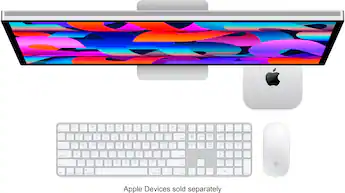
Best for: Budget-conscious buyers with existing peripherals
- CPU
- 10-core M4
- GPU
- 10-core
- Unified memory
- 16GB
- SSD
- 256GB
- Compact desktop design
- Strong everyday performance
- Useful front and rear ports
- Requires a separate monitor and input devices
- 256GB storage fills quickly with large media libraries
Is the Apple Mac mini M4 16GB 256GB worth buying on Black Friday 2026?
Yes. The Apple Mac mini M4 10-core CPU and 10-core GPU, 16GB unified memory, 256GB SSD is a strong entry desktop for everyday tasks when you already own a monitor and accessories. Add external storage if your files and apps need more room.
See today’s Black Friday price on Amazon
#2 · Top pick
Apple Mac mini M4 10-core CPU and 10-core GPU, 24GB unified memory, 512GB SSD
The Apple Mac mini M4 10-core CPU and 10-core GPU, 24GB unified memory, 512GB SSD is the best overall desktop for flexible home and office use. The Apple Mac mini M4 10-core CPU and 10-core GPU, 24GB unified memory, 512GB SSD's 24GB of unified memory and 512GB SSD provide more room for simultaneous apps and files than the base configuration.

Best for: Most buyers with a monitor already
- CPU
- 10-core M4
- GPU
- 10-core
- Unified memory
- 24GB
- SSD
- 512GB
- Balanced memory and storage
- Small footprint fits crowded desks
- Supports a flexible monitor setup
- Display and accessories are separate purchases
- Internal memory and storage are not user-upgradeable
Which Apple Mac mini M4 configuration is the best value?
The Apple Mac mini M4 10-core CPU and 10-core GPU, 24GB unified memory, 512GB SSD is the best balanced choice for many buyers. The larger memory and storage allowances suit multitasking and everyday file storage without requiring the Pro model.
See today’s Black Friday price on Amazon
#3
Apple Mac mini M4 10-core CPU and 10-core GPU, 32GB unified memory, 512GB SSD
The Apple Mac mini M4 10-core CPU and 10-core GPU, 32GB unified memory, 512GB SSD is the best Mac mini M4 configuration for heavier multitasking without stepping up to M4 Pro. The Apple Mac mini M4 10-core CPU and 10-core GPU, 32GB unified memory, 512GB SSD's 32GB of unified memory is useful for demanding projects and numerous open apps.
Best for: Multitaskers who want extra memory
- CPU
- 10-core M4
- GPU
- 10-core
- Unified memory
- 32GB
- SSD
- 512GB
- Ample memory for busy workflows
- Same compact form as other Mac mini models
- 512GB SSD offers useful everyday capacity
- Separate display and accessories add setup cost
- M4 Pro is a better fit for sustained high-end workloads
Is the Apple Mac mini M4 with 32GB memory good for multitasking?
Yes. The Apple Mac mini M4 10-core CPU and 10-core GPU, 32GB unified memory, 512GB SSD gives demanding multitaskers more memory headroom than the 16GB and 24GB versions. The configuration still uses the standard M4 chip rather than the M4 Pro.
See today’s Black Friday price on Amazon
#4
Apple Mac mini M4 Pro 12-core CPU and 16-core GPU, 24GB unified memory, 512GB SSD
The Apple Mac mini M4 Pro 12-core CPU and 16-core GPU, 24GB unified memory, 512GB SSD is the best premium compact desktop for intensive creative workloads. The Apple Mac mini M4 Pro 12-core CPU and 16-core GPU, 24GB unified memory, 512GB SSD's 12-core CPU and 16-core GPU are the standout step up for demanding editing and graphics tasks.

Best for: Creative professionals needing more processing power
- CPU
- 12-core M4 Pro
- GPU
- 16-core
- Unified memory
- 24GB
- SSD
- 512GB
- Thunderbolt
- Thunderbolt 5
- Higher-end CPU and GPU configuration
- Thunderbolt 5 connectivity
- Compact alternative to a tower desktop
- Costs more to configure as a complete setup
- Overpowered for basic browsing and office work
Who should buy the Apple Mac mini M4 Pro on Black Friday 2026?
The Apple Mac mini M4 Pro 12-core CPU and 16-core GPU, 24GB unified memory, 512GB SSD suits video editors, developers and other buyers with processor-intensive work. Buyers focused on email, browsing and office documents get better value from a standard M4 configuration.
See today’s Black Friday price on Amazon
#5
Apple iMac M4 8-core CPU and 8-core GPU, 16GB unified memory, 256GB SSD
The Apple iMac M4 8-core CPU and 8-core GPU, 16GB unified memory, 256GB SSD is the best entry all-in-one desktop for a simple home workspace. The Apple iMac M4 8-core CPU and 8-core GPU, 16GB unified memory, 256GB SSD's 24-inch 4.5K Retina display comes built into the computer, so there is no need to choose a separate monitor.

Best for: First-time desktop buyers and shared family spaces
- CPU
- 8-core M4
- GPU
- 8-core
- Display
- 24-inch 4.5K Retina
- Unified memory
- 16GB
- SSD
- 256GB
- Screen, computer and accessories in one package
- Sharp 24-inch display
- Neat setup with fewer separate devices
- Less flexible than a separate monitor and computer
- 256GB storage is limited for large local libraries
Is the Apple iMac M4 24-inch 16GB 256GB a good family computer?
Yes. The Apple iMac M4 8-core CPU and 8-core GPU, 16GB unified memory, 256GB SSD is a convenient shared desktop with a built-in 24-inch 4.5K Retina display. Families get a tidy setup, though large photo and video libraries benefit from external storage.
See today’s Black Friday price on Amazon
#6
Apple iMac M4 10-core CPU and 10-core GPU, 16GB unified memory, 256GB SSD
The Apple iMac M4 10-core CPU and 10-core GPU, 16GB unified memory, 256GB SSD is the best all-in-one for buyers who want a stronger chip without increasing memory. The Apple iMac M4 10-core CPU and 10-core GPU, 16GB unified memory, 256GB SSD's 10-core CPU and 10-core GPU suit everyday creative work, communication and general productivity.

Best for: Home offices that need a ready-to-use desktop
- CPU
- 10-core M4
- GPU
- 10-core
- Display
- 24-inch 4.5K Retina
- Unified memory
- 16GB
- SSD
- 256GB
- Built-in 24-inch high-resolution display
- 10-core CPU and GPU configuration
- Convenient all-in-one design
- 256GB SSD leaves less room for large files
- Memory and display cannot be upgraded separately
Is the Apple iMac M4 10-core model good for a home office?
Yes. The Apple iMac M4 10-core CPU and 10-core GPU, 16GB unified memory, 256GB SSD combines a capable processor with a built-in 24-inch display. The all-in-one format keeps a home office simple, while external storage helps with larger project files.
See today’s Black Friday price on Amazon
#7
Apple iMac M4 10-core CPU and 10-core GPU, 24GB unified memory, 512GB SSD
The Apple iMac M4 10-core CPU and 10-core GPU, 24GB unified memory, 512GB SSD is the best premium all-in-one for buyers who want a roomy, ready-to-use desktop. The Apple iMac M4 10-core CPU and 10-core GPU, 24GB unified memory, 512GB SSD's 24GB of unified memory pairs with a 512GB SSD for more comfortable multitasking and local storage.

Best for: A polished all-in-one setup with extra capacity
- CPU
- 10-core M4
- GPU
- 10-core
- Display
- 24-inch 4.5K Retina
- Unified memory
- 24GB
- SSD
- 512GB
- Includes a built-in 24-inch 4.5K display
- More memory and storage than entry iMac configurations
- Simple, coordinated desktop setup
- Less modular than a Mac mini setup
- Higher-capacity configuration is unnecessary for basic use
Which Apple iMac M4 configuration is best for a long-term desktop?
The Apple iMac M4 10-core CPU and 10-core GPU, 24GB unified memory, 512GB SSD is the strongest all-in-one choice in this guide for buyers who want extra capacity. The Apple iMac M4 10-core CPU and 10-core GPU, 24GB unified memory, 512GB SSD's display and accessories are included, and 24GB memory provides more headroom for multitasking.
See today’s Black Friday price on Amazon
Which is better, Apple Mac mini M4 or Apple iMac M4?
Choose Apple Mac mini M4 if you own a monitor; choose Apple iMac M4 for a complete desktop with a built-in 24-inch display. Both use Apple M4 chips.
Apple Mac mini M4 offers flexibility and takes up little desk space, but requires a monitor and input accessories. Apple iMac M4 combines those components in one setup. Match the choice to your workspace and existing equipment.
Is the Apple Mac mini M4 good for Black Friday 2026?
Apple Mac mini M4 suits buyers with a compatible display and accessories. Its base configuration has a 10-core CPU, 10-core GPU, 16GB of unified memory and a 256GB SSD.
The base storage suits everyday tasks; a larger SSD or external drive helps with extensive media libraries. Consider Apple Mac mini M4 with 24GB unified memory and a 512GB SSD for heavier multitasking, or Apple Mac mini M4 Pro for demanding processing and graphics work.
Is the Apple iMac M4 worth choosing over the Mac mini?
Apple iMac M4 is a convenient choice when you want a built-in 24-inch 4.5K display and a simple setup. Compare the specific memory and storage configuration: 16GB and 256GB suits general use, while 24GB and 512GB offers more capacity.
Apple Mac mini M4 suits buyers who own a display or want to choose another screen size.
How much memory and storage should you choose?
Choose 16GB of unified memory and 256GB of storage for everyday tasks, 24GB and 512GB for broader multitasking and local files, or 32GB for memory-intensive work. External drives add file storage, not unified memory.
Memory and internal storage cannot be upgraded after purchase. Check both specifications on the exact Black Friday 2026 listing.
What should you check before buying an Apple desktop?
Confirm the chip, core counts, memory, SSD capacity, ports and included accessories. For Apple Mac mini M4, include a monitor, keyboard, mouse and any necessary adapters in your setup. For Apple iMac M4, check the built-in display and whether its fixed design fits your desk.
Compare complete configurations and verify the seller’s listed accessories before buying.
Buying Guide
Choose an all-in-one or separate desktop
Choose Apple iMac M4 for a built-in 24-inch display, or Apple Mac mini M4 if you own a monitor or want to select one.
Match the chip to your workload
Apple Mac mini M4 suits everyday use and general creative tasks. Apple Mac mini M4 Pro is designed for demanding processing, graphics and development work.
Set memory and storage needs
Choose 16GB unified memory and 256GB SSD for basic use, 24GB and 512GB for more multitasking and files, or 32GB for memory-intensive work.
Plan the complete setup
Add a compatible monitor, keyboard and mouse to Apple Mac mini M4 if needed. Apple iMac M4 includes a display and accessories.
Verify the exact listing
Check processor and graphics core counts, memory, storage and ports on the specific Black Friday 2026 listing.
FAQ
Mac mini M4 vs iMac M4: which should I buy?
Buy the Apple Mac mini M4 if you own a compatible display and value a flexible, compact computer. Choose the Apple iMac M4 for a complete desktop with a built-in 24-inch 4.5K Retina display. Compare the total setup and exact memory and storage configuration.
Is the Apple Mac mini M4 good for students?
Yes. The Apple Mac mini M4 handles common student needs such as documents, browsing, video calls and research. Students need a separate display, keyboard and mouse, so the computer is most convenient when those accessories are already available.
Is the Apple iMac M4 good for photo editing?
The Apple iMac M4 is a capable choice for everyday photo editing, with a built-in 24-inch 4.5K Retina display and M4 processing. Buyers working with large libraries or many demanding apps should favor a configuration with 24GB memory and 512GB storage.
Can I use my own monitor with the Apple Mac mini M4?
Yes. The Apple Mac mini M4 is designed to connect to an external display, letting owners reuse a compatible monitor or choose a new one. Check the monitor’s inputs and the computer’s ports before purchase to confirm the connection suits your setup.
Which Apple Mac mini M4 is best for video editing?
The Apple Mac mini M4 Pro 12-core CPU and 16-core GPU, 24GB unified memory, 512GB SSD is the strongest video-editing pick in this guide. The higher-end chip and graphics configuration suit demanding projects better than the standard M4 options.
Is 256GB enough storage for an Apple iMac M4?
A 256GB SSD is enough for everyday apps, documents and a modest local media collection. Buyers keeping large photo libraries, video projects or extensive downloads on the computer should choose the 512GB Apple iMac M4 configuration or plan to use external storage.