

As an Amazon Associate we earn from qualifying purchases.
- Best overall: ASUS RT-BE88U BE7200 Dual-Band WiFi 7 Router
- Best budget: ASUS RT-BE58U BE3600 Dual-Band WiFi 7 Router
- Best premium: ASUS RT-BE96U BE19000 Tri-Band WiFi 7 Router
- Best for multi-gig wired connections: TP-Link Archer BE550 BE9300 Tri-Band WiFi 7 Router
- The Motorola MB8611 is a DOCSIS 3.1 cable modem with a 2.5GbE port; it does not provide WiFi.
- The ASUS RT-BE88U is a BE7200 WiFi 7 router with dual-band wireless and multiple high-speed wired ports.
- The Motorola MB8611 and ASUS RT-BE88U serve different network roles, so many households use them together.
- Check cable-provider compatibility and internet-plan speed before choosing a modem.
- Choose a router based on wireless coverage, device count and the wired speeds your home network needs.
The Motorola MB8611 is a DOCSIS 3.1 cable modem, while the ASUS RT-BE88U is a BE7200 WiFi 7 router; the right Black Friday 2026 choice depends on which part of your home network needs an upgrade. The modem connects a cable-internet service to your home, and the router shares that connection across wireless and wired devices.
We researched and compared specs, reviews and owner feedback to make the differences easy to scan. The Motorola MB8611 is a Best bet for a compatible cable plan and a separate router; the ASUS RT-BE88U is an Easy recommendation for households seeking WiFi 7 and fast wired connections. Since these products are not direct substitutes, several alternative modems and routers are included below.
How We Picked
- Compared network roles so cable modems are not mistaken for WiFi routers.
- Reviewed manufacturer specifications for DOCSIS support, WiFi generation, speed class and wired ports.
- Considered cable-provider compatibility and whether a modem fits a cable internet plan.
- Used owner-feedback themes to identify practical strengths, setup considerations and limitations.
- Selected options across different performance tiers and home-network needs.
Comparison Table
| Product | Best for | Network role | Wireless standard | Wireless class |
|---|---|---|---|---|
| Motorola MB8611 DOCSIS 3.1 Cable Modem | Cable internet users who need a standalone modem | Cable modem | None | Not applicable |
| ASUS RT-BE88U BE7200 Dual-Band WiFi 7 Router | Homes with many wired devices and newer WiFi clients | WiFi router | WiFi 7 | BE7200 |
| ASUS RT-BE96U BE19000 Tri-Band WiFi 7 Router | High-demand homes with WiFi 7 devices | WiFi router | WiFi 7 | BE19000 |
| ASUS RT-BE58U BE3600 Dual-Band WiFi 7 Router | Smaller homes upgrading to WiFi 7 | WiFi router | WiFi 7 | BE3600 |
| TP-Link Archer BE550 BE9300 Tri-Band WiFi 7 Router | Homes with multiple multi-gig wired devices | WiFi router | WiFi 7 | BE9300 |
| NETGEAR Nighthawk RS300 BE9300 Tri-Band WiFi 7 Router | WiFi 7 homes wanting a tri-band design | WiFi router | WiFi 7 | BE9300 |
| ASUS RT-AX88U Pro AX6000 Dual-Band WiFi 6 Router | Homes that prioritize wired ports over WiFi 7 | WiFi router | WiFi 6 | AX6000 |
Best Picks Reviewed
#1
Motorola MB8611 DOCSIS 3.1 Cable Modem
The Motorola MB8611 DOCSIS 3.1 Cable Modem is the best cable-modem pick for compatible households that want a 2.5GbE connection and already have a router.

Best for: Cable internet users who need a standalone modem
- Network role
- Cable modem
- DOCSIS
- 3.1
- Ethernet port
- 1 x 2.5GbE
- DOCSIS 3.1 support
- 2.5GbE Ethernet port
- Works with many compatible cable plans
- No built-in WiFi; provider compatibility is essential
Is the Motorola MB8611 DOCSIS 3.1 Cable Modem worth buying on Black Friday 2026?
The Motorola MB8611 DOCSIS 3.1 Cable Modem is worth considering for a compatible cable plan, especially when a separate router is already in place. The Motorola MB8611 DOCSIS 3.1 Cable Modem's 2.5GbE port supports a fast wired connection, but the modem does not create a WiFi network.
See today’s Black Friday price on Amazon
#2 · Top pick
ASUS RT-BE88U BE7200 Dual-Band WiFi 7 Router
The ASUS RT-BE88U BE7200 Dual-Band WiFi 7 Router is the best overall router for demanding wired homes that want a BE7200 wireless class and multi-gig connectivity.
Best for: Homes with many wired devices and newer WiFi clients
- Network role
- WiFi router
- Wireless standard
- WiFi 7
- Wireless class
- BE7200
- 10GbE ports
- 2
- WiFi 7 support
- Two 10GbE ports
- Extensive multi-gig wired connectivity
- Dual-band design does not include a 6GHz band
Is the ASUS RT-BE88U BE7200 Dual-Band WiFi 7 Router worth buying on Black Friday 2026?
The ASUS RT-BE88U BE7200 Dual-Band WiFi 7 Router is a strong choice for homes that need WiFi 7 and fast wired networking. The ASUS RT-BE88U BE7200 Dual-Band WiFi 7 Router's two 10GbE ports stand out, while its dual-band design means shoppers seeking 6GHz WiFi should compare a tri-band model.
See today’s Black Friday price on Amazon
#3
ASUS RT-BE96U BE19000 Tri-Band WiFi 7 Router
The ASUS RT-BE96U BE19000 Tri-Band WiFi 7 Router is the best premium router for large, busy homes that want a BE19000 class and a dedicated 6GHz band.

Best for: High-demand homes with WiFi 7 devices
- Network role
- WiFi router
- Wireless standard
- WiFi 7
- Wireless class
- BE19000
- WiFi bands
- 3
- Tri-band WiFi 7
- Includes 6GHz connectivity
- High-capacity wireless class
- Advanced features exceed the needs of many smaller homes
Is the ASUS RT-BE96U BE19000 Tri-Band WiFi 7 Router worth buying on Black Friday 2026?
The ASUS RT-BE96U BE19000 Tri-Band WiFi 7 Router is a strong premium pick for homes with newer WiFi 7 devices and heavy network use. The ASUS RT-BE96U BE19000 Tri-Band WiFi 7 Router's three bands include 6GHz, making it a more suitable fit than a dual-band router for shoppers prioritizing band choice.
See today’s Black Friday price on Amazon
#4
ASUS RT-BE58U BE3600 Dual-Band WiFi 7 Router
The ASUS RT-BE58U BE3600 Dual-Band WiFi 7 Router is the best budget-oriented WiFi 7 pick for smaller homes seeking a BE3600 class and a 2.5GbE port.
Best for: Smaller homes upgrading to WiFi 7
- Network role
- WiFi router
- Wireless standard
- WiFi 7
- Wireless class
- BE3600
- Multi-gig port
- 1 x 2.5GbE
- WiFi 7 support
- 2.5GbE connectivity
- Straightforward option for smaller networks
- Lower wireless class than premium WiFi 7 options
Is the ASUS RT-BE58U BE3600 Dual-Band WiFi 7 Router worth buying on Black Friday 2026?
The ASUS RT-BE58U BE3600 Dual-Band WiFi 7 Router is worth considering for smaller homes that want WiFi 7 without a premium-tier router. The ASUS RT-BE58U BE3600 Dual-Band WiFi 7 Router's 2.5GbE port adds a multi-gig wired option, while the BE3600 class suits less demanding networks than flagship models.
See today’s Black Friday price on Amazon
#5
TP-Link Archer BE550 BE9300 Tri-Band WiFi 7 Router
The TP-Link Archer BE550 BE9300 Tri-Band WiFi 7 Router is the best alternative for households seeking a BE9300 class and five 2.5GbE ports.
Best for: Homes with multiple multi-gig wired devices
- Network role
- WiFi router
- Wireless standard
- WiFi 7
- Wireless class
- BE9300
- 2.5GbE ports
- 5
- Tri-band WiFi 7
- Five 2.5GbE ports
- Includes 6GHz wireless
- Check device and service support before planning a multi-gig network
Is the TP-Link Archer BE550 BE9300 Tri-Band WiFi 7 Router worth buying on Black Friday 2026?
The TP-Link Archer BE550 BE9300 Tri-Band WiFi 7 Router is a good match for households that need several multi-gig wired connections alongside WiFi 7. Five 2.5GbE ports and three wireless bands are the key reasons to compare it with the ASUS RT-BE88U.
See today’s Black Friday price on Amazon
#6
NETGEAR Nighthawk RS300 BE9300 Tri-Band WiFi 7 Router
The NETGEAR Nighthawk RS300 BE9300 Tri-Band WiFi 7 Router is the best fit for shoppers seeking a BE9300 class router with three-band WiFi 7.
Best for: WiFi 7 homes wanting a tri-band design
- Network role
- WiFi router
- Wireless standard
- WiFi 7
- Wireless class
- BE9300
- WiFi bands
- 3
- Tri-band WiFi 7
- BE9300 wireless class
- Includes a 6GHz band
- Compare port needs with the ASUS RT-BE88U before choosing
Is the NETGEAR Nighthawk RS300 BE9300 Tri-Band WiFi 7 Router worth buying on Black Friday 2026?
The NETGEAR Nighthawk RS300 BE9300 Tri-Band WiFi 7 Router is worth comparing for a home moving to tri-band WiFi 7. The NETGEAR Nighthawk RS300 BE9300 Tri-Band WiFi 7 Router's BE9300 class and 6GHz band suit newer devices, while shoppers with many wired devices should compare its port layout with other picks.
See today’s Black Friday price on Amazon
#7
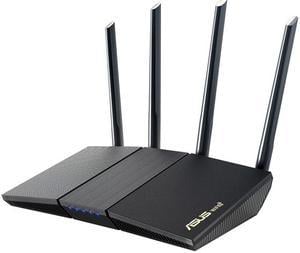
ASUS RT-AX88U Pro AX6000 Dual-Band WiFi 6 Router
The ASUS RT-AX88U Pro AX6000 Dual-Band WiFi 6 Router is the best previous-generation alternative for homes that need an AX6000 class and two 2.5GbE ports.
Best for: Homes that prioritize wired ports over WiFi 7
- Network role
- WiFi router
- Wireless standard
- WiFi 6
- Wireless class
- AX6000
- 2.5GbE ports
- 2
- Two 2.5GbE ports
- WiFi 6 support
- Useful wired connectivity
- Does not support WiFi 7
Is the ASUS RT-AX88U Pro AX6000 Dual-Band WiFi 6 Router worth buying on Black Friday 2026?
The ASUS RT-AX88U Pro AX6000 Dual-Band WiFi 6 Router is a reasonable fit for homes that value its two 2.5GbE ports and do not need WiFi 7. Shoppers upgrading newer wireless devices should compare it with the WiFi 7 routers in this guide.
See today’s Black Friday price on Amazon
Are the Motorola MB8611 and ASUS RT-BE88U direct competitors?
The Motorola MB8611 DOCSIS 3.1 Cable Modem and ASUS RT-BE88U BE7200 Dual-Band WiFi 7 Router perform 2 different jobs in a home network. The Motorola MB8611 connects compatible cable internet service; the ASUS RT-BE88U routes that connection to wireless and wired devices.
A shopper replacing a rented modem should start with the Motorola MB8611 and provider compatibility. A shopper upgrading WiFi should compare the ASUS RT-BE88U with the other routers here. Households needing both upgrades can pair a compatible modem with a separate router, but should verify modem approval, service speed and port requirements before buying.
What does the Motorola MB8611 do?
The Motorola MB8611 DOCSIS 3.1 Cable Modem connects a cable internet line to a router or a single wired device through its 2.5GbE Ethernet port. DOCSIS 3.1 support is the central specification for shoppers checking compatibility with their cable service.
The Motorola MB8611 does not include WiFi, so households without a separate router need to add one. Confirm the exact model on the provider’s approved-device list and check the plan’s speed tier before purchase. Cable providers set activation and service limits, so a modem’s port rating does not guarantee a matching internet speed.
What makes the ASUS RT-BE88U different?
The ASUS RT-BE88U BE7200 Dual-Band WiFi 7 Router creates a home WiFi network and provides wired connections, including two 10GbE ports. WiFi 7 and its BE7200 class make it a feature-rich choice for homes with newer devices and demanding local network use.
The ASUS RT-BE88U is dual-band, not tri-band, and does not include a 6GHz band. That difference matters when comparing it with the ASUS RT-BE96U, TP-Link Archer BE550 and NETGEAR Nighthawk RS300. Check client-device support, home layout and wired equipment to determine whether the RT-BE88U’s port mix or a tri-band alternative better suits the setup.
Can you use the Motorola MB8611 with the ASUS RT-BE88U?
The Motorola MB8611 DOCSIS 3.1 Cable Modem can connect to the ASUS RT-BE88U BE7200 Dual-Band WiFi 7 Router when the cable provider supports the modem. The Motorola MB8611 links to the internet service, and the ASUS RT-BE88U distributes that connection around the home.
Before pairing the products, confirm the provider authorizes the Motorola MB8611 and that the service plan works with its modem specifications. Connect the modem’s Ethernet port to the router’s WAN connection, then follow each manufacturer’s setup instructions. Existing modem-router equipment should be checked for bridge or access-point settings to avoid unnecessary network complications.
Which router should you choose for your home?
The ASUS RT-BE88U BE7200 Dual-Band WiFi 7 Router suits shoppers prioritizing multi-gig wired connections, while the ASUS RT-BE96U BE19000 Tri-Band WiFi 7 Router better fits shoppers who want three WiFi bands. The ASUS RT-BE58U BE3600 Dual-Band WiFi 7 Router is a simpler WiFi 7 pick for smaller homes.
For multiple 2.5GbE wired devices, compare the five-port TP-Link Archer BE550 BE9300 Tri-Band WiFi 7 Router. The NETGEAR Nighthawk RS300 offers another tri-band WiFi 7 option, and the ASUS RT-AX88U Pro AX6000 Dual-Band WiFi 6 Router serves homes that do not need WiFi 7. Check the number and location of devices, building materials, internet speed and Ethernet needs before choosing.
Buying Guide
Check whether you need a modem or router
The Motorola MB8611 DOCSIS 3.1 Cable Modem replaces a compatible cable modem; the ASUS RT-BE88U BE7200 Dual-Band WiFi 7 Router replaces or upgrades a router. Identify the device that needs replacing first.
Verify cable-provider compatibility
The Motorola MB8611 DOCSIS 3.1 Cable Modem needs approval from your cable provider. Check the provider’s current device list and your service plan before purchase; router models do not replace that compatibility check.
Match WiFi bands to your devices
The ASUS RT-BE88U BE7200 Dual-Band WiFi 7 Router has 2 bands, while tri-band alternatives add a third, including 6GHz. Check which bands your phones, computers and other devices support.
Count high-speed wired connections
The ASUS RT-BE88U has 2 10GbE ports, and the TP-Link Archer BE550 has 5 2.5GbE ports. Count wired computers, storage devices and switches to find the port layout that fits.
Plan for your home layout
The ASUS RT-BE96U BE19000 Tri-Band WiFi 7 Router and other routers suit different coverage needs, but specifications alone do not promise coverage in every home. Consider floor area, walls and router placement.
FAQ
What is the difference between the Motorola MB8611 and ASUS RT-BE88U?
The Motorola MB8611 DOCSIS 3.1 Cable Modem connects compatible cable internet service and has no WiFi. The ASUS RT-BE88U BE7200 Dual-Band WiFi 7 Router creates a WiFi network and connects devices. The products handle separate parts of a home network.
Does the Motorola MB8611 have WiFi?
The Motorola MB8611 DOCSIS 3.1 Cable Modem does not have built-in WiFi. Pair the modem with a separate WiFi router, such as the ASUS RT-BE88U BE7200 Dual-Band WiFi 7 Router, and confirm the cable provider supports the modem.
Does the ASUS RT-BE88U include a modem?
The ASUS RT-BE88U BE7200 Dual-Band WiFi 7 Router is a router, not a cable modem. Cable internet households need a compatible modem, such as the Motorola MB8611 DOCSIS 3.1 Cable Modem, or provider-supplied modem equipment to connect the router to internet service.
Is the ASUS RT-BE88U a tri-band router?
The ASUS RT-BE88U BE7200 Dual-Band WiFi 7 Router is dual-band and does not include a 6GHz band. Shoppers seeking tri-band WiFi 7 can compare the ASUS RT-BE96U, TP-Link Archer BE550 or NETGEAR Nighthawk RS300.
Which product is best for a cable internet upgrade?
The Motorola MB8611 DOCSIS 3.1 Cable Modem is the modem pick for cable customers whose provider approves it. The ASUS RT-BE88U BE7200 Dual-Band WiFi 7 Router is the router pick for upgrading WiFi and wired networking; some homes need both products.